1
Related Documentation
xi
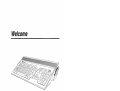
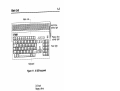
Amigakeys
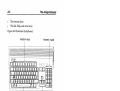
These two keys on the Amiga keyboard are used for
special functions. The left Amiga key is to the left of
the space bar and is marked with a large solid A.
The right Amiga key is to the right of the space bar
and is marked with an outlined A. Unlike Shift and
Alt key pairs, the two Amiga keys usually have
different functions.
Enter
Directions to "enter" something mean to type in the
indicated information and then press Return.
arrow keys
The arrow keys are the four keys in an inverted-T
formation to the right of the main keyboard, with
arrows on them pointing up, down, left, and right.
Do not confuse these keys with others on the
keyboard marked with arrows.
Related Documentation
•
Workbench™
•
AmigaDOSTM User's Guide
•
ARexx User's Guide
The Amiga Hard Drive User's Guide
•
User's Guide
If you come upon terms in this book that you do not understand,
look in the Glossary of the Workbench User's Guide, which defines
many computer and Amiga-specific terms.