1
3.1.1
3.1.2
3.2
System Memory ................................................................................. 20
3.2.1
3.2.2
3.3.3
3.2.4
3.3
Placement Direction .................................................................................. 19
Screw Holes .............................................................................................. 19
Overview ................................................................................................... 20
Memory Configurations ............................................................................. 21
Installing a SO-DIMM ................................................................................ 21
Removing a SO-DIMM .............................................................................. 23
Expansion Card ................................................................................. 23
3.3.1
3.3.2
3.3.3
3.3.4
Chapter 4
Installing an Expansion Card..................................................................... 23
Configuring an Expansion Card ................................................................ 24
PCI-Express x1 Slot (PCIE) ...................................................................... 24
PCI-Express Mini Card Connector ............................................................ 24
Hardware Description ........................... 25
4.1
Microprocessors ............................................................................... 25
4.2
BIOS ................................................................................................... 25
4.3
System Memory ................................................................................. 25
4.4
I/O Port Address Map ........................................................................ 26
4.5
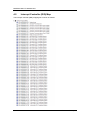
Interrupt Controller (IRQ) Map ......................................................... 28
4.6
Memory Map ...................................................................................... 35
Chapter 5
AMI BIOS Setup Utility .......................... 37
5.1
Starting ............................................................................................... 37
5.2
Navigation Keys ................................................................................ 37
5.3
Main Menu.......................................................................................... 39
5.4
Advanced Menu ................................................................................. 40
5.5
Chipset Menu ..................................................................................... 52
5.6
Boot Menu.......................................................................................... 55
5.7
Security Menu .................................................................................... 57
5.8
Save & Exit Menu .............................................................................. 58
vi