1
ITL 2000 Printer User Manual (UMITL201.PDF)
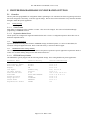
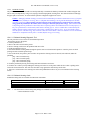
4.3 Panel LED Indicators......................................................................................................................................................... 19
4.3.1 Power/Paper ................................................................................................................................................................ 19
4.3.2 Ready............................................................................................................................................................................ 19
4.3.3 Attn/Err.........................................................................................................................................................................19
4.4 Panel Switches.................................................................................................................................................................... 20
4.5 Panel Switch Operations.....................................................................................................................................................20
4.5.1 Offline Operations........................................................................................................................................................ 20
4.5.2 Power-On Operations .................................................................................................................................................. 20
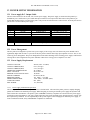
5 PRINTER PROGRAMMABLE CONFIGURATION SETTINGS.................................................................................... 25
5.1 Overview............................................................................................................................................................................. 25
5.1.1 Factory Settings............................................................................................................................................................ 25
5.1.2 Special Customization.................................................................................................................................................. 25
5.1.3 EEPROM Parameter Storage Memory........................................................................................................................ 25
6 PRINTER STATUS INFORMATION...................................................................................................................................26
6.1 ITL Printer Status Overview .............................................................................................................................................. 26
6.2 Operator Status ................................................................................................................................................................. 26
6.3 Port Level Interface Status .................................................................................................................................................26
6.4 Reverse Channel Status - Printer Status Programmer’s Information for Windows........................................................... 26
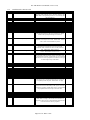
7 DATA INTERFACE AND AUXILIARY I/O....................................................................................................................... 27
7.1 IEEE-1284 Parallel Interface Cable.................................................................................................................................. 27
7.1.1 Parallel Port Signaling.................................................................................................................................................. 27
7.1.2 Parallel Interface Cable Schematic.............................................................................................................................. 27
7.1.3 Parallel Interface Cable Quality................................................................................................................................... 27
7.1.4 Parallel Interface Card Assembly................................................................................................................................. 27
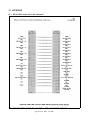
7.1.5 Parallel Interface Pin-out Table....................................................................................................................................28
7.2 RS232 Serial Interface........................................................................................................................................................ 29
7.2.1 RS-232 Serial Interface Card Assembly...................................................................................................................... 29
7.2.2 Serial DIP-Switch Settings........................................................................................................................................... 29
7.2.3 Serial Interface Pin-out.................................................................................................................................................29
7.3 USB Interface...................................................................................................................................................................... 30
7.3.1 USB Interface Pin-out Table........................................................................................................................................ 30
7.3.2 USB Interface Cable.....................................................................................................................................................30
7.4 Ethernet Interface............................................................................................................................................................... 30
7.5 Auxiliary I/O Connector..................................................................................................................................................... 30
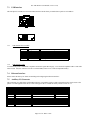
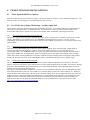
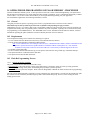
8 TICKET STOCK HANDLING OPTIONS........................................................................................................................... 31
8.1 Ticket Separation/Delivery Options.................................................................................................................................... 31
8.2 Low Ticket Stock (Paper) Monitoring – Auxiliary Input Port............................................................................................ 31
8.2.1 Low Ticket Stock (Paper) Host Status Information..................................................................................................... 31
8.2.2 Printer Reactions to the Low Ticket Stock (Paper) Condition..................................................................................... 31
8.2.3 Ticket Holder with Low Ticket Detection................................................................................................................... 31
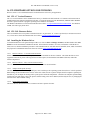
9 TICKET STOCK INFORMATION.......................................................................................................................................32
9.1 Ticket Stock Specifications.................................................................................................................................................. 32
9.1.1 Form Type.................................................................................................................................................................... 32
9.1.2 Ticket Stock - Thermal Paper Types:........................................................................................................................... 32
Page 3 of 72 Date: 3/9/06