1
Kapelle Dictation Tutorials
Page 55 of 57
Tutorial 10: Storing the State of an Exercise
Sometimes you might not have enough time to complete your work on a
particular exercise. Being able to store the “state” of an exercise allows you to
stop working on the exercise, save its current state of completion, and then pick
it up again later.
Storing the Exercise State
To store the state of an exercise:
Menu
Select File | Save Exercise State
A dialog box will ask you to confirm this action. After you store the state of an
exercise, you cannot evaluate it until you have restored that state.
When you would like to continue to work on the exercise that you have stored:
Menu
Select File | Restore Exercise State
A dialog box will ask you to confirm this action. If you are currently working on n
unevaluated exercise, the exercise will be closed without an evaluation.
If there is only one saved exercise, that exercise will be restored without further
prompting. However, it is possible that you might have saved the state of several
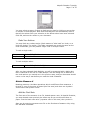
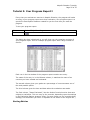
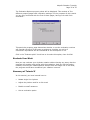
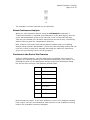
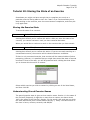
exercises. If that is the case, you will be presented with a dialog box that allows
you to choose which exercise to restore:
Select which exercise you wish to restore by clicking on one of the listed items,
and then click OK.
Understanding Stored Exercise Names
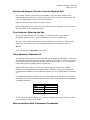
The stored exercise state is given a three-section name. Section 1 is the name of
the file itself (frequently it might be no more than a number, as above where
#03 is the name of the first file.) Section 2 is the month, day, and year on which
the state was stored (thus 010398 means January 3, 1998). The third section is
the time in hours, minutes, seconds, and AM/PM.