1
Precautions for Installation
Protective coating
Cabinet aluminum parts and rear face are protected from corrosion with coating. Be careful not to damage
the surface. In case the surface is damaged, corrosion may occur from there.
Installation position
• When direct sunlight is on the screen, black shadow may appear. This will disappear when the temperature drops.
• To install the product long term in a special environment such as near a swimming pool, hot spring, or ocean, or in
a factory uses chemicals or gases, please consult your local Panasonic dealer beforehand.
• The product is equipped with cooling fans and air lters that need to be cleaned or replaced if covered with dust.
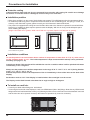
Removing or installing air lters requires space around the Display. With this in mind, provide adequate space
when installing the Display.
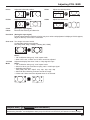
[Height 7.874”/200 mm or greater, Width 7.874”/200 mm or greater, Depth 7.874”/200 mm or greater]
d
d
d
d
d
d
d
d
d
d
d:7.874”/200 mm or greater
Installation conditions
To use the product in an environment where outdoor air temperature is lower than 32 °F (0 °C), make sure to
set the “Outdoor mode” to “On”. The inside temperature is kept constant and the startup can be performed
smoothly. (see page 17, 33)
Consult your dealer if this product will be exhibited or used in a condition where it will be splashed with water
continuously or for a long time.
Always use the product at an ambient temperature in the range of 32 °F - 122 °F / 0 °C - 50 °C (during Outdoor
mode: -4 °F - 122 °F / -20 °C - 50 °C).
Ambient temperature refers to the temperature of the air immediately in front of the inlets on the back of the
Display.
Set Outdoor mode to “On” if the Display is installed where direct sunlight is on the screen.
The Display can be tilted forward or backward at an angle as high as 20 degrees.
To install on a wall etc.
• Consult your dealer about ttings etc. beforehand.
• In securing the back side of the Display to a wall, use VESA-based (400 x 400) ttings. Note that any VESA-based
ttings should not interfere with the screws (x 10) allowing the lter covers or terminal cover to be attached / removed
and the front door to be opened / closed (in the interest of operations by a service contractor).
iv