1
ZenCut Black User Manual
4.1.2 Loading the Roll Media
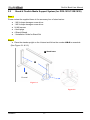
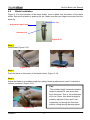
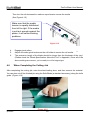
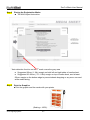
Step 1
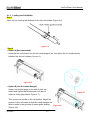
Place the roll media guide bushes on the two roll holders (Figure 4-5).
Figure 4-5
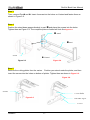
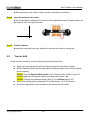
Step 2
-- Option A (Recommended)
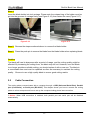
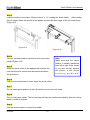
Insert the two roll holders into the roll media support set, then place the roll media directly
between the two roll holders (Figure 4-6).
Figure 4-6
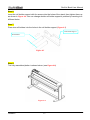
-- Option B (Use the media flanges)
Insert a roll media flange at the end of each roll
media and tighten the thumbscrew until the roll
media is firmly gripped(see Figure 4-7).
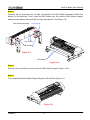
Then put the roll media on the roll holders. Adjust the
position of the roll media so that the media flanges are
able to rotate in the grooves of media guide bushes.
Figure 4-8
(Figure 4-8)
Operation
4-3
Figure 4-7