1
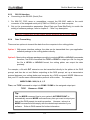
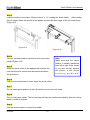
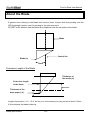
ZenCut Black User Manual • When the actual cutting line and the printed line need to be changed towards the direction of origin mark, then simply add the negative value of the offset. If the direction is from the opposite of the origin mark, then enter positive values for the offset. This method applies on both X and Y axis. For example: If the values set in cutter are X: 0.50 mm Y 0.50 mm and the measurement is X1:-0.25 mm Y 1:+0.25 mm. (In following figure, the Blue Line refers to the Y Value, and the Red Line refers to the X value.) We need to adjust AASII offset X new : (X + X1) Y new : (Y + Y1) which means X new : 0.25 mm Y new : 0.75, then save the set new value to cutter. Note: Before adjusting the AAS II settings, please proceed with scaling for width and length. The blade offset value isn’t set for this test graphic, please set it according to the blade you use. If you have any question, please contact your dealer for assistance. Accu-Aligning System 5-5