1
license.
⁃ Follow us on Twitter - Follow Northern Softworks on Twitter.
⁃ Visit Our Website - Visit Northern Softworks on the web.
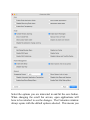
⁃ Preferences - Configure Automatic Maintenance in ElCC.
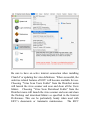
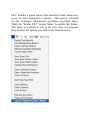
ElCC Menus - File
⁃ New ElCC Document - Create and Save a ElCC Document.
⁃ Open ElCC Log - Opens the current ElCC session log in the
Console application.
⁃ Install All ElCC Components - Installs ClamAV package and
the single user mode scripts.
⁃ Remove All ElCC Components - Removes ClamAV, the single
user mode script, and deactivates the ElCC Engine.
⁃ Install Clam Antivirus - Installs the ClamAV components and
activates the antivirus features.
⁃ Remove Clam Antivirus - Removes the ClamAV components.
⁃ Install ElCC Single User Mode Script - installs the single user
mode script to /usr/local/ElCC.
⁃ Remove ElCC Single User Mode Script - removes /usr/local/
ElCC
⁃ Create RAM Disk - Creates RAM disks. Contents are lost
when ejected.
⁃ Create Portable ElCC - Creates a portable version of ElCC on
USB thumb drive.
⁃ Create Emergency Disk - Creates a bootable emergency disk.
⁃ Create Lion Installer DVD - Creates a bootable Lion
installation DVD.
⁃ Create OS X USB Installer - Creates a bootable OS X