1
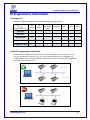
Dediware Software User Manual I. General Description This user manual illustrates how to install and use DediProg Dediware Software with DediProg programmers. Dediware is innovative and easy to use software that supports StarProg Engineering and ProgMaster Production series programmers. Dediware has all the necessary functions, including basic functions like read ID, read, blank check, program, verify, batch and advanced function like protection, auto-start, and standalone project which commands are also available. Dediware has two different modes dedicated to different types of needs. Engineering mode is a specific mode to help engineers to test and develop. Production mode can control several programming devices simultaneously and individually to achieve the best productivity. All updates and further versions of Dediware software are free to download and can be found on DediProg official website: www.dediprog.com II. System Requirements 2.1 Hardware Support Dual-core CPU or above 100GB Hard drive or above 1GB of RAM or above USB 2.0 ※ For eMMC or NAND IC programming , the faster hardware requirements the better. 2.2 Operating System Requirements Windows 8.1 Windows 8 Windows 7 Windows Server® 2008 Windows Vista® Support both 32-bit and 64-bit OS www.dediprog.com 2