1
 Requirements:
•
IW Player Version 1.1.7 or later
•
iOS 4.3 or later
Please Note: If you have an earlier version than 1.1.7, then go to App Store & select update IW Player.
iPad IW Player Device Settings
Set Device #
CCHD Device # Assigned to iPad Player
Set Account
CCHD Account Name (http://_______.channelshd.com)
Set Pin
CCHD Account Pin assigned in Configuration
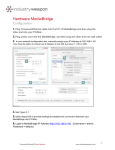
MediaBridge will require IP Address from CCHD
Caching (Cloud or MediaBridge)
Start Background Service
Check option ON once Device ID, Account & Pin Set
Auto Run Player
Check option ON to have player auto run on startup
Start Player
Select this option to start player immediately
Orientation (Landscape/Portrait)
Select either Landscape or Portrait Mode
Clear Cache
Select this option to clear cache on player
Reset Folders
Select this option to clear or reset folders
CommandCenterHD Configuration
Set Account
Account Name listed under Account Pin section
Set Pin
Unique Pin listed under Account Pin section
MediaBridge IP Address
IP Address listed under MediaBridge Zones
iPad User Manual
www.industryweapon.com