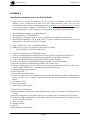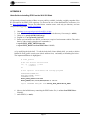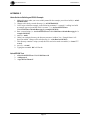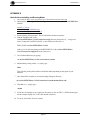
1
Hytec Electronics Ltd
IOC9010/PS/1.5
1. INTRODUCTION
The IOC Blade 9010 is a 1U, 19” Rack Mounted Input / Output controller, designed to carry up
to 6 Single width Industry Packs (IP) and a single PMC card simultaneously.
The logic on the motherboard of the 9010 1U IOC consists of interfacing hardware for the
PC104+ processor to the Industry Packs and to the PMC device. Additionally, support is
provided for the front panel displays and switches.
The interface is in the form of a PLX Technology PCI9030 bridge device and a Xilinx Spartan 2
logic chip. The ‘Local Bus’ side of the 9030 chip is a non-multiplexed microprocessor bus with
32 address lines, 16 data lines and control signals. The PCI clock from the 9030 is used by the
Xilinx device for all timing and clock requirements.
The 9030 device requests resources from the PC104+ processor as follows:
An I/O area for access to the configuration registers (not used).
A MEMORY area for access to the configuration registers (not used).
An I/O area for access to the internal registers of the Xilinx (Carrier Board registers).
A MEMORY area for access to the Industry Packs.
This I/O area is 64 bytes wide, organised as 32 16-bit words, starting at offset zero as follows:
Offset
0
2
4
6
8
A
C
E
10
12
14
16
18
1A
1C
Name
CSR-CB
CONFIG
DISP_CONT
DISP_DATA
INTS_LO
INTS_HI
MASK_LO
MASK_HI
IP_CLK
FAN_1_2
FAN_3_4
FAN_5_6
FAN_CONT
TEMP_FLAG
CONFIG_2
Description
Carrier board Control and Status Register.
Carrier Board Switches and settings.
Read/write access to the LCD display control register
Read/write access to the LCD display data register
Read only access to the IP IRQ Status Register (12 bits)
Read only access to the IP Error Status Register (7 bits)
Read/write access to a mask register for IP IRQ sources
Read/write access to a mask register for IP Error sources
Read/write access the IP CLOCK SELECT register (6 bits)
Read only register showing the speeds of fans 1 & 2 in RPS.
Read only register showing the speeds of fans 3 & 4 in RPS.
Read only register showing the speeds of fans 5 & 6 in RPS.
Read/Write access to Control bits for each fan
Read only access to temperature sensor output flags.
Read only access to second 8-bit configuration switch pack.
2. PRODUCT SPECIFICATIONS
Size:
Operating temp:
Number of input/outputs:
Power:
1U 19” Rack 400mm Deep Approx
0 to 45 deg C ambient
6 SCSI Style Connectors providing connection to the IP Cards.
+100 to 240VAC at 47-63Hz 20W Maximum Unpopulated.
Page 3