1
4. The back
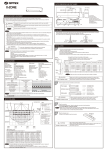
5-1 Store station
EN
Robio can store up to 10 of your favorite stations.
DC
Press the right knob for 2 seconds in order to store desired station. Unit
shows “Preset Store” and short press the right knob.
(1) Left Jack
- Headphones Output
(2) Middle Jack
- DC (Power in)
You can now choose preset location from 1-10. Confirm location with a
short press on the right knob.
(3) Right Jack
- AUX in or Wireless receiver
5. DAB mode
Turn the middle knob to its left position
Note: You can listen to the newly added stations by pressing the right
knob for 2 seconds, then turn the right knob, select the desired station
and press to confirm.
5-2 Prune
Robio’s prune function will remove any stations that are not used or
outdated from the broadcaster.
If this is the first time you turn on Robio, the unit will automatically perform a
full scan of all DAB stations.
You can perform a full scan at any time.
6
You can prune your station list by pressing the right knob for 2 seconds.
Turn the knob to “Prune” position and short press the right knob to enter
menu. You can now choose Prune YES/NO. Choose YES or NO by
again turning the right knob and confirm selection with a short press.
7