1
NVR/AHD/DVR User Manual
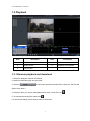
1.3 Playback
Area
Description
Area
Description
1
Device list
2
Search condition
3
Search result
4
Playback control panel
5
Play window
1.3.1 Remote playback and download
1. Select the playback channel and window.
2. Select recorded files type and query time.
3. Click key
to search the matched recorded files, if there are, the files will
shows in the area 3.
4. Select the time you want to start playback from area 3, and click icon
5. To download recording file, please click
.
6. In the file list dialog, select what you want to download.
3
.