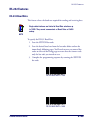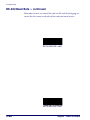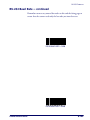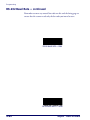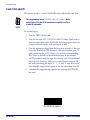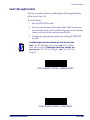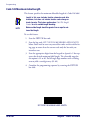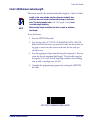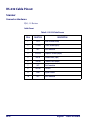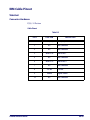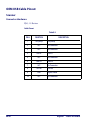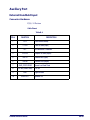
1
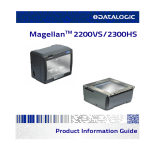
Magellan 2200VS and 2300HS
TM
Product Reference Guide
Datalogic Scanning, Inc.
959 Terry Street
Eugene, Oregon 97402
USA
Telephone: (541) 683-5700
Fax: (541) 345-7140
An Unpublished Work - All rights reserved. No part of the contents of this documentation or the procedures
described therein may be reproduced or transmitted in any form or by any means without prior written permission of Datalogic Scanning, Inc. or its subsidiaries or affiliates ("Datalogic" or “Datalogic Scanning”). Owners of Datalogic products are hereby granted a non-exclusive, revocable license to reproduce and transmit
this documentation for the purchaser's own internal business purposes. Purchaser shall not remove or alter
any proprietary notices, including copyright notices, contained in this documentation and shall ensure that
all notices appear on any reproductions of the documentation.
Should future revisions of this manual be published, you can acquire printed versions by contacting your
Datalogic representative. Electronic versions may either be downloadable from the Datalogic website
(www.scanning.datalogic.com) or provided on appropriate media. If you visit our website and would like to
make comments or suggestions about this or other Datalogic publications, please let us know via the "Contact Datalogic" page.
Disclaimer
Datalogic has taken reasonable measures to provide information in this manual that is complete and accurate, however, Datalogic reserves the right to change any specification at any time without prior notice.
Datalogic and the Datalogic logo are registered trademarks of Datalogic S.p.A. in many countries, including
the U.S.A. and the E.U. All other brand and product names may be trademarks of their respective owners.
Magellan is a registered trademark of Datalogic Scanning, Inc. in many countries, including the U.S.A. and
All-Weighs, FirstStrike and SurroundScan are registered trademarks of Datalogic Scanning, Inc. in the U.S.A.
OmegaTek, Produce Rail, Productivity Index Reporting and SmartSentry are all trademarks of Datalogic
Scanning, Inc.
This product may be covered by one or more of the following patents: 4603262 • 4639606 • 4652750 • 4672215 • 4699447 • 4709369 •
4749879 • 4786798 • 4792666 • 4794240 • 4798943 • 4799164 • 4820911 • 4845349 • 4861972 • 4861973 • 4866257 • 4868836 • 4879456 •
4939355 • 4939356 • 4943127 • 4963719 • 4971176 • 4971177 • 4991692 • 5001406 • 5015831 • 5019697 • 5019698 • 5086879 • 5115120 •
5144118 • 5146463 • 5179270 • 5198649 • 5200597 • 5202784 • 5208449 • 5210397 • 5212371 • 5212372 • 5214270 • 5229590 • 5231293 •
5232185 • 5233169 • 5235168 • 5237161 • 5237162 • 5239165 • 5247161 • 5256864 • 5258604 • 5258699 • 5260554 • 5274219 • 5296689 •
5298728 • 5311000 • 5327451 • 5329103 • 5330370 • 5347113 • 5347121 • 5371361 • 5382783 • 5386105 • 5389917 • 5410108 • 5420410 •
5422472 • 5426507 • 5438187 • 5440110 • 5440111 • 5446271 • 5446749 • 5448050 • 5463211 • 5475206 • 5475207 • 5479011 • 5481098 •
5491328 • 5493108 • 5504350 • 5508505 • 5512740 • 5541397 • 5552593 • 5557095 • 5563402 • 5565668 • 5576531 • 5581707 • 5594231 •
5594441 • 5598070 • 5602376 • 5608201 • 5608399 • 5612529 • 5629510 • 5635699 • 5641958 • 5646391 • 5661435 • 5664231 • 5666045 •
5671374 • 5675138 • 5682028 • 5686716 • 5696370 • 5703347 • 5705802 • 5714750 • 5717194 • 5723852 • 5750976 • 5767502 • 5770847 •
5786581 • 5786585 • 5787103 • 5789732 • 5796222 • 5804809 • 5814803 • 5814804 • 5821721 • 5822343 • 5825009 • 5834708 • 5834750 •
5837983 • 5837988 • 5852286 • 5864129 • 5869827 • 5874722 • 5883370 • 5905249 • 5907147 • 5923023 • 5925868 • 5929421 • 5945670 •
5959284 • 5962838 • 5979769 • 6000619 • 6006991 • 6012639 • 6016135 • 6024284 • 6041374 • 6042012 • 6045044 • 6047889 • 6047894 •
6056198 • 6065676 • 6069696 • 6073849 • 6073851 • 6094288 • 6112993 • 6129279 • 6129282 • 6134039 • 6142376 • 6152368 • 6152372 •
6155488 • 6166375 • 6169614 • 6173894 • 6176429 • 6188500 • 6189784 • 6213397 • 6223986 • 6230975 • 6230976 • 6244510 • 6259545 •
6260763 • 6266175 • 6273336 • 6276605 • 6279829 • 6290134 • 6290135 • 6293467 • 6303927 • 6311895 • 6318634 • 6328216 • 6332576 •
6332577 • 6343741 • 6454168 • 6478224 • 6568598 • 6578765 • 6705527 • 6857567 • 6974084 • 6991169 • 7051940 • 7170414 • 7172123 •
7201322 • 7204422 • 7215493 • 7224540 • 7234641 • 7243850 • 7374092 • 7407096 • 7490770 • 7495564 • 7506816 • 7527198 • 7527207 •
7537166 • 7562817 • 601 26 118.6 • AU703547 • D312631 • D313590 • D320011 • D320012 • D323492 • D330707 • D330708 • D349109 •
D350127 • D350735 • D351149 • D351150 • D352936 • D352937 • D352938 • D352939 • D358588 • D361565 • D372234 • D374630 • D374869
• D375493 • D376357 • D377345 • D377346 • D377347 • D377348 • D388075 • D446524 • D606544 •EP0256296 • EP0260155 • EP0260156 •
EP0295936 • EP0325469 • EP0349770 • EP0368254 • EP0442215 • EP0498366 • EP0531645 • EP0663643 • EP0698251 • EP01330772 •
EP870761 • GB2252333 • GB2284086 • GB2301691 • GB2304954 • GB2307093 • GB2308267 • GB2308678 • GB2319103 • GB2333163 •
GB2343079 • GB2344486 • GB2345568 • GB2354340 • ISR107546 • ISR118507 • ISR118508 • JP1962823 • JP1971216 • JP2513442 • JP2732459
• JP2829331 • JP2953593 • JP2964278 • MEX185552 • MEX187245 • RE37166 • RE40071 • Other Patents Pending
Table of Contents
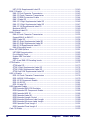
Chapter 1. Introduction .................................................................................... 1-1
Manual Overview ........................................................................................... 1-1
How to Use This Manual ............................................................................ 1-2
Scanner Nomenclature ................................................................................... 1-3
Connectors .............................................................................................. 1-4
Physical Parameters ....................................................................................... 1-5
Scanning ................................................................................................ 1-5
AC Adapter ............................................................................................. 1-5
Electrical Specifications .................................................................................. 1-6
Laser and Product Safety ................................................................................ 1-8
Labeling ..................................................................................................... 1-10
Agency Compliances .................................................................................... 1-12
Bar Codes Supported ................................................................................... 1-13
Chapter 2. Site Preparation and Installation..................................................... 2-1
Unpacking .................................................................................................... 2-1
Operational Verification .................................................................................. 2-2
Installation: Model 2200VS ............................................................................. 2-3
Installation: Model 2300HS ............................................................................. 2-6
Chapter 3. Operation and Maintenance ............................................................. 3-1
Scanning Items: Model 2200VS ....................................................................... 3-2
Scanning Items: Model 2300HS ....................................................................... 3-3
Operational Controls ...................................................................................... 3-4
Operational Modes ......................................................................................... 3-4
Power-Up/Selftest & Pre-Operation ............................................................. 3-4
Operating Mode ....................................................................................... 3-5
Additional Functions ....................................................................................... 3-7
Programming .......................................................................................... 3-7
Scanner Diagnostic Mode .......................................................................... 3-7
Scanner Reset ......................................................................................... 3-8
Operational Maintenance ................................................................................ 3-8
Cleaning ................................................................................................. 3-8
Chapter 4. Problem Isolation ............................................................................ 4-1
Diagnostic Procedures .................................................................................... 4-2
Error Codes .................................................................................................. 4-3
Flowcharts .................................................................................................... 4-4
Chapter 5. Programming................................................................................... 5-1
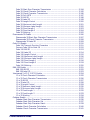
Product Reference Guide
i
Introduction to Label Programming .................................................................. 5-1
Understanding the Basics ............................................................................... 5-1
Integrating the Scanner With Your Host System ................................................ 5-1
Customizing Your Scanner’s Operation ....................................................... 5-2
Programming Overview .................................................................................. 5-3
Programming via Handheld Device ............................................................. 5-4
What Is Programming Mode? .................................................................... 5-4
Entering and Exiting Programming Mode. .................................................... 5-4
Programming Session .............................................................................. 5-5
LED and Beeper Indicators ............................................................................. 5-9
If You Make a Mistake... ................................................................................. 5-9
Return to Factory Settings ........................................................................ 5-9
Test Mode .............................................................................................5-10
General Scanner Features .............................................................................5-11
Double Read Timeout ..............................................................................5-11
Laser Timeout ........................................................................................5-13
Motor Timeout .......................................................................................5-15
Green LED Idle State ..............................................................................5-18
Scanner Button Options ...........................................................................5-19
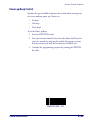
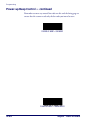
Power-up Beep Control ............................................................................5-21
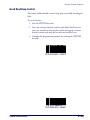
Good Read Beep Control ..........................................................................5-23
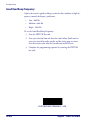
Good Read Beep Frequency .....................................................................5-24
Good Read Beep Length ..........................................................................5-26
Good Read Beep Volume .........................................................................5-27
Good Read When to Indicate ....................................................................5-30
EAS Active State ....................................................................................5-32
EAS Timeout ..........................................................................................5-33
Aux Port Mode .......................................................................................5-34
Productivity Index Reporting (PIR) ............................................................5-36
Interface Related Features ............................................................................5-37
Interface Type .......................................................................................5-37
Maximum Host-Transmitted Message Length ..............................................5-51
Number of Host Transmission Buffers ........................................................5-52
Global Prefix ..........................................................................................5-53
Global Suffix ..........................................................................................5-55
IBM Features ...............................................................................................5-57
IBM Transmit Labels in Code 39 Format .....................................................5-57
OEM USB Scanner Device Type .................................................................5-58
RS-232 Features ..........................................................................................5-59
RS-232 Baud Rate ..................................................................................5-59
RS-232 Number of Data Bits ....................................................................5-63
RS-232 Number of Stop Bits ....................................................................5-64
RS-232 Parity ........................................................................................5-65
RS-232 Hardware Control ........................................................................5-67
RS-232 Intercharacter Delay ....................................................................5-69
RS-232 Software Flow Control ..................................................................5-70
RS-232 Host Echo ..................................................................................5-71
ii
MagellanTM 2200VS and 2300HS
RS-232 Host Echo Quiet Interval .............................................................. 5-72
RS-232 Ignore Host Commands ............................................................... 5-73
RS-232 TTL ........................................................................................... 5-74
RS-232 TTL Invert ................................................................................. 5-75
RS-232 Beep on ASCII BEL ..................................................................... 5-76
RS-232 Beep on Not on File ..................................................................... 5-77
RS-232 ACK NAK Enable ......................................................................... 5-78
RS-232 ACK Character ............................................................................ 5-80
RS-232 NAK Character ............................................................................ 5-81
RS-232 Retry on ACK NAK Timeout .......................................................... 5-82
RS-232 ACK NAK Timeout Value .............................................................. 5-83
RS-232 ACK NAK Retry Count .................................................................. 5-84
RS-232 ACK NAK Error Handling .............................................................. 5-85
RS-232 Label ID Control ......................................................................... 5-87
Single Cable RS-232 Options ......................................................................... 5-89
Single Cable RS-232 RTS CTS Selection .................................................... 5-90
Single Cable RS-232 Use BCC .................................................................. 5-93
Single Cable RS-232 Use ACK/NAK ........................................................... 5-94
Single Cable RS-232 Use STX .................................................................. 5-95
Set Single Cable RS-232 STX Character .................................................... 5-96
Single Cable RS-232 Use ETX .................................................................. 5-97
Set Single Cable RS-232 ETX Character .................................................... 5-98
PC Keyboard Wedge and USB Keyboard Interfaces ........................................... 5-99
Connect to a Laptop/No Keyboard Attached ............................................. 5-100
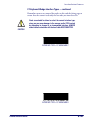
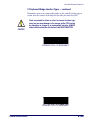
Send Control/Function Characters — continued ........................................ 5-102
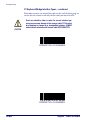
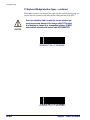
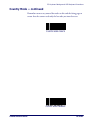
Caps Lock — continued ......................................................................... 5-104
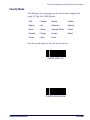
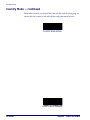
Country Mode ...................................................................................... 5-105
Keyboard Wedge Intercharacter Delay .................................................... 5-115
Quiet Interval ...................................................................................... 5-119
Symbology Programming ............................................................................ 5-123
UPC-A Enable ............................................................................................ 5-123
UPC-A Number System Character Transmission ........................................ 5-124
UPC-A Check Character Transmission ..................................................... 5-125
Expand UPC-A to EAN-13 ...................................................................... 5-126
UPC/EAN AIM ID .................................................................................. 5-127
UPC-A Label ID .................................................................................... 5-128
UPC-A 2-Digit Supplemental Label ID ...................................................... 5-129
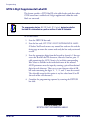
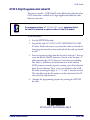
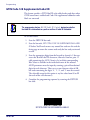
UPC-A 5-Digit Supplemental Label ID ...................................................... 5-130
UPC-A 128 Supplemental Label ID .......................................................... 5-131
UPC-E Enable ............................................................................................ 5-132
UPC-E Number System Character Transmission ........................................ 5-133
UPC-E Check Character Transmission ...................................................... 5-134
Expand UPC-E to UPC-A ........................................................................ 5-135
Expand UPC-E to EAN-13 ...................................................................... 5-136
UPC-E Label ID .................................................................................... 5-137
UPC-E 2-Digit Supplemental Label ID ...................................................... 5-138
UPC-E 5-Digit Supplemental Label ID ...................................................... 5-139
Product Reference Guide
iii
UPC-E 128 Supplemental Label ID .......................................................... 5-140
EAN-13 Enable .......................................................................................... 5-141
EAN-13 First Character Transmission ....................................................... 5-142
EAN-13 Check Character Transmission .................................................... 5-143
EAN-13 ISBN Conversion Enable ............................................................. 5-144
EAN 13 Label ID ................................................................................... 5-145
EAN-13 2-Digit Supplemental Label ID .................................................... 5-146
EAN-13 5-Digit Supplemental Label ID .................................................... 5-147
EAN-13 128 Supplemental Label ID ........................................................ 5-148
Bookland AIM ID .................................................................................. 5-149
Bookland Label ID ................................................................................ 5-150
EAN-8 Enable ............................................................................................ 5-151
EAN-8 Check Character Transmission ...................................................... 5-152
Expand EAN-8 to EAN-13 ....................................................................... 5-153
EAN 8 Label ID ..................................................................................... 5-154
EAN-8 2-Digit Supplemental Label ID ...................................................... 5-155
EAN-8 5-Digit Supplemental Label ID ...................................................... 5-156
EAN-8 128 Supplemental Label ID .......................................................... 5-157
EAN-8 Decoding Levels .......................................................................... 5-158
Other UPC/EAN Options .............................................................................. 5-161
UPC/EAN Reconstruction ........................................................................ 5-162
Price Weight Check ............................................................................... 5-163
Enable EAN Two Label ........................................................................... 5-166
Addons ............................................................................................... 5-167
UPC-A and EAN-13 Decoding Levels ........................................................ 5-169
GTIN Enable .............................................................................................. 5-172
GTIN Label ID ...................................................................................... 5-173
GTIN 2-Digit Supplemental Label ID ........................................................ 5-174
GTIN 5-Digit Supplemental Label ID ........................................................ 5-175
GTIN Code 128 Supplemental Label ID .................................................... 5-176
RSS-14 Enable .......................................................................................... 5-177
RSS-14 Check Character Transmission .................................................... 5-178
RSS-14/EAN-128 Emulation ................................................................... 5-179
RSS-14 2D Component Enable ............................................................... 5-180
RSS-14 AIM ID ..................................................................................... 5-181
RSS-14 Label ID ................................................................................... 5-182
RSS Expanded Enable ................................................................................. 5-183
RSS Expanded EAN-128 Emulation ......................................................... 5-184
RSS Expanded 2D Component Enable ...................................................... 5-185
RSS Expanded AIM ID ........................................................................... 5-186
RSS Expanded Label ID ......................................................................... 5-187
RSS Expanded Length Control ................................................................ 5-188
RSS Expanded Maximum Label Length .................................................... 5-189
RSS Expanded Minimum Label Length ..................................................... 5-190
RSS Expanded Fixed Length 1 ................................................................ 5-191
RSS Expanded Fixed Length 2 ................................................................ 5-192
Code 39 Enable ......................................................................................... 5-193
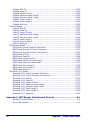
iv
MagellanTM 2200VS and 2300HS
Code 39 Start Stop Character Transmission ............................................. 5-194
Code 39 Check Character Calculation ...................................................... 5-195
Code 39 Check Character Transmission ................................................... 5-196
Code 39 Full ASCII ............................................................................... 5-197
Code 39 AIM ID ................................................................................... 5-198
Code 39 Label ID ................................................................................. 5-199
Code 39 Length Control ........................................................................ 5-200
Code 39 Maximum Label Length ............................................................. 5-201
Code 39 Minimum Label Length ............................................................. 5-202
Code 39 Fixed Length 1 ........................................................................ 5-203
Code 39 Fixed Length 2 ........................................................................ 5-204
Code 39 Stitching ................................................................................ 5-205
Pharmacode 39 Enable ............................................................................... 5-206
Pharmacode 39 Start Stop Character Transmission ................................... 5-207
Pharmacode 39 Check Character Transmission ......................................... 5-208
Pharmacode 39 Label ID ....................................................................... 5-209
Code 128 Enable ....................................................................................... 5-210
Code 128 Transmit Function Characters .................................................. 5-211
Convert Code 128 to Code 39 ................................................................ 5-212
Code 128 AIM ID ................................................................................. 5-213
Code 128 Label ID ............................................................................... 5-214
Code 128 Length Control ....................................................................... 5-215
Code 128 Maximum Label Length ........................................................... 5-216
Code 128 Minimum Label Length ............................................................ 5-217
Code 128 Fixed Length 1 ...................................................................... 5-218
Code 128 Fixed Length 2 ...................................................................... 5-219
Code 128 Stitching ............................................................................... 5-220
EAN-128 Enable ........................................................................................ 5-221
EAN 128 AIM ID ................................................................................... 5-222
EAN 128 Label ID ................................................................................. 5-223
Interleaved 2 of 5 (I 2 OF 5) Enable ............................................................. 5-224
I 2 of 5 Check Character Calculation ....................................................... 5-225
I 2 of 5 Check Character Transmission .................................................... 5-226
I 2 of 5 AIM ID .................................................................................... 5-227
I 2 of 5 Label ID .................................................................................. 5-228
I 2 of 5 Length Control ......................................................................... 5-229
I 2 of 5 Maximum Label Length .............................................................. 5-230
I 2 of 5 Minimum Label Length ............................................................... 5-231
I 2 of 5 Fixed Length 1 ......................................................................... 5-232
I 2 of 5 Fixed Length 2 ......................................................................... 5-233
I 2 of 5 Stitching .................................................................................. 5-234
Codabar Enable ......................................................................................... 5-235
Codabar Start Stop Character Transmission ............................................. 5-236
Codabar Start Stop Character Set .......................................................... 5-237
Codabar Start Stop Character Match ....................................................... 5-239
Codabar Check Character Calculation ...................................................... 5-240
Codabar Check Character Transmission ................................................... 5-241
Product Reference Guide
v
Codabar AIM ID ................................................................................... 5-242
Codabar Label ID .................................................................................. 5-243
Codabar Length Control ......................................................................... 5-244
Codabar Maximum Label Length ............................................................. 5-245
Codabar Minimum Label Length .............................................................. 5-246
Codabar Fixed Length 1 ......................................................................... 5-247
Codabar Fixed Length 2 ......................................................................... 5-248
Codabar Stitching ................................................................................. 5-249
Code 93 Enable ......................................................................................... 5-250
Code 93 AIM ID .................................................................................... 5-251
Code 93 Label ID .................................................................................. 5-252
Code 93 Length Control ......................................................................... 5-253
Code 93 Maximum Label Length ............................................................. 5-254
Code 93 Minimum Label Length .............................................................. 5-255
Code 93 Fixed Length 1 ......................................................................... 5-256
Code 93 Fixed Length 2 ......................................................................... 5-257
Code 93 Stitching ................................................................................. 5-258
MSI/Plessey Enable .................................................................................... 5-259
MSI/Plessey Check Character Calculation ................................................. 5-260
MSI/Plessey Number of Check Characters ................................................ 5-261
MSI/Plessey Check Character Transmission .............................................. 5-262
MSI/Plessey AIM ID .............................................................................. 5-263
MSI/Plessey Label ID ............................................................................ 5-264
MSI/Plessey Length Control ................................................................... 5-265
MSI/Plessey Maximum Label Length ........................................................ 5-266
MSI/Plessey Minimum Label Length ........................................................ 5-267
MSI/Plessey Fixed Length 1 ................................................................... 5-268
MSI/Plessey Fixed Length 2 ................................................................... 5-269
MSI/Plessey Stitching ............................................................................ 5-270
Standard 2 of 5 Enable ............................................................................... 5-271
Standard 2 of 5 Check Character Calculation ............................................ 5-272
Standard 2 of 5 Check Character Transmission ......................................... 5-273
Standard 2 of 5 AIM ID ......................................................................... 5-274
Standard 2 of 5 Label ID ....................................................................... 5-275
Standard 2 of 5 Length Control ............................................................... 5-276
Standard 2 of 5 Maximum Label Length ................................................... 5-277
Standard 2 of 5 Minimum Label Length .................................................... 5-278
Standard 2 of 5 Fixed Length 1 .............................................................. 5-279
Standard 2 of 5 Fixed Length 2 .............................................................. 5-280
Standard 2 of 5 Stitching ....................................................................... 5-281
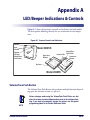
Appendix A. LED/Beeper Indications & Controls ................................. A-1
Volume/Tone Push Button ........................................................................ A-1
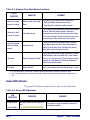
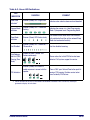
Green LED Indicator ................................................................................. A-2
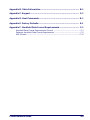
vi
MagellanTM 2200VS and 2300HS
Appendix B. Cable Information............................................................ B-1
Appendix C. Keypad............................................................................. C-1
Appendix D. Host Commands............................................................... D-1
Appendix E. Factory Defaults............................................................... E-1
Appendix F. Handheld Data Format Requirements............................... F-1
Handheld Data Format Requirements General .............................................. F-1
Datalogic Handheld Data Format Requirements ............................................ F-2
AIM Formats ......................................................................................... F-10
Product Reference Guide
vii
NOTES
viii
MagellanTM 2200VS and 2300HS
Chapter 1
Introduction
This Product Reference Guide contains comprehensive instructions on
how to install the scanner, how to program it using special programming
feature bar code labels, and advanced user information as described in the
following overview.
Manual Overview
Chapter 1, Introduction, presents the manual’s contents, describes features
and specifications, provides regulatory and safety information, and lists
the bar code symbologies the scanner will read.
Chapter 2, Site Preparation and Installation, supplies physical dimen-
sions for the scanner and its most common accessories, and details counter
preparation and installation. Cable routing, connection and testing are
also explained in this section.
Chapter 3, Operation and Maintenance, describes use and maintenance;
providing details about operator controls, programming and diagnostic
modes. Scanner routine maintenance is outlined in this section as well.
Chapter 4, Problem Isolation, provides an outline of three scanner test
modes: Selftest, Operational Tests and Diagnostic Tests. Descriptions of
the error indications if the scanner detects a system problem and troubleshooting flowcharts to aid in problem resolution are also presented.
Chapter 5, Programming, details procedures and provides custom barcodes for setting programmable scanner features. This section is organized
by the categories: General Features, Interface Related Features and Symbology Related Features.
Appendix A, LED/Beeper Indications & Controls, lists the various func-
tions and indications of the scanner control panel features.
Product Reference Guide
1-1
Introduction
Appendix B, Cable Information, outlines wire requirements, connector
specifications and pinout details for associated product cabling.
Appendix C, Keypad, furnishes bar codes representing the digits and characters required to enter extended programming data needed during certain
programming sessions.
Appendix D, Host Commands, contains a partial listing of available host
commands that can be used with a compatible host interface.
Appendix E, Factory Defaults, is a listing of standard factory defaults for
the various programmable features.
Appendix F, Handheld Data Format Requirements, provides application
notes to describe the general format of data that can be accepted by the
scanner through the auxiliary port as transmitted from a handheld scanner.
How to Use This Manual
You’ll find it helpful to familiarize yourself with the first section of this
manual, since it provides both a general description of the product’s features and an overview of the manual’s contents and organization. Reference the other sections as required for information about scanner
installation, operation, maintenance and bar code programming.
1-2
MagellanTM 2200VS and 2300HS
Scanner Nomenclature
Manual Conventions
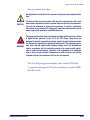
‘NOTE’ blocks contain information that is helpful and recommended. They provide information that is critical to
operations and/or procedures described in this manual.
‘CAUTION’ blocks inform you that proper handling
(adherence to the procedures described) is required to
avoid damage to equipment and/or property.
‘WARNING’ blocks alert you to potential physical harm or
injury. These statements do not include potentially fatal
hazards, which would be designated as ‘DANGER’
blocks. Use of this product does not warrant the need for
a DANGER block.
Scanner Nomenclature
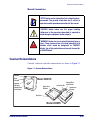
Controls, indicators and other nomenclature are shown in Figure 1-1.
Figure 1-1. Scanner Nomenclature
Speaker
Scan
Window
Model 2200VS
Indicator
LED plus
Volume/Tone
Push Button
Upper Scan
Window
Indicator LED
Volume/Tone
Push Button
Lower Scan
Window
Top Cover
Model 2300HS
Product Reference Guide
1-3
Introduction
Connectors
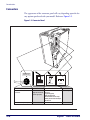
The appearance of the connector panel will vary depending upon the factory options purchased with your model. Reference Figure 1-2.
Figure 1-2. Connector Panel
Host
Scanner
Aux. Port
Power
EAS Opening
Scanner Host
EAS Connection
· Electronic Article Surveillance
Connection
Connection to this port is Optional
1-4
POS TERMINAL
Aux. Port
Power
AUXILIARY PORT
POWER
· Test Port
· Label Data
· Application Download · On Screen
Programming (OSP)
(where appropriate)
· Application Download
· RS-232 Handheld Scanner Input
· Auxiliary RS-232 Label Data Output
· EAS interlock
· DC Brick Input
Connection to this port is Optional
MagellanTM 2200VS and 2300HS
Physical Parameters
Physical Parameters
This section provides specifications for performance, environmental and
electrical parameters. Reference the second section of this manual, Site
Preparation and Installation, for physical measurements of all models and
some accessories.
Scanning
The scanner has a scan zone immediately in front of (or above) the scan
window where the scanner projects laser light in order to scan items. Scan
lines form a zone where bar code labels are read. Refer to the Operation
and Maintenance section of this manual for more details about the topic:
Scanning Items: Model 2200VS.
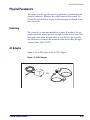
AC Adapter
Figure 1-3 is an illustration of the AC/DC Adapter.
Figure 1-3. AC/DC Adapter
OR
Product Reference Guide
1-5
Introduction
Figure 1-4. Environmental Specifications
Operation
+40 C
10 C
+104 F
50 F
Temperature
10 to +40 C
50 to +104 F
Illumination
Artificial Light:
450 Foot-candles
Dust Resistant
Optics Cavity, IP5X
Sunlight:
0-8,000 Foot-candles
Humidity
5 - 95% NC
Storage
+70 C
-40 C
POS
+158 F
-40 F
Scan
ner
Temperature
-40 to +70 C
-40 to +158 F
Electrical Specifications
Before installation, always verify that the site’s electrical service meets the
scanner’s requirements. The scanner has been engineered for compatibility
with most international electrical systems. Verify that the power source
will supply “clean” electrical power to the equipment; that is, it must be
free of excess electrical noise.
If the adapter will not plug into your AC power receptacle, the model
shipped is not compatible with your electrical system. Please contact your
distributor immediately to receive the necessary information and components to ensure electrical compatibility.
1-6
MagellanTM 2200VS and 2300HS
Electrical Specifications
Safe operation of your scanner or scanner requires properly grounded electrical outlets. Be sure to have a qualified electrician certify the earth-ground
connection on circuits which will be used to power the unit.
CAUTION
The scanner is powered on/off by connecting/disconnecting its AC power
supply.
NOTE
Product Reference Guide
1-7
Introduction
Laser and Product Safety
Laser safety requirements are based on IEC Standard Publication 60825-1
(2007) and CDRH 21CFR, Chapter 1, Subchapter J and (CDRH) Laser
Product Performance Standard, User information [1040.10(h)1]:
•
User Maintenance. No user maintenance of the system other than
cleaning of the scan window(s) is required.
•
Radiant Energy. The scanner is an IEC Class 1 and CDRH IIa laser
product. The system uses two embedded Class 3R Visible Laser
Diodes (VLDs) operating at 650.0 nm, in an opto-mechanical scanner, resulting in less than 3.1µW radiated power as observed
through a 7mm aperture averaged over 10 seconds. Maximum emitted peak output power at the window is 850µW, pulse duration is
92µs. No attempt should be made by the user to remove the protective housing of the scanner.
•
Laser Light Viewing. The scan window is the only aperture through
which laser light may be observed in this product.
Exposure to the light emitted from the scan window(s) has been shown
not to be harmful. The safety record of bar code scanning is perfect after
millions of hours of use worldwide. This safe and efficient use of laser
technology has gained wide acceptance in industries throughout the
world.
Operators and installers of the unit should observe the following cautions
and warnings:
Use of controls, adjustments or performance of procedures other than those
specified herein may result in hazardous laser light exposure.
CAUTION
The use of optical instruments with the scanner will increase eye hazard.
(Optical instruments include binoculars, microscopes, telescopes and magnifying glasses. This does not include eyeglasses worn by the user).
To prevent exposure to laser light, do not remove the protective housing of the
scanner. There are no user-serviceable parts inside the unit.
1-8
MagellanTM 2200VS and 2300HS
Laser and Product Safety
Safety precautions to be taken:
No adjustments or alteration of the scanner housing are to be attempted by the
user.
CAUTION
WARNING
The failure of the facet wheel motor while the unit is continuing to emit a laser
beam causes the emission levels to exceed those for inherently safe operation.
The unit has safeguards to prevent this occurrence. If, however, a stationary
laser beam is ever emitted, the failing unit should be disconnected from its
power supply until repaired by a qualified technician.
This equipment has been tested and found to comply with the limits for a Class
A digital device, pursuant to part 15 of the FCC Rules. These limits are
designed to provide reasonable protection against harmful interference when
the equipment is operated in a commercial environment. This equipment generates, uses, and can radiate radio frequency energy and, if not installed and
used in accordance with the instruction manual, may cause harmful interference to radio communications. Operation of this equipment in a residential
area is likely to cause harmful interference in which case the user will be
required to correct the interference at his or her own expense.
This Class B digital apparatus complies with Canadian ICES-0003.
Cet appareil numérique de la Classe B est confireme à la norme NMB0003 du Canada.
Product Reference Guide
1-9
Introduction
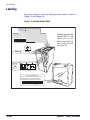
Labeling
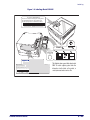
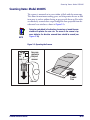
Regulatory, reference and safety labeling for both models is shown in
Figure 1-5 and Figure 1-6.
Figure 1-5. Labeling: Model 2200VS
PSC Inc.
959 Terry Street
Eugene, OR 97402 USA
XXXXXXXXXXXX
Product of USA
This device complies with Part 15 of the FCC Rules.
Operation is subject to the following two conditions:
(1) this device may not cause harmful interference, and
(2) this device must accept any interference received,
including interference that may cause undesired operation.
on
cti d
du ore
Pro nit
mo
THIS LASER PRODUCT COMPLIES WITH 21CFR 1040 AS APPLICABLE AS A CLASS IIA PRODUCT
This Class A digital apparatus complies with Canadian ICES-003.
Cet appareil numérique de la Classe A est confirme à la norme NMB-003 du Canada.
Sa
tes fet
ted y
U
PRODUCT SERVICE
NRTL
Use ONLY PSC INC. AC/DC Power Supply
Output:
Input: 50 - 60 Hz (0.5 - 0.25A)
+5V
100 - 240VAC (P/N 8-0582)
+12V
Power: 18 Watts (max)
6-1012
Host
S
N263
CAUTION - CLASS 3R LASER RADIATION WHEN OPEN.
AVOID DIRECT EYE EXPOSURE.
COVERED BY ONE OR MORE OF THE FOLLOWING U.S. PATENTS: 4,709,195
4,709,369 4,712,853 4,749,879 4,786,798 4,792,666 4,798,943 4,799,164
4,816,660 4,861,972 4,861,973 4,866,257 4,868,836 4,879,456 4,963,719
4,991,692 5,144,118 5,179,270 5,198,649 5,247,162 5,229,588 5,410,108
5,459,308 5,440,110 5,475,207 5,493,108 5,705,802 5,723,852 5,834,708
This illustration shows general label
shape/content ONLY. For actual
regulatory, patent and other
information, view the labels on the
product, or contact your nearest
sales or service office.
Au x
EAS Opening
Scanner Host
Aux. Port
Power
IEC CLASS 1 LASER PRODUCT
Class IIa Laser Product. Avoid long term viewing of direct
laser light. Appareil á laser de classe IIa. Eviter toute
exposition prolongée de la vue à lumière laser directe.
6-1018
1-10
MagellanTM 2200VS and 2300HS
Labeling
Figure 1-6. Labeling: Model 2300HS
IEC CLASS 1 LASER PRODUCT
Class IIa Laser Product. Avoid long term viewing of direct
laser light. Appareil á laser de classe IIa. Eviter toute
exposition prolongée de la vue à lumière laser directe.
6-1018
Host
Aux
EAS Opening
Scanner Host
PSC Inc.
959 Terry Street
Eugene, OR 97402 USA
XXXXXXXXXXXX
Product of USA
This device complies with Part 15 of the FCC Rules.
Operation is subject to the following two conditions:
(1) this device may not cause harmful interference, and
(2) this device must accept any interference received,
including interference that may cause undesired operation.
on
cti d
du ore
Pro nit
mo
THIS LASER PRODUCT COMPLIES WITH 21CFR 1040 AS APPLICABLE AS A CLASS IIA PRODUCT
This Class A digital apparatus complies with Canadian ICES-003.
Cet appareil numérique de la Classe A est confirme à la norme NMB-003 du Canada.
Sa
tes fet
ted y
U
PRODUCT SERVICE
NRTL
6-1012
Product Reference Guide
Use ONLY PSC INC. AC/DC Power Supply
Output:
Input: 50 - 60 Hz (0.5 - 0.25A)
+5V
100 - 240VAC (P/N 8-0582)
+12V
Power: 18 Watts (max)
S
N263
CAUTION - CLASS 3R LASER RADIATION WHEN OPEN.
AVOID DIRECT EYE EXPOSURE.
COVERED BY ONE OR MORE OF THE FOLLOWING U.S. PATENTS: 4,709,195
4,709,369 4,712,853 4,749,879 4,786,798 4,792,666 4,798,943 4,799,164
4,816,660 4,861,972 4,861,973 4,866,257 4,868,836 4,879,456 4,963,719
4,991,692 5,144,118 5,179,270 5,198,649 5,247,162 5,229,588 5,410,108
5,459,308 5,440,110 5,475,207 5,493,108 5,705,802 5,723,852 5,834,708
Aux. Port
Power
This illustration shows general label shape/content
ONLY. For actual regulatory, patent and other
information, view the labels on the product, or
contact your nearest sales or service office.
1-11
Introduction
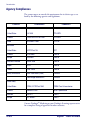
Agency Compliances
The scanner meets or exceeds the requirements for its device type as set
forth by the following agencies and regulations:
COUNTRY
COMPLIANCE
COMMENTS
Electrical
United States
UL 1950
TÜV NRTL
Canada
CAN/CSA C22.2 No. 1950
TÜV NRTL
World
IEC60950-1:2005
TÜV CB
United States
47CFR Part 15J
FCC
Canada
ICES-0003
Class B
Europe
EN 55022
Class B
Australia/N Zealand
AS/NZ 3548
Class B
Japan
VCCI
Class B
Taiwan
CNS 13438
Class B
Safety & Emissions
EMC 2004/108/EC(2004)
CE Mark
Low Voltage 2006/95//EEC
CE Mark
United States
CDRH, 21CFR Part 1040
CDRH Class IIa laser device
Canada
same as CDRH
SGM-1 specification
Australia
AS 2211
Class 1
Europe
IEC 60825-1
Class 1
Emissions
Laser Safety
Contact Datalogic® Marketing or your Datalogic Scanning representative
for a complete listing of approvals for other countries.
1-12
MagellanTM 2200VS and 2300HS
Bar Codes Supported
Bar Codes Supported
The scanner can read/decode the following bar code types (symbologies):
Product Reference Guide
•
UPC Versions A & E
•
UPC Supplementals and Add-ons (2 & 5 digit supplementals and
Code 128)
•
Reduced Space Symbology (RSS) RSS-14 and RSS expanded; both
support stacked component.
•
EAN-8 & 13
•
JAN-8 & 13
•
EAN/JAN two label
•
UCC/EAN 128
•
Code 39
•
Code 39 full ASCII
•
Code 128 (including conversion to Code 39)
•
Code 93
•
Interleaved 2 of 5 (I 2 of 5)
•
Italian Pharmacode (Code 39)
•
Codabar
•
Standard 2 of 5
•
MSI/Plessey
1-13
Introduction
NOTES
1-14
MagellanTM 2200VS and 2300HS
Chapter 2
Site Preparation and Installation
This chapter outlines the procedures for unpacking the scanner, verifying
function, preparing the countertop or wall, routing cables, and installing
the scanner.
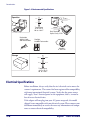
Unpacking
To unpack the unit:
•
Inspect the package for signs of damage that may have occurred during shipping. If damage is found, report it to your carrier immediately.
•
Lift any accessories from the box, including the AC/DC Power Supply, and the Quick Reference Guide.
•
Familiarize yourself with the Quick Reference Guide. Leave the
guide at the checkstand when the installation is complete.
•
Remove the protective packing and carefully lift the scanner from
the carton. Be sure to save the box and all packing material. In the
event of failure, the unit must be returned to the factory in its original packaging.
Proceed to the Operational Verification instructions below.
Product Reference Guide
2-1
Site Preparation and Installation
Operational Verification
Follow these steps to ensure that your unit has arrived undamaged and is
fully functional before installing it in the counter and connecting it to
your POS system:
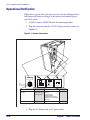
1. [2200VS scanners ONLY] Remove the mounting bracket.
2. Plug the connector from the AC/DC Adapter into the scanner (see
Figure 2-1).
Figure 2-1. Scanner Connections
Scanner
Host
Aux. Port
Power
EAS Opening
Scanner Host
EAS Connection
· Electronic Article Surveillance
Connection
Connection to this port is Optional
POS TERMINAL
Aux. Port
Power
AUXILIARY PORT
POWER
· Test Port
· Label Data
· Application Download · On Screen
Programming (OSP)
(where appropriate)
· Application Download
· RS-232 Handheld Scanner Input
· Auxiliary RS-232 Label Data Output
· EAS interlock
· DC Brick Input
Connection to this port is Optional
3. Plug the AC Adapter into an AC power outlet.
2-2
MagellanTM 2200VS and 2300HS
Installation: Model 2200VS
4. The scanner should beep to indicate it has passed the power-up
Selftest routine, and the green LED (lamp) will light continuously,
indicating the scanner is ready to scan.
Reference Chapter 4, Problem Isolation if the scanner does not
perform as expected.
NOTE
5. Scan a few known-good bar code labels to verify operation. Upon
reading each bar code, the scanner should beep once and flash its
green LED.
NOTE
Your scanner may only read one or two bar codes when not connected to a host terminal, requiring that you reset the scanner
before it will read again. This is normal, as some interface types
require the scanner to “buffer” (store) data until the terminal signals its readiness to accept the data.
Once you’re satisfied of the scanner’s operation, disconnect power and
proceed to the installation instructions.
Installation: Model 2200VS
The Magellan® 2200VS scanner can either be used “freestanding,” or can
be conveniently mounted to a countertop or wall using the mounting
bracket. Provide a secure installation as described below.
1. Determine the best location for scanner installation. Some considerations are:
• Cable routing to and from the scanner: Can cables and connected
devices be routed in such a way as to be protected from damage or
tampering? Depending on your installation, it may be necessary
to drill a 1-1/4” (3.2cm) hole in the countertop or wall.
• Mounting stability. Avoid placing the scanner in such a way as to
subject it to excess vibration, bumping, spillage, etc.
• Peripheral connections from the scanner, such as a handheld
device.
Product Reference Guide
2-3
Site Preparation and Installation
2. Determine if a cable-routing hole is necessary. If so, hold the scanner or mounting bracket in the desired, installed position to determine the center of the hole. Mark the center and drill a 1-1/4”
(3.2cm) hole.
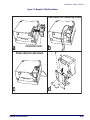
3. Secure the mount to the counter or wall using two #6 (3.5mm) pan
head screws (see Figure 2-2d). If the scanner is to be used “freestanding” (not attached), remove the mounting bracket (if installed)
to take advantage of the non-skid pads located on the bottom of the
scanner.
4. Remove the Connector Cover and connect the cables to the scanner.
Reference Figure 2-2a and Figure 2-1.
5. Route the cables as shown in Figure 2-2b or Figure 2-2c.
6. Switch the terminal OFF.
7. Connect the interface cable to the terminal.
8. Connect the AC Adapter to the AC outlet.
9. Switch the terminal ON.
10. Verify operation by scanning a few known-good bar code labels. The
scanner should now be communicating the bar code data to the
POS terminal.
Reference Chapter 4, Problem Isolation if the scanner does not
perform as expected.
NOTE
11. Slide the scanner into its mount until it’s fully seated; taking care to
guide cables so they won’t be pinched or trapped between assemblies. Reference Figure 2-2d.
This completes the installation instructions.
2-4
MagellanTM 2200VS and 2300HS
Installation: Model 2200VS
Figure 2-2. Magellan® 2200VS Installation
Route cables for countertop mount
a
Connector Cover
b
Route cables for wall mount
o
T
ll
Product Reference Guide
d
a
W
c
To
C
ou
nte
rto
p
2-5
Site Preparation and Installation
Installation: Model 2300HS
The Magellan® 2300HS scanner is mounted flush with the countertop to
promote comfortable and ergonomic slide-through scanning. Installation
as described below.
1. Determine the best location for scanner. Some considerations are:
• Proximity to the user. Verify that checkstand features allow the
unit to be within easy reach of the user, without interfering with
cash drawers or other equipment.
• Cable routing to and from the scanner: Can cables and connected
devices be routed in such a way as to be protected from damage or
tampering?
• Mounting stability. Avoid placing the scanner in such a way as to
subject it to excess vibration, bumping, spillage, etc.
• Peripheral connections from the scanner, such as a handheld
device.
2. The countertop must be modified to accept the scanner. At the time
of this writing, three options are available.
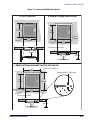
— Figure 2-3a shows the dimensions for the opening and other
details if a shelf is to be built to support the unit.
— Figure 2-3b details the cutout dimensions if an adapter fixture
holding the scanner will rest with its rim above the countertop.
— Figure 2-3c provides dimensions if an adapter fixture holding
the scanner will be recessed to be flush with the countertop.
3. Remove the Connector Cover, then connect and route the cables at
the scanner. Reference Figure 2-4.
4. Seat the scanner or in the countertop opening (or adapter).
5. Switch the terminal OFF.
6. Connect the interface cable to the terminal.
7. Connect the scanner’s AC Adapter to the AC outlet.
8. Switch the terminal ON.
2-6
MagellanTM 2200VS and 2300HS
Installation: Model 2300HS
Figure 2-3. Countertop Modification Options
a. Shelf installation
b. Adapter w/flange above counter
6.07"
(154.2mm)
Cut hole
6.26"
(159mm)
Rim of
adapter
6.07"
(154.2mm)
6.26"
(159mm)
Cut hole
Rim rests on top of counter
3.42"
(86.9mm)
3.47"
(88.1mm)
Shelf Depth
c. Adapter w/flange recessed to be flush with counter
7.40"
(188mm)
Radius 0.21" (5.3mm) x4
Routing is 0.050" (1.27mm) deep
7.91"
(201mm)
6.26"
(159mm)
Routed ledge
for rim
Cut hole
6.26"
(159mm)
Rim is flush with counter
3.52"
(89.4mm)
Product Reference Guide
2-7
Site Preparation and Installation
Figure 2-4. Magellan® 2300HS Cable Routing Options
Connector Cover
9. Verify operation by scanning a few known-good bar code labels. The
scanner should now be communicating the bar code data to the
POS terminal.
Reference Chapter 4, Problem Isolation if the scanner does not
perform as expected.
NOTE
This completes the installation instructions for this model.
2-8
MagellanTM 2200VS and 2300HS
Chapter 3
Operation and
Maintenance
The information contained in this section describes how to operate and
maintain the scanner. Topics include scanning tips, and scan window
cleaning and replacement.
Product Reference Guide
3-1
Operation and Maintenance
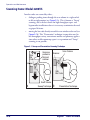
Scanning Items: Model 2200VS
Item bar codes are scanned by either...
•
sliding or pushing items through the scan volume in a right-to-left
or left-to-right motion (see Figure 3-1a). This is known as “Sweep”
scanning, and is the best choice for high throughput super- and
hypermarket installations where it is necessary to minimize the need
to grip or lift items.
•
moving the bar code directly toward the scan window to be read (see
Figure 3-1b). This “Presentation” technique is most often used in
low throughput variety, convenience market and pharmacy applications where usable countertop space is at a premium and “Sweep”
scanning is not possible.
Figure 3-1. Sweep and Presentation Scanning Technique
Item
Bar
Code
Items are
pushed or
slid past
scanner
Scanner
Scan Volume
Scanner
a
Item
Bar Code
Scan Volume
a
3-2
Sweep Technique
b
Presentation Technique
MagellanTM 2200VS and 2300HS
Scanning Items: Model 2300HS
Scanning Items: Model 2300HS
The scanner is mounted so its scan window is flush with the countertop.
This allows for maximum working space, and also permits the user to slide
items over its surface without having to grasp or pick them up. Bar codes
are effortlessly scanned when swept through the zone projected from the
substantial scan window as shown in Figure 3-1a.
NOTE
Facing bar code labels in the direction of scanning, or toward the scan
window will optimize the scan rate. The arrow on the scanner’s top
cover indicates the direction scanned items should be moved (see
Figure 3-1b).
Figure 3-2. Operating the Scanner
Item
Bar
Code
Items are
pushed or
slid past
scanner
Scanner
Product Reference Guide
Scan Volume
Product
Flow
3-3
Operation and Maintenance
Operational Controls
The function of scanner controls and indicators is listed in Appendix A,
LED/Beeper Indications & Controls. Turn to that appendix for full
details.
Operational Modes
The scanner features a number of modes that are important to both the
user and the system support personnel. These modes can be combined
into three groups: pre-operational, operational; and additional functions.
The following text describes these modes, what they mean, and how and
when they are seen.
Power-Up/Selftest & Pre-Operation
Pre-Operation describes those steps that must be successfully completed
before the scanner sounds the initial good read tone and illuminates the
LED (lamp) indicating readiness for operation. These steps include
Power-Up Selftest, Error Reporting, and Operational Configuration.
Power-Up/Selftest
Power-Up Selftest begins when power is applied. The scanner’s software
immediately begins the testing sequence to verify that all systems are functioning properly. This routine, which only takes a few seconds, checks all
the functions of the scanner and interface prior to indicating that it is
ready for operation.
A tone indicating Selftest is complete is a configurable feature. See the topic Power-up Beep Control in Chapter 5 of
this manual.
NOTE
3-4
MagellanTM 2200VS and 2300HS
Operational Modes
Error Reporting
If a fatal error is detected during Selftest or operation, the scanner will not
advance to Normal Operation Mode. Selftest diagnostics will cause the
scanner to sound a long, low tone. When this occurs, error codes may be
accessed by momentarily pressing the Volume/Tone Push Button. The
beeper and LED will then emit a coded series of indications to assist the
repair technician in identifying the failed component. If an error is indicated, make note of the tones heard/LED flashes. A table containing a listing of the error codes is included in Chapter 4.
Operational Configuration
Once Selftest diagnostics have been successfully run, a tone is emitted (if
configured to do so, and the unit enters an operational configuration state.
The scanner will automatically load your specific interface settings which
are required to communicate with the host system.
No bar code label can be in the scan volume while the unit is in this state.
Progress is halted until the label has been removed, thereby ensuring that
no extraneous bar code data is send to the host. When the scanner completes its Selftest successfully, it emits a tone (when configured to do so)
and enters Operating Mode.
Operating Mode
Operating Mode includes Normal Operation (scanning) and Sleep Mode.
These two modes are most commonly observed by the user/operator.
Normal Operation
This condition is indicated by the green light being on dim and steady.
LED indications are configurable. Your scanner may not be programmed to operate in the standard manner described above.
NOTE
Product Reference Guide
3-5
Operation and Maintenance
Once the scanner enters Normal Operation, it begins a countdown
sequence. If there is no activity during a preset period of time (also called
time-out1), the unit will shut off the laser and/or motor in order to prolong the life of the electrical and mechanical components. Once the scanner has timed out, it enters Sleep Mode.
Sleep Mode
After the scanner has been left idle for a preset period of time, the laser
and/or motor automatically turns off (goes to sleep). This state is called
Sleep Mode, and is indicated by a “slow” blink of the green light (blinking
at a 2-second rate). To wake up the unit, press the Volume/Tone Push
Button, wave your hand in front of the scan window, or scan an item
using an attached auxiliary scanner (if present). The scanner will recognize
these signals as a wake-up call and instantly return to Normal Operation.
1. “Timeout” and “Sleep Mode” time delays are programmable features that can be selected through
use of the programming bar codes included in Chapter 5.
3-6
MagellanTM 2200VS and 2300HS
Additional Functions
Additional Functions
Additional scanner functions include programming, running scanner
diagnostics, or initiating a reset.
Programming
Scanners are typically programmed at the factory to settings specified by
the customer. Generally, POS system interface and bar code symbologies
are pre-configured to operate in the target environment. Chapter 5 contains the necessary instructions, bar codes, and descriptions to program/
reprogram scanner settings.
Scanner Diagnostic Mode
While in Scanner Diagnostic Mode, continuous scanning of labels is
allowed, permitting the user to scan an unlimited number of bar codes
while troubleshooting problems. Under normal operation, the scanner
stores label data, awaiting the signal which transmits it to the host. When
the scanner is not connected to a host, it may read and store only up to
two labels, then quit reading until power is cycled (clearing the memory).
This mode of operation removes this limitation.
To place the scanner in Scanner Diagnostic Mode, press the Volume/Tone
Push Button for approximately four seconds. While pressing the button,
the scanner will first sound three tones, wait a few seconds, then sound six
rapid tones; after which you should immediately release the button.
To exit Scanner Diagnostic Mode, cycle power to the scanner or press and
hold the Volume/Tone Push Button for eight seconds to reset the scanner.
See the topic, Scanner Reset, below for more information about scanner
resets.
Turn to Chapter 4 for a description of error codes resulting from diagnostics.
Product Reference Guide
3-7
Operation and Maintenance
Scanner Reset
As with any electronic equipment, it is sometimes necessary to reset the
electronics. The reset procedure allows you to initiate a reset command to
the scanner. This may be necessary if the POS terminal has been switched
off or the store system has been reset while the unit is on. Reset can also be
used to initiate and run the scanner’s internal Selftest routine.
Pressing and holding the Volume/Tone Push Button for approximately
eight seconds initiates a reset, which is sounded by a rapid number of
beeps. If the motor had been spinning, the lamps will blink while the
motor spins down. At that point, the motor will spin back up and the
scanner will continue to run the Selftest diagnostics. For more information, see the topic, Power-Up/Selftest & Pre-Operation, earlier in this
chapter.
Operational Maintenance
The scanner will provide dependable service for many years. The following maintenance procedures will keep it operating at peak performance.
Cleaning
Clean the exterior surface of the scan window at least twice daily with a
nonabrasive, mild, water-based glass cleaner and paper towels or lint-free
cleaning tissues. Textured plastic surfaces and stainless steel can also be
cleaned using these cleaning agents.
3-8
MagellanTM 2200VS and 2300HS
Chapter 4
Problem Isolation
In the event of a suspected functional problem, use the troubleshooting
references provided in this section. This useful information will help you
identify and resolve the cause of the problem.
The scanner incorporates features that indicate when a problem occurs.
The scanner may:
•
emit a series of tones
•
flash the LED (lamp)
Three error reporting modes are used: Power-Up Selftest, Operational
tests and Diagnostic tests. These test sequences are explained on the following pages.
Power-Up Selftest
The Power-up Selftest is a pre-operational series of tests that must be successfully completed before the scanner indicates readiness for operation.
This pre-operational period is the time between power-up and normal
operation during which the motor comes up-to-speed and software, firmware and hardware are being tested. These tests ensure that all subsystems
are fully functional before turning on the Visible Laser Diode (VLD).
Refer to Chapter 3, Operational Modes, for a more detailed description
of this and other scanner modes.
Operational Tests
These are the tests that run continually during Normal Operation and
Sleep Mode. Firmware checks all subsystems, accessory connections as
well as the POS interface to verify everything is operating normally. If a
problem is detected at any time, a long, low tone is sounded and operation
may be halted. If you press the Volume/Tone Push Button at that time, a
series of tones will be sounded in concert with LED flashes.
Product Reference Guide
4-1
Problem Isolation
Diagnostic Tests
See Chapter 3, Scanner Diagnostic Mode for details about running diagnostic tests for the scanner. If a problem is discovered during diagnostics,
the scanner will provide feedback about the source of the problem. The
remainder of this section describes these failure indications and includes
troubleshooting flowcharts to help isolate the problem.
Diagnostic Procedures
Your Point-Of-Sale (POS) system may contain many components that
operate as a system. Since almost all scanner problems are caused by either
the scanner, POS terminal or communication links between them, troubleshooting flowcharts provided in this chapter focus on these components. Additionally, the AC/DC Power Supply and scanner cables are
potential problems addressed.
The flowcharts provided here walk you through a diagnostic process that
will isolate the failed component and instruct as to the corrective action
required. Since internal scanner components cannot be replaced by an
operator or installer, most functional errors will require the assistance of a
trained technical support person. However, if the problem is caused by
faulty cable, or power supply, you can fix the problem by replacing the
defective component and complete the installation.
4-2
MagellanTM 2200VS and 2300HS
Error Codes
Error Codes
If an error is detected, the scanner will sound a long low tone (for three
seconds) and flash its LED, indicating a failure. When this occurs, press
the Volume/Tone Push button to hear the error code. If it is configured to
do so, the scanner will sound a series of beeps corresponding to the error
code and/or flash its LED simultaneous to the beeps. The table below
describes what these codes mean and what action should be taken for
each.
When troubleshooting, always remember to check all cable connections
first before proceeding with other problem isolation steps.
Error
Beep
Probable Cause
Corrective Action
Configuration
No POS interface has been selected (Null interface). See Chapter 5,
Interface Type to select the required interface using programming
bar codes.
1
Configuration Error
See Chapter 5 for details about configuring the scanner using programming bar codes.
2
Interface Board
3
Motor
4
Laser
6
Digital Board
10
Button Module
Beeper
“Chirp”
Product Reference Guide
Unplug unit and call technical support personnel.
4-3
Problem Isolation
Flowcharts
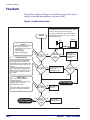
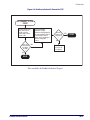
The problem isolation flowcharts on the following pages allow you to
identify and troubleshoot problems with your system.
Figure 4-1. Problem Isolation: Start
For units using an AC/DC adapter, verify that...
1. AC Adapter is connected to a functional AC outlet.
2. Power cord is firmly connected to scanner.
If your unit is a model which receives Power Off the
Terminal POT), verify that the I/F cable is securely
connected at both ends.
START
Scanner
AC
Adapter
Power-up
Scanner power-up is signified by
any or all of the following:
- Facet wheel shows movement
- Laser turns on
- Status LED lights
- Speaker sounds tone(s)
NO
Does
the scanner
power-up
?
Flashing Green LED
If the Green LED is flashing slowly, the
scanner is most likely in Sleep Mode.
Press and release the Volume/Tone
Push Button or wave your hand in front
of the vertical window to "wake-up" the
scanner.
A flashing Green LED can also mean
the scanner has been disabled by the
POS terminal. To exit this mode, cycle
power or have the terminal re-enable
the scanner.
NO
Have you
checked the
power
connections
?
YES
Check these
potential problems:
- AC/DC adaptor
- AC outlet
YES
Is the
Green LED
Lit
?
NO Ensure the Green LED is
enabled via programming bar codes.
YES
Selftest Failure
If the scanner fails its Selftest, the
following takes place:
- Speaker sounds a tone at the lowest
value for approx. 3 seconds.
- LED flashes on and off.
Is the
Green LED
Lit
?
NO
YES
Call Tech Support
Does
the scanner
pass Selftest
?
Consult the Selftest flowchart if you're
unsure the unit has passed Selftest.
NO
Go to Selftest
flowchart
NO
Go to Poor/No
Reading flowchart
YES
Other Problems?
Call Tech Support
4-4
YES
Will the
scanner read
bar codes
reliably
?
MagellanTM 2200VS and 2300HS
Flowcharts
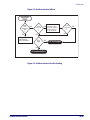
Figure 4-2. Problem Isolation: Selftest
SELFTEST
START
Is the
LED
blinking in
error
?
Scan the Factory
NO
Is the
error code
1
?
YES Defaults bar code in
Section 6 to enable the
default configuration
file. Restart the unit.
No interface selected
(Null Interface).
Select an interface.
Error
Beeps
?
YES
NO
NO
YES
Is the
error code
1
?
YES
Call Tech Support
NO
Unit passes Selftest
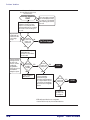
Figure 4-3. Problem Isolation: Poor/No Reading
Product Reference Guide
4-5
Problem Isolation
Have you verified that
the scan window(s) is/are clean
and scratch-free?
POOR/NO READING
START
Enter Scanner Diagnostic Mode by
holding the Volume/Tone Push
Button for 4 seconds (until first 3,
and then 6 rapid tones are sounded)
then release. Scan a known-good
bar code.
A good read is
signified by one
flash of the LED
and a single
beep1.
Does the
scanner read
the bar code
satisfactorily
?
NO
Before proceeding, verify that
bar code samples presented
to scanner are of good quality
and a symbology the scanner
can read.
Call Tech Support
YES
Reset the scanner by
holding down the
Volume/Tone Push Button
for 8 seconds.
If unexpected data
is being sent from
the host to the
scanner, consider
enabling the
programmable
feature Ignore Host
Commands to
debug the system.
Does the
scanner pass
the data to
the POS
?
NO
Go to No Transmit to
POS flowchart
YES
Does the
scanner read
satisfactorily
?
YES
DONE
NO
Verify programmable
parameters using the
information and programming
bar codes provided in Section
5. Check bar code symbology
options and other configurable
features.
Does the
scanner read
satisfactorily
?
YES
DONE
NO
Troubleshoot
the host or call
Tech Support.
1 LED and beeper indications are configurable
features. Behavior may vary from that described here.
4-6
MagellanTM 2200VS and 2300HS
Flowcharts
Figure 4-4. Problem Isolation: No Transmit to POS
NO TRANSMIT TO POS
START
Check the interface (I/F)
cable connections. If
possible, retest the
system using a knowngood I/F cable.
Does the
scanner pass
the data to
the POS
?
YES
NO
Verify programmable
parameters using the
information and programming
bar codes provided in Section
5. Check interface and I/F
options, inactive symbologies
and other configurable
features.
Does the
scanner read
satisfactorily
?
YES
DONE
NO
Troubleshoot
the host or call
Tech Support.
DONE
This concludes the Problem Isolation Chapter.
Product Reference Guide
4-7
Problem Isolation
NOTES
4-8
MagellanTM 2200VS and 2300HS
Chapter 5
Programming
Introduction to Label Programming
The programming bar code labels contained in this manual will allow you
to customize and configure features and settings for your scanner. To
ensure full compatibility and proper function, use only the programming
bar codes in this manual and other product-specific publications to program scanner features.
This manual has been developed to make it quick and easy for users of all
levels to find the information needed to understand and configure features. The following descriptions will help you to determine where to go
from here.
Understanding the Basics
If you have little or no prior experience with programming using bar code
labels, you should review the first few pages of this section to familiarize
yourself with the basics of scanner programming before performing any
changes to your configuration.
Integrating the Scanner With Your Host System
Your scanner MUST be equipped with the correct hardware (interface
board, cable, etc.) to properly communicate with your host system. Contact your dealer for information if you have questions about your scanner’s
hardware compatibility.
Product Reference Guide
5-1
Programming
You may also want to contact the dealer or your system administrator if
you have no record of how your scanner was pre-programmed at the factory. Scanners are typically programmed with the default settings for specific interface types (see Appendix E, Factory Defaults for more
information); however, your scanner may have been custom configured
with settings that are unique to your company or application.
Once you know the scanner’s current settings, you can determine what
changes will be required to allow communication with your host system
and/or optional features you choose to modify to customize your installation. After recording the modifications needed, finish reading this section,
then turn to the appropriate page and follow the instructions to program
the scanner.
When all scanner features are programmed to your satisfaction, the scanner is ready to be placed into operation.
Customizing Your Scanner’s Operation
Most scanner programming falls within three general categories:
CAUTION
NOTE
5-2
•
General Scanner Features - are features common to all interface
types. Examples include beeper adjustments such as volume and
length, read verification settings, etc.
•
Interface Related Features - are the mandatory settings necessary to
allow communication with your host terminal. Examples of these
settings are: RS-232 baud rate and parity.
It is possible, via programming bar codes, to change the interface type (for example: from RS-232 to IBM Port 17). Great care
should be taken to select the correct interface type, since you
can cause damage to the scanner and/or POS terminal by
attempting to change to an incompatible interface. ALWAYS
make interface selections with the host cable DISCONNECTED.
Ensure that your planned modifications are compatible with
the current interface. For example, baud rate selections are
only valid in the RS-232 interface. The scanner will sound an
error tone when scanning programming labels for features
invalid to the current interface group.
MagellanTM 2200VS and 2300HS
Programming Overview
•
Symbology Programming - gives the scanner the capability to autodiscriminate as few as one, and as many as all available symbologies.
For optimal scanner performance enable only those symbologies
required. Additionally the scanner may be programmed with the
standard options available for the various symbologies, such as check
digit, minimum label length, fixed and variable length bar codes,
etc.
If you experience difficulties, have questions or require additional information, contact your local distributor, or call your dealer or sales representative.
Programming Overview
The scanner’s programmable feature settings can be modified to accommodate your system’s unique requirements. These settings can be communicated to the scanner in one of two ways:
1. Commands can be sent directly from the host. A limited set of host
commands are available. Refer to Appendix D for more details or
contact Tech Support.
2. Programming bar code labels can also be used to modify the scanner’s programmable settings. This manual provides the bar code
labels and instructions necessary to configure the scanner’s features
and options.
When you program the scanner using any of the methods above,
the scanner will store the changes until reprogrammed or
returned to factory defaults.
NOTE
Product Reference Guide
5-3
Programming
Programming via Handheld Device
The scanner can also accept programming via its auxiliary port using a
handheld scanning device. Eligible handheld devices must have the ability
to transmit Code 128 function codes such as the programming bar codes
presented in this manual. Datalogic models QuickScan® 1000 and QuickScan® 6000 support this functionality. Handheld data format requirements (baud rate, parity, etc.) are presented in Appendix F of this manual.
Additionally the programmable feature, Aux Port Mode, must be set to
“External Handheld Input” to allow operation.
What Is Programming Mode?
Programming Mode is a state in which the scanner must be placed in
order to accept commands via programming bar code labels. When programming using the bar code labels in this manual, the scanner is typically
placed in Programming Mode by scanning the SWITCH label.
While in the Programming Mode, the scanner only recognizes the special
programming bar codes contained in this programming guide. See
Appendix A for information about scanner indications while in the Programming Mode.
Entering and Exiting Programming Mode.
Use the bar code label below to enter and exit (‘switch” into and out of )
Programming Mode.
SWITCH LABEL
5-4
MagellanTM 2200VS and 2300HS
Programming Overview
Programming Session
A typical programming session is conducted as follows:
1. Scan the SWITCH bar code to place the scanner in Programming
Mode. Depending upon its current programming, the scanner may
emit a beep or beeps, indicating it has read the bar code and the
green LED will flash on and off slowly while the scanner remains in
Programming Mode. Normal scanning functions are disabled.
2. Scan the programming bar code(s) that is (are) specially encoded to
make the desired changes. With few exceptions1, the scanner will
emit a triple beep each time you scan a valid programming bar code.
Not all features are available for all interfaces and the scanner
will sound an error tone when scanning programming bar codes
for features invalid to the current interface. Only features supported by the currently active interface will be implemented.
NOTE
If a bar code is scanned that changes the scanner’s interface, all
previous configuration items scanned in the programming session are lost.
NOTE
Additionally, when programming a feature requiring you to scan single
digits to set a multi-digit number, such as Minimum Label Length, scanning the SWITCH bar code (or any item tag/item value bar code) before
completing all input will result in an error tone and cause the scanner to
exit Programming Mode. Under these circumstances, the current feature
you were trying to set is thrown out; any previous bar codes scanned during the session will take effect.
1. Some features, such as Minimum Label Length, require you to select the label’s length by scanning a series of single-digit bar codes. A single ‘good read’ beep is sounded when scanning these
single digits in Programming Mode. Only the final required digit in the sequence will produce a triple beep when scanned, indicating a successfully programmed feature.
Product Reference Guide
5-5
Programming
NOTE
It is recommended that programming sessions be limited to
one feature at a time. Should you make a mistake in the programming sequence, it can be difficult to discover where an
error has been made if several features are programmed at
once. Additionally, it can be confusing to determine which
features may or may not have been successfully set following
such a session.
3. Scan the SWITCH bar code to save any new settings and exit Programming Mode. The scanner will sound a beep and reset upon
exiting Programming Mode, and the green LED will return to its
usual state (on steady or off ).
The scanner will exit Programming Mode under the following conditions:
— the programming sequence has been completed or the
SWITCH bar code is scanned
— five minutes have passed without scanning activity. Any data
programmed during the current session will be ignored1, and
the scanner will reset and revert to its condition previous to
initiating the exited session.
— power is disconnected. Disconnecting power during Programming Mode, before scanning the SWITCH bar code,
will cause all new settings to be ignored. On power-up, the
scanner will return to previous settings.
4. Maintain a good record of all changes made to ensure that you know
if the original factory settings have been changed.
1. Exception: If an interface bar code had been read while in Programming Mode, the scanner will
operate on the default settings for the new interface.
5-6
MagellanTM 2200VS and 2300HS
Programming Overview
Programming Sequence
To modify a scanner feature (item), the programming bar codes contained
in this manual must be scanned in a given sequence depending upon the
feature being programmed (as shown in Table 5-1). There are three possible programming sequences:
NOTE
If the scanner’s interface type must be changed, always be sure
that interface configuration is the FIRST item scanned during a
programming session. (Changing an interface type resets ALL
other configuration items to the factory default for that interface
type.)
A. Programming sample A (the most commonly used format) demonstrates how three bar codes are scanned in sequence to do the following:
1. Place the scanner in Programming Mode (SWITCH bar
code).
2. Scan the Item Tag1 that will enable the new feature.
3. End the programming session and reset the scanner
(SWITCH bar code).
B. Sample B provides an example of a programming feature requiring
the entry of a range value. Like sample A, the scanner is placed in
Programming Mode and an Item Tag1 is scanned. Then, a value
must be entered before ending the programming session. In the
example, three digits must be scanned from the number pad in
Appendix C. This type of format, requiring several bar codes, is necessary to allow flexible programming for item values with larger
numeric ranges.
C. The programming sequence shown in example C requires scanning
of a single, extended length bar code. This special programming bar
code contains all the data necessary to enter Programming Mode, set
the Item Tag1 and Item Value, and exit Programming Mode (all in
one step).
1. An “Item Tag” is a term used to describe an assigned number, which is encoded in a programming
bar code, that toggles (selects, enables, disables, etc.) a specific programming feature.
Product Reference Guide
5-7
Programming
Table 5-1. Programming Sequence
SET
A
ITEM TAG
ITEM VALUE
END/RESET
1
2
3
SWITCH
ENABLE
NEW FEATURE
SWITCH
1
2
345
6
0
B
SWITCH
C
5-8
ENABLE NEW
FEATURE
USING THE
FOLLOWING
SETTINGS...
0
8
SWITCH
1
ONE BAR CODE CONTAINS SWITCH + ITEM TAG + ITEM VALUE + SWITCH
MagellanTM 2200VS and 2300HS
LED and Beeper Indicators
LED and Beeper Indicators
The scanner provides a set of indicators that verify/announce the various
scanner functions.
If You Make a Mistake...
If, during a programming session, you find that you are unsure of the
scanner’s settings or wish to reset the scanner’s configuration, use the
Return to Factory Settings label below to return the scanner’s configuration to the factory settings. Scanning this label will also reset any changes
made during previous programming sessions.
Return to Factory Settings
Scan this bar code to return the scanner to the default settings configured
at the factory. This bar code is typically used to return the scanner to a
“known” operating state when the present programming status is not
known, faulty, or suspect.
The process of Returning to Factory Settings requires two steps:
1. Scan the Return to Factory Settings bar code.
2. Set your required interface type using the instructions in Interface
Related Features on page 5-37.
Step 2 is important because the Return to Factory Setting bar code may
alos change your scanner’s interface type.
Use this bar code with caution, since it will reset ALL features that
may have been programmed since the scanner’s installation.
CAUTION
DO NOT scan the SWITCH bar code before and after scanning this
bar code.
NOTE
Product Reference Guide
5-9
Programming
RETURN TO FACTORY SETTINGS
Test Mode
Use this feature to place the scanner into a testing, or “demo” mode. This
special mode disables the scanner interface, meaning that bar code data is
not sent out to the host via the scanner interface. This allows the bar code
to be scanned continuously without requiring a response from the POS
terminal.
To return the scanner to normal function, scan the TEST MODE = DISABLE bar code below.
DO NOT scan the SWITCH bar code before and after scanning the
bar codes on this page.
NOTE
Scanning the TEST MODE = DISABLE bar code sets the Double Read Timeout to 600ms.
TEST MODE = DISABLE
TEST MODE = ENABLE
5-10
MagellanTM 2200VS and 2300HS
General Scanner Features
General Scanner Features
Double Read Timeout
The Double Read Timeout feature sets a time limit that determines how
much time must pass before reading the same label again (e.g. two identical items in succession).
To set the Double Read Timeout:
1. Scan the SWITCH bar code.
2. Scan your selection from the bar codes below. You’ll need to cover
any unused bar codes on this and the facing page to ensure that the
scanner reads only the bar code you intend to scan.
3. Complete the programming sequence by scanning the SWITCH
bar code.
If the incidence of multiple reads is not acceptable, increase the
Double Read Timeout setting to a higher value.
NOTE
DOUBLE READ TIMEOUT = 400ms
DOUBLE READ TIMEOUT = 600ms
Product Reference Guide
5-11
Programming
Double Read Timeout — continued
Remember to cover any unused bar codes on this and the facing page to
ensure that the scanner reads only the bar code you intend to scan.
DOUBLE READ TIMEOUT = 800ms
DOUBLE READ TIMEOUT = 1 SECOND
5-12
MagellanTM 2200VS and 2300HS
General Scanner Features
Laser Timeout
The laser timeout feature sets the time for switching the visible laser
diodes (VLDs) off if the scanner is idle. Using this feature can prolong the
life of the VLDs.
To set the Laser Timeout:
1. Scan the SWITCH bar code.
2. Scan your selection from the bar codes below. You’ll need to cover
any unused bar codes on this and the facing page to ensure that the
scanner reads only the bar code you intend to scan.
3. Complete the programming sequence by scanning the SWITCH
bar code.
LASER TIMEOUT = 5 MINUTES
Product Reference Guide
5-13
Programming
Laser Timeout — continued
Remember to cover any unused bar codes on this and the facing page to
ensure that the scanner reads only the bar code you intend to scan.
LASER TIMEOUT = 10 MINUTES
LASER TIMEOUT = 15 MINUTES
5-14
MagellanTM 2200VS and 2300HS
General Scanner Features
Motor Timeout
The Motor Timeout feature sets the time for automatically switching the
motor off when the scanner is not in use.
Laser safety requires that the laser switch off before the motor. If
you set the motor timeout shorter than the laser timeout, the motor
and the laser will both shut off when the motor timeout expires.
NOTE
To set the Motor Timeout:
1. Scan the SWITCH bar code.
2. Scan your selection from the bar codes below. You’ll need to cover
any unused bar codes on this and the facing page to ensure that the
scanner reads only the bar code you intend to scan.
3. Complete the programming sequence by scanning the SWITCH
bar code.
MOTOR TIMEOUT = 5 MINUTES
Product Reference Guide
5-15
Programming
Motor Timeout — continued
Remember to cover any unused bar codes on this and the facing page to
ensure that the scanner reads only the bar code you intend to scan.
MOTOR TIMEOUT = 10 MINUTES
MOTOR TIMEOUT = 15 MINUTES
5-16
MagellanTM 2200VS and 2300HS
General Scanner Features
Motor Timeout — continued
Remember to cover any unused bar codes on this and the facing page to
ensure that the scanner reads only the bar code you intend to scan.
MOTOR TIMEOUT = 30 MINUTES
MOTOR TIMEOUT = 60 MINUTES
Product Reference Guide
5-17
Programming
Green LED Idle State
This feature specifies the state of the green scanner LED when the scanner
is idle and ready to read a label. Options are:
•
Off
•
On dim
To set the LED Idle State:
1. Scan the SWITCH bar code.
2. Scan your selection from the bar codes below. You’ll need to cover
any unused bar codes on this and the facing page to ensure that the
scanner reads only the bar code you intend to scan.
3. Complete the programming sequence by scanning the SWITCH
bar code.
GREEN LED IDLE STATE = OFF
GREEN LED IDLE STATE = ON DIM
5-18
MagellanTM 2200VS and 2300HS
General Scanner Features
Scanner Button Options
Configure the scanner volume button to one of the following modes of
operation:
•
Enable all functions: Volume, tone, diagnostics and reset.
•
Enable only volume, tone and reset.
•
Enable reset only.
•
Disable all button functions
To set the desired Scanner Button Option:
1. Scan the SWITCH bar code.
2. Scan your selection from the bar codes below. You’ll need to cover
any unused bar codes on this and the facing page to ensure that the
scanner reads only the bar code you intend to scan.
3. Complete the programming sequence by scanning the SWITCH
bar code.
SCANNER BUTTON OPTION = ENABLE ALL FUNCTIONS
SCANNER BUTTON OPTION = ENABLE ONLY VOLUME/TONE/RESET
Product Reference Guide
5-19
Programming
Scanner Button Options — continued
Remember to cover any unused bar codes on this and the facing page to
ensure that the scanner reads only the bar code you intend to scan.
SCANNER BUTTON OPTION = ENABLE RESET ONLY
SCANNER BUTTON OPTION = DISABLE ALL BUTTON FUNCTIONS
5-20
MagellanTM 2200VS and 2300HS
General Scanner Features
Power-up Beep Control
Specifies the type of audible indication that is made when entering scanner-active mode on power-up. Choices are:
•
No beep
•
One beep
•
Three beeps
To set the Power-up Beep:
1. Scan the SWITCH bar code.
2. Scan your selection from the three bar codes below. You’ll need to
cover any unused bar codes on this and the facing page to ensure
that the scanner reads only the bar code you intend to scan.
3. Complete the programming sequence by scanning the SWITCH
bar code.
POWER-UP BEEP = OFF
Product Reference Guide
5-21
Programming
Power-up Beep Control — continued
Remember to cover any unused bar codes on this and the facing page to
ensure that the scanner reads only the bar code you intend to scan.
POWER-UP BEEP = ONE BEEP
POWER-UP BEEP = THREE BEEPS
5-22
MagellanTM 2200VS and 2300HS
General Scanner Features
Good Read Beep Control
This feature enables/disables scanner beep upon successfully decoding of a
label.
To set this feature:
1. Scan the SWITCH bar code.
2. Scan your selection from the two bar codes below. You’ll need to
cover any unused bar codes on this and the facing page to ensure
that the scanner reads only the bar code you intend to scan.
3. Complete the programming sequence by scanning the SWITCH
bar code.
GOOD READ BEEP = DISABLE
GOOD READ BEEP = ENABLE
Product Reference Guide
5-23
Programming
Good Read Beep Frequency
Adjusts the scanner’s good read beep to sound at low, medium, or high frequency (controls the beeper’s pitch/tone).
•
Low = 660 Hz
•
Medium = 866 Hz
•
High = 1600 Hz
To set the Good Read Beep Frequency:
1. Scan the SWITCH bar code.
2. Scan your selection from the three bar codes below. You’ll need to
cover any unused bar codes on this and the facing page to ensure
that the scanner reads only the bar code you intend to scan.
3. Complete the programming sequence by scanning the SWITCH
bar code.
GOOD READ BEEP FREQUENCY = LOW
5-24
MagellanTM 2200VS and 2300HS
General Scanner Features
Good Read Beep Frequency — continued
Remember to cover any unused bar codes on this and the facing page to
ensure that the scanner reads only the bar code you intend to scan.
GOOD READ BEEP FREQUENCY = MEDIUM
GOOD READ BEEP FREQUENCY = HIGH
Product Reference Guide
5-25
Programming
Good Read Beep Length
Specifies the duration of a good read beep.
To set the good read beep length:
1. Scan the SWITCH bar code.
2. Scan the bar code, SET GOOD READ BEEP LENGTH. You’ll need
to cover any unused bar codes on this and the facing page to ensure
that the scanner reads only the bar code you intend to scan.
3. Scan the appropriate digits from the keypad in Appendix C that represent the desired good read beep length setting. The selectable
range is 1-255, which is the timeout in 10-millisecond increments.
Pad all single and double digit numbers with leading zeroes to yield
a three-digit entry (001-255).
Examples:
001 = 10ms
005 = 50ms
040 = 400ms
250 = 2,500ms (2.5 seconds)
4. The scanner will automatically exit Programming Mode when the
appropriate amount of digits have been scanned
SET GOOD READ BEEP LENGTH
5-26
MagellanTM 2200VS and 2300HS
General Scanner Features
Good Read Beep Volume
Selects the beeper volume upon a good read beep. There are four selectable volumes, with each volume incrementing upward from the previous
decibel level:
•
0 = Lowest Volume
•
1 = Medium-Low Volume
•
2 = Medium Volume
•
3 = High Volume
To set the Good Read Beep Volume:
1. Scan the SWITCH bar code.
2. Scan your selected volume bar code from this or the following pages.
You’ll need to cover any unused bar codes on this and the facing
page to ensure that the scanner reads only the bar code you intend
to scan.
3. Complete the programming sequence by scanning the SWITCH
bar code.
GOOD READ BEEP VOLUME = LOWEST
Product Reference Guide
5-27
Programming
Good Read Beep Volume — continued
Remember to cover any unused bar codes on this and the facing page to
ensure that the scanner reads only the bar code you intend to scan.
GOOD READ BEEP VOLUME = MEDIUM LOW
GOOD READ BEEP VOLUME = MEDIUM
5-28
MagellanTM 2200VS and 2300HS
General Scanner Features
Good Read Beep Volume — continued
Remember to cover any unused bar codes on this and the facing page to
ensure that the scanner reads only the bar code you intend to scan.
GOOD READ BEEP VOLUME = HIGH
Product Reference Guide
5-29
Programming
Good Read When to Indicate
This feature specifies when the scanner will provide indication (beep and/
or flash its green LED) upon successfully reading a bar code.
•
Good Read = Indicate after decode
•
Good Read = Indicate after transmit
•
Good Read = Indicate after CTS goes inactive, then active
The “Indicate after CTS goes inactive...” mode applies to RS-232
STD and RS-232 WN interfaces only. If set to this mode in other
interfaces, “Indicate after decode” mode will be implemented.
NOTE
To set the Good Read When to Indicate feature:
1. Scan the SWITCH bar code.
2. Scan the desired mode bar code from this page. You’ll need to cover
any unused bar codes on this and the facing page to ensure that the
scanner reads only the bar code you intend to scan.
3. Complete the programming sequence by scanning the SWITCH
bar code.
GOOD READ = INDICATE AFTER DECODE
5-30
MagellanTM 2200VS and 2300HS
General Scanner Features
Good Read When to Indicate — continued
Remember to cover any unused bar codes on this and the facing page to
ensure that the scanner reads only the bar code you intend to scan.
GOOD READ = INDICATE AFTER TRANSMIT
GOOD READ = INDICATE AFTER CTS GOES INACTIVE, THEN ACTIVE
(RS-232 ONLY)
Product Reference Guide
5-31
Programming
EAS Active State
Specifies the active state polarity of EAS (Electronic Article Surveillance);
the inactive state is its opposite polarity. EAS output goes active during the
good read of a bar code, allowing the EAS device to deactivate a tag on the
product.
To set the EAS Active State:
1. Scan the SWITCH bar code.
2. Scan bar code below representing the desired setting. You’ll need to
cover any unused bar codes on this and the facing page to ensure
that the scanner reads only the bar code you intend to scan.
3. Complete the programming sequence by scanning the SWITCH
bar code.
EAS ACTIVE STATE = ACTIVE LOW
EAS ACTIVE STATE = ACTIVE HIGH
5-32
MagellanTM 2200VS and 2300HS
General Scanner Features
EAS Timeout
Specifies the amount of time that an EAS (Electronic Article Surveillance)
signal is held in its active state for a good read.
To set the EAS Timeout:
1. Scan the SWITCH bar code.
2. Scan the bar code, SET EAS TIMEOUT below. You’ll need to cover
any unused bar codes on this and the facing page to ensure that the
scanner reads only the bar code you intend to scan.
3. Scan the appropriate digits from the keypad in Appendix C that represent the desired EAS Timeout duration. The selectable range is 0255, which is the timeout in 10-millisecond increments. Pad all single and double digit numbers with leading zeroes to yield a threedigit entry (000-255).
Examples:
000 = EAS timeout disabled
001 = 10ms
005 = 50ms
040 = 400ms
250 = 2,500ms (2.5 seconds)
A setting of 0 (000) disables this feature.
NOTE
4. The scanner will automatically exit Programming Mode when the
appropriate amount of digits have been scanned
SET EAS TIMEOUT
Product Reference Guide
5-33
Programming
Aux Port Mode
Selects the usage for the scanner’s optional auxilliary port. The choices
listed below are mutually exclusive (only one option can be active at a
time).
•
Disabled — Port is inactive
•
External Handheld Input — Supports Datalogic® handheld scanners
(QuickScan 1000, QuickScan 6000, PowerScan) as well as other
models such as the Symbol® HotShot. Call your dealer for more
information about supported devices.
Cable pinout information for the Aux Port is provided in Appendix
B of this manual. A connected handheld scanner must be configured to transmit data as outlined in Appendix F.
NOTE
•
PIR — (Productivity Index Reporting) allows the scanner to provide
information to an external computer indicating how easy the label
was to read.
To set this feature:
1. Scan the SWITCH bar code.
2. Scan your selection from the bar codes below. You’ll need to cover
any unused bar codes on this and the facing page to ensure that the
scanner reads only the bar code you intend to scan.
3. Complete the programming sequence by scanning the SWITCH
bar code.
AUX PORT MODE = DISABLE
5-34
MagellanTM 2200VS and 2300HS
General Scanner Features
Aux Port Mode — continued
Remember to cover any unused bar codes on this and the facing page to
ensure that the scanner reads only the bar code you intend to scan.
AUX PORT MODE = EXTERNAL HANDHELD INPUT
AUX PORT MODE = PIR
Product Reference Guide
5-35
Programming
Productivity Index Reporting (PIR)
When PIR is enabled, label quality data is appended to decoded data
before being presented to the POS. The PIR feature allows the scanner to
provide information to an external computer indicating how easy the label
was to read.
This value-added feature is a factory-programmed option. Contact
your dealer for information about upgrading your system to include
this advanced capability.
NOTE
To set this feature:
1. Scan the SWITCH bar code.
2. Scan your selection from the bar codes below. You’ll need to cover
any unused bar codes on this and the facing page to ensure that the
scanner reads only the bar code you intend to scan.
3. Complete the programming sequence by scanning the SWITCH
bar code.
PIR = DISABLE
PIR = ENABLE
5-36
MagellanTM 2200VS and 2300HS
Interface Related Features
Interface Related Features
Interface Type
Specifies the current scanner interface. Selections are:
INTERFACE TYPE
PAGE NUMBER
RS-232 Standard
5-39
RS-232 Wincor-Nixdorf
5-40
RS-232 Single Cable
5-41
OEM USB
5-43
IBM Port 17
5-42
USB Keyboard
5-44
PC Keyboard Wedge
5-45
NOT USER-SELECTABLE
Null Interface
Common factory configuration for
new scanners
NOTE
A new scanner may have been shipped from the factory with a
Null Interface (no interface type selected) to ensure system compatibility at installation. In this case, the correct Interface Type
programming bar code must be scanned first before the scanner
can be used with a POS system.
NOTE
If the scanner’s interface type must be changed, always be sure
that interface configuration is the FIRST item scanned during a
programming session. (Changing an interface type resets ALL
other configuration items to the factory default for that interface
type.)
Product Reference Guide
5-37
Programming
Interface Type — continued
To select the desired interface:
CAUTION
Great care should be taken to select the correct interface type,
since you can cause damage to the scanner and/or POS terminal
by attempting to change to an incompatible interface. ALWAYS
make interface selections with the host cable DISCONNECTED.
When an interface is selected, the scanner loads the factory configuration for that interface as the selection is made, erasing any
and all custom configuration that may have previously been done.
NOTE
1. Disconnect current interface cable(s) if currently connected.
2. Scan the SWITCH bar code
3. Scan the bar code representing the appropriate interface located on
the following pages. You’ll need to cover any unused bar codes adjacent to and on any facing pages to ensure the scanner reads only the
bar code you intend to scan.
4. Complete the programming sequence by scanning the SWITCH
bar code.
NOTE
Once the correct interface has been set, it will be necessary to proceed to the appropriate pages in this manual that select parameters
and options for that interface. For example, if RS-232 is selected,
turn to the pages in this manual headed as features specific to the
RS-232 interface.
5. Connect new interface cable(s).
5-38
MagellanTM 2200VS and 2300HS
Interface Related Features
RS-232 Interface Selection
Remember to cover any unused bar codes on this and the facing page to
ensure that the scanner reads only the bar code you intend to scan.
CAUTION
Great care should be taken to select the correct interface type, since
you can cause damage to the scanner and/or POS terminal by
attempting to change to an incompatible interface. ALWAYS make
interface selections with the host cable DISCONNECTED.
INTERFACE TYPE = RS-232 STANDARD
Product Reference Guide
5-39
Programming
RS-232 Wincor-Nixdorf Interface Selection
Remember to cover any unused bar codes on this and the facing page to
ensure that the scanner reads only the bar code you intend to scan.
CAUTION
Great care should be taken to select the correct interface type,
since you can cause damage to the scanner and/or POS terminal
by attempting to change to an incompatible interface. ALWAYS
make interface selections with the host cable DISCONNECTED.
INTERFACE TYPE = RS-232 WINCOR-NIXDORF
5-40
MagellanTM 2200VS and 2300HS
Interface Related Features
RS-232 Single Cable Interface Selection
Remember to cover any unused bar codes on this and the facing page to
ensure that the scanner reads only the bar code you intend to scan.
CAUTION
Great care should be taken to select the correct interface type,
since you can cause damage to the scanner and/or POS terminal by attempting to change to an incompatible interface.
ALWAYS make interface selections with the host cable DISCONNECTED.
INTERFACE TYPE = RS-232 SINGLE CABLE
Product Reference Guide
5-41
Programming
IBM Port 17 Interface Selection
Remember to cover any unused bar codes on this and the facing page to
ensure that the scanner reads only the bar code you intend to scan.
CAUTION
Great care should be taken to select the correct interface type,
since you can cause damage to the scanner and/or POS terminal
by attempting to change to an incompatible interface. ALWAYS
make interface selections with the host cable DISCONNECTED.
INTERFACE TYPE = IBM PORT 17
5-42
MagellanTM 2200VS and 2300HS
Interface Related Features
OEM USB Interface Selection
Remember to cover any unused bar codes on this and the facing page to
ensure that the scanner reads only the bar code you intend to scan.
CAUTION
Great care should be taken to select the correct interface type,
since you can cause damage to the scanner and/or POS terminal
by attempting to change to an incompatible interface. ALWAYS
make interface selections with the host cable DISCONNECTED.
INTERFACE TYPE = OEM USB
Product Reference Guide
5-43
Programming
USB Keyboard Interface Selection
Remember to cover any unused bar codes on this and the facing page to
ensure that the scanner reads only the bar code you intend to scan.
CAUTION
Great care should be taken to select the correct interface type,
since you can cause damage to the scanner and/or POS terminal
by attempting to change to an incompatible interface. ALWAYS
make interface selections with the host cable DISCONNECTED.
INTERFACE TYPE = USB KEYBOARD
5-44
MagellanTM 2200VS and 2300HS
Interface Related Features
PC Keyboard Wedge Interface Selection
This scanner supports a variety of PC Keyboard interfaces. The table
below defines the different interface selections. Scan the corresponding
bar code starting on page 5-46 to select the desired keyboard interface.
I/F Type
A
B
C
D
E
F
G
H
I
J
PCs Supported
PC/XT w/Alternate Key Encoding
AT, PS/2 25-286, 30-286, 50, 50Z, 60, 70, 80, 90 & 95 w/Alternate Key Encoding
PS/2 25 and 30 w/Alternate Key Encoding
PC/XT w/Standard Key Encoding
AT, PS/2 25-286, 30-286, 50, 50Z, 60, 70, 80, 90 & 95 w/Standard Key Encoding
PS/2 25 and 30 w/Standard Key Encoding
IBM 3xxx w/122 keyboard
IBM 3xxx w/102 keyboard
PS/55 5530T w/104 keyboard
NEC 9801
Page
5-46
5-46
5-47
5-47
5-48
5-48
5-49
5-49
5-50
5-50
We recommend you disconnect power before plugging/unplugging cables to
avoid any possibility of equipment damage.
NOTE
Product Reference Guide
5-45
Programming
PC Keyboard Wedge Interface Types
Remember to cover any unused bar codes on this and the facing page to
ensure that the scanner reads only the bar code you intend to scan.
CAUTION
Great care should be taken to select the correct interface type,
since you can cause damage to the scanner and/or POS terminal
by attempting to change to an incompatible interface. ALWAYS
make interface selections with the host cable DISCONNECTED.
INTERFACE TYPE = PC KEYBOARD A
INTERFACE TYPE = PC KEYBOARD B
5-46
MagellanTM 2200VS and 2300HS
Interface Related Features
PC Keyboard Wedge Interface Types — continued
Remember to cover any unused bar codes on this and the facing page to
ensure that the scanner reads only the bar code you intend to scan.
CAUTION
Great care should be taken to select the correct interface type,
since you can cause damage to the scanner and/or POS terminal
by attempting to change to an incompatible interface. ALWAYS
make interface selections with the host cable DISCONNECTED.
INTERFACE TYPE = PC KEYBOARD C
INTERFACE TYPE = PC KEYBOARD D
Product Reference Guide
5-47
Programming
PC Keyboard Wedge Interface Types — continued
Remember to cover any unused bar codes on this and the facing page to
ensure that the scanner reads only the bar code you intend to scan.
CAUTION
Great care should be taken to select the correct interface type,
since you can cause damage to the scanner and/or POS terminal
by attempting to change to an incompatible interface. ALWAYS
make interface selections with the host cable DISCONNECTED.
INTERFACE TYPE = PC KEYBOARD E
INTERFACE TYPE = PC KEYBOARD F
5-48
MagellanTM 2200VS and 2300HS
Interface Related Features
PC Keyboard Wedge Interface Types — continued
Remember to cover any unused bar codes on this and the facing page to
ensure that the scanner reads only the bar code you intend to scan.
CAUTION
Great care should be taken to select the correct interface type,
since you can cause damage to the scanner and/or POS terminal
by attempting to change to an incompatible interface. ALWAYS
make interface selections with the host cable DISCONNECTED.
INTERFACE TYPE = PC KEYBOARD G
INTERFACE TYPE = PC KEYBOARD H
Product Reference Guide
5-49
Programming
PC Keyboard Wedge Interface Types — continued
Remember to cover any unused bar codes on this and the facing page to
ensure that the scanner reads only the bar code you intend to scan.
CAUTION
Great care should be taken to select the correct interface type,
since you can cause damage to the scanner and/or POS terminal
by attempting to change to an incompatible interface. ALWAYS
make interface selections with the host cable DISCONNECTED.
INTERFACE TYPE = PC KEYBOARD I
INTERFACE TYPE = PC KEYBOARD J
5-50
MagellanTM 2200VS and 2300HS
Interface Related Features
Maximum Host-Transmitted Message Length
Specifies the maximum number of data characters allowed in messages
transmitted to the host.
To set the Maximum Host-Transmitted Message Length:
1. Scan the SWITCH bar code.
2. Scan the bar code, SET MAXIMUM HOST-TRANSMITTED MESSAGE LENGTH below. You’ll need to cover any unused bar codes
on this and the facing page to ensure that the scanner reads only the
bar code you intend to scan.
3. Scan the appropriate digits from the keypad in Appendix C that represent the desired maximum host-transmitted message length. The
selectable range is 0-249 data characters. (Labels that are longer than
this length are not read.) Pad all single and double digit numbers
with leading zeroes to yield a three-digit entry (000-249).
If this configuration item is set to 0 (000), there is no general
length limit imposed on data being transmitted to the host.
NOTE
4. The scanner will automatically exit Programming Mode when the
appropriate amount of digits have been scanned
SET MAXIMUM HOST-TRANSMITTED MESSAGE LENGTH
Product Reference Guide
5-51
Programming
Number of Host Transmission Buffers
Specifies the number of host transmission(s) that may be buffered. By
buffering data from a bar code, the scanner can continue to read a new bar
code while the old one is being transmitted to the host. Selecting BUFFERS = 1 means that the first bar code must be transmitted before a new
one can be read. A selection of BUFFERS = 2 means that a new bar code
can be read while data from the first bar code is transmitted. When the
feature, Good Read Beep Control, is enabled, the scanner will beep when the
data is placed in a transmission buffer.
When a DISABLE SCANNER command is received from the host, the
scanner will continue to transmit all data that is buffered.
To select the Number of Host Transmission Buffers:
1. Scan the SWITCH bar code.
2. Scan bar code below representing the desired setting. You’ll need to
cover any unused bar codes on this and the facing page to ensure
that the scanner reads only the bar code you intend to scan.
3. Complete the programming sequence by scanning the SWITCH
bar code.
NUMBER OF HOST TRANSMISSION BUFFERS = 1
NUMBER OF HOST TRANSMISSION BUFFERS = 2
5-52
MagellanTM 2200VS and 2300HS
Interface Related Features
Global Prefix
This feature applies to RS-232 interfaces (Standard, Wincor-Nixdorf, and
Single Cable). It specifies the prefix that is added to beginning of label
transmission.
To specify the Global Prefix Character(s):
1. Scan the SWITCH bar code.
2. Scan the bar code, SET GLOBAL PREFIX below. You’ll need to
cover any unused bar codes to ensure the scanner reads only the bar
code you intend to scan.
3. Scan the appropriate characters/digits from the keypad in Appendix
C that represent the hex designation for the desired character(s). A
table containing the ASCII Character Set and their corresponding
Hex Values is available in the inside back cover of this manual.
ASCII parameters must be input by scanning a pair of hexadecimal
digits for each character. Thus, to set a two-character value of AB,
bar codes containing the digits ‘4’, ‘1’, ‘4’, and ‘2’ must be scanned.
The selectable range for this option is any hex value from 00 to FF.
Up to 20 hex pairs can be designated.
To specify “no Global Prefix,” scan 00.
NOTE
4. If designating the full 20 hex pairs, the scanner will automatically
exit Programming Mode when the appropriate amount of digits
have been scanned. If designating less than 20 hex pairs, you can
end the programming sequence early by scanning the TERMINATE
SEQUENCE bar code.
5. Complete the programming sequence by scanning the SWITCH
bar code.
Product Reference Guide
5-53
Programming
Global Prefix — continued
Remember to cover any unused bar codes on this and the facing page to
ensure that the scanner reads only the bar code you intend to scan.
SET GLOBAL PREFIX
TERMINATE SEQUENCE
5-54
MagellanTM 2200VS and 2300HS
Interface Related Features
Global Suffix
This feature applies to RS-232 interfaces (Standard, Wincor-Nixdorf, and
Single Cable). It specifies the suffix that is added to end of a label transmission. Three standard options are available below. Contact your dealer
for other alternate settings for this feature.
•
No Global Suffix
•
CR — Carriage Return
•
CR LF — Carriage Return, Line Feed
To set the Global Suffix:
1. Scan the SWITCH bar code.
2. Scan your selection from the bar codes below.
3. Complete the programming sequence by scanning the SWITCH
bar code.
GLOBAL SUFFIX = NO GLOBAL SUFFIX
Product Reference Guide
5-55
Programming
Global Suffix — continued
Remember to cover any unused bar codes on this and the facing page to
ensure that the scanner reads only the bar code you intend to scan.
GLOBAL SUFFIX = CR
GLOBAL SUFFIX = CR LF
5-56
MagellanTM 2200VS and 2300HS
IBM Features
IBM Features
IBM Transmit Labels in Code 39 Format
This feature enables/disables scanner's ability to set a symbology identifier
for a specified label to Code 39 before transmitting that label data to an
IBM host. This applies to: Code 128, Code 93 and Codabar for IBM Port
5B; Code 93 and Codabar for IBM Port 9B; Code 128, Code 93 and
Codabar for OEM USB.
When enabled, this feature has no effect on IBM Port 17.
NOTE
To enable/disable the IBM Transmit Labels in Code 39 Format feature:
1. Scan the SWITCH bar code.
2. Scan either the enable or disable bar code below. You’ll need to cover
any unused bar codes on this and the facing page to ensure that the
scanner reads only the bar code you intend to scan.
3. Complete the programming sequence by scanning the SWITCH
bar code.
IBM TRANSMIT LABELS IN CODE 39 FORMAT = DISABLE
IBM TRANSMIT LABELS IN CODE 39 FORMAT = ENABLE
Product Reference Guide
5-57
Programming
OEM USB Scanner Device Type
The OEM USB protocol allows for the scanner to be identified as one of
two different types of barcode scanners. Depending on what other scanners you may already have connected to a USB POS, you may need to
change this setting to enable all scanners to communicate. Options are:
•
Fixed Position Scanner
•
Handheld Scanner
To set this feature:
1. Scan the SWITCH bar code.
2. Scan your selection from the bar codes below. You’ll need to cover
any unused bar codes on this and the facing page to ensure that the
scanner reads only the bar code you intend to scan.
3. Complete the programming sequence by scanning the SWITCH
bar code.
OEM USB SCANNER DEVICE TYPE = FIXED POSITION SCANNER
OEM USB SCANNER DEVICE TYPE = HANDHELD SCANNER
5-58
MagellanTM 2200VS and 2300HS
RS-232 Features
RS-232 Features
RS-232 Baud Rate
This feature selects the baud rate required for sending and receiving data.
Single cable interfaces are limited to Baud Rate selections up
to 19200. They cannot communicate at Baud Rates of 38400
and up.
NOTE
To specify the RS-232 Baud Rate:
1. Scan the SWITCH bar code.
2. Scan the desired baud rate from the bar codes below and on the
immediately following pages. You’ll need to cover any unused bar
codes on this and the facing page to ensure that the scanner reads
only the bar code you intend to scan.
3. Complete the programming sequence by scanning the SWITCH
bar code.
RS-232 BAUD RATE = 1200
RS-232 BAUD RATE = 2400
Product Reference Guide
5-59
Programming
RS-232 Baud Rate — continued
Remember to cover any unused bar codes on this and the facing page to
ensure that the scanner reads only the bar code you intend to scan.
RS-232 BAUD RATE = 4800
RS-232 BAUD RATE = 9600
5-60
MagellanTM 2200VS and 2300HS
RS-232 Features
RS-232 Baud Rate — continued
Remember to cover any unused bar codes on this and the facing page to
ensure that the scanner reads only the bar code you intend to scan.
RS-232 BAUD RATE = 19200
RS-232 BAUD RATE = 38400
Product Reference Guide
5-61
Programming
RS-232 Baud Rate — continued
Remember to cover any unused bar codes on this and the facing page to
ensure that the scanner reads only the bar code you intend to scan.
RS-232 BAUD RATE = 57600
RS-232 BAUD RATE = 115200
5-62
MagellanTM 2200VS and 2300HS
RS-232 Features
RS-232 Number of Data Bits
Specifies number of data bits required for sending and receiving data.
To set this feature:
1. Scan the SWITCH bar code.
2. Scan the bar code below representing the desired Data Bit setting.
You’ll need to cover any unused bar codes on this and the facing
page to ensure that the scanner reads only the bar code you intend
to scan.
3. Complete the programming sequence by scanning the SWITCH
bar code.
RS-232 NUMBER OF DATA BITS = 7
RS-232 NUMBER OF DATA BITS = 8
Product Reference Guide
5-63
Programming
RS-232 Number of Stop Bits
Specifies number of stop bits required for sending and receiving data.
To set this feature:
1. Scan the SWITCH bar code.
2. Scan the bar code below representing the desired Stop Bit setting.
You’ll need to cover any unused bar codes on this and the facing
page to ensure that the scanner reads only the bar code you intend
to scan.
3. Complete the programming sequence by scanning the SWITCH
bar code.
RS-232 NUMBER OF STOP BITS = 1
RS-232 NUMBER OF STOP BITS = 2
5-64
MagellanTM 2200VS and 2300HS
RS-232 Features
RS-232 Parity
Specifies parity required for sending and receiving data.
Options for this setting are:
•
RS-232 PARITY = NONE
•
RS-232 PARITY = EVEN
•
RS-232 PARITY = ODD
To set this feature:
1. Scan the SWITCH bar code.
2. Scan the bar code below or on the following pages representing the
desired Parity setting. You’ll need to cover any unused bar codes, as
well as facing pages to ensure that the scanner reads only the bar
code you intend to scan.
3. Complete the programming sequence by scanning the SWITCH
bar code.
RS-232 PARITY = NONE
Product Reference Guide
5-65
Programming
RS-232 Parity — continued
Remember to cover any unused bar codes on this and the facing page to
ensure that the scanner reads only the bar code you intend to scan.
RS-232 PARITY = EVEN
RS-232 PARITY = ODD
5-66
MagellanTM 2200VS and 2300HS
RS-232 Features
RS-232 Hardware Control
Enables/disables use of the RS-232 CTS signal for flow control and/or
scan control.
Options are:
•
Disable — The scanner transmits to the host regardless of any activity on the CTS line.
•
Enable CTS Flow Control — The CTS signal controls transmission
of data to the host.
•
Enable CTS Scan Control — The CTS line must be active for scanner to read and transmit data. While the CTS line is inactive, scanner remains in a host- disabled state; following a successful label
transmission, the CTS signal must transition to inactive and then to
active to enable scanning for the next label.
To set this feature:
1. Scan the SWITCH bar code.
2. Scan bar code below or from the following page for the desired setting. You’ll need to cover any unused bar codes on facing pages to
ensure that the scanner reads only the bar code you intend to scan.
3. Complete the programming sequence by scanning the SWITCH
bar code.
RS-232 HARDWARE CONTROL = DISABLE
Product Reference Guide
5-67
Programming
RS-232 Hardware Control — continued
Remember to cover any unused bar codes on this and the facing page to
ensure that the scanner reads only the bar code you intend to scan.
RS-232 HARDWARE CONTROL = ENABLE CTS FLOW CONTROL
RS-232 HARDWARE CONTROL = ENABLE CTS SCAN CONTROL
5-68
MagellanTM 2200VS and 2300HS
RS-232 Features
RS-232 Intercharacter Delay
Specifies delay between the end of one character and the beginning of the
next in 10-millisecond increments.
To set the RS-232 Intercharacter Delay:
1. Scan the SWITCH bar code.
2. Scan the bar code below, SET RS-232 INTERCHARACTER DELAY.
You’ll need to cover any unused bar codes on this and the facing
page to ensure that the scanner reads only the bar code you intend
to scan.
3. Scan the appropriate digits from the keypad in Appendix C that represent the desired delay. The selectable range is 0-100, which is the
delay in 10-millisecond increments. Pad all single and double digit
numbers with leading zeroes to yield a three-digit entry (000-100).
Examples:
001 = 10ms
005 = 50ms
040 = 400ms
100 = 1,000ms (1 second)
4. The scanner will automatically exit Programming Mode when the
appropriate amount of digits have been scanned.
SET RS-232 INTERCHARACTER DELAY
Product Reference Guide
5-69
Programming
RS-232 Software Flow Control
Enables/disables RS-232 Flow Control using XON/ XOFF characters.
This item will be ignored when the feature, RS-232 NAK Character, is enabled
NOTE
To set this feature:
1. Scan the SWITCH bar code.
2. Scan either the enable or disable bar code below. You’ll need to cover
any unused bar codes on this and the facing page to ensure that the
scanner reads only the bar code you intend to scan.
3. Complete the programming sequence by scanning the SWITCH
bar code.
RS-232 SOFTWARE FLOW CONTROL = DISABLE
RS-232 SOFTWARE FLOW CONTROL = ENABLE
5-70
MagellanTM 2200VS and 2300HS
RS-232 Features
RS-232 Host Echo
When enabled, this feature passes all data through the scanner to the host
as it comes in. This feature is used for applications where “daisy chaining”
of RS-232 devices onto the same cable is necessary. If, for example, one of
the devices in the chain is a terminal where someone is entering data while
another person is simultaneously scanning a bar code requiring transmission to the host, the scanner will wait for the RS-232 channel to be quiet
for a specified period of time (set via RS-232 Host Echo Quiet Interval).
The scanner can be set to observe this delay before sending its data in
order to avoid RS-232 transmission conflicts.
NOTE
When RS-232 Host Echo is enabled, the following features are
ignored: RS-232 Software Flow Control and RS-232 ACK NAK
Enable as well as all other ACK/ NAK related operations, plus processing of RS-232 host commands.
To enable/disable this feature:
1. Scan the SWITCH bar code.
2. Scan either the enable or disable bar code below. You’ll need to cover
any unused bar codes on this and the facing page to ensure that the
scanner reads only the bar code you intend to scan.
3. Complete the programming sequence by scanning the SWITCH
bar code.
RS-232 HOST ECHO = DISABLE
RS-232 HOST ECHO = ENABLE
Product Reference Guide
5-71
Programming
RS-232 Host Echo Quiet Interval
This setting specifies the time interval of RS-232 channel inactivity which
must transpire before the scanner will break the host echo loop to transmit
the bar code data that has just been scanned to the host.
•
0 - 100 = Time in 10-millisecond increments.
To set the Host Echo Quiet Interval:
1. Scan the SWITCH bar code.
2. Scan the bar code below, SET RS-232 HOST ECHO QUIET INTERVAL. You’ll need to cover any unused bar codes on this and the facing page to ensure that the scanner reads only the bar code you
intend to scan.
3. Scan the appropriate digits from the keypad in Appendix C that represent the desired timeout. The selectable range is 0-100, which is
the timeout in 10-millisecond increments. Pad all single and double
digit numbers with leading zeroes to yield a three-digit entry (000100).
Examples:
001 = 10ms
005 = 50ms
040 = 400ms
100 = 1,000ms (1 second)
4. The scanner will automatically exit Programming Mode when the
appropriate amount of digits have been scanned.
SET RS-232 HOST ECHO QUIET INTERVAL
5-72
MagellanTM 2200VS and 2300HS
RS-232 Features
RS-232 Ignore Host Commands
When set to ignore host commands, the scanner will ignore all host commands except for the minimum set necessary to keep the interface active
and transmit labels. For normal operation of the interface, disable this feature.
To set this feature:
1. Scan the SWITCH bar code.
2. Scan your selection from the bar codes below. You’ll need to cover
any unused bar codes on this and the facing page to ensure that the
scanner reads only the bar code you intend to scan.
3. Complete the programming sequence by scanning the SWITCH
bar code.
RS-232 IGNORE HOST COMMANDS = DISABLE
RS-232 IGNORE HOST COMMANDS = ENABLE
Product Reference Guide
5-73
Programming
RS-232 TTL
Specifies whether RS-232 interface provides TTL levels on the output
pins TxD and RTS.
Choices are:
•
Normal RS-232 levels
•
TTL levels
To set this feature:
1. Scan the SWITCH bar code.
2. Scan the bar code below which represents the desired setting for this
feature. You’ll need to cover any unused bar codes on this and the
facing page to ensure that the scanner reads only the bar code you
intend to scan.
3. Complete the programming sequence by scanning the SWITCH
bar code.
RS-232 LEVELS = NORMAL RS-232
RS-232 LEVELS = TTL
5-74
MagellanTM 2200VS and 2300HS
RS-232 Features
RS-232 TTL Invert
Enables/disables inversion of TTL.
To set this feature:
1. Scan the SWITCH bar code.
2. Scan the bar code below which represents the desired setting for this
feature. You’ll need to cover any unused bar codes on this and the
facing page to ensure that the scanner reads only the bar code you
intend to scan.
3. Complete the programming sequence by scanning the SWITCH
bar code.
RS-232 TTL INVERT = DISABLE
RS-232 TTL INVERT = ENABLE
Product Reference Guide
5-75
Programming
RS-232 Beep on ASCII BEL
Enables/disables ability of scanner to beep (sound a good read tone) on
receiving an ASCII BEL (07 hex).
•
Disable
•
Enable
To enable/disable this feature:
1. Scan the SWITCH bar code.
2. Scan either the enable or disable bar code below. You’ll need to cover
any unused bar codes on this and the facing page to ensure that the
scanner reads only the bar code you intend to scan.
3. Complete the programming sequence by scanning the SWITCH
bar code.
RS-232 BEEP ON ASCII BEL = DISABLE
RS-232 BEEP ON ASCII BEL = ENABLE
5-76
MagellanTM 2200VS and 2300HS
RS-232 Features
RS-232 Beep on Not on File
Select for the host to beep (or not) when a not-on-file condition is
detected by the host. This feature is also applicable to single cable RS-232.
RS-232 BEEP ON NOT ON FILE = DISABLE
ENABLE
Product Reference Guide
5-77
Programming
RS-232 ACK NAK Enable
This enables/disables the ability of the scanner to support the RS-232
ACK/NAK protocol. When configured, the scanner and/or host sends an
“ACK” when it receives data properly, and sends “NAK” when the data is
in error. Selections for this option are:
•
Disable
•
Label Transmission — the scanner expects an ACK/NAK response
from the host when a label is sent)
•
Host Acknowledgement — Enabled for Host Commands (the scanner will respond with ACK/NAK when the host sends a command)
•
Label & Host — Enabled for both Label Transmission & Host
Commands
To select the option for RS-232 ACK NAK Enable:
1. Scan the SWITCH bar code.
2. Scan the desired option from bar codes below and on the following
page. You’ll need to cover any unused bar codes on this and the facing page to ensure that the scanner reads only the bar code you
intend to scan.
3. Complete the programming sequence by scanning the SWITCH
bar code.
RS-232 ACK NAK = DISABLE
RS-232 ACK/NAK = LABEL TRANSMISSION
5-78
MagellanTM 2200VS and 2300HS
RS-232 Features
RS-232 ACK NAK Enable — continued
Remember to cover any unused bar codes on this and the facing page to
ensure that the scanner reads only the bar code you intend to scan.
RS-232 ACK/NAK = HOST ACKNOWLEDGEMENT
RS-232 ACK/NAK = LABEL & HOST
Product Reference Guide
5-79
Programming
RS-232 ACK Character
This feature specifies which ASCII character will be used as an ACK character.
NOTE
DO NOT set this feature to use previously defined characters
such as XON, XOFF or host commands as this will conflict with
normal operation of these characters. 8-bit data is not recognized when the feature, RS-232 Number of Data Bits, is set to
7 data bits.
To specify the RS-232 ACK Character:
1. Scan the SWITCH bar code.
2. Scan the bar code, SET RS-232 ACK Character below. You’ll need to
cover any unused bar codes on this and the facing page to ensure the
scanner reads only the bar code you intend to scan.
3. Scan the appropriate digits from the keypad in Appendix C that represent the hex designation for the desired character. A table containing the ASCII Character Set and their corresponding Hex Values is
available in the inside back cover of this manual. ASCII parameters
must be input by scanning a pair of hexadecimal digits for the
desired character. For example, if ASCII “A” were the desired ACK
character, you would scan the digits “4”, then “1” (the ASCII corresponding hex value).
4. The scanner will automatically exit Programming Mode when the
appropriate amount of digits/characters have been scanned.
SET RS-232 ACK Character
5-80
MagellanTM 2200VS and 2300HS
RS-232 Features
RS-232 NAK Character
This feature specifies which ASCII character will be used as a NAK character.
NOTE
DO NOT set this feature to use previously defined characters such
as XON, XOFF or host commands as this will conflict with normal
operation of these characters. 8-bit data is not recognized when the
feature, RS-232 Number of Data Bits, is set to 7 data bits.
To specify the RS-232 NAK Character:
1. Scan the SWITCH bar code.
2. Scan the bar code, SET RS-232 NAK Character below. You’ll need to
cover any unused bar codes on this and the facing page to ensure the
scanner reads only the bar code you intend to scan.
3. Scan the appropriate digits from the keypad in Appendix C that represent the hex designation for the desired character. A table containing the ASCII Character Set and their corresponding Hex Values is
available in the inside back cover of this manual. ASCII parameters
must be input by scanning a pair of hexadecimal digits for the
desired character. For example, if ASCII “A” were the desired NAK
character, you would scan the digits “4”, then “1” (the ASCII corresponding hex value).
4. The scanner will automatically exit Programming Mode when the
appropriate amount of digits/characters have been scanned.
SET RS-232 NAK Character
Product Reference Guide
5-81
Programming
RS-232 Retry on ACK NAK Timeout
This option specifies the action scanner performs on expiration of the RS232 ACK NAK Timeout Value.
To set this feature:
1. Scan the SWITCH bar code.
2. Scan either the enable or disable bar code below. You’ll need to cover
any unused bar codes on this and the facing page to ensure that the
scanner reads only the bar code you intend to scan.
3. Complete the programming sequence by scanning the SWITCH
bar code.
RS-232 RETRY ON ACK NAK TIMEOUT = DISABLE
RS-232 RETRY ON ACK NAK TIMEOUT = ENABLE
5-82
MagellanTM 2200VS and 2300HS
RS-232 Features
RS-232 ACK NAK Timeout Value
This item specifies the time the scanner will wait for an ACK character
from the host following a label transmission.
•
0 = Infinite timeout
•
1 - 75 = Timeout in 200-millisecond increments
To set the ACK NAK Timeout Value:
1. Scan the SWITCH bar code.
2. Scan the bar code below, SET RS-232 ACK NAK TIMEOUT
VALUE. You’ll need to cover any unused bar codes on this and the
facing page to ensure that the scanner reads only the bar code you
intend to scan.
3. Scan the appropriate digits from the keypad in Appendix C that represent the desired timeout. A setting of 0 specifies an infinite timeout. The remaining selectable range is 1-75, which is the timeout in
200-millisecond increments. Pad all single digit numbers with a
leading zero to yield a two-digit entry (00-75).
Examples:
00 = Infinite timeout
01 = 200ms
05 = 1,000ms (1 second)
40 = 8,000ms (8 seconds)
75 = 15,000ms (15 seconds)
4. The scanner will automatically exit Programming Mode when the
appropriate amount of digits have been scanned.
SET RS-232 ACK NAK TIMEOUT VALUE
Product Reference Guide
5-83
Programming
RS-232 ACK NAK Retry Count
This feature sets the number of times for the scanner to retry a label transmission under a retry condition.
To set the RS-232 ACK NAK Retry Count:
1. Scan the SWITCH bar code.
2. Scan the bar code, SET RS-232 ACK NAK RETRY COUNT below.
You’ll need to cover any unused bar codes on this and the facing
page to ensure that the scanner reads only the bar code you intend
to scan.
3. Scan the appropriate digits from the keypad in Appendix C that represent the desired number. The selectable range is 0-255 resets. Pad
all single and double digit numbers with leading zeroes to yield a
three-digit entry (000-255).
A setting of 255 specifies “retry forever.”
NOTE
4. The scanner will automatically exit Programming Mode when the
appropriate amount of digits have been scanned.
SET RS-232 ACK NAK RETRY COUNT
5-84
MagellanTM 2200VS and 2300HS
RS-232 Features
RS-232 ACK NAK Error Handling
This item specifies the method the scanner will use to handle errors
detected while waiting to receive the ACK character from the host. Errors
include unrecognized host commands and communication errors such as
parity or framing errors.
•
Ignore Errors (recommended setting)
•
Assume ACK (risk of lost label data)
•
Assume NAK (risk of duplicate label)
To select the option for RS-232 ACK NAK Error Handling:
1. Scan the SWITCH bar code.
2. Scan the desired option from the bar codes below. You’ll need to
cover any unused bar codes on this and the facing page to ensure
that the scanner reads only the bar code you intend to scan.
3. Complete the programming sequence by scanning the SWITCH
bar code.
RS-232 ACK NAK ERROR HANDLING = IGNORE ERRORS
Product Reference Guide
5-85
Programming
RS-232 ACK NAK Error Handling — continued
Remember to cover any unused bar codes on this and the facing page to
ensure that the scanner reads only the bar code you intend to scan.
RS-232 ACK NAK ERROR HANDLING = ASSUME ACK
RS-232 ACK NAK ERROR HANDLING = ASSUME NAK
5-86
MagellanTM 2200VS and 2300HS
RS-232 Features
RS-232 Label ID Control
This feature specifies whether or not Label IDs are transmitted to the host
and if so, whether to attach them as a prefix or suffix.
RS-232 LABEL ID CONTROL = DISABLE
RS-232 LABEL ID CONTROL = ENABLE AS PREFIX
Product Reference Guide
5-87
Programming
RS-232 Label ID Control — continued
Remember to cover any unused bar codes on this and the facing page to
ensure that the scanner reads only the bar code you intend to scan.
RS-232 LABEL ID CONTROL = ENABLE AS SUFFIX
5-88
MagellanTM 2200VS and 2300HS
Single Cable RS-232 Options
Single Cable RS-232 Options
The RS-232 Single Cable interface shares some configuration options
with other RS-232 interfaces. Rather than repeat them in this section as
Single Cable options, please find them referenced as follows:
Product Reference Guide
•
RS-232 Baud Rate on page 5-59
•
RS-232 Number of Data Bits on page 5-63
•
RS-232 Number of Stop Bits on page 5-64
•
RS-232 Parity on page 5-65
•
RS-232 Software Flow Control on page 5-70
•
RS-232 Beep on Not on File on page 5-77
•
RS-232 Beep on Not on File on page 5-77
•
RS-232 Label ID Control on page 5-87
5-89
Programming
Single Cable RS-232 RTS CTS Selection
Specifies how RTS and CTS are used to control the data flow. RTS is controlled by the Scanner and can be continuously held high/low, or can be
asserted during label transmission. The scanner looks at CTS, as the configuration values state, to determine when to send label data.
Choices are:
•
Option 0 = RTS is held in low state and CTS is ignored
•
Option 1 = RTS is held in high state and CTS is ignored
•
Option 2 = Assert RTS and wait for CTS to be asserted
•
Option 3 = Assert RTS and ignore CTS
•
Option 4 = RTS held low, wait for CTS to be asserted
•
Option 5 = RTS held high, wait for CTS to be asserted
To set this feature:
1. Scan the SWITCH bar code.
2. Scan a bar code below or on the following pages representing the
desired option. You’ll need to cover any unused bar codes, as well as
facing pages to ensure that the scanner reads only the bar code you
intend to scan.
3. Complete the programming sequence by scanning the SWITCH
bar code.
RTS CTS SELECTION = OPTION 0
RTS CTS SELECTION = OPTION 1
5-90
MagellanTM 2200VS and 2300HS
Single Cable RS-232 Options
Single Cable RS-232 RTS CTS Selection — continued
Remember to cover any unused bar codes on this and the facing page to
ensure that the scanner reads only the bar code you intend to scan.
RTS CTS SELECTION = OPTION 2
RTS CTS SELECTION = OPTION 3
Product Reference Guide
5-91
Programming
Single Cable RS-232 RTS CTS Selection — continued
Remember to cover any unused bar codes on this and the facing page to
ensure that the scanner reads only the bar code you intend to scan.
RTS CTS SELECTION = OPTION 4
RTS CTS SELECTION = OPTION 5
5-92
MagellanTM 2200VS and 2300HS
Single Cable RS-232 Options
Single Cable RS-232 Use BCC
Enables/disables the ability of the scanner to use BCC.
To set this feature:
1. Scan the SWITCH bar code.
2. Scan either the enable or disable bar code below. You’ll need to cover
any unused bar codes on this and the facing page to ensure that the
scanner reads only the bar code you intend to scan.
3. Complete the programming sequence by scanning the SWITCH
bar code.
SINGLE CABLE RS-232 USE BCC = DISABLE
SINGLE CABLE RS-232 USE BCC = ENABLE
Product Reference Guide
5-93
Programming
Single Cable RS-232 Use ACK/NAK
Enables/disables the ability of the scanner to use ACK/NAK.
To set this feature:
1. Scan the SWITCH bar code.
2. Scan either the enable or disable bar code below. You’ll need to cover
any unused bar codes on this and the facing page to ensure that the
scanner reads only the bar code you intend to scan.
3. Complete the programming sequence by scanning the SWITCH
bar code.
SINGLE CABLE RS-232 USE ACK/NAK = DISABLE
SINGLE CABLE RS-232 USE ACK/NAK = ENABLE
5-94
MagellanTM 2200VS and 2300HS
Single Cable RS-232 Options
Single Cable RS-232 Use STX
Enables/disables the ability of the scanner to use STX.
To set this feature:
1. Scan the SWITCH bar code.
2. Scan either the enable or disable bar code below. You’ll need to cover
any unused bar codes on this and the facing page to ensure that the
scanner reads only the bar code you intend to scan.
3. Complete the programming sequence by scanning the SWITCH
bar code.
SINGLE CABLE RS-232 USE STX = DISABLE
SINGLE CABLE RS-232 USE STX = ENABLE
Product Reference Guide
5-95
Programming
Set Single Cable RS-232 STX Character
This feature selects the STX character.
To specify the STX Character:
1. Scan the SWITCH bar code.
2. Scan the bar code, SET SINGLE CABLE RS-232 STX CHARACTER
below. You’ll need to cover any unused bar codes on this and the facing page to ensure the scanner reads only the bar code you intend to
scan.
3. Scan the appropriate characters/digits from the keypad in Appendix
C that represent the decimal designation for the desired character. A
table containing the ASCII Character Set and their corresponding
decimal values is available in the inside back cover of this manual.
ASCII parameters must be input by scanning decimal digits for each
character. Pad all numbers with leading zeroes to yield a three-digit
entry (001-127). Thus, to set a single character value of A, bar codes
containing the digits ‘0’, ‘6’ and ‘5’ must be scanned. The selectable
range for this option is any decimal value from 001 to 127.
4. The scanner will automatically exit Programming Mode when the
appropriate amount of digits have been scanned.
SET SINGLE CABLE RS-232 STX CHARACTER
5-96
MagellanTM 2200VS and 2300HS
Single Cable RS-232 Options
Single Cable RS-232 Use ETX
Enables/disables the ability of the scanner to use ETX.
To set this feature:
1. Scan the SWITCH bar code.
2. Scan either the enable or disable bar code below. You’ll need to cover
any unused bar codes on this and the facing page to ensure that the
scanner reads only the bar code you intend to scan.
3. Complete the programming sequence by scanning the SWITCH
bar code.
SINGLE CABLE RS-232 USE ETX = DISABLE
SINGLE CABLE RS-232 USE ETX = ENABLE
Product Reference Guide
5-97
Programming
Set Single Cable RS-232 ETX Character
Allows selection of the ETX character.
To specify the ETX Character:
1. Scan the SWITCH bar code.
2. Scan the bar code, SET SINGLE CABLE RS-232 ETX CHARACTER
below. You’ll need to cover any unused bar codes on this and the facing page to ensure the scanner reads only the bar code you intend to
scan.
3. Scan the appropriate characters/digits from the keypad in Appendix
C that represent the decimal designation for the desired character. A
table containing the ASCII Character Set and their corresponding
decimal values is available in the inside back cover of this manual.
ASCII parameters must be input by scanning decimal digits for each
character. Pad all numbers with leading zeroes to yield a three-digit
entry (001-127). Thus, to set a single character value of A, bar codes
containing the digits ‘0’, ‘6’ and ‘5’ must be scanned. The selectable
range for this option is any decimal value from 001 to 127.
4. The scanner will automatically exit Programming Mode when the
appropriate amount of digits have been scanned.
SET SINGLE CABLE RS-232 ETX CHARACTER
5-98
MagellanTM 2200VS and 2300HS
PC Keyboard Wedge and USB Keyboard Interfaces
PC Keyboard Wedge and USB Keyboard Interfaces
This section contains the following PC Keyboard Wedge and USB Keyboard Interface parameters in the order listed:
•
Connect to a Laptop/No Keyboard Attached (PC Keyboard Wedge
ONLY)
•
Send Control/Function Characters
•
Caps Lock
•
Country Mode
•
Keyboard Wedge Intercharacter Delay (PC Keyboard Wedge
ONLY)
•
Quiet Interval (PC Keyboard Wedge ONLY)
If the transmission parameters are configured such that a label results in no
actual data to send, the label will be accepted, beeped, and no data transmitted.
NOTE
Product Reference Guide
5-99
Programming
Connect to a Laptop/No Keyboard Attached
This feature applies to PC Keyboard Wedge ONLY.
NOTE
If no keyboard is attached, the scanner must provide the acknowledge signal to the PC. In this case, enable the "Laptop/No External Keyboard"
mode. If a keyboard is attached, enable "Keyboard Attached."
Laptop (no external keyboard):provides the acknowledge signal to
the PC when the scanner is connected to a laptop computer or when the
scanner is operated with no external keyboard.
Keyboard attached:is enabled when the scanner is connected to a stan-
dard PC with an external keyboard.
LAPTOP (NO EXTERNAL KEYBOARD)
KEYBOARD ATTACHED
5-100
MagellanTM 2200VS and 2300HS
PC Keyboard Wedge and USB Keyboard Interfaces
Send Control/Function Characters
Options for this feature are:
Send Control Characters:transmits all ASCII characters except NUL
(00h) .
Disable Control Characters:disabling this feature limits transmission
of ASCII characters to the following:
•
Only ASCII characters between 20h..127h, plus.
•
- Carriage Return (CR=0Dh)
•
- BackSpace (BS=08h)
•
- Right Tab (HT=09h)
•
- Left Tab (0Bh)
•
- Esc (1Bh)
Send Function Character:transmits characters 00H - IFH according
to special function key mapping.
Scan the bar code belows below to select the applicable option for connecting to a laptop or PC.
SEND CONTROL CHARACTERS
Product Reference Guide
5-101
Programming
Send Control/Function Characters — continued
Remember to cover any unused bar codes on this and the facing page to
ensure that the scanner reads only the bar code you intend to scan.
DISABLE CONTROL CHARACTERS
SEND FUNCTION CHARACTER
5-102
MagellanTM 2200VS and 2300HS
PC Keyboard Wedge and USB Keyboard Interfaces
Caps Lock
Three caps lock settings are available. These are:
Caps Lock Off:•sends character data to the host in normal format.
Caps Lock On:•sends character data to the host in reverse case
(a.z) = (A.Z)
(A.Z) = (a.z)
Use this feature if your keyboard's caps lock key is on.
Caps Lock = Shift-Lock:sends character data (to the host) in shifted
case. Use this feature if you choose to use the keyboard with the shift lock
key left on. For use with interface type G (IBM 3xxx 122-keyboard)
ONLY.
CAPS LOCK: OFF
CAPS LOCK: ON
Product Reference Guide
5-103
Programming
Caps Lock — continued
Remember to cover any unused bar codes on this and the facing page to
ensure that the scanner reads only the bar code you intend to scan.
CAPS LOCK: CAPS LOCK = SHIFT LOCK
5-104
MagellanTM 2200VS and 2300HS
PC Keyboard Wedge and USB Keyboard Interfaces
Country Mode
The following country/languages can be selected when configured for
wedge I/F Type E or USB Keyboard:
• USA
• Germany
• Sweden
• Slovakia
• Belgium
• Italy
• Switzerland
• Romania
• Britain
• Norway
• Japanese 106-Key
• Croatia
• Denmark
• Portugal
• Hungary
• Poland
• France
• Spain
• Czech
Scan the bar code below to select the desired country.
COUNTRY MODE: USA
COUNTRY MODE: BELGIUM
Product Reference Guide
5-105
Programming
Country Mode — continued
Remember to cover any unused bar codes on this and the facing page to
ensure that the scanner reads only the bar code you intend to scan.
COUNTRY MODE: BRITAIN
COUNTRY MODE: DENMARK
5-106
MagellanTM 2200VS and 2300HS
PC Keyboard Wedge and USB Keyboard Interfaces
Country Mode — continued
Remember to cover any unused bar codes on this and the facing page to
ensure that the scanner reads only the bar code you intend to scan.
COUNTRY MODE: FRANCE
COUNTRY MODE: GERMANY
Product Reference Guide
5-107
Programming
Country Mode — continued
Remember to cover any unused bar codes on this and the facing page to
ensure that the scanner reads only the bar code you intend to scan.
COUNTRY MODE: ITALY
COUNTRY MODE: NORWAY
5-108
MagellanTM 2200VS and 2300HS
PC Keyboard Wedge and USB Keyboard Interfaces
Country Mode — continued
Remember to cover any unused bar codes on this and the facing page to
ensure that the scanner reads only the bar code you intend to scan.
COUNTRY MODE: PORTUGAL
COUNTRY MODE: SPAIN
Product Reference Guide
5-109
Programming
Country Mode — continued
Remember to cover any unused bar codes on this and the facing page to
ensure that the scanner reads only the bar code you intend to scan.
COUNTRY MODE: SWEDEN
COUNTRY MODE: SWITZERLAND
5-110
MagellanTM 2200VS and 2300HS
PC Keyboard Wedge and USB Keyboard Interfaces
Country Mode — continued
Remember to cover any unused bar codes on this and the facing page to
ensure that the scanner reads only the bar code you intend to scan.
COUNTRY MODE: JAPANESE 106-KEY
COUNTRY MODE: HUNGARY
Product Reference Guide
5-111
Programming
Country Mode — continued
Remember to cover any unused bar codes on this and the facing page to
ensure that the scanner reads only the bar code you intend to scan.
COUNTRY MODE: CZECH
COUNTRY MODE: SLOVAKIA
5-112
MagellanTM 2200VS and 2300HS
PC Keyboard Wedge and USB Keyboard Interfaces
Country Mode — continued
Remember to cover any unused bar codes on this and the facing page to
ensure that the scanner reads only the bar code you intend to scan.
COUNTRY MODE: ROMANIA
COUNTRY MODE: CROATIA
Product Reference Guide
5-113
Programming
Country Mode — continued
Remember to cover any unused bar codes on this and the facing page to
ensure that the scanner reads only the bar code you intend to scan.
COUNTRY MODE: POLAND
5-114
MagellanTM 2200VS and 2300HS
PC Keyboard Wedge and USB Keyboard Interfaces
Keyboard Wedge Intercharacter Delay
This feature applies to PC Keyboard Wedge ONLY.
NOTE
Intercharacter Delay refers to the pause, if any, between each character
before it is sent to the host. This time delay is used to control the flow of
data from the scanner. Use these labels to select the desired Intercharacter
Delay.
KEYBOARD WEDGE INTERCHARACTER DELAY = NONE
KEYBOARD WEDGE INTERCHARACTER DELAY = 10 MILLISECONDS
Product Reference Guide
5-115
Programming
Keyboard Wedge Intercharacter Delay — continued
Remember to cover any unused bar codes on this and the facing page to
ensure that the scanner reads only the bar code you intend to scan.
KEYBOARD WEDGE INTERCHARACTER DELAY = 20 MILLISECONDS
.
KEYBOARD WEDGE INTERCHARACTER DELAY = 30 MILLISECONDS
5-116
MagellanTM 2200VS and 2300HS
PC Keyboard Wedge and USB Keyboard Interfaces
Keyboard Wedge Intercharacter Delay — continued
Remember to cover any unused bar codes on this and the facing page to
ensure that the scanner reads only the bar code you intend to scan.
KEYBOARD WEDGE INTERCHARACTER DELAY = 40 MILLISECONDS
.
KEYBOARD WEDGE INTERCHARACTER DELAY = 60 MILLISECONDS
Product Reference Guide
5-117
Programming
Keyboard Wedge Intercharacter Delay — continued
Remember to cover any unused bar codes on this and the facing page to
ensure that the scanner reads only the bar code you intend to scan.
KEYBOARD WEDGE INTERCHARACTER DELAY = 80 MILLISECONDS
.
KEYBOARD WEDGE INTERCHARACTER DELAY = 100 MILLISECONDS
5-118
MagellanTM 2200VS and 2300HS
PC Keyboard Wedge and USB Keyboard Interfaces
Quiet Interval
This feature applies to PC Keyboard Wedge ONLY.
NOTE
Quiet Interval is the amount of time to look for keyboard activity before
the scanner breaks the keyboard connection in order to transmit data to
the host.
QUIET INTERVAL = 10 MILLISECONDS
.
QUIET INTERVAL = 20 MILLISECONDS
Product Reference Guide
5-119
Programming
Quiet Interval — continued
Remember to cover any unused bar codes on this and the facing page to
ensure that the scanner reads only the bar code you intend to scan.
QUIET INTERVAL = 50 MILLISECONDS
.
QUIET INTERVAL = 100 MILLISECONDS
5-120
MagellanTM 2200VS and 2300HS
PC Keyboard Wedge and USB Keyboard Interfaces
Quiet Interval — continued
Remember to cover any unused bar codes on this and the facing page to
ensure that the scanner reads only the bar code you intend to scan.
QUIET INTERVAL = 200 MILLISECONDS
.
QUIET INTERVAL = 500 MILLISECONDS
Product Reference Guide
5-121
Programming
Quiet Interval — continued
Remember to cover any unused bar codes on this and the facing page to
ensure that the scanner reads only the bar code you intend to scan.
QUIET INTERVAL = ONE SECOND
5-122
MagellanTM 2200VS and 2300HS
Symbology Programming
Symbology Programming
NOTE
If the scanner’s interface type must be changed, always be sure
that interface configuration is the FIRST item scanned during a
programming session. (Changing an interface type resets ALL
other configuration items — including symbology programming
— to the factory default for that interface type.)
UPC-A Enable
Enables/disables the ability of the scanner to decode UPC-A labels.
To set this feature:
1. Scan the SWITCH bar code.
2. Scan either the enable or disable bar code below. You’ll need to cover
any unused bar codes on this and the facing page to ensure that the
scanner reads only the bar code you intend to scan.
3. Complete the programming sequence by scanning the SWITCH
bar code.
UPC-A = DISABLE
UPC-A = ENABLE
Product Reference Guide
5-123
Programming
UPC-A Number System Character Transmission
Enables/disables transmission of a UPC-A number system character.
This feature MUST be enabled for IBM interfaces for proper
function.
NOTE
This item is ignored when the advanced feature, Full Label Edit,
is enabled.
To set this feature:
1. Scan the SWITCH bar code.
2. Scan either the enable or disable bar code below. You’ll need to cover
any unused bar codes on this and the facing page to ensure that the
scanner reads only the bar code you intend to scan.
3. Complete the programming sequence by scanning the SWITCH
bar code.
UPC-A NUMBER SYSTEM CHARACTER TRANSMISSION = DISABLE
UPC-A NUMBER SYSTEM CHARACTER TRANSMISSION = ENABLE
5-124
MagellanTM 2200VS and 2300HS
UPC-A Enable
UPC-A Check Character Transmission
Enables/disables transmission of a UPC-A check character.
This item is ignored when the advanced feature, Full Label Edit, is
enabled.
NOTE
To set this feature:
1. Scan the SWITCH bar code.
2. Scan either the enable or disable bar code below. You’ll need to cover
any unused bar codes on this and the facing page to ensure that the
scanner reads only the bar code you intend to scan.
3. Complete the programming sequence by scanning the SWITCH
bar code.
UPC-A CHECK CHARACTER TRANSMISSION = DISABLE
UPC-A CHECK CHARACTER TRANSMISSION = ENABLE
Product Reference Guide
5-125
Programming
Expand UPC-A to EAN-13
Enables/disables expansion of UPC-A labels to EAN/JAN-13.
To set this feature:
1. Scan the SWITCH bar code.
2. Scan either the enable or disable bar code below. You’ll need to cover
any unused bar codes on this and the facing page to ensure that the
scanner reads only the bar code you intend to scan.
3. Complete the programming sequence by scanning the SWITCH
bar code.
EXPAND UPC-A TO EAN/JAN-13 = DISABLE
EXPAND UPC-A TO EAN/JAN-13 = ENABLE
5-126
MagellanTM 2200VS and 2300HS
UPC-A Enable
UPC/EAN AIM ID
This feature enables/disables transmission of the UPC/EAN AIM symbology identifier.
To set this feature:
1. Scan the SWITCH bar code.
2. Scan your selection from the bar codes below. You’ll need to cover
any unused bar codes on this and the facing page to ensure that the
scanner reads only the bar code you intend to scan.
3. Complete the programming sequence by scanning the SWITCH
bar code.
UPC/EAN AIM ID = DISABLE
UPC/EAN AIM ID = ENABLE
Product Reference Guide
5-127
Programming
UPC-A Label ID
This feature specifies a UPC-A label ID to be added to bar code data.
The programming feature, RS-232 Label ID Control, designates whether the Label ID is transmitted as a prefix or suffix or
if Label ID is disabled.
NOTE
To set this feature:
1. Scan the SWITCH bar code.
2. Scan the bar code, SET UPC-A LABEL ID below. You’ll need to
cover any unused bar codes on this and the facing page to ensure the
scanner reads only the bar code you intend to scan.
3. Scan the appropriate digits from the keypad in Appendix C that represent the desired Label ID characters; entered as two hex pairs. A
table containing the ASCII Character Set and their corresponding
Hex Values is available in the inside back cover of this manual.
ASCII parameters must be input by scanning a pair of hexadecimal
digits for each character. Thus, to set a two-character value of AB,
bar codes containing the digits ‘4’, ‘1’, ‘4’, and ‘2’ must be scanned.
The selectable range for this option is any hex value from 00 to FF.
4. Complete the programming sequence by scanning the SWITCH
bar code.
SET UPC-A LABEL ID
5-128
MagellanTM 2200VS and 2300HS
UPC-A Enable
UPC-A 2-Digit Supplemental Label ID
This feature specifies a UPC-A 2-Digit Supplemental label ID to be added
to bar code data.
The programming feature, RS-232 Label ID Control, designates
whether the Label ID is transmitted as a prefix or suffix or if Label
ID is disabled.
NOTE
To set this feature:
1. Scan the SWITCH bar code.
2. Scan the bar code, SET UPC-A 2-DIGIT SUPPLEMENTAL LABEL
ID below. You’ll need to cover any unused bar codes on this and the
facing page to ensure the scanner reads only the bar code you intend
to scan.
3. Scan the appropriate digits from the keypad in Appendix C that represent the desired Label ID characters; entered as two hex pairs. A
table containing the ASCII Character Set and their corresponding
Hex Values is available in the inside back cover of this manual.
ASCII parameters must be input by scanning a pair of hexadecimal
digits for each character. Thus, to set a two-character value of AB,
bar codes containing the digits ‘4’, ‘1’, ‘4’, and ‘2’ must be scanned.
The selectable range for this option is any hex value from 00 to FF.
4. Complete the programming sequence by scanning the SWITCH
bar code.
SET UPC-A 2-DIGIT SUPPLEMENTAL LABEL ID
Product Reference Guide
5-129
Programming
UPC-A 5-Digit Supplemental Label ID
This feature specifies a UPC-A 5-Digit Supplemental label ID to be added
to bar code data.
The programming feature, RS-232 Label ID Control, designates whether the Label ID is transmitted as a prefix or suffix or
if Label ID is disabled.
NOTE
To set this feature:
1. Scan the SWITCH bar code.
2. Scan the bar code, SET UPC-A 5-DIGIT SUPPLEMENTAL LABEL
ID below. You’ll need to cover any unused bar codes on this and the
facing page to ensure the scanner reads only the bar code you intend
to scan.
3. Scan the appropriate digits from the keypad in Appendix C that represent the desired Label ID characters; entered as two hex pairs. A
table containing the ASCII Character Set and their corresponding
Hex Values is available in the inside back cover of this manual.
ASCII parameters must be input by scanning a pair of hexadecimal
digits for each character. Thus, to set a two-character value of AB,
bar codes containing the digits ‘4’, ‘1’, ‘4’, and ‘2’ must be scanned.
The selectable range for this option is any hex value from 00 to FF.
4. Complete the programming sequence by scanning the SWITCH
bar code.
SET UPC-A 5-DIGIT SUPPLEMENTAL LABEL ID
5-130
MagellanTM 2200VS and 2300HS
UPC-A Enable
UPC-A 128 Supplemental Label ID
This feature specifies a UPC-A 128 Supplemental label ID to be added to
bar code data.
The programming feature, RS-232 Label ID Control, designates
whether the Label ID is transmitted as a prefix or suffix or if Label
ID is disabled.
NOTE
To set this feature:
1. Scan the SWITCH bar code.
2. Scan the bar code, SET UPC-A 128 SUPPLEMENTAL LABEL ID
below. You’ll need to cover any unused bar codes on this and the facing page to ensure the scanner reads only the bar code you intend to
scan.
3. Scan the appropriate digits from the keypad in Appendix C that represent the desired Label ID characters; entered as two hex pairs. A
table containing the ASCII Character Set and their corresponding
Hex Values is available in the inside back cover of this manual.
ASCII parameters must be input by scanning a pair of hexadecimal
digits for each character. Thus, to set a two-character value of AB,
bar codes containing the digits ‘4’, ‘1’, ‘4’, and ‘2’ must be scanned.
The selectable range for this option is any hex value from 00 to FF.
4. Complete the programming sequence by scanning the SWITCH
bar code.
SET UPC-A 128 SUPPLEMENTAL LABEL ID
Product Reference Guide
5-131
Programming
UPC-E Enable
Enables/disables the ability of the scanner to decode UPC-E labels.
To set this feature:
1. Scan the SWITCH bar code.
2. Scan either the enable or disable bar code below. You’ll need to cover
any unused bar codes on this and the facing page to ensure that the
scanner reads only the bar code you intend to scan.
3. Complete the programming sequence by scanning the SWITCH
bar code.
UPC-E = DISABLE
UPC-E = ENABLE
5-132
MagellanTM 2200VS and 2300HS
UPC-E Enable
UPC-E Number System Character Transmission
Enables/disables transmission of a UPC-E number system character.
This item is ignored when the advanced feature, Full Label Edit, is
enabled.
NOTE
To set this feature:
1. Scan the SWITCH bar code.
2. Scan either the enable or disable bar code below. You’ll need to cover
any unused bar codes on this and the facing page to ensure that the
scanner reads only the bar code you intend to scan.
3. Complete the programming sequence by scanning the SWITCH
bar code.
UPC-E NUMBER SYSTEM CHARACTER TRANSMISSION = DISABLE
UPC-E NUMBER SYSTEM CHARACTER TRANSMISSION = ENABLE
Product Reference Guide
5-133
Programming
UPC-E Check Character Transmission
Enables/disables transmission of a UPC-E check character.
This item is ignored when the advanced feature, Full Label Edit,
is enabled.
NOTE
To set this feature:
1. Scan the SWITCH bar code.
2. Scan either the enable or disable bar code below. You’ll need to cover
any unused bar codes on this and the facing page to ensure that the
scanner reads only the bar code you intend to scan.
3. Complete the programming sequence by scanning the SWITCH
bar code.
UPC-E CHECK CHARACTER TRANSMISSION = DISABLE
UPC-E CHECK CHARACTER TRANSMISSION = ENABLE
5-134
MagellanTM 2200VS and 2300HS
UPC-E Enable
Expand UPC-E to UPC-A
Enables/disables expansion of UPC-E labels to UPC-A.
To set this feature:
1. Scan the SWITCH bar code.
2. Scan either the enable or disable bar code below. You’ll need to cover
any unused bar codes on this and the facing page to ensure that the
scanner reads only the bar code you intend to scan.
3. Complete the programming sequence by scanning the SWITCH
bar code.
EXPAND UPC-E TO UPC-A = DISABLE
EXPAND UPC-E TO UPC-A = ENABLE
Product Reference Guide
5-135
Programming
Expand UPC-E to EAN-13
Enables/disables expansion of UPC-E labels to EAN/JAN-13.
To set this feature:
1. Scan the SWITCH bar code.
2. Scan either the enable or disable bar code below. You’ll need to cover
any unused bar codes on this and the facing page to ensure that the
scanner reads only the bar code you intend to scan.
3. Complete the programming sequence by scanning the SWITCH
bar code.
EXPAND UPC-E TO EAN/JAN-13 = DISABLE
EXPAND UPC-E TO EAN/JAN-13 = ENABLE
5-136
MagellanTM 2200VS and 2300HS
UPC-E Enable
UPC-E Label ID
This feature specifies a UPC-E label ID to be added to bar code data.
The programming feature, RS-232 Label ID Control, designates
whether the Label ID is transmitted as a prefix or suffix or if Label
ID is disabled.
NOTE
To set this feature:
1. Scan the SWITCH bar code.
2. Scan the bar code, SET UPC-E LABEL ID below. You’ll need to
cover any unused bar codes on this and the facing page to ensure the
scanner reads only the bar code you intend to scan.
3. Scan the appropriate digits from the keypad in Appendix C that represent the desired Label ID characters; entered as two hex pairs. A
table containing the ASCII Character Set and their corresponding
Hex Values is available in the inside back cover of this manual.
ASCII parameters must be input by scanning a pair of hexadecimal
digits for each character. Thus, to set a two-character value of AB,
bar codes containing the digits ‘4’, ‘1’, ‘4’, and ‘2’ must be scanned.
The selectable range for this option is any hex value from 00 to FF.
4. Complete the programming sequence by scanning the SWITCH
bar code.
SET UPC-E LABEL ID
Product Reference Guide
5-137
Programming
UPC-E 2-Digit Supplemental Label ID
This feature specifies a UPC-E 2-Digit Supplemental label ID to be added
to bar code data.
The programming feature, RS-232 Label ID Control, designates whether the Label ID is transmitted as a prefix or suffix or
if Label ID is disabled.
NOTE
To set this feature:
1. Scan the SWITCH bar code.
2. Scan the bar code, SET UPC-E 2-DIGIT SUPPLEMENTAL LABEL
ID below. You’ll need to cover any unused bar codes on this and the
facing page to ensure the scanner reads only the bar code you intend
to scan.
3. Scan the appropriate digits from the keypad in Appendix C that represent the desired Label ID characters; entered as two hex pairs. A
table containing the ASCII Character Set and their corresponding
Hex Values is available in the inside back cover of this manual.
ASCII parameters must be input by scanning a pair of hexadecimal
digits for each character. Thus, to set a two-character value of AB,
bar codes containing the digits ‘4’, ‘1’, ‘4’, and ‘2’ must be scanned.
The selectable range for this option is any hex value from 00 to FF.
4. Complete the programming sequence by scanning the SWITCH
bar code.
SET UPC-E 2-DIGIT SUPPLEMENTAL LABEL ID
5-138
MagellanTM 2200VS and 2300HS
UPC-E Enable
UPC-E 5-Digit Supplemental Label ID
This feature specifies a UPC-E 5-Digit Supplemental label ID to be added
to bar code data.
The programming feature, RS-232 Label ID Control, designates
whether the Label ID is transmitted as a prefix or suffix or if Label
ID is disabled.
NOTE
To set this feature:
1. Scan the SWITCH bar code.
2. Scan the bar code, SET UPC-E 5-DIGIT SUPPLEMENTAL LABEL
ID below. You’ll need to cover any unused bar codes on this and the
facing page to ensure the scanner reads only the bar code you intend
to scan.
3. Scan the appropriate digits from the keypad in Appendix C that represent the desired Label ID characters; entered as two hex pairs. A
table containing the ASCII Character Set and their corresponding
Hex Values is available in the inside back cover of this manual.
ASCII parameters must be input by scanning a pair of hexadecimal
digits for each character. Thus, to set a two-character value of AB,
bar codes containing the digits ‘4’, ‘1’, ‘4’, and ‘2’ must be scanned.
The selectable range for this option is any hex value from 00 to FF.
4. Complete the programming sequence by scanning the SWITCH
bar code.
SET UPC-E 5-DIGIT SUPPLEMENTAL LABEL ID
Product Reference Guide
5-139
Programming
UPC-E 128 Supplemental Label ID
This feature specifies a UPC-E 128 Supplemental label ID to be added to
bar code data.
The programming feature, RS-232 Label ID Control, designates whether the Label ID is transmitted as a prefix or suffix or
if Label ID is disabled.
NOTE
To set this feature:
1. Scan the SWITCH bar code.
2. Scan the bar code, SET UPC-E 128 SUPPLEMENTAL LABEL ID
below. You’ll need to cover any unused bar codes on this and the facing page to ensure the scanner reads only the bar code you intend to
scan.
3. Scan the appropriate digits from the keypad in Appendix C that represent the desired Label ID characters; entered as two hex pairs. A
table containing the ASCII Character Set and their corresponding
Hex Values is available in the inside back cover of this manual.
ASCII parameters must be input by scanning a pair of hexadecimal
digits for each character. Thus, to set a two-character value of AB,
bar codes containing the digits ‘4’, ‘1’, ‘4’, and ‘2’ must be scanned.
The selectable range for this option is any hex value from 00 to FF.
4. Complete the programming sequence by scanning the SWITCH
bar code.
SET UPC-E 128 SUPPLEMENTAL LABEL ID
5-140
MagellanTM 2200VS and 2300HS
EAN-13 Enable
EAN-13 Enable
Enables/disables the ability of the scanner to decode EAN/JAN-13 labels.
To set this feature:
1. Scan the SWITCH bar code.
2. Scan either the enable or disable bar code below. You’ll need to cover
any unused bar codes on this and the facing page to ensure that the
scanner reads only the bar code you intend to scan.
3. Complete the programming sequence by scanning the SWITCH
bar code.
EAN-13 = DISABLE
EAN-13 = ENABLE
Product Reference Guide
5-141
Programming
EAN-13 First Character Transmission
Enables/disables transmission of EAN/JAN-13 first character.
This item is ignored when the advanced feature, Full Label Edit,
is enabled.
NOTE
To set this feature:
1. Scan the SWITCH bar code.
2. Scan either the enable or disable bar code below. You’ll need to cover
any unused bar codes on this and the facing page to ensure that the
scanner reads only the bar code you intend to scan.
3. Complete the programming sequence by scanning the SWITCH
bar code.
EAN-13 FIRST CHARACTER TRANSMISSION = DISABLE
EAN-13 FIRST CHARACTER TRANSMISSION = ENABLE
5-142
MagellanTM 2200VS and 2300HS
EAN-13 Enable
EAN-13 Check Character Transmission
Enables/disables transmission of an EAN/JAN-13 check character.
This item is ignored when the advanced feature, Full Label Edit, is
enabled.
NOTE
To set this feature:
1. Scan the SWITCH bar code.
2. Scan either the enable or disable bar code below. You’ll need to cover
any unused bar codes on this and the facing page to ensure that the
scanner reads only the bar code you intend to scan.
3. Complete the programming sequence by scanning the SWITCH
bar code.
EAN-13 CHECK CHARACTER TRANSMISSION = DISABLE
EAN-13 CHECK CHARACTER TRANSMISSION = ENABLE
Product Reference Guide
5-143
Programming
EAN-13 ISBN Conversion Enable
Enables/disables conversion of EAN/JAN-13 labels starting with 978 to
Bookland ISBN labels.
To set this feature:
1. Scan the SWITCH bar code.
2. Scan either the enable or disable bar code below. You’ll need to cover
any unused bar codes on this and the facing page to ensure that the
scanner reads only the bar code you intend to scan.
3. Complete the programming sequence by scanning the SWITCH
bar code.
EAN-13 ISBN Conversion= DISABLE
EAN-13 ISBN Conversion = ENABLE
5-144
MagellanTM 2200VS and 2300HS
EAN-13 Enable
EAN 13 Label ID
This feature specifies an EAN 13 label ID to be added to bar code data.
To set this feature:
The programming feature, RS-232 Label ID Control, designates
whether the Label ID is transmitted as a prefix or suffix or if Label
ID is disabled.
NOTE
To set this feature:
1. Scan the SWITCH bar code.
2. Scan the bar code, SET EAN 13 LABEL ID below. You’ll need to
cover any unused bar codes on this and the facing page to ensure the
scanner reads only the bar code you intend to scan.
3. Scan the appropriate digits from the keypad in Appendix C that represent the desired Label ID characters; entered as two hex pairs. A
table containing the ASCII Character Set and their corresponding
Hex Values is available in the inside back cover of this manual.
ASCII parameters must be input by scanning a pair of hexadecimal
digits for each character. Thus, to set a two-character value of AB,
bar codes containing the digits ‘4’, ‘1’, ‘4’, and ‘2’ must be scanned.
The selectable range for this option is any hex value from 00 to FF.
4. Complete the programming sequence by scanning the SWITCH
bar code.
SET EAN 13 LABEL ID
Product Reference Guide
5-145
Programming
EAN-13 2-Digit Supplemental Label ID
This feature specifies an EAN-13 2-Digit Supplemental label ID to be
added to bar code data.
The programming feature, RS-232 Label ID Control, designates whether the Label ID is transmitted as a prefix or suffix or
if Label ID is disabled.
NOTE
To set this feature:
1. Scan the SWITCH bar code.
2. Scan the bar code, SET EAN-13 2-DIGIT SUPPLEMENTAL LABEL
ID below. You’ll need to cover any unused bar codes on this and the
facing page to ensure the scanner reads only the bar code you intend
to scan.
3. Scan the appropriate digits from the keypad in Appendix C that represent the desired Label ID characters; entered as two hex pairs. A
table containing the ASCII Character Set and their corresponding
Hex Values is available in the inside back cover of this manual.
ASCII parameters must be input by scanning a pair of hexadecimal
digits for each character. Thus, to set a two-character value of AB,
bar codes containing the digits ‘4’, ‘1’, ‘4’, and ‘2’ must be scanned.
The selectable range for this option is any hex value from 00 to FF.
4. Complete the programming sequence by scanning the SWITCH
bar code.
SET EAN-13 2-DIGIT SUPPLEMENTAL LABEL ID
5-146
MagellanTM 2200VS and 2300HS
EAN-13 Enable
EAN-13 5-Digit Supplemental Label ID
This feature specifies an EAN-13 5-Digit Supplemental label ID to be
added to bar code data.
The programming feature, RS-232 Label ID Control, designates
whether the Label ID is transmitted as a prefix or suffix or if Label
ID is disabled.
NOTE
To set this feature:
1. Scan the SWITCH bar code.
2. Scan the bar code, SET EAN-13 5-DIGIT SUPPLEMENTAL LABEL
ID below. You’ll need to cover any unused bar codes on this and the
facing page to ensure the scanner reads only the bar code you intend
to scan.
3. Scan the appropriate digits from the keypad in Appendix C that represent the desired Label ID characters; entered as two hex pairs. A
table containing the ASCII Character Set and their corresponding
Hex Values is available in the inside back cover of this manual.
ASCII parameters must be input by scanning a pair of hexadecimal
digits for each character. Thus, to set a two-character value of AB,
bar codes containing the digits ‘4’, ‘1’, ‘4’, and ‘2’ must be scanned.
The selectable range for this option is any hex value from 00 to FF.
4. Complete the programming sequence by scanning the SWITCH
bar code.
SET EAN-13 5-DIGIT SUPPLEMENTAL LABEL ID
Product Reference Guide
5-147
Programming
EAN-13 128 Supplemental Label ID
This feature specifies an EAN-13 128 Supplemental label ID to be added
to bar code data.
The programming feature, RS-232 Label ID Control, designates whether the Label ID is transmitted as a prefix or suffix or
if Label ID is disabled.
NOTE
To set this feature:
1. Scan the SWITCH bar code.
2. Scan the bar code, SET EAN-13 128 SUPPLEMENTAL LABEL ID =
DISABLE below. You’ll need to cover any unused bar codes on this
and the facing page to ensure the scanner reads only the bar code
you intend to scan.
3. Scan the appropriate digits from the keypad in Appendix C that represent the desired Label ID characters; entered as two hex pairs. A
table containing the ASCII Character Set and their corresponding
Hex Values is available in the inside back cover of this manual.
ASCII parameters must be input by scanning a pair of hexadecimal
digits for each character. Thus, to set a two-character value of AB,
bar codes containing the digits ‘4’, ‘1’, ‘4’, and ‘2’ must be scanned.
The selectable range for this option is any hex value from 00 to FF.
4. Complete the programming sequence by scanning the SWITCH
bar code.
SET EAN-13 128 SUPPLEMENTAL LABEL ID = DISABLE
5-148
MagellanTM 2200VS and 2300HS
EAN-13 Enable
Bookland AIM ID
This feature enables/disables transmission of the Bookland AIM symbology identifier.
To set this feature:
1. Scan the SWITCH bar code.
2. Scan your selection from the bar codes below. You’ll need to cover
any unused bar codes on this and the facing page to ensure that the
scanner reads only the bar code you intend to scan.
3. Complete the programming sequence by scanning the SWITCH
bar code.
BOOKLAND AIM ID = DISABLE
BOOKLAND AIM ID = ENABLE
Product Reference Guide
5-149
Programming
Bookland Label ID
This feature specifies a Bookland label ID to be added to bar code data.
The programming feature, RS-232 Label ID Control, designates whether the Label ID is transmitted as a prefix or suffix or
if Label ID is disabled.
NOTE
To set this feature:
1. Scan the SWITCH bar code.
2. Scan the bar code, SET BOOKLAND LABEL ID below. You’ll need
to cover any unused bar codes on this and the facing page to ensure
the scanner reads only the bar code you intend to scan.
3. Scan the appropriate digits from the keypad in Appendix C that represent the desired Label ID characters; entered as two hex pairs. A
table containing the ASCII Character Set and their corresponding
Hex Values is available in the inside back cover of this manual.
ASCII parameters must be input by scanning a pair of hexadecimal
digits for each character. Thus, to set a two-character value of AB,
bar codes containing the digits ‘4’, ‘1’, ‘4’, and ‘2’ must be scanned.
The selectable range for this option is any hex value from 00 to FF.
4. Complete the programming sequence by scanning the SWITCH
bar code.
SET BOOKLAND LABEL ID
5-150
MagellanTM 2200VS and 2300HS
EAN-8 Enable
EAN-8 Enable
Enables/disables the ability of the scanner to decode EAN/JAN-8 labels.
To set this feature:
1. Scan the SWITCH bar code.
2. Scan either the enable or disable bar code below. You’ll need to cover
any unused bar codes on this and the facing page to ensure that the
scanner reads only the bar code you intend to scan.
3. Complete the programming sequence by scanning the SWITCH
bar code.
EAN-8 = DISABLE
EAN-8 = ENABLE
Product Reference Guide
5-151
Programming
EAN-8 Check Character Transmission
Enables/disables transmission of an EAN/JAN-8 check character.
This item is ignored when the advanced feature, Full Label Edit, is
enabled.
NOTE
To set this feature:
1. Scan the SWITCH bar code.
2. Scan either the enable or disable bar code below. You’ll need to cover
any unused bar codes on this and the facing page to ensure that the
scanner reads only the bar code you intend to scan.
3. Complete the programming sequence by scanning the SWITCH
bar code.
EAN-8 CHECK CHARACTER TRANSMISSION = DISABLE
EAN-8 CHECK CHARACTER TRANSMISSION = ENABLE
5-152
MagellanTM 2200VS and 2300HS
EAN-8 Enable
Expand EAN-8 to EAN-13
Enables/disables expansion of EAN/JAN-8 labels to EAN/JAN-13.
To set this feature:
1. Scan the SWITCH bar code.
2. Scan either the enable or disable bar code below. You’ll need to cover
any unused bar codes on this and the facing page to ensure that the
scanner reads only the bar code you intend to scan.
3. Complete the programming sequence by scanning the SWITCH
bar code.
EXPAND EAN/JAN-8 TO EAN/JAN-13 = DISABLE
EXPAND EAN/JAN-8 TO EAN/JAN-13 = ENABLE
Product Reference Guide
5-153
Programming
EAN 8 Label ID
This feature specifies an EAN 8 label ID to be added to bar code data.
To set this feature:
The programming feature, RS-232 Label ID Control, designates whether the Label ID is transmitted as a prefix or suffix or
if Label ID is disabled.
NOTE
To set this feature:
1. Scan the SWITCH bar code.
2. Scan the bar code, SET EAN 8 LABEL ID below. You’ll need to cover
any unused bar codes on this and the facing page to ensure the scanner reads only the bar code you intend to scan.
3. Scan the appropriate digits from the keypad in Appendix C that represent the desired Label ID characters; entered as two hex pairs. A
table containing the ASCII Character Set and their corresponding
Hex Values is available in the inside back cover of this manual.
ASCII parameters must be input by scanning a pair of hexadecimal
digits for each character. Thus, to set a two-character value of AB,
bar codes containing the digits ‘4’, ‘1’, ‘4’, and ‘2’ must be scanned.
The selectable range for this option is any hex value from 00 to FF.
4. Complete the programming sequence by scanning the SWITCH
bar code.
SET EAN 8 LABEL ID
5-154
MagellanTM 2200VS and 2300HS
EAN-8 Enable
EAN-8 2-Digit Supplemental Label ID
This feature specifies an EAN-8 2-Digit Supplemental label ID to be
added to bar code data.
The programming feature, RS-232 Label ID Control, designates
whether the Label ID is transmitted as a prefix or suffix or if Label
ID is disabled.
NOTE
To set this feature:
1. Scan the SWITCH bar code.
2. Scan the bar code, SET EAN-8 2-DIGIT SUPPLEMENTAL LABEL
ID below. You’ll need to cover any unused bar codes on this and the
facing page to ensure the scanner reads only the bar code you intend
to scan.
3. Scan the appropriate digits from the keypad in Appendix C that represent the desired Label ID characters; entered as two hex pairs. A
table containing the ASCII Character Set and their corresponding
Hex Values is available in the inside back cover of this manual.
ASCII parameters must be input by scanning a pair of hexadecimal
digits for each character. Thus, to set a two-character value of AB,
bar codes containing the digits ‘4’, ‘1’, ‘4’, and ‘2’ must be scanned.
The selectable range for this option is any hex value from 00 to FF.
4. Complete the programming sequence by scanning the SWITCH
bar code.
SET EAN-8 2-DIGIT SUPPLEMENTAL LABEL ID
Product Reference Guide
5-155
Programming
EAN-8 5-Digit Supplemental Label ID
This feature specifies an EAN-8 5-Digit Supplemental label ID to be
added to bar code data.
The programming feature, RS-232 Label ID Control, designates whether the Label ID is transmitted as a prefix or suffix or
if Label ID is disabled.
NOTE
To set this feature:
1. Scan the SWITCH bar code.
2. Scan the bar code, SET EAN-8 5-DIGIT SUPPLEMENTAL LABEL
ID below. You’ll need to cover any unused bar codes on this and the
facing page to ensure the scanner reads only the bar code you intend
to scan.
3. Scan the appropriate digits from the keypad in Appendix C that represent the desired Label ID characters; entered as two hex pairs. A
table containing the ASCII Character Set and their corresponding
Hex Values is available in the inside back cover of this manual.
ASCII parameters must be input by scanning a pair of hexadecimal
digits for each character. Thus, to set a two-character value of AB,
bar codes containing the digits ‘4’, ‘1’, ‘4’, and ‘2’ must be scanned.
The selectable range for this option is any hex value from 00 to FF.
4. Complete the programming sequence by scanning the SWITCH
bar code.
SET EAN-8 5-DIGIT SUPPLEMENTAL LABEL ID
5-156
MagellanTM 2200VS and 2300HS
EAN-8 Enable
EAN-8 128 Supplemental Label ID
This feature specifies an EAN-8 128 Supplemental label ID to be added to
bar code data.
The programming feature, RS-232 Label ID Control, designates
whether the Label ID is transmitted as a prefix or suffix or if Label
ID is disabled.
NOTE
To set this feature:
1. Scan the SWITCH bar code.
2. Scan the bar code, SET EAN-8 128 SUPPLEMENTAL LABEL ID
below. You’ll need to cover any unused bar codes on this and the facing page to ensure the scanner reads only the bar code you intend to
scan.
3. Scan the appropriate digits from the keypad in Appendix C that represent the desired Label ID characters; entered as two hex pairs. A
table containing the ASCII Character Set and their corresponding
Hex Values is available in the inside back cover of this manual.
ASCII parameters must be input by scanning a pair of hexadecimal
digits for each character. Thus, to set a two-character value of AB,
bar codes containing the digits ‘4’, ‘1’, ‘4’, and ‘2’ must be scanned.
The selectable range for this option is any hex value from 00 to FF.
4. Complete the programming sequence by scanning the SWITCH
bar code.
SET EAN-8 128 SUPPLEMENTAL LABEL ID
Product Reference Guide
5-157
Programming
EAN-8 Decoding Levels
Decoding levels allow the decoder to be set to perform at one of four
selectable levels:
•
Very Conservative — Slower scan time, virtually eleminates misreads. The most secure setting.
•
Slightly More Aggressive — Faster scanning, more aggressive, yet
minimizes misreads.
•
Moderately Aggressive — Even faster scanning, even more aggressive.
•
Very Aggressive — Fastest scan speed, most aggressive.
Use caution when setting this feature, as the aggressive settings for
this feature allow a higher potential for misreads.
CAUTION
To set this feature:
1. Scan the SWITCH bar code.
2. Scan the bar code representing the desired option on the following
pages. You’ll need to cover any unused bar codes on facing pages to
ensure that the scanner reads only the bar code you intend to scan.
3. Complete the programming sequence by scanning the SWITCH
bar code.
It is important to note that the default for this feature is the “Slightly
More Aggressive” setting. For default settings for other features, see
Appendix E.
NOTE
5-158
MagellanTM 2200VS and 2300HS
EAN-8 Enable
EAN-8 Decoding Levels — continued
Remember to cover any unused bar codes on this and the facing page to
ensure that the scanner reads only the bar code you intend to scan.
EAN-8 DECODING LEVELS = VERY CONSERVATIVE
EAN-8 DECODING LEVELS = SLIGHTLY MORE AGGRESSIVE
Product Reference Guide
5-159
Programming
EAN-8 Decoding Levels — continued
Remember to cover any unused bar codes on this and the facing page to
ensure that the scanner reads only the bar code you intend to scan.
EAN-8 DECODING LEVELS = MODERATELY AGGRESSIVE
EAN-8 DECODING LEVELS = VERY AGGRESSIVE
5-160
MagellanTM 2200VS and 2300HS
Other UPC/EAN Options
Other UPC/EAN Options
The following pages contain other selectable features for UPC/EAN symbologies:
Product Reference Guide
•
UPC/EAN Reconstruction
•
Price Weight Check
•
Enable EAN Two Label
•
Addons
•
UPC-A and EAN-13 Decoding Levels
5-161
Programming
UPC/EAN Reconstruction
Enables/disables the ability of the scanner to decode a class of UPC/EAN
labels with voids. The label voids may be caused by printing defects or
physical damage. This feature may be helpful in environments with instore printed labels.
Enabling this feature increases the potential of misreads.
CAUTION
To set this feature:
1. Scan the SWITCH bar code.
2. Scan either the enable or disable bar code below. You’ll need to cover
any unused bar codes on this and the facing page to ensure that the
scanner reads only the bar code you intend to scan.
Complete the programming sequence by scanning the SWITCH bar
code.
UPC/EAN RECONSTRUCTION = DISABLE
UPC/EAN RECONSTRUCTION = ENABLE
5-162
MagellanTM 2200VS and 2300HS
Other UPC/EAN Options
Price Weight Check
Enables/disables calculation and verification of price/weight check digits.
Applies to all UPC-A and EAN/JAN-13 labels with eligible1 Number System/First Character digits.
Options are:
•
Disable
•
4-digit price/weight
•
5-digit price/weight
•
4-digit European price/weight
•
5-digit European price/weight
To set this feature:
1. Scan the SWITCH bar code.
2. Scan the bar code representing the desired option below or on the
following pages. You’ll need to cover any unused bar codes on facing
pages to ensure that the scanner reads only the bar code you intend
to scan.
3. Complete the programming sequence by scanning the SWITCH
bar code.
PRICE WEIGHT CHECK = DISABLE
1. Price Weight Check generally applies to UPC-A labels with a Number System Digit of 2 and EAN/
JAN-13 labels with a First Character of 2. There are a total of six flag digits corresponding to the
six types. Checking applies depending upon which type is enabled.
Product Reference Guide
5-163
Programming
Price Weight Check — continued
Remember to cover any unused bar codes on this and the facing page to
ensure that the scanner reads only the bar code you intend to scan.
PRICE WEIGHT CHECK = 4-DIGIT PRICE/WEIGHT
PRICE WEIGHT CHECK = 5-DIGIT PRICE/WEIGHT
5-164
MagellanTM 2200VS and 2300HS
Other UPC/EAN Options
Price Weight Check — continued
Remember to cover any unused bar codes on this and the facing page to
ensure that the scanner reads only the bar code you intend to scan.
PRICE WEIGHT CHECK = 4-DIGIT EUROPEAN PRICE/WEIGHT
PRICE WEIGHT CHECK = 5-DIGIT EUROPEAN PRICE/WEIGHT
Product Reference Guide
5-165
Programming
Enable EAN Two Label
Enables/disables the ability of the scanner to decode EAN two-label pairs.
To set this feature:
1. Scan the SWITCH bar code.
2. Scan either the enable or disable bar code below. You’ll need to cover
any unused bar codes on this and the facing page to ensure that the
scanner reads only the bar code you intend to scan.
3. Complete the programming sequence by scanning the SWITCH
bar code.
Contact Customer Support for details about advanced programming for this feature.
NOTE
EAN TWO LABEL = DISABLE
EAN TWO LABEL = ENABLE
5-166
MagellanTM 2200VS and 2300HS
Other UPC/EAN Options
Addons
The scanner is capable of processing different types of addon codes,
including:
•
2-Digit Supplemental
•
5-Digit Supplemental
Options are provided on the following pages for your convenience:
•
Disable all addons — The scanner will not look for or read addons.
•
Optional 2-Digit and 5-Digit Supplemental — Bar codes can be
read which include 2-Digit or 5-Digit Supplementals, however, it is
not required that addons be included in bar codes.
Contact customer support for advanced programming of optional and
conditional addons.
NOTE
To set this feature:
1. Scan the SWITCH bar code.
2. Scan the bar code representing the desired option on this and the
following page. You’ll need to cover any unused bar codes on facing
pages to ensure that the scanner reads only the bar code you intend
to scan.
3. Complete the programming sequence by scanning the SWITCH
bar code.
ADDONS = DISABLE
Product Reference Guide
5-167
Programming
Addons — continued
Remember to cover any unused bar codes on this and the facing page to
ensure that the scanner reads only the bar code you intend to scan.
ADDONS = OPTIONAL 2-DIGIT AND 5-DIGIT SUPPLEMENTAL
5-168
MagellanTM 2200VS and 2300HS
Other UPC/EAN Options
UPC-A and EAN-13 Decoding Levels
Decoding levels allow the decoder to be set to perform at one of four
selectable levels:
•
Very Conservative — Slower scan time, virtually eleminates misreads. The most secure setting.
•
Slightly More Aggressive — Faster scanning, more aggressive, yet
minimizes misreads.
•
Moderately Aggressive — Even faster scanning, even more aggressive.
•
Very Aggressive — Fastest scan speed, most aggressive.
Use caution when setting this feature, as the aggressive settings for
this feature allow a higher potential for misreads.
CAUTION
To set this feature:
1. Scan the SWITCH bar code.
2. Scan the bar code representing the desired option on the following
pages. You’ll need to cover any unused bar codes on facing pages to
ensure that the scanner reads only the bar code you intend to scan.
3. Complete the programming sequence by scanning the SWITCH
bar code.
It is important to note that the default for this feature is the “Slightly
More Aggressive” setting. For default settings for other features, see
Appendix E.
NOTE
Product Reference Guide
5-169
Programming
UPC-A and EAN-13 Decoding Levels — continued
Remember to cover any unused bar codes on this and the facing page to
ensure that the scanner reads only the bar code you intend to scan.
UPC-A/EAN-13 DECODING LEVELS = VERY CONSERVATIVE
UPC-A/EAN-13 DECODING LEVELS = SLIGHTLY MORE AGGRESSIVE
5-170
MagellanTM 2200VS and 2300HS
Other UPC/EAN Options
UPC-A and EAN-13 Decoding Levels — continued
Remember to cover any unused bar codes on this and the facing page to
ensure that the scanner reads only the bar code you intend to scan.
UPC-A/EAN-13 DECODING LEVELS = MODERATELY AGGRESSIVE
UPC-A/EAN-13 DECODING LEVELS = VERY AGGRESSIVE
Product Reference Guide
5-171
Programming
GTIN Enable
Enables/Disables the ability to convert UPCE, UPCA, EAN8, and
EAN13 labels into the GTIN 14-character format.
If add-on information is present on the base label prior to the conversion
taking place, the add-on information will be appended to the converted
GTIN bar code.
NOTE
To set this feature:
1. Scan the SWITCH bar code.
2. Scan either the enable or disable bar code below. You’ll need to cover
any unused bar codes on this and the facing page to ensure that the
scanner reads only the bar code you intend to scan.
3. Complete the programming sequence by scanning the SWITCH
bar code.
GTIN = DISABLE
GTIN = ENABLE
5-172
MagellanTM 2200VS and 2300HS
GTIN Enable
GTIN Label ID
This feature specifies a GTIN label ID to be added to bar code data when
GTIN conversion is enabled.
The programming feature, RS-232 Label ID Control, designates whether
the Label ID is transmitted as a prefix or suffix or if Label ID is disabled.
NOTE
To set this feature:
1. Scan the SWITCH bar code.
2. Scan the bar code, SET GTIN LABEL ID below. You’ll need to cover
any unused bar codes on this and the facing page to ensure the scanner reads only the bar code you intend to scan.
3. Scan the appropriate digits from the keypad in Appendix C that represent the desired Label ID characters; entered as two hex pairs. A
table containing the ASCII Character Set and their corresponding
Hex Values is available in the inside back cover of this manual.
ASCII parameters must be input by scanning a pair of hexadecimal
digits for each character. Thus, to set a two-character value of AB,
bar codes containing the digits ‘4’, ‘1’, ‘4’, and ‘2’ must be scanned.
The selectable range for this option is any hex value from 00 to FF
(for each of the two characters).
4. Complete the programming sequence by scanning the SWITCH
bar code.
SET GTIN LABEL ID
Product Reference Guide
5-173
Programming
GTIN 2-Digit Supplemental Label ID
This feature specifies a GTIN label ID to be added to bar code data when
GTIN conversion is enabled and 2-digit supplemental addon bar code
labels are converted.
The programming feature, RS-232 Label ID Control, designates whether
the Label ID is transmitted as a prefix or suffix or if Label ID is disabled.
NOTE
To set this feature:
1. Scan the SWITCH bar code.
2. Scan the bar code, SET GTIN 2-DIGIT SUPPLEMENTAL LABEL
ID below. You’ll need to cover any unused bar codes on this and the
facing page to ensure the scanner reads only the bar code you intend
to scan.
3. Scan the appropriate digits from the keypad in Appendix C that represent the desired Label ID characters; entered as two hex pairs. A
table containing the ASCII Character Set and their corresponding
Hex Values is available in the inside back cover of this manual.
ASCII parameters must be input by scanning a pair of hexadecimal
digits for each character. Thus, to set a two-character value of AB,
bar codes containing the digits ‘4’, ‘1’, ‘4’, and ‘2’ must be scanned.
The selectable range for this option is any hex value from 00 to FF
(for each of the two characters).
4. Complete the programming sequence by scanning the SWITCH
bar code.
SET GTIN 2-DIGIT SUPPLEMENTAL LABEL ID
5-174
MagellanTM 2200VS and 2300HS
GTIN Enable
GTIN 5-Digit Supplemental Label ID
This feature specifies a GTIN label ID to be added to bar code data when
GTIN conversion is enabled and 5-digit supplemental addon bar code
labels are converted.
The programming feature, RS-232 Label ID Control, designates whether
the Label ID is transmitted as a prefix or suffix or if Label ID is disabled.
NOTE
To set this feature:
1. Scan the SWITCH bar code.
2. Scan the bar code, SET GTIN 5-DIGIT SUPPLEMENTAL LABEL
ID below. You’ll need to cover any unused bar codes on this and the
facing page to ensure the scanner reads only the bar code you intend
to scan.
3. Scan the appropriate digits from the keypad in Appendix C that represent the desired Label ID characters; entered as two hex pairs. A
table containing the ASCII Character Set and their corresponding
Hex Values is available in the inside back cover of this manual.
ASCII parameters must be input by scanning a pair of hexadecimal
digits for each character. Thus, to set a two-character value of AB,
bar codes containing the digits ‘4’, ‘1’, ‘4’, and ‘2’ must be scanned.
The selectable range for this option is any hex value from 00 to FF
(for each of the two characters).
4. Complete the programming sequence by scanning the SWITCH
bar code.
SET GTIN 5-DIGIT SUPPLEMENTAL LABEL ID
Product Reference Guide
5-175
Programming
GTIN Code 128 Supplemental Label ID
This feature specifies a GTIN label ID to be added to bar code data when
GTIN conversion is enabled and Code 128 supplemental addon bar code
labels are converted
The programming feature, RS-232 Label ID Control, designates whether
the Label ID is transmitted as a prefix or suffix or if Label ID is disabled.
NOTE
To set this feature:
1. Scan the SWITCH bar code.
2. Scan the bar code, SET GTIN CODE 128 SUPPLEMENTAL LABEL
ID below. You’ll need to cover any unused bar codes on this and the
facing page to ensure the scanner reads only the bar code you intend
to scan.
3. Scan the appropriate digits from the keypad in Appendix C that represent the desired Label ID characters; entered as two hex pairs. A
table containing the ASCII Character Set and their corresponding
Hex Values is available in the inside back cover of this manual.
ASCII parameters must be input by scanning a pair of hexadecimal
digits for each character. Thus, to set a two-character value of AB,
bar codes containing the digits ‘4’, ‘1’, ‘4’, and ‘2’ must be scanned.
The selectable range for this option is any hex value from 00 to FF
(for each of the two characters).
4. Complete the programming sequence by scanning the SWITCH
bar code.
SET GTIN CODE 128 SUPPLEMENTAL LABEL ID
5-176
MagellanTM 2200VS and 2300HS
RSS-14 Enable
RSS-14 Enable
Enables/disables the ability of the scanner to decode RSS-14 labels.
This value-added feature is a factory-programmed option. Contact
your dealer for information about upgrading your system to include
this advanced capability.
NOTE
To set this feature:
1. Scan the SWITCH bar code.
2. Scan either the enable or disable bar code below. You’ll need to cover
any unused bar codes on this and the facing page to ensure that the
scanner reads only the bar code you intend to scan.
3. Complete the programming sequence by scanning the SWITCH
bar code.
RSS-14 = DISABLE
RSS-14 = ENABLE
Product Reference Guide
5-177
Programming
RSS-14 Check Character Transmission
Enables/disables transmission of the RSS-14 check character.
To set this feature:
1. Scan the SWITCH bar code.
2. Scan either the enable or disable bar code below. You’ll need to cover
any unused bar codes on this and the facing page to ensure that the
scanner reads only the bar code you intend to scan.
3. Complete the programming sequence by scanning the SWITCH
bar code.
RSS-14 CHECK CHARACTER TRANSMISSION = DISABLE
RSS-14 CHECK CHARACTER TRANSMISSION = ENABLE
5-178
MagellanTM 2200VS and 2300HS
RSS-14 Enable
RSS-14/EAN-128 Emulation
Enables/disables the ability of RSS-14 to be transmitted as EAN-128.
To set this feature:
1. Scan the SWITCH bar code.
2. Scan either the enable or disable bar code below. You’ll need to cover
any unused bar codes on this and the facing page to ensure that the
scanner reads only the bar code you intend to scan.
3. Complete the programming sequence by scanning the SWITCH
bar code.
RSS-14/EAN-128 EMULATION = DISABLE
RSS-14/EAN-128 EMULATION = ENABLE
Product Reference Guide
5-179
Programming
RSS-14 2D Component Enable
When this feature is enabled, the software will not decode an RSS-14 bar
code with a 2D component associated with it, and the 2D component will
be discarded.
To set this feature:
1. Scan the SWITCH bar code.
2. Scan your selection from the bar codes below. You’ll need to cover
any unused bar codes on this and the facing page to ensure that the
scanner reads only the bar code you intend to scan.
3. Complete the programming sequence by scanning the SWITCH
bar code.
RSS-14 2D COMPONENT = DISABLE
RSS-14 2D COMPONENT = ENABLE
5-180
MagellanTM 2200VS and 2300HS
RSS-14 Enable
RSS-14 AIM ID
This feature enables/disables transmission of the RSS-14 AIM symbology
identifier.
To set this feature:
1. Scan the SWITCH bar code.
2. Scan your selection from the bar codes below. You’ll need to cover
any unused bar codes on this and the facing page to ensure that the
scanner reads only the bar code you intend to scan.
3. Complete the programming sequence by scanning the SWITCH
bar code.
RSS-14 AIM ID = DISABLE
RSS-14 AIM ID = ENABLE
Product Reference Guide
5-181
Programming
RSS-14 Label ID
This feature specifies an RSS-14 label ID to be added to bar code data.
To set this feature:
The programming feature, RS-232 Label ID Control, designates whether the Label ID is transmitted as a prefix or suffix or
if Label ID is disabled.
NOTE
To set this feature:
1. Scan the SWITCH bar code.
2. Scan the bar code, SET RSS-14 LABEL ID below. You’ll need to
cover any unused bar codes on this and the facing page to ensure the
scanner reads only the bar code you intend to scan.
3. Scan the appropriate digits from the keypad in Appendix C that represent the desired Label ID characters; entered as two hex pairs. A
table containing the ASCII Character Set and their corresponding
Hex Values is available in the inside back cover of this manual.
ASCII parameters must be input by scanning a pair of hexadecimal
digits for each character. Thus, to set a two-character value of AB,
bar codes containing the digits ‘4’, ‘1’, ‘4’, and ‘2’ must be scanned.
The selectable range for this option is any hex value from 00 to FF.
4. Complete the programming sequence by scanning the SWITCH
bar code.
SET RSS-14 LABEL ID
5-182
MagellanTM 2200VS and 2300HS
RSS Expanded Enable
RSS Expanded Enable
Enables/disables the ability of the scanner to decode RSS-Expanded labels.
This value-added feature is a factory-programmed option. Contact
your dealer for information about upgrading your system to include
this advanced capability.
NOTE
To set this feature:
1. Scan the SWITCH bar code.
2. Scan either the enable or disable bar code below. You’ll need to cover
any unused bar codes on this and the facing page to ensure that the
scanner reads only the bar code you intend to scan.
3. Complete the programming sequence by scanning the SWITCH
bar code.
RSS-EXPANDED = DISABLE
RSS-EXPANDED = ENABLE
Product Reference Guide
5-183
Programming
RSS Expanded EAN-128 Emulation
Enables/disables EAN 128 emulation for RSS Expanded.
To set this feature:
1. Scan the SWITCH bar code.
2. Scan either the enable or disable bar code below. You’ll need to cover
any unused bar codes on this and the facing page to ensure that the
scanner reads only the bar code you intend to scan.
3. Complete the programming sequence by scanning the SWITCH
bar code.
RSS EXPANDED/EAN-128 EMULATION = DISABLE
RSS EXPANDED/EAN-128 EMULATION = ENABLE
5-184
MagellanTM 2200VS and 2300HS
RSS Expanded Enable
RSS Expanded 2D Component Enable
When this feature is enabled, the software will not decode an RSS
Expanded bar code with a 2D component associated with it, and the 2D
component will be discarded.
To set this feature:
1. Scan the SWITCH bar code.
2. Scan your selection from the bar codes below. You’ll need to cover
any unused bar codes on this and the facing page to ensure that the
scanner reads only the bar code you intend to scan.
3. Complete the programming sequence by scanning the SWITCH
bar code.
RSS EXPANDED 2D COMPONENT = DISABLE
RSS EXPANDED 2D COMPONENT = ENABLE
Product Reference Guide
5-185
Programming
RSS Expanded AIM ID
This feature enables/disables transmission of the RSS Expanded AIM
symbology identifier.
To set this feature:
1. Scan the SWITCH bar code.
2. Scan your selection from the bar codes below. You’ll need to cover
any unused bar codes on this and the facing page to ensure that the
scanner reads only the bar code you intend to scan.
3. Complete the programming sequence by scanning the SWITCH
bar code.
RSS EXPANDED AIM ID = DISABLE
RSS EXPANDED AIM ID = ENABLE
5-186
MagellanTM 2200VS and 2300HS
RSS Expanded Enable
RSS Expanded Label ID
This feature specifies an RSS Expanded label ID to be added to bar code
data.
The programming feature, RS-232 Label ID Control, designates
whether the Label ID is transmitted as a prefix or suffix or if Label
ID is disabled.
NOTE
To set this feature:
1. Scan the SWITCH bar code.
2. Scan the bar code, SET RSS EXPANDED LABEL ID below. You’ll
need to cover any unused bar codes on this and the facing page to
ensure the scanner reads only the bar code you intend to scan.
3. Scan the appropriate digits from the keypad in Appendix C that represent the desired Label ID characters; entered as two hex pairs. A
table containing the ASCII Character Set and their corresponding
Hex Values is available in the inside back cover of this manual.
ASCII parameters must be input by scanning a pair of hexadecimal
digits for each character. Thus, to set a two-character value of AB,
bar codes containing the digits ‘4’, ‘1’, ‘4’, and ‘2’ must be scanned.
The selectable range for this option is any hex value from 00 to FF.
4. Complete the programming sequence by scanning the SWITCH
bar code.
SET RSS EXPANDED LABEL ID
Product Reference Guide
5-187
Programming
RSS Expanded Length Control
This feature specifies either variable-length or fixed-length decoding for
RSS Expanded.
To set this feature:
1. Scan the SWITCH bar code.
2. Scan your selection from the bar codes below. You’ll need to cover
any unused bar codes on this and the facing page to ensure that the
scanner reads only the bar code you intend to scan.
3. Complete the programming sequence by scanning the SWITCH
bar code.
NOTE
If variable-length control was selected, you must now set the features RSS Expanded Maximum Label Length and RSS
Expanded Minimum Label Length. If fixed-length control was
selected, you must now set RSS Expanded Fixed Length 1 and
RSS Expanded Fixed Length 2.
RSS EXPANDED LENGTH CONTROL = VARIABLE-LENGTH
RSS EXPANDED LENGTH CONTROL = FIXED-LENGTH
5-188
MagellanTM 2200VS and 2300HS
RSS Expanded Enable
RSS Expanded Maximum Label Length
This feature specifies the maximum allowable length of an RSS Expanded
label.
Length in this case includes check and data characters. This
applies when RSS Expanded Length Control is set to variablelength decoding.
NOTE
Maximum Label Length should be greater than or equal to Minimum Label Length.
To set this feature:
1. Scan the SWITCH bar code.
2. Scan the bar code, SET RSS EXPANDED MAXIMUM LABEL
LENGTH below. You’ll need to cover any unused bar codes on this
and the facing page to ensure that the scanner reads only the bar
code you intend to scan.
3. Scan the appropriate digits from the keypad in Appendix C that represent the desired maximum label length. The selectable range for
this option is 00 to 74. Pad all single digit numbers with a leading
zero to yield a two-digit entry (00-74).
4. Complete the programming sequence by scanning the SWITCH
bar code.
SET RSS EXPANDED MAXIMUM LABEL LENGTH
Product Reference Guide
5-189
Programming
RSS Expanded Minimum Label Length
This feature specifies the minimum allowable length of an RSS Expanded
label.
Length in this case includes check and data characters. This
applies when RSS Expanded Length Control is set to variable-length decoding.
NOTE
Minimum Label Length should be less than or equal to Maximum Label Length.
To set this feature:
1. Scan the SWITCH bar code.
2. Scan the bar code, SET RSS EXPANDED MINIMUM LABEL
LENGTH below. You’ll need to cover any unused bar codes on this
and the facing page to ensure that the scanner reads only the bar
code you intend to scan.
3. Scan the appropriate digits from the keypad in Appendix C that represent the desired minimum label length. The selectable range for
this option is 00 to 74. Pad all single digit numbers with a leading
zero to yield a two-digit entry (00-74).
4. Complete the programming sequence by scanning the SWITCH
bar code.
SET RSS EXPANDED MINIMUM LABEL LENGTH
5-190
MagellanTM 2200VS and 2300HS
RSS Expanded Enable
RSS Expanded Fixed Length 1
This feature specifies RSS Expanded first fixed length.
This applies when RSS Expanded Length Control is set to fixedlength decoding.
NOTE
To set this feature:
1. Scan the SWITCH bar code.
2. Scan the bar code, SET RSS EXPANDED FIXED LENGTH 1 below.
You’ll need to cover any unused bar codes on this and the facing
page to ensure that the scanner reads only the bar code you intend
to scan.
3. Scan the appropriate digits from the keypad in Appendix C that represent the desired fixed label length. The selectable range for this
option is 00 to 74. Pad all single digit numbers with a leading zero
to yield a two-digit entry (00-74).
4. Complete the programming sequence by scanning the SWITCH
bar code.
SET RSS EXPANDED FIXED LENGTH 1
Product Reference Guide
5-191
Programming
RSS Expanded Fixed Length 2
This feature specifies RSS Expanded second fixed length.
This applies when RSS Expanded Length Control is set to
fixed-length decoding.
NOTE
If Fixed Length 2 is set to 00 (zero), then Fixed Length 1 will
apply.
To set this feature:
1. Scan the SWITCH bar code.
2. Scan the bar code, SET RSS EXPANDED FIXED LENGTH 2 below.
You’ll need to cover any unused bar codes on this and the facing
page to ensure that the scanner reads only the bar code you intend
to scan.
3. Scan the appropriate digits from the keypad in Appendix C that represent the desired fixed label length. The selectable range for this
option is 00 to 74. Pad all single digit numbers with a leading zero
to yield a two-digit entry (00-74).
4. Complete the programming sequence by scanning the SWITCH
bar code.
SET RSS EXPANDED FIXED LENGTH 2
5-192
MagellanTM 2200VS and 2300HS
Code 39 Enable
Code 39 Enable
Enables/disables the ability of the scanner to decode Code 39 labels.
To set this feature:
1. Scan the SWITCH bar code.
2. Scan either the enable or disable bar code below. You’ll need to cover
any unused bar codes on this and the facing page to ensure that the
scanner reads only the bar code you intend to scan.
3. Complete the programming sequence by scanning the SWITCH
bar code.
CODE 39 = DISABLE
CODE 39 = ENABLE
Product Reference Guide
5-193
Programming
Code 39 Start Stop Character Transmission
Enables/disables transmission of Code 39 start and stop characters.
This item is ignored when the advanced feature, Full Label Edit, is
enabled.
NOTE
To set this feature:
1. Scan the SWITCH bar code.
2. Scan either the enable or disable bar code below. You’ll need to cover
any unused bar codes on this and the facing page to ensure that the
scanner reads only the bar code you intend to scan.
3. Complete the programming sequence by scanning the SWITCH
bar code.
CODE 39 START STOP CHARACTER TRANSMISSION = DISABLE
CODE 39 START STOP CHARACTER TRANSMISSION = ENABLE
5-194
MagellanTM 2200VS and 2300HS
Code 39 Enable
Code 39 Check Character Calculation
Enables/disables calculation and verification of an optional Code 39 check
character. When disabled, any check character in label is treated as a data
character.
If check calculation is disabled, the risk is increased that a misread
can occur.
NOTE
To set this feature:
1. Scan the SWITCH bar code.
2. Scan either the enable or disable bar code below. You’ll need to cover
any unused bar codes on this and the facing page to ensure that the
scanner reads only the bar code you intend to scan.
3. Complete the programming sequence by scanning the SWITCH
bar code.
CODE 39 CHECK CHARACTER CALCULATION = DISABLE
CODE 39 CHECK CHARACTER CALCULATION = ENABLE
Product Reference Guide
5-195
Programming
Code 39 Check Character Transmission
Enables/disables transmission of optional Code 39 check character.
This item is ignored when the advanced feature, Full Label Edit,
is enabled.
NOTE
To set this feature:
1. Scan the SWITCH bar code.
2. Scan either the enable or disable bar code below. You’ll need to cover
any unused bar codes on this and the facing page to ensure that the
scanner reads only the bar code you intend to scan.
3. Complete the programming sequence by scanning the SWITCH
bar code.
CODE 39 CHECK CHARACTER TRANSMISSION = DISABLE
CODE 39 CHECK CHARACTER TRANSMISSION = ENABLE
5-196
MagellanTM 2200VS and 2300HS
Code 39 Enable
Code 39 Full ASCII
Enables/disables the ability of the scanner to translate to Code 39 full
ASCII labels.
To set this feature:
1. Scan the SWITCH bar code.
2. Scan either the enable or disable bar code below. You’ll need to cover
any unused bar codes on this and the facing page to ensure that the
scanner reads only the bar code you intend to scan.
3. Complete the programming sequence by scanning the SWITCH
bar code.
CODE 39 FULL ASCII = DISABLE
CODE 39 FULL ASCII = ENABLE
Product Reference Guide
5-197
Programming
Code 39 AIM ID
This feature enables/disables transmission of the Code 39 AIM symbology
identifier.
To set this feature:
1. Scan the SWITCH bar code.
2. Scan your selection from the bar codes below. You’ll need to cover
any unused bar codes on this and the facing page to ensure that the
scanner reads only the bar code you intend to scan.
3. Complete the programming sequence by scanning the SWITCH
bar code.
CODE 39 AIM ID = DISABLE
CODE 39 AIM ID = ENABLE
5-198
MagellanTM 2200VS and 2300HS
Code 39 Enable
Code 39 Label ID
This feature specifies a Code 39 label ID to be added to bar code data.
The programming feature, RS-232 Label ID Control, designates
whether the Label ID is transmitted as a prefix or suffix or if Label
ID is disabled.
NOTE
To set this feature:
1. Scan the SWITCH bar code.
2. Scan the bar code, SET CODE 39 LABEL ID below. You’ll need to
cover any unused bar codes on this and the facing page to ensure the
scanner reads only the bar code you intend to scan.
3. Scan the appropriate digits from the keypad in Appendix C that represent the desired Label ID characters; entered as two hex pairs. A
table containing the ASCII Character Set and their corresponding
Hex Values is available in the inside back cover of this manual.
ASCII parameters must be input by scanning a pair of hexadecimal
digits for each character. Thus, to set a two-character value of AB,
bar codes containing the digits ‘4’, ‘1’, ‘4’, and ‘2’ must be scanned.
The selectable range for this option is any hex value from 00 to FF.
4. Complete the programming sequence by scanning the SWITCH
bar code.
SET CODE 39 LABEL ID
Product Reference Guide
5-199
Programming
Code 39 Length Control
This feature specifies whether variable-length or fixed-length decoding
will be set for Code 39.
To set this feature:
1. Scan the SWITCH bar code.
2. Scan your selection from the bar codes below. You’ll need to cover
any unused bar codes on this and the facing page to ensure that the
scanner reads only the bar code you intend to scan.
3. Complete the programming sequence by scanning the SWITCH
bar code.
NOTE
If variable-length control was selected, you must now set the features Code 39 Maximum Label Length and Code 39 Minimum
Label Length. If fixed-length control was selected, you must now
set Code 39 Fixed Length 1 and Code 39 Fixed Length 2.
CODE 39 LENGTH CONTROL = VARIABLE-LENGTH
CODE 39 LENGTH CONTROL = FIXED-LENGTH
5-200
MagellanTM 2200VS and 2300HS
Code 39 Enable
Code 39 Maximum Label Length
This feature specifies the maximum allowable length of a Code 39 label.
Length in this case includes check, data and ASCII characters,
but does not include start, or stop characters. This feature
applies when Code 39 Length Control is set to variable-length
decoding.
NOTE
Maximum label length should be greater than or equal to minimum label length.
To set this feature:
1. Scan the SWITCH bar code.
2. Scan the bar code, SET CODE 39 MAXIMUM LABEL LENGTH
below. You’ll need to cover any unused bar codes on this and the facing page to ensure that the scanner reads only the bar code you
intend to scan.
3. Scan the appropriate digits from the keypad in Appendix C that represent the desired maximum label length. The selectable range for
this option is 00 to 50. Pad all single digit numbers with a leading
zero to yield a two-digit entry (00-50).
4. Complete the programming sequence by scanning the SWITCH
bar code.
SET CODE 39 MAXIMUM LABEL LENGTH
Product Reference Guide
5-201
Programming
Code 39 Minimum Label Length
This feature specifies the minimum allowable length of a Code 39 label.
Length in this case includes check, data and ASCII characters, but does not include start, or stop characters. This feature applies when Code 39 Length Control is set to variablelength decoding.
NOTE
Minimum label length should be less than or equal to maximum label length.
To set this feature:
1. Scan the SWITCH bar code.
2. Scan the bar code, SET CODE 39 MINIMUM LABEL LENGTH
below. You’ll need to cover any unused bar codes on this and the facing page to ensure that the scanner reads only the bar code you
intend to scan.
3. Scan the appropriate digits from the keypad in Appendix C that represent the desired minimum label length. The selectable range for
this option is 00 to 50. Pad all single digit numbers with a leading
zero to yield a two-digit entry (00-50).
4. Complete the programming sequence by scanning the SWITCH
bar code.
SET CODE 39 MINIMUM LABEL LENGTH
5-202
MagellanTM 2200VS and 2300HS
Code 39 Enable
Code 39 Fixed Length 1
This feature specifies Code 39 first fixed length.
This applies when Code 39 Length Control is set to fixed-length
decoding.
NOTE
The minimum decodable length is four when an optional check
character is present.
To set this feature:
1. Scan the SWITCH bar code.
2. Scan the bar code, SET CODE 39 FIXED LENGTH 1 below. You’ll
need to cover any unused bar codes on this and the facing page to
ensure that the scanner reads only the bar code you intend to scan.
3. Scan the appropriate digits from the keypad in Appendix C that represent the desired fixed label length. The selectable range for this
option is 00 to 50. Pad all single digit numbers with a leading zero
to yield a two-digit entry (00-50).
4. Complete the programming sequence by scanning the SWITCH
bar code.
SET CODE 39 FIXED LENGTH 1
Product Reference Guide
5-203
Programming
Code 39 Fixed Length 2
This feature specifies Code 39 second fixed length.
This applies when Code 39 Length Control is set to fixedlength decoding.
NOTE
If Fixed Length 2 is set to 00, then Fixed Length 1 will apply
To set this feature:
1. Scan the SWITCH bar code.
2. Scan the bar code, SET CODE 39 FIXED LENGTH 2 below. You’ll
need to cover any unused bar codes on this and the facing page to
ensure that the scanner reads only the bar code you intend to scan.
3. Scan the appropriate digits from the keypad in Appendix C that represent the desired fixed label length. The selectable range for this
option is 00, no second fixed length, or 01 to 50. Pad all single digit
numbers with a leading zero to yield a two-digit entry (00-50).
4. Complete the programming sequence by scanning the SWITCH
bar code.
SET CODE 39 FIXED LENGTH 2
5-204
MagellanTM 2200VS and 2300HS
Code 39 Enable
Code 39 Stitching
Enables/disables stitching for Code 39 labels. When parts of a Code 39
bar code are presented to the scanner with this feature enabled, the bar
code parts will be assembled by the scanner’s software, and the data will be
decoded if all bar code proofing requirements are met.
To set this feature:
1. Scan the SWITCH bar code.
2. Scan your selection from the bar codes below. You’ll need to cover
any unused bar codes on this and the facing page to ensure that the
scanner reads only the bar code you intend to scan.
Complete the programming sequence by scanning the SWITCH bar
code.
CODE 39 STITCHING = DISABLE
CODE 39 STITCHING = ENABLE
Product Reference Guide
5-205
Programming
Pharmacode 39 Enable
Enables/disables the ability of the scanner to decode Italian Pharmacode
39 labels.
To set this feature:
1. Scan the SWITCH bar code.
2. Scan either the enable or disable bar code below. You’ll need to cover
any unused bar codes on this and the facing page to ensure that the
scanner reads only the bar code you intend to scan.
3. Complete the programming sequence by scanning the SWITCH
bar code.
PHARMACODE 39 = DISABLE
PHARMACODE 39 = ENABLE
5-206
MagellanTM 2200VS and 2300HS
Pharmacode 39 Enable
Pharmacode 39 Start Stop Character Transmission
Enables/ disables transmission of start and stop characters for Pharmacode
39.
This item is ignored when the advanced feature, Full Label Edit, is
enabled.
NOTE
To set this feature:
1. Scan the SWITCH bar code.
2. Scan either the enable or disable bar code below. You’ll need to cover
any unused bar codes on this and the facing page to ensure that the
scanner reads only the bar code you intend to scan.
3. Complete the programming sequence by scanning the SWITCH
bar code.
PHARMACODE 39 START STOP CHARACTER TRANSMISSION = DISABLE
PHARMACODE 39 START STOP CHARACTER TRANSMISSION = ENABLE
Product Reference Guide
5-207
Programming
Pharmacode 39 Check Character Transmission
Enables/disables transmission of Pharmacode 39 check character.
This item is ignored when the advanced feature, Full Label Edit, is
enabled.
NOTE
To set this feature:
1. Scan the SWITCH bar code.
2. Scan either the enable or disable bar code below. You’ll need to cover
any unused bar codes on this and the facing page to ensure that the
scanner reads only the bar code you intend to scan.
3. Complete the programming sequence by scanning the SWITCH
bar code.
PHARMACODE 39 CHECK CHARACTER TRANSMISSION = DISABLE
PHARMACODE 39 CHECK CHARACTER TRANSMISSION = ENABLE
5-208
MagellanTM 2200VS and 2300HS
Pharmacode 39 Enable
Pharmacode 39 Label ID
This feature specifies a Pharmacode 39 label ID to be added to bar code
data.
The programming feature, RS-232 Label ID Control, designates
whether the Label ID is transmitted as a prefix or suffix or if Label
ID is disabled.
NOTE
To set this feature:
1. Scan the SWITCH bar code.
2. Scan the bar code, SET PHARMACODE 39 LABEL ID below. You’ll
need to cover any unused bar codes on this and the facing page to
ensure the scanner reads only the bar code you intend to scan.
3. Scan the appropriate digits from the keypad in Appendix C that represent the desired Label ID characters; entered as two hex pairs. A
table containing the ASCII Character Set and their corresponding
Hex Values is available in the inside back cover of this manual.
ASCII parameters must be input by scanning a pair of hexadecimal
digits for each character. Thus, to set a two-character value of AB,
bar codes containing the digits ‘4’, ‘1’, ‘4’, and ‘2’ must be scanned.
The selectable range for this option is any hex value from 00 to FF.
4. Complete the programming sequence by scanning the SWITCH
bar code.
SET PHARMACODE 39 LABEL ID
Product Reference Guide
5-209
Programming
Code 128 Enable
Enables/disables the ability of the scanner to decode Code 128 labels.
To set this feature:
1. Scan the SWITCH bar code.
2. Scan either the enable or disable bar code below. You’ll need to cover
any unused bar codes on this and the facing page to ensure that the
scanner reads only the bar code you intend to scan.
3. Complete the programming sequence by scanning the SWITCH
bar code.
CODE 128 = DISABLE
CODE 128 = ENABLE
5-210
MagellanTM 2200VS and 2300HS
Code 128 Enable
Code 128 Transmit Function Characters
Enables/disables transmission of Code 128 function characters 1, 2, 3,
and 4.
Disabled is the recommended setting for all interfaces.
NOTE
To set this feature:
1. Scan the SWITCH bar code.
2. Scan either the enable or disable bar code below. You’ll need to cover
any unused bar codes on this and the facing page to ensure that the
scanner reads only the bar code you intend to scan.
3. Complete the programming sequence by scanning the SWITCH
bar code.
CODE 128 TRANSMIT FUNCTION CHARACTERS = DISABLE
CODE 128 TRANSMIT FUNCTION CHARACTERS = ENABLE
Product Reference Guide
5-211
Programming
Convert Code 128 to Code 39
Enables/disables conversion of Code 128 labels to Code 39.
To set this feature:
1. Scan the SWITCH bar code.
2. Scan either the enable or disable bar code below. You’ll need to cover
any unused bar codes on this and the facing page to ensure that the
scanner reads only the bar code you intend to scan.
3. Complete the programming sequence by scanning the SWITCH
bar code.
CONVERT CODE 128 TO CODE 39 = DISABLE
CONVERT CODE 128 TO CODE 39 = ENABLE
5-212
MagellanTM 2200VS and 2300HS
Code 128 Enable
Code 128 AIM ID
This feature enables/disables transmission of the Code 128 AIM symbology identifier.
To set this feature:
1. Scan the SWITCH bar code.
2. Scan your selection from the bar codes below. You’ll need to cover
any unused bar codes on this and the facing page to ensure that the
scanner reads only the bar code you intend to scan.
3. Complete the programming sequence by scanning the SWITCH
bar code.
CODE 128 AIM ID = DISABLE
CODE 128 AIM ID = ENABLE
Product Reference Guide
5-213
Programming
Code 128 Label ID
This feature specifies a Code 128 label ID to be added to bar code data.
The programming feature, RS-232 Label ID Control, designates whether the Label ID is transmitted as a prefix or suffix or
if Label ID is disabled.
NOTE
To set this feature:
1. Scan the SWITCH bar code.
2. Scan the bar code, SET CODE 128 LABEL ID below. You’ll need to
cover any unused bar codes on this and the facing page to ensure the
scanner reads only the bar code you intend to scan.
3. Scan the appropriate digits from the keypad in Appendix C that represent the desired Label ID characters; entered as two hex pairs. A
table containing the ASCII Character Set and their corresponding
Hex Values is available in the inside back cover of this manual.
ASCII parameters must be input by scanning a pair of hexadecimal
digits for each character. Thus, to set a two-character value of AB,
bar codes containing the digits ‘4’, ‘1’, ‘4’, and ‘2’ must be scanned.
The selectable range for this option is any hex value from 00 to FF.
4. Complete the programming sequence by scanning the SWITCH
bar code.
SET CODE 128 LABEL ID
5-214
MagellanTM 2200VS and 2300HS
Code 128 Enable
Code 128 Length Control
This feature specifies whether variable-length or fixed-length decoding
will be set for Code 128.
To set this feature:
1. Scan the SWITCH bar code.
2. Scan your selection from the bar codes below. You’ll need to cover
any unused bar codes on this and the facing page to ensure that the
scanner reads only the bar code you intend to scan.
3. Complete the programming sequence by scanning the SWITCH
bar code.
NOTE
If variable-length control was selected, you must now set the features Code 128 Maximum Label Length and Code 128 Minimum Label Length. If fixed-length control was selected, you
must now set Code 128 Fixed Length 1 and Code 128 Fixed
Length 2.
CODE 128 LENGTH CONTROL = VARIABLE-LENGTH
CODE 128 LENGTH CONTROL = FIXED-LENGTH
Product Reference Guide
5-215
Programming
Code 128 Maximum Label Length
This feature specifies the maximum allowable length of a Code 128 label.
Length in this case includes function characters and data
characters, but does not include function code change or
check character. This feature applies when Code 128 Length
Control is set to variable-length decoding.
NOTE
Maximum label length should be greater than or equal to minimum label length.
To set this feature:
1. Scan the SWITCH bar code.
2. Scan the bar code, SET CODE 128 MAXIMUM LABEL LENGTH
below. You’ll need to cover any unused bar codes on this and the facing page to ensure that the scanner reads only the bar code you
intend to scan.
3. Scan the appropriate digits from the keypad in Appendix C that represent the desired maximum label length. The selectable range for
this option is 01 to 80. Pad all single digit numbers with a leading
zero to yield a two-digit entry (01-80).
4. Complete the programming sequence by scanning the SWITCH
bar code.
SET CODE 128 MAXIMUM LABEL LENGTH
5-216
MagellanTM 2200VS and 2300HS
Code 128 Enable
Code 128 Minimum Label Length
This feature specifies the minimum allowable length of a Code 128 label.
Length in this case includes function characters and data characters, but does not include function code change or check character. This feature applies when Code 128 Length Control is set
to variable-length decoding.
NOTE
Minimum label length should be less than or equal to maximum
label length.
To set this feature:
1. Scan the SWITCH bar code.
2. Scan the bar code, SET CODE 128 MINIMUM LABEL LENGTH
below. You’ll need to cover any unused bar codes on this and the facing page to ensure that the scanner reads only the bar code you
intend to scan.
3. Scan the appropriate digits from the keypad in Appendix C that represent the desired minimum label length. The selectable range for
this option is 01 to 80. Pad all single digit numbers with a leading
zero to yield a two-digit entry (01-80).
4. Complete the programming sequence by scanning the SWITCH
bar code.
SET CODE 128 MINIMUM LABEL LENGTH
Product Reference Guide
5-217
Programming
Code 128 Fixed Length 1
This feature specifies Code 128 first fixed length.
This applies when Code 128 Length Control is set to fixedlength decoding.
NOTE
To set this feature:
1. Scan the SWITCH bar code.
2. Scan the bar code, SET CODE 128 FIXED LENGTH 1 below. You’ll
need to cover any unused bar codes on this and the facing page to
ensure that the scanner reads only the bar code you intend to scan.
3. Scan the appropriate digits from the keypad in Appendix C that represent the desired fixed label length. The selectable range for this
option is 01 to 80. Pad all single digit numbers with a leading zero
to yield a two-digit entry (01-80).
4. Complete the programming sequence by scanning the SWITCH
bar code.
SET CODE 128 FIXED LENGTH 1
5-218
MagellanTM 2200VS and 2300HS
Code 128 Enable
Code 128 Fixed Length 2
This feature specifies Code 128 second fixed length.
This applies when Code 128 Length Control is set to fixedlength decoding.
NOTE
If Fixed Length 2 is set to 00 (zero), then Fixed Length 1 will
apply.
To set this feature:
1. Scan the SWITCH bar code.
2. Scan the bar code, SET CODE 128 FIXED LENGTH 2 below. You’ll
need to cover any unused bar codes on this and the facing page to
ensure that the scanner reads only the bar code you intend to scan.
3. Scan the appropriate digits from the keypad in Appendix C that represent the desired fixed label length. The selectable range for this
option is 01 to 80. Pad all single digit numbers with a leading zero
to yield a two-digit entry (01-80).
4. Complete the programming sequence by scanning the SWITCH
bar code.
SET CODE 128 FIXED LENGTH 2
Product Reference Guide
5-219
Programming
Code 128 Stitching
Enables/disables stitching for Code 128 labels. When parts of a Code 128
bar code are presented to the scanner with this feature enabled, the bar
code parts will be assembled by the scanner’s software, and the data will be
decoded if all bar code proofing requirements are met.
To set this feature:
1. Scan the SWITCH bar code.
2. Scan your selection from the bar codes below. You’ll need to cover
any unused bar codes on this and the facing page to ensure that the
scanner reads only the bar code you intend to scan.
Complete the programming sequence by scanning the SWITCH bar
code.
CODE 128 STITCHING = DISABLE
CODE 128 STITCHING = ENABLE
5-220
MagellanTM 2200VS and 2300HS
EAN-128 Enable
EAN-128 Enable
Enables/disables the ability of the scanner to decode EAN-128 labels.
To set this feature:
1. Scan the SWITCH bar code.
2. Scan either the enable or disable bar code below. You’ll need to cover
any unused bar codes on this and the facing page to ensure that the
scanner reads only the bar code you intend to scan.
3. Complete the programming sequence by scanning the SWITCH
bar code.
EAN-128 = DISABLE
EAN-128 = ENABLE
Product Reference Guide
5-221
Programming
EAN 128 AIM ID
This feature enables/disables transmission of the EAN 128 AIM symbology identifier.
To set this feature:
1. Scan the SWITCH bar code.
2. Scan your selection from the bar codes below. You’ll need to cover
any unused bar codes on this and the facing page to ensure that the
scanner reads only the bar code you intend to scan.
3. Complete the programming sequence by scanning the SWITCH
bar code.
EAN 128 AIM ID = DISABLE
EAN 128 AIM ID = ENABLE
5-222
MagellanTM 2200VS and 2300HS
EAN-128 Enable
EAN 128 Label ID
This feature specifies an EAN 128 label ID to be added to bar code data.
The programming feature, RS-232 Label ID Control, designates
whether the Label ID is transmitted as a prefix or suffix or if Label
ID is disabled.
NOTE
To set this feature:
1. Scan the SWITCH bar code.
2. Scan the bar code, SET EAN 128 LABEL ID below. You’ll need to
cover any unused bar codes on this and the facing page to ensure the
scanner reads only the bar code you intend to scan.
3. Scan the appropriate digits from the keypad in Appendix C that represent the desired Label ID characters; entered as two hex pairs. A
table containing the ASCII Character Set and their corresponding
Hex Values is available in the inside back cover of this manual.
ASCII parameters must be input by scanning a pair of hexadecimal
digits for each character. Thus, to set a two-character value of AB,
bar codes containing the digits ‘4’, ‘1’, ‘4’, and ‘2’ must be scanned.
The selectable range for this option is any hex value from 00 to FF.
4. Complete the programming sequence by scanning the SWITCH
bar code.
SET EAN 128 LABEL ID
Product Reference Guide
5-223
Programming
Interleaved 2 of 5 (I 2 OF 5) Enable
Enables/disables the ability of the scanner to decode Interleaved 2 of 5
labels.
To set this feature:
1. Scan the SWITCH bar code.
2. Scan either the enable or disable bar code below. You’ll need to cover
any unused bar codes on this and the facing page to ensure that the
scanner reads only the bar code you intend to scan.
3. Complete the programming sequence by scanning the SWITCH
bar code.
I 2 OF 5 = DISABLE
I 2 OF 5 = ENABLE
5-224
MagellanTM 2200VS and 2300HS
Interleaved 2 of 5 (I 2 OF 5) Enable
I 2 of 5 Check Character Calculation
Enables/disables calculation and verification of an optional Interleaved 2
of 5 check character.
If check character calculation is disabled, the risk is increased that
a misread can occur. When disabled, any check characters in a bar
code are treated as data characters.
NOTE
To set this feature:
1. Scan the SWITCH bar code.
2. Scan either the enable or disable bar code below. You’ll need to cover
any unused bar codes on this and the facing page to ensure that the
scanner reads only the bar code you intend to scan.
3. Complete the programming sequence by scanning the SWITCH
bar code.
I 2 of 5 CHECK CHARACTER CALCULATION = DISABLE
I 2 of 5 CHECK CHARACTER CALCULATION = ENABLE
Product Reference Guide
5-225
Programming
I 2 of 5 Check Character Transmission
Enables/disables transmission of an optional Interleaved 2 of 5 check character.
This feature applies only when I 2 of 5 Check Character Calculation is enabled. This item is ignored when the advanced feature, Full Label Edit, is enabled.
NOTE
To set this feature:
1. Scan the SWITCH bar code.
2. Scan either the enable or disable bar code below. You’ll need to cover
any unused bar codes on this and the facing page to ensure that the
scanner reads only the bar code you intend to scan.
3. Complete the programming sequence by scanning the SWITCH
bar code.
I 2 of 5 CHECK CHARACTER TRANSMISSION = DISABLE
I 2 of 5 CHECK CHARACTER TRANSMISSION = ENABLE
5-226
MagellanTM 2200VS and 2300HS
Interleaved 2 of 5 (I 2 OF 5) Enable
I 2 of 5 AIM ID
This feature enables/disables transmission of the I 2 of 5 AIM symbology
identifier.
To set this feature:
1. Scan the SWITCH bar code.
2. Scan your selection from the bar codes below. You’ll need to cover
any unused bar codes on this and the facing page to ensure that the
scanner reads only the bar code you intend to scan.
3. Complete the programming sequence by scanning the SWITCH
bar code.
I 2 of 5 AIM ID = DISABLE
I 2 of 5 AIM ID = ENABLE
Product Reference Guide
5-227
Programming
I 2 of 5 Label ID
This feature specifies an I 2 of 5 label ID to be added to bar code data.
The programming feature, RS-232 Label ID Control, designates whether the Label ID is transmitted as a prefix or suffix or
if Label ID is disabled.
NOTE
To set this feature:
1. Scan the SWITCH bar code.
2. Scan the bar code, SET I 2 of 5 LABEL ID below. You’ll need to cover
any unused bar codes on this and the facing page to ensure the scanner reads only the bar code you intend to scan.
3. Scan the appropriate digits from the keypad in Appendix C that represent the desired Label ID characters; entered as two hex pairs. A
table containing the ASCII Character Set and their corresponding
Hex Values is available in the inside back cover of this manual.
ASCII parameters must be input by scanning a pair of hexadecimal
digits for each character. Thus, to set a two-character value of AB,
bar codes containing the digits ‘4’, ‘1’, ‘4’, and ‘2’ must be scanned.
The selectable range for this option is any hex value from 00 to FF.
4. Complete the programming sequence by scanning the SWITCH
bar code.
SET I 2 of 5 LABEL ID
5-228
MagellanTM 2200VS and 2300HS
Interleaved 2 of 5 (I 2 OF 5) Enable
I 2 of 5 Length Control
This feature specifies whether variable-length or fixed-length decoding
will be set for I 2 of 5.
To set this feature:
1. Scan the SWITCH bar code.
2. Scan your selection from the bar codes below. You’ll need to cover
any unused bar codes on this and the facing page to ensure that the
scanner reads only the bar code you intend to scan.
3. Complete the programming sequence by scanning the SWITCH
bar code.
NOTE
If variable-length control was selected, you must now set the features I 2 of 5 Maximum Label Length and I 2 of 5 Minimum
Label Length. If fixed-length control was selected, you must now
set I 2 of 5 Fixed Length 1 and I 2 of 5 Fixed Length 2.
I 2 OF 5 LENGTH CONTROL = VARIABLE-LENGTH
I 2 OF 5 LENGTH CONTROL = FIXED-LENGTH
Product Reference Guide
5-229
Programming
I 2 of 5 Maximum Label Length
This feature specifies the maximum allowable length of an I 2 of 5 label.
Length in this case includes check and data characters, but
does not include start or stop characters. This feature applies
when I 2 of 5 Length Control is set to variable-length decoding.
NOTE
Maximum label length should be greater than or equal to minimum label length.
To set this feature:
1. Scan the SWITCH bar code.
2. Scan the bar code, SET I 2 OF 5 MAXIMUM LABEL LENGTH
below. You’ll need to cover any unused bar codes on this and the facing page to ensure that the scanner reads only the bar code you
intend to scan.
3. Scan the appropriate digits from the keypad in Appendix C that represent the desired maximum label length. The selectable range for
this option is 02 to 50, even numbers only. Pad all single digit numbers with a leading zero to yield a two-digit entry (02-50).
4. Complete the programming sequence by scanning the SWITCH
bar code.
SET I 2 OF 5 MAXIMUM LABEL LENGTH
5-230
MagellanTM 2200VS and 2300HS
Interleaved 2 of 5 (I 2 OF 5) Enable
I 2 of 5 Minimum Label Length
This feature specifies the minimum allowable length of an I 2 of 5 label.
Length in this case includes check and data characters, but does
not include start or stop characters. This feature applies when I 2
of 5 Length Control is set to variable-length decoding.
NOTE
Minimum label length should be less than or equal to maximum
label length.
To set this feature:
1. Scan the SWITCH bar code.
2. Scan the bar code, SET I 2 OF 5 MINIMUM LABEL LENGTH
below. You’ll need to cover any unused bar codes on this and the facing page to ensure that the scanner reads only the bar code you
intend to scan.
3. Scan the appropriate digits from the keypad in Appendix C that represent the desired minimum label length. The selectable range for
this option is 02 to 50, even numbers only. Pad all single digit numbers with a leading zero to yield a two-digit entry (02-50).
4. Complete the programming sequence by scanning the SWITCH
bar code.
SET I 2 OF 5 MINIMUM LABEL LENGTH
Product Reference Guide
5-231
Programming
I 2 of 5 Fixed Length 1
This feature specifies I 2 of 5 first fixed length.
This applies when I 2 of 5 Length Control is set to fixedlength decoding.
NOTE
To set this feature:
1. Scan the SWITCH bar code.
2. Scan the bar code, SET I 2 OF 5 FIXED LENGTH 1 below. You’ll
need to cover any unused bar codes on this and the facing page to
ensure that the scanner reads only the bar code you intend to scan.
3. Scan the appropriate digits from the keypad in Appendix C that represent the desired fixed label length. The selectable range for this
option is 02 to 50, even numbers only. Pad all single digit numbers
with a leading zero to yield a two-digit entry (02-50).
4. Complete the programming sequence by scanning the SWITCH
bar code.
SET I 2 OF 5 FIXED LENGTH 1
5-232
MagellanTM 2200VS and 2300HS
Interleaved 2 of 5 (I 2 OF 5) Enable
I 2 of 5 Fixed Length 2
This feature specifies I 2 of 5 second fixed length.
This applies when I 2 of 5 Length Control is set to fixed-length
decoding.
NOTE
If Fixed Length 2 is set to 00 (zero), then Fixed Length 1 will
apply.
To set this feature:
1. Scan the SWITCH bar code.
2. Scan the bar code, SET I 2 OF 5 FIXED LENGTH 2 below. You’ll
need to cover any unused bar codes on this and the facing page to
ensure that the scanner reads only the bar code you intend to scan.
3. Scan the appropriate digits from the keypad in Appendix C that represent the desired fixed label length. The selectable range for this
option is 00, or 02 to 50; even numbers only. Pad all single digit
numbers with a leading zero to yield a two-digit entry (02-50).
4. Complete the programming sequence by scanning the SWITCH
bar code.
SET I 2 OF 5 FIXED LENGTH 2
Product Reference Guide
5-233
Programming
I 2 of 5 Stitching
Enables/disables stitching for I 2 of 5 labels. When parts of an I 2 of 5 bar
code are presented to the scanner with this feature enabled, the bar code
parts will be assembled by the scanner’s software, and the data will be
decoded if all bar code proofing requirements are met.
To set this feature:
1. Scan the SWITCH bar code.
2. Scan your selection from the bar codes below. You’ll need to cover
any unused bar codes on this and the facing page to ensure that the
scanner reads only the bar code you intend to scan.
Complete the programming sequence by scanning the SWITCH bar
code.
I 2 OF 5 STITCHING = DISABLE
I 2 OF 5 STITCHING = ENABLE
5-234
MagellanTM 2200VS and 2300HS
Codabar Enable
Codabar Enable
Enables/disables the ability of the scanner to decode Codabar labels.
To set this feature:
1. Scan the SWITCH bar code.
2. Scan either the enable or disable bar code below. You’ll need to cover
any unused bar codes on this and the facing page to ensure that the
scanner reads only the bar code you intend to scan.
3. Complete the programming sequence by scanning the SWITCH
bar code.
CODABAR = DISABLE
CODABAR = ENABLE
Product Reference Guide
5-235
Programming
Codabar Start Stop Character Transmission
Enables/disables transmission of Codabar start and stop characters.
This item is ignored when the advanced feature, Full Label Edit,
is enabled.
NOTE
To set this feature:
1. Scan the SWITCH bar code.
2. Scan either the enable or disable bar code below. You’ll need to cover
any unused bar codes on this and the facing page to ensure that the
scanner reads only the bar code you intend to scan.
3. Complete the programming sequence by scanning the SWITCH
bar code.
CODABAR START STOP CHARACTER TRANSMISSION = DISABLE
CODABAR START STOP CHARACTER TRANSMISSION = ENABLE
5-236
MagellanTM 2200VS and 2300HS
Codabar Enable
Codabar Start Stop Character Set
This feature selects the format of transmitted Codabar start/stop characters.
Options are:
•
ABCD/TN* E
•
ABCD/ABCD
•
abcd/tn* e
•
abcd/abcd
To set this feature:
1. Scan the SWITCH bar code.
2. Scan the bar code below or from the following page representing the
desired option. You’ll need to cover any unused bar codes and facing
pages to ensure that the scanner reads only the bar code you intend
to scan.
3. Complete the programming sequence by scanning the SWITCH
bar code.
CODABAR START STOP CHARACTER = ABCD/TN* E
CODABAR START STOP CHARACTER = ABCD/ABCD
Product Reference Guide
5-237
Programming
Codabar Start Stop Character Set — continued
Remember to cover any unused bar codes on this and the facing page to
ensure that the scanner reads only the bar code you intend to scan.
CODABAR START STOP CHARACTER = abcd/tn* e
CODABAR START STOP CHARACTER = abcd/abcd
5-238
MagellanTM 2200VS and 2300HS
Codabar Enable
Codabar Start Stop Character Match
Enables/disables the requirement that start and stop characters match.
To set this feature:
1. Scan the SWITCH bar code.
2. Scan either the enable or disable bar code below. You’ll need to cover
any unused bar codes on this and the facing page to ensure that the
scanner reads only the bar code you intend to scan.
3. Complete the programming sequence by scanning the SWITCH
bar code.
CODABAR START STOP CHARACTER MATCH = DISABLE
CODABAR START STOP CHARACTER MATCH = ENABLE
Product Reference Guide
5-239
Programming
Codabar Check Character Calculation
Enables/disables calculation and verification of an optional Codabar check
character.
If check character calculation is disabled, the risk is increased
that a misread can occur. When disabled, any check characters
in a bar code are treated as data characters.
NOTE
To set this feature:
1. Scan the SWITCH bar code.
2. Scan either the enable or disable bar code below. You’ll need to cover
any unused bar codes on this and the facing page to ensure that the
scanner reads only the bar code you intend to scan.
3. Complete the programming sequence by scanning the SWITCH
bar code.
CODABAR CHECK CHARACTER CALCULATION = DISABLE
CODABAR CHECK CHARACTER CALCULATION = ENABLE
5-240
MagellanTM 2200VS and 2300HS
Codabar Enable
Codabar Check Character Transmission
Enables/disables transmission of an optional Codabar check character.
Applies only when Codabar Check Character Calculation is
enabled. This item is ignored when the advanced feature, Full Label
Edit, is enabled.
NOTE
To set this feature:
1. Scan the SWITCH bar code.
2. Scan either the enable or disable bar code below. You’ll need to cover
any unused bar codes on this and the facing page to ensure that the
scanner reads only the bar code you intend to scan.
3. Complete the programming sequence by scanning the SWITCH
bar code.
CODABAR CHECK CHARACTER TRANSMISSION = DISABLE
CODABAR CHECK CHARACTER TRANSMISSION = ENABLE
Product Reference Guide
5-241
Programming
Codabar AIM ID
This feature enables/disables transmission of the Codabar AIM symbology
identifier.
To set this feature:
1. Scan the SWITCH bar code.
2. Scan your selection from the bar codes below. You’ll need to cover
any unused bar codes on this and the facing page to ensure that the
scanner reads only the bar code you intend to scan.
3. Complete the programming sequence by scanning the SWITCH
bar code.
CODABAR AIM ID = DISABLE
CODABAR AIM ID = ENABLE
5-242
MagellanTM 2200VS and 2300HS
Codabar Enable
Codabar Label ID
This feature specifies a Codabar label ID to e added to bar code data.
The programming feature, RS-232 Label ID Control, designates
whether the Label ID is transmitted as a prefix or suffix or if Label
ID is disabled.
NOTE
To set this feature:
1. Scan the SWITCH bar code.
2. Scan the bar code, SET CODABAR LABEL ID below. You’ll need to
cover any unused bar codes on this and the facing page to ensure the
scanner reads only the bar code you intend to scan.
3. Scan the appropriate digits from the keypad in Appendix C that represent the desired Label ID characters; entered as two hex pairs. A
table containing the ASCII Character Set and their corresponding
Hex Values is available in the inside back cover of this manual.
ASCII parameters must be input by scanning a pair of hexadecimal
digits for each character. Thus, to set a two-character value of AB,
bar codes containing the digits ‘4’, ‘1’, ‘4’, and ‘2’ must be scanned.
The selectable range for this option is any hex value from 00 to FF.
4. Complete the programming sequence by scanning the SWITCH
bar code.
SET CODABAR LABEL ID
Product Reference Guide
5-243
Programming
Codabar Length Control
This feature specifies whether variable-length or fixed-length decoding
will be set for Codabar.
To set this feature:
1. Scan the SWITCH bar code.
2. Scan your selection from the bar codes below. You’ll need to cover
any unused bar codes on this and the facing page to ensure that the
scanner reads only the bar code you intend to scan.
3. Complete the programming sequence by scanning the SWITCH
bar code.
NOTE
If variable-length control was selected, you must now set the
features Codabar Maximum Label Length and Codabar
Minimum Label Length. If fixed-length control was selected,
you must now set Codabar Fixed Length 1 and Codabar
Fixed Length 2.
CODABAR LENGTH CONTROL = VARIABLE-LENGTH
CODABAR LENGTH CONTROL = FIXED-LENGTH
5-244
MagellanTM 2200VS and 2300HS
Codabar Enable
Codabar Maximum Label Length
This feature specifies the maximum allowable length of a Codabar label.
Length in this case includes start, stop or check and data characters, but does not include full ASCII shift characters. This feature
applies when Codabar Length Control is set to variable-length
decoding.
NOTE
Maximum label length should be greater than or equal to minimum label length.
To set this feature:
1. Scan the SWITCH bar code.
2. Scan the bar code, SET CODABAR MAXIMUM LABEL LENGTH
below. You’ll need to cover any unused bar codes on this and the facing page to ensure that the scanner reads only the bar code you
intend to scan.
3. Scan the appropriate digits from the keypad in Appendix C that represent the desired maximum label length. The selectable range for
this option is 03 to 50. Pad all single digit numbers with a leading
zero to yield a two-digit entry (03-50).
4. Complete the programming sequence by scanning the SWITCH
bar code.
SET CODABAR MAXIMUM LABEL LENGTH
Product Reference Guide
5-245
Programming
Codabar Minimum Label Length
This feature specifies the minimum allowable length of a Codabar label.
Length in this case includes start, stop or check and data
characters, but does not include full ASCII shift characters.
This feature applies when Codabar Length Control is set to
variable-length decoding.
NOTE
Minimum label length should be less than or equal to maximum label length.
To set this feature:
1. Scan the SWITCH bar code.
2. Scan the bar code, SET CODABAR MINIMUM LABEL LENGTH
below. You’ll need to cover any unused bar codes on this and the facing page to ensure that the scanner reads only the bar code you
intend to scan.
3. Scan the appropriate digits from the keypad in Appendix C that represent the desired minimum label length. The selectable range for
this option is 03 to 50. Pad all single digit numbers with a leading
zero to yield a two-digit entry (03-50).
4. Complete the programming sequence by scanning the SWITCH
bar code.
SET CODABAR MINIMUM LABEL LENGTH
5-246
MagellanTM 2200VS and 2300HS
Codabar Enable
Codabar Fixed Length 1
This feature specifies Codabar first fixed length.
Length in this case includes start, stop or check and data characters, but does not include full ASCII shift characters.
This feature applies when Codabar Length Control is set to
fixed-length decoding.
NOTE
Decodable length is four when the optional check character is
present.
To set this feature:
1. Scan the SWITCH bar code.
2. Scan the bar code, SET CODABAR FIXED LENGTH 1 below. You’ll
need to cover any unused bar codes on this and the facing page to
ensure that the scanner reads only the bar code you intend to scan.
3. Scan the appropriate digits from the keypad in Appendix C that represent the desired fixed label length. The selectable range for this
option is 03 to 50. Pad all single digit numbers with a leading zero
to yield a two-digit entry (03-50).
4. Complete the programming sequence by scanning the SWITCH
bar code.
SET CODABAR FIXED LENGTH 1
Product Reference Guide
5-247
Programming
Codabar Fixed Length 2
This feature specifies Codabar second fixed length.
Length in this case includes start, stop or check and data
characters, but does not include full ASCII shift characters.
This feature applies when Codabar Length Control is set to
fixed-length decoding.
NOTE
Decodable length is four when the optional check character
is present.
If Fixed Length 2 is set to 00 (zero), then Fixed Length 1 will
apply.
To set this feature:
1. Scan the SWITCH bar code.
2. Scan the bar code, SET CODABAR FIXED LENGTH 2 below. You’ll
need to cover any unused bar codes on this and the facing page to
ensure that the scanner reads only the bar code you intend to scan.
3. Scan the appropriate digits from the keypad in Appendix C that represent the desired fixed label length. The selectable range for this
option is 00, or 03 to 50. Pad all single digit numbers with a leading
zero to yield a two-digit entry (03-50).
4. Complete the programming sequence by scanning the SWITCH
bar code.
SET CODABAR FIXED LENGTH 2
5-248
MagellanTM 2200VS and 2300HS
Codabar Enable
Codabar Stitching
Enables/disables stitching for Codabar labels. When parts of a Codabar
bar code are presented to the scanner with this feature enabled, the bar
code parts will be assembled by the scanner’s software, and the data will be
decoded if all bar code proofing requirements are met.
To set this feature:
1. Scan the SWITCH bar code.
2. Scan your selection from the bar codes below. You’ll need to cover
any unused bar codes on this and the facing page to ensure that the
scanner reads only the bar code you intend to scan.
Complete the programming sequence by scanning the SWITCH bar
code.
CODABAR STITCHING = DISABLE
CODABAR STITCHING = ENABLE
Product Reference Guide
5-249
Programming
Code 93 Enable
Enables/disables the ability of the scanner to decode Code 93 labels.
To set this feature:
1. Scan the SWITCH bar code.
2. Scan either the enable or disable bar code below. You’ll need to cover
any unused bar codes on this and the facing page to ensure that the
scanner reads only the bar code you intend to scan.
3. Complete the programming sequence by scanning the SWITCH
bar code.
CODE 93 = DISABLE
CODE 93 = ENABLE
5-250
MagellanTM 2200VS and 2300HS
Code 93 Enable
Code 93 AIM ID
This feature enables/disables transmission of the Code 93 AIM symbology
identifier.
To set this feature:
1. Scan the SWITCH bar code.
2. Scan your selection from the bar codes below. You’ll need to cover
any unused bar codes on this and the facing page to ensure that the
scanner reads only the bar code you intend to scan.
3. Complete the programming sequence by scanning the SWITCH
bar code.
CODE 93 AIM ID = DISABLE
CODE 93 AIM ID = ENABLE
Product Reference Guide
5-251
Programming
Code 93 Label ID
This feature specifies a Code 93 label ID to be added to bar code data.
The programming feature, RS-232 Label ID Control, designates
whether the Label ID is transmitted as a prefix or suffix or if Label
ID is disabled.
NOTE
To set this feature:
1. Scan the SWITCH bar code.
2. Scan the bar code, SET CODE 93 LABEL ID below. You’ll need to
cover any unused bar codes on this and the facing page to ensure the
scanner reads only the bar code you intend to scan.
3. Scan the appropriate digits from the keypad in Appendix C that represent the desired Label ID characters; entered as two hex pairs. A
table containing the ASCII Character Set and their corresponding
Hex Values is available in the inside back cover of this manual.
ASCII parameters must be input by scanning a pair of hexadecimal
digits for each character. Thus, to set a two-character value of AB,
bar codes containing the digits ‘4’, ‘1’, ‘4’, and ‘2’ must be scanned.
The selectable range for this option is any hex value from 00 to FF.
4. Complete the programming sequence by scanning the SWITCH
bar code.
SET CODE 93 LABEL ID
5-252
MagellanTM 2200VS and 2300HS
Code 93 Enable
Code 93 Length Control
This feature specifies whether variable-length or fixed-length decoding
will be set for Code 93.
To set this feature:
1. Scan the SWITCH bar code.
2. Scan your selection from the bar codes below. You’ll need to cover
any unused bar codes on this and the facing page to ensure that the
scanner reads only the bar code you intend to scan.
3. Complete the programming sequence by scanning the SWITCH
bar code.
NOTE
If variable-length control was selected, you must now set the features Code 93 Maximum Label Length and Code 93 Minimum
Label Length. If fixed-length control was selected, you must now
set Code 93 Fixed Length 1 and Code 93 Fixed Length 2.
CODE 93 LENGTH CONTROL = VARIABLE-LENGTH
CODE 93 LENGTH CONTROL = FIXED-LENGTH
Product Reference Guide
5-253
Programming
Code 93 Maximum Label Length
This feature specifies the maximum allowable length of a Code 93 label.
Length in this case includes data characters, but does not
include start, stop, full ASCII shift, or check characters. This
feature applies when Code 93 Length Control is set to variable-length decoding.
NOTE
Maximum label length should be greater than or equal to minimum label length.
To set this feature:
1. Scan the SWITCH bar code.
2. Scan the bar code, SET CODE 93 MAXIMUM LABEL LENGTH
below. You’ll need to cover any unused bar codes on this and the facing page to ensure that the scanner reads only the bar code you
intend to scan.
3. Scan the appropriate digits from the keypad in Appendix C that represent the desired maximum label length. The selectable range for
this option is 01 to 50. Pad all single digit numbers with a leading
zero to yield a two-digit entry (01-50).
4. Complete the programming sequence by scanning the SWITCH
bar code.
SET CODE 93 MAXIMUM LABEL LENGTH
5-254
MagellanTM 2200VS and 2300HS
Code 93 Enable
Code 93 Minimum Label Length
This feature specifies the minimum allowable length of a Code 93 label.
Length in this case includes data characters, but does not
include start, stop, full ASCII shift, or check characters. This feature applies when Code 93 Length Control is set to variablelength decoding.
NOTE
Minimum label length should be less than or equal to maximum
label length.
To set this feature:
1. Scan the SWITCH bar code.
2. Scan the bar code, SET CODE 93 MINIMUM LABEL LENGTH
below. You’ll need to cover any unused bar codes on this and the facing page to ensure that the scanner reads only the bar code you
intend to scan.
3. Scan the appropriate digits from the keypad in Appendix C that represent the desired minimum label length. The selectable range for
this option is 01 to 50. Pad all single digit numbers with a leading
zero to yield a two-digit entry (01-50).
4. Complete the programming sequence by scanning the SWITCH
bar code.
SET CODE 93 MINIMUM LABEL LENGTH
Product Reference Guide
5-255
Programming
Code 93 Fixed Length 1
This feature specifies Code 93 first fixed length.
This applies when Code 93 Length Control is set to fixedlength decoding.
NOTE
To set this feature:
1. Scan the SWITCH bar code.
2. Scan the bar code, SET CODE 93 FIXED LENGTH 1 below. You’ll
need to cover any unused bar codes on this and the facing page to
ensure that the scanner reads only the bar code you intend to scan.
3. Scan the appropriate digits from the keypad in Appendix C that represent the desired fixed label length. The selectable range for this
option is 01 to 50. Pad all single digit numbers with a leading zero
to yield a two-digit entry (01-50).
4. Complete the programming sequence by scanning the SWITCH
bar code.
SET CODE 93 FIXED LENGTH 1
5-256
MagellanTM 2200VS and 2300HS
Code 93 Enable
Code 93 Fixed Length 2
This feature specifies Code 93 second fixed length.
This applies when Code 93 Length Control is set to fixed-length
decoding.
NOTE
If Fixed Length 2 is set to 00 (zero), then Fixed Length 1 will
apply.
To set this feature:
1. Scan the SWITCH bar code.
2. Scan the bar code, SET CODE 93 FIXED LENGTH 2 below. You’ll
need to cover any unused bar codes on this and the facing page to
ensure that the scanner reads only the bar code you intend to scan.
3. Scan the appropriate digits from the keypad in Appendix C that represent the desired fixed label length. The selectable range for this
option is 00, or 01 to 50. Pad all single digit numbers with a leading
zero to yield a two-digit entry (01-50).
4. Complete the programming sequence by scanning the SWITCH
bar code.
SET CODE 93 FIXED LENGTH 2
Product Reference Guide
5-257
Programming
Code 93 Stitching
Enables/disables stitching for Code 93 labels. When parts of a Code 93
bar code are presented to the scanner with this feature enabled, the bar
code parts will be assembled by the scanner’s software, and the data will be
decoded if all bar code proofing requirements are met.
To set this feature:
1. Scan the SWITCH bar code.
2. Scan your selection from the bar codes below. You’ll need to cover
any unused bar codes on this and the facing page to ensure that the
scanner reads only the bar code you intend to scan.
Complete the programming sequence by scanning the SWITCH bar
code.
CODE 93 STITCHING = DISABLE
CODE 93 STITCHING = ENABLE
5-258
MagellanTM 2200VS and 2300HS
MSI/Plessey Enable
MSI/Plessey Enable
Enables/disables the ability of the scanner to decode MSI/Plessey labels.
To set this feature:
1. Scan the SWITCH bar code.
2. Scan either the enable or disable bar code below. You’ll need to cover
any unused bar codes on this and the facing page to ensure that the
scanner reads only the bar code you intend to scan.
3. Complete the programming sequence by scanning the SWITCH
bar code.
MSI/PLESSEY = DISABLE
MSI/PLESSEY = ENABLE
Product Reference Guide
5-259
Programming
MSI/Plessey Check Character Calculation
Enables/disables calculation and verification of optional MSI/Plessey
check characters.
If check character calculation is disabled, the risk is increased
that a misread can occur. When disabled, any check characters
in a bar code are treated as data characters.
NOTE
To set this feature:
1. Scan the SWITCH bar code.
2. Scan either the enable or disable bar code below. You’ll need to cover
any unused bar codes on this and the facing page to ensure that the
scanner reads only the bar code you intend to scan.
3. Complete the programming sequence by scanning the SWITCH
bar code.
MSI/PLESSEY CHECK CHARACTER CALCULATION = DISABLE
MSI/PLESSEY CHECK CHARACTER CALCULATION = ENABLE
5-260
MagellanTM 2200VS and 2300HS
MSI/Plessey Enable
MSI/Plessey Number of Check Characters
Specifies number of MSI/Plessey check characters to be calculated and
verified.
Check characters are always modulus 10.
NOTE
To set this feature:
1. Scan the SWITCH bar code.
2. Scan the bar code below representing the desired number of MSI/
Plessey check characters to be calculated and verified. You’ll need to
cover any unused bar codes on this and the facing page to ensure
that the scanner reads only the bar code you intend to scan.
3. Complete the programming sequence by scanning the SWITCH
bar code.
MSI/PLESSEY NUMBER OF CHECK CHARACTERS = 1
MSI/PLESSEY NUMBER OF CHECK CHARACTERS = 2
Product Reference Guide
5-261
Programming
MSI/Plessey Check Character Transmission
Enables/disables transmission of optional MSI/Plessey check characters.
This feature applies only when MSI/Plessey Check Character
Calculation is enabled. This item is ignored when the
advanced feature, Full Label Edit, is enabled.
NOTE
To set this feature:
1. Scan the SWITCH bar code.
2. Scan either the enable or disable bar code below. You’ll need to cover
any unused bar codes on this and the facing page to ensure that the
scanner reads only the bar code you intend to scan.
3. Complete the programming sequence by scanning the SWITCH
bar code.
MSI/PLESSEY CHECK CHARACTER TRANSMISSION = DISABLE
MSI/PLESSEY CHECK CHARACTER TRANSMISSION = ENABLE
5-262
MagellanTM 2200VS and 2300HS
MSI/Plessey Enable
MSI/Plessey AIM ID
This feature enables/disables transmission of the MSI/Plessey AIM symbology identifier.
To set this feature:
1. Scan the SWITCH bar code.
2. Scan your selection from the bar codes below. You’ll need to cover
any unused bar codes on this and the facing page to ensure that the
scanner reads only the bar code you intend to scan.
3. Complete the programming sequence by scanning the SWITCH
bar code.
MSI/PLESSEY AIM ID = DISABLE
MSI/PLESSEY AIM ID = ENABLE
Product Reference Guide
5-263
Programming
MSI/Plessey Label ID
This feature specifies an MSI/Plessey label ID to be added to bar code
data.
The programming feature, RS-232 Label ID Control, designates whether the Label ID is transmitted as a prefix or suffix or
if Label ID is disabled.
NOTE
To set this feature:
1. Scan the SWITCH bar code.
2. Scan the bar code, SET MSI/PLESSEY LABEL ID below. You’ll need
to cover any unused bar codes on this and the facing page to ensure
the scanner reads only the bar code you intend to scan.
3. Scan the appropriate digits from the keypad in Appendix C that represent the desired Label ID characters; entered as two hex pairs. A
table containing the ASCII Character Set and their corresponding
Hex Values is available in the inside back cover of this manual.
ASCII parameters must be input by scanning a pair of hexadecimal
digits for each character. Thus, to set a two-character value of AB,
bar codes containing the digits ‘4’, ‘1’, ‘4’, and ‘2’ must be scanned.
The selectable range for this option is any hex value from 00 to FF.
4. Complete the programming sequence by scanning the SWITCH
bar code.
SET MSI/PLESSEY LABEL ID
5-264
MagellanTM 2200VS and 2300HS
MSI/Plessey Enable
MSI/Plessey Length Control
This feature specifies whether variable-length or fixed-length decoding
will be set for MSI/Plessey.
To set this feature:
1. Scan the SWITCH bar code.
2. Scan your selection from the bar codes below. You’ll need to cover
any unused bar codes on this and the facing page to ensure that the
scanner reads only the bar code you intend to scan.
3. Complete the programming sequence by scanning the SWITCH
bar code.
NOTE
If variable-length control was selected, you must now set the features MSI/Plessey Maximum Label Length and MSI/Plessey
Minimum Label Length. If fixed-length control was selected,
you must now set I 2 of 5 Fixed Length 1 and MSI/Plessey
Fixed Length 2.
MSI/PLESSEY LENGTH CONTROL = VARIABLE-LENGTH
MSI/PLESSEY LENGTH CONTROL = FIXED-LENGTH
Product Reference Guide
5-265
Programming
MSI/Plessey Maximum Label Length
This feature specifies the maximum allowable length of an MSI/Plessey
label.
Length in this case includes check and data characters, but
does not include start, stop or full ASCII shift characters. This
feature applies when MSI/Plessey Length Control is set to
variable-length decoding.
NOTE
Maximum label length should be greater than or equal to minimum label length.
To set this feature:
1. Scan the SWITCH bar code.
2. Scan the bar code, SET MSI/PLESSEY MAXIMUM LABEL
LENGTH below. You’ll need to cover any unused bar codes on this
and the facing page to ensure that the scanner reads only the bar
code you intend to scan.
3. Scan the appropriate digits from the keypad in Appendix C that represent the desired maximum label length. The selectable range for
this option is 4 to 16. Pad all single digit numbers with a leading
zero to yield a two-digit entry (04-16).
4. Complete the programming sequence by scanning the SWITCH
bar code.
SET MSI/PLESSEY MAXIMUM LABEL LENGTH
5-266
MagellanTM 2200VS and 2300HS
MSI/Plessey Enable
MSI/Plessey Minimum Label Length
This feature specifies the minimum allowable length of an MSI/Plessey
label.
Length in this case includes check and data characters, but does
not include start, stop or full ASCII shift characters. This applies
when MSI/Plessey Length Control is set to variable-length
decoding.
NOTE
Minimum label length should be less than or equal to maximum
label length.
To set this feature:
1. Scan the SWITCH bar code.
2. Scan the bar code, SET MSI/PLESSEY MINIMUM LABEL
LENGTH below. You’ll need to cover any unused bar codes on this
and the facing page to ensure that the scanner reads only the bar
code you intend to scan.
3. Scan the appropriate digits from the keypad in Appendix C that represent the desired minimum label length. The selectable range for
this option is 4 to 16. Pad all single digit numbers with a leading
zero to yield a two-digit entry (04-16).
4. Complete the programming sequence by scanning the SWITCH
bar code.
SET MSI/PLESSEY MINIMUM LABEL LENGTH
Product Reference Guide
5-267
Programming
MSI/Plessey Fixed Length 1
This feature specifies MSI/Plessey first fixed length.
This applies when MSI/Plessey Length Control is set
to fixed-length decoding.
NOTE
To set this feature:
1. Scan the SWITCH bar code.
2. Scan the bar code, SET MSI/PLESSEY FIXED LENGTH 1 below.
You’ll need to cover any unused bar codes on this and the facing
page to ensure that the scanner reads only the bar code you intend
to scan.
3. Scan the appropriate digits from the keypad in Appendix C that represent the desired fixed label length. The selectable range for this
option is 4 to 16. Pad all single digit numbers with a leading zero to
yield a two-digit entry (04-16).
4. Complete the programming sequence by scanning the SWITCH
bar code.
SET MSI/PLESSEY FIXED LENGTH 1
5-268
MagellanTM 2200VS and 2300HS
MSI/Plessey Enable
MSI/Plessey Fixed Length 2
This feature specifies MSI/Plessey second fixed length.
This applies when MSI/Plessey Length Control is set to fixedlength decoding.
NOTE
If Fixed Length 2 is set to 00 (zero), then Fixed Length 1 will
apply.
To set this feature:
1. Scan the SWITCH bar code.
2. Scan the bar code, SET MSI/PLESSEY FIXED LENGTH 2 below.
You’ll need to cover any unused bar codes on this and the facing
page to ensure that the scanner reads only the bar code you intend
to scan.
3. Scan the appropriate digits from the keypad in Appendix C that represent the desired fixed label length. The selectable range for this
option is 0 (zero), or 4 to 16. Pad all single digit numbers with a
leading zero to yield a two-digit entry (00, 04-16).
4. Complete the programming sequence by scanning the SWITCH
bar code.
SET MSI/PLESSEY FIXED LENGTH 2
Product Reference Guide
5-269
Programming
MSI/Plessey Stitching
Enables/disables stitching for MSI/Plessey labels. When parts of an MSI/
Plessey bar code are presented to the scanner with this feature enabled, the
bar code parts will be assembled by the scanner’s software, and the data
will be decoded if all bar code proofing requirements are met.
To set this feature:
1. Scan the SWITCH bar code.
2. Scan your selection from the bar codes below. You’ll need to cover
any unused bar codes on this and the facing page to ensure that the
scanner reads only the bar code you intend to scan.
Complete the programming sequence by scanning the SWITCH bar
code.
MSI/PLESSEY STITCHING = DISABLE
MSI/PLESSEY STITCHING = ENABLE
5-270
MagellanTM 2200VS and 2300HS
Standard 2 of 5 Enable
Standard 2 of 5 Enable
Enables/disables the ability of the scanner to decode Standard 2 of 5
labels.
To set this feature:
1. Scan the SWITCH bar code.
2. Scan either the enable or disable bar code below. You’ll need to cover
any unused bar codes on this and the facing page to ensure that the
scanner reads only the bar code you intend to scan.
3. Complete the programming sequence by scanning the SWITCH
bar code.
STANDARD 2 OF 5 = DISABLE
STANDARD 2 OF 5 = ENABLE
Product Reference Guide
5-271
Programming
Standard 2 of 5 Check Character Calculation
Enables/disables calculation and verification of an optional Standard 2 of
5 check character.
If check character calculation is disabled, the risk is increased that
a misread can occur. When disabled, any check character in a bar
code is treated as data character.
NOTE
To set this feature:
1. Scan the SWITCH bar code.
2. Scan either the enable or disable bar code below. You’ll need to cover
any unused bar codes on this and the facing page to ensure that the
scanner reads only the bar code you intend to scan.
3. Complete the programming sequence by scanning the SWITCH
bar code.
STANDARD 2 of 5 CHECK CHARACTER CALCULATION = DISABLE
STANDARD 2 of 5 CHECK CHARACTER CALCULATION = ENABLE
5-272
MagellanTM 2200VS and 2300HS
Standard 2 of 5 Enable
Standard 2 of 5 Check Character Transmission
Enables/disables transmission of an optional Standard 2 of 5 check character.
This feature applies only when Standard 2 of 5 Check Character Calculation is enabled. This item is ignored when the
advanced feature, Full Label Edit, is enabled.
NOTE
To set this feature:
1. Scan the SWITCH bar code.
2. Scan either the enable or disable bar code below. You’ll need to cover
any unused bar codes on this and the facing page to ensure that the
scanner reads only the bar code you intend to scan.
3. Complete the programming sequence by scanning the SWITCH
bar code.
STANDARD 2 of 5 CHECK CHARACTER TRANSMISSION = DISABLE
STANDARD 2 of 5 CHECK CHARACTER TRANSMISSION = ENABLE
Product Reference Guide
5-273
Programming
Standard 2 of 5 AIM ID
This feature enables/disables transmission of the Standard 2 of 5 AIM
symbology identifier.
To set this feature:
1. Scan the SWITCH bar code.
2. Scan your selection from the bar codes below. You’ll need to cover
any unused bar codes on this and the facing page to ensure that the
scanner reads only the bar code you intend to scan.
3. Complete the programming sequence by scanning the SWITCH
bar code.
STANDARD 2 of 5 AIM ID = DISABLE
STANDARD 2 of 5 AIM ID = ENABLE
5-274
MagellanTM 2200VS and 2300HS
Standard 2 of 5 Enable
Standard 2 of 5 Label ID
This feature specifies an Standard 2 of 5 label ID to be added to bar code
data.
The programming feature, RS-232 Label ID Control, designates whether the Label ID is transmitted as a prefix or suffix or
if Label ID is disabled.
NOTE
To set this feature:
1. Scan the SWITCH bar code.
2. Scan the bar code, SET STANDARD 2 of 5 LABEL ID below. You’ll
need to cover any unused bar codes on this and the facing page to
ensure the scanner reads only the bar code you intend to scan.
3. Scan the appropriate digits from the keypad in Appendix C that represent the desired Label ID characters; entered as two hex pairs. A
table containing the ASCII Character Set and their corresponding
Hex Values is available in the inside back cover of this manual.
ASCII parameters must be input by scanning a pair of hexadecimal
digits for each character. Thus, to set a two-character value of AB,
bar codes containing the digits ‘4’, ‘1’, ‘4’, and ‘2’ must be scanned.
The selectable range for this option is any hex value from 00 to FF.
4. Complete the programming sequence by scanning the SWITCH
bar code.
SET STANDARD 2 of 5 LABEL ID
Product Reference Guide
5-275
Programming
Standard 2 of 5 Length Control
This feature specifies whether variable-length or fixed-length decoding
will be set for Standard 2 of 5.
To set this feature:
1. Scan the SWITCH bar code.
2. Scan your selection from the bar codes below. You’ll need to cover
any unused bar codes on this and the facing page to ensure that the
scanner reads only the bar code you intend to scan.
3. Complete the programming sequence by scanning the SWITCH
bar code.
NOTE
If variable-length control was selected, you must now set the features Standard 2 of 5 Maximum Label Length and Standard 2
of 5 Minimum Label Length. If fixed-length control was
selected, you must now set Standard 2 of 5 Fixed Length 1 and
Standard 2 of 5 Fixed Length 2.
STANDARD 2 OF 5 LENGTH CONTROL = VARIABLE-LENGTH
STANDARD 2 OF 5 LENGTH CONTROL = FIXED-LENGTH
5-276
MagellanTM 2200VS and 2300HS
Standard 2 of 5 Enable
Standard 2 of 5 Maximum Label Length
This feature specifies the maximum allowable length of a Standard 2 of 5
label.
Length in this case includes check and data characters, but
does not include start or stop characters. This feature applies
when Standard 2 of 5 Length Control is set to variablelength decoding.
NOTE
Maximum label length should be greater than or equal to minimum label length.
To set this feature:
1. Scan the SWITCH bar code.
2. Scan the bar code, SET STANDARD 2 OF 5 MAXIMUM LABEL
LENGTH below. You’ll need to cover any unused bar codes on this
and the facing page to ensure that the scanner reads only the bar
code you intend to scan.
3. Scan the appropriate digits from the keypad in Appendix C that represent the desired maximum label length. The selectable range for
this option is 01 to 50, even numbers only. Pad all single digit numbers with a leading zero to yield a two-digit entry (01-50).
4. Complete the programming sequence by scanning the SWITCH
bar code.
SET STANDARD 2 OF 5 MAXIMUM LABEL LENGTH
Product Reference Guide
5-277
Programming
Standard 2 of 5 Minimum Label Length
This feature specifies the minimum allowable length of an Standard 2 of 5
label.
Length in this case includes check and data characters, but does
not include start or stop characters. This feature applies when
Standard 2 of 5 Length Control is set to variable-length decoding.
NOTE
Minimum label length should be less than or equal to maximum
label length.
To set this feature:
1. Scan the SWITCH bar code.
2. Scan the bar code, SET STANDARD 2 OF 5 MINIMUM LABEL
LENGTH below. You’ll need to cover any unused bar codes on this
and the facing page to ensure that the scanner reads only the bar
code you intend to scan.
3. Scan the appropriate digits from the keypad in Appendix C that represent the desired minimum label length. The selectable range for
this option is 01 to 50, even numbers only. Pad all single digit numbers with a leading zero to yield a two-digit entry (01-50).
4. Complete the programming sequence by scanning the SWITCH
bar code.
SET STANDARD 2 OF 5 MINIMUM LABEL LENGTH
5-278
MagellanTM 2200VS and 2300HS
Standard 2 of 5 Enable
Standard 2 of 5 Fixed Length 1
This feature specifies Standard 2 of 5 first fixed length.
This applies when Standard 2 of 5 Length Control is set to
fixed-length decoding.
NOTE
To set this feature:
1. Scan the SWITCH bar code.
2. Scan the bar code, SET STANDARD 2 OF 5 FIXED LENGTH 1
below. You’ll need to cover any unused bar codes on this and the facing page to ensure that the scanner reads only the bar code you
intend to scan.
3. Scan the appropriate digits from the keypad in Appendix C that represent the desired fixed label length. The selectable range for this
option is 1 to 50. Pad all single digit numbers with a leading zero to
yield a two-digit entry (01-50).
4. Complete the programming sequence by scanning the SWITCH
bar code.
SET STANDARD 2 OF 5 FIXED LENGTH 1
Product Reference Guide
5-279
Programming
Standard 2 of 5 Fixed Length 2
This feature specifies Standard 2 of 5 second fixed length.
This applies when Standard 2 of 5 Length Control is set to
fixed-length decoding.
NOTE
If Fixed Length 2 is set to 00 (zero), then Fixed Length 1 will
apply.
To set this feature:
1. Scan the SWITCH bar code.
2. Scan the bar code, SET STANDARD 2 OF 5 FIXED LENGTH 2
below. You’ll need to cover any unused bar codes on this and the facing page to ensure that the scanner reads only the bar code you
intend to scan.
3. Scan the appropriate digits from the keypad in Appendix C that represent the desired fixed label length. The selectable range for this
option is 1 to 50. Pad all single digit numbers with a leading zero to
yield a two-digit entry (01-50).
4. Complete the programming sequence by scanning the SWITCH
bar code.
SET STANDARD 2 OF 5 FIXED LENGTH 2
5-280
MagellanTM 2200VS and 2300HS
Standard 2 of 5 Enable
Standard 2 of 5 Stitching
Enables/disables stitching for Standard 2 of 5 labels. When parts of a Standard 2 of 5 bar code are presented to the scanner with this feature enabled,
the bar code parts will be assembled by the scanner’s software, and the data
will be decoded if all bar code proofing requirements are met.
This applies when Standard 2 of 5 Length Control is set to
fixed-length decoding.
NOTE
To set this feature:
1. Scan the SWITCH bar code.
2. Scan your selection from the bar codes below. You’ll need to cover
any unused bar codes on this and the facing page to ensure that the
scanner reads only the bar code you intend to scan.
Complete the programming sequence by scanning the SWITCH bar
code.
STANDARD 2 OF 5 STITCHING = DISABLE
STANDARD 2 OF 5 STITCHING = ENABLE
Product Reference Guide
5-281
Programming
NOTES
5-282
MagellanTM 2200VS and 2300HS
Appendix A
LED/Beeper Indications & Controls
Figure A-1 shows the operator’s controls and indicators for both models.
The descriptions following identify the use or function of each component.
Figure A-1. Scanner Controls and Indicators
Speaker
Model 2200VS
Scan
Window
Indicator
LED plus
Volume/Tone
Push Button
Upper Scan
Window
Indicator LED
Volume/Tone
Push Button
Lower Scan
Window
Top Cover
Model 2300HS
Volume/Tone Push Button
The Volume/Tone Push Button also performs multiple functions depending upon the duration of time it is pressed:
NOTE
Product Reference Guide
Volume changes made using the Volume/Tone Push Button are lost
when the scanner is powered-down and are reset to the configured setting. If you wish to permanently change the volume, use the special
programming labels in the Product Reference Guide.
A-1
Table A-1. Volume/Tone Push Button Functions
PRESS
DURATION
FUNCTION
COMMENT
Wakes scanner from Sleep
Mode
Alternatively, the scanner can be awakened by:
- Moving an object through the scan zone.
- Scanning with an attached auxiliary scanner.
Increments volume
Press the push button momentarily to increase speaker
volume. When the loudest volume is reached, a
repeated press of the push button cycles volume back
to the lowest setting, then volume increases on subsequent press(es). Four volume levels are available.
Increments tone
Press the push button for approximately 2 seconds,
then release. Each time this is done, the beeper will
sound at one of three tones. Stop when the desired
tone (high, medium or low) is sounded.
4 Seconds
Scanner Diagnostics Modea
This mode allows system support personnel to troubleshoot problems with the scanner and is used to determine if it can read bar codes. Press the button for eight
seconds or cycle power to exit Scanner Diagnostics
Mode and reset the scanner.
8 Seconds
Resets Scannerb
Only system support personnel should perform a reset.
Momentary (when
scanner is asleep)
Momentary (when
scanner is awake)
Hold, then release
when the beeper
sounds
a. By standard default, this function is normally disabled to prevent accidental activation by users.
b. Users should not perform scanner resets except under the direction of trained systems support personnel.
Green LED Indicator
The green LED indicates scanner status as shown in the table below.
Table A-2. Green LED Indications
LED
INDICATION
Scanner Activea
(Normal Mode)
A-2
DURATION
Scanner (Green) LED on steady and
dim
COMMENT
The scanner is ready for operation. Scanning is
immediately available.
MagellanTM 2200VS and 2300HS
Table A-2. Green LED Indications
LED
INDICATION
Good Read
Indicationa
Program Mode
Indication
Sleep Mode
Indication
Host Disabled
Field Replaceable Unit (FRU)
Warning (Error
Mode)
FRU Indication
DURATION
Scanner (Green) LED - bright flash
Scanner (Green) LED - Continuous
flashing
Scanner (Green) LED flashes slowly
Scanner (Green) LED 1-second off, 1/
10-second on
Audible low tone 1 second. LED
flashes continuously.
Scanner (Green) LED flashes a
coded sequence in concert with the
speaker.
COMMENT
Indicates a bar code has been read and decoded.
Indicates the scanner is in Label Programming
Mode. Cycle power to exit Programming Mode.
The scanner motor and/or laser have automatically switched off and the unit has entered Sleep
Mode due to extended inactivity.
Host has disabled scanning.
Serves notice that a fatal FRU failure has been
detected. Call systems support for service.
Occurs ONLY upon Volume/Tone button push following a FRU warning. Enables service technicians to identify FRU failures.
a. Certain functions of the LED is selectable to be enabled or disabled. Your scanner may not be programmed to display all indications.
Product Reference Guide
A-3
NOTES
A-4
MagellanTM 2200VS and 2300HS
Appendix B
Cable Information
Introduction
The following pages contain pinout information, enabling you to create
standard interface cables for use in interconnecting the scanner, external
handheld scanner, and POS terminal.
General Specifications
Wire Requirements
Product Reference Guide
•
Cable length should not exceed 15 feet.
•
Wire gauge = Standard for RJ-45 connectors (28-26 AWG).
•
If run exceeds 15 feet, we recommend 26 AWG wire size.
B-1
RS-232 Cable Pinout
Scanner
Connector Hardware
RJ45, 10 Position
Cable Pinout
Table B-1. RS-232 Cable Pinouts
B-2
PIN #
FUNCTION
DESCRIPTION
1
DTR
Data Terminal Ready
2
CTS in
Clear To Send (input)
3
N/C
4
RTS out
Request To Send (output)
5
RxD in
Receive Data (Input)
6
TxD out
Transmit Data (output)
7
N/C
8
+5V out
9
GND
Signal Ground
10
N/C
No Connection
No Connection
No Connection
+5V out
MagellanTM 2200VS and 2300HS
IBM Cable Pinout
Scanner
Connector Hardware
RJ45, 10 Position
Cable Pinout
Table B-2
Product Reference Guide
PIN #
FUNCTION
DESCRIPTION
1
+5V pullup
2
N/C
No Connection
3
N/C
No Connection
4
Serial I/O B
5
N/C
6
Serial I/O A
7
N/C
8
+5V out
+5V out
9
Ground
Signal Ground
10
N/C
No Connection
+5V pullup
Serial Data No Connection
Serial Data +
No Connection
B-3
OEM USB Cable Pinout
Scanner
Connector Hardware
RJ45, 10 Position
Cable Pinout
Table B-3
B-4
PIN #
FUNCTION
DESCRIPTION
1
+5V pullup
2
N/C
No Connection
3
N/C
No Connection
4
USB D-
5
N/C
6
USB D+
7
N/C
8
+5V out
9
GND
Signal Ground
10
N/C
No Connection
+5V pullup
USB DNo Connection
USB D+
No Connection
+5V out
MagellanTM 2200VS and 2300HS
Auxiliary Port
External Handheld Input
Connector Hardware
RJ45, 10 Position
Cable Pinout
Table B-4
PIN #
FUNCTION
1
DTR
Data Terminal Ready
2
CTS in
Clear To Send (input)
3
N/C
No Connection - Reserved
4
RTS out
Request To Send (output)
5
RxD in
Receive Data (Input)
6
TxD out
Transmit Data (output)
7
~EAS_GOOD READ
Special use Good Read
8
+5V out (500mA max)
+5V out
9
GND
10
SPKR OUT
Product Reference Guide
DESCRIPTION
Signal Ground
Speaker Out
B-5
NOTES
B-6
MagellanTM 2200VS and 2300HS
Appendix C
Keypad
Use the bar codes in this section to enter numbers and characters as you
would select digits/characters from a keypad.
Scan your selection from the bar codes below. You’ll need to cover any
unused bar codes on this and the facing page to ensure that the scanner
reads only the bar code you intend to scan.
0
1
Product Reference Guide
C-1
Use the bar codes in this section to enter numbers and characters as you
would select digits/characters from a keypad.
Scan your selection from the bar codes below. You’ll need to cover any
unused bar codes on this and the facing page to ensure that the scanner
reads only the bar code you intend to scan.
2
3
C-2
MagellanTM 2200VS and 2300HS
Use the bar codes in this section to enter numbers and characters as you
would select digits/characters from a keypad.
Scan your selection from the bar codes below. You’ll need to cover any
unused bar codes on this and the facing page to ensure that the scanner
reads only the bar code you intend to scan.
4
5
Product Reference Guide
C-3
Use the bar codes in this section to enter numbers and characters as you
would select digits/characters from a keypad.
Scan your selection from the bar codes below. You’ll need to cover any
unused bar codes on this and the facing page to ensure that the scanner
reads only the bar code you intend to scan.
6
7
C-4
MagellanTM 2200VS and 2300HS
Use the bar codes in this section to enter numbers and characters as you
would select digits/characters from a keypad.
Scan your selection from the bar codes below. You’ll need to cover any
unused bar codes on this and the facing page to ensure that the scanner
reads only the bar code you intend to scan.
8
9
Product Reference Guide
C-5
Use the bar codes in this section to enter numbers and characters as you
would select digits/characters from a keypad.
Scan your selection from the bar codes below. You’ll need to cover any
unused bar codes on this and the facing page to ensure that the scanner
reads only the bar code you intend to scan.
A
B
C-6
MagellanTM 2200VS and 2300HS
Use the bar codes in this section to enter numbers and characters as you
would select digits/characters from a keypad.
Scan your selection from the bar codes below. You’ll need to cover any
unused bar codes on this and the facing page to ensure that the scanner
reads only the bar code you intend to scan.
C
D
Product Reference Guide
C-7
Use the bar codes in this section to enter numbers and characters as you
would select digits/characters from a keypad.
Scan your selection from the bar codes below. You’ll need to cover any
unused bar codes on this and the facing page to ensure that the scanner
reads only the bar code you intend to scan.
E
F
C-8
MagellanTM 2200VS and 2300HS
Appendix D
Host Commands
Accepting Commands from an RS-232 Scanner Host
The scanner responds to the following RS-232 commands:
COMMAND
ASCII
HEX
COMMENT
Enable Scanner
E
0x45
Disable Scanner
D
0x44
Reset Scanner
R
0x52
Not On File Indication
F
0x46
Long series of beeps
Beep Good Read Tone
B
0x42
Beeps if Good Read Beep is enabled
Force Good Read Tone
0x01
Beeps regardless of beep setting
Bel
0x07
Force Good Read Tone
Identification request
i
0x69
Returns long responsea
Health request
h
0x68
Returns long responsea
Status request
s
0x73
Returns long responsea
a. Call Tech Support for information.
If one of the above commands is received, the scanner will perform the
steps indicated for the command. Host commands for other interfaces is
also available. Contact Tech Support for more details.
Product Reference Guide
D-1
NOTES
D-2
MagellanTM 2200VS and 2300HS
Appendix E
Factory Defaults
The following table provides a listing of the most common factory settings
for the interfaces shown.
Table E-1. Factory Default Settings
Table E-2
Aux
RS-232
WincorNixdorf
Single
Cable
IBM 17
OEM
USB
USB
Keybd
PC
KBW
Double Read
Timeout
60
(600ms
)
60
(600ms)
60
(600ms)
60
(600ms
)
60
(600ms)
60
(600ms)
60
(600ms)
60
(600ms)
Laser Timeout
20 (5
min.)
20 (5
min.)
20 (5
min.)
20 (5
min.)
20 (5
min.)
20 (5
min.)
20 (5
min.)
20 (5
min.)
Motor Timeout
40
(10
min.)
40
(10
min.)
40
(10
min.)
40
(10
min.)
40
(10
min.)
40
(10 min.)
40
(10 min.)
40
(10 min.)
Green LED
Idle State
2 (on
dim)
2 (on
dim)
2 (on
dim)
2 (on
dim)
2 (on
dim)
2 (on
dim)
2 (on
dim)
2 (on
dim)
Scanner Button Options
1
(vol/
tone/
reset)
1
(vol/
tone/
reset)
1
(vol/
tone/
reset)
1
(vol/
tone/
reset)
1
(vol/
tone/
reset)
1
(vol/
tone/
reset)
1
(vol/
tone/
reset)
1
(vol/
tone/
reset)
Power-up
Beep Control
1 beep
1 beep
1 beep
1 beep
1 beep
1 beep
1 beep
1 beep
Good Read
Beep Control
1
(enable
)
1
(enable)
1
(enable)
1
(enable
)
1
(enable)
1
(enable)
1
(enable)
1
(enable)
Product Reference Guide
E-1
Table E-2
Aux
RS-232
WincorNixdorf
Single
Cable
IBM 17
OEM
USB
USB
Keybd
PC
KBW
Good Read
Beep Frequency
1
(mediu
m)
1
(mediu
m)
1
(mediu
m)
1
(mediu
m)
1
(mediu
m)
1
(medium
)
1
(medium
)
1
(medium
)
Good Read
Beep Length
8
(80ms)
8
(80ms)
8
(80ms)
8
(80ms)
8
(80ms)
8 (80ms)
8 (80ms)
8 (80ms)
Good Read
Beep Volume
3 (medhigh)
3 (medhigh)
3 (medhigh)
3 (medhigh)
3 (medhigh)
3 (medhigh)
3 (medhigh)
3 (medhigh)
Good Read
When to Indicate
0 (after
decode
)
0 (after
decode)
0 (after
decode)
0 (after
decode
)
0 (after
decode)
0 (after
decode)
0 (after
decode)
0 (after
decode)
EAS Active
State
0
(active
low)
0
(active
low)
0 (active
low)
0
(active
low)
0 (active
low)
0 (active
low)
0 (active
low)
0 (active
low)
EAS Timeout
2
(20ms)
2
(20ms)
2
(20ms)
2
(20ms)
2
(20ms)
2 (20ms)
2 (20ms)
2 (20ms)
Aux Port Mode
0 (disable)
0 (disable)
0 (disable)
0 (disable)
0 (disable)
0 (disable)
0 (disable)
0 (disable)
Productivity
Index Reporting (PIR)
0 (disable)
0 (disable)
0 (disable)
0 (disable)
0 (disable)
0 (disable)
0 (disable)
0 (disable)
PC Keyboard
Wedge Interface Selection
Wedge
E
Connect to a
Laptop/No
Keyboard
Attached
0 (disable)
Send Control/
Function Characters
Caps Lock
E-2
0 (disable
0 (disable)
0 (Caps
lock
OFF)
0 (Caps
lock
OFF)
MagellanTM 2200VS and 2300HS
Table E-2
Aux
RS-232
WincorNixdorf
Single
Cable
IBM 17
OEM
USB
USB
Keybd
PC
KBW
Country Mode
A (U.S.)
Keyboard
Wedge Intercharacter
Delay
00 (no
delay)
Quiet Interval
1 (10
msec)
Maximum
Host-Transmitted Message
Length
0 (no
limit)
0 (no
limit)
0 (no
limit)
0 (no
limit)
0 (no
limit)
0 (no
limit)
0 (no
limit)
0 (no
limit)
Number of
Host Transmission Buffers
1
(2 buffers)
1
(2 buffers)
1
(2 buffers)
1
(2 buffers)
0
(1 buffer)
0
(1 buffer)
1
(2 buffers)
1
(2 buffers)
Global Prefix
("")
("")
("")
("")
("")
("")
Global Suffix
0D00
("\0D")
0D00
("\0D")
0D00("")
("")
0D00
("\0D")
0D00
("\0D")
IBM Transmit
Labels in Code
39 Format
0 (disable)
OEM USB
Scanner
Device Type
0 (fixed
scanner)
RS-232 Baud
Rate
1
(9600)
1
(9600)
1 (9600)
1
(9600)
RS-232 Number of Data
Bits
1 (8
data
bits)
1 (8
data
bits)
1 (8
data
bits)
0 (7
data
bits)
RS-232 Number of Stop Bits
0 (1
stop bit)
0 (1
stop bit)
0 (1 stop
bit)
0 (1
stop bit)
RS-232 Parity
0
(none)
0
(none)
2 (odd)
2 (odd)
Product Reference Guide
E-3
Table E-2
Aux
RS-232
WincorNixdorf
RS-232 Hardware Control
0 (disable)
0 (disable)
1
(enable
CTS
flow)
RS-232 Intercharacter
Delay
0
(none)
0
(none)
0 (none)
RS-232 Software Flow
Control
0 (disable)
0 (disable)
0 (disable)
0 (disable)
0 (disable)
RS-232 Host
Echo
RS-232 Host
Echo Quiet
Interval
1
(10ms)
1
(10ms)
RS-232 Ignore
Host Commands
0 (disable)
0 (disable)
0 (disable)
0 (normal RS232)
0 (normal RS232)
RS-232 TTL
RS-232 TTL
Invert
0 (disable)
0 (disable)
RS-232 Beep
on ASCII BEL
0 (disable)
0 (disable)
0 (disable)
RS-232 Beep
on Not on File
1
(enable
)
1
(enable)
1
(enable)
RS-232 ACK
NAK Enable
0 (disable)
0 (disable)
0 (disable)
RS-232 ACK
Character
6 (ACK)
6 (ACK)
6 (ACK)
E-4
Single
Cable
IBM 17
OEM
USB
0 (disable)
0 (disable)
USB
Keybd
PC
KBW
0 (disable)
0 (disable)
1
(enable
)
MagellanTM 2200VS and 2300HS
Table E-2
Aux
RS-232
WincorNixdorf
RS-232 NAK
Character
21
(NAK)
21
(NAK)
21
(NAK)
RS-232 Retry
on ACK NAK
Timeout
1
(enable
)
1
(enable)
1
(enable)
RS-232 ACK
NAK Timeout
Value
1
(200ms
)
1
(200ms)
1
(200ms)
RS-232 ACK
NAK Retry
Count
3 resets
3 resets
3 resets
RS-232 ACK
NAK Error
Handling
0
(ignore
errors)
0
(ignore
errors)
0
(ignore
errors)
RS-232 Label
ID Control
1
(enable
as prefix)
1
(enable
as prefix)
1
(enable
as prefix)
Single Cable
RS-232 RTS
CTS Selection
0 (disable)
Single Cable
RS-232 Use
ACK/NAK
0 (disable)
Single Cable
RS-232 Use
STX
1
(enable)
Product Reference Guide
IBM 17
OEM
USB
USB
Keybd
PC
KBW
1
(enable
as prefix)
Option
5
Single Cable
RS-232 Use
BCC
Set Single
Cable RS-232
STX Character
Single
Cable
83 (S)
E-5
Table E-2
Aux
RS-232
Single Cable
RS-232 Use
ETX
WincorNixdorf
Single
Cable
IBM 17
OEM
USB
USB
Keybd
PC
KBW
1
(enable)
Set Single
Cable RS-232
ETX Character
13 (CR)
UPC-A Enable
1
(enable
)
1
(enable)
1
(enable)
1
(enable
)
1
(enable)
1
(enable)
1
(enable)
1
(enable)
UPC-A Number System
Character
Transmission
0 (disable)
1
(enable)
1
(enable)
1
(enable
)
1
(enable)
1
(enable)
1
(enable)
1
(enable)
UPC-A Check
Character
Transmission
1
(enable
)
1
(enable)
1
(enable)
0 (disable)
1
(enable)
1
(enable)
1
(enable)
1
(enable)
Expand UPC-A
to EAN-13
0 (disable)
0 (disable)
1
(enable)
0 (disable)
0 (disable)
0 (disable)
0 (disable)
0 (disable)
UPC/EAN AIM
ID
0 (disable)
0 (disable)
0 (disable)
0 (disable)
0 (disable)
UPC-A Label
ID
4100("A
")
4100("A
")
4100("A
")
4100("A
")
4100("A"
)
4100("A"
)
UPC-A 2-Digit
Supplemental
Label ID
4100("A
")
4100("A
")
4100("A
")
4100("A
")
4100("A"
)
4100("A"
)
UPC-A 5-Digit
Supplemental
Label ID
4100("A
")
4100("A
")
4100("A
")
4100("A
")
4100("A"
)
4100("A"
)
UPC-A 128
Supplemental
Label ID
4100("A
")
4100("A
")
4100("A
")
4100("A
")
4100("A"
)
4100("A"
)
UPC-E Enable
1
(enable
)
1
(enable)
1
(enable)
1
(enable
)
1
(enable)
1
(enable)
E-6
1
(enable)
1
(enable)
MagellanTM 2200VS and 2300HS
Table E-2
Aux
RS-232
WincorNixdorf
Single
Cable
IBM 17
OEM
USB
USB
Keybd
PC
KBW
UPC-E Number System
Character
Transmission
1
(enable
)
1
(enable)
1
(enable)
1
(enable
)
1
(enable)
1
(enable)
1
(enable)
1
(enable)
UPC-E Check
Character
Transmission
0 (disable)
0 (disable)
0 (disable)
0 (disable)
1
(enable)
1
(enable)
0 (disable)
0 (disable)
Expand UPC-E
to UPC-A
0 (disable)
0 (disable)
0 (disable)
0 (disable)
0 (disable)
0 (disable)
0 (disable)
0 (disable)
Expand UPC-E
to EAN-13
0 (disable)
0 (disable)
0 (disable)
0 (disable)
0 (disable)
0 (disable)
0 (disable)
0 (disable)
UPC-E Label
ID
4500("E
")
4500("E
")
4300("C
")
4500("E
")
4500("E"
)
4500("E"
)
UPC-E 2-Digit
Supplemental
Label ID
4500("E
")
4500("E
")
4300("C
")
4500("E
")
4500("E"
)
4500("E"
)
UPC-E 5-Digit
Supplemental
Label ID
4500("E
")
4500("E
")
4300("C
")
4500("E
")
4500("E"
)
4500("E"
)
UPC-E 128
Supplemental
Label ID
4500("E
")
4500("E
")
4300("C
")
4500("E
")
4500("E"
)
4500("E"
)
EAN-13
Enable
1
(enable
)
1
(enable)
1
(enable)
1
(enable
)
1
(enable)
1
(enable)
1
(enable)
1
(enable)
EAN-13 First
Character
Transmission
1
(enable
)
1
(enable)
1
(enable)
1
(enable
)
1
(enable)
1
(enable)
1
(enable)
1
(enable)
EAN-13 Check
Character
Transmission
1
(enable
)
1
(enable)
1
(enable)
0 (disable)
1
(enable)
1
(enable)
1
(enable)
1
(enable)
EAN-13 ISBN
Conversion
Enable
0 (disable)
0 (disable)
0 (disable)
0 (disable)
0 (disable)
0 (disable)
0 (disable)
0 (disable)
Product Reference Guide
E-7
Table E-2
Aux
RS-232
WincorNixdorf
Single
Cable
USB
Keybd
PC
KBW
EAN 13 Label
ID
4600("F
")
4600("F
")
4100("A
")
4600("F
")
4600("F"
)
4600("F"
)
EAN-13 2-Digit
Supplemental
Label ID
4600("F
")
4600("F
")
4100("A
")
4600("F
")
4600("F"
)
4600("F"
)
EAN-13 5-Digit
Supplemental
Label ID
4600("F
")
4600("F
")
4100("A
")
4600("F
")
4600("F"
)
4600("F"
)
EAN-13 128
Supplemental
Label ID
4600("F
")
4600("F
")
4100("A
")
4600("F
")
4600("F"
)
4600("F"
)
Bookland AIM
ID
0 (disable)
0 (disable)
0 (disable)
0 (disable)
0 (disable)
Bookland
Label ID
4900
("I")
4900
("I")
4100
("A")
4900
("I")
4900
("I")
4900
("I")
EAN-8 Enable
1
(enable
)
1
(enable)
1
(enable)
1
(enable
)
1
(enable)
1
(enable)
1
(enable)
1
(enable)
EAN-8 Check
Character
Transmission
1
(enable
)
1
(enable)
1
(enable)
0 (disable)
1
(enable)
1
(enable)
1
(enable)
1
(enable)
Expand EAN-8
to EAN-13
0 (disable)
0 (disable)
0 (disable)
0 (disable)
0 (disable)
0 (disable)
0 (disable)
0 (disable)
EAN 8 Label
ID
4646
("FF")
4646
("FF")
4200
("B")
4646
("FF")
4646
("FF")
4646
("FF")
EAN-8 2-Digit
Supplemental
Label ID
4646
("FF")
4646
("FF")
4200
("B")
4646
("FF")
4646
("FF")
4646
("FF")
EAN-8 5-Digit
Supplemental
Label ID
4646
("FF")
4646
("FF")
4200
("B")
4646
("FF")
4646
("FF")
4646
("FF")
E-8
IBM 17
OEM
USB
MagellanTM 2200VS and 2300HS
Table E-2
Aux
RS-232
WincorNixdorf
Single
Cable
EAN-8 128
Supplemental
Label ID
4646
("FF")
4646
("FF")
4200
("B")
4646
("FF")
UPC/EAN
Reconstruction
0 (disable)
0 (disable)
0 (disable)
0 (disable)
0 (disable)
Price Weight
Check
0 (disable)
0 (disable)
0 (disable)
0 (disable)
Enable EAN
Two Label
0 (disable)
0 (disable)
0 (disable)
Addons
Disable
All
Disable
All
RSS-14
Enable
0 (disable)
GTIN Enable
0 (disable)
GTIN Label ID
4700
(“G”)
GTIN Label
ID-2
4700
(“G”)
GTIN Label
ID-5
4700
(“G”)
GTIN C128
Label ID
4700
(“G”)
RSS-14 Check
Character
Transmission
1
(enable
)
Product Reference Guide
USB
Keybd
PC
KBW
4646
("FF")
4646
("FF")
0 (disable)
0 (disable)
0 (disable)
0 (disable)
0 (disable)
0 (disable)
0 (disable)
0 (disable)
0 (disable)
0 (disable)
0 (disable)
0 (disable)
Disable
All
Disable
All
Disable
All
Disable
All
Disable
All
Disable
All
0 (disable)
0 (disable)
0 (disable)
0 (disable)
0 (disable)
0 (disable)
0 (disable)
0 (disable)
0 (disable)
0 (disable)
0 (disable)
0 (disable)
4700
(“G”)
4700
(“G”)
4700
(“G”)
4700
(“G”)
4700
(“G”)
4700
(“G”)
4700
(“G”)
4700
(“G”)
4700
(“G”)
4700
(“G”)
4700
(“G”)
4700
(“G”)
4700
(“G”)
4700
(“G”)
1
(enable)
1
(enable)
1
(enable
)
IBM 17
OEM
USB
4700
(“G”)
4700
(“G”)
1
(enable)
1
(enable)
1
(enable)
4700
(“G”)
4700
(“G”)
1
(enable)
E-9
Table E-2
Aux
RS-232
WincorNixdorf
Single
Cable
IBM 17
OEM
USB
USB
Keybd
PC
KBW
RSS-14/EAN128 Emulation
0 (disable)
0 (disable)
0 (disable)
0 (disable)
0 (disable)
0 (disable)
0 (disable)
0 (disable)
RSS-14 2D
Component
Enable
0 (disable)
0 (disable)
0 (disable)
0 (disable)
0 (disable)
0 (disable)
0 (disable)
0 (disable)
RSS-14 AIM
ID
0 (disable)
0 (disable)
0 (disable)
0 (disable)
0 (disable)
RSS-14 Label
ID
5234
("R4")
5234
("R4")
4500
("E")
5234
("R4")
5234
("R4")
5234
("R4")
RSS
Expanded
Enable
0 (disable)
0 (disable)
0 (disable)
0 (disable)
0 (disable)
0 (disable)
0 (disable)
0 (disable)
RSS
Expanded
EAN-128 Emulation
0 (disable)
0 (disable)
0 (disable)
0 (disable)
0 (disable)
0 (disable)
0 (disable)
0 (disable)
RSS
Expanded 2D
Component
Enable
0 (disable)
0 (disable)
0 (disable)
0 (disable)
0 (disable)
0 (disable)
0 (disable)
0 (disable)
RSS
Expanded AIM
ID
0 (disable)
0 (disable)
0 (disable)
0 (disable)
0 (disable)
RSS
Expanded
Label ID
5258
("RX")
5258
("RX")
4500
("E")
5258
("RX")
5258
("RX")
5258
("RX")
RSS
Expanded
Length Control
0
(variable)
0
(variable)
0
(variable)
0
(variable)
0
(variable)
0
(variable)
0
(variable)
0
(variable)
74
74
74
74
74
74
74
74
RSS
Expanded
Maximum
Label Length
E-10
MagellanTM 2200VS and 2300HS
Table E-2
Aux
RS-232
WincorNixdorf
Single
Cable
IBM 17
OEM
USB
USB
Keybd
PC
KBW
RSS
Expanded Minimum Label
Length
1
1
1
1
1
1
1
1
RSS
Expanded
Fixed Length 1
8
8
8
8
8
8
8
8
RSS
Expanded
Fixed Length 2
14
14
14
14
14
14
14
14
Code 39
Enable
1
(enable
)
1
(enable)
0 (disable)
1
(enable
)
1
(enable)
1
(enable)
1
(enable)
1
(enable)
Code 39 Start
Stop Character Transmission
0 (disable)
0 (disable)
0 (disable)
0 (disable)
0 (disable)
0 (disable)
0 (disable)
0 (disable)
Code 39
Check Character Calculation
0 (disable)
0 (disable)
0 (disable)
0 (disable)
0 (disable)
0 (disable)
0 (disable)
0 (disable)
Code 39
Check Character Transmission
1
(enable
)
1
(enable)
1
(enable)
1
(enable
)
1
(enable)
1
(enable)
1
(enable)
1
(enable)
Code 39 Full
ASCII
0 (disable)
0 (disable)
0 (disable)
0 (disable)
0 (disable)
0 (disable)
0 (disable)
0 (disable)
Code 39 AIM
ID
0 (disable)
0 (disable)
0 (disable)
0 (disable)
0 (disable)
Code 39 Label
ID
2A00
("*")
2A00
("*")
4D00
("M")
4231
("B1")
2A00
("*")
2A00
("*")
Code 39
Length Control
0
(variable)
0
(variable)
0
(variable)
0
(variable)
0
(variable)
0
(variable)
Product Reference Guide
0
(variable)
0
(variable)
E-11
Table E-2
Aux
RS-232
WincorNixdorf
Single
Cable
IBM 17
OEM
USB
USB
Keybd
PC
KBW
Code 39 Maximum Label
Length
50
50
50
50
50
50
50
50
Code 39 Minimum Label
Length
6
6
6
6
6
6
6
6
Code 39 Fixed
Length 1
8
8
8
8
8
8
8
8
Code 39 Fixed
Length 2
14
14
14
14
14
14
14
14
Code 39
Stitching
1
(enable
)
1
(enable)
1
(enable)
1
(enable
)
1
(enable)
1
(enable)
1
(enable)
1
(enable)
Pharmacode
39 Enable
1
(enable
)
0 (disable)
0 (disable)
0 (disable)
0 (disable)
0 (disable)
0 (disable)
0 (disable)
Pharmacode
39 Start Stop
Character
Transmission
0 (disable)
0 (disable)
0 (disable)
0 (disable)
0 (disable)
0 (disable)
0 (disable)
0 (disable)
Pharmacode
39 Check
Character
Transmission
1
(enable
)
1
(enable)
1
(enable)
1
(enable
)
1
(enable)
1
(enable)
1
(enable)
Pharmacode
39 Label ID
4100("A
")
4100("A
")
4100("A
")
4100("A
")
4100("A"
)
4100("A"
)
Code 128
Enable
1
(enable
)
1
(enable)
0 (disable)
1
(enable
)
1
(enable)
1
(enable)
1
(enable)
1
(enable)
Code 128
Transmit Function Characters
0 (disable)
0 (disable)
0 (disable)
0 (disable)
0 (disable)
0 (disable)
0 (disable)
0 (disable)
Convert Code
128 to Code
39
0 (disable)
0 (disable)
0 (disable)
0 (disable)
0 (disable)
0 (disable)
0 (disable)
0 (disable)
E-12
MagellanTM 2200VS and 2300HS
Table E-2
Aux
RS-232
WincorNixdorf
USB
Keybd
PC
KBW
Code 128 AIM
ID
0 (disable)
0 (disable)
0 (disable)
0 (disable)
0 (disable)
Code 128
Label ID
2300
("#")
2300
("#")
4B00
("K")
4233
("B3")
2300
("#")
2300
("#")
Code 128
Length Control
0
(variable)
0
(variable)
0
(variable)
0
(variable)
0
(variable)
0
(variable)
0
(variable)
0
(variable)
Code 128
Maximum
Label Length
80
80
80
80
80
80
80
80
Code 128 Minimum Label
Length
2
2
2
2
2
2
2
2
Code 128
Fixed Length 1
8
8
8
8
8
8
8
8
Code 128
Fixed Length 2
14
14
14
14
14
14
14
14
Code 128
Stitching
1
(enable
)
1
(enable)
1
(enable)
1
(enable
)
1
(enable)
1
(enable)
1
(enable)
1
(enable)
EAN-128
Enable
0 (disable)
0 (disable)
0 (disable)
0 (disable)
0 (disable)
0 (disable)
0 (disable)
0 (disable)
EAN 128 AIM
ID
1
(enable
)
1
(enable)
0 (disable)
1
(enable)
1
(enable)
EAN 128 Label
ID
0000
("")
0000
("")
5000
("P")
0000
("")
0000 ("")
0000 ("")
Interleaved 2
of 5 (I 2 OF 5)
Enable
0 (disable)
0 (disable)
0 (disable)
0 (disable)
0 (disable)
0 (disable)
0 (disable)
0 (disable)
I 2 of 5 Check
Character Calculation
0 (disable)
0 (disable)
0 (disable)
0 (disable)
0 (disable)
0 (disable)
0 (disable)
0 (disable)
Product Reference Guide
Single
Cable
IBM 17
OEM
USB
E-13
Table E-2
Aux
RS-232
WincorNixdorf
Single
Cable
IBM 17
OEM
USB
USB
Keybd
PC
KBW
I 2 of 5 Check
Character
Transmission
1
(enable
)
1
(enable)
1
(enable)
1
(enable
)
1
(enable)
1
(enable)
1
(enable)
1
(enable)
I 2 of 5 AIM ID
0 (disable)
0 (disable)
0 (disable)
0 (disable)
0 (disable)
I 2 of 5 Label
ID
6900
("i")
6900
("i")
4900
("I")
4232
("B2")
6900
("i")
6900
("i")
I 2 of 5 Length
Control
0
(variable)
0
(variable)
0
(variable)
0
(variable)
0
(variable)
0
(variable)
0
(variable)
0
(variable)
I 2 of 5 Maximum Label
Length
50
50
50
50
50
50
50
50
I 2 of 5 Minimum Label
Length
6
6
6
6
6
6
6
6
I 2 of 5 Fixed
Length 1
10
10
10
10
10
10
10
10
I 2 of 5 Fixed
Length 2
0
0
0
0
0
0
0
0
I 2 of 5 Stitching
0 (disable)
0 (disable)
0 (disable)
0 (disable)
0 (disable)
0 (disable)
0 (disable)
0 (disable)
Codabar
Enable
0 (disable)
0 (disable)
0 (disable)
0 (disable)
0 (disable)
0 (disable)
0 (disable)
0 (disable)
Codabar Start
Stop Character Transmission
0 (disable)
0 (disable)
1
(enable)
0 (disable)
0 (disable)
0 (disable)
0 (disable)
0 (disable)
Codabar Start
Stop Character Set
3
(abcd/
abcd)
3 (abcd/
abcd)
3 (abcd/
abcd)
3
(abcd/
abcd)
3 (abcd/
abcd)
3 (abcd/
abcd)
3 (abcd/
abcd)
3 (abcd/
abcd)
E-14
MagellanTM 2200VS and 2300HS
Table E-2
Aux
RS-232
WincorNixdorf
Single
Cable
IBM 17
OEM
USB
USB
Keybd
PC
KBW
Codabar Start
Stop Character Match
0 (disable)
0 (disable)
0 (disable)
0 (disable)
0 (disable)
0 (disable)
0 (disable)
0 (disable)
Codabar
Check Character Calculation
0 (disable)
0 (disable)
0 (disable)
0 (disable)
0 (disable)
0 (disable)
0 (disable)
0 (disable)
Codabar
Check Character Transmission
1
(enable
)
1
(enable)
1
(enable)
1
(enable
)
1
(enable)
1
(enable)
1
(enable)
1
(enable)
Codabar AIM
ID
0 (disable)
0 (disable)
0 (disable)
0 (disable)
0 (disable)
Codabar Label
ID
2500
("%")
2500
("%")
4E00
("N")
2500
("%")
2500
("%")
2500
("%")
Codabar
Length Control
0
(variable)
0
(variable)
0
(variable)
0
(variable)
0
(variable)
0
(variable)
0
(variable)
0
(variable)
Codabar Maximum Label
Length
50
50
50
50
50
50
50
50
Codabar Minimum Label
Length
8
8
8
8
8
8
8
8
Codabar Fixed
Length 1
8
8
8
8
8
8
8
8
Codabar Fixed
Length 2
14
14
14
14
14
14
14
14
Codabar
Stitching
0 (disable)
0 (disable)
0 (disable)
0 (disable)
0 (disable)
0 (disable)
0 (disable)
0 (disable)
Code 93
Enable
0 (disable)
0 (disable)
0 (disable)
0 (disable)
0 (disable)
0 (disable)
0 (disable)
0 (disable)
Code 93 AIM
ID
0 (disable)
0 (disable)
0 (disable)
0 (disable)
0 (disable)
Product Reference Guide
E-15
Table E-2
Aux
RS-232
WincorNixdorf
Single
Cable
USB
Keybd
PC
KBW
Code 93 Label
ID
2600
("&")
2600
("&")
4C00
("L")
2600
("&")
2600
("&")
2600
("&")
Code 93
Length Control
0
(variable)
0
(variable)
0
(variable)
0
(variable)
0
(variable)
0
(variable)
0
(variable)
0
(variable)
Code 93 Maximum Label
Length
50
50
50
50
50
50
50
50
Code 93 Minimum Label
Length
2
2
2
2
2
2
2
2
Code 93 Fixed
Length 1
8
8
8
8
8
8
8
8
Code 93 Fixed
Length 2
14
14
14
14
14
14
14
14
Code 93
Stitching
1
(enable
)
1
(enable)
1
(enable)
1
(enable
)
1
(enable)
1
(enable)
1
(enable)
1
(enable)
MSI/Plessey
Enable
0 (disable)
0 (disable)
0 (disable)
0 (disable)
0 (disable)
0 (disable)
MSI/Plessey
Check Character Calculation
1
(enable
)
1
(enable)
1
(enable)
1
(enable
)
1
(enable)
1
(enable)
MSI/Plessey
Number of
Check Characters
0 (1
check
char)
0 (1
check
char)
0 (1
check
char)
0 (1
check
char)
0 (1
check
char)
0 (1
check
char)
MSI/Plessey
Check Character Transmission
1
(enable
)
1
(enable)
1
(enable)
1
(enable
)
1
(enable)
1
(enable)
MSI/Plessey
AIM ID
0 (disable)
0 (disable)
0 (disable)
0 (disable)
0 (disable)
E-16
IBM 17
OEM
USB
MagellanTM 2200VS and 2300HS
Table E-2
Aux
RS-232
WincorNixdorf
Single
Cable
USB
Keybd
PC
KBW
MSI/Plessey
Label ID
4000
("@")
4000
("@")
4F00
("O")
4000
("@")
4000
("@")
4000
("@")
MSI/Plessey
Length Control
0
(variable)
0
(variable)
0
(variable)
0
(variable)
0
(variable)
0
(variable)
MSI/Plessey
Maximum
Label Length
16
16
16
16
16
16
MSI/Plessey
Minimum Label
Length
4
4
4
4
4
4
MSI/Plessey
Fixed Length 1
7
7
7
7
7
7
MSI/Plessey
Fixed Length 2
8
8
8
8
8
8
MSI/Plessey
Stitching
0 (disable)
0 (disable)
0 (disable)
0 (disable)
0 (disable)
0 (disable)
Standard 2 of
5 Enable
0 (disable)
0 (disable)
0 (disable)
0 (disable)
0 (disable)
0 (disable)
0 (disable)
0 (disable)
Standard 2 of
5 Check Character Calculation
0 (disable)
0 (disable)
0 (disable)
0 (disable)
0 (disable)
0 (disable)
0 (disable)
0 (disable)
Standard 2 of
5 Check Character Transmission
1
(enable
)
1
(enable)
1
(enable)
1
(enable
)
1
(enable)
1
(enable)
1
(enable)
1
(enable)
Standard 2 of
5 AIM ID
0 (disable)
0 (disable)
0 (disable)
0 (disable)
0 (disable)
0 (disable)
0 (disable)
0 (disable)
Standard 2 of
5 Label ID
5300
("S")
5300
("S")
5300
("S")
5300
("S")
5300
("S")
5300
("S")
5300
("S")
5300
("S")
Product Reference Guide
IBM 17
OEM
USB
E-17
Table E-2
Aux
RS-232
WincorNixdorf
Single
Cable
IBM 17
OEM
USB
USB
Keybd
PC
KBW
Standard 2 of
5 Length Control
0
(variable)
0
(variable)
0
(variable)
0
(variable)
0
(variable)
0
(variable)
0
(variable)
0
(variable)
Standard 2 of
5 Maximum
Label Length
50
50
50
50
50
50
50
50
Standard 2 of
5 Minimum
Label Length
6
6
6
6
6
6
6
6
Standard 2 of
5 Fixed Length
1
10
10
10
10
10
10
10
10
Standard 2 of
5 Fixed Length
2
0
0
0
0
0
0
0
0
Standard 2 of
5 Stitching
0 (disable)
0 (disable)
0 (disable)
0 (disable)
0 (disable)
0 (disable)
0 (disable)
0 (disable)
E-18
MagellanTM 2200VS and 2300HS
Appendix F
Handheld Data Format Requirements
This appendix provides application notes to describe the general format of
data that can be accepted by the scanner through the auxiliary port as
transmitted from a handheld scanner.
Handheld Data Format Requirements General
Product Reference Guide
•
9600 bps, 8 data bits, 1 stop bit, no parity.
•
RTS is used to "bracket" the data received from the handheld: RTS
must be asserted high during data transmission, and de-asserted
after label transmission is complete. No other flow control mechanisms are required or supported.
•
Symbologies requiring fixed lengths (UPC/EAN) will enforce length
requirements for validation of the label.
•
Handheld will be required to transmit start and stop characters for
Codabar and Code 39 labels.
•
Appropriate industrial length requirements will be enforced (if configured) for validation of the label.
•
Maximum label lengths will be enforced for label validation (i.e.
labels longer than the maximum label size will not be validated).
•
Standard Datalogic formats generally use a single prefix character.
The specific formats are provided below.
F-1
Datalogic Handheld Data Format Requirements
The following sections describe label transmission formats that are typically observed in factory configurations of Datalogic handheld scanners.
RSS-14
•
Prefix must be ASCII characters ‘R4’
•
Check character must be included in label
•
Application identifier “01” must follow the prefix and preceed the
base label
•
Label length excluding prefix characters must be 16 characters.
•
Example: ‘R40101044123456789’
RSS Expanded
•
Prefix must be ASCII characters ‘R4’
•
Check character must be included in label
UPC-A
•
Number system must be included in label data.
•
Check digit must be included in label data and is assumed to be correct.
•
Prefix must be an ASCII character 'A' - total length including prefix
must be 13.
•
Example: 'A060992011187'.
UPC-A with 2-Digit Supplemental
F-2
•
Number system must be included in label data.
•
Check digit must be included in label data and is assumed to be correct.
•
Supplemental data is appended to base label.
•
Prefix must be an ASCII character 'A' - total length including prefix
must be 15.
•
Example: 'A06099201118712'.
MagellanTM 2200VS and 2300HS
UPC-A with 5-Digit Supplemental
•
Number system must be included in label data
•
Check digit must be included in label data and is assumed to be correct
•
Prefix must be an ASCII character 'A' - total length including prefix
must be 18
•
Example: 'A06099201118712345'
UPC-A with Code 128 Supplemental
•
Number system must be included in label data.
•
Check digit must be included in label data and is assumed to be correct.
•
Supplemental data is appended to base label.
•
Prefix must be an ASCII character 'A' - total length including prefix
must be greater or equal to 19 Code 128 Supplemental codes are
variable length having a minimum of 2 data characters).
•
Characters immediately following base label must be of the form
'8100', '8101' or '8102'.
•
Example: 'A0609920111878100000951'.
UPC-E
Product Reference Guide
•
Number system must be included in label data
•
Check digit must be included in label data and is assumed to be correct
•
Prefix must be an ASCII character 'E' - total length including prefix
must be 9
•
Example: 'E09988750'
F-3
UPC-E with 2-Digit Supplemental
•
Number system must be included in label data.
•
Check digit must be included in label data and is assumed to be correct.
•
Supplemental data is appended to base label.
•
Prefix must be an ASCII character 'E' - total length including prefix
must be 11.
•
Example: 'E0998875012'.
UPC-E with 5-Digit Supplemental
•
Number system must be included in label data.
•
Check digit must be included in label data and is assumed to be correct.
•
Prefix must be an ASCII character 'E' - total length including prefix
must be 14.
•
Example: 'E0998875012345'.
UPC-E with Code 128 Supplemental
F-4
•
Number system must be included in label data.
•
Check digit must be included in label data and is assumed to be correct.
•
Supplemental data is appended to base label.
•
Prefix must be an ASCII character 'E' - total length including prefix
must be greater or equal to 15 (code 128 Supplemental codes are
variable length having a minimum of 2 data characters).
•
Characters immediately following base label must be of the form
'8100', '8101' or '8102'.
•
Example: 'E099887508101000951'.
MagellanTM 2200VS and 2300HS
EAN-8
•
Check digit must be included in label data and is assumed to be correct
•
Prefix must be an ASCII characters 'FF' - total length including prefix must be 10
•
Example: 'FF00210126'
EAN-8 with 2-Digit Supplemental
•
Check digit must be included in label data and is assumed to be correct.
•
Supplemental data is appended to base label.
•
Prefix must be an ASCII characters 'FF' - total length including prefix must be 12.
•
Example: 'FF0021012612'.
EAN-8 with 5-Digit Supplemental
•
Check digit must be included in label data and is assumed to be correct.
•
Prefix must be an ASCII characters 'FF' - total length including prefix must be 15.
•
Example: 'FF0021012612345'.
EAN-8 with Code 128 Supplemental
Product Reference Guide
•
Check digit must be included in label data and is assumed to be correct.
•
Supplemental data is appended to base label.
•
Prefix must be an ASCII characters 'FF' - total length including prefix must be greater than 16 (code 128 Supplemental codes are variable length having a minimum of 2 data characters).
•
Characters immediately following base label must be of the form
'8100', '8101' or '8102'.
•
Example: 'FF002101268102000951'.
F-5
EAN-13
•
Check digit must be included in label data and is assumed to be correct
•
Prefix must be an ASCII character 'F'- total length including prefix
must be 14
•
Example: 'F1101234567891'
EAN-13 with 2-Digit Supplemental
•
Check digit must be included in label data and is assumed to be correct
•
Supplemental data is appended to base label
•
Prefix must be an ASCII character 'F'- total length including prefix
must be 16
•
Example: 'F110123456789112'
EAN-13 with 5-Digit Supplemental
•
Check digit must be included in label data and is assumed to be correct.
•
Prefix must be an ASCII character 'F'- total length including prefix
must be 19.
•
Example: 'F110123456789112345'.
EAN-13 with Code 128 Supplemental
F-6
•
Check digit must be included in label data and is assumed to be correct
•
Supplemental data is appended to base label
•
Prefix must be an ASCII character 'F'- total length including prefix
must be greater or equal to 20 (code 128 Supplemental codes are
variable length having a minimum of 2 data characters)
•
Characters immediately following base label must be of the form
'8100', '8101' or '8102'
•
Example: 'F11012345678918100000951'
MagellanTM 2200VS and 2300HS
Code 39
•
Check character must be included in label data.
•
Label length including start, stop and check characters and excluding prefix character must meet requirements imposed by the main
scanner's fixed or variable label length control for this symbology
type.
•
Start and stop characters "*" must be included in label.
•
Prefix must be an ASCII character '*'.
•
Example : '**Code 39.TEST*'.
Code 39-Pharmacode
•
Check character must be included in label data.
•
Label length including start, stop and check characters and excluding prefix character must meet requirements imposed by the main
scanner's fixed or variable label length control for this symbology
type.
•
Start and stop characters "*" must be included in label.
•
Prefix must be an ASCII character 'p'.
•
Example: 'p*123456789*'.
I 2 of 5
Product Reference Guide
•
Check character must be included in label data.
•
Label length including check characters and excluding prefix character must meet requirements imposed by the main scanner's fixed or
variable label length control for this symbology type.
•
Prefix must be an ASCII character 'i'.
•
Example: 'i0123456789'.
F-7
Codabar
•
Check character must be included in label data.
•
Label length including check character and excluding prefix character must meet requirements imposed by the main scanner's fixed or
variable label length control for this symbology type.
•
Prefix must be an ASCII character '%'.
•
Start stop character sets must meet the matching requirement set
forth by the scanner configuration item Codabar Start Stop Character
Match.
•
Start stop character sets must be of the form ABCD/ABCD and
must be included in the label.
•
Example: '%s$99.95s' (the lower case ‘s’ at each end of the example
is a placeholder for the start stop character set).
Code 128
F-8
•
Prefix must be an ASCII character '#'.
•
Label length excluding prefix character must meet requirements
imposed by the main scanner's fixed or variable label length control
for this symbology type.
•
Function characters may be transmitted as a hexadecimal value 8x.
Where x correlates to function characters 1 thru 4 as follows:
•
x80 = function code 1
•
x81 = function code 2
•
x82 = function code 3
•
x83 = function code 4
•
For Code 128 programming labels the format is of the general form
'#/82nnnnn/r ' - /82 is hexadecimal 82 and /r is carriage return.
•
Example: '#Code_128.Test'.
MagellanTM 2200VS and 2300HS
MSI/Plessey
•
Check character must be included in label data.
•
Label length including check character and excluding prefix character must meet requirements imposed by the main scanner's fixed or
variable label length control for this symbology type.
•
Prefix must be an ASCII character '@'.
•
Example: '@144769254'.
Code 93
•
Prefix must be an ASCII character '&'.
•
Label length excluding prefix character must meet requirements
imposed by the main scanner's fixed or variable label length control
for this symbology type.
•
Example: '&Code93-test'.
PDF417
Product Reference Guide
•
Prefix must be an ASCII character 'P'.
•
Label length excluding prefix character cannot exceed 300 characters. In addition to this, label length excluding prefix character must
meet requirements imposed by the main scanner’s fixed or variable
label length control for this symbology type.
F-9
AIM Formats
AIM specifies a 3-character string that is attached as a prefix to the label
data for transmission. Because AIM specifies one identifier for UPC-A,
UPC-E and EAN-13 labels, UPC-A, UPC-E and EAN-13 will be received
from the handheld and transmitted by the scanner as EAN-13. The ']'
character must be the first character received in the label transmission
from the handheld.
The following sections describe the prefix strings and identify what specific label characteristics can be supported.
UPC-A
•
AIM does not specify UPC-A as a separate symbology using this
transmission format - labels will be transmitted as EAN-13.
•
Example: ']E00060992011187'.
UPC-E
•
AIM does not specify UPC-E as a separate symbology using this
transmission format - labels will be transmitted as EAN-13.
•
Example: ']E00000000998875'.
EAN-13
•
Check digit must be included in label data and is assumed to be correct.
•
Prefix must be ASCII characters ']E0'- total length including prefix
must be 16.
•
Example: ']E01101234567891'.
EAN-8
F-10
•
Check digit must be included in label data and is assumed to be correct.
•
Prefix must be ASCII characters ']E4' - total length including prefix
must be 11.
•
Example: ']E400210126'.
MagellanTM 2200VS and 2300HS
2-Digit Supplemental
•
Supplemental data is appended to any EAN base label.
•
Prefix must be ASCII characters ']E1'.
•
length of Supplemental data including prefix must be 5. Total
required length is 21 for EAN-13 and 16 for EAN-8.
•
Examples: addon portion is highlighted data is underlined.
UPC-A 2-Digit addon
']E00060992011187]E112'
UPC-E 2-Digit addon
']E00000000998875]E112'
EAN-8 2-Digit addon
']E400210126]E112'
EAN-13 2-Digit addon
']E01101234567891]E112'
5-Digit Supplemental
Product Reference Guide
•
Supplemental data is appended to any EAN base label.
•
Prefix must be ASCII characters ']E2'.
•
Length of supplemental data including prefix must be 8. Total
required length is 24 for EAN-13 and 19 for EAN-8.
•
Examples: addon portion is highlighted data is underlined.
UPC-A 5-Digit addon
']E00060992011187]E212345'
UPC-E 5-Digit addon
']E00000000998875]E212345'
EAN-8 5-Digit addon
']E400210126]E212345'
EAN-13 5-Digit addon
']E01101234567891]E212345'
F-11
Code 128 Supplemental
•
Supplemental data is appended to any EAN base label.
•
Prefix must be ASCII characters ']C0'.
•
length of Supplemental data including prefix is variable but must be
at least 9.
•
Examples: addon portion is highlighted data is underlined.
UPC-A Code 128 addon
']E00060992011187]C081000009
51'
UPC-E Code 128 addon
'E00000000998875]C0810000095
1'
EAN-8 Code 128 addon
']E400210126]C08100000951'
EAN-13 Code 128 addon
']E01101234567891]C081000009
51'
Bookland
•
The 'Bookland' / ISBN code will be formatted as a vendor specific
AIM label.
•
Prefix must be ASCII characters ']X0'.
•
length of label data including prefix is 13.
•
Examples: ']X01234567890'.
Code 39
F-12
•
Check character must be included in label data.
•
Label length including start, stop and check characters and excluding prefix characters must meet requirements imposed by the main
scanner's fixed or variable label length control for this symbology
type.
•
Start and stop characters "*" must be included in label.
•
Prefix must be ASCII characters ']A0' or ']A1'.
•
Example: '*]A0Code 39.TEST*'.
MagellanTM 2200VS and 2300HS
Codabar
•
Check character must be included in label data.
•
Label length including check character and excluding prefix characters must meet requirements imposed by the main scanner's fixed or
variable label length control for this symbology type.
•
Prefix must be ASCII characters ']F0'.
•
Start stop character sets must meet the matching requirement set
forth by the scanner configuration item Codabar Start Stop Character
Match.
•
Start stop character sets s must be of the form ABCD/ABCD and
must be included in the label.
•
Example: ']F0s$99.95s' (the lower case ‘s’ at each end of the example
is a placeholder for the start stop character set).
MSI/Plessey
•
Check character must be included in label data.
•
Label length including check character and excluding prefix characters must meet requirements imposed by the main scanner's fixed or
variable label length control for this symbology type.
•
Prefix must be ASCII characters ']M0'.
•
Example: ']M0144769254'.
Code 93
Product Reference Guide
•
Prefix must be ASCII characters ']G0'.
•
Label length excluding prefix characters must meet requirements
imposed by the main scanner's fixed or variable label length control
for this symbology type.
•
Example : ']G0Code93-test'.
F-13
RSS-14
•
Prefix must be ASCII characters ']e0'.
•
Check character must be included in label.
•
Label length excluding prefix characters must be 14 characters.
•
Example: ']e001044123456789'.
RSS Expanded
•
Prefix must be ASCII characters ']e0'.
•
Label length excluding prefix characters must be at least 1 character.
Maximum length is the maximum label size supported by the scanner.
•
Example: ']e001900123456789083103001750'.
I 2 of 5
F-14
•
Check character must be included in label data.
•
Label length including check characters and excluding prefix characters must meet requirements imposed by the main scanner's fixed or
variable label length control for this symbology type.
•
Prefix must be an ASCII character ']I1' (other prefixes specify different check character properties which are not supported).
•
Example: ']I10123456789'.
MagellanTM 2200VS and 2300HS
Code 128 / EAN128
•
Prefix must be either ASCII characters ']C0', ']C1' or ']C2'.
•
Label length excluding prefix character must meet requirements
imposed by the main scanner's fixed or variable label length control
for this symbology type.
•
If EAN-128 Symbology is Enabled and prefix is ']C1', label will be
identified as an EAN128 otherwise it is identified as a Code 128.
•
A prefix of ']C0' designates that no function code is present in the
1st or 2nd character position.
•
A prefix of ']C2' designates that a function code 1 is present in the
2nd character.
•
Example : ']C0Code_128.Test'.
PDF417
Product Reference Guide
•
Prefix must be an ASCII characters ']L0'.
•
Label length excluding prefix character cannot exceed 300 characters. In addition to this, label length excluding prefix character must
meet requirements imposed by the main scanner’s fixed or variable
label length control for this symbology type.
•
Example : ']L0pdf_test_label'.
F-15
NOTES
F-16
MagellanTM 2200VS and 2300HS
NOTES
Product Reference Guide
F-17
NOTES
F-18
MagellanTM 2200VS and 2300HS
ASCII Character Set
The table on this page shows a set of ASCII characters and their corresponding Hex Values. The
Hex Values in this table are needed for setting symbology specific label identifiers, as well as
enabling custom prefix and suffix characters.
ASCII
Char.
Hex No.
ASCII
Char.
Hex No.
ASCII
Char.
Hex No.
ASCII
Char.
Hex
No.
NUL
SOH
STX
ETX
EOT
ENQ
ACK
BEL
BS
HT
LF
VT
FF
CR
SO
SI
DLE
DC1
DC2
DC3
DC4
NAK
SYN
ETB
CAN
EM
SUB
ESC
FS
GS
RS
US
00
01
02
03
04
05
06
07
08
09
0A
0B
0C
0D
0E
0F
10
11
12
13
14
15
16
17
18
19
1A
1B
1C
1D
1E
1F
SP
!
“
#
$
%
&
’
(
)
*
+
,
.
/
0
1
2
3
4
5
6
7
8
9
:
;
<
=
>
?
20
21
22
23
24
25
26
27
28
29
2A
2B
2C
2D
2E
2F
30
31
32
33
34
35
36
37
38
39
3A
3B
3C
3D
3E
3F
@
A
B
C
D
E
F
G
H
I
J
K
L
M
N
O
P
Q
R
S
T
U
V
W
X
Y
Z
[
\
]
^
_
40
41
42
43
44
45
46
47
48
49
4A
4B
4C
4D
4E
4F
50
51
52
53
54
55
56
57
58
59
5A
5B
5C
5D
5E
5F
‘
a
b
c
d
e
f
g
h
i
j
k
l
m
n
o
p
q
r
s
t
u
v
w
x
y
z
{
|
}
~
DEL
60
61
62
63
64
65
66
67
68
69
6A
6B
6C
6D
6E
6F
70
71
72
73
74
75
76
77
78
79
7A
7B
7C
7D
7E
7F
Australia
Japan
Datalogic Scanning Pty Ltd
Telephone: [61] (2) 9870 3200
[email protected]
Datalogic Scanning KK
Telephone: 81 (0)3 3491 6761
[email protected]
France and Benelux
Latin America
Datalogic Scanning SAS
Telephone: [33].01.64.86.71.00
[email protected]
Datalogic Scanning, Inc
Telephone: (305) 591-3222
[email protected]
Germany
Singapore
Datalogic Scanning GmbH
Telephone: 49 (0) 61 51/93 58-0
[email protected]
Datalogic Scanning Singapore PTE LTD
Telephone: (65) 6435-1311
[email protected]
India
Iberia
Datalogic Scanning India
Telephone: 91- 22 - 64504739
[email protected]
Datalogic Scanning SAS Sucursal en España
Telephone: 34 91 746 28 60
[email protected]
Italy
United Kingdom
Datalogic Scanning SpA
Telephone: [39] (0) 39/62903.1
[email protected]
Datalogic Scanning LTD
Telephone: 44 (0) 1582 464900
[email protected]
www.scanning.datalogic.com
Datalogic Scanning, Inc.
959 Terry Street
Eugene, OR 97402
USA
Telephone: (541) 683-5700
Fax: (541) 345-7140
©2002 - 2010 Datalogic Scanning, Inc.
R44-2715 (Rev. D)
10/10