1
TURNING OFF DC MICROPHONE POWER
The T17 is designed to supply positive DC voltage to the plug tip of 2-wire, “barefoot” electret
(power condenser) microphones. If you will be using the T17 with a non-Williams Sound, Lo-Z
(dynamic) microphone, this DC power should be turned off. (See Figure 4.) If you use both the
Microphone input and the Audio Input on the T17, the signals will be mixed together.
Step 1:
Unplug the power cord from the T17 and remove its antenna.
Step 2:
Use a phillips-type screwdriver to loosen the two screws on the rear of the
Transmitter. Remove the cover. Slide the circuit board out of the case.
Step 3:
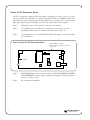
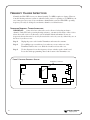
Use the diagram to locate the HD4 Jumper. This black jumper is also labeled on the
T17 circuit board.
FIGURE 4: TURNING OFF DC MICROPHONE POWER
HD4 Jumper Location
This black jumper is also labeled on the T17
circuit board
Front
8
Step 4:
Pull the HD4 Jumper off the two pins it connects. DO NOT MAKE ANY OTHER
ADJUSTMENTS! For handy storage, simply turn the jumper sideways and place it
on just one of the two pins.
Step 5:
Re-assemble the Transmitter.
Williams
Sound ®
Helping People Hear