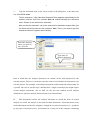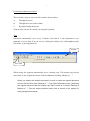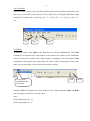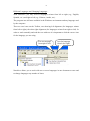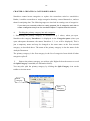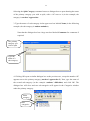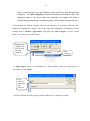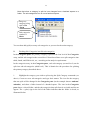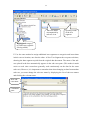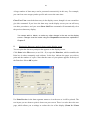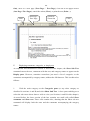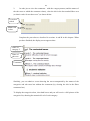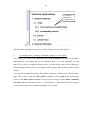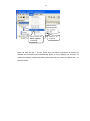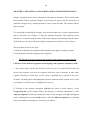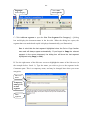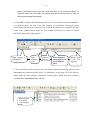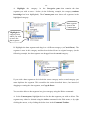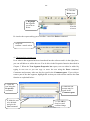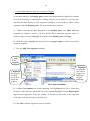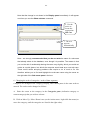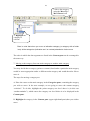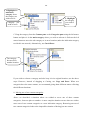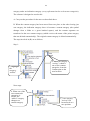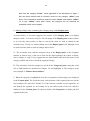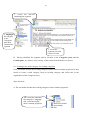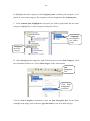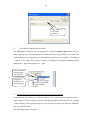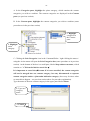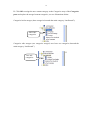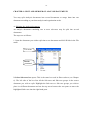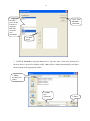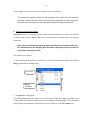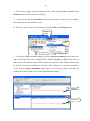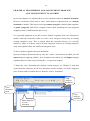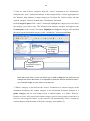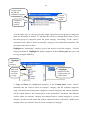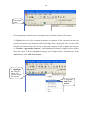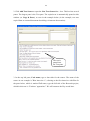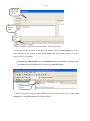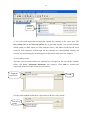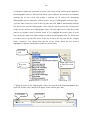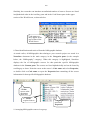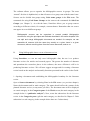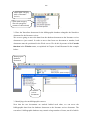
1
NARRALIZER USERS GUIDE QUALITATIVE RESEARCH DATA ANALYSIS SOFTWARE For textual analysis and the organization of bibliographic data Development of Analysis Method: Dr Asher Shkedi Software Development: Yuval Shkedi © All rights reserved to Asher Shkedi and Yuval Shkedi, Narralizer-Yozmot Yakum 1 Dear User Welcome to Narralizer 1.1, the software solution for qualitative research data analysis, textual analysis and for analyzing and organizing bibliographical data. This unique software, can answer questions relating to both textual analysis and qualitative data analysis. Narralizer is also effective in organizing bibliographic data and literature reviews. We hope these tools will help to answer most of your research needs. The program is applicable for all forms of textual and qualitative research, recognized analysis methods, and bibliographical requirements. The program is friendly and anyone familiar with the Windows work environment will use it more or less instinctively, hardly needing this guide at all. To make life easier, most menus and icons are borrowed from Windows. We are certain this program will prove a practical tool and would be glad to hear from you and offer any help we can. The User Guide has two sections. Section 1 is the largest section. It reviews the program and describes its uses for textual and qualitative data analysis. Section 2 describes the program’s value in organizing bibliographic material and using it to write a literature review. Website: www.narralizer.com Information and Sales: [email protected] 2 Contents CHAPTER 1: INTRODUCING THE SOFTWARE ……………………... 3 CHAPTER 2: CREATING A CATEGORIES ARRAY ………………….10 CHAPTER 3: ORGANIZATION OF DATA USING THE SOFTWARE ……………………………………………… 18 CHAPTER 4: ENTERING DATA IN THE CATEGORIES ARRAY……………………………………………………..27 CHAPTER 5: DISPLAYING THE PROPERTIES OF CATEGORIES AND DATA SEGMENTS …………………………………33 CHAPTER 6: PRESENTING AND PRINTING THE ANALYZED DATA ARRAY CHAPTER……………………………….38 CHAPTER 7: CREATING A CATEGORIES ARRAY FROM THE RAW DATA…………………………………………………..48 CHAPTER 8: CHANGING THE EXISTING CATEGORIES ARRAY………………………………………………………...56 CHAPTER 9: SPLIT AND MERGER OF ANALYSIS DOCUMENTS..….72 CHAPTER 10: WORKING WITH SEVERAL ANALYSIS DOCUMENTS AT ONCE …….…….………………………………………..79 CHAPTER 11: TRANSFERRING ANALYSIS SEGMENTS FROM ONE ANALYSIS DOCUMENT TO ANOTHER …………..……83 CHAPTER 12: EXPORT FROM ANALYSIS DUCOMENTS TO WORD PROCESSING SOFTWARE…………...………….87 CHAPTER 13: SEARCH………………………………………………………89 CHAPTER 14: CREATING THE RESEARCH SOURCES DATABASE…………………………………………………..92 CHAPTER 15: STORING BIBLIOGRAPHIC DATA…………………..…99 3 CHAPTER 1: INTRODUCING THE SOFTWARE The Work Screen The Work Screen has three panes. When the program is launched, three panes appear, which function as the user’s work environment. As in Windows, the user can change the size of the panes, or scroll up or down to reveal information. Henceforth, the pane on the left will be referred to as the Categories pane. This is the long pane on the left of the Work Screen. It is used for listing and changing the list of categories. Henceforth, the lower right pane will be called the Display pane. It is the largest pane in the Work Screen and displays the different phases of the analysis results. The upper right pane is the Content pane, which allows you to modify the analysis array. The upper section of the screen contains different menus: File, Edit, View, Action, Window, Help. The row beneath the menus consists of the Toolbar and icons. Pointing to an icon reveals the name of its function. The menu and Toolbar icons are activated using the mouse. Content pane העזר Menu Toolbar icons Adjustable pane borders הניתנים להזזה Categories pane הקטגוריות Display pane 4 You can enlarge or decrease the size of each pane by moving the inner border of the pane using the mouse, as shown in the above illustration. Narralizer Work Documents A. Analysis Document The analysis document is created using the Narralizer software. It stores all data analyzed according to the Analysis Categories. When you open the software, a new document labeled “Narralizer 1” will appear in the Categories pane (additional new documents will be labeled "Narralizer 2", "Narralizer 3", etc.). The name of the Analysis Document carries the same name as the first category (and may be changed at any time). You can name the first category and the Analysis Document by changing the temporary name (“Narralizer 1”). Changing the temporary name is the same as the Windows environment: 1. To rename a document, place the cursor on the temporary name of the document (Narralizer 1) or use the File menu as illustrated below: Temporary document name Rename 2. When you select Rename, the Save as dialog box will appear. In the upper section, under Save in, indicate the folder where you wish to save the Analysis Document. You can save the Analysis Document in either a new or existing folder together with other documents. 5 3. Type the document name in the lower section of the dialog box, in the inner text box labeled File name. The file extension (*.nbr) (Narralizer Research Files) appears automatically in the multiple selection inner box marked Save as located beneath the document name. Please do not alter this file extension. Note too that the extension .nbr is the extension for Narralizer analysis files (just like Word documents have the file extension .doc). There is no need to type this extension because it appears automatically. Select the directory where you wish to save your file Type name of analysis document הניתוח Bear in mind that one analysis document can contain all the data analyzed for the research project. However, researchers can also create several analysis documents for one research project. For example, each analysis document could contain the analysis data for a specific sub-case or specific topic, and therefore a single research project might require several analysis documents. (As we shall see, the user can combine several analysis documents or split one analysis document into several documents). B. Data document: besides the analysis document in which the units of textual analysis are sorted, the analysis is also based on data documents. A data document is any textual document stored in the computer. It might be a word processed text (i.e., produced by any type of word-processor), an internet text, or any text in the computer containing 6 the data we are analyzing. Analysis documents can contain texts in languages written from left to right (English, Spanish, etc.), or languages written from right to left (e.g., Hebrew and Arabic). The analysis document might contain an interview, observation, diary, or any other word-processed material that we wish to analyze. Data drawn from multiple data documents can be used as analysis material for one analysis document or in multiple analysis documents. It is entirely up to the researcher and depends on his or her research needs. 7 Performing standard procedures There are three ways to carry out all or almost all procedures: A. Through the menu B. Through the icons on the toolbar C. By right clicking the mouse Some actions can also be carried out using the keyboard. Save Narralizer automatically saves every 5 minutes. Note that it is also important to save manually every so often. You can save by clicking the toolbar icon, clicking Save on the File menu, or pressing Ctrl + S. Toolbar Save icon When saving, the program automatically saves a backup copy. The backup copy has the same name as the original document, with the additional wording "Backup of …" When you reopen the analysis document, be sure to open the original document and not the file which says “Backup of…” If you open the backup copy, it becomes the original document and the backup copy that is made of it will say "Backup of Backup of…." This can create confusion and a loss of control of the system for saving analysis documents. 8 Cut/Copy/Paste Narralizer allows you to Cut/Copy/Paste different parts of the analysis document in the same way as you with a word processor. This is achieved by clicking the Edit menu, right clicking the Toolbar icon, or pressing Ctrl + V = Paste, Ctrl + C = Copy, or Ctrl + X = Cut. Cut Copy Paste Undo/Redo To undo an action, click Undo on the Edit menu (or click the Undo icon). The Undo command is accompanied by a description of the action to be undone (in the illustration below the action to be undone is the “Add Category” command). You can also give Undo command by clicking the icon on the right side of the Toolbar. Pointing the cursor at the undo icon on the toolbar reveals which action will be undone. Using Undo command in the Edit menu Undo Redo Similarly, Redo will replace the action undone by the Undo command. Undo and Redo can only apply to the last five actions taken. Also: Undo by pressing Ctrl + Z; Redo by pressing Ctrl + Y 9 Different Languages and Changing Languages With Narralizer, you may work in languages written from left to right (e.g., English, Spanish, etc.) and right to left (e.g., Hebrew, Arabic, etc.). The program uses all fonts available in the Windows environment and any language used by the computer. There are two icons on the Toolbar, one showing left alignment (for languages written from left to right), the other right alignment (for languages written from right to left). In order to work smoothly and read the text with ease it is important to click the correct icon for the language you are using. Icon for language from right to left Icon for language from left to right . Narralizer allows you to work with two or more languages in one document at once and to change languages any number of times. 10 CHAPTER 2: CREATING A CATEGORIES ARRAY Narralizer cannot invent categories or replace the researchers mind or sensitivities. Rather, it enables researchers to assign categories that they created themselves, and use them for analyzing data. The following stages are involved in creating a set of categories: If you start your research without a ready prepared list of categories and wish to create a categories array from the raw data Chapter 7 explains how this is done. A. Dividing the primary category into sub-categories 1. Establishing the primary category: as described on p. 3 above, when you open Narralizer the category Narralizer 1 is displayed in the Categories pane (when you open subsequent documents: the names Narralizer 2, 3, etc. will be displayed). This is just a temporary name and may be changed to the same name as the first research category, as described above. The name of the primary category is also the name of the Analysis Document. The primary category is the first category in the list of categories from which all other categories split off. 2. Point to the primary category you wish to split. Right click on the mouse to reveal the Split Category command (see illustration below). You may also split the primary category by clicking the Split Category icon on the toolbar or Action menu. Main category Split Category 11 Selecting the Split Category command causes a dialogue box to open showing the name of the primary category you wish to split, with a “1” next to it (in the example, the category is teachers’ approaches. 3. Type the name of a sub-category in the upper text box labeled Name (in the following example, the sub-category is student attitudes). Note that the dialogue box has a large text box labeled Comments for comments if required. The primary category you wish to split Type the name of a sub-category 4. Clicking OK opens a similar dialogue box to the previous one, except the number “2” appears next to the primary category (teachers’ approaches 2). Now, type the name of the second sub-category (in the example: students’ difficulties) and click OK. The dialogue box will close and two sub-categories will appear in the Categories window under the primary category. Main category המרכזית Subcategories 12 Bear in mind that when you split categories, there must be at least two branched categories. The Split Categories command therefore automatically opens the dialog box twice. If you fail to create two categories, the program will create a second category and assign it a temporary name, which can be changed any time. 5. Having split the primary category into two sub-categories, we can now add more subcategories. Highlight the category you wish to split into additional sub-categories (in the example below: teachers’ approaches) and right click Add Category, use the Action menu, or click the icon on the Toolbar. Highlight the category you wish to split into subcategories Add Category 6. Add Category opens a new dialogue box. Type the name of the new sub-category in the upper text box Name: Type name of additional subcategory Click OK and the new sub-category will be added to the Categories window 13 Note that when a category is split its icon changes from a hatched square to a folder. The sub-categories icon is now a hatched square. Image for category being split: a file תיקיה Sub-categories symbol: a lattice רשת You can thus add (split) as many sub-categories as you need to the main category. B. Dividing Sub-Categories into Sub sub-categories In the Categories pane, the primary category represents the first level of the Categories array, and the sub-categories the second level. Narralizer allows us to split categories into third, fourth, and fifth levels, etc., according to the analysis requirements. In the categories array in the Categories pane, each sub-category (second level) can be split into sub-sub-categories (third level). This is identical to the procedure for splitting the primary category described above. 1. Highlight the category you wish to split using the Split Category command (see above). Create two new sub-categories and type their names. The icon for the category that was split will be changed in the Categories pane (in the example shown: students’ attitudes), and show a folder instead of a hatched square. The icon in the Categories pane shows a closed folder, and the sub-categories that split from it are inside and do not appear. The + (plus) sign to the left of the folder indicates that the folder is closed, as illustrated below: 14 The split category: sub-categories are not shown (+) 2. In order to view the sub-categories in the Categories pane, click the square with the + (plus) sign. This will reveal the sub-categories and the + sign will be replaced with a – (minus), as illustrated below. Click the + sign The sub-categories are revealed and the sign next to the folder changes to a (-) minus sign Similarly, clicking the square with the (-) minus sign hides the categories and replaces the (-) sign with a (+) sign. Another way to display the sub-categories is to point the cursor at the category whose sub-categories you wish to display, and right click the mouse to reveal a pane with the command Expand. 1. Place the cursor on the category 2 Left click on Expand 15 Left clicking Expand causes all the sub-categories relating to the category above them to appear. The same method is used to collapse the sub-categories. Place in the cursor on the category, right click the mouse to open a pane labeled Collapse. Lift click on Collapse to collapse all the sub-categories into the category above them. The categories we wish to collapse לכנס 1. Place the cursor on the category הקטגוריה 3. Left click Collapse To add new sub-categories to the category that you have split, use the Add Category function described above. Use Split Category and Add Category to split all other categories in the Categories pane. The next example shows the Categories pane after its three categories were split into three category levels: A. Primary category B. Sub-categories split from the primary category C. Sub-categories split from each of the sub-categories Level A: Primary category Level B: Subcategories Level C: Sub-subcategories 16 Use the Add Category function to add as many categories as you need on both Level B and Level C. Splitting Sub-Sub-Categories into Another Level of Categories In the same way, you can continue splitting sub-sub-categories into fourth, fifth, etc., levels of categories, depending on how much detail your research analysis requires. After splitting the categories into a fourth level, the categories will appear thus: Level A ' Level B Level C Level D Level C categories that were not split Scroll bar to display categories in the pane. Level C category that was split Note: Eventually the category list will be larger than the Categories pane. When this happens, use the horizontal and vertical scroll bars to view all categories. D. Continuing to Split Categories As mentioned earlier, the software can create as many categories as required. For example, you may split certain sub-categories as far as Level E, and leave other categories at Level C, as shown in the following illustration: 17 Level C: unsplit categories Level D: unsplit categories Level C: split category Level D: split category Level E 18 CHAPTER 3: ORGANIZATION OF DATA USING THE SOFTWARE A research project can contain a large number of data sources that are identifiable by their research objects (e.g., names of different subjects), type of data document (interview, observation, report, etc.), or time points when the data were collected (e.g., from Year 1, Year 2, etc.). Because the amount and variety of data can be so vast, it is recommended to organize the data before starting the analysis, as this significantly aids our control of the analysis and research. One of important Narralizer’s functions is to help us organize the data. Every Analysis Document allows us to categorize data according to cases, sub-cases, and sub-case groups. Case – in fact refers to all data in the study. The case is defined at the start of the research and its full or abbreviated name appears as the primary category of the research on the Analysis Document, as defined above (however, the researcher can decide that a particular research project comprises multiple cases, in which case the name of each project will appear on a separate Analysis Document). Sub-case – refers to the division into data units. For example, if the data are divided into subjects, each subject represents a sub-case. Another example is if the research is spread over several years and has multiple subjects. In this case, each sub-case might relate to the data for a particular subject for a particular year so that each subject in a time unit of one year represents one sub-case (Jacob Year 1, Jacob Year 2; Isaac Year 1, etc.). Sub-case group – this refers to a group of several sub-cases. For example, all sub-cases for one subject are grouped as a group of sub-cases (Jacob, Isaac, etc.). 1. Entering names of sub-cases in the Analysis Document In the previous chapter, we described how to enter the name of the case (or primary category) in the Analysis Document. We will now describe how to enter the names of the sub-cases. The following steps are taken: 19 A. Open File menu and click on Sub- cases. File Sub cases... B. A box opens. In the upper window of the box, type the sub-case name (Sharon 1 in the example below, in other words, the data for the subject Sharon, in Year 1 of the study). Enter subcase name C. Click Add to add a sub-case to the Sub-case list in the Analysis Document in the large pane of the box. Enter the remaining sub-cases and the following will appear: Add List of Subcases Delete Exit 20 To delete one or more of the sub-cases, place the cursor on the name in the list that you wish to delete (in the large pane of the dialog box) and highlight the name. Click the Delete button in the upper right section of the box to delete the name from the list. D. When we have finished transferring all the names to the list of names in the large pane of the dialog box, click on Exit (far right at bottom of dialog box) to conclude the action. E. When the Exit command is given, the names of the sub-cases will appear in the Sub-cases pane on the bottom left of the Work Screen under the Toolbar icons Sub-cases pane To view the list of sub-cases, click the arrow on the right side of the Sub-cases pane. A pane opens displaying the names of all the sub-cases. Scroll up and down to view names on list. Click arrow to view Subcase list Sub-case list Scroll bar to view list of names 21 Note: Even though the data are divided into sub-cases before commencing the analysis, it is possible at any stage in the research to add or delete sub-cases and rename existing sub-cases. Combining sub-cases into a sub-cases group Some research may only involve one sub-case; others may involve dozens or hundreds of sub-cases. The more sub-cases there are, the greater the need to combine several subcases in one group. Creating a group of sub-cases still means that each of the sub-cases in the group will exist independently. The following sections explain how to create sub-case groups. A. Click on Sub-cases groups in the File menu to open a box with four panes. The lower pane, called Non-group members, lists all sub-cases in the Analysis Document. List of all subcases in the document שבמסמך B. From the list of sub-cases, identify the sub-cases you wish to place in a group and type the name of the group in the upper pane of the box (in our case, the name of the group is Sharon). 1. Type the name of the group 2. Add 22 Click the Add button to add the new name to the list of groups as shown in the example below. C. Add names of groups as required (in the example below, we have added the group “Miriam” to “Sharon” which already existed in the list of groups.) Enter name of new group The existing list of group names D. In the Groups pane, highlight the name of the group in which you wish to insert subcases (in our example, we have highlighted Sharon). In the Non-group members pane we have highlighted the sub-cases we wish to combine as a group (in the example: Sharon 1, 2, 3, 4). 1. Highlight name of group 3. Click Add command to create the group 2. Highlight the sub-cases to place in the group 23 The Add command forms the group and transfers the names of the sub-cases in the group to the Group members pane as shown in the following illustration. Group name Sub-cases in the group Sub-cases not in the group Note: A sub-case can be in several groups at once depending on research requirements. For example, Sharon 1 can be in the group with the other Sharon sub-cases; it can also be in the group labeled First year, containing the subcases for the other subjects (Miriam, Jacob, etc.) in the research for Year 1. Whenever a new group is created using the above steps, all sub-cases in the document are restored to the Non-group members pane. Add the name of the new group to the list of groups in the second pane 3. Click the Add command to create the group 2. Highlight sub-cases belonging to the group 24 Note: When you begin this action, the full list of sub-cases is restored to the Non group members pane. You may thus create as many groups as needed for the research. In order to display the list of Sub-case groups in the Analysis Document on the Work Screen, click the arrow on the right of the Sub-case groups pane. A new pane will open listing all the sub-case groups. Use the scroll bar to view all names on the list. Name of Sub-case group Renaming Sub-cases The following describes how to rename a sub-case. A. Highlight the primary category in the Categories pane, click on Rename sub-cases in the File menu. Alternatively place the cursor on the primary category in the Categories pane. 1. Highlight the primary category 2. Rename Sub Cases 25 B. Clicking the Rename sub-cases command opens a dialog box with this name. Find the name of the sub-case (Sharon 1 in the example below) you wish to rename using the arrow in the upper pane. Write the new name of the sub-case in the bottom pane (Teacher 1 in the example below) C. Click OK to replace old name with new. 3 .OK Find the name of the target sub-case 2. Write a new name to the subcase If the sub-case you rename appears in several Analysis Documents, be sure to rename them in all the Analysis Documents. Merging Sub-cases In the course of your research, you may wish to add two or more sub-cases to a single sub-case that will bear the name of one of them (in other words, you are adding one subcase to another). The principle underlying this action is similar to renaming a sub-case (see section above). The action involves the following steps: A. Use the Rename sub-cases command as described in the last section. B. Find the name of the sub-case you wish to rename using the arrow in the upper pane of the Rename sub-cases dialog box C. Use the arrow in the bottom pane of the Rename sub-cases dialog box to locate the name of the sub-case you wish to merge with a different sub-case whose name it will take. D. Click OK to merge the sub-cases under the name you wish. 26 3. OK 1. Locate name to be changed 2. Locate name to be retained Note that if you work with several Analysis Documents in a single research project, renaming a sub-case or sub-case group only applies to the document to which the action relates. The action must therefore be applied to the remaining Analysis Documents of the research. 27 CHAPTER 4: ENTERING DATA IN THE CATEGORIES ARRAY As noted earlier, the analysis involves two types of documents: the Analysis Document, which is directly produced by the Narralizer software, and data documents, which are documents outside the analysis document. During our analysis, we import texts into the software from the data documents. As noted earlier, Narralizer is the same as any other qualitative and textual research software in that it does not analyze the data for us, but helps us with our analysis. The following section explains the data entry process. 1. Copying data from a data document To analyze the data, we must open both the data document we wish to analyze and the analysis document in which we set up the category array (see explanation in earlier chapters). The analysis procedure is as follows: A. We examine the data text in the data document (which is outside Narralizer) and the category array we set up the analysis document (see Chapter 2) and look for segments of text that match the categories in the Categories pane. Categories array Text segment for analysis 28 B. Find a text segment that relates to the existing categories. The following example shows a Word document with an interview text. The interview contains a section, which is relevant to the category distance from students of the categories array. We highlight the segment in the data document and give the Copy command. Give Copy command 1. Highlight relevant text 2. Inserting Segment in Data Document A. After copying the data item, we turn to the analysis document. Position the cursor on the category relating to the data item (in our example, the category is distance from students) and highlight the category. Right click on the selected category (see illustration below), or use the Action menu, to open the pane containing the Add Text Segment command. 29 1. Highlight the category where you wish to paste the segment הקטע Position cursor on the Add Text Segment command Segment command Add Text Segment B. Click Add Text Segment to open the dialog box. The box will automatically display the text copied from the data document. Name of category to which text segment is assigned Text segment automatically transferred from data document There is a quicker method for opening the box, using the Add Text Segment icon on the Toolbar. 30 C. All data segments must be assigned to a predefined sub-case. The top pane of the box is the sub-cases pane. Click the right arrow of the sub-cases pane to display the complete list of sub-cases. Left click on the name of the relevant sub-case and release in order to place the name in the pane. Click OK to close the box and place the text in the appropriate location. 3. OK Sub-case pane 2. Highlight relevant sub-case 1. Click arrow to reveal list of sub-cases D. Click OK to add data segment to Narralizer’s data pool. When you have added the data segment to the data pool, the name of the sub-case will be shown in the Content pane (the long pane at the top of the Work Screen) under the Subcase column (in our example – Sharon 1). A green hatched square will appear next to the name of the sub-case. This is the text segment icon. The initial words of the data segment can be seen in the text column in the Content pane, allowing us to identify the segment. 31 Sub-case name accompanied by sub-case icon Opening words of the text segment Highlighted category (to which text segment is being added) E. Use the same method to assign additional text segments to categories and insert them in their correct location, one after the other. A New Text Segment box reopens each time, showing the data segment copied from the original data document. The name of the subcase placed in the box automatically appears in the sub-cases pane. (This makes it much easier to work since researchers generally work continuously on the data for the same sub-case). However, it is important to remember that when changing to data from another sub-case, you must change the sub-case name by displaying the list of sub-case names and clicking the relevant name. New subcase name Comments pane 32 All New Text Segment boxes have a Comments pane to record comments regarding the data text: memos, segment abstract, researcher’s notes. F. Click OK to assign the segment to the relevant location in the analysis software. The icon indicating a new segment will appear in the Content pane, displaying the new segment name (in this case, Rachel 1). Name of new subcase Initial words of new text segment הנתונים החדש Note: A text segment (or part of one) can be assigned to several categories at once (according to the researcher’s requirements). In this case, the researcher must perform the same Add text segment action for each segment individually. Similar to the procedure described above, the researcher assigns all of the segments to the categories and sub-cases appropriate to them. Note: There are two types of categories: categories with a folder icon from which other branch off. These categories are called “Prime categories”. The second type of category is denoted by a hatched green square. These are categories that cannot be split, and are called “Content categories”; only they can hold data segments. If we try to insert data segments into a prime category, the program will prevent it. 33 CHAPTER 5: DISPLAYING THE PROPERTIES OF CATEGORIES AND DATA SEGMENTS A. Displaying Text Segment Properties Researchers often want to reread the data for a particular text segment, without having to read all or part of the data array. The Properties function enables us to do this. A. Highlight the data segment icon in the Content pane. B. Click the Properties command in the Edit menu or right click the mouse. Another alternative is to double-click the data segment icon in the Content pane 1. Click icon 2. Click Properties Properties C. The Text Segment Properties box will open allowing you to change text, delete (or add words) and write notes in the Comments pane. Clicking OK will close the box, saving all your changes. 34 Write comments Revise text Name of category to which text segment belongs Note: The title of the category to which the data segment belongs is shown at the bottom of each Text Segment Properties box. B. Displaying Category Properties In the section above, we described the text segments properties. The software can also apply the Properties action to categories. The steps are: 1. Position the cursor on the category whose properties you wish to display and give the Properties command via the File menu or by right-clicking the mouse. 35 1. Highlight category 2. Give Properties command 2. A two “page” Category Properties box opens (box with two tabs). The top “page” (tab) is General. The name of the category whose properties you wish to display is shown in the narrow, top pane of the box (in the next example: enjoy). You may rename the category in the window, and when you close the box, the new name will appear in the categories pane (this is another way to rename categories besides the Rename function described in Chapter 2). At the bottom of the box, the name of the primary category containing this category is displayed under the heading Containing category (in the example below: student attitudes). The large pane in the box is the Comments pane. Researchers can use the Comments pane to write notes and memos about the category. "Page" 1: General Place to write notes concerning the category comments לקטגוריה Page" 2: Content Category name Primary Category name העל 36 3. Click on the Content tab to open the second “page”. This page contains information about the sub-categories of the category we are examining. At the bottom of the box, under the title Total sub-categories, appears the total number of sub-categories for the displayed category. The example shows two sub-categories (this information is very helpful if a category has multiple sub-categories). You may easily return to the previous page / tab by clicking the General tab or by closing the box by clicking OK. Click Content Sub-categories of the category examined Total number of sub-categories The example above shows the properties of the indication category (a category that does not contain data segments, but sub-categories). The Properties action can also be executed for a content category. In this case, the segment icons are shown in the Content “page”, and each item is accompanied by comments (if comments were made) and the opening words of the data segment. The total number of segments is displayed in the lower section of the box under the title Total segments. 37 Data segment icons הנתונים Number of data segments 38 CHAPTER 6: PRESENTING AND PRINTING THE ANALYZED DATA ARRAY A. Presenting the complete data array At any stage in the analysis, you may view the analysis products, which have been sorted into categories and show to the sub-cases to which they belong. The following describes the method for displaying data segments: 1. Point the cursor at the primary category to highlight it. Right click or use the File menu or icon on the icon toolbar to highlight the Show sub tree command. 2. 1. Highlight the category 2. Highlight the Show sub tree command 2. Click on the icon or on the Show sub tree command to open the Select Sub-cases box. A list of all sub-cases relating to the analysis document is displayed on the left, and above it, a list of all the sub-case groups in the analysis document. To view the complete analysis array for all categories, click Select all. Note that the lower section of the box contains two small windows – Show comments and Show text – both of which are ticked. Leave the boxes ticked for now. These commands will be explained later. 39 Select all List of sub cases groups List of sub-cases 3. Click Select to display all of the text segments according to their categories and subcases. The categories displayed are numbered with numerals and letters to help differentiate between categories and sub-categories. The name of the category and subcase to which the segment belongs is displayed above each text segment. Adjust the display pane using the scroll bar. 40 Primary category Content subcategory Text segments The Display pane is the largest pane of the work screen. Above the display pane is the Content pane and to the left, the Categories pane. The Display pane may be enlarged or reduced as required by moving its borders at the expense of the other two panes. B. Selective display of data array according to sub-cases To display the data array for just one or more sub-case, open the Select Sub-Cases Box as described above. In the left hand pane in the box, highlight the sub-case using the mouse. 1. Highlight the sub-case 41 Click the top arrow in the middle of the box to transfer the name of the sub-case to the right hand pane. To display more than one sub-case, highlight any additional names and transfer them using the top arrow in the middle of the box. Click on Use selected command to display all data segments of the sub-case highlighted in the Display pane. 3. Use selected 2. Click arrow The selected sub-cases To display the full list of sub-cases for a particular sub-case group, highlight the sub-case group in the top pane of the box (in the example below: Rachel). All sub-cases in the lower pane will be highlighted automatically (in the example above: Rachel 1; Rachel 2). Then proceed with the same commands as above. You can of course highlight as many groups at once as you wish. 42 Highlight subcases group Sub-cases for that group are highlighted automatically C. Selective presentation of data array according to category In order to obtain a data array for certain categories but not others, mark the categories which interest you, and use the Show sub tree function described above. When the box opens, click Select all to obtain a selective data array. Clicking an indication category (folder icon) will summon all data contained in the categories below it, as shown in the example below: 2. Give command: Show sub tree Part of the data analysis display 1. Mark category 43 A large number of data arrays can be presented consecutively in this way. For example, you can focus on a category and a specific sub-case at the same time. Clear Text View cancels the data array in the display screen, though it is not essential to give this command. If you leave the data array on the display screen you can still carry out other procedures, and your next Show Sub Tree command will automatically clear the previous data array display. You cannot add to, delete, or make any other change in the text on the display screen. Changes must be made using the Properties command as explained in Chapter 5. D. Printing the data array analysis shown on the display screen You can print the data array analysis that appears on the display screen. Click Print in the File menu (or use Ctrl + P) to open the Print box, which resembles the Print box in other commonly used software. In the box, indicate the pages you wish to print and the number of copies. Note that the name of your printer appears at the top of the Print box. Select OK to print. Use Print Preview in the data segments menu to view the text as it will be printed. The text layout you are about to print is shown on your screen. There is a ruler above the text page, which allows you to enlarge or reduce the size of the display (Zoom In / Zoom 44 Out), move to a new page (Next Page / Prev Page), view one or two pages at once (One Page / Two Pages), cancel the action (Close), or print the text (Print…). Next Page / Print Prev Page Zoom In / Zoom Out Close ה הפעו לה E. Displaying comments, categories, or simply text As explained and illustrated in sections A and B of this chapter, the Show Sub Tree command causes the text, comments with the text, and category names to appear on the Display pane. However, sometime researchers just need a list of categories or the comments accompanied by category names, without the full data text. This is achieved as follows: 1. Click the main category on the Categories pane (or any other category as described in sections A and B) and select Show Sub Tree. A box opens enabling us to select the sub-cases whose data we wish to view (see Sections A and B in this chapter). As noted before, the lower section of the box contains two small cells called Show comments and Show text. These cells contain ticks, denoting that the Show sub tree command will display both the texts and the comments accompanying the category names. 45 2. In order just to view the comments with the category names (and the names of the sub-cases to which the comment relates), clear the tick in the box marked Show text (so that it reads “do not show text”) as shown below: Leave box ticked Clear tick in box Complete the procedure as described in sections A and B in this chapter. When you have finished, the display screen appears thus: Name of category 1 Name of sub-case Comments Similarly, you can obtain a screen showing the text accompanied by the names of the categories and sub-cases but without the comments (by clearing the tick in the Show comments box) To display the categories alone, clear both boxes and you will receive a full picture of the categories list, showing the numerical level of each category. 46 Categories shown on Display Pane When the data is displayed on screen, it can be printed (see section C above). F. A “standing order” to display comments, categories, or text alone The changes you make to the Show text and Show comments functions in the Select sub-cases box (by deleting the tick as explained above), are only applicable for one action. If you wish to change the display again, you must reselect your choice (otherwise the full display showing text, and comments with category and sub-cases names will be shown). You can also permanently deselect either Show comments or Show text or deselect them both. This is done using the Show option command in the Action menu. Resting the cursor on the Show option command will open a new screen in which Show comments and Show text are both marked with a . Deleting the from either of the two options or from both will provide a permanent display of your choice. 47 Place cursor on Show options command command Delete as required Note: as long as the for the Show text and Show comments is present or deleted, the command will automatically apply to every display you request. To restore the default, repeat the above steps and use the cursor to restore the to the two boxes. 48 CHAPTER 7: CREATING A CATEGORIES ARRAY FROM THE RAW DATA Chapter 2 explains how to insert categories in the analysis document. This is useful when the researcher lacks a particular category array or does not wish to base the research on a particular category array, wishing instead to create it from the data. The software allows this to be done. You can begin developing the category array from the data once you have organized the data in Sub-cases (see Chapter 3). Open an analysis document. The temporary name Narralizer 1 is replaced with the name of the main category of the analysis and the names of the Sub-cases are entered into the analysis document (see Chapters 2 and 3 above). This procedure involves two steps: I. Division of the data into segments and assigning each segment a temporary name. II. Organization of the data segments into categories. I Dividing the data into segments and assigning each segment a temporary name I. Division of the data into segments and assigning each segment a temporary name A. The analysis begins with the data document. The first step is to read the data document and divide it into segments. Next look for segments, which form units of meaning, in other words segments discussing a certain topic. Use the cursor to highlight these segments in the source document. The background of the highlighted segment is darkened and the segment can be copied (see Chapter 4 for details of how to highlight and copy text). B. Turning to the analysis document, highlight the name of main category in the Categories pane (in the example below, the category is “teachers conceptions”). Click Add text segment. Do this by placing the cursor on the category and right-clicking the mouse. Alternatively, use the Action menu, or click the Add text segment icon (pointing to the icon displays a description of its action, see below). 49 Highlight main category Click Add text segment C. Click Add text segment to open the New Text Segment For Category […] dialog box and display the document name in the box title. When the dialog box opens, the segment that was marked and copied is displayed automatically (see illustration). Bear in mind that the last segment highlighted when the Cut or Copy function was used will always appear automatically. If you forget to Copy the relevant segment in the source document, the dialog box will show the last segment highlighted using Copy (or Cut). D. Use the right arrow of the Sub-case screen to highlight the name of the Sub-case (in the example below: Jacob 1). Type the name you wish to give to the segment in the Comments pane. This is a temporary name, and may be changed later when you create categories. Sub-case name Temporary name given to data segment שניתן לקטע הנתונים Data segment הנתונים 50 Bear in mind that we can type more than one name in the Comments pane if a segment deals with more than one subject and add comments that can help us identify and analyze the segment. E. Click OK to transfer the information in the box to the Narralizer document database. As explained earlier, the icon of the data segment you introduced will appear on the screen along with the name of the sub-case to which the segment was assigned. The first words of the segment appear under the Text column, allowing the researcher to check that he has inserted the right segment. Main category is highlighted Data segment icon Name of Sub-case The temporary name appears in the Comment Pane Initial words of the Text segment F. The researcher can now examine all of the data documents, identifying segments and undertaking the actions described above. As mentioned, at this stage, all of the data are shown under the same category, namely the main category. When more data segments are added the Content pane looks like this: Data segment icon in the Content pane העזר 51 II Organizing data segments into categories After analyzing large quantities of data, the researcher will have hundreds, if not thousands of data segments, each described by a temporary name. The research can now proceed to the stage of creating categories from the data segments (there is no need to analyze all the data in this way, just as much as the researcher believes will represent the overall picture). Categorization involves two processes: (1) dividing the data into segments, and (2) assigning segments to categories or groups, albeit not in the same order of appearance in the source documents. So far, the procedure for creating categories out of the raw data has only involved dividing the data into separate segments bearing a temporary name. We will now learn how the software creates categories. A. Review the temporary name of the segments in the Comments column of the Contents pane using the scroll bar to see all the segment names. Segment Names Note that you can read the entire segment if required (and not just the segment name) by following the instructions above. 1. To read all the segments and their names, use the Show sub tree command described earlier in Chapter 6. 2. To only read some segments, for example, segments whose names do not describe their content clearly enough), click Properties (see Chapter 5 above), which opens the Text Segment Properties box you will find the entire segment. You can also print the segments that appear in the Display pane (see Chapter 6) 52 To make it easier to sort segments into main categories (families) and name all the main categories, simply display the comments (see instructions in Chapter 6 above) and review the list of temporary segment names. The is useful as it facilitates the review process, while allowing you to return to the more detailed display whenever you like to read the relevant segments. Of course, you can also print a list of temporary segment names (list of comments) using the File menu command. B. In order to create a categories array, the segments must be divided into families. You do this by identifying a common subject shared by several different segments. Each family represents a category. You can create several categories in this way and assign segments to them (you can create as many categories as needed). In the following example, we took a small section of the list of data segment names in the Content pane and found that it can be sorted into two families (or as they are called in the analysis process: “categories”). Category 1: Contextual issues Category 2: Students’ attitudes The list of segments to be sorted can contain dozens or hundreds of names. C. All the data segments are stored in the main category of the Analysis Document. This category must now be split into sub-categories, that is the “families” discussed above. To save the initial list of data segments (in case they are needed in future, and to speed up the analysis procedure in the research database), we suggest using the Save as function (see Chapter 1). In order to change the name of the Analysis document, we need to change the name of the main category (even a minor change, such as adding a word, number, or data will suffice). The “old” document is saved under its original name. 53 In the example below, we have called the new document "Teachers conceptions B", which is of course the name of the main category containing the data segments we assigned to the category. We will now split the main category using the Split Category command (see Chapter 2). This command opens two boxes in which you type the names of the two sub-categories. Similarly, we can add as many sub-categories as we like using the Add category (see Chapter 2). The following screen is then displayed: The subcategories we created The temporary category containing the data segments segments Data segments appear in the Content pane when the name of the temporary category is highlighted. Note that in addition to the two sub-categories we created, a new category was also created (in the example above: Temporary teachers’ conceptions B). This category stores all of the data segments. It is a temporary category, which will be deleted after the researcher has moved the data segments into the appropriate sub-categories (see below). D. Once you have create the Categories array in the Categories pane, you may then place the data segments in the appropriate category. When the cursor is pointed at the Temporary category (in the following illustration Temporary teachers’ conceptions B), the data segments and their temporary names will be displayed in the Content pane. You may now take each segment and place it in the appropriate category. There are two ways to do this: by dragging and by Cut & Paste. To drag the data segment to the appropriate category: Highlight the data segment in the Content pane (in the next example: “Students’ difficulties in light of school messages”) and drag it using the cursor into the subcategory where you wish to assign it (in our example: Contextual issues). 2. Drag data segment over to appropriate category 54 1. Highlight data segment When we highlight the category to which the data segment was assigned, the Content pane will display the segment belonging to that category, as shown in the following illustration: 1. Highlighted category 2. Data segment displayed in Content pane Thus, we can transfer the data segments to their appropriate categories, until the Temporary category is empty and can be deleted by placing the cursor on it and pressing Delete. This is how the screen appears at the end of the procedure (the temporary category has been deleted) The two categories containing the data segments The Content pane displays the icons of the segments stored in the highlighted category 55 Researchers sometimes find it hard to decide where to place certain data segments. This decision can certainly be postponed, and the data segments left in the temporary category without deleting this category. This procedure can also be carried out using the Cut & Paste function. It is better to use Cut & Paste rather than dragging if we wish to assign a segment to more than one category. We can also transfer the data segments using the Copy function, though this is not advisable. Although the Copy function allows us to place the data segment in the target category, it also leaves it in the original category (in our case, the temporary category). Removing the segment from the source category gives us control of the segments that we already removed and guarantees that we will not transfer the same segment several times. It is important to remember that segments are not automatically transferred from their temporary names to the categories system in the Categories pane (as one might perhaps expect), but must be transferred manually, one segment at a time. The program was deliberately planned in this way. The segment’s initial names and even their size are only temporary and must be reassessed by the researcher. When deploying segments to the categories array, it is important to reconsider the category to which each segment was assigned and decide whether to assign some segments to more than one category. In the example above, we saw how to create two sub-categories. We can create as many categories as we like in the same way, using the Add category function. As in the above example, we can assess the segments assigned to a given sub-category and divide the sub-category into further sub-sub-categories where we can place the relevant data segments. See next chapter for explanation. 56 CHAPTER 8: CHANGING THE EXISTING CATEGORIES ARRAY In the previous chapters, we described how to create a categories array, analyze data into categories, and assign data segments to these categories. Analysis, however, is a fairly complex process involving several stages, each of which changes the existing categories array and the location of its constituent data. Sometimes, when assigning segments to their categories or after this process is complete, we need to change the categories array so that the data are stored in situ, without requiring us to return to the sources documents to reanalyze them. These changes can be made in several ways. This chapter explains the functions that allow researchers to constantly rebuild their analysis array. 1. Splitting categories containing data segments Chapter 2, which deals with creating a categories array, explained how to split a category using the Split Category and Add Category commands. This method is used to split categories containing no data. Chapter 7, which discusses the creation of a categories array from raw data, explained how to split a main category containing data segments, which is part of the process of constructing a categories array. Sometimes, however, we may wish to split categories in the categories array, which already contain data segments. This is the same as the procedure in Chapter 7, though this time the categories array already exists. As we saw in Chapter 7, the software creates a temporary category into which data segments are inserted before being assigned to new categories, which are created as follows: A. Highlight the category in the Categories pane that you wish to split (in the example: “distance from students”) and split the category using the Split Category command (see Chapter 2). 57 The category you wish to split B. As we saw in Chapter 2, a box opens for you to type the name of the first category (in the example: “formal relationship”). This is followed by a second box where you type the name of the second category (in the example: “separation”). After clicking OK for the second category, the divided category becomes a prime category containing three subcategories, one of which is named after the original category and has the title “temporary” (in the example: “Temporary distance from students”). At this stage, all of the data segments are contained in the temporary category and the two new categories contain no data segments. Category that was split and became an indication category Temporary category containing data segments The two new categories 2. Changing an existing category name At the analysis stage, the researcher may decide that a category name does not reflect its content and wants to change the name without changing the segments inside. This is achieved as follows: A. In the Categories pane, highlight the name of the category you wish to change, then use the File menu or right click the mouse to mark select the Rename command. 58 1. Highlight the category 2. Select Rename B. When you select Rename, a rectangle appears around the category title where you should type the new name. Type the new name of the category To change the name of the main category in the categories array, use the Rename function. This time, a box opens where you should type the name of the main category, which is also the document name, and assign it to the appropriate directory (see Chapter 1). 3. To Delete or Move a Data Segment from one Category to Another A researcher can sometimes find that a data segment belonging to a particular category is in the wrong place, or that it is redundant, or was placed in the wrong category, or should be in two categories and not one. These corrections can be carried out without the need to copy the written text. You simply move the data segment icon from one category to another as explained below: 59 A. Highlight the category in the Categories pane that contains the data segment you wish to move / delete (in the following example, the category students knowledge has been highlighted). The Content pane now shows all segments in the highlighted category. Data segment icons in the Content pane Highlight the category from where you wish to move the data segment B. Highlight the data segment and drag it to a different category (or Cut & Paste). The segment is now in this category and has been deleted from its original category (in the following example, the data segment was dragged into the sacred category. If you wish a data segment to be in both the source category and a second category you must duplicate the segment. This resembles the action described above, but instead of dragging or cutting the data segment, we Copy & Paste. You can also delete a data segment in a given category using the Delete command: A. In the Content pane, highlight the icon for the data segment you wish to delete. The segment may either be deleted using the delete command in the Edit menu, or by right clicking the mouse, or by clicking the delete icon in the Command Toolbar. 60 2. Click the Delete icon Delete 1. Highlight the segment you wish to delete B. An alert box opens asking you to confirm / cancel the Delete command. Alert box: confirm / cancel action 4. Changing data segment text Even when a data segment has been introduced into the software and is in the right place, you can still delete or add to the text. You do this via the Properties function described in Chapter 5. When the Text Segment Properties box opens, text can either be added by typing in new text or you can copy or move the text using the Paste command. Comments and memory aids can also be typed in the Comments pane. If you wish to remove part of the data segment, highlight the section you wish to delete and use the Cut function as explained below: 1. Open the box using the Properties command 2. Mark the text to be deleted and give the Cut command Comments and memos may be typed in the Comments pane 3. Click OK to close box and confirm change 61 5. Copying data segments from one category to another As its name indicates, the Display pane is where the analyzed data is displayed. It cannot be used for analyzing or changing the existing categories array. However, you can copy data from the data display to other categories (though it is not possible to add or delete segments inside the Display pane). The steps for this are as follows: A. When reviewing the data displayed in the Display pane (see Show sub tree command in Chapter 6 above), you may decide that a particular segment relates to another category as well. Highlight the segment in the Display pane and Copy. B. With the cursor, highlight the category in the Categories pane to which you wish to assign the segment. C. Give the Add Text Segment command 3. Add Text Segment 2. Highlight the category to which you wish to assign the segment 1. Highlight the segment you wish to assign to an additional category and Copy D. A New Text Segment box opens containing your highlighted text. Now, ensure that the name of the Sub-case shown the top of the segment highlighted in the Display pane appears in the right place in the box window. To do this, use the arrow on the right side of the pane to locate the name of the Sub-case. E. Click OK to add the segment to its new location. 62 Note that the change is not shown in the Display pane immediately. It will appear next time you use the Show sub tree command. 2. Use the arrow to locate the appropriate Sub case 1. The text appears automatically Note – we strongly recommended that you do not write the name of a sub-case that already exists in the database, even though it is possible. The reason is that you run the risk of accidentally altering the name very slightly, which you would not notice at a quick glance, but which the computer would treat as a new sub-case. These errors cause annoying problems that require a lot of work to fix. We therefore advise you to find and highlight the sub-case name using the arrow on the right side of the Sub-cases pane in the box. 6. Changing the order of categories / order of data segments Categories are arranged in the Category, Display, and Content panes in the same order as entered. The order can be changed as follows: A. Point the cursor at the category in the Categories pane (indication category or content category) that you wish to relocate. B. Click on Move Up / Move Down icons (or the Action menu / right click the mouse) to move the category, until the categories are listed in the right order). 63 2. Move the category using the Move Up / Move Down icons 1. Highlight the category to relocate Bear in mind that when you move a indication category (a category with a folder icon) all the categories (indication and / or content) attached to it also move. The order in which the data segments are listed in the Content pane can be rearranged in the same way. 7. Moving a sub-category from one main category to another main category You may decide that a category (prime or content) listed under a particular main category would be more appropriate under a different main category and would therefore like to move it. The steps for moving a category are: A. Place the cursor on the main category in the Categories pane, containing the category you wish to move. In the next example, we are going to move the content category “criticism”. To do this, highlight the prime category one level above it (in this case “student attitudes”), which causes the category one level below it to be displayed in the Content pane. B. Highlight the category in the Content pane (upper right hand pane) that you wish to move. 64 1. Highlight the indication category above the category we wish to move Category you wish to move 2. Highlight the category you wish to move C. Drag the category from the Content pane to the Categories pane using the left mouse button and place it in the main category where you wish to relocate it. Release the left mouse button to move the sub-category to its new location (under the indication category to which it was moved). Alternatively, use Cut & Paste. The category has moved to another location If you wish to relocate a category and also keep it in its original location, use the above steps. However, instead of dragging or Cutting, use Copy and Paste. When two categories have the same content, we recommend giving them different names reflecting their different locations. 8. Moving one of two content categories Above we described a situation where we wished to move one of three content categories, from one place to another. A more complex situation occurs when we wish to move one of two content categories to a new indication category. Removing one out of two content categories leads to the impossible situation of having just one content 65 category under an indication category (every split must involve at least two categories). The software is designed to resolve this. A. Carry out the procedure for the move as described above. B. When the content category has been moved from one place to the other leaving just one category, the indication category above it becomes a content category (the symbol changes from a folder to a green hatched square), and the content segments are transferred to the new content category (which receives the name of the prime category that was deleted automatically). The original content category is deleted automatically. The steps involved in (B) are as follows. Step 1: 1. Highlight the category: “milieu” 2. Move the category “society”, which is one of two content categories, from the Content pane to the new location. Next stage: 4. When one of the two content subcategories is moved, the “milieu” category changes to a content category 3. The category "society" has been moved to a new position 66 Note how the category “home”, which appeared in the description of stage 1, has now been deleted and its contents moved to the category “milieu” (see later). If the researcher decides to keep the name “home” and replace “milieu” (or to give “milieu” some other name), the category can be renamed as explained earlier in this chapter. 9. Making changes after examining the Category array in the Display pane As noted before, as its name suggests, the purpose of the Display pane is to display analysis results – it is not for analysis. The advantage of the Display pane is that it allows us to view the entire picture so that we can decide what we wish to change in the Analysis array. Clearly, we cannot change text in the Display pane itself, although it can be used to decide what we want to change and to find it. A. The researcher may read the categories array in the Display pane on the computer monitor or print a copy of the text to look for the data segment(s) he wishes to delete, move, change, or copy. Every segment has an identification label with the name of the category and the sub-case to which the segment belongs. B. The researcher seeks the category he needs in the Categories pane (using the scroll bar or Find function as described in Chapter 13) and highlights it. The category in the next example is “distance from students”. C. When the category is highlighted, all icons for segments in that category are displayed in the Content pane. The researcher may seek the name of the required sub-case (in the next example, the sub-case is Rachel 2). If the sub-case contains several segments, we can identify the segment we are looking for by the initial words of the text, which is displayed in the Content pane (if required, double click Properties, to display the full segment in the box). 67 3. Locate the sub-case containing the segment 2. Highlight the category in the Categories pane that contains the segment 1. Locate the segment you wish to move or edit D. Having identified the segment and its location in the Categories pane and the Content pane, we can now carry out any of the actions described above or below. 10. Creating a new main category for existing categories If the researcher decides that existing categories share certain common properties he may decide to create a main category from an existing category and reflect this in the organization of the Categories array. Steps involved: A. The researcher decides that existing categories share common properties The researcher finds that the categories “language” and “prior knowledge” share common properties 68 B. Highlight the main category in the Categories pane containing the categories to be placed in a new main category. The categories are now displayed in the Content pane. C. In the Content pane, highlight the categories you wish to group under the new main category. Highlight two or more categories using the Ctrl key. 2. Highlight the categories you wish to group together 1.Highlight the main category D. After highlighting the categories, right click the mouse to select Join Category / click the Command Toolbar icon / select Join Category in the Action menu. Join Categories icon Click Join Categories command Click the Join Categories command to open the Join Categories box. In the Name rectangle in the upper pane of the box, type the name of your new main category. 69 Type name of new main category E. Click OK to complete the procedure. The highlighted categories are now grouped in a single Categories pane under the new main category. The content categories are under the prime category that you created. The content categories are under the new main category and may be revealed by clicking the + square at the right of the prime category or clicking the Expand command (which changes the + sign in the square to a – sign). The new main category that was created Categories under the new main category 11. Combining several content categories into one content category Sometimes the researcher may wish to combine one or more content categories into a single category. The procedure for this is principally similar to the procedure for creating a main category from existing categories (see previous section), but with one difference that is explained below. The following steps are required: 70 A. In the Categories pane, highlight the prime category, which contains the content categories you wish to combine. The content categories are displayed in the Content pane (see previous section). B. In the Content pane, highlight the content categories you wish to combine (same procedure as in the previous section) 2. Highlight categories in the Content pane 1. Highlight main category C. Clicking the Join Categories icon in the Command Ruler / right clicking the mouse / using the Action menu will open the Join Categories box (same procedure as in previous section). At the bottom of the box is a small pane, labeled keep subtree structure, which contains a . Click on the label to cancel the . It is important to cancel the because if it is not cancelled, the content categories will not be merged into one content category, but stay disconnected as separate content categories under a joint main indication category (there may be times when we want this to happen – see previous section above for procedure explanation). Type the name of the new content category in the upper pane labeled Name. 2. Type new category name החדשה 1. Cancel 71 D. Click OK to assign the new content category to the Categories array of the Categories pane and replace the merged content categories, see two illustrations below: Categories before merger (three categories beneath the main category “intellectual”) Three subcategories Categories after merger (two categories merged; now have two categories beneath the main category “intellectual”) Two subcategories 72 CHAPTER 9: SPLIT AND MERGER OF ANALYSIS DOCUMENTS You may split Analysis documents into several documents or merge them into one document according to your data analysis and organization needs. A. Splitting the Analysis document An analysis document containing two or more sub-cases may be split into several documents. The steps are as follows: 1. Open the document you wish to split into a new document and click Divide in the File menu. File menu Divide command e 2. Select Sub-cases box opens. This is the same box used in Show sub tree (see Chapter 6). The left side of the box lists all the Sub-cases and Sub-case groups in the source document you wish to split. Highlight the Sub-cases or Sub-case groups you wish to place in a different document and use the top arrow between the two panes to move the highlighted Sub-cases into the right hand pane. 73 1. Highlight the Subcases in the bottom or top pane that will form the new document Click Use selected command 2. Click arrow 3. Click Use selected to open the Save as box. Type the name of the new document in the box (there is no need to add the suffix *nbr as this is added automatically) and place the document in the appropriate folder. 1. Place document in folder 2. Name new document 3. Save 74 4. Click Save to save new document with the name you assigned. This saves the original contents of the document from which the new document was split, including the Sub-cases, which are also contained in the new document. We have now two documents: the new document and the original document. B. Merging Analysis Documents Narralizer allows you to merge several Analysis documents into one Analysis document, in other words, you can import data from several Analysis documents into one Analysis document. Note that the method of merging Analysis documents only applies when the two documents we are merging have the same categories array or at least an array that is mostly the same. The method is as follows: 1. Open the Analysis document to which you wish to add another document and click the Merge command in the File menu. File menu Merge command 2. An Open box will appear Use the Look in pane in the upper section of the box to find the Analysis document you wish to add to the Analysis document you are working on, and highlight it. The document name appears automatically in the bottom section of the box in the File name pane. 75 1. Highlight the relevant document The document name will appear automatically Click Open pen 3. Click Open to open the information and question box 4. Click Yes to open the Save As box. Type the name of the merged document, and assign it to the appropriate folder. 1. Assign the new document to the appropriate folder 2. Name the new documen t 3. Save 76 5. Click Save to merge the two Analysis documents into a single Analysis document (the source documents are also saved as separate files). 6. Where a difference is found between the categories array of the document that is added to the recipient document and the categories array of the recipient document, the software identifies the categories that appear in the “added document” but not in the “recipient document” and displays a question box (in the example below, the question is whether to add the school message category to the prime category student difficulties) Affirmative answer – category is added Negative answer – ignores category (does not add it) Cancel – exits Merge sequence A similar question box is opened each time Narralizer identifies a difference. Repeat the final steps 3 and 4 above once the document is merged. Remember that the software identifies the slightest difference in category names (e.g., a different letter, additional comma, a space) as an completely different category. So, please read the question in the box carefully C. Copying an existing category array to a new document Occasionally, we may wish to duplicate an existing categories array without the accompanying contents of the source document. This is mainly required in research dealing with multiple case studies or subjects at the same time, and in longitudinal studies. In these cases, we may wish to assign each subject / case study / period a separate Analysis document. It is also very important for every case study / subject to be analyzed in a uniform Categories array (in order to assess their similarities and differences, etc.). The following steps are required: 77 1. Open the document whose Categories array you wish to duplicate. 2. Click Divide in the File menu. The Select Sub-cases box will open. The left hand pane contains a list of all sub-cases and sub-case groups. However, this time, they must not be moved to the right pane. Click Use selected as shown below. Click Use selected Do not move sub-cases to the right pane 3. In the Save As box, type the name of the new Analysis document, and assign and save it to the appropriate directory. 2. Assign new document to appropriate directory 1. Type name of new document 3. Save 78 4. The Save command creates the required document without data segments. This document can be used as a Work Document for additional sub-cases and can easily be merged later with documents of the same Categories array (using the Merge command as described earlier in this chapter). 79 CHAPTER 10: WORKING WITH SEVERAL ANALYSIS DOCUMENTS AT ONCE The user may work on several Analysis documents at the same time. This is especially effective when moving segments from one document to another (see below). There are several ways to open multiple documents at the same time: 1. By opening two or more Narralizer documents consecutively, which the user may work on in parallel. The easiest way is to place one document under the other. In the example below, two documents are displayed on the screen, one under the other. This allows the user to move easily between them without closing or minimizing the documents. When the cursor is located inside one of the documents that document becomes the primary work document. Analysis document 1 Analysis document 2 2. Several documents can be placed side by side using the Cascade function in the Window menu. The steps are as follows: A. Consecutively open the Narralizer documents you wish to work on. (In the example, three documents are concurrently in use). 80 B. Position the cursor in one of the three documents and click Cascade in the Window menu. Window menu Cascade command C. Cascade will arrange all of the open Analysis documents, one on top of the other (the example below shows three documents). The documents can be moved, maximized, minimized, and their order changed to suit the researcher’s needs. If other Analysis documents appear that we do not need, simply close them by clicking X in the top right corner of the superfluous document. Document 1 Document 2 Document 3 81 3. We can also arrange several documents side by side using the Tile command in the Window menu. The procedure is as follows: A. Consecutively open the Narralizer documents you wish to work on (in the example, two documents are concurrently in use). B. Place the cursor in one of the documents and click Tile in the Window menu. Window menu Tile C. Clicking the Tile command arranges all open Analysis documents one on top of the other (two documents in the example below). Unlike Cascade, the Tile option does not hide the lower documents. Instead, all documents are equally visible. The documents may be moved, maximized, minimized, and their order changed to meet the researcher’s needs. If other Analysis documents appear that we do not need, simply close them by clicking X in the top right corner of the superfluous document. Document 1 Document 2 82 The researcher can now transfer data segments between documents using Copy or Cut & Paste, and drag them when in the Cascade or Tile layout. These procedures are described in the following chapter. 83 CHAPTER 11: TRANSFERRING ANALYSIS SEGMENTS FROM ONE ANALYSIS DOCUMENT TO ANOTHER In previous chapters we explained how to move segments within an Analysis document. However, researchers often need to move entire analysis segments from one Analysis document to another. This involves moving content categories with their data segments, or prime categories with all the categories below them (including the data segments assigned to them). With Narralizer this is easy. It is especially important to be able to move analysis segments from one document to another when the researcher wishes to create a new categories array from an already existing categories array. This is needed when the researcher focuses on a specific number of issues or creates a system of main categories based on an existing categories array, and organizes them into a different categories array. To move analysis segments between documents: Open two analysis documents side by side: the “source” document from which you will export analysis segments, and the “new” document into which you will import analysis segments (there are three ways of doing this – see previous chapter). 1. Name the “new” document (for naming a main category, see Chapter 2), and then create the main categories for the new document (in the example, two main categories were created, neither of which derives from the “source” document). “Old” Analysis document “New” document name “New” Analysis document Main categories of “new” document 84 2. Now we want to move categories from the “source” document to the “destination” document (the “new” Analysis document). In the example below, it seems appropriate for the "distance from students" content category to be below the "believes about relevant content" category, which is located in the “destination” document. In the Categories pane of the “source” document, highlight the category one level above the category you wish to copy. The "distance from students" category will appear in the Content pane of the “source” document. Highlight and Copy the category, then position the cursor on the destination category in the “destination” document and Paste. 1. Highlight the category and Copy 2. Highlight the destination category and Paste Note that in this case, we do not advise you to Cut or drag the text since this will change the source document. It is important to leave the source document intact – as a research stage you can return to at any time. 3. When a category is moved from the “source” document to a content category in the destination document, the content category in the destination document changes to a prime category and its icon changes from a hatched square to a folder. However, because we have only moved one content category (and a prime category must have at least two sub categories below it), the software will automatically create a temporary content category with the name of the prime category and a number 2). 85 Category that became an indication category Content category copied Temporary category created . 4. In the same way, we can copy not only single categories but also groups of categories from one document to another. To illustrate this, the next example shows how to move the entire group of categories below the prime category “knowledge” in the “source” document to the “believe about its concepts” category in the destination document. The procedure is the same as above. Highlight the “knowledge” category (you do not want to copy this category – just the category beneath it). Highlight the prime categories in the Content pane that you wish to copy (using the Ctrl key). 1. Highlight main category העל Indication categories you wish to copy 2. Highlight categories in the Content pane you wish to move 5. Copy and Paste the highlighted categories in the Content pane of the “source” document into the “believe about its concepts” category, and the complete categories array, with all the associated prime categories, content categories and content segments, will be copied whole to the relevant place in the “destination” document. Note that the “believe about its concepts” category has changed from a content category to a prime category, and has several prime and content categories below it (therefore, unlike in the example above, the software does not create a temporary category). 86 1. Copy Paste. The category becomes an indication category Categories array copied from source document In a similar way, “material” can be moved from one Analysis document to another. 87 CHAPTER 12: EXPORT FROM ANALYSIS DUCOMENTS TO WORD PROCESSING SOFTWARE As explained earlier, we can display analysis outcomes on the Display pane. Using Narralizer we can export analysis results from the Display pane to an external destination, in other words, to a document from which you can print the analysis outcomes or work on them further in the post-analysis stage. All or part of the analysis can be exported to a Word Processing document (word.rtf). The procedure is as follows: A. Carry out the Show sub tree steps described in Chapter 6. This has two stages: 1. Highlight the category (prime or content) in the Categories pane whose data you wish to export as a Word document. 2. Carry out Show sub tree steps. The Display pane will display the data you wish to export as a Word document. B. When the Display screen contains the data you wish to export to the word processor open the File menu and click Export. File menu 1. Display data for export Click Export 88 C. When you click Export, the Save As box will open. In the upper pane of the Save As box, enter the name of the directory where you wish to save the Word document you have created. The bottom section of the box contains two panes. In File name, type the name of the document you wish to save. In the lower pane, Save as type, the *rtf suffix (Rich Text Format) appear automatically. Do not change this suffix. Click Save to save the Word document as an rtf file. This document can now be used as a word processor work document. All or part of the document can now be printed as required. 1. Click the directory into which you wish to save the document 2. Name document 3. Save You now have a Word document in rtf format, which can be converted into any word processing document. The document you have created can be used for all research needs and text can be changed, introduced and, of course, printed. 89 CHAPTER 13: SEARCH The Narralizer software can conduct complex search functions and searching for up to three expressions at a time. The researcher can search via the Categories pane or the Display pane. When the cursor is in one of these panes, a search can be carried out in that pane. To search using the Display pane, we first must display the data we wish to search. Therefore, before searching the Display pane, we must conduct the Show sub tree procedure (see Chapter 6). When the data is available on the Display pane the search can begin. A. Place the cursor in the Display pane and click Find in the File menu / right click the mouse / click the icon in the Activities toolbar / enter Ctrl + F. When the window opens, highlight the Find action as shown below. Find B. When the Find box appears, type the word or expression (in the example: kids) you wish to find in the Find what pane. You can search for one word or an expression with several words. You can copy words and expressions from the text and paste them in the box using the Copy and Paste function. 90 1. Type or Copy word or expression 2. Click to implement command C. Click Find Next and the word you require will be highlighted in color throughout the document. Use Find Next to identify every occurrence of the word or expression you seek in the document. Use Find Next to find every occurrence of the word or expression you seek in the document. The expression you searched for highlighted in color When using Find Next, the number of occurrences of the word or expression in the document is displayed at the bottom left of the screen. In the example below, there the word kid occurred five times. Number of occurrences of the expression 91 D. Continue searching for other words and expressions: up to a maximum of three words or expressions. Each word or expression you seek will be highlighted in a different color. Thus, three different words or expressions will appear on the screen in three different colors for easy detection. In the example below, the second search marked the word student and the third search marked the word child (the first search marked the word kid). Remember that each time you search the number of occurrences of the last word or expression appears on the bottom left of the screen. Find not only informs the researcher how many times a word or expression appears in a document but where to find combinations of specific words or expressions (if they exist). Researchers can use this function and its options to locate the properties of investigated data and make decisions relating to categories. 92 CHAPTER 14: CREATING THE RESEARCH SOURCES DATABASE Earlier, we described the two categories of documents used in the software: the Analysis Document, which is the document produced using the Narralizer software, and the Raw Data Document, which refers to a document that was produced outside the software (a word processor document, internet text, etc.). The data analysis can proceed effectively when the raw data (interviews, observations, documentation, etc.) and analyzed data are in two different types of documents and software. However, it is also possible to incorporate the raw data into the software alignment, and there are at least two advantages to this. I. The researcher can organize data from different sources in a single unified database. II. The researcher has the benefit of using the Narralizer tools to examine the raw data (chiefly via the Find function). A. Creating source documents with Narralizer Narralizer software “produces” two types of document: the Research Documents (i.e., the analysis document) which were discussed in the previous chapters and Sources Documents, which are presented in this Chapter. When we open Narralizer, the software “produces” Research Documents as a matter of course. However, when we wish to start using Source Documents, we have to give a special command. The procedure is as follows: 1. In the File menu, click New. The New box will open. The New box contains two alternatives: the Research Document and the Source Document. The Research Document is highlighted as the default option. To “create” a Source Document, move the highlight to the next line – so that Sources Document is highlighted as shown below. 93 1. Select New 2 Choose Sources Document 3. OK 2. A Sources Document Work Screen opens which, at first sight, seems identical to the Research Document Work Screen. However, look carefully and you will see that the title in the blue strip at the top of the Work Screen reads Narralizer – [Sources Document – Narralizer 1:1]. You will also see that a document icon in the second line to the left of “File”. Work Screen title Work Screen icon 3. From now on, the commands relating to the Sources Documents are almost the same as the commands for the Research Documents in the preceding chapters. The first step is to name the Sources Document. In the next example, we want to assemble all of our research sources into one Source Document. We therefore give the Sources Document the same name as the Research project. In the example, the name of the research project is Teachers’ Approaches, therefore the name of the Sources Document will be Teachers’ Approaches Sources (or any other name you wish). Rename the document as described in Chapter 1, to name the document and place it in the appropriate directory. 94 Document name B. Incorporating external source documents into a Narralizer Source Document 1. Highlight the text of the external document or segments of the external text that you wish to incorporate into Narralizer and click Copy. After copying the text, we turn to the Narralizer document. Place the cursor on the main category (in the example, the category is “Teachers’ Approaches Sources”) and highlight the category. Right click the mouse when the cursor is on the highlighted category (see example below). Alternatively, in the Action menu, click Add Text Source. 1. Highlight the category where you wish to assign the sources 2. Highlight Add Text Source 95 2. Click Add Text Source to open the New Text Source for… box. This box has several panes. The largest pane is the Text pane. The copied text is automatically pasted to this window (or Copy & Paste), as seen in the example below (in the example, text was copied from an external document describing a classroom observation): The text is pasted into the Text pane 3. In the top left pane, Code name, type a short title for the source. The name of the source in our example is "Rita interview 1", referring to the first interview with Rita. In the pane below, which is marked Full name, type the full title of the Research project, which in this case is “Teachers’ approaches”. We will return to the Key words later. 96 Shortened title of the source Research project name Source text 4. Click OK to add the source to the software database. In the Content pane, the source name appears in the column marked Code name, and the opening words of the text appear in the Text column. Note that the Text source icon in the Content pane is the image of an open book, in contrast to the text segment icon, which is a hatched square. Text source icon source 5. Add new sources using the same method. Name each source and type it in the Code name pane in the Text source box as shown below. 97 Source names 6. You can record important concepts that capture the contents of the source text. The Key words pane in the New text source box is provided for this. List several concepts which sprang to mind when you first read the source, and which could provide focal issues for new categories. At this stage, the key concepts are a non-binding, memory aid to assist you in choosing research categories as discussed in the previous chapters. To record Key words: Type the word or words which you consider key concept(s) in the text (in the example below, the phrase classroom discussion was chosen). Click Add to include the expression in the list of key words for your source. 1. Type the expression Use the same method to add more expressions to the list of key words. List of key words 2. OK 98 Click OK in the New text source box and the Content pane will appear: Source name Initial words of source text Key words All of the usual Narralizer functions presented in the previous chapters, which are relevant to Source Documents, are also applicable in this chapter. The most important function, and the reason why it is worthwhile storing Source Documents in the Narralizer software, is the Find function. As explained in Chapter 13, Narralizer provides a more sophisticated search mechanism than a word processor. 99 CHAPTER 15: STORING BIBLIOGRAPHIC DATA As we noted earlier, Narralizer is excellent for organizing bibliographic data and rendering it instantly accessible for use in research work and when writing articles. In order to create a bibliographic database, we use the Text sources documents we created in Chapter 14. The current chapter contains two sections, each concerned with the researcher’s research requirements: A. Creating a bibliographic database B. Using the bibliographic database to produce a literature review. A. Creating a bibliographic database 1. Open a Text sources document, as explained in the previous chapter, and give the document a name that indicates that the document is being used as a bibliographic database (in the example below, the name Bibliography was chosen). When we select New in the File menu in order to create a new document, a box titled Research document automatically opens. In order to retrieve a Sources document, we must state this requirement specifically (see Chapter 14 above). When we click Open in the File menu to open an existing document, the lower section of the Open box that appears contains a File of type pane which automatically displays the name Narralizer Research Files (*nbr). When a source document is required, click the right arrow of this pane and select Narralizer Sources Files (*nbs). This causes the box to display source files instead of the analysis files previously displayed. Select the source document required and its name will appear at the bottom of the File name pane. In the example below, the document is called Bibliography). 100 Source documents File name Narralizer Sources Files 2. Click Add text source to open the New text source box as described in the last chapter. Type the full name of the bibliographic source in the Full name pane (the researcher may use any bibliographic format he chooses). Enter bibliographic source name הבבליוגרפי 3. In the Code name pane, type a shortened name for the bibliographic source for easy location when needed. We suggest using the surname(s) of the author(s) and the publication year. In the next example, we used Jerome Bruner’s article from 1985, and gave it the Code name Bruner, 1985. 101 Shortened bibliographic source title 4. In the Text pane, type in the source abstract or your remarks regarding the source content, whichever is appropriate to your requirements and work style. Source abstract or remarks 5. In the Key words pane, type the key words for the article. The purpose of key words is to remind us which concepts appear in the bibliographic source. Researchers can create a list of key words as they work or use existing ones. The procedure for entering key words for a source document was explained in the last chapter. When the key words have been entered, the screen looks like this: Key words of the bibliographic source 102 6. Narralizer enables the researcher to create a list of key words, which can be applied to all bibliographic sources. This function allows you to add new key words to a constantly growing list of key words and creates a uniform set of criteria for identifying bibliographic sources (naturally, it allows you to “retrieve” bibliographic items by topic). Type the name of the key word in the top pane and click Add to automatically add the key word to the specific bibliographic source and the total keywords list. Existing key words may be used for new bibliographic items. Click the right arrow on the Key words pane to see whether a term is already listed. If it is, highlight the term to place it in the key words pane, then click Add to assign it to the new bibliographic item. To find a term or nearby terms, type the first letter of the key word in the top pane (in the example below, “narrative” was chosen from the list of key words. When the key word is highlighted it appears automatically in the Key words pane). Key word pane Click right arrow to show key word list Key word list 7. When all items for the bibliographic source are entered in the New text source box, click OK, and the source details will appear in the Content pane, thus: Code Name Key words Text 103 Similarly, the researcher can introduce an unlimited number of sources. Sources are listed in alphabetical order in the Auxiliary pane and in the Code Names pane in the upper section of the Work Screen, as shown below. Code names as they appear in the top section of the Work Screen 8. Data identification and retrieval from the bibliographic database. As noted earlier, all bibliographic data relating to your research project are stored in a Narralizer document in the main category in the Categories pane (in the example below, the “Bibliography” category). When this category is highlighted, Narralizer displays the list of bibliographic sources for that particular specific bibliographic database in the Content pane. The sources are listed alphabetically and can be found by scrolling up or down. Point the cursor at the source’s Code name and select Properties, or double click on Code name to open the Properties box containing all the source information for that specific bibliographic database. 1. Point cursor at the document name and highlight 2. and Locate name required highlight it source 9. Arranging bibliographic sources in a group. 3 Highlight source and select Properties 104 The software allows you to organize the bibliographic sources in groups. The most “natural” division is alphabetical, so that all sources in a group start with the same letter. Sources can be divided into groups using Code name groups in the File menu. The commands for using Code Name Groups are the same as the commands for Sub-Case Groups (see Chapter 3). As with the latter, Narralizer allows you to group sources according to different criteria, for example, content themes. Remember that one source can appear in several different groups. Bibliographic sources can be organized in several parallel bibliographic documents, using the principles and methods described in the earlier chapters. We can split and merge bibliographic documents as needed: for example, we can assemble all sources (with the same key words) on a given issue in a given document, without removing them from the source document, and so on. B. Using bibliographic data to create a literature review Using Narralizer, we can not only store bibliographic data, but use it to produce literature reviews for articles and research papers. The greater the number of abstracts and quotations the researcher places in the software, the more efficient it will be in producing literature reviews. We will now suggest an approach for creating a literature review based on the analysis and assembly functions presented in the earlier in the Guide: 1. Opening a document and establishing the bibliographic boundary for the literature review Open a Sources document by selecting New in the File menu (see previous chapter). Name the document and its main category. The name should reflect the content of the planned literature review (or any name you like). The document name will be displayed as a main category in the Categories pane of the Work screen (the main category in the example below is “qualitative analysis”). Next, create the subsections for the literature review in the Categories pane (split the main category, as described in Chapter 2. Each subsection is a sub-category (in the example below there are 5 subsections). 105 Name main category (title of literature review) Split main category into sub-categories (names of subsections) . 2. Place the Narralizer document for the bibliographic database alongside the Narralizer document for the literature review. We are now going to move the data from the database document to the literature review document we just created. In order to move data from one document to another, both documents must be positioned in the Work screen. We do this by means of the Cascade function in the Window menu, as explained in Chapter 10 and illustrated in the example below: Bibliographic database document י Literature review document 3. Identifying relevant bibliographic sources Now that the two documents are stacked behind each other, we can move the bibliographic data from the database document to the literature review document. The researcher’s bibliographic database may contain a large number of items, not all of which 106 are relevant to the literature review. The researcher must therefore identify those that are relevant. To decide which material is relevant, look through the Content pane of the bibliographic database document containing the alphabetical list of bibliographic items. The important subjects in each item appear in the Key words column. The researcher can identify relevant items by their Key words. In the following example, the researcher wishes to find items concerning qualitative research. [To explain the steps involved, the bibliographic items dealing with “qualitative research” and the relevant key words have been marked with arrows, (Note: these arrows are not part of the software)] 4. When both documents (the bibliographic source document and the literature review document) are open – either one on top of the other in Cascade mode, or one next to the other in – the researcher can examine the literature review and find and mark bibliographic items that are relevant. In the example below, Agar, 1980 is relevant to the literature review. 107 Selected bibliographic item Bibliographic document Literature review document (hidden) 5. Now, double click the icon next to the bibliographic items of interest (or chooses Properties) to open the Properties box. The main pane in the box is the Text pane. As explained earlier, the Text pane contains summaries or selected segments of the article. The next step is to highlight and Copy segments relevant to the literature review. Highlight relevant segment and Copy 6. After Copying, switch to the literature review document and point to the destination category (bibliographic subject) for the segment then click Add Text Source as illustrated below. 108 Bibliographic document 1. Highlight destination category of bibliographic segment Literature review document 2. Click Add Text Source 7. After selecting Add Text Source, a New Text Source box will open and the highlighted and copied text will appear in the Text pane of the box. Type an appropriate name in the Code name pane. There is no need to write anything in the Full name or Key words panes. Code name Copied text 109 8. Click OK to close the box and assign the segment icon to the Content pane. In this way, we can add different bibliographic segments to each category. Source segment icon Point to the source segment icon and select Properties (or double click the icon) to open the box containing the bibliographic source segment, which can now be altered. 9. Sometimes relevant segments have not been correlated with key words, in which case the researcher cannot identify bibliographic segments by key words alone. In such cases, the Find function is used. The Find function, which was explained in detail in Chapter 13, can be used in the bibliographic sources document in exactly the same way. Click Show sub tree to display the bibliographic sources document on the Display Screen. When the text appears on the Display Screen locate relevant bibliographic segments using the Find function (1-3 expressions at a time). In the example below, three expressions were sought – “school”, “teacher” and “student” – and are highlighted in the text. 110 Segments can now be examined to determine their relevance to the literature review. If a segment is relevant, copy it from the Display Screen using Copy then click on Add Text Source to assign it to the appropriate category (bibliographic subject) in the Category pane of the literature review. 10. After assigning all relevant segments to the categories (bibliographic subjects) and arranging them in the necessary order for the literature review, click Show sub tree to view the bibliographic segments on the Display Screen. The Export function will now export these segments to a Word document and the material is ready for the final processing of the literature review.