1
Reviewing your sessions
The Pool-Mate contains a large memory to store the details of up to 400 sessions
Previous Session
Other sessions
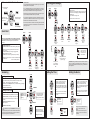
Data can be viewed after swimming directly from the CLOCK screen
by simply using the Up/Down buttons to scroll though Laps, Average
Strokes per lap, Distance (metres), Speed (seconds per 100m),
Calories, Efficiency and Time.
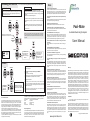
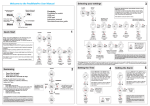
From CLOCK screen press Mode twice to go to LOG
Press Start to enter. Use Up and Down to scroll through recorded
sessions (the Pool-Mate stores each session in the log by number
and date).
Press Start to view selected log details.
Use Mode to scroll through the TOTALS for this session - Swimming
time (without rest periods), Laps, Distance, Calories and Average
Strokes.
LOG
CLOCK
wim
START
MODE
Any SETS can then be viewed. Scroll through SET Time, Laps,
Distance, Average Strokes, Speed, Efficiency Index with Mode.
x2
SWIM icon indicates a Swim log.
No SWIM icon indicates a Chrono log
Q The Pool-Mate doesn’t count all my laps
A If you have inaccurate lap results make sure the watch is securely
attached to your wrist and can’t move around. Also try gliding for a
longer period at the start of each lap. This saves you energy and
gives the Pool-Mate a little longer to register the change of laps.
User Manual
Q Will the Pool-Mate work in Open Water?
A The Pool-Mate has been designed for lap swimming in a pool and
this version will not work in Open Water.
Use Mode to scroll
through SET Time,
Laps, Distance,
Strokes per lap, Speed
and Efficiency Index.
Use the Pool-Mate in this mode when running or cycling
The Pool-Mate can also be used in Chrono mode as a 99 lap timer
when not in the pool
CHRONO
From CLOCK screen press Mode to go to CHRONO
Press Start .
Set 1 will show on the display
As when Swimming, pressing Start again will PAUSE, another
press will RESTART and the Set count will increment.
A long press will STOP.
START BUTTON:
MODE
Automatic Swimming Computer
MODE
START
Chrono
START
Pool-Mate
Q The Pool-Mate doesn’t work when I’m doing kick sets or
some drills.
A The Pool-Mate must be put into Pause mode when kicking or
drilling.
SETS
Use Mode to scroll
through TOTAL Time,
Laps, Distance,
Calories and Average
Strokes.
hold for 2
secs to
EXIT
wim
Q Why do I need to enter my weight?
A The Pool-Mate uses this to work out the calories you expend.
TIP: To see how specific metrics vary between sets (Time, Speed
etc) select required metric (eg Time) with Mode and scroll through
Sets with Up/Down. The metric will be shown for each set so you can
compare.
TOTALS
Use Mode to
view Elapsed
time and
Actual time
Q Do I need to press a button at the end of each lap like other lap
counters?
A No, The Pool-Mate is fully automatic and will sense when you start
a new lap without you having to do anything.
Q I want to swim sets, can the Pool-Mate record each set?
A Yes, you can playback all the details from individual sets as well as
the details of the total swim session.
to change set
CLOCK
Q How does the Pool-Mate work?
A The Pool-Mate contains state of the art motion sensors that
detect the motion of your arm. Our unique software algorithms and
digital signal processing techniques analyse the data and extract
lap, stroke, distance, speed and calorie information automatically.
Hold Start to exit
wim
SELECT
REQUIRED
LOG
FAQs
A quick press will START.
A further press will PAUSE.
Another press will RESTART
A long press will STOP.
Care and maintenance
The Pool-Mate is water resistant to 50m, however the buttons are not
designed to be operated underwater. You should make sure the PoolMate is out of the water before pressing any buttons. The Pool-Mate
should not be used if any fogging or water droplets appear inside the
watch. Never attempt to dismantle or service your Pool-Mate yourself.
Always protect your Pool-Mate from shocks, hard and sharp objects,
extremes of heat and prolonged exposure to direct sunlight.
If not in use, store your Pool-Mate in a clean, dry environment at room
temperature. Do not store in a damp environment such as a sports bag.
Do not expose to strong chemicals and cleaning products as they may
damage the Pool-Mate’s seals, case and finish.
If your Pool-Mate needs cleaning, wipe it with a soft damp cloth. Mild
soap may be used if necessary.
The session can be viewed in exactly the same way as swim
sessions- using Up/Down immediately after the session or from the
LOG screen. Chrono files are distinguished from Swim files as the
SWIM icon will not show.
NOTE: In Chrono mode the motion sensor will not operate- only
Time is recorded- not Speed or Distance.
The Efficiency Index is calculated from the distance travelled per stroke
and time per stroke. This index decreases as your efficiency increases.
less than 30
Excellent -Professional athlete
30-40
Very Good
40-50
Above average
50-70
Average
more than 70
Below average
Replacing the battery
The Pool-Mate’s battery (CR2025) has an estimated life expectancy of
over 12 months. The higher your average hours swimming a week, the
shorter the battery life will be. To maintain water resistance and ensure
the warranty remains valid, the Pool-Mate must be returned to
Swimovate Ltd for battery replacement.
Q Can I wear the Pool-Mate on my right arm?
A Yes, the Pool-Mate will work on either wrist, just change the setting
in the SETUP menu .
LOG
Q The Pool-Mate gives strange results when I change strokes
mid lap.
A The Pool-Mate has not been designed to recognise changes of
stroke part way through a lap. If you are going to change strokes you
must do it when you change laps. If a hesitation or interruption in the
stroke pattern occurs mid lap this may also cause inaccurate lap
counts.
Warranty
Q What does the efficiency index measure?
A The efficiency index is based on the recognized Swim Golf
method that you may be familiar with. It is the number of strokes plus
the time taken to swim 25 metres. Concentrate on reducing this
number to increase your efficiency and improve your swimming.
Q What units is the Speed measured in?
A We have found that the time to swim 100m is more of a meaningful
measure of swimming speed than metres per second or miles an
hour as swimmers are used to watching the pool clock and judging
speed from it. The Speed shown is the average time in seconds per
100 metres.
Q Will the Pool-Mate work with tumble turns?
A Yes, the Pool-Mate will work with both tumble turns and when
pushing off the wall.
Q How accurate is the Pool-Mate?
A The watch has been tested on a wide variety of swimmers over an
18 month period prior to launch. We have a 99.75% accuracy rate
with our database of thousands of laps from many swimmers with
1500m times of between 22 and 40 minutes. No guarantee is given
for accuracy with individual swimmers and rates may differ with
users whose strokes or abilities differ from the norm.
Q Will the watch work with all pools?
A The watch will work with pools over 10m in length. It just needs
setting to the pool length before use- the default setting is 25m.
Please note that in order to recognise you are swimming, the watch
needs to detect several swim strokes, if using a very small pool you
may reach the end before this occurs and the watch will not know
you are swimming. If this occurs we recommend you try a larger
pool.
No guarantee is given as to the accuracy of the watch or it’s lap and stroke
counting ability with particular swimmers or strokes. If this product should
fail due to defects in materials or workmanship, Swimovate Ltd will repair
or replace it free of charge for a period of twelve months from the date of
purchase (proof of purchase required). This warranty is only extended to
the original purchaser and covers failures due to defects in materials or
workmanship that occur during normal use. It does not cover battery,
battery replacement, damage or failures resulting from neglect, accident,
misuse, mishandling, alteration or modifications of the product or any
failure caused by the operation of the product outside the scope of its
published specifications. Swimovate Ltd shall in no event be liable for any
incidental or consequential damages arising from the use or inability to use
the product. Swimovate Ltd do not assume any responsibility for losses or
claims by third parties that may arise through the use of this product. If a
claim under warranty appears to be necessary email
[email protected] (or telephone +44 (0)1784 481562) to obtain a
returns number before returning your Pool-Mate. Packages will not be
accepted without a returns number.
Certification
?
The CE mark is used to mark conformity with the European Union
EMC directive 89/336/EEC.
This User Manual and its contents are intended solely for the use of our
customers to obtain knowledge regarding the operation of the PoolMate.The contents shall not be disclosed or reproduced without the prior
written consent of Swimovate Ltd. Great care has been taken to ensure the
accuracy of this documentation but it's contents are subject to change at
any time without notice. The latest version of this documentation can be
downloaded from www.pool-mate.com.
Copyright © 2009 Swimovate Ltd
www.pool-mate.com