1
4. User Security – Roles and Levels
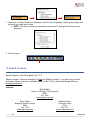
Every user is assigned both a Role and a Level.
Roles enable a user to perform certain functions such as entering data in sheets or accessing
reports.
• Report Only: Users will have access to view all reports and Dashboards published to them,
but will not have access to create reports or edit data on sheets.
• Standard: Unit Directors can edit data on sheets, access and create reports, see salary
Level detail, see which users are logged in, and approve Levels in Workflow. In Discovery,
user can view Dashboards published to them, edit Personal Discovery Dashboards, and use
analysis tools.
• Discovery: User can view Dashboards published to them, edit Personal Discovery
Dashboards, and use analysis tools.
Levels provide access to data for the appropriate areas of the college. Some users may have
more than one Level.
• Access to reports is granted by Level or by user.
• A user can save a report with the “Show all data regardless of Level” option, allowing viewers
of the report to see data for all Levels available.
o If a user tries to drill into data he/she normally does not have access to, the system will
not allow a user to drill any further and will display an error message.
o Access cannot be granted by folder, nor can reports be assigned to an individual user.
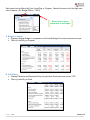
Users will only see those
Levels that he/she has been
given access to in the dropdown selectors on reports.
Page |4
Version 1.0