1
3. Logging into Adaptive Insights
1. Go to www.adaptiveinsights.com OR to the Budget Office webpage at
www.ramapo.edu/budget and click on the “Adaptive Insights” button.
Login with your email address and password.
2. If a user has forgotten their password, select the link “Forgot your Password?”. An email will
be sent containing a link to reset the password.
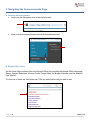
3. To change a password after logging in, go to the upper right corner of the home page. Click
on the down arrow and select Settings.
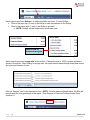
4. In the top right, enter the old password, a new password, and then verify the new password
one more time. Click save at the bottom of the page.
Page |3
Version 1.0