1
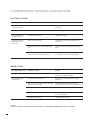
4. ELIMINATION OF TECHNICAL MALFUNCTIONS
ELECTRICAL SYSTEM
Message on the screen
Possible reasons
Actions
The system does not
start in any mode
No power supply
• Check the power protection switch and/or
the GFCI
Starts by itself
Normal automatic daily filtration cycle
• Do nothing
The Chromotherapy
lamp does not lit
The lamp has burnt out
• Replace the lamp
The pump switches
off unexpectedly
during use
Water level is too low
• Check the water level and add water, if
necessary
Automatic timer has switched the pump
off
• To start a new cycle, press the Pump key
again
Motor overheated Automatic protection
device has switched the pump(s) off
• If the pump(s) do not start upon pressing
the Pump key, contact technical support
Message on the screen
Possible reasons
Actions
Pulsing jets
Water level is too low
• Fill the minipool until the water level
reaches 10 cm above the filters
Jets do not work or
work weakly
Jets have been turned shut
Open the jets by turning the jet casings
clockwise
The valve of the water massage directing
device has been turned.
• Turn the handle of the water massage
directing device clockwise or counter clockwise
Dirty fi lter
• Clean the filter
Air residues in the device
• Loosen the pump connection and let the
air out of the pump
Closing valve is shut
• Open the closing valve
WATER SYSTEM
NOTE!
For control panel related problems and messages read the Balboa TP800 control panel user guide.
8