1
8.
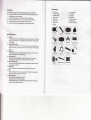
Remolecontroller
Mode buttonr tp switch video/photo/playback mode
REC button: undervid@ mode, press REC button lo starustop re@ding; under
photo mode, press it to take pictures; under playback mode,
pres
it to playback
videos/picture6.
"
9.
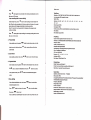
Playback on HDTV
Connec't the @mera to HD TV with the HDMI @ble, choose HDMI mode on TV. The
€meE $Ben will be of, all operalions €n bo chec.ked on TV.
10. Playbackon PC
€rera to a PC via thg USB €ble, it will tum on automati@lly.
shore "L,lass StoEge', 'PC Camera", Video Re@rdl.
LCD ffi
"Mass stoEge' is fq videotpictures check on PC.
conned
'PC
Camf
is
"Vids R@rd-
Re$ldon
forreb€m.
is for
@rding when @nnected to PC.
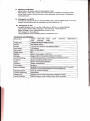
1080P 1920'1080 30Ds 720P '1280'720
VGA 640'480
lmaoe
sia
Sener
S(M
File
3ofps/60fps
30fDs
fomat
3M CMOS
*ner
l SindTtr
170 de@
270 d
rohlion
MOV H.264/JPEG
Diqital zoom
4X
Baturu
Built in
liion battery 1000mAh
Suomrt Mi@ SD
€rd
to 32c(not included)
lv re@rdinq ,automati@lly oveMdte function,
Cvcle
t. builGin oEvitv
sensr
Built-in Micrcohone/SDeake,
USB2.O/HDMI/GPS
Menu hnguage
English/F@nch/ltaliarrRusian/Geman/Japanese/Porluge*/
SMnirh/ Chinesf simolffi edyChinesettreditional'l
Rffiob@tu|
Ys.
lR Emole @ntaoller
50H"J60Hz
WaterprcoI
Other funalions
to 60
Mtea@of €s)
WDR funclion. Ptat6 number inout. SOS re@rdinq