1
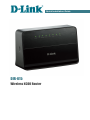
DIR-615
Obtaining
IP
in OS Windows 7
Quick Installation Guide
Address
Automatically
1. Click the Start button and proceed to the Control Panel window.
2. Select the Network and Sharing Center section. (If the Control Panel
has the category view (the Category value is selected from the View by
drop-down list in the top right corner of the window), choose the View
network status and tasks line under the Network and Internet
section.)
3. In the menu located on the left part of the window, select the Change
adapter settings line.
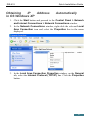
4. In the opened window, right-click the relevant Local Area Connection
icon and select the Properties line in the menu displayed.
5. In the Local Area Connection Properties window, on the
Networking tab, select the Internet Protocol Version 4 (TCP/IPv4)
line. Click the Properties button.
7