1
3.2 The Assignment of I/O Address
The plug&play BIOS will assign the proper I/O address to PCI-TMC12. If
there is only one PCI-TMC12, the user can identify the board as card_0. If there are
two PCI-TMC12 cards in the system, the user will be very difficult to identify which
board is card_0? The software driver can support 16 boards max. Therefore the user
can install 16 boards of PCI-TMC12 in one PC system. How to find the card_0 &
card_1 ?
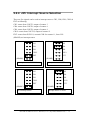
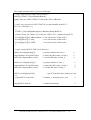
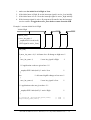
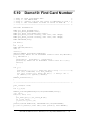
The simplest way to find the card number is to use DEM10.EXE given in
DOS demo program. This demo program will send a value to D/O and read back
from D/I. If the user install a 20-pin flat cable between CON2 & CON3, the value
read from D/I will be the same as D/O. The operation steps are given as following:
1. Remove all 20-pin flat cable between CON2 and CON3
2. Install all PCI-TMC12 cards into this PC system
3. Power-on and run DEM10.EXE
4. Now all D/I value will be different from D/O value
5. Install a 20-pin flat cable into CON2 & CON3 of any PCI-TMC12 card
6. There will be one card’s D/I value = D/O value, the card number is also
show in screen
Therefore the user can find the card number very easy if he install a 20-pin flat
cable into PCI-TMC12 one-by-one.
PCI-TMC12/TMC12A User’s Manual (Ver. 2.0, Sep/2002, PMH-016-20) --- 21