1
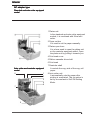
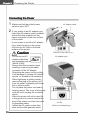
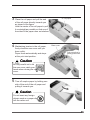
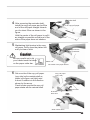
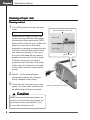
3. Place the roll paper and pull the end
1P roll paper
of the roll paper directly towards you
as shown in the figure.
Hold the center of the roll paper to pull
it as straight as possible so that one of
the sides of the paper does not slacken.
4. Maintaining tension in the roll paper,
firmly close the rear cover until you
hear a click.
Paper feeds automatically and stops
at the print start position.
Rear cover
Roll paper that is
gently pulled taut.
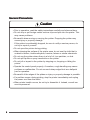
Caution
Be very careful not to let
the rear cover catch your
hands when closing the rear
cover.
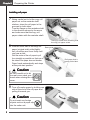
5. Tear off surplus paper by holding one
side of the end of the roll paper and
pulling it towards you.
Caution
Do not insert any foreign
objects such as a paper clip
into the cutter unit.
20