1
ReadyNAS Replicate
About ReadyNAS Replicate
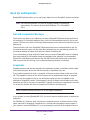
ReadyNAS Replicate lets you copy data from one ReadyNAS system to another. It uses
ReadyNAS Remote as its underlying communication technology. ReadyNAS Remote allows
devices to communicate with each remotely over the Internet. For more information about
ReadyNAS Remote, see the ReadyNAS Remote User Manual.
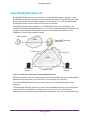
ReadyNAS Replicate allows data from one ReadyNAS system to be replicated to and
restored from another ReadyNAS system. You use the centralized ReadyNAS Replicate web
portal to create, manage, and monitor backup and restore tasks that operate across
ReadyNAS systems from multiple locations.
Web browser
WAN
ReadyNAS Replicate
web portal
Gather reports
Dispatch job
WAN
ReadyNAS
system
Peer-to-peer
ReadyNAS
system
Figure 1. Create and manage jobs using ReadyNAS Replicate
Although replication and restore tasks happen between ReadyNAS systems, the ReadyNAS
Replicate web portal gives you full control over every aspect of the process.
Use the ReadyNAS Replicate portal to control data on your ReadyNAS systems from
anywhere.
The ReadyNAS Replicate portal runs in the cloud and dispatches tasks to your ReadyNAS
systems, where the replication or restore job runs. You can use it to schedule jobs,
immediately store and restore data, disable and resume jobs, and view consolidated reports.
Getting Started
5








![[PDF版:13.4MB] (日)](http://vs1.manualzilla.com/store/data/006537897_2-bdc033a127f4fc7c5a7cbb1be387ee25-150x150.png)