1
~
f!M
f!J
..
Shots
@II
@II
@II
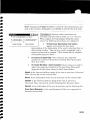
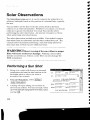
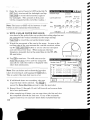
Number of sets: is the number of sets that will be taken to the
celestial object.
Reverse Shots 0: When checked, reverse shots
will be required with each set. When unchecked,
only direct shots are required.
Io."fi1J;T111
pir
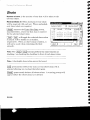
Toss I / I Incll: will toggle the selected observation
so that it will be hidden or un-hidden,
respectively. When an observation is hidden, it
will not be used when calculating the final
azimuth.
•
Number of sets
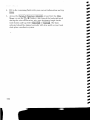
I Shoot I: accesses the Enter Shot Data screen,
described below, where the shot data is entered
for the selected observation.
I
13
AZimutl,
~
BD
·~1
[11
"35"3'~1[112::::\\
~
[12
~:5'::')11]'27"
orI
[1.3
~:5::::oI]9l5211
I
Note: The IToss 1/ IIncll buttons perform the same function as
checking / un-checking the checkbox in front of each observation.
Note: A backsight observation cannot be tossed.
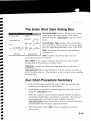
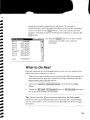
@ill: permanently deletes the most current observation if it is
selected allowing you to shoot that shot again.
I Reset I: permanently deletes all observations.
appear before the observations are deleted.
R-IOO
Settiflas I Clnse
I
A warning prompt will
::J
t2?verse shotsP"
un Time
rn
....
....
......
....
....
......
....
......
..
III
III
~
~
~
~