1
':;
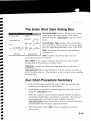
The Enter Shot Data Dialog Box
'IMiimtl.mN;fjijmn'.nm- OK I clQ!>~1
lo,ooclO
Horizont'3I Angle:
01/01/2000
currentIJatce/iimEl
DUT:
r",llvl
DD
(W
yyy\,
FFI
Date:
Time;
13:22:43
Hrs Te, (:;MTHH
r;:-'.".
U
I" .
1-
3.
Take§hot
J
MM
r7"'.............
I .".,
. !OS
r;---..
I', •\.
Get LQc.:l1
SSB
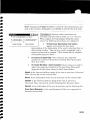
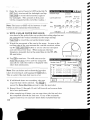
Horizontal Angle: displays the horizontal angle
measured bv the total station. This value is
updated with the
button, described
below.
[Ta}ZesFOD
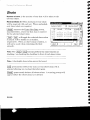
Current Date / Time: displays the current date,
time, and DDT. These settings can be changed
from the Date/Time Settings screen (Page R-36l.
Date: if incorrect, the current date should be
lime
entered here.
Time: is where the precise time that the
observation occurred is entered.
Hrs to GMT: is the number of hours that the time at the current
location differs from Greenwich Mean Time.
[ake Shot I: records the horizontal angle from the total station.
I Get Local Time I: fills in the Time field
with the current time that is
set in the data collector. This function is not available when shooting
the backsight.
Sun Shot Procedure Summary
1. Point the telescope ahead of the path of the sun and lock the
horizontal movement of the total station.
2. Immediately record the horizontal angle from the total station
using the I Take Shot I button.
3. When the target becomes properly aligned with the crosshairs,
record the current time as accurately as possible. The time can
be automatically read from the data collector using the
I Get Local Time Ibutton, or measured from an external time piece
and manually entered in the appropriate fields.
I
4. When finished, tap the I OK button to complete the current
observation.
R·IOI