1
EX8 User Manual v1.0
a Visual Plus Corporation Company
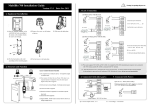
Enrollment
Enrollment area
Correct enrollment
Incorrect enrollment
Troubleshooting
Symptom
Problem
EX8 and reader not
operating at all.
No power supply
On powering the
system, at the EX8, red
LED stays ON while
yellow LED blinks every
30 seconds
No communication between
EX8 and reader
Reader authorize the
finger but door do not
open
If green LED at EX8 is ON
(Relay1 is activated) it is
lock problem
If green LED at EX8 is OFF
(Relay1 is not activated) it
is EX8 problem
Dirty or damaged sensor
Bad fingerprint reading
EX8 reset when door
lock is activated
Finger too dry
User have too smooth
fingerprints
Finger is damaged
Bad power supply
Solution
- Check main AC power
- Power supply unit
- Replace fuse F1
- Check cable, terminals A and B
- Replace reader
- Replace EX8
- Check lock power supply
- Check lock
- Assign relays to user
Check D0 and D1 connections
Clean the sensor (do not use
abrasive cleaning solutions)
Touch your forehead
- Increase sensor sensitivity
- Decrease security level
Enroll other finger
Replace power supply unit or use
separate supply for lock
Safety precautions
Do not install the device in a place subject to direct sun light without protective cover.
Do not install the device and cabling close to a source of strong electro-magnetic fields like
radio-transmitting antenna.
Do not place the device near or above heating equipments.
If cleaning, do not spray or splash water or other cleaning liquids but wipe it out with smooth
cloth or towel.
Do not let children touch the device without supervision.
Note that if the sensor is cleaned by detergent, benzene or thinner, surface is damaged and
fingerprint can’t be entered.
www.visual-plus.com
12