1
3 Custom Function SettingsK
C.Fn-11
Assign SET button
You can assign a frequently-used function to <0>. When the camera
is ready to shoot, pressing the <0> button will display the respective
function setting screen.
0: Normal (disabled)
1: Image quality
The image quality setting screen will appear.
2: Flash exposure compensation
The flash exposure compensation setting screen will appear.
3: LCD monitor On/Off
You can turn on or off the LCD monitor.
4: Menu display
The menu screen will appear.
5: ISO speed
The ISO speed setting screen will appear.
6: Flash function settings
The built-in flash or external flash function setting screen will
appear.
C.Fn-12
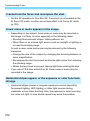
LCD display when power ON
0: Display on
When the power switch is turned on, the shooting settings will be
displayed (p.61).
1: Previous display status
If you press the <T> button and turn off the camera while the
LCD monitor is off, the shooting settings will not be displayed
when you turn on the camera again. This helps to save battery
power. The menu screens and image playback will still function
when used.
If you press the <T> button to display the shooting settings and
then turn off the camera, the shooting settings will be displayed
when you turn on the camera again.
344