1
Mode
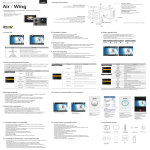
4. LCD screen shot
Video screen
①
Function
Super fine video image quality
Photo screen
② ③
④ ⑤
①
Description
Icons
* Use CLASS10 memory card only
② ③
④
⑤
VIDEO
Image quality
Fine video image quality
Normal video image quality
WiFi Hotkey
Shows WiFi connectivity (WiFi on/off)
Single photo shooting
Captures each image of setup time and save as photo.
(0.5sec / 1sec / 3sec / 5sec / 10sec / 30sec / 60sec)
⑥
⑦
⑧ ⑨
No.
Function
①
Current mode
⑥
⑦
WiFi
Shows WiFi connection status
Zoom
Shows current zoom level
④
Memory capacity
⑤
Battery
⑥
Recording option
Resolution
Image quality
⑨
WiFi Hotkey
Function
Image Size
Current mode
ALL
WiFi
Zoom
Memory capacity
Battery
WiFi Hotkey
While shooting video or photo, it shows resolution and speed
While shooting video or photo, it shows image quality
Shows WiFi connectivity (WiFi on/off)
1.
2.
3.
4.
Description
WiFi signal activated
WiFi signal deactivated
* Zoom function will be disabled during high speed recording
(720p 120fps / 480p 240fps)
Shows usable memory capacity in percentage (%)
Shows battery capacity status
Video recording starts and stops by shutter button only.
(1min / 5min / 10min / 30min)
Press shutter button to stop.
Recording automatically stops in setup time.
Captures each image of setup time and save as video file.
(1sec / 3sec / 5sec / 10sec / 30sec)
Press shutter button to stop.
Full HD (1920x1080) 60fps / 30fps video recording
VIDEO
UXGA (1600x1200) 60fps / 30fps video recording
Real HD (1280x720) 60fps / 30fps video recording
Resolutions
Real HD (1280x720) 120fps high speed video recording
High speed recording file is played with 1/4 speed slow motion video.
* In high speed recording, camera zoom and audio recording will be disabled.
WVGA (848x480) 240fps high speed video recording
High speed recording file is played with 1/8 speed slow motion video.
* In high speed recording, camera zoom and audio recording will be disabled.
2
Shows WiFi connectivity (WiFi on/off)
6. Video recording
) button to start video recording.
After the camera is turned on, press REC. (
When the camera starts to record, LED light blinks and shows recording time on LCD.
) button to stop recording.
Press REC. (
Without entering user setting menu, user can select video 'QUICK SETUP' before start recording.
(* If 'Auto LED off' option is selected in user setup, LED light will not blink.)
Video Recording Mode
Photo Shooting Mode
Fine photo image quality
Normal photo image quality
While shooting video or photo, it shows current recording option
Record consecutive videos files of setup time continuously.
Recording
options
8.5MP (3648 x 2432) 3:2 ratio
Super fine photo image quality ( * Use CLASS10 memory card only )
Image quality
Shows battery capacity status
Zoom level (Upto x4)
Burst photo shooting (11 photo images per second)
7.2MP (3648 x 2052) 16:9 ratio
Shows usable memory capacity in percentage (%)
Icons
* In high speed time lapse mode (0.5sec/1sec), use CLASS10 memory only.
12MP (4000x3000) 4:3 ratio
Photo
5. Graphical icon description
Mode
Press shutter REC. button to stop.
Self-timer photo
Shows current shooting mode (video or photo)
③
⑧
⑧ ⑨
Description
②
⑦
Photo shoot
options
7. Photo shoot
●
●
Press MODE ( ) button and hold for two seconds to change to photo camera mode.
Mode changes as
( video mode → photo mode → playback mode → video mode ) in turn.
) button to shoot photo.
1. Press REC. (
) button to stop photo shooting.
2. In time lapse photo mode, press REC. (
3. Without entering user setting menu, user can select photo 'QUICK SETUP' before start shooting.