1
9. User setup menu
8. Quick setup
●
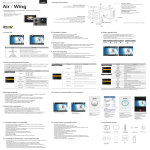
Without entering user setting menu, user can adjust various quick setups in live screen.
1. Press QUICK SETUP ( ) button to select quick setup options on bottom of the screen.
2. Quick setup mode changes as
recording option → resolution → image quality → wifi on/off → exit in turn.
) button to adjust setting option.
3. Select the quick setup option and press SELECT (
,
) button to choose setting option.
4. In setting option, press UP / DOWN (
) button to confirm setting option.
5. Press SELECT (
Quick setup screen
Operation
●
User can select basic settings and detailed setting options through user setup menu.
Press SETUP ( ) button and hold for 2 seconds to enter user setup menu.
User setup menu is divided into four categories (video, photo, effect, settings)
Press UP ( ) button to move category.
Press DOWN ( ) button to enter the sub-menu.
) button to select and confirm setting option within sub-menu.
Press SELECT (
1.
2.
3.
4.
5.
Function
Sub menu
Video quick setup screen
● Press QUICK SETUP (
) button to go to quick setup
● Select recording options
● Use UP / DOWN (
,
) button to choose option
● Press SELECT (
) to confirm setting option
●
Resolution
Recording
option
●
Video quick setup screen
Press QUICK SETUP ( ) button to go to quick setup
● Select image quality
● Use UP / DOWN (
,
) button to choose option
● Press SELECT (
) to confirm setting option
Photo
1200p 50fps, 25fps
720p 120fps, 60fps, 30fps
720p 100fps, 50fps, 25fps
480p 240fps
Manual
480p 200fps
Multi file REC. 1min, 5min, 10min, 30min
(record consecutive video files of setup time)
Super Fine (*Use CLASS10 memory card only)
Fine
Normal
Manual
Recording
option
Time lapse 0.5sec, 1sec, 3sec, 5sec, 10sec, 30sec
(captures each image of setup time and save as photo)
Burst 11 photo images per second
Timer 5sec, 10sec
Video quick setup screen
● Press QUICK SETUP (
) button to go to quick setup
● Select WiFi connectivity
● Use UP / DOWN (
,
) button to choose option
● Press SELECT (
) to confirm setting option
Photo quick setup screen
● Press QUICK SETUP (
) button to go to quick setup
● Select image size
● Use UP / DOWN (
,
) button to choose option
● Press SELECT (
) to confirm setting option
1200p 60fps, 30fps
(captures each image of setup time and save as video file)
Image
quality
12M (4000 x 3000) 4:3
●
Photo quick setup screen
● Press QUICK SETUP (
) button to go to quick setup
● Select photo shooting option
● Use UP / DOWN (
,
) button to choose option
● Press SELECT (
) to confirm setting option
1080p 50fps, 25fps
Time lapse 1sec, 3sec, 5sec, 10sec, 30sec
●
●
PAL
1080p 60fps, 30fps
Timer 1min, 5min, 10min, 30min
Video quick setup screen
Press QUICK SETUP ( ) button to go to quick setup
● Select video resolution and recording speed
● Use UP / DOWN (
,
) button to choose option
● Press SELECT (
) to confirm setting option
●
●
Description
NTSC
Video
Resolution
8.5M (3648 x 2432) 3:2
7.2M (3648 x 2052) 16:9
Image
quality
Effect
Super Fine (*Use CLASS10 memory card only)
Fine
Normal
Time stamp On / Off . Shows current time in recorded file
On / Off .
Aqua scene When the camera is shooting underwater, select
'aqua scene on' to give more vivid color images in the scene
Wide lens angle
FOV
●
Medium lens angle
Narrow lens angle
Settings
Mic. Volume
Buzzer
LED
WiFi
TV Out
Time
Off, 30%, 60%, 100%
Buzzer On / Off
LED On / Off
WiFi On / Off
NTSC / PAL
Set current time (YYMMDD:HHMM)
Yes / No.
Memory card format
Yes / No
Default Setting Turn back all settings to default
Yes / No
Auto LCD Off LCD will automatically turn off in 30sec when there is
no operation
Format
Yes / No
Auto Power Off The camera will automatically turn off in 3min when there
is no operation.
Info
Shows current firmware version
13