1
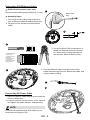
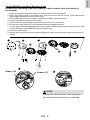
Connecting RJ45 Ethernet Cable
RJ45 Cable Dimension (unit: mm)
Recommended cable gauge: 24AWG (0.51 mm)
1
Rubber Seal
Plug
Assembly Steps
1. Drill a hole on the rubber seal plug and insert an Ethernet cable through the opening.
2.Strip part of the sheath from the Ethernet
cable.
2
3
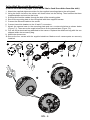
o: white/orange stripe
O: orange solid
g: white/green stripe
B: blue solid
b: white/blue stripe
G: green solid
br: white/brown stripe
BR: brown solid
o
O
g
B
b
G
br
BR
3.You will need an RJ45 crimping tool to
attach the Ethernet wires to a connector. When done, connect the cable to
the camera’s Ethernet RJ45 socket.
1
2
3
4
5
6
7
8
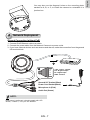
4. Feed the Ethernet cable from the bottom of the
camera and through the hole. Attach the rubber seal
plug for water proofing.
4
1
2
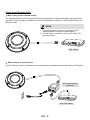
Connecting DC Power Cable
1. Add the supplied rubber washer to the cable as
shown in the picture.
2.Feed the cable from the bottom of the camera
and tighten the plastic base for waterproofing.
NOTE:
Connect the supplied power & IO cables if your
switch does not support PoE.
EN - 4