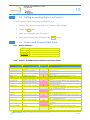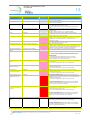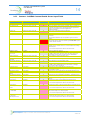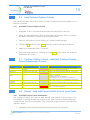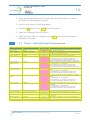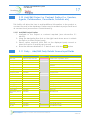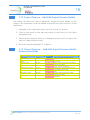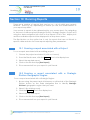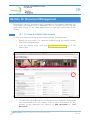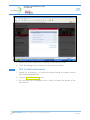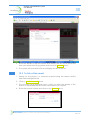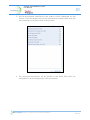
1
TerraQuest Response to the Government Procurement Service Invitation to Tender G- Cloud Procurement Vehicle RM1557 V1.0 Response to the Invitation to Tender G- Cloud Procurement Vehicle i Contents Page 1 Executive Summary 2 Service Definition 3 Business Benefits 4 Commercial Overview Appendices A Standard Terms and Conditions B User Guide/Training Materials Contact Details Craig Harper Bid Manager TerraQuest 10 Clement Street Birmingham West Midlands B1 2SL T: 0121 234 1300 M: 07787 563 842 E: [email protected] W: www.terraquest.co.uk © TerraQuest Subject to Contract and Commercial in Confidence Private and Confidential Executive Summary “A comprehensive land and property management system, enabling clients to administer their estates with confidence” TerraQuest Land and Property Information TerraQuest provides 24/7 secure web-based access to land and property data, enabling assured business decisions. The Issue Many organisations have incomplete information on the land and property assets they own, or rely upon independent non-electronic records and employee retained knowledge to provide a holistic view of their estate. As portfolios can be large and diverse, key decision making and on-going estate management is inefficient and potentially compromised by lack of good quality information. TerraQuest has developed a bespoke land and property portal that enables the integration of multiple data sources to provide a single, consolidated and up to date view of the entire estate. All key contextual information is linked and accessible to any authenticated user, in a secure environment. The Service − − − Recording and mapping of all land ownership into a single, web based management service Integration with other GIS-enabled data including OS Mapping and supporting documents, including Land Registry Information, agreements etc Flexible reporting capability to support financial, legal and land management functions Key Benefits A single consolidated view of all land and property assets Reports and KPI’s available against any parameters within the database, for individual stakeholders Information accessible and tailored for each stakeholder Identification of unrecorded land and property assets, enabling proactive management and generating capital receipts © TerraQuest Subject to Contract and Commercial in Confidence Private and Confidential Response to the Invitation to Tender G- Cloud Procurement Vehicle 3 The TerraQuest Team TerraQuest has developed a series of web portals based on its own proprietary service orientated architecture designed specifically to meet the land management needs of major infrastructure projects, property developers and major landowners. This architecture utilises a strong blend of industry strength database management systems with the best of Open Source business solutions to deliver a highly effective and cost efficient solution for land and property information management. The web portals are hosted within data centres meeting the highest standards of security and reliability available in the industry and are supported 24/7/365 on one-hour hardware response. The server-side information management application comprises: Enterprise strength relational and spatial database management system Standards compliant workflow management server Document management and storage Geographic information management server TerraQuest has over 40 years’ experience in driving operational efficiencies through improved Property and Business Processes. We provide efficient and cost effective property information services for Government, Transport, Energy and the Property Sectors. i.e. any organisation or agency which has a large property portfolio. TerraQuest prides itself on its detailed understanding of information management, relevant business processes and the application of appropriate technology to deliver services to clients. © TerraQuest Subject to Contract and Commercial in Confidence Private and Confidential Response to the Invitation to Tender G- Cloud Procurement Vehicle 4 Case Studies Case Study Taylor Wimpey TerraQuest initially delivered a comprehensive audit of all existing Taylor Wimpey systems and business processes. Once the information had been gathered, TerraQuest then replaced all the existing databases with one externally hosted service. The external database provided a single consolidated view of the land holding, with a consistent and comprehensive approach to data management to support the land and planning function. Taylor Wimpey has developed a strong bond with TerraQuest as we have work together to develop what we consider to be an excellent asset to our business. I have absolute confidence that our requirement will continue to be achieved by the team at TerraQuest and their on-going commitment to Taylor Wimpey Kevin Shelley MD Strategic Land (North) Case Study Department for Transport TerraQuest delivered a comprehensive “electronic doomsday book” containing all the Department’s property assets. The overall result gave the Department for Transport improved decision making, and a more cost effective estate. In addition, TerraQuest delivered enhancements to e-PIMS, and a process to maintain the quality of the property information in the future. The specialist services provided by TerraQuest generated an increase in income, cost savings and capital receipts. The initial savings in the first 18 months will lead to £20m benefits over the next 5 years. These benefits are only the tip of the iceberg to what can now be achieved with better property information. Mark Mathews Head of Estates © TerraQuest Subject to Contract and Commercial in Confidence Private and Confidential Response to the Invitation to Tender G- Cloud Procurement Vehicle 5 Section 2: TerraQuest Service Definition Background TerraQuest has been providing hosted land and property information services to a range of clients since 2006, including support for the land acquisition programmes for both Crossrail and EDF Nuclear programme; and also Taylor Wimpey land and planning management functions. The TerraQuest Land and Property Service not only supports Client project teams, but other stakeholders including their legal advisors, engineers and planners, land agents etc. to ensure that a single version of land and property data, including spatial data, documents, maps, plans, and workflow is accessible to all. TerraQuest enables: − − − − A cost effective service delivering a comprehensive view of client land and property data integrated with appropriate 3rd Party information sources. A single source of current, up to date client land and property information, accessed by authorised project stakeholders. 24/7 access to all client data and documents maintained by project stakeholders. Version control which removes the potential for duplication of data and provides confidence in reporting and user experience. − A secure scalable service which can be extended to support additional users, capacity and data requirements. − Users have the ability to add documents and link to records to support efficient information management and retrieval. − Effective access to spatial data sources (including OS mapping) for each work area, and provide the ability to load and overlay additional spatial datasets as required e.g. environmental, planning, socio demographic etc. Users have the ability to search for and retrieve information either spatially (i.e. via the mapping) or via database query. − Security and Access TerraQuest has extensive experience in maintaining the confidentiality of client data at all stages of its life, from its creation or receipt through processing and storage to deletion or return. The underlying ethos of confidentiality and protection is part of the company culture and is extended to cover all client data, whether protectively marked or not. The TerraQuest solution is in accordance with the Information Security Management System as defined by ISO/IEC 27001. © TerraQuest Subject to Contract and Commercial in Confidence Private and Confidential Response to the Invitation to Tender G- Cloud Procurement Vehicle 6 TerraQuest’s obligations under the Data Protection Act are taken seriously, this is demonstrated through the company’s Business Management System, accredited to ISO 9001. Security features of the portal include − Secure access via https using SSL certification − The URL does is not published to internet search engines The URL is in the form https://xxxxxxx.terraquest.co.uk the login page consist of a Terraquest login screen, following a successful login the user is then directed to their Client Branded Dash Board. − − − Access restricted to individual Named Users with password control Enforced changes to passwords on a regular basis − Security prevents multiple login sessions using the same User Id i.e. several individuals within an organisation do not have concurrent access through the same User Id − Additional/replacement/removal of Named Users are managed as functions of the TerraQuest Helpdesk The hosted service includes a Help Desk and technical support team to provide: − Service support and bug fixes Daily housekeeping activities e.g. backups − Restoration of data in the event of system failure − Addition/replacement/removal of Named Users − Functionality The functionality provided via the Land and Property Service includes: − Client Branded Dashboard - on login users are presented with a dashboard comprising: © TerraQuest − A series of one or more active projects to choose from − A series of ‘news’ messages, including latest date of data upload Subject to Contract and Commercial in Confidence Private and Confidential Response to the Invitation to Tender G- Cloud Procurement Vehicle − Mapping interface − Zoom and pan controls − − Location query tools: − Hover & highlight − Click to query Layer control: − Background mapping photography) − − − 7 (OS mapping or aerial Other Spatial data layers – environmental, planning, socio demographic etc. User defined layers Search facility across specific key fields, e.g.: − − © TerraQuest Party Name Address − Land Parcel Number − Work Area Subject to Contract and Commercial in Confidence Private and Confidential Response to the Invitation to Tender G- Cloud Procurement Vehicle 8 − Information display panel, allows users to navigate between associated records − Ability to select a record and display the spatial extent on the map pane − Documents are associated with each database record. Selecting the Document icon for a record opens a window displaying a list of associated documents. The user can then select a document to open / download. − Reporting – standard and user defined reporting is available. Users can download the latest Land and Property information. © TerraQuest Subject to Contract and Commercial in Confidence Private and Confidential Response to the Invitation to Tender G- Cloud Procurement Vehicle 9 Datasets Land and Property information (both spatial and textual) not available through 3rd Party sources is researched, created and maintained by TerraQuest. This is made available to clients through the service and integrated with data provided “on the fly” from authorised sources. TerraQuest is a strong advocate of GIS and the power of visualising the results of spatial analysis. The user is informed by an interface that is graphically presented and very easy to understand. This gives the user added confidence in the decisions that are to be made. Ordnance Survey Digital Mapping datasets – The Land and Property Service utilises: − − − Ordnance Survey digital mapping (small scale) Licensed Ordnance Survey MasterMap (large scale) mapping of individual work areas/sites Aerial photography Styling The Property Portal Service is styled using: − Client logo and images − Primary and secondary highlight colours in accordance with client website conventions Extensions to the Portal Whilst the Land and Property Portal Service has been designed to provide a generic solution; extensions to datasets and functionality can be provided. Any new requirement (i.e. customisation) is assessed in terms of the impact on development, deployment resources, costs and timescales and agreed with the client. Additional spatial datasets can be loaded into the Property Portal and their display managed under the layer control function e.g.: − − − − − Local planning constraints (e.g. green belt, SSSI, conservation areas etc) Geo-referenced engineering drawings Environmental data e.g. flooding Legal undertakings Land ownership © TerraQuest Subject to Contract and Commercial in Confidence Private and Confidential Response to the Invitation to Tender G- Cloud Procurement Vehicle 10 Section 3: Business Benefits Benefits The benefits of the Land and Property Portal Service are to have a positive impact on efficiency, communications and cost: Secure access to data and documents through a secure internet link Controls editing of client data Ability for legal team to view individual source documents and compare directly against the database Removes reliance on traditional methods of communication and data sharing Scalable solution in terms of the number of projects, volumes and users supported by the single application Hosted service administration Concurrent access by the wider Project Team to the latest land and property information, (including database records, mapping, schedules and documents. Ability for users to upload documents and attach notes to database records for access by the wider Project Team © TerraQuest provides all the necessary Subject to Contract and Commercial in Confidence support and database Private and Confidential Response to the Invitation to Tender G- Cloud Procurement Vehicle 11 Section 4: Commercial Overview Setup & Implementation of TerraQuest Generic Portal Price: £2,000 per month for the duration of the project. Subject to a minimum contract period of 12 months. Price includes: − Externally hosted secure web service − Functionality as set out above − 10 Named Users − Client data update to agreed frequency − − Unlimited data storage One day training − System Support and Administration − Online help − Helpdesk Note: The above price excludes 3rd party data costs e.g. Ordnance Survey Mapping. Each Additional Project − Price: £2,000 per project running from same service − Price based on same functional requirement − 10 Named Users Subsequent projects would be subject to discount to reflect the aggregation of reduced cost of delivery to client. Each Additional User − Price: £100 for each additional User per Project Unlimited Access per Project − Price: £5,000 per Project − Same service and functionality as above Unlimited number of users across the wider corporate project team − Agreement The above services, including all options is subject to agreement between the Client and TerraQuest on: − Service Level Agreement − Internet Acceptable Use Policy © TerraQuest Subject to Contract and Commercial in Confidence Private and Confidential Response to the Invitation to Tender G- Cloud Procurement Vehicle 12 Terms − All prices are fixed for 60 days. − Prices quoted exclude VAT, which will be applied at the appropriate rate. − On acceptance of the Property Portal, monthly charges will be invoiced quarterly in advance. Invoices will be due for payment within 30 days. On the anniversary of the contract monthly charges will be increased in line with the Retail Price Index. − − TerraQuest’s standard terms and conditions can be provided on request. Any enhancements to the agreed generic functionality or change in scope of Service will be subject to commercial consideration by TerraQuest, and is reflected in changes to monthly charges or other charging options. © TerraQuest Subject to Contract and Commercial in Confidence Private and Confidential Response to the Invitation to Tender G- Cloud Procurement Vehicle 13 Appendix A – Standard Terms and Conditions © TerraQuest Subject to Contract and Commercial in Confidence Private and Confidential Dated 2013 TERRAQUEST SOLUTIONS LTD (t/a TerraQuest) and [NAME OF CLIENT] CONTRACT FOR THE PROVISION OF XXXXXXXXXXXXX SERVICES TerraQuest Solutions Limited Contracts Section Clement Street Birmingham B1 2SL Company Support Service Schedule v1.3 BIR_COMM\853794\1 1 of 21 TERMS AND CONDITIONS Dated this day of 2013 1. PARTIES TerraQuest Solutions Limited trading as TerraQuest. Registered in England and Wales, Number 4653583. Registered Office 1390 Montpelier Court, Gloucester Business Park, Brockworth, Gloucester, Gloucestershire, GL3 4AH (“the Company”); AND [INSERT NAME OF CLIENT], whose registered office is situate at [INSERT REGISTERED OFFICE OF THE CLIENT] (“the Client”) 2. DEFINITIONS Words and expressions used in this Agreement (unless the context requires otherwise) have the following meanings given to them. “Agreement” means this Contract and any Schedules, Appendices attached thereto which together constitute the agreement between the Parties. “Charges” means the charges for the services as outlined in Condition 6 and Schedule 3 to this Agreement. “Client Data” means the data and information owned by the Client in connection with the Services “Confidential Information” means all information of a confidential nature disclosed by the Client or the Company relating to the business of the Client or the Company and/or this Agreement “Default Notice” means a written notice given by either party to the other under Condition 13.3 “Documentation” means the instruction manuals, user guides, and any other documentation provided by the Company in respect of the Service “Service Schedule” means this Service Schedule as outlined in Schedule 2 which may be amended, modified or supplemented from time to time in accordance with these provisions “Initial Term” means the period from the Service Commencement Date for a period of XXXX months Company Support Service Schedule v1.3 BIR_COMM\853794\1 2 of 21 “Intellectual Property Rights” means any and all patents, trade marks, trade names, service marks, copyright, moral rights, rights in design, rights in databases, knowhow, Confidential Information and all or any other intellectual or industrial property rights whether or not registered or capable of registration and whether subsisting in the United Kingdom or any other part of the world together with all or any goodwill relating thereto “Project Implementation Plan” means the implementation plan in Schedule 6 “Service(s)” means the Service more particularly detailed in Schedule 2 to this Agreement “Service Commencement Date” means XXXX 2010 “Service Standard” means the standards outlined in the Specification (Schedule 4) and the Service Level Agreement (Schedule 5) “Support Policy” means the specification of the support provided by the Company and related guidelines for the Client set out in Schedule 5 “Term” means each succeeding period of xx months following the Initial Term 3. APPOINTMENT 3.1. The Client appoints the Company and the Company agrees to provide the Services (and any additional services requested by the Client which are reasonably connected with the Services) to the Service Standard from the Commencement Date for the Initial Term and any Term thereafter. 3.2. The Services are to be provided by the Company within the timescales detailed within Schedule 6 of this Agreement (if applicable). The time specified for the completion of the Services shall be of the essence. 3.3. If, following the service of any Default Notice, the Company continues to materially fail to provide the Services in accordance with this Agreement, then without prejudice to any other right the Client may have in this respect but subject to the Client’s duty to mitigate its losses wherever possible, the Client may itself provide the Services or arrange for other persons to provide the Services and to the extent that such costs exceed the payment which would have otherwise have been payable to the Company for such Services, the Client may offset any costs of such services incurred by the Client against any invoices from the Company 4. STAFF 4.1. In providing the Services and any Additional Services and all other necessary professional and administrative support services, the Company shall use best endeavours to ensure that it uses the dedicated staff named in any Company proposal. Company Support Service Schedule v1.3 BIR_COMM\853794\1 3 of 21 4.2. The Company shall ensure that all members of its staff are properly and sufficiently qualified, competent, skilled, honest and experienced for the Services to be performed, and at all times exercise proper care in the execution of their duties and tasks. 4.3. During this Agreement, and within 12 months of its termination, neither the Company nor the Client shall approach or make offers of employment to or engage any member of each other's staff engaged or employed in connection with this Agreement without having first obtained the written consent of the other. 4.4. Subject to prevailing employment legislation, and Condition XX the Client shall have the right to request that the Company remove any member of staff employed or used by the Company under this Agreement provided such requirement shall be stated in writing and not be made unreasonably. 4.5. Upon receiving a request under Condition 4.4, the Company shall consider the grounds for removal of the specified person and, if in agreement with the request, the Company shall remove and replace the employee as soon as possible, and in any event not later than 14 days of the Client requesting the Company of this requirement, unless the Client shall require otherwise. If the Company is not in agreement with the request, the Company shall detail the grounds for refusing the request as soon as possible, and in any event not later than 14 days of the Client requesting the Company of this requirement. 5. SUPPORT 5.1. The Company shall only respond to any request for support under this Agreement if such request is made in accordance with the reporting procedures set out in Schedule 5 5.2. The support Services will only be provided during the business hours as identified in Schedule 5 5.3. The Company shall accept no liability under this Agreement and shall have no obligation to provide the Services for: 5.3.1. Any services, software, accessories, attachments, machines, systems or other devices not specifically listed in Schedule 1 5.3.2. The rectification of lost or corrupted data arising for any reason other than the Company’s own negligence or breach of this Agreement or defect in the Service 5.3.3. The inaccurate input of any Client Data by the Client 5.4. The Client shall ensure that only such of its personnel who have been trained by or on behalf of the Company shall be available to liaise with the Company’s representatives to receive the Services. The Company shall be entitled to charge at its consultancy rates then prevailing for any additional time spent in the provision of the Services as a result of failure by the Client to make such trained personnel available. Contractor Support Service Schedule v1.3 BIR_COMM\853794\1 4 of 21 6. CHARGES & PAYMENT 6.1. The Charges shall be paid by the Client to the Company representing the agreed and total charges 6.2. Charges are payable as follows: 6.2.1. in respect of the Initial Term a sum of £XXXXXXX shall be payable on Commencement of the Service as an Initial Charge (as detailed within the Project Implementation Plan – Schedule 6) 6.2.2. any supplementary services in connection with the Service, which are to be agreed in writing by the Company and the Client in advance. 6.3. The Company shall provide to the Client’s Project Manager a monthly invoice during the Initial Term or any Term thereafter in the prescribed form and for the agreed amount. 6.4. Within 14 days of receipt of the invoice, the Project Manager shall give the Company notice of the amount that he considers is properly due. 6.5. The Client shall pay the Company the undisputed amount within 14 days of the issue of the notice in accordance with Condition 6.4 or if no such notice has been issued, within 28 days of the date on the invoice. 6.6. Where the Services and any additional services have not been provided in accordance with this Agreement, the Client’s Project Manager shall not certify that an amount is due in respect of them and shall give written reasons to the Company. 6.7. The Client shall pay VAT on the Fee at the prevailing rate provided that such VAT shall not fall due for payment until receipt by the Client of a formal VAT invoice. 6.8. The interest payable on any late payment under this Clause 6 will be 4% above the basic rate of the National Westminster Bank in force at the time, on demand from the day following the end of the specified payment period until the payment is made. 6.9. The Client may require the Company to provide additional services under this Agreement which are substantially similar or connected with, but not the same as the Services (“Additional Services”). 6.10. If Additional Services are requested by the Client, payment for such additional Services will be at the rates stated within Schedule 3. The Company shall not undertake Additional Services under this condition without the express written authority of the Client. The Client will require the Company to produce an invoice in the form indicated in Condition 6.3 above in connection with any payment for Additional Services. Contractor Support Service Schedule v1.3 BIR_COMM\853794\1 5 of 21 7. REVIEW & ACCEPTANCE TESTING 7.1. The first two months following the Service Commencement Date, the Company and the Client will have a meeting to undertake a review of progress against the Project Implementation Plan. 7.2. Following the review in Condition 7.1 and subject to the Client being satisfied that the Company has achieved the progress against the Project Implementation Plan, the Client will certify that the Company has achieved the requirements of the Project Implementation Plan. 7.3. In the event that the Client believes the Service fails to meet the Specification within Schedules 4 & 5 or fails to achieve any of the timescales in the Project Implementation Plan pursuant to Schedule 6 (excluding any delays caused by or agreed with the Client), the Client may issue a Default Notice upon the Company in accordance with Condition 13.3 below. 7.4. The Client shall not be permitted to issue Default Notices: 7.4.1. for any delay in the Project Implementation Plan if the delay to the Project Implementation Plan is caused by the Client; 7.4.2. following the Client’s certification of the User Acceptance Testing, relating to any matters outside the scope of any functional specification but this shall not preclude the Client issuing a Default Notice(s) in respect of the Services. 7.5. The acceptance criteria for any User Acceptance Testing shall be agreed by the parties and documented within a User Acceptance Testing Plan and the Company shall perform initial tests to test if the Service meets any functional specification issued by the Client. 8. PROPRIETARY RIGHTS AND PROTECTION 8.1. All copyright or other proprietary rights in all work produced by the Company directly and exclusively in connection this Agreement shall be vested solely in the Client. 8.2. The Company warrants that any document or design produced by the Company in performing the Services shall be original in them, and shall not infringe the copyright, design right, moral right or any other rights of any third party, and that no claims of such infringement have been made or are the subject of litigation actual or threatened. Contractor Support Service Schedule v1.3 BIR_COMM\853794\1 6 of 21 9. INDEMNITY AND INSURANCE 9.1. The Company shall fully indemnify and keep fully indemnified the Client against all claims demands proceedings damages costs charges and expenses whatsoever directly in connection with the provision of or failure to provide or delay in providing the Services or directly resulting from any act neglect or default of the Company its employees or agents in providing the Services. 9.2. The Company shall throughout the Term maintain such insurances as are necessary to cover its liabilities that may arise under this Agreement, and shall provide the Client with certified copies of the insurance policy upon written request. 10. CONFIDENTIAL INFORMATION 10.1. The Company shall not, whether during or after its appointment, disclose or allow to be disclosed to any person (except on a confidential basis to its professional advisers) any information acquired by the Company in the course of carrying out its duties under this Agreement, except as may be required or permitted by law or as directed by the Client. 10.2. The Company and the Client agrees:10.2.1. to keep the Confidential Information in strict confidence and secrecy; 10.2.2. not to use the Confidential Information save for complying with its obligations under this Agreement; 10.2.3. not to disclose the same to a third party with the consent of the other party; and 10.2.4. to restrict the disclosure of the relevant and necessary parts of the Confidential Information to such of its employees, agents and sub-contractors who of necessity need the same in the performance of this Agreement and in such circumstances to ensure that such employees, agents and sub-contractors are aware of the confidential nature of the Confidential Information, provided however that where a part of the Confidential Information is already in or enters the public domain (except through a breach of the obligations imposed under this Agreement) then the foregoing obligations of confidentiality in respect of such part shall not apply or shall cease to apply (as the case may be). 10.3. The obligations set out in this Condition 10 shall not apply to any Confidential Information which: 10.3.1. the Company or the Client can show by documentary evidence was already in its lawful possession and at its free disposal otherwise than directly or indirectly from the Client; 10.3.2. is lawfully disclosed to the Company or the Client without any obligations of confidence, by any person who has not derived it directly or indirectly from the disclosing party; 10.3.3. is or has come into the public domain through no fault of the Company or the Client or their personnel; Contractor Support Service Schedule v1.3 BIR_COMM\853794\1 7 of 21 10.3.4. is required by law or by order of a court of competent jurisdiction to be disclosed but only to the extent required by such law or order; or 10.3.5. is disclosed with the prior written consent of the Client. 10.4. The Company acknowledges that damages would not be an adequate remedy for any breach of this Condition 10 and that (without prejudice to all other rights, powers and remedies which the disclosing party may be entitled to as a matter of law) the Client shall be entitled to seek the remedies of injunction, specific performance and other equitable relief to enforce the provisions of this Condition 10; 10.5. The Company accepts that the Client (if a public sector client) may be obliged to comply with the Freedom of Information Act 2000 and the Code of Practice on the Act (collectively “the Act and Code”), and will assist the Client (if necessary) to comply with its obligations under the Act and Code. This includes helping the Client comply with its obligation to respond to a request for information (“Information Request”) within 20 days of receipt; and providing information to the Client where the Client requests. 10.6. The Client may also be entitled to disclose information unless it believes that the information is Exempt under the Act. Exemption may apply where, for example, information is provided in confidence; where the information is a trade secret; or where release is likely to prejudice commercial interests. The Client will decide, acting reasonably, whether information requested under the Act is to be disclosed or not. The Client will in all circumstances, consult the Company and will consider any representations made by the Company. The Client shall not be liable for any loss or other detriment caused by the disclosure of any information. 10.7. This obligation of confidentiality shall survive the termination of this Agreement 11. ASSIGNMENT AND SUBCONTRACTING 11.1. The Company and the Client will be entitled to assign and/or novate any aspect of this Agreement subject to the agreement of the other party which is not to be unreasonably withheld; provided that in each case the party exercising its rights under this Agreement shall remain primarily liable for the performance of all obligations under this Agreement until the Agreement has been concluded or novated. 11.2. Where the Company sub-contracts all or any part of the Services or the provision of the Software to any person, the Company shall: 11.2.1. ensure that such person is obliged to comply with all of the obligations and duties of the Company under this Agreement insofar as they relate to the Services or the provision of the Software or part thereof (as the case may be) which that sub-Company is required to provide; 11.2.2. be solely responsible for payments to that person; and 11.2.3. remain solely responsible and liable to the Client for any breach of this Agreement or act or omission of a sub-Company or any performance, nonperformance, part-performance or delay in performance of any of the Services Contractor Support Service Schedule v1.3 BIR_COMM\853794\1 8 of 21 and/or obligations by any sub-Company to the same extent as if such breach or act or omission had been committed by the Company. 11.3. Either party shall give notice to the other in the event that there is any change in the control of: 11.3.1. the Party where such change relates to 50% or more of the issued share capital of that Party; and 11.3.2. the Holding Company where such change relates to 50% or more of the issued share capital of the Holding Company, 11.3.3. such notice to be given within ten (10) Working Days of the date on which such change takes effect. 12. OTHER OBLIGATIONS 12.1. In carrying out the Services the Company shall: 12.1.1. at all times ensure that the Services comply with and meet all the requirements of this Agreement and all relevant legislation; 12.1.2. comply so far as is appropriate with all the Client’s relevant rules, codes, policies, procedures and standards notified from time to time during the Initial Term and any Term thereafter by the Client to the Company, including in particular the Client’s financial regulations and standing orders; 12.1.3. take all reasonable steps to ensure the Client’s interests are protected at all times, in particular by ensuring that all systems and procedures adopted by the Company for carrying out the Service are in accordance with Best Practice; 12.1.4. not unlawfully discriminate within the meaning of the Race Relations Act 1976 (as amended), the Sex Discrimination Act 1975, the Disability Discrimination Act 1995 and 2005 or any comparable provision relating to discrimination in employment or service provision and will ensure that all employees, agents and sub-contractors do not unlawfully discriminate, and will comply with all relevant codes of practice issued by the Commission for Racial Equality or comparable body and, so far as practicable, operate an equal opportunities policy which complies with the practical guidance and recommendations contained in such codes of practice; 12.1.5. adopt safe methods of work and comply with all other requirements of the Health and Safety at Work Act 1974 in order to protect the health and safety of its personnel and those of the Client and all other persons; 12.1.6. take all reasonable steps to ensure that systems and procedures adopted by the Company in the performance of the Services are in accordance with and take account of the provisions of the Human Rights Act 1998. 13. TERM AND TERMINATION 13.1. The Services under this Agreement shall commence on the Service Commencement Date and shall, subject to payment of relevant Charges and/or any Contractor Support Service Schedule v1.3 BIR_COMM\853794\1 9 of 21 termination issues arising, automatically renew on the expiration of the Initial Term and each succeeding Term unless terminated under the provisions hereof. 13.2. This Agreement shall terminate: 13.2.1. on receipt by the Company from the Client of at least 12 months written notice to the effect that the Client wishes to terminate this Agreement, such notice to take effect upon the expiration of the Initial Term or any succeeding Term. Any such termination shall be without prejudice to any provision of this Agreement intended to operate thereafter. 13.2.2. immediately if either party: 13.2.2.1. suffers any distress or execution to be levied, commits an act of bankruptcy, make any composition or arrangement with creditors, has a receiver appointed or goes into liquidation; or 13.2.2.2. any employee or any other person acting on its behalf has offered, given or agreed to give any gift or consideration of any kind as an inducement or reward for doing or not doing something or for showing favour or disfavour in relation to this or any other agreement with the Client; or shall have committed any offence under the Prevention of Corruption Acts 1889 to 1916, or shall have offered or given any fee or reward to any officer of the Client which if accepted is or would be an offence contrary to s.117 Local Government Act 1972 or any amendment or re-enactment thereof. 13.2.2.3. is in material breach of this Agreement; 13.2.2.4. has failed to comply with a Default Notice reasonably and lawfully served in accordance with Condition 13.3 below. 13.3. If a Party considers the other is in default of their obligations under this Agreement including any delays in the Project Implementation Plan or failures arising in any User Acceptance Testing for the Service to perform in accordance with the defined Specification, the non-breaching party may issue a Default Notice (a “Default Notice”). 13.4. The Default Notice shall clearly state in what way the party considers the other to be in default, the remedial additions sought and any time limit in which it should be implemented, and where appropriate the amount of any losses, damage or compensation due to the non-defaulting party in respect of the breach. 13.5. If the Breaching Party is still in breach at the end of the time period specified in the Default Notice then in accordance with Condition 13.2.2.4, notice of termination of this Agreement may be served by the non-breaching party such notice to take immediate effect. 14. LIMITATION OF LIABILITY 14.1. Except to the extent set out in this Agreement, the Company expressly excludes all conditions, warranties and representations whether express or implied, to the fullest extent permitted by law in respect of this Agreement. Contractor Support Service Schedule v1.3 BIR_COMM\853794\1 10 of 21 14.2. Neither party excludes or limits its liability in respect of the following and Condition 9.1 shall not apply in relation to (i) any deliberate or negligent act or omission of either party or any of its employees (ii) any negligent act or omission giving rise to death or personal injury or (iii) fraud (including fraudulent misrepresentation). 14.3. Subject to Sub-Condition 9.2 above, each party’s liability to the other in respect of any breach of this Agreement in contract, tort (including negligence or breach of statutory duty) or howsoever otherwise arising, shall not exceed four times the Charges paid or payable by the Client to the Company for the Services in the Year in which the claim is made commencing on the Service Commencement Date and continuing for 12 months thereafter or the amount of £250,000, (two hundred and fifty thousand pounds) whichever is the greater. 14.4. This limitation shall not apply to the obligation on the Client to pay Charges to the Company nor shall it apply to any claims made by the Client in connection with a breach of Condition 10 (Confidentiality). 15. SERVICES OUTSIDE THE SCOPE OF THIS SERVICE SCHEDULE 15.1. Unless otherwise covered by any other agreement, any Services not falling within the Services as outlined in Schedule 2 shall be deemed to be Additional Services for which the terms of Condition 6.10 shall apply. 16. SPECIAL TERMS 16.1. The special terms (if any) annexed hereto and initialled by the parties for identification (“Special Terms”) shall form part of this Agreement and shall be incorporated herein. In case of any conflict between these Special Terms and the terms this Agreement, then such Special Terms shall prevail and take precedence over this Agreement. 17. VARIATION 17.1. A variation to this Agreement (including to the scope and nature of the Services) shall only be valid if it has been agreed in writing and signed by the Company and the Client. 17.2. Should either party wish to vary this Agreement then it shall serve on the other a Variation Notice which shall set out the nature of the variation sought and the reasons for it. 17.3. Should either party receive a Variation Notice then within 28 days of receipt it shall notify the other in writing whether or not it agrees to the variation and if not, the reasons. If the Variation Notice is agreed, it and the response shall be a variation for the purposes of Condition 17. 17.4. In the event that the Client proposes a variation, the Company may only decline to agree it if: 17.4.1. the Company can reasonably demonstrate to the Client that it is unable to deliver it for economic, operational or legislative reasons: or Contractor Support Service Schedule v1.3 BIR_COMM\853794\1 11 of 21 17.4.2. the Company provides to the Client an alternative way of delivering the same result which is just as cost-effective. 17.5. In the event that Condition 17.4.1 applies, the Client may elect either: 17.5.1. to withdraw the Variation Notice and revert to the previous position, or 17.5.2. to terminate this Agreement in respect of the element of the Service to which the Variation Notice relates, in which case this shall be treated as though both the Company and the Client agreed in writing so to do on six month’s notice. 17.6. In the event that Condition 17.4.2 applies, the Client may elect either: 17.6.1. to accept the Company’s proposed alternative way of delivering the same result in which case, the exchange of communications shall be a variation for the purposes of Condition 17: 17.6.2. to reject the Company’s proposed alternative and revert to the original position: or 17.6.3. to propose a fresh Variation Notice. 17.7. In declining to agree a variation as proposed the Company must indicate whether it could or could not deliver the variation as proposed if the variation was revalued in which case the Company may also propose a value for the Client to consider and accompany that by any supporting documentation the Company regards as appropriate. 17.8. In proposing a variation and carrying out the other steps under these conditions the Company and the Client will act fairly, will carry out any consultation that may be necessary to determine what is required, and so far as such data is reasonably available, at the Client’s discretion the cost of any proposed changes to this Agreement will be benchmarked against other services of similar quality where this does not infringe on the Company’s Intellectual Property Rights or the Client’s obligations under Condition 10. 17.9. If the variation involves an instruction: 17.9.1. to omit or postpone any part of the Services for such time and in such matter as the Client may require, 17.9.2. to provide services additional to the Services provided that such additional services are similar to the Services, or 17.9.3. to vary the scope of the Services or any part of them for such time and in such a manner as the Client may require, the variation shall be valued by the Client in accordance with the following provisions:- Contractor Support Service Schedule v1.3 BIR_COMM\853794\1 12 of 21 17.9.3.1. wherever it is appropriate and reasonable to do so, the valuation shall be ascertained in accordance with the principles used and the Companys rates and prices applicable to the Client at the time of variation ; 17.9.3.2. if a valuation is not made under Condition 17.7, the principal rates and prices referred to in Schedule 3 shall wherever it is appropriate and reasonable to do so be used as a basis for ascertaining the valuation; 17.9.3.3. if a valuation falls outside the scope of the Condition 17.7, the valuation shall be ascertained on a fair and reasonable basis; 17.10. where the modification relates to an omission or postponement of any part of the Services the valuation shall not include and the Client shall not be liable to the Company for any loss or reduced contributions to overheads or profit whether in respect of this Agreement or any lost opportunity to earn a contribution to overheads or profit elsewhere. 18. THE CLIENT’S DATA 18.1. The Company acknowledges the Client’s ownership of the Client Data and the Intellectual Property Rights which may subsist in the Client Data. The Company shall not delete or remove any copyright notices contained within or relating to the Client Data. 18.2. The Company shall preserve the integrity of the Client Data and prevent any corruption or loss to the Client Data including the Company’s obligations in the Service Level Agreement. 18.3. The Company shall comply with all of its obligations under the Data Protection Act 1998 (“DPA”) and, if Processing Personal Data on behalf of the Client (as such terms are defined in the DPA) shall only carry out such Processing for the purposes of providing the Services in accordance with this Agreement and the DPA including taking all appropriate technical and organisational security measures, that are satisfactory to the Client, against unauthorised or unlawful Processing of the Client Personal Data, and against accidental loss, destruction of, or damage to such Personal Data. 18.4. Minor and Household paper applications will be securely destroyed after an 8 week period, Major applications will be securely destroyed after a 14 week period 19. WAIVER 19.1. Any waiver of a breach of any of the terms of this Agreement shall not be deemed a waiver of any subsequent breach and shall not affect the other terms of this Agreement. 20. NOTICES 20.1. Any notice, demand or communication in connection with this Agreement will be in writing and may be delivered by hand, first class post or facsimile addressed to the recipient at the address set out below, or any other address and facsimile number notified to the other party in writing in accordance with this condition as an address to which notices, demands and communications may be sent. The notice, demand or communication will be deemed to have been duly served: Contractor Support Service Schedule v1.3 BIR_COMM\853794\1 13 of 21 20.1.1. if delivered by hand, at the commencement of the following Working Day 20.1.2. if delivered by post, seventy-two (72) hours after being posted or, in the case of airmail, ten (10) Working Days after being posted; or 20.1.3. if delivered by facsimile, at the commencement of the following Working Day, provided that a confirming copy is sent by first class post to the other party within twenty-four (24) hours after transmission. 21. RIGHTS OF THIRD PARTIES 21.1. Save that any Client Group member has the right to enforce the terms of this Agreement in accordance with the Contracts (Rights of Third Parties) Act 1999 (“Third Party Act”), the parties do not intend that any of the terms of this Agreement will be enforceable by virtue of the Third Party Act by any person not a party to it. 21.2. Notwithstanding Condition 21.1, the parties are entitled to vary or rescind this Agreement without the consent of any Client Group members. 22. ENTIRE AGREEMENT 22.1. This Agreement and the documents and Schedules and Annexes which are incorporated into and form part of this Agreement contain all the terms which the parties have agreed in relation to the subject matter of this Agreement and supersede any prior written or oral agreements, representations or understandings between the parties in relation to such subject matter. 22.2. Nothing in this Condition 22 will exclude any liability which one party would otherwise have to the other party in respect of any statements made fraudulently. 23. SEVERABILITY 23.1. If any provision of this Agreement (in whole or in part) is held invalid, illegal or unenforceable for any reason by any court of competent jurisdiction, such provision shall be severed from this Agreement and the remaining provisions shall continue in full force and effect as if this Agreement had been executed without the invalid, illegal, or unenforceable provision. In the event that in the Client’s reasonable opinion such a provision is so fundamental as to prevent the accomplishment of the purpose of this Agreement, the Client and the Company shall immediately commence good faith negotiations to remedy such invalidity. 24. GOVERNING LAW 24.1. This Agreement shall be governed by and construed in accordance with the laws of England and the parties hereby submit to the non-exclusive jurisdiction of the English Courts. Contractor Support Service Schedule v1.3 BIR_COMM\853794\1 14 of 21 IN WITNESS whereof the parties have entered into this Agreement by signature of their respective duly authorised representatives. Signed by (Insert Full Name): Signed by (Insert Full Name): Position: Position: Signature: Signature: FOR AND ON BEHALF OF THE COMPANY FOR AND ON BEHALF OF THE CLIENT Dated: Dated: Contractor Support Service Schedule v1.3 BIR_COMM\853794\1 15 of 21 SCHEDULE 1 - SUPPLEMENTARY CONDITIONS Contractor Support Service Schedule v1.3 BIR_COMM\853794\1 16 of 21 SCHEDULE 2 - THE SERVICES Contractor Support Service Schedule v1.3 BIR_COMM\853794\1 17 of 21 SCHEDULE 3 - THE CHARGES [INSERT DETAILS OF THE CHARGES] Additional Services pursuant to Condition 6.10, will be agreed with the Client in advance and based upon the following Rates: Operative: £XX.XX per hour Project Manager: £XX.XX per hour Director: £XX.XX per hour Charges are exclusive of VAT which will be added to the Charges at prevailing rates. Contractor Support Service Schedule v1.3 BIR_COMM\853794\1 18 of 21 SCHEDULE 4 – SPECIFICATION Contractor Support Service Schedule v1.3 BIR_COMM\853794\1 19 of 21 SCHEDULE 5 - SERVICE LEVEL AGREEMENT Contractor Support Service Schedule v1.3 BIR_COMM\853794\1 20 of 21 SCHEDULE 6 – PROJECT IMPLEMENTATION PLAN Contractor Support Service Schedule v1.3 BIR_COMM\853794\1 21 of 21 Response to the Invitation to Tender G- Cloud Procurement Vehicle 14 Appendix B – User Guide/Training Materials © TerraQuest Subject to Contract and Commercial in Confidence Private and Confidential Strategic Land Database System User Manual Strategic Land Database System User Manual i Contents Page 1 Introduction 1 2 Logging On 2 3 The Home Page 3 4 Enter Strategic Land System 4 5 System Navigation 5 6 Data Hierarchy 6 7 System Toolbar 7 8 Data Navigation Bar 8 9 Searching for a Project, Contract or Party 9 10 Running Reports 19 11 Tasks 21 12 Document Management 28 Contact Details Craig Harper TerraQuest 10 Clement Street Birmingham West Midlands B1 2SL T: 0121 234 1300 M: 07787 563 842 E: [email protected] W: www.terraquest.co.uk © TerraQuest Subject to Contract and Commercial in Confidence Private and Confidential Version 0.6 Strategic Land Database System User Manual 1 Section 1: Introduction The Taylor Wimpey Strategic Land Database (Version 2) is a web based system accessible only by authorised Taylor Wimpey users via the Taylor Wimpey network. It is designed for the Strategic Land Team who is responsible for the data related to projects, contracts and project financial information. All project related documents can be stored and managed within the database. © TerraQuest Subject to Contract and Commercial in Confidence Private and Confidential Version 0.6 Strategic Land Database System User Manual 2 Section 2: Logging On To log on to the Strategic Land and Planning Database: 1. Double-click on the Internet Explorer icon on your desktop. 2. Type the link you have been given by your system’s administrator into the web browser’s Address Bar. Press Enter on your keyboard. 3. The login screen is displayed 4. Enter the Username and Password provided by your System Administrator and press Enter on your keyboard Please note that if you click on the checkbox that tells the system to Remember me? It will retain your User ID details, but not your password. © TerraQuest Subject to Contract and Commercial in Confidence Private and Confidential Version 0.6 Strategic Land Database System User Manual 3 Section 3: The Home Page The Home page is your personal dashboard and contains: − − − Your personal tasks and the Tasks toolbar Dependent on your User you will see the Strategic Land System gateway and/or the Incidental Land System gateway The Quick Reports area A © TerraQuest Subject to Contract and Commercial in Confidence Private and Confidential Version 0.6 Strategic Land Database System User Manual 4 Section 4: Enter Strategic Land System The system will recognise your username and password. This will determine whether you can have access to the Strategic Land System and or Incidental land System. If you have access to both there will be two vertical bars at the bottom left of the screen see A above. 1. To enter the system either: a. Enter the name of the project, contract or party in the search box and click on the Search arrow (see section 9.1).This is the most direct and quickest method to access the project details. b. Click on the Browse arrow if you need to bring up a list of projects in your region or division (see section 9.2). c. Click on the Add New Project arrow if a new project is to be added (see section 9.3) © TerraQuest Subject to Contract and Commercial in Confidence Private and Confidential Version 0.6 Strategic Land Database System User Manual 5 Section 5: System Navigation Most of the command buttons have hyperlink characteristics. On pointing to the button a “hand” icon will appear, on clicking on the button the User will be taken to a new screen. Please DO NOT use your web browser’s navigation buttons to move from page to page. This is to avoid re-displaying data that is cached in your PC and which does not reflect what has been entered in the database. © TerraQuest Subject to Contract and Commercial in Confidence Private and Confidential Version 0.6 Strategic Land Database System User Manual 6 Section 6: Data Hierarchy The projects and their associated data are held within a hierarchy relating to Strategic Division and Strategic Region. The Navigation Bar at the top of the screen will show the user which area of data they are able to access (dependent on the User’s defined access level). The data hierarchy is illustrated below: Data Hierarchy National © TerraQuest Strategic Division Strategic Region Regional Business Unit DMD Area Project Parcels Contracts Consultants Collaborators Option Period Agent Vendor Solicitor Subject to Contract and Commercial in Confidence Project Finance Private and Confidential Version 0.6 Strategic Land Database System User Manual 7 Section 7: System Toolbar This is the red tool bar displayed at the top of each page. The current User location in the system is indicated by an enlarged button. 1. To move between different parts of the system place the mouse over the relevant button and click. The options are as follow: Home The Home page is your personal dashboard and has been configured according to your role, your access levels with regards to the Strategic Land System and/or Incidental Land System. Projects The Projects Tab will become active on entering the projects area from your Home page. Reports On selecting the Reports Tab page a list of available “general” reports will be displayed to you. These will be general reports not connected to a specific Division, region or project. There are no “general” reports in Version 2 release of software. Tasks All tasks are listed on the Tasks page, including tasks that have been assigned by you and to you. Administration Only System Administrators will have access to this area of the database. This tab will not be visible to Strategic Land System Users. Help Displays this file. © TerraQuest Subject to Contract and Commercial in Confidence Private and Confidential Version 0.6 Strategic Land Database System User Manual 8 Section 8: Data Navigation Bar This is the grey tool bar displayed at the top of each page. The current User location in the database is indicated by the information displayed on this bar. There will be down arrows displayed alongside the data fields which will give access to ‘parent’ and ‘child’ records in the data hierarchy. The level of access is determined by the User’s defined access level. 1. To go up the hierarchy click on the left hand down arrow. 2. To go down the hierarchy click on the right hand arrow. © TerraQuest Subject to Contract and Commercial in Confidence Private and Confidential Version 0.6 Strategic Land Database System User Manual 9 Section 9: Searching for a Project, Contract or Party 9.1 Search for a Particular Project, Contract or Part (recommended method) Use this method when you know the name or part of the name of the Project, Contract or Party (Vendor, Solicitor, Agent, Consultant or Collaborator) or the Financial Cost Code. This is the recommended method as this will take the User on the most direct route to the information that is required. 1. Enter all or some of the project, contract or party name that you want to find in the search box. 2. Click on the Search button. 3. The results of the Search will be listed on the left hand side of the screen by category. Here you will see a selection of other relevant documents (all with part or all of the keyword in the title). For example, if the word “Berry” is entered into the Search box and the Search arrow is clicked, There would be two categories of results; two Projects (Berry Hill, Berryfields MDA) and two Contracts (Berryfields and Bournemouth - Berry Hill), a total of four documents. © TerraQuest Subject to Contract and Commercial in Confidence Private and Confidential Version 0.6 Strategic Land Database System User Manual 10 4. Place your mouse over the item required and click. The relevant information will be displayed in the box on the right of the page. 9.2 Browse Portfolio Depending on your User access this option will give the User the ability to list all the projects in their Division or Region, i.e. if you are a Divisional User you will be able to browse the projects in your Division, if you are a Regional User you will be able to browse all the projects in your Region. Given the volume of information that the system will have to sift through this option will take more time than going direct to the project using the search facility (see 5.1 above) 1. Click on the Browse arrow button in the search area on the page. © TerraQuest Subject to Contract and Commercial in Confidence Private and Confidential Version 0.6 Strategic Land Database System User Manual 11 2. The list of projects will appear on the left hand side of the screen. 3. Place the mouse over the selected project and click. 9.3 Add a New Project 1. Click on the Add New Project arrow button. 2. The input screen for the new project will appear on the right hand side of the screen. 3. Enter the data as described in section 9.5 below. 4. Save the information by clicking on the Save button. © TerraQuest Subject to Contract and Commercial in Confidence Private and Confidential Version 0.6 Strategic Land Database System User Manual 9.4 12 Editing an existing Project or Contract To edit a project (after searching or browsing for it): 1. Scroll to the bottom of the Project or Contract details page. 2. Click the Edit button. 3. Make your changes. (See 9.5 below). 4. Save the information by clicking on the Save button. 9.5 9.5.1 Project and Contract Data Fields Screen Field Key KEY 9.5.2 Description Optional Field Mandatory Field Conditional Mandatory Field Project - Add/Edit Project Details Screen Input Fields Input Field Format Type Site Name Alternative Site Name Characters Optional/ Mandatory M O Financial Cost Code Characters Numbers and Characters Project Owner Select from drop down box M Nearest Road Town County M M M Government Region Numbers and characters Numbers and characters Select from drop down box Numbers and characters Select from drop down box Select from drop down box Select from drop down box Collaboration Select from drop down box O Strategic Region Select from drop down box M DMD Area Select from drop down box M RBU Area Select from drop down box M RBU 2 Area Select from drop down box O Project Origin Select from drop down box M TW Land Code Select from drop down box M Consent Probability Numbers O Local Authority © TerraQuest O M M Expected Contents Enter Name of the Site Enter an Alternative name for the Site Enter cost code Field is left blank where there is no cost code Select a name from the registered names supplied in the drop down box Enter the name of the nearest road to the project site Enter the nearest town to the project site Select the County within which the majority of the Project is located. Select the Local Authority (District) within which the majority of the Project is located. Select the Government region within which the majority of the Project is located. Select correct option from the list: Yes - if the Project is in collaboration with another company. No - Not a collaboration project. Select the Strategic Region within which this project is located Select the Divisional Managing Directorate within which the project is geographically located. Select the first Regional Business Unit within which the Project is geographically located. Select the second Regional Business Unit within which the Project is geographically located. Select the originating company from which the project derived. Possible Values: George Wimpey, Taylor Woodrow, Taylor Wimpey Select the relevant Taylor Wimpey Land Code that describes this site Enter the Percentage probability of achieving outline planning consent. This will be a value greater than 0 and up to 100 Subject to Contract and Commercial in Confidence Private and Confidential Version 0.6 Strategic Land Database System User Manual Input Field Format Type Optional/ Mandatory O 13 Expected Contents Consent Month Select from drop down box Select the month of the year in which planning permission is expected to be obtained. Enter the year in format YYYY in which planning permission is expected to be obtained. Percentage probability of achieving delivery consent. This will be a value between 0 and up to 100 0 is used when for land such as mowing strips and ransom strips Estimated month that the project will be transferred from Strategic Land. This will a value between 01 to 12 or leave blank Estimated year that the project will be transferred from Strategic Land This must be a valid year equal to or greater than the current year or leave blank Select current Project Planning Status. Possible values: Allocated, Application Submitted, At Enquiry, Detailed Consent, Identified, None, Outline Consent, Resolution to grant. Percentage probability of achieving delivery consent. This will be a value between 0 and up to 100 Select Promotional Strategy. Possible values: Awaiting Decision, Work up Application, Take to Appeal, Retain as Long Term Land, RSS/LDF Promotion, RA Minimal Promotion, RA Retain as Ransom, RA Disposal. Enter any notes related to the Promotional Strategy. Consent Year Numbers O Delivery Probability Numbers M Month Select from drop down box O Year Numbers O Planning Status Select from drop down box M % Affordable Numbers M Promotional Strategy Select from drop down box M Promotional Strategy Notes Project Equalised? Characters and numbers O Select from drop down box M Total Project Gross Acres Numbers M Total Project Residential Acres Numbers M i) Enter Project Residential Acres to 2 decimal places including decimal point ii) A comma is required for values in the thousands Total Project Commercial Acres Numbers M i) Enter Project Commercial Acres to 2 decimal places including decimal point ii) A comma is required for values in the thousands Taylor Wimpey Total Residential Acres Numbers C i) IF Project Equalised is ‘NO’ enter Total Taylor Wimpey net residential acres included in the Project to 2 decimal places including decimal point ii) A comma is required for values in the thousands Yes- If the Project equalised. or No - Project is not equalised; Data MUST be entered in the following fields: i) Taylor Wimpey Net Residential Acres in the project ii) Taylor Wimpey Net Commercial Acres in the Project iii) Taylor Wimpey Total Plots in the Project i) Enter Project Gross Acres to 2 decimal places including decimal point ii) A comma is required for values in the thousands i) IF Project Equalised is YES’ this field will be automatically calculated (total ((Project Residential Acres/Total Project Gross Acres)*TW total Acres in Project) Taylor Wimpey Net Commercial Acres in project Numbers C i) IF Project Equalised is ‘NO’ enter Total Taylor Wimpey net commercial acres included in the Project to 2 decimal places including decimal point ii) A comma is required for values in the thousands i) IF Project Equalised is YES’ this field will be automatically calculated (total ((Project Net Commercial Acres/Total Project Gross Acres)*TW total Acres in Project) Total Project Plots Taylor Wimpey Total Plots numbers numbers M Ci Enter Total Project plots i) If Project Equalised is ‘NO’ enter Taylor Wimpey Total Project ii) A comma is required for values in the thousands i) IF Project Equalised is YES’ this field will be automatically calculated (total ((TW ((Total Acres in Project /Total Project Gross Acres)*Total Project Plots) Project Notes © TerraQuest Characters and numbers O Enter any notes related to this project. Subject to Contract and Commercial in Confidence Private and Confidential Version 0.6 Strategic Land Database System User Manual 9.5.3 14 Contract - Add/Edit Contract Details Screen Input Fields Input Field Contract Reference Land Manager Acquisition Type Characters Select from drop down list Select from drop down list Optional/ Mandatory M M 0 Land Type Select from drop down list M Acquisition Note Acquisition Date Characters DATE - select from calendar O O Acquisition Cost numbers C Discount to OMV numbers M Enter the Percentage Open Market Value discount to be applied to the contract Acres to 1 decimal places including decimal point ii) A comma is required for values in the thousands Minimum Price Minimum Acquisition Cost Type numbers Select from drop down box O O Price Indexation Select from drop down box O Name of Index Applied Deductible Planning Cost Valuation Type Characters O Enter the Minimum price (£) Select Minimum Acquisition Cost Type. Possible values: Fixed, Per Gross Acre, Per Gross Acre Less Affordable, Per Net Acre, Per Net Acre Less Affordable. Select Minimum Price Indexation value. Possible values: No, Yes Enter the Name of Index applied Select from drop down list O Select from drop down list O Valuation Note Discount Notes Characters Characters O O Deductions Note Introductory Fee Notes Acquisition Summary Internal Acquisition_Summary Characters Characters O O Characters O Characters O Gross Acres Greenfield Numbers M Gross Acres Previously Developed Land Numbers M i) Enter Gross Acres of Previously Developed Land included in the Contract to 2 decimal points ii) A comma is required for values in the thousands Gross Acres In Project - Greenfield Numbers M i) Enter the Gross Acres of Greenfield land to be included in the parent Project to 2 decimal points ii) A comma is required for values in the thousands Gross Acres In Project - Previously Developed Land Numbers M i) Enter the Gross Acres of Previously Developed Land to be included in the parent Project to 2 decimal points ii) A comma is required for values in the thousands © TerraQuest Format Type Expected Contents Enter Contract Name/Reference. Select Land Manager from list Select Acquisition Type from list. Possible values: Conditional Contract, Freehold, Lease, License/Developers Agreement, Option, Pre-emption, Promotion Agreement, Reciprocal/Swap. Select Type of development land from list. Possible values: Greenfield, Mixed, Previously Developed. Enter Free text note regarding the acquisition method. Select correct Date of Acquisition– populated from the calendar. This should be entered only if Acquisition Type is not set to Option Enter Acquisition cost (£) This should only be used if Acquisition Type is not set to Option i) enter value in whole £ Select Planning cost deductable value. Possible values: No, Yes Select the Valuation type. Possible values: Defined Recovery, Fixed Price, JV Margin, Pre-emption Value, Red Book. Enter free text note regarding the valuation type. Enter free text note regarding the Discount Percentage to Open Market Value. Enter free text note regarding the Deductible Planning Cost. Enter free text note regarding any introductory fee. Enter free text notes regarding acquisition – internal use only – not included on reports Enter free text notes regarding acquisition – included on reports i) Enter Gross Acres of Greenfield land included in the Contract in format to 2 decimal points ii) A comma is required for values in the thousands Subject to Contract and Commercial in Confidence Private and Confidential Version 0.6 Strategic Land Database System User Manual 9.6 15 Add Contract Option Periods This facility will allow the user to enter Contract Option Period information for a specific contract. 9.6.1 Add/Edit Contract Option Period 1. Navigate to the Contract required (see sub-section 8.1 above). 2. Using the Navigation Bar click on the right hand down arrow to obtain the option to select Contract Option Period party. 3. Scroll to the bottom of the Project or Contract details page. 4. Click the Edit button or the Add Contract Option Period as required. 5. Make your changes (See 9.7 below). 6. Save the information by clicking on the Save button Enter the data as detailed in 8.7 below 9.7 Contract Option Period - Add/Edit Contract Option Period Details Input Screen Input Field Format Type Start Date Duration Expiry Date Option Percentage OMV DATE select from drop down calendar Numbers DATE select from drop down calendar Number Optional/ Mandatory M O M O Cost of taking the Option (£) Indexation Number O Select from drop down list O Index Applied Characters C 9.8 9.8.1 Expected Contents Select correct Option Period Start Date from calendar. Format to be displayed is DD-MMM-YY Enter Duration of the Option Period in years Select correct Expiry Date From calendar. Format to be displayed is DD-MMM-YY. Enter Percentage option discount in format zz9v99 valid in range 0 to 100 where: Leading zeroes (‘z’) are left blank ii) The numeric unit (‘9’) must be in the range 0 to 9 iii) A decimal point and two decimal places are required Enter Cost of taking the option (£) in format zz,zzz,zz9 Select Option Period index linked value Possible values: Yes, No. Enter name of the index applied. Mandatory if Indexation = ‘Yes’. (Controlled by protocol) Parcel - Add/Edit Parcel Details Screen Input Fields Add/Edit Project Parcel Information This facility will allow the user to add parcel information to the project. This information is always added at project level (see section 6 Data Hierarchy). Therefore the User must navigate to the required project before commencing with this option. 1. Navigate to the Project required (see sub-section 9.1 above). © TerraQuest Subject to Contract and Commercial in Confidence Private and Confidential Version 0.6 Strategic Land Database System User Manual 16 2. Using the Navigation Bar click on the right hand down arrow to obtain the option to select Parcel required. 3. Scroll to the bottom of the Parcel page. 4. Click the Edit button or the Add Parcel as required. 5. Make your changes. (See 9.9 below). 6. Save the information by clicking on the Save button Enter the data as detailed in 9.9 below 9.9 Parcel - Add/Edit Parcel Details Input Fields Input Field Format Type Parcel Name Transfer Value Date of Transfer Characters Numbers Select from calendar Transfer Complete Land Transferred Gross_Acres Select from drop down list Numbers O M Land Transferred Residential Acres Numbers M Land Transferred Commercial Acres Numbers M Plots Transferred Private NUMBER M Plots Affordable NUMBER M Enter number of affordable plots in the Parcel in format z,zz9 where: i) Leading zeroes (‘z’) are left blank ii) The numeric unit (‘9’) must be in the range 0 to 9 iii) A comma is required for values in the thousands Transfer Type Transferred to RBU Select from drop down list Select from drop down list O O RBU Site Name Characters O RBU Site Reference Characters O Notes Characters O Enter Transfer type. Possible values: External, Internal. Enter Name of the Regional Business Unit to which the Parcel has been transferred Enter Name of the Parcel as used by a receiving Regional Business Unit. Enter Reference number as used by a receiving Regional Business Unit. Enter Free text notes relating to the transfer © TerraQuest Optional/ Mandatory M M O Expected Contents Enter the Name of the Parcel as known by Strategic Land Enter the Value of the Parcel Select the correct transfer date from the calendar. This is to be displayed in format DD-MMM-YY Enter Transfer complete value. Possible values: No, Yes. Enter Parcel Gross Acres in format z,zz9V99 where: i) Leading zeroes (‘z’) are left blank ii) The numeric unit (‘9’) must be in the range 0 to 9 iii) A comma is required for values in the thousands iv) A decimal point and two decimal places are required Enter Parcel Net Residential Acres in format z,zz9V99 where: i) Leading zeroes (‘z’) are left blank ii) The numeric unit (‘9’) must be in the range 0 to 9 iii) A comma is required for values in the thousands iv) A decimal point and two decimal places are required Enter Parcel Net Commercial Acres in format z,zz9V99 where: i) Leading zeroes (‘z’) are left blank ii) The numeric unit (‘9’) must be in the range 0 to 9 iii) A comma is required for values in the thousands iv) A decimal point and two decimal places are required Enter number of private plots in the Parcel in format z,zz9 where: i) Leading zeroes (‘z’) are left blank ii) The numeric unit (‘9’) must be in the range 0 to 9 iii) A comma is required for values in the thousands Subject to Contract and Commercial in Confidence Private and Confidential Version 0.6 Strategic Land Database System User Manual 17 9.10 Add/Edit Project or Contract Parties (i.e. Vendors, Agents, Collaborators, Consultants, Solicitors etc) This facility will allow the User to add additional information to the project or contract records in the database. Parties may be added at project level and at contract level (see section 6. Data Hierarchy). 9.10.1 Add/Edit Project Parties 1. Navigate to the Project or contract required (see sub-section 9.1 above). 2. Using the Navigation Bar click on the right hand down arrow to obtain the option to select Project party. 3. Select option required (click Edit on the displayed party record or select the option to add a party record) 4. Enter the data as detailed in 9.11 below and click the SAVE button 9.11 Party - Add/Edit Party Details Screen Input Fields Format Type Optional/ Mandatory Expected Contents Party Type Select from drop down box M Possible values: Organisation, Person. Person Title Characters O An individuals title Person_Forename Characters O An individuals forename Person_Initials Characters O An individuals complete set of initials including that for the forename Person_Surname Characters O Individuals surname. Person_Salutation Characters O Salutation applied to the individual on correspondence. Company_Name Characters O Company name. Telephone Characters O Telephone number Fax Characters O Fax number Email Characters O Email address Department_Name Characters O Organisation department or sub-division name Building_Number Characters O Building number Building_Name Characters O Building name Sub_Building_Name Characters O Sub-building name, eg Flat 6 Thoroughfare Characters O Major road Dependent_Thoroug hfare Characters O Secondary road Locality Characters O Locality/District Town Characters O Town County Characters O County Country Characters O Country Postcode Characters O Postcode/ZIP code etc PO_Box Characters O Post Office Box number © TerraQuest Subject to Contract and Commercial in Confidence Private and Confidential Version 0.6 Strategic Land Database System User Manual 18 9.12 Project Finance - Add/Edit Project Finance Details This facility will allow the User to add/edit Project Finance details to the project. This information must be added at project level (see section 6. Data Hierarchy). 1. Navigate to the required Project (see sub-section 9.1 above). 2. Click on the arrow to the right hand side of the Project on the Data Navigation bar. 3. Select option required (click on a displayed party record or select the option to add a party record) 4. Enter the data as detailed in 9.13 below 9.13 Project Finance - Add/Edit Project Finance Details Screen Input Fields Input Field Asset Value Number Optional/ Mandatory M Blended Serviced Land Value Net Book Value Number M Number M Cost Ledger Balance Number M PD Serviced Land Value Number M Recovery Costs per Acre Number M Expenditure to Date Number M Budget Number M © TerraQuest Format Type Subject to Contract and Commercial in Confidence Expected Contents Enter Current Asset Value (£) in format: zz,zzz,zz9 zero if blank Enter Blended Serviced Land Value (£000) in format z,zzz9 Enter Current net book value (£) in format: zz,zzz,zz9 zero if blank Enter Current Cost Ledger Balance (£) in format: zz,zzz,zz9 zero if blank Enter Previously Developed Serviced Land Value (£000) in format z,zzz9 Enter Recovery Costs per Acre (£000) in format z,zzz9 Enter Expenditure to Date (£) in format: zz,zzz,zz9 zero if blank Enter Allocated budget (£)in format: zz,zzz,zz9 zero if blank Private and Confidential Version 0.6 Strategic Land Database System User Manual 19 Section 10: Running Reports There are a number of reports that can be run – all of which are contextsensitive. That is to say, depending on where you are, the characteristics of your report may differ. Your access to reports is also determined by your access level. On navigating to the level of data required (Strategic Division, Strategic Region, Project etc) using the data navigation bar click on the Report ICON in the display box and the available reports will be displayed in a drop down menu. The Red button on the option bar is only for reports that are not linked to specific data and also for those reports requiring User parameters. 10.1 Running a report associated with a Project To run a report associated with an existing project: 1. Choose the project and select it (click on it once). 2. From the Results area, click the Reports Icon in the display box. 3. Select the required report. 4. Click on the link that says [Run Report]. 5. This command will run your report in .pdf format. 10.2 Running a report associated with a Strategic Division Geographic Region To run a report associated with a Strategic Region: 1. Browse using the parent and child arrows on either side of the Strategic Division button on the Data Navigation Bar to identify Strategic Division’s geographic region that you want. 2. Select it (by clicking once). 3. Click the Reports Icon in the display box. 4. Select the required report 5. Click on the link that says [Run Report]. 6. This command will run your report in .pdf format. © TerraQuest Subject to Contract and Commercial in Confidence Private and Confidential Version 0.6 Strategic Land Database System User Manual 20 10.3 Running a report associated with a Strategic Division’s geographic region. To run a report associated with a Strategic Division: 1. Browse using the parent and child arrows on either side of the Strategic Division button on the Data Navigation Bar to identify Strategic Division that you require. 2. Select it (by clicking once). 3. Click the Reports Icon in the display box. 4. Select the required report 5. Click on the link that says [Run Report]. 6. This command will run your report in .pdf format. © TerraQuest Subject to Contract and Commercial in Confidence Private and Confidential Version 0.6 Strategic Land Database System User Manual 21 Section 11: Tasks Tasks are divided into three categories: Tasks I’m working on (these are in your To Do list). The system will e-mail you when you are assigned new tasks, passed a Warning date and passed the Deadline date. Tasks I can accept (these are in your personal Task Pool) Tasks I’ve assigned to others (these will be displayed in your To Do list when they have been updated to “done” status by the person to whom you assigned the task). The system will send you an e-mail if the task warning date and deadline date have been exceeded. It will also send you an email when the task has been actioned and returned to you. 1. At the Dashboard screen the tasks allocated to you will be displayed: 2. The First two words on the task line indicate the status of the task. a. Adhoc Task - a task requires some action. © TerraQuest Subject to Contract and Commercial in Confidence Private and Confidential Version 0.6 Strategic Land Database System User Manual 22 b. Review Data - this is a task that associated with a project or a contract and requires action. c. Review OK? - This will be seen by the originator of the task. This indicates that the task has been actioned. The Originator must check that this has been done and confirm that the task has been completed before it will be deleted from the task lists. 11.1 Viewing / Update Tasks 1. At the Dashboard click on the Pencil Icon on the right hand end of the task line. From elsewhere in the system click on the TASK Button on the Strategic Land & Planning Database bar at the top of the page. 2. If this is a project or contract related task a dialogue box will be displayed showing the name of the Project or contract. © TerraQuest Subject to Contract and Commercial in Confidence Private and Confidential Version 0.6 Strategic Land Database System User Manual 23 3. Click on the project or contract name to look at their details (if required). 4. The task information is displayed above the dialogue box for project and contract tasks (see above) or inside the dialogue box for Ad-hoc tasks (see below). 5. There is a Done arrow in the bottom right hand corner. 6. If the task is completed click on the Done arrow. 7. The task will return to the task originator (a few seconds will elapse before the task appears on the originators list). 8. The task originator will see the task appear on their list. The task line will commence with Review OK? (see below). 9. The originator checks to see that the task is completed (this may require viewing additional data on the database). © TerraQuest Subject to Contract and Commercial in Confidence Private and Confidential Version 0.6 Strategic Land Database System User Manual 24 10. To confirm that a task has been completed click on the pencil icon to display the task. This will display a dialogue box to input the task status: 11. Select Yes or No from the drop down box and click on the Done arrow © TerraQuest Subject to Contract and Commercial in Confidence Private and Confidential Version 0.6 Strategic Land Database System User Manual 25 11.2 Creating a new Task To create a new task: 1. From the Strategic Land & Planning Database toolbar, click on the New Tasks tab. 2. Complete all the task fields as required. All fields must be completed see 14.3 below. 3. Click Go © TerraQuest Subject to Contract and Commercial in Confidence Private and Confidential Version 0.6 Strategic Land Database System User Manual 26 4. Add a task from a Project or Contract click on the tasks icon in the top right hand corner of the Project or Contract screen. 5. The Add Task screen will appear. 6. Complete all the task fields as required. All fields must be completed and Click Go NB Tasks may not be deleted in Version 2. © TerraQuest Subject to Contract and Commercial in Confidence Private and Confidential Version 0.6 Strategic Land Database System User Manual 27 11.3 Create Task - Data Fields Some information on how to complete the Add Task screen: Description Enter a brief description of the task. Notes Add any appropriate notes. Project/Contract If you click on the [Change] link, you will be able to browse to the appropriate Project/Contract. Priority Click in the appropriate radio button to indicate whether the priority assigned to this task is High, Medium or Low. Deadline Date If there is a deadline associated with this task, click on the calendar icon to enter it. Warning Date This is the date when you want a warning to appear in connection with this task. For example, if you have a deadline date of one month from today, you might want to enter a warning date for three weeks from today. Assigned To You can assign tasks to yourself as well as anyone else whose name appears in this section of the Add Task screen. Save If you want to confirm your instructions, just click on the Save button. © TerraQuest Subject to Contract and Commercial in Confidence Private and Confidential Version 0.6 Strategic Land Database System User Manual 28 Section 12: Document Management Documents can be accessed and uploaded to the system wherever the Documents and Report Icon is displayed. This icon will be found in the top right hand corner of the data display box on the right hand side of the screen. 12.1 To View Available Documents To view associated documents associated with an existing project: 1. Search for the project or contract required using the search facility and Data Navigation Bar 2. From the Results area, click the Documents/ Reports Icon in the display box. 3. This will bring up a dialogue box displaying the available documents with associated Icons for delete, edit or view document. At the bottom of the dialogue box options to Add document or Link document © TerraQuest Subject to Contract and Commercial in Confidence Private and Confidential Version 0.6 Strategic Land Database System User Manual 29 4. Select the option required by clicking on the relevant icon. 5. Close the dialogue box to return to the previous screen. 12.2 To Add a Document 1. Search for the project or contract required using the search facility and Data Navigation Bar 2. Click on Add Document arrow. 3. This will bring up a dialogue box in which to enter the details of the document: © TerraQuest Subject to Contract and Commercial in Confidence Private and Confidential Version 0.6 Strategic Land Database System User Manual 30 4. Enter the details of the document and identify the file to be uploaded from your electronic filing system and clock on Upload arrow. 5. The system will upload the file and display the file in the list. 12.3 To link a Document 1. Search for the project or contract required using the search facility and Data Navigation Bar 2. Click on Link Document arrow. 3. This will bring up a dialogue box in which to enter the details of the search of the database to find the documents you require 4. Enter the search criteria and click on the Search arrow © TerraQuest Subject to Contract and Commercial in Confidence Private and Confidential Version 0.6 Strategic Land Database System User Manual 31 5. All the documents identified in the search will be displayed on the screen. Click the boxes next to the documents required and click the Associate arrow at the bottom of the screen. 6. The selected documents will be linked to the data item that you navigated to at the beginning of this procedure. © TerraQuest Subject to Contract and Commercial in Confidence Private and Confidential Version 0.6 www.terraquest.co.uk Birmingham 10 Clement Street Birmingham B1 2SL © TerraQuest Subject to Contract and Commercial in Confidence 'TerraQuest' is the trading name for TerraQuest Solutions Limited. Registered in England and Wales, Number 4653583. Registered Office: TerraQuest Solutions Limited, 1390 Montpellier Court, Gloucester Business Park, Brockworth, Gloucestershire. GL3 4AH All rights reserved. Subject only to the purposes of this report TerraQuest reserves the right to retain copyright of all intellectual property that it creates, in all forms and irrespective of how such intellectual property comes into the possession of any other organisation. No part of this publication may be reproduced, stored in a retrieval system, or transmitted, in any form or by means, electronic, mechanical, photocopying, recording, or otherwise, without the prior written permission of the copyright holder unless for review purposes. This work may not be sold, lent, hired out or otherwise dealt with in the course of trade or supply in any form of binding cover than that in which it is published without the prior written permission of the publisher. No responsibility for loss occasioned to any person acting or refraining from action as a result of any material in this publication can be accepted by the reviewer, author or publisher. www.terraquest.co.uk Birmingham 10 Clement Street Birmingham B1 2SL © TerraQuest Subject to Contract and Commercial in Confidence 'TerraQuest' is the trading name for TerraQuest Solutions Limited. Registered in England and Wales, Number 4653583. Registered Office: TerraQuest Solutions Limited, 1390 Montpellier Court, Gloucester Business Park, Brockworth, Gloucestershire. GL3 4AH All rights reserved. Subject only to the purposes of this report TerraQuest reserves the right to retain copyright of all intellectual property that it creates, in all forms and irrespective of how such intellectual property comes into the possession of any other organisation. No part of this publication may be reproduced, stored in a retrieval system, or transmitted, in any form or by means, electronic, mechanical, photocopying, recording, or otherwise, without the prior written permission of the copyright holder unless for review purposes. This work may not be sold, lent, hired out or otherwise dealt with in the course of trade or supply in any form of binding cover than that in which it is published without the prior written permission of the publisher. No responsibility for loss occasioned to any person acting or refraining from action as a result of any material in this publication can be accepted by the reviewer, author or publisher.