1
6.12
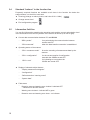
“Fade out detect. / warn. zone segment” function button
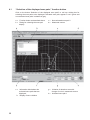
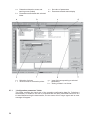
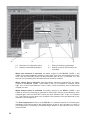
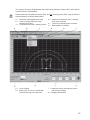
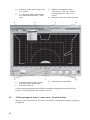
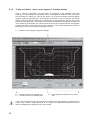
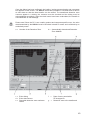
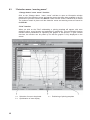
Once a contour is specified, you can fade out segments of the detection zone and
warning zone by setting two coordinate points. The segments between these two points
will be faded out. When you click on this button, all of the tools except zooming appear
against a light gray background. The program now waits for you to position the mouse
pointer and click, thereby setting the coordinates for the beginning and the end of the
segment to be faded out. The section of the contour between the two points is faded out
in the direction of the beam axis. After you have set the first corrective point, the program
provides you with a yellow auxiliary line as a reference. The coordinate display is useful in
helping you check your setting of the faded out area.
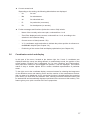
a = Button for activating the segment change
a
b
c
b = Sample contour for comparison
c = First and second coordinate point
d
d = Connecting lines based on the beam
axis
If you fade out sectors that can be entered or walked through, hazards to personnel can
result if the minimum safety distance is no longer met. Additional measures must be
taken to safeguard the danger zone in such cases.
40