1
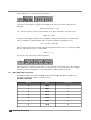
otherwise the unit will continue booting normally;
•
After confirming and releasing all keys, the factory defaults are restored and the unit
reboots. Listen to the SonicIP and note down the IP address.
•
Open the web page at the announced IP address, and change the application from
“ICCLIENT” to “ICMASTER”. Click “Apply to reboot.
After reboot, reconfigure the ICMASTER as it was before.
6.3
Configuring ICPAGING in multimaster environment
In some cases, multiple masters may be needed in the paging system. For example, a door station
may need to ring to the reception at the entrance during normal working hours, and to the security
room at night.
For this purpose, ICPAGING supports several multimaster scenarios:
6.3.1
Call Failover scenario:
In this case maximum 4 masters can be called by the client. If one of the first two masters in the
client IP/ID list are called, and it is in "call reject mode" then the client starts calling the other three
masters in a chain. However, if the first master does not reply (or any other master called in the
chain) then the client will timeout, and may not connect to any master. To prevent this happen, the
"Call next Master" on the client must be enabled.
6.3.2
Call all masters scenario
For that mode the masters must be addressed by IP. This is done by setting the ICCLIENT Call
Masters by and the ICMASTER Call Master by configuration options to “IP Address”.
Then it is enough to set one of the first two master IP addresses in the ICCLIENT list to IP address
0.0.0.0. In this case, when the call button associated with that IP address is pressed, then the call
request is broadcasted to all masters, and one of them may pickup. The masters track the current
state of the calling client status message, and if it changes to something other that 3 (connecting)
then they stop ringing. The masters also stop ringing if more than 5 seconds have elapsed after the
last call request command, sent from the client.
6.3.3
Call all + failover scenario:
Configured as call all masters scenario. However, if there is one master in a call reject mode, the
client will get the reject and start calling the other masters in the list by sending unicast call
requests. The masters that got the broadcasted call request shall stop ringing.
6.4
Understanding BARP address bitmaps
According to BARP protocol, the address bitmap is 128 bytes, allowing to address client IDs 11024 (starting from "1", client ID=0 is not valid). In the ICMASTER application, because of the
limited memory space in the EEPROM only the first 16 bytes can be stored, thus allowing to group
select only the first 128 client IDs.
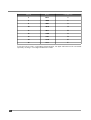
Each byte addresses 8 clients (for ex. byte 0 addresses clients IDs 1-8, byte 1 addresses client IDs
9-16, etc.) Setting a bit within a byte enables the corresponding client, clearing the bit-disables it.
However, the client IDs within a byte are stored in reversed order, i.e. the smallest ID is stored in the
MSB, the biggest at the LSB. The composed address map is then transmitted with the smallest
39
Additional information