1
PINsafe Manual
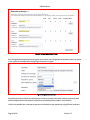
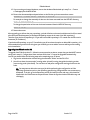
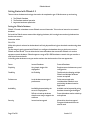
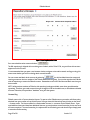
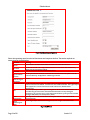
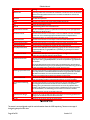
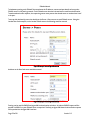
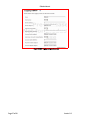
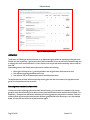
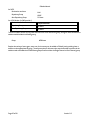
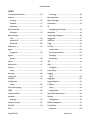
Parameter
Meaning
Administrator
The distinguished name of the LDAP user credentials to access the server. This username
needs to be a fully qualified username for a user within the LDAP server that has the
required privileges
Password
The LDAP user’s password
Server
The name or IP address of the server hosting the directory service
Port
The port on which LDAP is running
Base DN
The base distinguished name of the LDAP server
Synchronization Schedule
How often the PINsafe repository is updated from the directory server (see Appendix D
CRON Strings for details on this)
Username attribute
The name of the attribute on a user object to use as the PINsafe user name. The default
for this is uid. This is the most appropriate attribute if users are implemented as
inetOrgPerson objects, or custom extensions to that object class
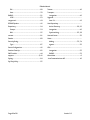
Initial PIN attribute
The name of the attribute on a user object to use as the initial PIN for a user
Initial password attribute
The name of the attribute on a user object to use as the initial password for a user
Base Search Context
The sub-context on the LDAP server in which all users and groups exist
Group ObjectClass Name
The name of the LDAP object class representing a group. For most servers, this will be
groupOfUniqueNames, but groupOfNames is a possibility, or you may have created a
custom schema.
User ObjectClass Name
The name of the LDAP object class representing a user. inetOrgPerson is the standard
schema, but you may have created a custom schema.
Member attribute name
The name of the attribute on a group object that contains the names of members. If the
group object class is groupOfUniqueNames, this will be uniqueMember. If groupOfNames,
then member.
The simple LDAP implementation assumes that group membership is represented by a
multi-valued attribute on the group. If your directory server works differently, you will not
be able to use Simple LDAP, and will need a custom repository class.
Member group attribute name
The name of the attribute on a group object that contains the names of member groups.
This is only relevant in cases where individual members and group members are added
with different attributes, as in the case of the IBM Tivoli Directory Server. If this is
omitted, it is assumed to be the same as the member attribute name.
Import disabled state
Whether or not to import the PINsafe disabled state from the LDAP repository. If this is set
to Yes, the following attribute is used to decide whether or not a user is disabled.
User disabled/enabled flag
name
The name of the attribute on a user that indicates that the user is disabled or enabled.
The inetOrgPerson schema does not allow for such an attribute, so to implement
disabling users, you would need a custom schema. The use of two properties allows
disabling to be handled in one of two ways: either a disabled flag is set to indicate that
the user is disabled, or an enabled flag is set to indicate that the user is enabled.
If no such flag exists, the user is assumed to be active.
Ignore FQ name changes
Whether or not to treat an LDAP user object as the same user if the fully-qualified name
changes, but the PINsafe username remains the same.
Use SSL
Whether or not the server uses SSL for authentication
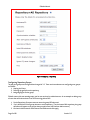
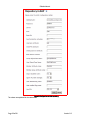
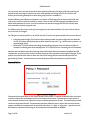
Figure 16.LDAP Values
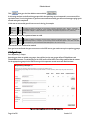
The server is now configured to pull in user information from the LDAP repository. There are two ways of
instigating the pull of this data.
Page 40 of 90
Version 3.3