1
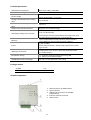
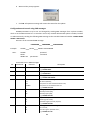
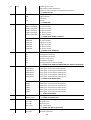
Purpose of contacts
Contact
+E
COM
IN1 ir IN2
NC
C
NO
Description
Power supply + terminal
Power supply – terminal and common terminal for IN1, IN2 inputs
Terminals for input circuits
2 unused terminals
Output relay NC terminal
Output relay common C terminal
Output relay NO terminal
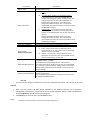
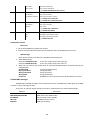
Light indication
Indicator
NETWORK
(denotes
communication
between the
GC1000 and
GSM network)
TROUBLE
(denotes
GC1000
operation)
POWER
(denotes
GC1000 power
supply)
Status
OFF
Yellow flashing
Green light (5 sec.) + N
green flashes
OFF
Green light
Red light (5 sec.) + red
flashes:
1 flash
2 flashes
3 flashes
4 flashes
5 flashes
6 flashes
7 flashes
8 flashes
OFF
Green light
Yellow light
Yellow flashing
Description
GC1000 initialisation in progress
Registration to GSM network in progress
N - relative GSM signal level.
3 flashes – minimum sufficient level (30%),
10 flashes – maximum (100%).
No faults
Programming mode
Insufficient power supply voltage, below 9 V
No SIM card
PIN code error
Registration to GSM network failed for 60 seconds
Operation mode setting error *
Threshold GSM signal level (~ 30%)**
Critical error in the parameters structure
Error in the user phone number list structure
No power supply
Normal power supply
Low supply voltage, below 11,5V
Insufficient power supply voltage, below 9 V
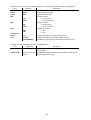
Notes:
* - not a single administrator phone number is entered and the user list is prohibited.
** - use a portable GSM antenna with a cable and fit it to the exterior of the case if
GC1000 is mounted into the metal case of automatics.
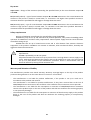
GC1000 installation
Follow this GC1000 installation procedure in order to ensure that GC1000 will be available for
use to everyone with whom SIM card phone number is shared.
1. Purchase GC1000. Factory settings should not be changed!
2. Insert the SIM card of the desired network provider into the GC1000.
-
It is not recommended to use pre-paid contract SIM cards.
SIM card PIN code must be disabled.
SIM card must be already registered in the network.
5