1
Infinitely expandable
Multi-PDP
Features of Multi-PDP
Enjoy a wide flat screen with high brightness and high quality.
Install and move anywhere thanks to its thin shape.
Enjoy your favorite programs with various split-screen features simultaneously presenting
several programs.
1. Safety Precautions
2. How to install
Thank you for purchasing our Multi-PDP monitor.
This manual describes how to use the product and notes in use.
Please read the manual carefully before using it.
After reading this manual, please retain for future reference along with the original purchase receipt.
If you have any questions or a problem occurs, please contact either the company you purchased this
product from or an authorized service center.
Pausing static picture for around 3 hours may cause an afterimage effect.
Warning If you fail to comply with the regulations for safety and proper use,
fire or injury may be caused.
Notice to users
Class A digital device
Contents
It is a device designed for business purpose with a safety certificate for electromagnetic interference, which
user should be mindful of.
3~4
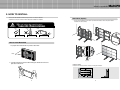
How to move Multi-PDP
Stand Unit (Option)
Wall Mounting Unit (Option)
5
6
7
8
9
10
3. Guidance for Users
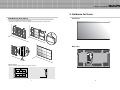
Input/Output Terminals
Set ID Switch Setting
4. How to connect cables
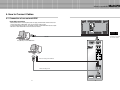
4.1. Connection of one set Multi-PDP
PC & DVI Connection
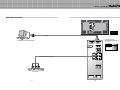
VCR Connection
DVD & DTV Connection
4.2. Connection of M x N Multi-PDP
4.3. Connection of 3 x 3 Multi-PDP
4.4. Setting ID of M x N Multi-PDP
11
13
15
17~18
19
20
5. Setting and operation of MSCS
Supplied Accessories
User’s Manual
Multi-Screen Control
System(MSCS)
Guide Pin(4pcs)
PC Cable
Power Cable
RS232 Cable
Optional Accessories
CVBS Cable
S-Video Cable
Component Cable
DVI-D Cable
(Length 1.2m & 5m)
(Length 1.2m & 5m)
(Length 1.2m & 5m)
(Length 1.2m & 5m)
Wall mounting Unit
Stand Unit
RS-232C Distributor
(refer to page 7)
(refer to page 6)
(Recommended for4 x 4 or more units.)
5.1. Setting 'Com Port'
5.2 “Last design/New design” setting
5.3 Setting 'Multi-Screen' Configuration
5.4 Remote Control
5.5 ID Setting
5.6 Configuration of various modes
5.7 Setting multi screens at a time
5.8 Slide Control
5.9 MSCS Size Control
5.10 Picture Control
5.11 Auto Tracking
5.12 Setting “Time On/Off”
5.13 Test Pattern
5.14 WVGA Mode
5.15 WXGA Mode
5.16 Orion PDP Home Page logon and Version information
6. MSCS Protocol
7. Other tips
7.1 Before calling for service
7.2 About Plasma display panel
22
22
23
24
24
25
26
27
29
30
31
32
33
33
34
34
35~39
40
41
8. Resolution of PC video signal
8.1 DVD/DTV
8.2 PC & DVI
1 Input, 6 Output
1
42
42
43
9. Specifications
2