1
Link Navigator Setup
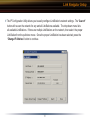
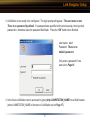
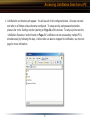
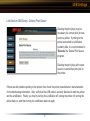
◗ This part of the program changes LinkStation’s IP Address. Check the check box that states ‘Acquire IP
Address Automatically’. This will give LinkStation an IP Address from the network’s router/DHCP server.
A set (static) IP Address and Gateway can also be set if preferred. The ‘Administrator Password’ field
sets an administrator password for the web-based configuration. If desired, type a password in the field.
When finished, press the ‘OK’ button. LinkStation will set the IP Address and Password settings.
NOTE: If LinkStation was plugged directly into a PC, then the DHCP function will timeout and give
LinkStation the default IP Address of 192.168.11.150. You will need to adjust your PC’s IP Address to an
IP Address on the same subnet (e.g. 192.168.11.151).
14