1
Troubleshooting and Routine Maintenance
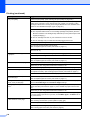
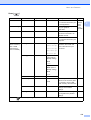
Sending Faxes (continued)
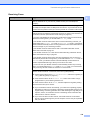
Difficulty
Suggestions
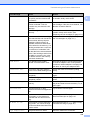
Transmission Verification Report
says ‘RESULT:NG’.
There is probably temporary noise or static on the line. Try sending the fax again.
If you send a PC FAX message and get ‘RESULT:NG’ on the Transmission
Verification Report, your machine may be out of memory. To gain extra memory,
you can turn off Memory Receive (see Turning off Memory Receive Operations
on page 47), print fax messages in memory (see Printing a fax from the memory
on page 49) or cancel a Delayed Fax or Polling Job (see Checking and canceling
waiting jobs on page 38). If the problem continues, ask the telephone company to
check your telephone line.
If you often get transmission errors due to possible interference on the telephone
line, try changing the menu setting of Compatibility to Basic(for VoIP).
(See Telephone line interference on page 139.)
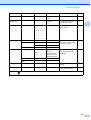
Sent faxes are blank.
Make sure you are loading the document properly. (See Loading documents
on page 21.)
Poor fax send quality.
Try changing your resolution to Fine or S.Fine. Make a copy to check your
machine's scanner operation. If the copy quality is not good, clean the scanner.
(See Cleaning the scanner on page 154.)
Vertical black lines when sending.
Black vertical lines on faxes you send are typically caused by dirt or correction fluid
on the glass strip. Clean the glass strip.
(See Cleaning the scanner on page 154.)
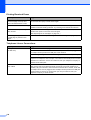
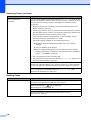
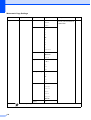
Handling Incoming Calls
Difficulty
Suggestions
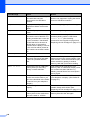
The machine ‘Hears’ a voice as a
CNG Tone.
If Easy Receive is set to On, your machine is more sensitive to sounds. It may
mistakenly interpret certain voices or music on the line as a fax machine calling
and respond with fax receiving tones. Deactivate the machine by pressing
Stop/Exit. Try avoiding this problem by turning Easy Receive to Off.
(See Easy Receive on page 44.)
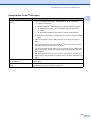
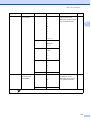
Sending a fax call to the machine.
If you answered on an extension telephone, press your Fax Receive Code (the
factory setting is l 5 1). If you answered on the external telephone (connected to
the EXT jack), press Start to receive the fax. When your machine answers, hang
up.
Custom features on a single line.
If you have Call Waiting, Call Waiting/Caller ID, Voice Mail, an alarm system or
other custom feature on a single telephone line with your machine, it may create
a problem sending or receiving faxes.
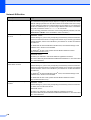
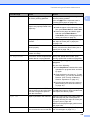
For example: If you subscribe to Call Waiting or some other custom service and
its signal comes through the line while your machine is sending or receiving a fax,
the signal can temporarily interrupt or disrupt the faxes. Brother's ECM (Error
Correction Mode) feature should help overcome this problem. This condition is
related to the telephone system industry and is common to all devices that send
and receive information on a single, shared line with custom features. If avoiding
a slight interruption is crucial to your business, a separate telephone line with no
custom features is recommended.
135
B