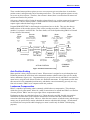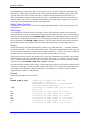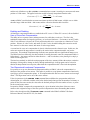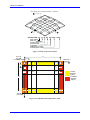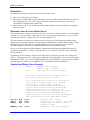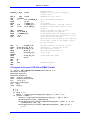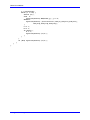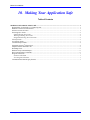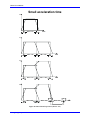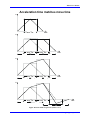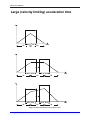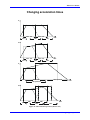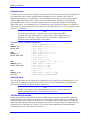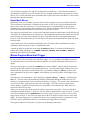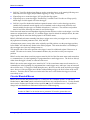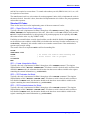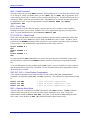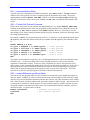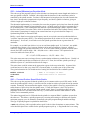
1
^1 USER MANUAL ^2 PMAC ^3 Programmable Multi-Axis Controller ^4 3Ax-602264-xUxx ^5 May 29, 2003 Single Source Machine Control Power // Flexibility // Ease of Use 21314 Lassen Street Chatsworth, CA 91311 // Tel. (818) 998-2095 Fax. (818) 998-7807 // www.deltatau.com Copyright Information © 2003 Delta Tau Data Systems, Inc. All rights reserved. This document is furnished for the customers of Delta Tau Data Systems, Inc. Other uses are unauthorized without written permission of Delta Tau Data Systems, Inc. Information contained in this manual may be updated from time-to-time due to product improvements, etc., and may not conform in every respect to former issues. To report errors or inconsistencies, call or email: Delta Tau Data Systems, Inc. Technical Support Phone: (818) 717-5656 Fax: (818) 998-7807 Email: [email protected] Website: http://www.deltatau.com Operating Conditions All Delta Tau Data Systems, Inc. motion controller products, accessories, and amplifiers contain static sensitive components that can be damaged by incorrect handling. When installing or handling Delta Tau Data Systems, Inc. products, avoid contact with highly insulated materials. Only qualified personnel should be allowed to handle this equipment. In the case of industrial applications, we expect our products to be protected from hazardous or conductive materials and/or environments that could cause harm to the controller by damaging components or causing electrical shorts. When our products are used in an industrial environment, install them into an industrial electrical cabinet or industrial PC to protect them from excessive or corrosive moisture, abnormal ambient temperatures, and conductive materials. If Delta Tau Data Systems, Inc. products are exposed to hazardous or conductive materials and/or environments, we cannot guarantee their operation. PMAC User Manual Table of Contents Chapter 1 Chapter 2 Chapter 3 Chapter 4 Chapter 5 Chapter 6 Chapter 7 Chapter 8 Chapter 9 Chapter 10 Chapter 11 Chapter 12 Chapter 13 Chapter 14 Chapter 15 Chapter 16 Chapter 17 Introduction Getting Started with PMAC PMAC Features Talking to PMAC Troubleshooting Input/Output: Connecting PMAC to the Machine Setting up a Motor Setting up PMAC Commutation Closing the Servo Loop Making Your Application Safe Basic Motor Moves Setting up a Coordinate System Computational Features Writing Programs for PMAC Synchronizing PMAC to External Events Writing a PLC Program Writing a Host Communications Program Table of Contents i PMAC User Manual ii Table of Contents PMAC User Manual Figures Figure 1 PMAC Motion Controller Custom Gate Array IC ..................................................................................... 6-2 Figure 2 PMAC Encoder Input Circuitry ................................................................................................................. 6-3 Figure 3 Encoder Digital Delay Filter ...................................................................................................................... 6-5 Figure 4 Using the PMAC Control Panel Analog (Wiper) Input............................................................................ 6-13 Figure 5 PMAC Pulse and Direction Output ............................................................................................................ 7-3 Figure 6 PMAC 1/T Extension ................................................................................................................................. 7-6 Figure 7 Interpolated Encoder Feedback .................................................................................................................. 7-7 Figure 8 Encoder Conversion Table Process .......................................................................................................... 7-13 Figure 9 Configure Encoder Conversion Table Editing Screen.............................................................................. 7-14 Figure 10 PMAC Encoder Conversion Table Principle.......................................................................................... 7-15 Figure 11 Conversion Table Example for Time-Base Entry .................................................................................. 7-23 Figure 12 PMAC Position Processing .................................................................................................................... 7-28 Figure 13 PMA Compensation Tables.................................................................................................................... 7-31 Figure 14 Two Dimensional Compensation Table ................................................................................................. 7-31 Figure 15 PMAC Commutation................................................................................................................................ 8-2 Figure 16 Hall Effect Waveform Diagram ............................................................................................................... 8-9 Figure 17 PMAC/PMAC2 Direct Microstepping System ...................................................................................... 8-14 Figure 18 PMAC PID and NOTCH Servo Filter...................................................................................................... 9-5 Figure 19 PMAC PID Servo Loop Modifiers........................................................................................................... 9-6 Figure 20 Extended Control Alogorithm Block Diagram....................................................................................... 9-10 Figure 21 Motor x Motion Variables...................................................................................................................... 11-4 Figure 22 Homing Search Move Trajectory ........................................................................................................... 11-6 Figure 23 PMAC Coordinate Definition ................................................................................................................ 12-5 Figure 24 PMAC Multitasking Example ................................................................................................................ 13-4 Figure 25 PMAC Memory Mapping ...................................................................................................................... 13-7 Figure 26 Coordinate System Variables ................................................................................................................. 14-4 Figure 27 Automatic S Curve Acceleration............................................................................................................ 14-5 Figure 28 Linear Mode Trajectories (Sheet 1 of 4) ................................................................................................ 14-7 Figure 29 Linear Mode Trajectories (Sheet 2 of 4) ................................................................................................ 14-8 Figure 30 Linear Mode Trajectories (Sheet 3 of 4) ................................................................................................ 14-9 Figure 31 Linear Mode Trajectories (Sheet 4 of 4) .............................................................................................. 14-10 Figure 32 PMAC Circular Interpolation................................................................................................................ 14-16 Figure 33 PVT Mode Contouring (Hermite Spline) ............................................................................................. 14-18 Figure 34 PVT Segment Shapes ........................................................................................................................... 14-19 Figure 35 Splined Moves (All segments at same time) ........................................................................................ 14-19 Figure 36 Cubic Spline Trajectories ..................................................................................................................... 14-20 Figure 37 PMAC Transition Point Moves (PVT Mode, Parabolic Velocity) ....................................................... 14-20 Figure 38 Compensation – Inside Corner ............................................................................................................. 14-24 Figure 39 Compensation Outside Corner ............................................................................................................. 14-25 Figure 40 Inside Cutter Compensation ................................................................................................................ 14-26 Figure 41 Outside Corner Cutter Compensation Sharp Angle.............................................................................. 14-27 Figure 42 Outside Corner Cutter Compensation – Shallow Angle....................................................................... 14-27 Figure 42 Reversal in Cutter Compensation......................................................................................................... 14-28 Figure 44 Failure When Compensation Extends Full Circle ................................................................................ 14-29 Figure 45 Cutter Compensation in Change of Direction ...................................................................................... 14-30 Figure 46 Cutter Compensation Change of Direction – No Intersection ............................................................. 14-30 Figure 47 Removing Compensation – Inside Corner............................................................................................ 14-31 Figure 48 Removing Compensation – Outside Corner......................................................................................... 14-32 Figure 49 Failures in Cutter Compensation .......................................................................................................... 14-33 Figure 50 PMAC Motion Program Recalculation ................................................................................................ 14-55 Figure 51 PMAC Motion Program Recalculation .................................................................................................. 15-2 Figure 52 Position Following Parameters............................................................................................................... 15-4 Figure 53 PMAC-PC/VME Customer Gate Array (DSPGATE) Encoder Functions........................................... 15-15 Table of Figures i PMAC User Manual Figure 54 Figure 55 Figure 56 Figure 57 ii PMAC-PC/PMAC-Lite Interrupt Structure............................................................................................ 17-7 PMAC-STD Interrupt Structure ............................................................................................................. 17-8 PMAC-VME Communications Flow Diagram .................................................................................... 17-24 Dual Ported RAM Data Gathering Formats ......................................................................................... 17-30 Table of Figures PMAC User Manual 1. Introduction Table of Contents INTRODUCTION ...................................................................................................................................................... 1-1 PMAC Overview...................................................................................................................................................... 1-1 Flexibility............................................................................................................................................................. 1-1 Configuration For a Task .................................................................................................................................... 1-1 PMAC Is a Computer........................................................................................................................................... 1-1 Manual Layout ......................................................................................................................................................... 1-2 Conventions Used in This Manual....................................................................................................................... 1-2 Safety Summary ....................................................................................................................................................... 1-2 Keep Away from Live Circuits ............................................................................................................................. 1-2 Live Circuit Contact Procedures ......................................................................................................................... 1-2 Electrostatic Sensitive Devices ............................................................................................................................ 1-3 Magnetic Media ................................................................................................................................................... 1-3 Related Technical Documentation ........................................................................................................................... 1-3 Technical Support .................................................................................................................................................... 1-3 By Telephone ....................................................................................................................................................... 1-3 By Fax and E-Mail............................................................................................................................................... 1-3 Bulletin Board Service (BBS) .............................................................................................................................. 1-3 Table of Contents 1-i PMAC User Manual 1-ii Table of Contents PMAC User Manual INTRODUCTION PMAC Overview The Delta Tau Data Systems, Inc. Programmable Multi-Axis Controller (PMAC) is a family of highperformance servo motion controllers capable of commanding up to eight axes of motion simultaneously with a high level of sophistication. Through the power of a Digital Signal Processor (DSP), PMAC offers a price-performance ratio for multi-axis control that was not previously available. Motorola’s DSP56001 is the CPU for PMAC, and it handles all the calculations for all eight axes. There are four hardware versions of PMAC: the PMAC-PC, the PMAC-Lite, the PMAC-VME, and the PMAC-STD. These cards differ from each other in their form factor, the nature of the bus interface, and in the availability of certain I/O ports. All versions of the card have identical on-board firmware, so PMAC programs written for one version will run on any other version. The PMAC-STD has a different memory mapping of some I/O. Any version of PMAC may run as a standalone controller, or it may be commanded by a host computer, either over a serial port or over a bus port. Flexibility As a general purpose controller, PMAC can serve in a wide variety of applications, from those requiring sub-micro inch precision to those needing hundreds of kilowatts or horsepower. Its diverse uses include robotics, machine tools, paper and lumber processing, assembly lines, food processing, printing, packaging, material handling, camera control, automatic welding, silicon wafer processing, laser cutting, and many others. Configuration for a Task PMAC is configured for a particular application by choice of the hardware set (through options and accessories), configuration of parameters, and the writing of motion and PLC programs. Each PMAC possesses firmware capable of controlling eight axes. The eight axes can be associated all together for completely coordinated motion; each axis can be put in its own coordinate system for eight completely independent operations; any intermediate arrangement of axes into coordinate systems is also possible. The PMAC CPU communicates with the axes through specially designed custom gate array ICs, referred to as DSPGATES. Each of these ICs can handle four analog output channels, four encoders as input, and four analog-derived inputs from accessory boards. One PMAC can utilize from one to four of these gate array ICs, so specifying the hardware configuration amounts to counting the numbers and types of inputs and outputs. Up to 16 PMAC may be ganged together with complete synchronization, for a total of 128 axes. PMAC Is a Computer It is important to realize that PMAC is a full computer in its own right, capable of standalone operation with its own stored programs. Furthermore, it is a real-time, multitasking computer that can prioritize tasks and have the higher priority tasks pre-empt those of lower priority (most personal computers are not capable of this). Even when used with a host computer, the communications should be thought of as those from one computer to another, not as computer to peripheral. In these applications, the ability of to run multiple tasks simultaneously, properly prioritized, can take a tremendous burden off the host computer (and its programmer), both in terms of processor time, and of task-switching complexity. Introduction 1-1 PMAC User Manual Manual Layout This manual provides a quick step-by-step guide for the beginner setting up a typical system, as well as explaining how to use the various features available on PMAC. It is organized by subject (safety, I/O, servos, trajectories, etc.) to allow quick access by the area of concern. The subjects are ordered by the typical sequence of events to go through to set up a system. The commands are organized in alphabetical order, and the variables, registers, jumpers and connectors are in numerical order. There is extensive cross-referencing between the chapters. Any variable, command, register, jumper, or connector mentioned in chapter 2 is covered in more detail in the appropriate reference chapters. Reading the chapters, there may be topics or depth of coverage not needed at the time. Simply skip these chapters and proceed to a chapter that is of more immediate use. This manual assumes the system integrator who is responsible for this installation knows the basics of working in a Microsoft® Windows environment and has more than a basic understanding of electronics, machine tool technology, and the PMAC motion control board. If any questions about a particular aspect of the installation arise, do not attempt the task until a thorough understanding is gained. Feel free to contact Delta Tau Data Systems, Inc. Technical Support at any time during installation. Refer to the Technical Support section below for information on contacting our technical support department. Conventions Used in This Manual The following conventions are used throughout the manual: <ENTER> Text inside arrows is used to represent keyboard keys or key combinations. <CTRL+F4> OPEN PROGRAM Mono-spaced is used for code listings. Warning Information that, if not observed, may cause serious injury or death. Caution Information that, if not observed, may cause damage to equipment or software. Note A note concerning special functions or information of special interest. Safety Summary The following are general safety precautions not related to any specific procedures and therefore may not appear elsewhere in this publication. These are recommended precautions that personnel must understand and apply during many phases of operation and maintenance. Keep Away from Live Circuits Do not replace components or make adjustments inside equipment with power applied. Under certain conditions, dangerous potentials may exist when power has been turned off due to charges retained by capacitors. To avoid casualties, always remove power, discharge, and ground a circuit before touching it. Live Circuit Contact Procedures Never attempt to remove a person from a live circuit with bare hands. To do so is to risk sure and sudden death. If a person is connected to a live circuit, the following steps should be taken: Call for help immediately De-energize the circuit, if possible. Use a wood or fiberglass hot stick to pull the person free of the circuit. Apply cardiopulmonary resuscitation (CPR) if the person has stopped breathing or is in cardiac arrest. Obtain immediate medical assistance. 1-2 Introduction PMAC User Manual Electrostatic Sensitive Devices Various circuit card assemblies and electronic components may be classified as Electrostatic Discharge (ESD) sensitive devices. Equipment manufacturers recommend handling all such components in accordance with the procedures described in Appendix A. Failure to do so may void your warranty. Magnetic Media Do not place or store magnetic media (tapes, discs, etc.) within ten feet of any magnetic field. Related Technical Documentation Manual Number Manual Title 3A0-602204-363 3A0-602191-363 3A0-602274-363 3A0-602244-363 3A0-602199-363 3A0-602812-363 PMAC & PMAC2 Software Reference PMAC-PC Hardware Reference Manual PMAC-Lite Hardware Reference Manual PMAC-STD Hardware Reference Manual PMAC-VME Hardware Reference Manual Mini PMAC Hardware Reference Manual Technical Support Delta Tau is happy to respond to any questions or concerns regarding PMAC. Contact the Delta Tau Technical Support Staff by the following methods: By Telephone For immediate service, contact the Delta Tau Technical Support Staff by telephone Monday through Friday. Our support line hours and telephone numbers are listed below. By Fax and E-Mail Fax or E-Mail a request or problem to us overnight and we will deal with it the following business day. Our Fax numbers and E-Mail addresses are listed below. Supply all pertinent equipment set-up information. Bulletin Board Service (BBS) In addition, messages can be left on one of the Bulletin Board Services (BBSs). The BBSs are provided for customers, distributors, representatives, and integrators, et al. Download and upload files and read posted bulletins and Delta Tau newsletters. Messages may be left for anyone who is a member/user of the Bulletin Board System(s). A modem and Procomm-Plus or similar communications program is all that is needed to use this service. Many download-upload protocols such as Z-Modem are supported. Delta Tau Data Systems, Inc. Technical Support Phone: (818) 717-5656 Fax: (818) 998-7807 Email: [email protected] Website: http://www.deltatau.com Delta Tau Europa AG Rheinweg 4 CH-8200 Schaffhausen Switzerland PH: 41 (0) 52 625 20 88 FX: 41 (0) 52 625 44 82 Email: [email protected] Introduction 1-3 PMAC User Manual PMAC Japan 3-6-7, Nihonbashi Ningyocho Chuo-Ku Tokyo 103 Japan PH: 011-81-3-3665-6421 FX: 011-81-3-3665-6888 Email: [email protected] Website: www.Pmac-japan.co.jp 1-4 Introduction PMAC User Manual 2. Getting Started with PMAC Table of Contents GETTING STARTED WITH PMAC.......................................................................................................................... 1 Overview ..................................................................................................................................................................... 1 Preparing the Card....................................................................................................................................................... 1 E-Point Jumpers ..................................................................................................................................................... 1 Card Number Jumpers............................................................................................................................................ 1 Communications Baud Rate Jumpers ..................................................................................................................... 2 PCbus Address Jumpers ......................................................................................................................................... 2 STDbus Address Jumpers ....................................................................................................................................... 2 PMAC-VME Interface Setup................................................................................................................................... 2 Encoder Jumpers .................................................................................................................................................... 2 Analog Circuit Jumpers .......................................................................................................................................... 3 Re-initialization Jumper ......................................................................................................................................... 3 Standard and Option 5 PMACs .............................................................................................................................. 3 PMAC with Options 4A, 5A, and 5B....................................................................................................................... 3 Connecting PMAC to the Host Computer................................................................................................................... 4 Bus Connection....................................................................................................................................................... 4 Serial Port Connection ........................................................................................................................................... 4 Installing the PMAC Executive Program................................................................................................................ 4 Establishing Host Communications........................................................................................................................ 5 Terminal Mode Communications............................................................................................................................ 5 Connecting PMAC to the System................................................................................................................................ 5 Machine Connectors............................................................................................................................................... 6 Connecting the Analog Power Supply .................................................................................................................... 6 Incremental Encoder Connection ........................................................................................................................... 6 Amplifier Connection.............................................................................................................................................. 7 Auxiliary Connections ............................................................................................................................................ 7 Software Setup for a Motor ......................................................................................................................................... 8 Encoder I-Variables................................................................................................................................................ 9 Motor I-variables.................................................................................................................................................... 9 Motor Activation..................................................................................................................................................... 9 For PMAC-Commutated Motors Only.................................................................................................................... 9 For Motors Not Commutated By PMAC............................................................................................................... 10 For All Types of Motors........................................................................................................................................ 10 Testing the Output and Polarity............................................................................................................................ 12 Non-PMAC Commutated Motors.......................................................................................................................... 12 Overtravel Limit Polarity...................................................................................................................................... 12 Setting up the Servo Loop ..................................................................................................................................... 13 Closing the Loop................................................................................................................................................... 13 Jogging Moves ...................................................................................................................................................... 13 Power-Up Mode.................................................................................................................................................... 14 Homing Search Move ........................................................................................................................................... 14 Setting up a Coordinate System ................................................................................................................................ 14 Defining an Axis ................................................................................................................................................... 14 Scaling an Axis ..................................................................................................................................................... 15 Multiple Axes ........................................................................................................................................................ 15 Writing a Motion Program ........................................................................................................................................ 15 Using the Program Editor .................................................................................................................................... 16 Executing A Motion Program ................................................................................................................................... 16 Table of Contents 2-1 PMAC User Manual Starting the Program ............................................................................................................................................ 16 Stopping the Program........................................................................................................................................... 16 Refining the Program ........................................................................................................................................... 16 Writing and Executing a PLC Program..................................................................................................................... 17 Starting the PLC Program.................................................................................................................................... 17 Stopping the PLC Program................................................................................................................................... 17 2-2 Table of Contents PMAC User Manual GETTING STARTED WITH PMAC Overview PMAC is a very flexible controller, suitable for many different types of applications, with different types of hosts, amplifiers, motors, and sensors. As such, the card must be configured for a specific application, using both hardware and software features, in order to run that application properly. (PMAC is shipped from the factory with defaults set in hardware and software setup to be satisfactory for the most common application types.) This section explains this configuration process for the inexperienced user. Note The PMAC Setup (PS) program that is provided on the Executive program diskette walks you through each of these steps in an interactive fashion. Use of that program may enable you to skip this part of the manual. By following this procedure, those unfamiliar with PMAC should be able to get the card going quickly and reliably. Once more acquainted with the card, these tasks may be performed in a different order and some of the checking steps may be skipped to perform the installation more quickly. The Getting Started section is a quick introduction to exercise the basic functionality of the card. Each of the areas dealt with in this section is also covered in later chapters in more detail. Preparing the Card First, inspect the card for any signs of damage. PMAC was thoroughly tested, burned in, and tested again (including actually running motors), before it left the factory, but there always exists the (remote) possibility of shipping damage. If any visible damage is seen, report this to Delta Tau immediately. E-Point Jumpers On the PMAC, there are many jumpers (pairs of metal prongs) called E-points (on the bottom board of the PMAC-STD they are called W-points) Some have been shorted together; others have been left open. These jumpers customize the hardware features of the board for a given application. The PMAC was shipped with jumpers configured for the needs of a typical user, so it can be started initially without changing any jumpers. However, we will check a few jumpers here to make sure they are correct before we start. In the Hardware Reference manual for the version of the board is a map of the jumper locations and a detailed description of each jumper's function. Check the jumpers according to the instructions and refer to the map. For more detailed instructions on changing any setting than what is given below, refer to the detailed jumper descriptions. Card Number Jumpers The PMAC was preset in the factory at card number (software address) 0 by the jumper configuration of E40 - E43 on the PMAC-PC, -Lite, and -VME which should all be ON (for the PMAC-STD this is controlled by DIP switches SW1-1 to SW1-4 which should all be OFF). The card number is important for two reasons. First, if several cards are daisy-chained together on the serial interface, it is the software addressing that determines which card should send data and receive commands. Second, card 0 creates its own servo clock signal; all the other cards receive the servo clock signal from the outside as a synchronizing signal. If they do not receive it, they will shut down. Each set of synchronized PMAC cards must have one, and only one, card 0. For the initial setup with PMAC, it is advised that the card be set at software address 0. If this must be changed, refer to the detailed E-point description. Getting Started with PMAC 2-1 PMAC User Manual Communications Baud Rate Jumpers The PMAC was shipped configured to be able to communicate either over the bus interface, or over the serial interface at 9600 baud. The communications setting is controlled by jumpers E44-E47 on the PMAC-PC, -Lite, and -VME, and by DIP switches SW1-5 to SW1-8 on the PMAC-STD. If communicating over the bus port for the initial setup of the board, the settings of these jumpers is not important. However, if the initial communications is over the serial port, make sure these jumpers enable the serial port and provide the baud rate you desire. (The Setup program and Executive program do have automatic baud rate search algorithms. As sent from the factory, E44 and E47 should be OFF, while E45 and E46 should be ON (on PMAC-STD, SW1-5 and SW1-8 should be ON; SW1-6 and SW1-8 should be OFF). PMAC can receive commands from both the bus and serial ports. (Keep commands on the two ports from overlapping.) PMAC powers up or resets in a mode to respond over the serial interface, but any character received over the bus interface changes the mode so it will respond over the bus interface instead. A <CTRL-Z> character received over the serial port changes PMAC back to responding over the serial port. If the default jumper setting must be changed, refer to the detailed E-point description. PCbus Address Jumpers PMAC-PC and PMAC-Lite are shipped from the factory set to communicate over the PC-bus at I/O address 528 decimal (210 hex). This setting is controlled by jumpers E91-E92 and E66-E71 located on the rightmost of the lower-edge bank of jumpers (for this default address, E91-E92 are ON, E66 is OFF, E67E70 are ON, and E71 is off). Unless there is a conflict at this address, start using the first card at this address. If the address must be changed, change the jumpers as shown in the detailed E-point descriptions in the Hardware Reference manual. STDbus Address Jumpers PMAC-STD is shipped from the factory set to communicate over the STD-bus at I/O address 61,584 decimal (F090 hex). This setting is controlled by jumpers W11 to W22 on the bottom circuit board (for this default address, W11-W14 are OFF, W15-W18 are ON, W19 is OFF, W20-W21 are ON, and W22 is OFF). Unless there is a conflict at this address, start using the first card at this address. If the address must be changed, change the jumpers as shown in the detailed E-and W-point descriptions in the Hardware Reference manual. PMAC-VME Interface Setup The VMEbus interface is set up by writing to PMAC registers through the serial port. If using the PMACVME, the initial development is done by communicating to the PMAC over the serial port from an IBMPC or compatible host. Follow the directions for using the serial port. Information for setting up the VMEbus interface is provided in the Writing a Host Communications Program section of this manual. Encoder Jumpers PMAC can take either non-differential (single-ended A, B, C) or differential inputs (A, A/, B, B/, C, C/) from encoders. As shipped from the factory, the card is set up for non-differential encoders, individually selectable by jumpers E18-E21 (not available on PMAC-Lite or PMAC-STD) and E24-E27. In this setup with pins 1 and 2 of each E-point connected, the main signal line is pulled up to +5V with a 470 ohm resistor, and the complementary lines are held at +2.5V with 1 kohm pull-up and pull-down resistors, allowing them to be a steady comparison point for the signal lines. If using single-ended encoders, leave the complementary lines (A/, B/, and C/) floating, so PMAC can hold them at 2.5V. Do not ground these inputs. If using single-ended encoders, have the jumpers set up for non-differential. If using differential encoders with open-collector drivers on each channel (this is rare), have the jumpers set up for differential (pins 2 and 3 connected, providing an effective 500 ohm pull-up on the complementary line). If using encoders 2-2 Getting Started with PMAC PMAC User Manual with differential line drivers, the jumpers can be set either way, although it is preferable to have them set for differential to balance the lines. Note If not using a certain encoder input, it is better to leave it jumpered for single-ended input; otherwise it is much more likely to pick up extraneous noise as count information. Analog Circuit Jumpers On PMAC, the analog output circuitry can be optically isolated from the digital logic circuitry for noise reduction purposes. PMAC is shipped from the factory with the circuits optically isolated (E85, E87, and E88 OFF). It is recommended that the card be used in this configuration, but it is possible to jumper the bus supply voltage (+/- 12V) over to the analog circuitry by putting these jumpers ON, defeating the optical isolation, but eliminating the need for an separate power source. Isolated Setup With the optical isolation in effect, it is necessary to provide separate power supply to the analog output circuitry. On the JMACH connectors, the A+15V analog supply should be brought in on pin 59, the A-15V analog supply on pin 60, and the analog ground (AGND) on pin 58. (Jumper E89 should be ON, and Jumper E90 should connect Pins 1 and 2 to permit this +15V to pull up the limit-switch and other optically isolated inputs, which is required for PMAC to command motion. PMAC is shipped with E89 and E90 in this configuration.) Most amplifiers provide supply outputs for this purpose. Alternatively, an external supply may be used. Non-Isolated Setup The +12V and -12V bus supplies may be used to power the analog output circuitry by jumpering them across to the analog side with E85 (+12V), E87 (Analog GND), and E88 (-12V); however, this defeats the isolation and connects the whole computer electrically to the amplifier. This is not recommended, and should only be done for low power systems. To power the flags from the bus +12V supply as well, Jumper E90 must be moved to connect Pins 2 and 3, so the +12V can pull up the limit-switch and other optically isolated inputs. Re-initialization Jumper If the card powers up or resets with jumper E51 in its default state (OFF for PMAC-PC, -Lite, and -VME; ON for PMAC-STD), PMAC will go through its normal reset cycle, utilizing the setup parameters (such as I-variables that were previously saved in EAROM. Standard and Option 5 PMACs If a PMAC with the Standard or Option 5 CPU powers up or resets with E51 in the non-default state (ON for PMAC-PC, -Lite, and -VME; OFF for PMAC-STD), PMAC will re-initialize as it resets, utilizing the factory default parameters. Usually, this setting will be used only if the card software and parameters are so confused that even basic communications is impossible. For startup, make sure this jumper is in its default state. PMAC with Options 4A, 5A, and 5B If the jumper E51 is ON when a PMAC with the Option CPU executes its reset cycle, PMAC enters a special re-initialization mode that permits the downloading of new firmware. In this mode, the PMAC can communicate over the serial port only at a baud rate of 38,400, regardless of the setting of the baud rate jumpers. Bus communications is also possible on PMAC with bootstrap version 1.01 and newer (most PMAC have one of these versions). To verify the bootstrap version, type the command VER while communicating to PMAC in bootstrap mode. To bypass the download operation in this mode, send a <CONTROL-R> character to PMAC. This puts PMAC in the normal operational mode with the existing firmware. Factory default values for I-variables, Getting Started with PMAC 2-3 PMAC User Manual conversion table settings, and bus addresses for DPRAM and VME are copied from the firmware section of flash memory into active memory. The saved values of these values are not used, but they are kept in the user section of flash memory. For more information on PMAC bootstrap mode and downloading new firmware, refer to the PROM Update Specification sheet included with the PROM. Connecting PMAC to the Host Computer Bus Connection Caution With the board plugged into the bus, it will pull +5V power from the bus automatically. In this case, there must be no external +5V supply, or the two supplies will fight each other, possibly causing damage. With computer power off, plug the PMAC into an open bus slot. The PMAC-Lite requires one slot on the bus, the PMAC-PC requires 1-1/2 slots (permitting a half-size board in the next slot), the PMAC-VME requires two slots (one double slot), and the PMAC-STD requires two slots for the 4-channel version, and three slots for the 8-channel version. Serial Port Connection For serial communications, use a serial cable to connect the PC’s COM port to the PMAC serial port connector (J4 on PMAC-PC, -Lite, and -VME; J1 on PMAC-STD's bottom board). Delta Tau provides cables for this purpose: Accessory 3D connects PMAC-PC or -VME to a DB-25 connector; ACC-3L connects PMAC-Lite to a DB-9 connector; and ACC-3S connects PMAC-STD to a DB-25 connector. Standard DB-9-to-DB-25 or DB-25-to-DB-9 adapters may be needed for a particular setup. If using the ACC-26 Serial Communications converter, connect from the PC COM port to ACC-26 with a standard DB-9 or DB-25 cable, and from ACC-26 to PMAC using the cable provided with ACC-26. Since the serial ports on PMAC-PC and PMAC-VME are RS-422, this accessory can provide the level conversion between RS-232 and RS-422 (communications is possible without this conversion, but at reduced noise margin). Because the conversion is optically isolated, the accessory also helps prevent noise and ground loop problems. Note If the PMAC is not plugged into a bus, it will need an external 5V supply to power its digital circuits. The +5V line from the supply should be connected to pin 1 or 2 of the JMACH connector (usually through the terminal block), and the digital ground to pin 3 or 4. Installing the PMAC Executive Program The initial communications to the card will be done with Delta Tau’s PMAC Executive program (PE) or the accompanying PMAC Setup (PS) program, which are provided on a diskette (ACC-9D or 9W). The diskette contains an Install utility to make this easy. Refer to the Executive Program section in the PEWIN User’s Manual, 3A00OPEWIN-363, for details. 2-4 Getting Started with PMAC PMAC User Manual Establishing Host Communications Either the Executive or Setup program can be used to establish initial communications with the card. Both programs have menus that tell the PC where to expect to find the PMAC and how to communicate with it at that location. If it is told to look for PMAC on the bus, also tell it the PMAC base address on the bus (this was set up with jumpers on PMAC). If it is told to look for PMAC on a COM port, tell it that the baud rate (this was set up with jumpers or switches on the PMAC). The Executive program (ACC-9W) does have an automatic baud rate search to find out how the card is set up. Instructions for setting up the communications are given in detail in the PMAC Executive for Windows User’s manual, 3A0-0PEWIN-363, p1 Setup Manual, 3A0-1SETUP-363, and P2 Setup Manual, 3A02SETUP-363. Refer to those manuals for more explanation. Once the program has been told where and how to communicate with PMAC, it will attempt to find PMAC at that address by sending a query command and waiting for the response. If it gets the expected type of response, it will report that it has found PMAC. If it does not get the expected type of response after several attempts, it will report that it has not found PMAC. Terminal Mode Communications Once the program reports that it has found PMAC, and a key has been pressed to escape the Found/NotFound window, the program should be in terminal emulation mode, so that the PC is acting as a dumb terminal to PMAC. Check to see if a response is received by typing I10<CR> (<CR> means carriage return, the Enter or Return key). PMAC should respond with a six or seven digit number. Now type III<CR>. PMAC should respond with a beep, signifying an unrecognized command and the error-code ERR003 if the I-variable I6 is set to its default value of three. For more information on the error-codes, refer to the explanation of I-Variable I6 in PMAC and PMAC2 Software Reference Manual, 3A0-602705363. Next, if satisfied that communications with the card is at a basic level, type a P <CR> (case does not matter). This command requests a position. PMAC should respond with a number, probably a 0. Now type a <CONTROL-F. Eight numbers (one for each axis) should appear since <CONTROL-F> requests following error from all eight motors; some or all may be 0. Note Even with encoder counts as read-out (no scaling) PMAC position is displayed with fractional counts. Connecting PMAC to the System Once the basic operation of the card and the host communications have been established, it is time to connect PMAC to the amplifier, motor, and feedback device. Of course, most PMAC systems will have more than one motor attached. The process described here can be repeated for multiple motors. As our example here, we will discuss the setup of motor #1. The procedure is parallel for any other motors. There are many combinations of amplifier types, motor types and feedback device types that can be connected to PMAC, each requiring a somewhat different procedure. The easiest connection is that of a DC motor and amplifier with an incremental encoder. That is what is described first here. Other options will be discussed later, or in other sections. Getting Started with PMAC 2-5 PMAC User Manual Typically, connections are made to a terminal block that is attached to the JMACH connector by a flat cable (Acc- 8D or 8P). The pinout numbers on the terminal block are the same as those on the JMACH connector for PMAC-PC. Make sure PMAC is unpowered while the connections are being made. Leave any loads disconnected from the motor at this point. Machine Connectors The primary machine interface connector is JMACH1 (J8 on PMAC-PC, J11 on PMAC-Lite, P2 on PMAC-VME, J4 on PMAC-STD top board). It contains the pins for four channels of machine I/O: analog outputs, incremental encoder inputs, and associated input and output flags, plus power-supply connections. These four channels can be used for two to four motors, depending on the configuration. Our example will use this connector. The next machine interface connector is JMACH2 (J7 on PMAC-PC, P2A on PMAC-VME, J4 on the middle board of an 8-channel PMAC-STD, not available on a PMAC-Lite). It is essentially identical to the JMACH1 connector for two to four more axes. It is only present if the PMAC card has been fully populated to handle eight axes (Option 1), because it interfaces the optional extra components. Note While the numbering scheme for the pins on machine connectors on PMAC-VME is different from that for PMAC-PC, the physical arrangement is the same, and PMAC-VME can use the same terminal numbers on the terminal block board. Connecting the Analog Power Supply The analog output circuitry on PMAC is optically isolated from the digital computation circuitry, and so requires a separate power supply. This is brought in on the JMACH connector. The positive supply (+12 to +15 volts) should be brought in on the A+15V line on pin 59. The negative supply (-12 to -15V) should be brought in on the A-15V line on pin 60. The analog common should be brought in on the AGND line on pin 58. Typically, this supply can come from the servo amplifier. Many commercial amplifiers provide such a supply. If this is not the case, an external supply may be used. Even with an external supply, the AGND line should be tied to the amplifier common. As mentioned before, it is possible to get the power for the analog circuits from the bus, but doing so defeats optical isolation. In this case, no new connections need to be made. However, be sure jumpers E85, E87, E88, E89, and E90 are set up for this circumstance as explained previously in the Preparing the Card section. (The card is not shipped from the factory in this configuration.) Incremental Encoder Connection Each JMACH connector provides two +5V outputs and two logic grounds for powering encoders and other devices. The +5V outputs are on pins 1 and 2; the grounds are on pins 3 and 4. The encoder signal pins are grouped by number: all those numbered 1 (CHA1, CHA1/, CHB1, CHC1, etc.) belong to encoder #1. The encoder number does not have to match the motor number, but usually does. If the PMAC is not plugged into a bus and drawing its +5V and GND from the bus, use these pins to bring in +5V and GND from the power supply. Connect the A and B (quadrature) encoder channels to the appropriate terminal block pins. For encoder 1, the CHA1 is pin 25, CHB1 is pin 21. If using a single-ended signal, leave the complementary signal pins floating. Do not ground them. For a differential encoder, connect the complementary signal lines (CHA1/ is pin 27, and CHB1/ is pin 23). The third channel (index pulse) is optional; for encoder 1, CHC1 is pin 17, and CHC1/ is pin 19. 2-6 Getting Started with PMAC PMAC User Manual Amplifier Connection If PMAC is not performing the commutation for the motor, only one analog output channel is required to command the motor. This output channel can be either single-ended or differential, depending on what the amplifier is expecting. Single-Ended Command Signal For a single-ended command using PMAC channel 1, connect DAC1 (pin 43) to the command input on the amplifier. Connect the amplifier’s command signal return line to PMAC AGND line (pin 58). In this setup, leave the DAC1/ pin floating. Do not ground it. Differential Command Signal For a differential command using PMAC channel 1, connect DAC1 (pin 43) to the plus-command input on the amplifier. Connect DAC1/ (pin 45) to the minus-command input on the amplifier. PMAC AGND should still be connected to the amplifier common. Sign and Magnitude Command Signal If the amplifier is expecting separate sign and magnitude signals, connect DAC1 (pin 43) to the magnitude input. Connect AENA1/DIR1 (pin 47) to the sign (direction input). Amplifier signal returns should be connected to AGND (pin 58). This format requires some parameter changes on PMAC; refer to variable Ix02 and Ix25 below. Jumper E17 controls the polarity of the direction output; this may have to be changed during the polarity test. Motor Commutated by PMAC If using PMAC to commutate the motor, use two analog output channels for the motor. Each output may be single-ended or differential, just as for the DC motor. The two channels must be consecutively numbered, with the lower-numbered channel having an odd number (e.g., use DAC1 and DAC2 for a motor, or DAC3 and DAC4, but not DAC2 and DAC3, or DAC2 and DAC4). For motor #1 example, connect DAC1 (pin 43) and DAC2 (pin 45) to the analog inputs of the amplifier. Do not worry about the phasing polarity yet; it will be checked later. If using the complements as well, connect DAC1/ (pin 45) and DAC2/ (pin 46) the minus-command inputs; otherwise leave the complementary signal outputs floating. To limit the range of each signal to +/- 5V, do so with parameter I169, as discussed below. Auxiliary Connections There are several other lines for each motor that are important. These are: Limit Signals (+LIMn and -LIMn) PMAC has two inputs for each motor intended for the hardware overtravel limit switches. These lines must actively be held low (to draw current through the LED in the optoisolator) in order for the motor to able to move. This requires the use of normally closed (or normally conducting, if solid state) limit switches. These inputs are direction sensitive; they only stop movement in one direction. To implement limit switches, wire the -LIM1 input (pin 53) to one side (positive-voltage end if there is a polarity) of the limit switch expected to be on the positive end of travel; wire the +LIM1 input (pin 51) to the equivalent side of the limit switch expected to be on the negative end of travel. Wire the other side of the limit switches (negative-voltage end if there is a polarity) to PMAC AGND (pin 58), unless keeping the flags on the digital circuit side, isolated from the analog circuitry, in which case, wire the other side to PMAC GND line (pins 3 and 4). If not using limit switches (e.g., for a rotary axis, or for a preliminary test set-up), either tie the limits (pins 51 and 53) to analog ground (pin 58), or disable the limit function in software (refer to variable Ix25, below). Getting Started with PMAC 2-7 PMAC User Manual Note The direction polarity of the limit pins is the opposite of what many would consider intuitive. That is, the limit switch at the positive end of travel should be wired into the -LIM input, and the limit switch at the negative end of travel should be wired into the +LIM input. If the direction input of the encoder is ever changed, the wiring of the limit switches must be changed as well. It is important to check and re-check the direction sense of the limit inputs. Amplifier Enable Signal (AENAx/DIRn) Most amplifiers have an enable/disable input that permits complete shutdown of the amplifier regardless of the voltage of the command signal. PMAC AENA line is meant for this purpose. If not using a direction and magnitude amplifier or voltage-to-frequency converter, use this pin to enable and disable the amplifier (wired to the enable line). AENA1/DIR1 is pin 47. This signal is an open-collector output and requires a pull up resistor to A+15V. For early tests, this amplifier signal may be under manual control. The polarity of the signal is controlled by jumper(s) E17. The default is low-true (conducting) enable. Home Flag Signal (HMFLn) A home switch can be wired between this pin (HMFL1 is pin 55) and analog ground (AGND), or if powered from the bus, to digital ground (GND). The switch may be normally open or normally closed; open is high (1), and closed is low (0). The polarity of the edge that causes the home position capture is programmable with Encoder I-Variables 2 and 3 (I902 and I903 for HMFL1). Amplifier fault signal (FAULTn) This input can take a signal from the amplifier so PMAC knows when the amplifier is having problems, and can shut down action. The polarity is programmable with I-variable Ix25 (I125 for motor #1) and the return signal is analog ground (AGND). FAULT1 is pin 49. With the default setup, this signal must be actively pulled low for a fault condition. In this setup, if nothing is wired into this input, PMAC will consider the motor not to be in a fault condition. Software Setup for a Motor PMAC has a large set of Initialization parameters (I-variables) that determine the personality of the card for a specific application. Many of these are used to configure a motor properly. Once set up, these variables may be stored in non-volatile EAROM memory (using the SAVE command) so the card is always configured properly (PMAC loads the EAROM I-variable values into RAM on power-up). Run the PMAC Executive Program on the PC. The value of an I- variable may be queried simply by typing in the name of the I- variable. For instance, typing I900 <CR> causes the value of the I900 to be returned. The value may be changed by typing in the name, an equals sign, and the new value (e.g. I900=3<CR>). Note Remember that if any I-variables are changed during this setup, use the SAVE command before powering down or resetting the card, or the changes that were made will be lost. Alternatively, use the I-variable pages (under the Configuration menu) to view and change these variables in a more user-friendly fashion. 2-8 Getting Started with PMAC PMAC User Manual Encoder I-Variables Several I-variables are linked to particular encoder inputs, regardless of which motor the encoder is assigned to. These control how the encoder signal is interpreted. They are numbered in the 900s: I900I904 belong to Encoder 1, I905-I909 belong to Encoder 2, and so on, to I975-I979 belonging to Encoder 16. Initially we will only concern ourselves with the first encoder I-variable. I900, I905, I910, Etc. These control the decoding of the encoder signal into counts. Quadrature x1, x2, and x4, plus pulse and direction decode, are all possible. PMAC is shipped with counterclockwise x4 decode set up (I900, I905, ... = 7). Check this value for Encoder 1 (I900), and change it to 7, if it is different. I901, I906, I911, etc. Encoder digital filter disable — This controls whether the digital delay filter for noise spike elimination is turned on. PMAC is shipped with the filters on (I901, I906, ... = 0). I902, I907, I912, etc. Encoder position capture control — This controls which transitions of those associated encoder signals trigger a position capture for that encoder. This must be used for homing moves. It can also be used for other purposes. It specifies an edge of the encoder third channel, the edge of one of the encoder flags, or the edge of a logically combined signal from both. If it uses a flag, also set the next variable. The default value for this variable is 1 specifying the rising edge of the third channel. I903, I908, I913, etc. Encoder flag select control — This controls which of the encoder flags is used to trigger a position capture if the previous I-variable has specified that a flag be to be used. This is almost always set to 0 to specify the home flag (HMFLn). Motor I-variables PMAC can be attached to up to eight motors, called #1 to #8. A motor is defined in PMAC by setting up Ivariables that tell the I/O addresses of the input and output data (where to look for the feedback position, and where to send the output command). The I-variables for motor #1 are in the 100s (I100-I184); for motor #2 in the 200s, and so on, to the 800s for motor #8. As a shorthand to refer to a particular variable independent of a particular motor, the hundreds digit is replaced with the letter x. For instance, Ix20 refers to I120 for motor 1, or I220 for motor 2, and so on. In this example, set up motor #1. In preparation, disable motor #1 by cutting power to the amplifier. Motor Activation The first thing to do in the software setup of a motor is to activate the software algorithms for the motor by setting Ix00 to 1. For Motor #1, set I100 to 1. For PMAC-Commutated Motors Only If using PMAC to commutate this motor, set up the commutation algorithm I-variables at this point. First, set I101 to 1 to tell PMAC that motor #1 is to be commutated by PMAC. Analog Outputs Tell PMAC which pair of analog outputs are being used to command the amplifier. Do this by setting Ix02 to the lower address of the pair of outputs that have been wired to the amplifier. To tell motor 1 to use DAC1 and DAC2 in the example, set I102 to $C002 (49154). Getting Started with PMAC 2-9 PMAC User Manual Commutation Encoder The encoder register used for commutation feedback must be specified with Ix83. The default value of Ix83 specifies Encoder 2x-1; e.g. ENC1 for Motor #1, ENC3 for Motor #2, and ENC15 for Motor #8. The actual value of Ix83 is the address of the phase position register for that encoder. For ENC1 (Motor #1), this value is 49153 ($C001). If setting up a PMAC-commutated Motor #1 using ENC1, make sure I183 is set equal to 49153 ($C001). Counts per Commutation Cycle Next, determine the number of encoder counts per commutation cycle (per pole pair). I900 defines an encoder count here (1, 2, or 4 counts per line). For instance, if using a 2500 line per revolution encoder with x4 decode and a 4-pole motor, the calculation would be: (2500 lines/rev) * (4 counts/line) / (2 polepairs/rev) = 5000 counts/pole-pair. If this value is an integer, set I170 to 1, and set I171 to the value. If the value is not an integer (for example, a 6-pole motor and a 1024-line encoder), figure out the integer multiplier required to make it an integer (usually 3). In this case, set I170 to the multiplier, and I171 to the multiplied integer value. Angle Between Phases If it is a 3-phase motor, set I172 to 85. This tells PMAC that the two phases are 85/256 (1/3) cycle apart. This may be changed later to 171 if the polarity of the signals are wrong. If it is a 4-phase motor, set I172 to 64 (64/256 = 1/4); the may be changed later to 192. Phase Search Parameters Now, if using a brushless DC (synchronous AC) motor, establish the parameters for the power-up phasefinding search. Initially, set I173 (the magnitude of the phase-finding output) to 8192 which is one-quarter of full output. Next, set I174 (the time for each half of the phase-finding routine) to 5 servo cycles. These can be optimized later. Now make sure the induction motor parameters I177 and I178 are set to 0, so PMAC will not think this is an induction motor. Slip Gain and Magnetization Current If using an AC induction motor, do not worry about power-up phase finding. Set I173 and I174 to 0. Also, set I177 (magnetization current) and I178 (slip gain). Initially, set I177 to 3200 (1/10 full current) and I178 to 2500 (for a low-slip motor) or 5000 (for a high-slip motor). These can be optimized later. The fact that I178 is greater than zero prevents a phasing search, so I173 and I174 are irrelevant. For Motors Not Commutated By PMAC If PMAC is not performing the commutation for the motor, set Ix01 to 0 so that the commutation routines are disabled and only one analog output is used. In the example using motor 1, set I101 to 0. This is the default. DAC Output Address If not commutating from PMAC, Ix02 must be set to the register address of the single analog output used to command the amplifier. Define the output register address for motor #1 using I102. In order to send the motor 1 output command to the DAC1 pin connected, set I102 address $C003 (49155 decimal). This is the default value. If the amplifier is expecting sign and magnitude input, set I102 to $1C003 instead. For All Types of Motors Regardless of whether PMAC is commutating the motor or not, several variable values must be established to tell PMAC where to get its servo loop information. Position-Loop (Load) Feedback Address Variable Ix03 defines the register to be used for the position-loop servo feedback. Typically, this reads a processed encoder value from what is known as the encoder conversion table. To have motor 1 read the processed input from Encoder 1, I103 must be set to 1824 ($720). This should be the value preset at the factory. 2-10 Getting Started with PMAC PMAC User Manual Velocity-Loop (Motor) Feedback Address It is possible to have separate motor and load feedback encoders (this can allow good control even with poor coupling). In this case, the sensor on the load is used to close the position loop; it is addressed by Ix03 above. The sensor on the motor is used to close the velocity loop; it is addressed by Ix04. The vast majority uses only one feedback encoder, whether it is on the motor, or on the load. For these, Ix04 will be set to the same value as Ix03, addressing the same encoder. If only using one feedback encoder (ENC1) for the Motor #1 in the example, make sure I104 is set to 1824, just as I103 is (this is the default). Flag Address Now, make sure the card knows where to look for its limit and home flag inputs, which is controlled by I125 (remember that this is essential to command a move). To use +LIM1, -LIM1, and HMFL1, I125 should be set to ($C000) 49152. This should be the value set at the factory. If not using overtravel limit switches and the limit pins have not been wired to ground, set I125 to $2C000 instead. If the amplifier is expecting sign (direction) and magnitude command, disable the use of AENAn/DIRn as an amplifier-enable line so it can be used for direction. For motor 1, set I125 to $1C000. If the limits should be disabled, set I125 to $3C000. Reading Position Now start checking on some basic motor functions. First, try to read motor position. With the Executive program in terminal mode, type #1<CR> to address motor 1. Next, type P<CR>, and PMAC should return a position value to the terminal screen. Now turn the motor shaft by hand and type P<CR> again. The reported position should have changed. (Alternately, use the F7 position reporting window of the PMAC Executive program, which automatically polls position repeatedly.) Repeat this as often as needed to verify that the position counting is working properly in both directions. If it is not, check the following: • • • • • • • • • Is the encoder receiving power (+5V and GND)? Are both quadrature channels connected properly? If single-ended, are the complementary lines floating? If single-ended, is E27 (or equiv.) in default setting? If differential, has E27 been changed? Is the motor activated (I100=1)? Is I103 set to the proper encoder input? Is I900 set for proper decode of the signal? Can a signal be detected with a scope or voltmeter? Changing Position Direction If getting position feedback, but want to change the positive and negative directions, use I900 (for ENC 1) to change the direction sense (or exchange the Channel A and Channel B inputs). For example, if I900 is 7, changing it to 3 will change the direction sense. Setting DAC Output Range Check the output range by looking at I169. This is the maximum value that can be written to the DAC, whose full range is -32,768 to +32,767 (16 bits for +/- 10V). The default value of I169 is 20,480, which is about +/-6.25V. If the amplifier is expecting +/-10V and the full range is being used, set I169 to 32,767. If the amplifier is expecting a differential signal with up to +/- 10V between the lines (each line is +/-5V), set I169 to 16,384 or less. Getting Started with PMAC 2-11 PMAC User Manual Testing the Output and Polarity Next, check the outputs and whether the output polarity matches the feedback polarity. To do this, provide power to the amplifier. First, have PMAC disable its own outputs for the motor by typing K<CR> (kill). Make sure that the motor has no load at this point so that uncontrolled motion cannot damage anything. Now provide power to the amplifier. PMAC-Commutated Motors If PMAC is commutating this motor, get the polarity of the commutation feedback and the phased commutation outputs to match. If the feedback polarity direction has been set to get it to count up when moving in the proper direction, test whether the phasing polarity of the outputs as set by I172 is correct. (There is a 50% chance of having this correct.) Permanent-Magnet Brushless Motors If using a permanent-magnet brushless motor, check the polarity match by a technique that drives the motor like a stepper motor. First, type O0<CR> (open-loop output of zero magnitude). Then type I129=2000<CR>, which puts an offset on one of the phases, forcing current through it. Note the position of the motor in this state. Next type I179=2000<CR>, which puts the same offset in the next phase. Note the position again, and determine whether it counted up or counted down since the first check. If the position counted down, I172 should be set to 85 for a 3-phase motor, or 64 for a 4-phase motor. If the position counted up, I172 should be set to 171 for a 3-phase motor or 192 for a 4-phase motor. Before continuing, make sure to set the offset parameters I129 and I179 back to 0. Induction Motors If this motor is an induction motor, check the polarity by trying to run the motor with both polarities (settings of I172), and seeing which produces satisfactory results. Type $<CR> to initiate the phasing of the motor. Now type O10<CR> (open-loop output 10%) and see if the motor spins well (even if it does not accelerate quickly). The position should be counting up. Next, kill the output temporarily with K<CR> and change the output polarity by giving I172 a new value (e.g. if it was 85, change it to 171). Now type O10<CR> again and observe the response. Kill the motor again and set I172 to the value that gave decent response. If there is no movement with either setting, check the troubleshooting guide immediately above. Non-PMAC Commutated Motors If PMAC is not doing the commutation for a motor, make sure that the servo feedback and output polarities match. Do this by giving the motor an open-loop output command and seeing which way the position counts. Type O10<CR> (open-loop output 10%). The position counter should count up. If it counts down, there is a polarity mismatch. Now type O-10<CR>. The position counter should count down. If it counts up, there is a polarity mismatch. If the counter does not count in opposite directions for the two tests, there is an encoder and/or amplifier problem. If there is a polarity mismatch, there will be a potentially dangerous runaway condition when trying to close the loop. To fix this, change I900 (e.g. from 7 to 3, or 3 to 7) to reverse the counting sense. This will change the positive direction of the axis. Alternatively, exchange the motor leads instead. If there is no movement, check the voltage on the output pin. It should be approximately 1V relative to AGND. If it has not changed, recheck I102, the analog power supply, and the limit-input configuration. If the voltage has changed but there is still no movement, recheck the amplifier and motor connections. Overtravel Limit Polarity Make sure as the direction sense of the motor is verified the hardware position limit switches are wired into the proper inputs. That is, the limit switch on the positive (counting up) end of travel must be wired into the -LIMn input, and the switch on the negative end must be wired into the +LIMn input. If these are reversed, the hardware limit functions will not work. 2-12 Getting Started with PMAC PMAC User Manual Setting up the Servo Loop Warning Make sure the motor is in open-loop mode before restoring the proportional gain. Otherwise, it may lurch to an old commanded position. This is enough to see if the motor is working. Make sure the motor can run free (preferably no plant attached at this point) and that things can be stopped quickly so that no damage can be caused. Type K<CR> to disable the output(s), then restore the proportional gain by setting I130 (try 2000 initially for very fine resolution systems, 50,000 for very coarse systems, or somewhere in between for medium resolution). Closing the Loop Now close the motor’s servo loop by typing J<CR> (the jog-stop command, which brings the motor into zero-velocity position control). It should hold position at this point, resisting attempts to move it away, at least gently. If it runs away, there is a mismatched polarity; re-run the above polarity tests. If there is loss of control or the motor starts behaving wildly, type K<CR> to disable the motor. Weak Loop If it does not resist being turned, or does so very weakly, try increasing proportional gain (I130). Try doubling it until there is some reasonable stiffness, but do not try yet to get the maximum possible stiffness. The tests described below will help do that. Oscillations If the motor has a tendency to oscillate at low to moderate frequency, there is inadequate derivative gain. Try doubling I131 and see if the oscillation goes away. Buzzing If the motor has a tendency to oscillate at high frequency (a "buzz"), there is too much proportional gain, or maybe too much derivative gain. Try lowering I130 (or I131) until the buzz disappears. Extensive Servo Loop Tuning The PMAC Executive Program for PC-compatibles has a large section devoted to assisting the user in optimizing the servo loop parameters for a motor. It allows performance of step moves and profiled moves and the response is plotted to the screen with key statistics calculated, so that easy choices may be made about changing gains. This process is documented in detail with examples in the manual for the PMAC Executive Program. In addition, there is an auto-tuning feature that lets the Executive program make the decisions about what the gains should be. The program excites the system, evaluates the response, and calculates the gains necessary to achieve the desired response. Remember that precise tuning cannot be done until the load has been connected to the motor. Our goal at this point is simply to get the motor moving reasonably well without a load. Jogging Moves With these two parameters (I130 and I131) at reasonable levels, good performance in moves should be achieved. Try a jog move first. Before doing the move, set up the jog speed (I122, in counts/msec) acceleration time (I120, in milliseconds), and S-curve time (I121, in msec) to desired values (to be safe, use low speed and high acceleration times at first). Now type J<CR> — the motor should turn in the positive direction. Getting Started with PMAC 2-13 PMAC User Manual Type J<CR> and the motor should stop. If it takes a while to stop, either slow down the move next time or increase I130 to reduce the error. J-<CR> should cause the motor to turn in the negative direction, and J<CR> should stop it again. J=<CR> should cause the motor to jog to the last pre-jog position and stop there automatically. Optimizing Jog Performance If your jog speed seems slower than desired, one or more of PMAC automatic safety limit parameters may have been used, particularly if there is a fine-resolution system. The first of these is I119, which is the 2 maximum permitted motor jog acceleration, expressed in counts/msec . The default value is quite low for most systems. Increase it several orders of magnitude for now to get it out of the way. Velocity Feedforward Gain When jogging at constant speed, monitor following error and increase velocity feedforward gain (I132) to minimize the following error. If there is a current-loop amplifier, set I132 equal to I131 or just slightly greater. Integral Gain To eliminate steady-state error, bring in some integral gain. Set I133 to 10,000. This should provide weak integral action, but enough to eliminate steady-state error over a few seconds. Now try increasing I133 some more to get quicker action. It should be safe to raise it in increments of 10,000 to get the performance needed (quick restoration of commanded position without introducing oscillation). If there is oscillation, reduce the integral gain until the oscillation is eliminated. If there is no effect from adding integral gain, check the integration limit parameter I163. If this is low (100,000 or less), it will limit what integral gain can do. If this is the problem, set this parameter to its default value by typing I163=*<CR>. Power-Up Mode For future power-up/reset cycles, set I180 so power up is done in the mode wanted. If I180 is zero, Motor #1 will power up "killed" (0V output, AENA signal false). It will not attempt to control until a servo command is given (usually J, A, or <CTRL-A) for a non-PMAC-commutated motor, or a $ command for a PMAC-commutated motor. This I-variable must be stored in non-volatile memory (with the SAVE command) to be effective at the next power-up/reset cycle. Homing Search Move To do a homing search move, first check the position-capture I-variables (I902 and I903 in the example). Make sure they are set up to capture the position where the home position should be. With a bare motor, only use the third channel of the encoder. Set I902 to 1 to force a capture on the rising edge of the third channel. Next, set the homing speed with I123 (in units of counts/millisecond). Changing the sign of I123 changes the direction of the homing move. Homing accel/decel is controlled by I120 and I121 (which also affect jog moves). Now command a homing move with the HM command, and the motor will move as specified until the proper signal edges is found, then decelerate to a stop and come back to the position of the trigger, plus or minus an offset amount determined by I126. Setting up a Coordinate System In order to run a program on PMAC, first define a coordinate system. These motors execute a program. For this example, set up coordinate system 1. Defining an Axis Type &1<CR>. This will address coordinate system 1. (Confirm which coordinate system is addressed by typing &<CR> and PMAC will return the number of the currently addressed coordinate system.) Next, type #1->X<CR> (the arrow between 1 and X is comprised of the minus sign and the greater- than symbol; 2-14 Getting Started with PMAC PMAC User Manual there should be no space before the arrow). This matches the X axis of coordinate system 1 (&1) to motor #1. As it is here, one unit in X is one encoder count. Scaling an Axis To scale the X units, place a scale factor before the X in the definition statement. (i.e., this axis definition statement is what defines the scale of the user position units.) For instance, if using a 500-line encoder on the motor, with 4X decoding (refer to I900), and a 5-pitch (five turns per inch) screw converting to linear motion, yielding 10,000 counts/inch, use the command #1->10000X to define the X axis in inches. Multiple Axes Caution Every motor in the coordinate system must have its limit inputs held low in order for any program to run in that coordinate system, even if the program does not use that motor. If another motor is set up, include it in this same coordinate system. For instance #2->10000Y matches the second motor to the Y-axis in this coordinate system at 10,000 counts per user unit. This is about all there is to defining a coordinate system. If a motor is assigned to a coordinate system, make sure that both its limits are held low, either through switches or directly to AGND (nothing else for that motor needs to be connected). Define the time units to work in (I190 for coordinate system 1). This parameter holds the number of milliseconds in the time units being used. For instance, to specify the velocity in user position units per second (e.g., inches/sec), set I190 to 1000 (this should be the default). To work in minutes (e.g. rpm), set I190 to 60,000. Writing a Motion Program With the coordinate system(s) defined, begin to write a program. Open a program buffer for entry by typing OPEN PROG 1<CR>. and CLEAR<CR> to erase anything that might exist in the buffer. Now the program lines entered will be held in program buffer 1. A program to do a simple back-and-forth trapezoidal move will look like this (with comments): LINEAR ABS F2.00 X10.0 X0.0 ; ; ; ; ; Linear interpolation mode Absolute move mode 2 inches/sec move to X = 10 inches move back to X = 0 inches If the X-axis is defined with a 1-to-1 scaling {#1->X}, this program would only cause a 10 count move over 5 seconds {and back}, which might not be noticeable. The acceleration time for the moves is controlled by Ix87, and the S-curve portion of that acceleration time is controlled by Ix88 (for the coordinate system x that is running the program). Getting Started with PMAC 2-15 PMAC User Manual When finished entering the program, type CLOSE <CR> to exit the program buffer. To enter a new program in the place of the one in the buffer, open the buffer, type CLEAR, and enter the new program. An example follows: OPEN PROG 1 CLEAR ; erase old program F2.36 X5.346 Y0 X5.346 Y5.346 X0 Y5.346 X0 Y0 ; ; ; ; ; 2.36 in/sec first side of square second side third side fourth side CLOSE Using the Program Editor It is easiest to type programs using the program editor in the PC Executive (terminal) Program. Here the program can be changed at will, and then it can be downloaded to the card by selecting the Download Editor to PMAC menu option, or by hitting <ALT-D> when the editor screen is displayed. Include in each program space the lines to open the buffer, to clear out the old program, and to close the buffer at the end. Executing A Motion Program Starting the Program With a program held in PMAC buffer, it is easy to run. To run program 1, make sure the coordinate system to run the program is addressed (&1 in this case), type B1<CR> (point to beginning of program 1), then type R<CR>. The B command with a number makes the specified program the working (operative) program for the coordinate system. The R command will start execution of the program. Stopping the Program There are several ways to stop a running program. Q<CR> (Quit) stops the program at the end of the presently executing move. A<CR> (Abort) causes the motors in the coordinate system to start decelerating immediately. Both of these commands leave the program ready to execute (run or step) the next line in the program. To re-start the program at the beginning, type B<CR> (the B command without a number operates on the current working program). This resets the program counter to the top (completion of a program automatically resets the counter to the top). Remember that the motor velocity and acceleration limits (Ix16 and Ix17) are in effect for all motors in the coordinate system. If a motor is asked to exceed one of these limits, all motors in the coordinate system are slowed to honor the limit. If the programmed moves seem slower than what as expected, this could be the cause. Refining the Program Few times will the program work exactly right the first time. Go through an iterative process of editing, downloading, executing, and evaluating. This is one of the key reasons for using the program editor. The required changes can be made in the editor without re-typing the entire program. Then, the entire revised program can be downloaded to PMAC. This process is why it is a good idea to have the CLEAR command immediately after the OPEN command: it erases the old version in PMAC so the new version can replace it. There is no reason in this process to upload the program from PMAC. The program editor maintains its copy even after the download, and it keeps comments with it. The only reasons to upload a program are to confirm that it is downloaded properly, and to restore a program that was lost by the host computer. 2-16 Getting Started with PMAC PMAC User Manual Writing and Executing a PLC Program PLC programs are useful for doing monitoring and calculations in background, asynchronously to any motion programs. They are written much like motion programs, and have much of the same language (although no motion commands). There can be up to 32 PLC programs, which can be enabled and disabled individually. The enabled programs cycle through continually in background, as time allows. Start by writing a simple PLC program that increments a variable each time through. Using either Terminal mode or (preferably) the Program Editor in the Executive Program, type the following: CLOSE OPEN PLC 1 CLEAR P1=P1+1 CLOSE If using the Editor, download what has been written to PMAC by selecting the Download Editor to PMAC menu option, or by typing <ALT-D>. Now, see if the program got to PMAC properly. From the Terminal mode, type LIST PLC 1<CR>. The following response should appear: P1=P1+1 RETURN PMAC automatically adds a RETURN statement {short form: RET} to the end of a program when it gets a CLOSE command. The OPEN, CLOSE, and CLEAR commands are not actually part of the program; they are on-line commands to control the program buffer operation. Starting the PLC Program Now type I5=2<CR>. This permits PLCs 1 to 31 to be enabled. Next type ENABLE PLC 1. This should actually start operation of the PLC program. The variable P1 should be incrementing steadily. Verify this by repeatedly typing P1<CR>. The reported value should be greater each time. If it is not, recheck the value of I5, the listing of the program, and try re-enabling the PLC. Other things can be happening in between cycles of the PLC program. Reset the value of P1 by typing P1=0<CR>. PMAC will execute this command, and then PLC 1 will start incrementing the value again from that point. Motion programs can be run simultaneously. Re-run the motion program and notice that P1 keeps incrementing during the operation of the motion program. Stopping the PLC Program To halt operation of the PLC program, type DISABLE PLC 1. Note that repeated queries of P1’s value yield the same answer. ENABLE PLC 1 will re-enable operation of the program. Each time a PLC program buffer is opened for editing, the program is automatically disabled. Closing the buffer does not automatically re-enable the program. When working on a PLC program with the program editor, follow the CLOSE command with an ENABLE PLC 1 command, so that this command does not need to be re-typed every time the edited PLC program is downloaded to PMAC. Getting Started with PMAC 2-17 PMAC User Manual 2-18 Getting Started with PMAC PMAC User Manual 3. PMAC Features Table of Contents PMAC FEATURES................................................................................................................................................ 1 Executing Motion Programs................................................................................................................................. 1 Executing PLC Programs ..................................................................................................................................... 1 Servo Loop Update............................................................................................................................................... 1 Commutation Update ........................................................................................................................................... 1 Housekeeping ....................................................................................................................................................... 1 Communicating With the Host ......................................................................................................................... 2 Task Priorities ................................................................................................................................................. 2 Table of Contents 3-1 PMAC User Manual 3-2 Table of Contents PMAC User Manual 1. PMAC FEATURES Executing Motion Programs The most obvious task of PMAC is executing sequences of motions given to it in a motion program. When told to execute a motion program, PMAC works through the program one move at a time, performing all the calculations up to that move command (including non-motion tasks) to prepare for actual execution of the move. PMAC is always working ahead of the actual move in progress, so it can blend properly into the upcoming move, if required. Refer to the Writing Programs for PMAC section of this manual for more details. Executing PLC Programs The sequential nature of motion program suits it well for commanding a series of moves and other coordinated actions; however these programs are not good at performing actions that are not directly coordinated with the sequence of motions. For these types of tasks, PMAC provides the capability for users to write PLC programs. These are named after Programmable Logic Controllers because they operate in a similar manner, continually scanning through their operations as fast as processor time allows. These programs are very useful for any task that is asynchronous to the motion sequences. Refer to the Writing Programs for PMAC section of this manual for more details. Servo Loop Update In an automatic task that is essentially invisible to the PMAC user, PMAC performs a servo update for each motor at a fixed frequency (usually around 2 kHz). The servo update for a motor consists of incrementing the commanded position (if necessary) according the equations generated by the motion program or other motion command, comparing this to the actual position as read from the feedback sensor, and computing a command output based on the difference. This task occurs automatically without the need for any explicit commands. Refer to the Closing the Servo Loop section of this manual for more details. Commutation Update If PMAC is requested to perform the commutation for a multiphase motor, it will perform commutation updates automatically at a fixed frequency (usually around 9 kHz). The commutation, or phasing, update for a motor consists of measuring and/or estimating the rotor magnetic field orientation, then apportioning the command that was calculated by the servo update among the different phases of the motor. This task occurs automatically without the need for any explicit commands. Refer to the Setting Up PMAC Commutation section of this manual for more details. Housekeeping PMAC regularly and automatically performs housekeeping tasks that make sure the system is in good working order. These tasks include the safety checks, such as following error limits, hardware overtravel limits, software overtravel limits, and amplifier faults. They also include the update of the watchdog timer. If any problem in hardware or software keeps these tasks from executing, the watchdog timer will trip, and the card will shut down. Refer to the Making Your Application Safe section of this manual for more details. PMAC Features 3-1 PMAC User Manual Communicating With the Host PMAC can communicate with the host at any time, even in the middle of a sequence of motions. PMAC will accept a command, and take the appropriate action (putting the command in a program buffer for later execution), providing a data response to the host, starting a motor move, etc. If the command is illegal, it will report an error to the host. Task Priorities These tasks are ordered in a priority scheme that was optimized to keep applications running efficiently and safely. While the priority levels are fixed, the frequency at which various tasks are performed is under user control. Refer to the Setting Up PMAC Commutation and Closing the Servo Loop sections of this manual for more details. 3-2 PMAC Features PMAC User Manual 4. Talking to PMAC Table of Contents TALKING TO PMAC.................................................................................................................................................1 Basic Aspects Of Communicating With PMAC .......................................................................................................1 Communications Ports ..............................................................................................................................................1 Active Response Port ............................................................................................................................................1 Serial Interface .....................................................................................................................................................1 PC bus Interface ...................................................................................................................................................3 STD bus Interface .................................................................................................................................................3 VME bus Interface ................................................................................................................................................3 Giving Commands to PMAC ....................................................................................................................................4 PMAC Processing of Commands..........................................................................................................................4 Command Acknowledgement................................................................................................................................4 Data Response ......................................................................................................................................................4 Data Integrity .......................................................................................................................................................4 Data Response Format .........................................................................................................................................5 On-Line (Immediate) Commands..............................................................................................................................5 Types of On-Line Commands................................................................................................................................5 Motor-Specific Commands ...................................................................................................................................5 Coordinate-System-Specific Commands ...............................................................................................................6 Global Commands ................................................................................................................................................6 Buffered (Program) Commands ................................................................................................................................6 Rotary Motion Program Buffer.............................................................................................................................7 Multiple-Card Applications.......................................................................................................................................7 Bus Communications ............................................................................................................................................7 Simultaneous Commands......................................................................................................................................7 Serial Communications.........................................................................................................................................7 Serial Card Addressing.........................................................................................................................................8 Setting Up the Addresses ......................................................................................................................................8 Multi-Card Mode Variable ...................................................................................................................................9 Addressed-Card Actions .......................................................................................................................................9 Simultaneous Addressing......................................................................................................................................9 Handling Data Response ......................................................................................................................................9 Power-Up State...................................................................................................................................................10 Control-Character Commands ...........................................................................................................................10 Resetting PMAC .....................................................................................................................................................11 PMAC Reset Actions...........................................................................................................................................11 PMAC Re-initialization Actions: Standard CPU................................................................................................11 PMAC Re-initialization Actions: Flash CPU .....................................................................................................12 Re-initialize Command .......................................................................................................................................13 Table of Contents 4-i PMAC User Manual 4-ii Table of Contents PMAC User Manual TALKING TO PMAC Basic Aspects Of Communicating With PMAC This section covers basic aspects of communicating with PMAC from a host computer. At this level, there is a program for the host computer that processes these communications. The PMAC Executive Program (Accessory 9D) is the most common of these programs. If there will be a host computer in the final application, communications routines must be written for the host computer as part of the front-end software for the application. That is a more advanced topic, and it is covered in the Writing a Host Communications Program section of this manual. This section concentrates on the actual communications. At a basic level, PMAC can communicate to a host dumb terminal, either over the serial (RS-422) or the parallel (bus) interface. The communications mostly consists of lines of ASCII characters sent back and forth. Of course, most of the time the host will be a computer with considerably more intelligence, but at root it will talk to the card as if it were a terminal. The PMAC Executive PC program has a terminal emulator mode to do this directly. Communications Ports Each version of PMAC can communicate either over its serial port or its parallel (bus) port. The main difference between the different hardware versions of PMAC is the type of bus interface: PC, STD, or VME. Note It is important not to command PMAC simultaneously from both ports; the characters can be intermixed and the commands garbled. Active Response Port Either the serial port or the bus port is the active response port, where PMAC will send its responses to the commands. PMAC powers up/resets with the serial port as the active response port. However, any command received over the bus port makes the bus port the active response port (this happens immediately in most bus-host applications, so is transparent to the user). Further responses are returned to the bus port. A subsequent command from the serial port does not automatically make the serial port the active response port again, so it is possible that PMAC will respond to a command over the serial port by sending data to the bus port. This will probably confuse both host computers. To make the serial port the active response port again, you must send a <CTRL-Z character to PMAC. Caution If using a bus-based system with an auxiliary computer over the serial port to do some diagnostic work, such as data gathering or tuning with the PMAC Executive Program, it is important to stop bus communications. Serial Interface The hardware configuration for the PMAC serial interface port is slightly different on different versions of PMAC. Talking to PMAC 4-1 PMAC User Manual Hardware Configuration PMAC-PC, -VME PMAC-PC and -VME have an RS-422 interface on a 26-pin IDC connector (J4). This port connects directly to a standard DB-25 connector on a host computer with a straight-across 26-strand flat-cable connector. For a DB-9 host connector, a standard 9-to-25-pin adapter should be used on the other end of the cable. PMAC-Lite PMAC-Lite has an RS-232 interface on a 10-pin IDC connector (J4). This port can connect directly with a standard DB-9 connector on a host computer with a straight 10-strand flat-cable connector. For a DB25 host connector, a standard 25-to-9-pin adapter should be used on the other end of the cable. For an RS-422 interface, the Option 9L piggyback board can be added. This provides a DB-25 connector for the RS-422 port. The RS-232 port is disabled. PMAC-STD PMAC-STD has both an RS-232 interface on a 5-pin SIP connector (bottom board J1) and an RS-422 interface on a 20-pin mini-IDC connector (bottom board J3). Only one of these interfaces should be connected at any one time. PMAC1.5-STD PMAC1.5-STD has an RS-232 interface on a 5-pin SIP and a 10-pin IDC connector; the 10-pin connector can connect directly with a standard DB-9 connector on a host computer with a straight-across 10-strand flat cable. It also has an RS-422 interface on a 26-pin IDC connector, which can connect directly with a standard DB-25 connector on a host computer with a straight-across 26-strand flat cable. RS-422 vs. RS-232 The PMAC RS-422 serial interface is very similar to the RS-232 interface that most PCs have. RS-422 has differential 0 to +5V signals, whereas RS-232 has single-ended -10 to +10V signals. The PMAC RS422 receivers accept inputs from RS-232 well, with significant noise margin. Most PCs’ RS-232 receivers can read the PMAC RS-422 signals quite well, but noise margin tends to be minimal, and communications in this direction can be garbled, especially in the presence of PWM amplifiers. For robust communications to an RS-232 host, PMAC Accessory 26 provides conversion capabilities and optical isolation. Of course, direct connection to a host RS-422 port can be made. Baud Rate The serial-port baud rate is determined at power-up by jumpers E44-E47 (PMAC-PC, -Lite, 1.5-STD, VME) or switches SW1-1 to SW1-4 (PMAC-STD), and the PMAC master clock rate. Serial baud rate can be set up to 76,800 baud on a 20 or 40 MHz board, up to 115,200 baud on a 30 or 60 MHz board. If E44- E47 are all ON (SW1-1 to SW1-4 all OFF), the serial port is disabled. Signal Lines Since serial interfaces vary from system to system, PMAC provides a simple but flexible interface. In addition to the signal ground, only four lines are required (eight counting the complements): datatransmit, data-receive, clear-to- send, and ready-to-send. These pairs of lines may be exchanged through jumpers (E9-E16), if necessary, to match the host configuration. PMAC simply shorts together the DSR and DTR lines to provide an automatic return signal on this strobe for those systems that require it. 4-2 Talking to PMAC PMAC User Manual Data Format The serial communications data format is eight bits, one start bit, one stop bit, with no parity if jumper E49 is ON, or odd parity if jumper E49 is OFF (opposite for PMAC-STD). PMAC can echo back to the host each character it receives from the host; the <CTRL-T command toggles this function on and off. No XON/XOFF handshaking is supported. Line-by-line checksums can be computed. Variable I4 controls this function. PC bus Interface The PC bus interface for the PMAC-PC and the PMAC-Lite can work with just the PC-XT bus (eight bits wide). The additional AT-bus connecter is provided, but it can only be used to access the additional AT interrupt lines. One PMAC occupies 16 addresses in the PC’s port I/O space. The base address of this space is determined by jumpers E91-E92 and E66-E71. Of course, the address should be chosen so as not to conflict with anything else in the PC. The factory default setting is for address 528 (210 hex). The Jumper Description section contains a thorough mapping of a typical PC's I/O mapping and likely empty addresses. Characters are passed one at a time through one of these addresses. The software to support this interface is very similar to that for the serial port. Of course, characters can be sent much faster over the bus port. The Option 2 dual-ported RAM board provides 8k x 16 bits of shared memory for passing data back and forth between PMAC and the host computer. The data path for this memory is 16 bits wide, and so supports the AT bus directly. STD bus Interface The bus interface for the PMAC-STD works virtually identically to the PC bus interface on the PMACPC or -Lite. The interface can work with either the original 8-bit STD bus, or the new 32-bit STD32 bus. It occupies 16 words in the I/O space of the host computer. The base address of these 16 words is determined using jumpers W11-W22 on the baseboard of the PMAC-STD. The factory default setting is for address 61,584 (F090 hex). The Jumper Description section contains a thorough mapping of a typical STD bus computer's I/O mapping and likely empty addresses. The new PMAC1.5-STD does not support the 32-bit features of STD32, although it will work in either STD80 or STD32 buses with 16-bit addressing. On the PMAC1.5-STD, the DIP switch bank S1-1 to S112 controls the address of the board on the STD bus. VME bus Interface The PMAC-VME interfaces to the VME bus as a slave device. Commands and responses are sent through a set of 16 8-bit mailbox registers. Binary data can be passed through the on-board Option 2V dual-ported RAM (8k x 16 bits). The data bus is eight bits wide for the mailbox, and 16 bits wide for the DPRAM. The address bus can be configured for 16, 24, or 32 bits. The address and nature of this interface must be set up through the serial port by writing to registers in PMAC, saving the values to nonvolatile memory, and resetting the card. Typically for this model of board, the initial setup and development is done through the serial port with an IBM-PC or compatible, using the supplied PMAC Executive program. Instructions for setting up the VME bus interface are given in the Writing a Host Communications Program section of this manual. Talking to PMAC 4-3 PMAC User Manual Giving Commands to PMAC PMAC is fundamentally a command-driven device, unlike other controllers that are register driven. PMAC will do things if it is issued ASCII command text strings. Generally, PMAC provides information to the host in ASCII text strings. PMAC Processing of Commands When PMAC receives an alphanumeric text character over one of its ports, it does nothing but place the character in its command queue. It requires a control character (ASCII value 1 to 31) to cause it to take some actual action. The most common control character used is the carriage return (<CR>; ASCII value 13), which tells PMAC to interpret the preceding set of alphanumeric characters as a command and to take the appropriate action. Note If using the Option 2 dual-ported RAM, command PMAC by writing values to specific registers in the DPRAM. PMAC can provide information by placing binary values in these registers, but the ASCII commands must have been sent already to PMAC that cause it to take the proper action when these values are received, and to place the values in these registers. Control Characters Other control characters cause PMAC to take an action independent of the alphanumeric characters sent before it. These control characters can be sent in the middle of a line of alphanumeric command characters without disturbing the flow of the command. PMAC will respond first to the control-character command, storing the text string until the <CR> character is received. Command Acknowledgement The exact nature of the PMAC acknowledgement of commands and its data response is controlled by Ivariables I3, I4, and I9, with I3 as the most important. If I3 is 1, PMAC acknowledges a valid alphanumeric command by sending the line-feed (<LF>; ASCII value 10) character back to the host. If I3 is 2 or 3, it uses the <ACK> character (ASCII value 6) instead. If I3 is 0, it does not provide any acknowledging character. Regardless of the setting of I3, PMAC responds to an invalid command by returning the <BELL> character (ASCII value 7). When working interactively with PMAC in terminal mode, it is often nice to use the <LF> as acknowledgement because it spaces commands and responses automatically on the terminal screen. Data Response When the command received requires a data response, PMAC will precede each line of the data response with a line feed character if I3 is set to 1 or 3. It will not do so if I3 is set to 0 or 2. PMAC will terminate each line of the data response with a carriage return character regardless of the setting of I3. For these commands, the command acknowledgement character — <LF> or <ACK> — is sent after the data response, serving as an end-of-transmission character. For computer parsing of the response, the <ACK> should serve as a unique EOT character. Data Integrity Variable I4 determines some of the data integrity checks PMAC performs on the communications, the most important of which is a line-by-line checksum. The Writing a Host Communications Program section covers this feature in detail. 4-4 Talking to PMAC PMAC User Manual Data Response Format Variable I9 controls some aspects of how PMAC sends data to the host. Its setting determines whether PMAC lists program lines back to the host in long or short form, whether it reports I-variable values and M-variable definitions as full command statements or not, and whether address I-variable values are reported in decimal or hexadecimal form. On-Line (Immediate) Commands Many of the commands given to PMAC are on-line commands; that is, they are executed immediately by PMAC to cause some action, change some variable, or report some information back to the host. The command itself is thrown away after executing (so cannot be listed back), although its effects may stay in PMAC. Some commands, such as P1=1, are executed immediately if there is no open program buffer, but are stored in the buffer if one is open. Other commands, such as X1000 Y1000, cannot be on-line commands; there must be an open buffer, even if it is a special buffer for immediate execution. These commands will be rejected by PMAC (reporting an ERR005 if I6 is set to 1 or 3) if there is no buffer open. Still other commands, such as J+, are on-line commands only, and cannot be entered into a program buffer (unless in the form of CMD"J+", for instance). Types of On-Line Commands There are three basic classes of on-line commands: • • Motor-specific commands, which affect only the motor that is currently addressed by the host. • Global commands, which affect the card regardless of any addressing modes. Coordinate-system-specific commands, which affect only the coordinate system that is currently addressed by the host In the reference chapter, each command is classified into one of these types under the Scope descriptor. Motor-Specific Commands Motor Addressing A motor is addressed by a #n command, where n is the number of the motor, with a range of 1 to 8, inclusive. This motor stays the one addressed until another #n is received by the card. For instance, the command line #1J+#2J- tells Motor 1 to jog in the positive direction, and Motor 2 to jog in the negative direction (like most commands, the jog command does not take effect until the carriage return character is received, so both axes start acting on the command at roughly the same time in this case). Note Each program that can use the COMMAND statement to issue on-line commands from within the card has its own motor and coordinate system addressing, independent of which motor and coordinate system the host is addressing. Changing the host’s addressing mode(s) does not affect the program’s, or vice versa. Also independent of the host addressing, the control panel selects a motor and coordinate system for its hardwired inputs to affect with its BCD-coded (lowtrue) FDPn/ lines (determined by a rotary switch on Delta Tau’s ACC-16 Control Panel). Talking to PMAC 4-5 PMAC User Manual Motor Commands There are only a few types of motor-specific commands. These include the jogging commands, a homing command, an open loop command, and requests for motor position, velocity, following error, and status. Coordinate-System-Specific Commands Coordinate System Addressing A coordinate system is addressed by a &n command, where n is the number of the coordinate system, with a range of 1 to 8, inclusive. This coordinate system remains the one addressed until another &n command is received by the card. For instance, the command line &1B6R&2B8R tells Coordinate System 1 to run Motion Program 6 and Coordinate System 2 to run Motion Program 8. Coordinate System Commands There are a variety of types of coordinate-system-specific commands. Axis definition statements act on the addressed coordinate system, because motors are matched to an axis in a particular coordinate system. Since it is a coordinate system that runs a motion control program, all program control commands act on the addressed coordinate system. Q-variable assignment and query commands are also coordinate system commands, because the Q-variables themselves belong to a coordinate system. Note A command to a coordinate system can affect several motors if more than one motor is assigned to that coordinate system. For instance, if motor 4 is assigned to coordinate system 1, a command to coordinate system 1 to run a motion program can start motor 4 moving. Global Commands Some on-line commands do not depend on which motor or coordinate system is addressed. For instance, the command P1=1 sets the value of P1 to 1 regardless of what is addressed. Among these global on-line commands are the buffer management commands. PMAC has multiple buffers, one of which can be open at a time. When a buffer is open, commands can be entered into the buffer for later execution. Control character commands (those with ASCII values 0 - 31D) are always global commands. Those that do not require a data response act on all cards on a serial daisy-chain. These characters include carriage return <CR>, backspace <BS>, and several special-purpose characters. This allows, for instance, commands to be given to several locations on the card in a single line, and have them take effect simultaneously at the <CR> at the end of the line (&1R&2R<CR> causes both Coordinate Systems 1 and 2 to run). Buffered (Program) Commands As their name implies, buffered commands are not acted on immediately, but held for later execution. PMAC has many program buffers — 256 regular motion program buffers, 8 rotary motion program buffers (1 for each coordinate system), and 32 PLC program buffers. Before commands can be entered into a buffer, that buffer must be opened (e.g., OPEN PROG 3, OPEN PLC 7). Each program command is added onto the end of the list of commands in the open buffer; to replace the existing buffer, use the CLEAR command immediately after opening to erase the existing contents before entering the new ones. After finishing entering the program statements, use the CLOSE command to close the opened buffer. 4-6 Talking to PMAC PMAC User Manual Rotary Motion Program Buffer The rotary motion program buffer is a special program buffer that can execute motion programs at the same time it is open for entry of program commands from the host computer. If an open rotary program buffer is executing, but has already executed every command sent to it, it will execute the next buffered program command sent to it almost immediately. Multiple-Card Applications If there are several cards communicating with the host, there must be a way for the host to distinguish between the different cards. The host computer must be able to talk to each of the cards individually, and sometimes to talk to the cards collectively. Therefore, the host must have a means of addressing the cards. This section covers the basic concepts of communications issues dealing with multiple cards. For more detailed information, refer to the Writing a Host Communications and Synchronizing PMACs to Other PMACs sections of this manual. Bus Communications When the interface is a bus-type interface (e.g., PC-bus, STD-bus or VME-bus), the distinction between cards is taken care of by hardware addressing. This means that the different cards respond to different bus address locations as selected by the bus address lines The setup of the hardware addressing of multiple cards is done just as it is for single cards (above); one simply cannot put two different cards at the same hardware address on the bus. Simultaneous Commands A little trickier task is to initiate simultaneous action on all boards, because commands must be issued sequentially to the different boards. However, characters can be sent to all of the boards in sequence so quickly that this delay will not be the major limitation in keeping action simultaneous between the boards. The commands should be sent so that everything except the carriage return character is sent to all of the boards; then the <CR> command is sent to each board in rapid succession. (If checking for the writeready bits, make sure they are true on all boards before sending the character to any board.) On a typical bus system, send these characters one microsecond apart. This is much faster than the approximately one millisecond software scan time of the command interpreters on PMAC, so the commands are effectively issued simultaneously. Serial Communications However, if serial communication is being used (RS-232 or RS-422), the daisychaining of PMAC does not permit separate hardware addressing, so there must be a software addressing scheme. PMAC cards equipped with PROM version 1.13 and higher are capable of daisychained communication using the RS-422 port. PMAC-Lites and PMAC-STDs cannot use daisychained communication with the RS-232 port; the RS-422 port is required (Option 9L for PMAC-Lite). Up to 16 PMAC cards can be connected and synchronized using serial port communications. To do this however, a few hardware and software set up procedures must be followed. Connections When using serial communications to multiple PMACs from a single host serial port, the connection is made through a single multi-drop daisy chained cable. At one end is the connector for the host computer (usually a DB-25 connector). At the other end of the cable is one connector (drop) for each PMAC on the chain. Each strand of the cable is brought out on the same pin of each connector. Talking to PMAC 4-7 PMAC User Manual Multi-Drop Cable The PMAC-STD has both a RS-232 port and a RS-422 port. If daisy chaining is desired, the RS-422 port must be used. Delta Tau does not provide this cable. The ACC-3D cable provides serial connection to the RS-422 port of a single PMAC-PC or PMAC-VME, and each ACC-3E ordered with it provides an extra drop for an additional PMAC-PC or PMAC-VME. If connected to an RS-232 port of a host computer, it is strongly recommended that an ACC-26 or similar converter be used, especially in multi-drop applications. Note The Option 9L RS-422 interface is required on a PMAC-Lite to tie it to another PMAC. In this case, the ACC-3D 26-pin serial cable should be used, not the ACC-3L 10-pin serial cable. Serial Card Addressing This software addressing is done by the @n command, where n is a hexadecimal digit from 0 to F (15 decimal). Up to sixteen cards may be chained together under one host. The command addresses all cards simultaneously, but it is not legal to send a querying command for response over the serial port when the system is in this mode (which card would respond?). Setting Up the Addresses The software address command issued by the host must match the card number of the particular PMAC as determined by jumpers E40-E43 on PMAC-PC, PMAC-Lite, PMAC1.5-STD, and PMAC-VME, or by switches SW1-1 to SW1-4 on PMAC-STD. See Table 4-1 for the proper jumper configurations. One card on the chain must be set up as card @0. It is recommended that the other cards be numbered sequentially from zero (@1, @2, etc.). Card Address Control E Points for PMAC-PC, -Lite, 1.5-STD and -VME E40 E41 E42 E43 Card Address Default ON OFF ON OFF ON OFF ON OFF ON OFF ON OFF ON OFF ON OFF 4-8 ON ON OFF OFF ON ON OFF OFF ON ON OFF OFF ON ON OFF OFF ON ON ON ON OFF OFF OFF OFF ON ON ON ON OFF OFF OFF OFF ON ON ON ON ON ON ON ON OFF OFF OFF OFF OFF OFF OFF OFF @0 @1 @2 @3 @4 @5 @6 @7 @8 @9 @A @B @C @D @E @F @0 Talking to PMAC PMAC User Manual Switch Address Control For PMAC-STD SW1-3 SW1-4 Card Address SW1-1 SW1-2 OFF ON OFF ON OFF ON OFF ON OFF ON OFF ON OFF ON OFF OFF OFF ON ON OFF OFF ON ON OFF OFF ON ON OFF OFF ON OFF OFF OFF OFF ON ON ON ON OFF OFF OFF OFF ON ON ON OFF OFF OFF OFF OFF OFF OFF OFF ON ON ON ON ON ON ON @0 @1 @2 @3 @4 @5 @6 @7 @8 @9 @A @B @C @D @E ON ON ON ON @F Default @0 Multi-Card Mode Variable When talking to multiple cards over a single daisy-chained connector, variable I1 should be set to 2 or 3 (usually 2) on every PMAC on the chain for proper communications (usually, I1 is set to 0, sometimes 1, if it is the only card on the connecting cable). If this setting has not been made already, as would be the case on the initial connection, simply set I1 to 2 as the first command to the cards, then immediately address one of the cards. For example, the command string I1=2@0<CR> could be used to set up all the cards for daisy chained communications, and then address card 0. Once this setting has been made (and stored with the SAVE command), it is not necessary to issue this command, but it will not hurt to do so. Setting I1 to 3 rather than 2 disables the CTS handshaking, so the host cannot hold off characters from a PMAC; typically this is undesirable. Addressed-Card Actions The addressed card at any time can accept alphanumeric commands and respond to them. Only it tries to control the communications and handshake lines back to the host computer. The cards not addressed at a given time ignore alphanumeric characters sent over the serial port, and their communications and handshake outputs are tri-stated so as not to interfere with those of the addressed card. The cards not addressed still can respond to certain control characters (not those querying a card, below), and, of course, are listening to see if the addressed card number changes. Simultaneous Addressing It is possible to address all cards simultaneously for alphanumeric commands with @@ software addressing. In this case, all cards will accept alphanumeric characters. Card @0 will provide the handshake response characters. Query commands are not permitted in addressing. If the host sends such a command in this mode, card @0 will respond with the <BELL> character. Handling Data Response When sending commands that require a data response, it is important to ask for data from only one card per command line (a command line is terminated by the <CR> character), and to accept the response before querying another card. Otherwise more than one card may try to control the lines at once when responding. For example, the command string @1P@2P<CR> could lead to contention as both cards try to send position data (neither card starts to process the command until it sees the <CR> character). Talking to PMAC 4-9 PMAC User Manual Power-Up State With the cards set up for daisy chained communications (i.e., I1 = 2 or 3 saved in EAROM), card @0 comes out of the power-up/reset cycle as the addressed card, ready to respond to commands; all other cards come out of the power-up/reset cycle not addressed, so they will ignore alphanumeric commands until they are addressed. Control-Character Commands Control-character commands that do not require a data response are always addressed to all cards on the chain. The commands in this class are: <CTRL-A> <CTRL-D> <CTRL-I> <CTRL-K> <CTRL-M> <CTRL-Q> <CTRL-R> <CTRL-S> <CTRL-W> <CTRL-X> <CTRL-Z> Abort all programs and moves Disable all PLC programs Repeat last command line (tab) Kill all motors Feed hold all coordinate systems Quit all motion programs Run all coordinate systems Step all coordinate systems Take command line from (bus port) dual-ported RAM Erase command and response queues Make serial port the active response port <CTRL-M> <CTRL-M>: The carriage return character causes the command line just transmitted to every card in the chain to be accepted by that card and processed. This allows separate command lines to be sent to each card, but processed simultaneously. If a particular card in the chain has not been sent a command when it sees the carriage return command, it will process a "no-operation" command. Example: The command string @0&1B4R@1&3B25R<CR> will cause card @0’s coordinate system 1 to start executing motion program 4, and card @1’s coordinate system 3 to start executing motion program 25. Control-character commands that require a data response are accepted and processed by the currently addressed card, and ignored by the other cards. They will be rejected in the addressing mode. Commands in this category are: <CTRL-B> <CTRL-C> <CTRL-E> <CTRL-F> <CTRL-G> <CTRL-P> <CTRL-V> <CTRL-Y> Report all motor status words Report all coordinate system status words Report data-gathering address contents in binary Report all following errors Report global status words Report all motor positions Report all motor velocities Report and repeat last command line A control-character command requiring a data response will be acted on by the card addressed by the most recently processed addressing command. Since an addressing command is not processed until the next carriage return character, but a control-character command is acted on before a carriage return, it is important to send a carriage return character between the addressing and the control-character command. Other control character commands and their properties in multiple-card applications are: 4-10 Talking to PMAC PMAC User Manual <CTRL-H> <CTRL-H> (backspace to erase last character sent) actually acts on the entire data stream as it is sent to the cards. It erases the last alphanumeric character sent in the stream. Repeated <CTRL-H> characters can erase all the alphanumeric characters sent since the latest carriage return character. If this includes addressing characters, these are erased as well. <CTRL-T> Full duplex communication (echoing of characters) is not permitted in daisy-chained serial mode. Therefore, the <CTRL-T> command (full/half-duplex toggle) will be rejected in this mode. Resetting PMAC There are several ways that PMAC can be reset. The first way is by cycling the 5V power off, then on. The second way is by taking the INIT/ line on the JPAN connector low, then high. The third way is to use the backplane-bus reset line. This method depends on the setting of jumper E39, and in PC-bus versions, E93 and E94. The fourth method is to send the command to PMAC over either port. PMAC Reset Actions When PMAC receives the reset signal or command from any of these sources, it immediately stops all active computations and starts its reset cycle. At the beginning of the reset cycle, it disables all outputs and loads the firmware into active memory. It then proceeds to load active memory in a manner dependent on the hardware configuration and the setting of re-initialization jumper E51. The PMAC memory can be retained through a power-down or reset cycle with either EEPROM or battery-backed RAM (the standard CPU section, which comes with the default configuration, Options 4 and 5), or completely with flash memory (the Option CPU section, which comes with Options 4A, 5A, and 5B). With the standard CPU section, the basic user card setup information (I-variables, conversion table settings, VME and DPRAM address settings) are held in non-volatile EEPROM after being written there with the SAVE command. User programs, tables, buffers, and definitions are simply retained in RAM by the battery. No command or action is required to keep these items through a power-down or reset cycle. With the Option CPU section, all user card information is held in non-volatile flash memory after being written there with the SAVE command. No information is held in RAM through a power-down or reset cycle, so the SAVE command must be used to keep any information in the card through a reset. If jumper E51 is in its default state (OFF for PMAC-PC, -Lite, -VME, and 1.5STD; ON for PMAC-STD), PMAC copies the contents that were last saved into its non-volatile memory into active memory. For PMACs with the standard CPU section, this involves just the items stored in the little EEPROM. Other items are kept just as they were before the reset. For PMACs with the Option CPU section, this involves all user settings: variables, definitions, programs, buffers, and tables. All incremental encoder counters are set to zero during the reset cycle. At the end of the reset cycle, all activated motors that have Ix80 set to 1 are enabled, with the commanded position set to the actual position. Other motors are left in the killed state; these require a command to enable them at a future time. PMAC Re-initialization Actions: Standard CPU If Jumper E51 is in its non-default state on a PMAC with the standard CPU section (ON for PMAC-PC, Lite, and -VME; OFF for PMAC-STD), PMAC performs a re-initialization during the reset cycle. Instead of copying saved values of parameters from EEPROM into active memory, it copies the factory default values from the firmware PROM into active memory. Talking to PMAC 4-11 PMAC User Manual Typically, this re-initialization procedure is necessary only if the card has been locked up due to errant software or parameter settings, and communications are impossible to establish. The most common instances of this type are PLC programs with accidentally repeating SEND or CMD statements (try sending a <CTRL-D> before re-initializing), or a fast servo time with too many motors activated. PMAC Re-initialization Actions: Flash CPU If the jumper E51 is ON when a PMAC with the Flash CPU executes its reset cycle, PMAC enters a special re-initialization mode that permits the downloading of new firmware. In this mode, the PMAC can communicate only over the PC/STD bus port, or over the serial port at a baud rate of 38,400, regardless of the setting of the baud rate jumpers. Only a very basic bootstrap firmware is executing in this mode. In this bootstrap mode, there are very few command options. PMAC will respond to any of the status-bit query commands (?, ??, or ???) with the response BOOTSTRAP PROM. This permits the host to know whether PMAC is in this mode or not. PMAC will respond to the VERSION query command with the number of the bootstrap firmware (e.g. 1.01) which will probably be different than the operational firmware version. Normal Re-initialization To bypass the download operation in this mode, send a <CONTROL-R> character to PMAC. This puts PMAC in the normal operational mode with the existing firmware. Factory default values for I-variables, conversion table settings, and bus addresses for DPRAM and VME are copied from the firmware section of flash memory into active memory. The saved values of these values are not used, but they are still kept in the user section of flash memory. For any change in the operational firmware, the compiled PLCs will have to be re-compiled with the LIST LINK file for the new firmware version. It is important to delete all compiled PLCs (DELETE PLCC n) before attempting to change the operational firmware version. Compiled PLC programs running under a firmware version other than that which they were compiled for can have unpredictable consequences. To download new operational firmware to the PMAC, send a <CONTROL-O> character to PMAC over the serial port. The bootstrap firmware interprets this as a signal to prepare for downloading of new operational firmware. All subsequent bytes received over the serial port will be considered as binarycoded bytes of machine-code firmware, and will be written into the flash memory. Note Before attempting to upgrade PMAC operational firmware, make sure all of PMAC configuration has been stored to disk. If the new firmware provides a different user memory map, PMAC will clear memory on power-up after new firmware has been loaded. Even if this is not the case, the easiest way to establish a new firmware checksum reference value is to send the $$$*** command, which clears the buffers. The host computer should wait at least five seconds after the <CONTROL-O> command before starting to download the operational firmware. This delay ensures that the flash memory is ready to be written to. After downloading, the PMAC should be powered down. No other communications should be attempted with PMAC at this time. After turning off power to PMAC, the E51 jumper should be removed. When power is re-applied to PMAC, it should operate normally with the new firmware. The user settings stored in other segments of the flash memory with the SAVE command are not affected by the downloading of new firmware (unless the new firmware has a different user memory map). 4-12 Talking to PMAC PMAC User Manual The PMAC Executive program V3.x and newer, when it establishes communications with a PMAC in this re-initialization mode, will notice automatically that PMAC is in this mode. In this mode, the menu selection Download binary firmware file.. in the File menu can be selected to take a binary file from disk and copy over the serial port to PMAC. The program then forces an exit to the operating system. At this point, turn off power to PMAC and remove the E51 jumper. With older versions of the PMAC Executive program, or with a terminal emulator program running on a PC, the procedure for downloading new firmware is as follows (remember to back up the PMAC software and delete any compiled PLC programs first): • • • • • • • • Establish communications to PMAC over the serial port at 38400 baud. Confirm that PMAC is in this re-initialization mode by seeing that it responds to the ? command with BOOTSTRAP PROM. If using the Executive program, make sure that all windows other than the Terminal window (such as the position window) are closed, so no other commands are being sent to PMAC. Type a <CONTROL-O> character in the terminal window and immediately exit to DOS. Do not send any other characters to PMAC here. Use the binary version (/B) of the DOS COPY command to download the file containing the new firmware to PMAC. The command typed at the DOS prompt will look something like: COPY/B B:V115A.BIN COM1: Where B:V115A.BIN is the directory and name of the file containing the operational firmware in binary machine code format, and COM1: is the serial port being used for communications. Shut off power to PMAC and remove the E51 jumper. Restore power to PMAC and resume normal operation with the new firmware. To update the firmware checksum reference value so PMAC does not report a firmware checksum error, the easiest method is to send the $$$*** command, which causes PMAC to compute the new reference value automatically (but it also clears all of your programs and buffers from active memory). As an alternative method, send the command RHX:$0794 several times. If the same value is received each time, PMAC has stopped its checksum calculations on an error, and the reported value is the value it calculated for the firmware checksum. Write this value into reference register X:$07B1. For example, if RHX:$0794 returns 9A3B12 several times, send the command WX:$07B1,$9A3B12 to PMAC. Remember that for either method, store this reference value to flash memory with the SAVE command. To re-compile PLC programs, either use the LISTLINK.TXT file that corresponds to the new firmware version, or create this file by sending the LIST LINK command to the PMAC with the new firmware and storing the response in a text file of this name. Re-initialize Command The $$$*** command causes a reset and full re-initialization of PMAC. In addition to loading default parameter values, it also clears out all of the buffers in battery-backed RAM: motion program, PLC program, tables, etc. Some users will always have the card set up to re-initialize during the reset cycle; they then download all parameter settings and programs immediately after each cycle. The logic behind this strategy is that the same startup sequence of operations is used even if a new replacement board has just been put in. It is also useful for those applications that do not wish to rely in any way on the PMAC own non-volatile storage (EEPROM and battery-backed RAM or flash). Talking to PMAC 4-13 PMAC User Manual For a complete re-initialization of PMAC to known state, the following commands can be added: P0..1023=0 Q0..1023=0 M0..1023->* UNDEFINE ALL Remember that these commands directly affect only active memory (RAM). To copy new settings into non-volatile memory (EEPROM or Flash), use the SAVE command. 4-14 Talking to PMAC PMAC User Manual 5. Troubleshooting Table of Contents TROUBLESHOOTING..............................................................................................................................................1 PMAC Card Troubleshooting ...................................................................................................................................1 General .................................................................................................................................................................1 Bus Communications ............................................................................................................................................1 Serial Communications.........................................................................................................................................1 Commutation Troubleshooting..................................................................................................................................1 Servo Loop and Jogging Troubleshooting.................................................................................................................1 Homing Search Troubleshooting...............................................................................................................................2 No Movement At All..............................................................................................................................................2 Movement, But Sluggish. ......................................................................................................................................2 Runaway Condition ..............................................................................................................................................2 Brief Movement, Then Stop...................................................................................................................................2 Motion Program Troubleshooting .............................................................................................................................3 Table of Contents 5-1 PMAC User Manual 5-2 Table of Contents PMAC User Manual TROUBLESHOOTING PMAC Card Troubleshooting General Is the green LED (power indicator) on PMAC CPU board ON, as it should be? If it is not, find out why PMAC is not getting a +5V voltage supply. Is the red LED (watchdog timer indicator) on PMAC CPU board OFF, as it should be? If it is ON, make sure PMAC is getting close to 5V supply (at less than 4.75V), the watchdog timer will trip, shutting down the card. The voltage can be probed at pins 1 and 3 of the J8 connector (A1 and A2 on the PMAC-VME). If the voltage is satisfactory, inspect PMAC to see that all inter-board connections and all socketed ICs are well seated. If the card will not run with the red LED off, contact the factory. Bus Communications Do the bus address jumpers (E91-E92, E66-E71) set an address that matches the bus address that the Executive program is trying to communicate with? Is there something else on the bus at the same address? Try changing the bus address to see if communications can be established at a new address. Address 768 (300 hex) is usually open. Serial Communications Is the proper port being used on the PC? If the Executive program is addressing the COM1 port, make sure that it is cabled out of the COM1 connector. Does the baud rate specified in the Executive program match the baud rate setting of the E44-E47 jumpers on PMAC? With a breakout box or oscilloscope, make sure there is action on the transmit lines from the PC as you type into the Executive program. If there is not, there is a problem on the PC end. Probe the return communication line while giving PMAC a command that requires a response (e.g. <CONTROL-F>). If there is no action, change jumpers E9-E16 on PMAC to exchange the send and receive lines. If there is action, but the host program does not receive characters, RS-232 may be receiving circuitry that does not respond at all to PMAC RS-422 levels. If using another model of PC, try using it as a test (most models accept RS-422 levels quite well). If the computer will not accept the signals, a level-conversion device, such as Delta Tau's Accessory-26, may be needed. Commutation Troubleshooting If there was no movement, check to make sure that output voltages were received on DAC1 and DAC2. A value of 2000 should put 0.6V on the DAC lines. If voltage outputs were received from PMAC, but no movement, check the amplifier and motor setups. If voltage outputs were not received, check the analog supply to PMAC; make sure that the limits are held low or disabled; and make sure that the amplifier fault signal is not indicating to PMAC that it has faulted. Servo Loop and Jogging Troubleshooting If holding position well, but cannot move the motor, make sure that the hardware limits are held low. Check which limits I125 is addressed to (usually +/-LIM1), then make sure those points are held low (to AGND), and sourcing current (unscrew the wire from the terminal block and put the ammeter in series with this circuit to confirm this). If this is not right, refer to the Connecting PMAC to the System section previously, and the PMAC Opto-Isolation drawing to re-check the connections. Troubleshooting 5-1 PMAC User Manual If the motor dies after it is given a jog command, the fatal following error limit has been exceeded. If this has happened, it is either because a move that is more than the system can physically do has been requested (if so, reduce I122), or because it is badly tuned (if this is the case, increase proportional gain I130). To restore closed-loop control, issue the J command. Homing Search Troubleshooting No Movement At All Check the following: • • • • • Are both limits held low to AGND and sourcing current out of the pins? Is there a proper supply to A+15V, A-15V, and AGND? Is the proportional gain (Ix30) greater than zero? Can any output be measured at the DAC pin when an O command has been given? Is the following error limit being tripped? Disable the fatal following error limit (Ix11) by setting it to zero, and try to move again. Movement, But Sluggish. Check the following: • • • • Is proportional gain (Ix30) too low? Try increasing it (as long as stability is kept). Is the big step limit (Ix67) too low? Try increasing it to 8,000,000 (near the maximum) to eliminate any effect. Is the output limit (Ix69) too low? Try increasing it to 32,767 (the maximum) to make sure PMAC can output adequate voltage. Can an integrator help? Try increasing integral gain (Ix33) to 10,000 or more, and the integration limit (Ix63) to 8,000,000. Runaway Condition Check the following: • • Is there feedback? Check that position changes can be read in both directions. Does the feedback polarity match output polarity? Recheck the polarity match as explained above. Brief Movement, Then Stop Check the following: • 5-2 Is this following error limit being tripped? Disable fatal following error limit (Ix11) by setting it to zero, then try to move again. Troubleshooting PMAC User Manual Motion Program Troubleshooting If the program does not run at all, there are several possibilities: • • • • Can the program be listed? In terminal mode, type LIST PROG 1 (or whichever program), and see if it is there. If not, try to download it to the card again. Is the program buffer closed? Type A just in case the program is running; type CLOSE to close any open buffer; type B1 (or the program #) to point to the top of the program; and type R to try to run it again. Can each motor in the coordinate system be jogged in both directions? If not, review that motor's setup. Have any motors been assigned to the coordinate system that are not really set up yet? Every motor in the coordinate system must have its limits held low, even if there is no real motor attached. Troubleshooting 5-3 PMAC User Manual 5-4 Troubleshooting PMAC User Manual 6. Input/Output: Connecting PMAC to the Machine Table of Contents INPUT/OUTPUT: CONNECTING PMAC TO THE MACHINE.................................................................................... 1 Capabilities and Features..................................................................................................................................................... 1 Quadrature Encoder Inputs (JMACH Port) ......................................................................................................................... 1 Single-Ended vs. Differential.......................................................................................................................................... 1 Differential Encoders...................................................................................................................................................... 3 Analog Encoders............................................................................................................................................................. 3 Power Supply and Isolation............................................................................................................................................ 4 Wiring Techniques .......................................................................................................................................................... 4 Encoder Signal Sampling................................................................................................................................................ 4 Digital Delay Filter ........................................................................................................................................................ 5 Error Detection............................................................................................................................................................... 5 Optically Isolated Dedicated Digital Input Flags (JMACH Port)........................................................................................ 5 Flag Wiring..................................................................................................................................................................... 6 Overtravel Limit Inputs................................................................................................................................................... 6 Home Flag Input............................................................................................................................................................. 6 Amplifier Fault Input ...................................................................................................................................................... 6 Flag Isolation ................................................................................................................................................................. 6 Dedicated Digital Output Flags (JMACH, JEQU Ports) ..................................................................................................... 6 Amplifier-Enable/Direction Output ................................................................................................................................ 6 Amplifier Enable/Disable Use ........................................................................................................................................ 6 Transition........................................................................................................................................................................ 7 Sinking Drivers ............................................................................................................................................................... 7 Sourcing Drivers............................................................................................................................................................. 7 Polarity Control.............................................................................................................................................................. 7 Direction Bit Use ............................................................................................................................................................ 7 General-Purpose Use ..................................................................................................................................................... 8 Compare-Equals Outputs ............................................................................................................................................... 8 Optically Isolated Analog Outputs (JMACH Port) ............................................................................................................. 8 Connections .................................................................................................................................................................... 8 Isolation .......................................................................................................................................................................... 9 Drive Capability ............................................................................................................................................................. 9 General-Purpose Use ..................................................................................................................................................... 9 General-Purpose Digital Inputs and Outputs (JOPTO Port)................................................................................................ 9 Software Access .............................................................................................................................................................. 9 Standard Sinking Outputs ............................................................................................................................................... 9 Option for Sourcing Outputs......................................................................................................................................... 10 Input Source/Sink Control ............................................................................................................................................ 10 Thumbwheel Multiplexer Port I/O (JTHW Port) .............................................................................................................. 10 Multiplexed Uses .......................................................................................................................................................... 10 Non-Multiplexed Uses .................................................................................................................................................. 10 Control-Panel Port I/O (JPAN Port).................................................................................................................................. 10 Discrete Inputs.............................................................................................................................................................. 11 Alternate Use ................................................................................................................................................................ 11 Reset Input .................................................................................................................................................................... 11 Handwheel Inputs ......................................................................................................................................................... 11 Analog Input ................................................................................................................................................................. 11 Table of Contents 6-1 PMAC User Manual Display Port Outputs (JDISP Port).................................................................................................................................... 12 6-2 Table of Contents PMAC User Manual Table of Contents 6-3 PMAC User Manual INPUT/OUTPUT: CONNECTING PMAC TO THE MACHINE Capabilities and Features PMAC has extensive input and output capabilities, analog and digital, special-purpose and generalpurpose. The I/O has many features to ensure the integrity of the signals; as the different types of I/O are introduced, the steps taken to improve the integrity of each type of I/O is explained. Quadrature Encoder Inputs (JMACH Port) PMAC is equipped to take digital quadrature encoder signals at 0 to 5V levels as a standard feature. For each DSPGATE IC in a PMAC configuration, four encoders can be attached. Single-Ended vs. Differential PMAC has differential line receivers for each encoder channel, but can accept either single-ended (one signal line per channel) or differential (two signal lines, main and complementary, per channel). A jumper for each encoder (E18-E21 and E24-E27) permits customized configurations, as described below. The differential line receivers can accept up to +/-12V between main and complementary inputs, and +/12V between either input the GND reference voltage. Typically 0 and +5V levels are used. Single-Ended Encoders With the jumper for an encoder set for single-ended, the differential input lines for that encoder are tied to 2.5V; the single signal line for each channel is then compared to this reference as it changes between 0 and 5V. Input/Output: Connecting PMAC to the Machine 6-1 6-2 4 ENCODER INPUTS A B C A B C A B C A B C 24-BIT DATA BUS ENCODER CONTROL ENCODER 4 ENCODER 3 ENCODER 2 ENCODER 1 ENCODER SAMPLE FLAG CONTROL PHASE 16-BIT ADDRESS BUS ANALOG CONTROL ADC SHIFT REGISTERS (4) DSP-GATE DAC SHIFT REGISTERS (4) SERVO SELECTABLE-FREQUENCY CLOCK INPUTS MUX CONTROL CLOCK SERIAL DATA IN SERIAL DATA OUT OUTPUT FLAGS INPUT FLAGS OPTO ISOLATION LD MUX DAC 4 LD DAC 3 LD DAC 2 ACCESSORY BOARD ADC 16 BIT LD DAC 1 4 3 2 1 4 ANALOG INPUTS 16 BIT RESOLUTION 4 ANALOG OUTPUTS. AENA 1-4 EQU 1-4 HOME 1-4 +LIMIT 1-4 -LIMIT 1-4 FAULT 1-4 PMAC User Manual Figure 1 PMAC Motion Controller Custom Gate Array IC Input/Output: Connecting PMAC to the Machine PMAC User Manual Connect pin 1 to 2 to tie differential line to +2.5V Connect pin 2 to 3 to tie differential line to +5V (Reversible socketed SIP on PMAC2) Tie to +2.5V when no connection Tie to +2.5V for single-ended encoders Don't care for differential line driver encoders Tie to +5V for complementary opencollector encoders (obsolete) Tie to +5V to support external XOR loss of encoder circuitry Figure 2 PMAC Encoder Input Circuitry When using single-ended TTL-level digital encoders, the differential line input should be left open, not grounded or tied high; this is required for the PMAC differential line receivers to work properly. Differential Encoders Differential encoder signals can enhance noise immunity by providing common-mode noise rejection. Modern design standards virtually mandate their use for industrial systems, especially in the presence of PWM power amplifiers, which generate a great deal of electromagnetic interference. Open-Collector Differential There are two types of differential encoder signals. The first has simple open-collector drivers (or equivalent) on both the main and complementary channels. For this type of encoder, the jumper must be set up for differential mode to provide pull-up resistors on both inputs. Differential Line Drivers The second type of differential encoder format (and the one that is strongly recommended) is the differential line driver on both signals. For this type of encoder, it does not matter what the jumper setting is; most will leave the jumper in the default setting. Termination Resistors When driving the encoder signals over a long cable (10 meters or more), to reduce the ringing on transitions, add termination resistors between the main and complementary lines. PMAC provides sockets for resistor packs for this purpose. The optimum value of the termination resistor is system dependent, but 330 ohms is a good starting point. Analog Encoders PMAC can take analog voltage-source encoder inputs into its differential line receivers if the drivers have enough capability to work against a 470 ohm pull-up resistor and the maximum differential voltage the line receiver sees is between 2 and 12V. For a single-ended analog signal, the complementary channel should be tied to GND to provide proper transitions as the voltage signal goes positive and negative. It is better, but not required, to jumper the input for single-ended. For a differential analog encoder, the two signals for each channel are wired in just as for a digital differential encoder. It is better, but not required, to jumper the input for differential. In this case, the 12V input limit is a peak-to-peak measurement. Input/Output: Connecting PMAC to the Machine 6-3 PMAC User Manual Power Supply and Isolation In the basic configuration of PMAC, the encoder circuitry is not isolated from the PMAC digital circuitry and the signals are referenced to the PMAC digital common level GND. Typically, the encoders in this case are powered from the PMAC +5V lines with a return on GND. The total encoder current draw must be considered in sizing the PMAC power supply. It is also possible to use a separate supply for the encoders with non-isolated signals connected to PMAC. In this case, the return of the supply should be connected to the digital common GND on PMAC to give the signals a common reference. The +5V lines of separate supplies should never be tied together, as they will fight each other to control the exact voltage level. Isolated Encoder Signals In many systems, the encoder circuitry is optically isolated from the PMAC digital circuitry. This is common in systems with long distances from the encoder to the controller (> 10m or 30 ft) and/or systems with very high levels of electrical noise. Isolation can be achieved using the ACC-8D Opt 6 4channel encoder isolator board. With an isolated encoder, a separate power supply is required for the encoders to maintain isolation, and the return on the supply must not be connected to the digital common GND, or the isolation will be defeated. Simulated Encoder Signals Special consideration must be given to systems that have a simulated encoder signal provided from a resolver-to-digital converter in a brushless motor amplifier. In these systems, the encoder signals are almost always referenced to the amplifier's signal return, which in turn is connected to the PMAC analog common AGND. The best setup in these cases is to isolate the simulated encoder signal from the PMAC digital circuitry with the ACC-8D Opt 6 isolator board or similar module. This will keep full isolation between the PMAC digital circuitry and the amplifier. If isolation of the simulated encoder signals is not feasible, the PMAC digital circuitry and the amplifier signal circuitry (including the PMAC analog circuitry) must be well tied together to provide a common reference voltage. Do this by putting jumpers on PMAC E-Points E85, E87, and E88, tying the digital and analog circuits on PMAC together, and therefore the analog signal circuits. Avoid having the simulated encoder cable(s) providing the only connection between the circuits. This can result in lost signals from bad referencing, or even component damage from ground loops. Wiring Techniques There are several important techniques in the wiring of the encoders that are important for noise mitigation. First, the encoder cable should be kept physically separate from the motor power cable if at all possible. Second, both of these cables should be shielded, the motor cable to prevent noise from getting out, and the encoder cable to prevent noise from getting in. These shields should be grounded at the inward end only, that is, to the device that is itself tied to a ground. Twisted Pairs A third important noise mitigation technique is to twist the leads of the complementary pairs around each other. With these twisted pairs, what noise does get in tends to cancel itself out in opposite halves of the twist. Encoder Signal Sampling After the front-end processing through the differential line receivers, the encoder signals are sampled digitally at a rate determined by the SCLK (encoder sampling clock) frequency. SCLK is divided down from the master clock frequency by an amount determined by jumpers E34 to E38. The default setting is E34 ON, which gives SLCK half the frequency of the master clock, which on the standard board is about 10 MHz. 6-4 Input/Output: Connecting PMAC to the Machine PMAC User Manual E35 ON gives it one-fourth the frequency; E36 one-eighth; and E37 one-sixteenth. Setting E38 ON provides an external SCLK signal (on CHC4 and CHC4/ inputs). The SCLK frequency used sets the upper limit on the possible count rate; in actual use, the maximum count rate should be considered about 20% lower, allowing for imperfections in the input signals. Digital Delay Filter Each encoder has a digital delay filter consisting of three cascaded D-flip-flops on each line, with a best two-of-three voting scheme on the outputs of the flip-flops. The flip-flops are clocked by the SCLK signal. This filter does not pass through a state change that only lasts for one SCLK cycle; any change this narrow should be a noise spike. In doing this, the filter delays actual transitions by two SCLK. 2 of 3 Voting CHA D Q D Q D Q D Q 2 of 3 Voting C B D Q D Q D Q D Q Figure 3 Encoder Digital Delay Filter Frequency Tradeoffs The lower the SCLK frequency, the wider the noise spike that can be rejected, but the lower the maximum count frequency. These aspects must be balanced in the system. In general, SCLK should be set to the lowest frequency that permits PMAC to keep up the maximum possible count frequency from the encoder. Bypassing the Filter This delay filter may be bypassed by setting the Encoder I-Variable 1 (I901, I906, etc.) to 1. Bypassing this filter will probably be done only by those with parallel sub-count interpolation for which the delay could cause transition errors. Refer to the Feedback Features section of this manual. Error Detection Count-Error Flag If an illegal encoder transition (both channels changing on the same SCLK cycle) does get through (or around, if bypassed) the delay filter, and to the decoder, a count-error flag is set, noting a loss of position information. This flag is bit 18 of the encoder status/control word (X:$C000 for Encoder 1, X:$C004 for Encoder 2, etc.). Suggested M-variable definitions M118, M218, etc., can be used to access these bits. Once-per-Rev Check In addition, it is possible to use the third channel of the encoder to do a once-around position check using the PMAC position-capture feature to detect any loss of count. Refer to the Position-Capture description in the Synchronizing PMAC to External Events section of this manual, and program example PLCMOD.PMC for more details. Optically Isolated Dedicated Digital Input Flags (JMACH Port) Each channel of PMAC has four dedicated digital inputs on the machine connector: +LIMn, -LIMn (overtravel limits), HMFLn (home flag), and FAULTn (amplifier fault). These inputs are typically Input/Output: Connecting PMAC to the Machine 6-5 PMAC User Manual assigned to a motor as a set for dedicated use as flags by addressing them with the motor I-variable Ix25. Those flags not used for the dedicated purposes may be used as general-purpose inputs with the assignment of an M-variable. Flag Wiring All of these flag inputs must be shorted to the zero-volt reference voltage for the circuit (usually AGND), allowing current to flow through the LEDs in the opto-isolator, in order to be considered in a zero state. The current flow to 0V just needs to be broken to put the flag in its 1 state; no external pull-up is required, although it will not hurt. For an electronic switch, an open-collector output is usually used. For a mechanical switch, an open/closed contact between the flag pin and 0V is usually used. Overtravel Limit Inputs When assigned for the dedicated uses, these signals provide important safety and accuracy functions. +LIMn and -LIMn are direction-sensitive overtravel limits that must be actively held low (sourcing current from the pins to ground) to permit motion in their direction. The direction sense of +LIMn and -LIMn is the opposite of what many people would consider intuitive. That is, +LIMn should be placed at the negative end of travel, and -LIMn should be placed at the positive end of travel. Home Flag Input Typically, the HMFLn input is used for homing or other registration functions through use of the PMAC hardware position-capture feature. Encoder/flag I-variables 2 and 3 determine which signals and which edges cause a capture. Amplifier Fault Input Typically, the FAULTn input is used as a signal from the amplifier that something is wrong. Ix25 controls whether a high signal or a low signal means fault. For more details on the actions taken on these flags, refer to the Making Your Application Safe and Synchronizing PMAC to External Events sections of this manual. Flag Isolation These inputs can be kept isolated from other circuits. If supplied from the analog supply voltage (A+15V) and tied to analog ground (AGND), they will be isolated from the PMAC digital circuitry. If supplied from a digital supply voltage (+12V) and tied to digital ground (GND), they will be isolated from the PMAC analog circuitry. If supplied from a separate supply (OPTO+V; 12 to 24V) and tied back to the supply’s own ground, they will be isolated from both the digital and analog circuitry. The setting of jumpers E89 and E90 controls which power the flag circuitry, and therefore, which circuit(s) it is isolated from. Dedicated Digital Output Flags (JMACH, JEQU Ports) PMAC has two dedicated digital outputs for each channel in the hardware configuration: the AmplifierEnable/Direction line (AENA/DIRn) and the Compare-Equals line (EQUn). Amplifier-Enable/Direction Output The AENA/DIRn output is an optically-isolated output tied to the same circuit as the dedicated digital inputs. It can be kept isolated from the PMAC digital computation circuitry, from the PMAC analog circuitry, or both. Amplifier Enable/Disable Use These outputs are typically used as enable/disable lines for the amplifiers commanded by PMAC. This control function is very important for safety reasons to make sure the amplifier can be completely shut down when needed. (It is not a good idea to rely on a zero analog output voltage; offsets can easily build 6-6 Input/Output: Connecting PMAC to the Machine PMAC User Manual up so that a zero command does not cause a stop. Analog output offset will manifest itself as creep in a velocity-mode drive; on a lightly-loaded torque-mode drive, it can show up as high-speed runaway.) Transition When PMAC sees a fault signal from the amplifier, it will kill the motor automatically, taking the amplifier-enable signal to the disabled state. Many amplifiers, when they are disabled for any reason, will indicate a fault signal to the controller. PMAC permits an amplifier (changing the amplifier enable line from disabled to enabled) to be enabled even when the amplifier shows a fault. However, in the PMAC next error scan, which occurs in the background housekeeping task every few milliseconds, if the amplifier still shows a fault, PMAC will disable that axis again. Refer to the Synchronizing PMAC to External Events section of this manual. Sinking Drivers The default drivers for these outputs are open-collector (sinking) circuits, requiring external pull-up resistors. Typically, they can be connected directly to the cathode (negative end) of an opto-isolator input on an amplifier. The ULN2803A ICs used are rated to 100 mA and 24V; internal diode protection circuits in the IC limit the high voltage of the output to the analog positive supply voltage, usually +15V. To defeat this protection and allow the outputs to be pulled above 15V, pin 10 of the driver IC must be removed from the socket. Sourcing Drivers On newer hardware versions of PMAC, those with jumpers E101 and E102, a UDN2981A open-emitter (sourcing) driver can be substituted for the standard sinking driver. This is done by exchanging the IC in the socket and changing the placement of jumpers E101 and E102. Polarity Control Jumper E17 controls the polarity of these outputs. For PMAC-PC, a jumper ON means low true enable (default); a jumper OFF means high true enable. PMAC-PC has a single jumper E17 for all four or eight lines; PMAC-Lite, -VME, and -STD have separate jumpers E17A to E17H for each channel. For PMACLite, -VME, and –STD, a jumper OFF means low true enable (default for PMAC-Lite and -VME); a jumper ON means high-true enable (default for PMAC-STD). The reason that the polarity is under hardware, not software control is that it is important to make sure the amplifiers are properly disabled even if the software fails. Failsafe Polarity With the default sinking drivers for the amplifier enable signals, using the low-true enable polarity (low voltage — conducting — is enable; high voltage — non-conducting — is disabled) provides better failsafe protection against loss of power supply. If either the +5V supply for the PMAC computational section, or the +15V analog supply is lost, the amplifier will be disabled automatically, because the output transistor will go into its non-conducting state. To use this failsafe protection without connecting a signal of this polarity directly to the amplifier, use intermediate circuitry to change the signal format. With the alternate sourcing drivers, the high-true enable polarity provides better failsafe protection. Direction Bit Use An alternate use for these outputs is as the direction (sign) bits for drive systems expecting sign-andmagnitude commands. Some servo amplifiers expect this command format, and if the signal needs to be run through a voltage-to-frequency converter such as the ACC-8D Opt 2 to create a pulse train for a stepper drive, this format should be used. To use the output in this manner, bit 16 of Ix25 for the motor using this line must be set to 1. This disables its use as an amplifier-enable line. Also bit 16 of Ix02 for the motor must be set to 1. This makes the analog output an absolute value, and places the sign bit on this output. Input/Output: Connecting PMAC to the Machine 6-7 PMAC User Manual General-Purpose Use If no dedicated use is made of this output, it may be used as a general-purpose output by assigning an Mvariable to the bit (M114, M214, etc., in the suggested M-variable definitions). Compare-Equals Outputs The compare-equals (EQU) outputs have a dedicated use of providing a signal edge when an encoder position reaches a pre-loaded value. This is very useful for scanning and measurement applications. Instructions for use of these outputs are covered in detail in the Synchronizing PMAC to External Events section of this manual. PMAC-PC On the PMAC-PC, there is not a framed connector for the EQU outputs. However, these signals may be brought out by placing a 26-pin IDC connector over the 13 E-point pairs E53 to E65, which include the eight EQU lines. These outputs are TTL-level with very low drive capability; they must be buffered externally before they can drive any real devices. ACC-27, normally used as an I/O buffer for the thumbwheel multiplexer port, can be used to drive several of these EQU lines. The 26-pin cable provided with the ACC-27 fits over the 13 jumper pairs E53-E65. PMAC-VME On PMAC-VME, these signals are brought out on connector J7 (JEQU), referenced to digital ground (GND). As shipped from the factory, they are open-collector (sinking) outputs, with a ULN2803A driver IC, rated to 24V and 100mA each. They may be changed to open-emitter (sourcing) drivers by replacing this chip in U28 with a UDN2981A driver IC and changing jumpers E93 and E94. PMAC-Lite On PMAC-Lite, these signals are brought out on connector J8 (JEQU), optically isolated from the digital circuitry, referenced either to analog ground (AGND) or an external flag supply ground. As shipped from the factory, they are open-collector (sinking) outputs, with a ULN2803A driver IC, rated to 24V and 100mA each. They may be changed to open-emitter (sourcing) drivers by replacing this chip in U54 with a UDN2981A driver IC and changing jumpers E101 and E102. PMAC-STD On PMAC-STD, these signals are brought out on connector J6 (JEQU) on each of the piggyback boards. They are open-collector (sinking) outputs with internal 1 kΩ pull-up resistors, rated to 5V. On PMAC-STD1.5, these signals are brought out on connector J8 (JEQU), optically isolated from the digital circuitry, referenced either to analog ground (AGND) or an external flag supply ground. As shipped from the factory, they are open-collector (sinking) outputs, with a ULN2803A driver IC, rated to 24V and 100mA each. They may be changed to open-emitter (sourcing) drivers by replacing this chip in U54 with a UDN2981A driver IC and changing jumpers E101 and E102. Optically Isolated Analog Outputs (JMACH Port) PMAC provides high-precision analog outputs on the JMACH machine connectors that are generally used to command servo amplifiers as a velocity command, a torque command, or phase current commands (in pairs). Each channel of PMAC provides complementary DAC and DAC/ outputs, operating from 16-bit digital-to-analog converters. Each output has a range of -10V to +10V, providing a resolution of 300µV/bit. Connections If the amplifier has a single-ended input, DACn should be used as the command line, and AGND as the return. If the amplifier has a differential input, DACn should be used as the command line and DACn/ as the return. The common of the amplifier input should still be tied to the PMAC AGND in this case. 6-8 Input/Output: Connecting PMAC to the Machine PMAC User Manual Isolation The analog command output circuitry is optically isolated from the digital logic circuitry on PMAC. Usually the analog circuitry will get its power from the amplifier (most amplifiers provide +/- 15V for this purpose). It is possible to jumper the power supply for the analog circuitry from the digital side of the board by using Jumpers E85, E87, E88, and E90, but this defeats the optical isolation; it is not recommended for any high-power or high-noise environment, especially when PMAC is electrically connected to a host computer, either by backplane bus or by non-isolated serial cable. Drive Capability The analog outputs are intended to drive high-impedance inputs with no significant current draw. The 220Ω output resistors will keep the current draw lower than 50mA in all cases and prevent damage to the output circuitry, but any current draw above 10mA can result in noticeable signal distortion. General-Purpose Use Any analog output not used for dedicated servo purposes may be utilized as a general-purpose analog output. Usually this is done by defining an M-variable to the digital-to-analog-converter register (suggested M-variable definitions M102, M202, etc.), then writing values to the M-variable. General-Purpose Digital Inputs and Outputs (JOPTO Port) The PMAC JOPTO connector (J5 on PMAC-PC, -Lite, and -VME) provides eight general-purpose digital inputs and eight general-purpose digital outputs. Each input and each output has its own corresponding ground pin in the opposite row. The 34-pin connector was designed for easy interface to OPTO-22 or equivalent optically isolated I/O modules. Delta Tau's Accessory 21F is a six-foot cable for this purpose. The PMAC-STD has a different form of this connector from the other versions of PMAC. Its JOPT connector (J4 on the base board) has 24 I/O, individually selectable in software as inputs or outputs. The rest of this discussion does not pertain to the PMAC-STD port, unless specifically mentioned. Refer to the PMAC-STD Hardware Reference Manual for details on its JOPT port. Software Access These inputs and outputs are typically accessed in software through the use of M-variables. In the suggested set of M-variable definitions, variables M1 through M8 are used to access outputs 1 through 8, respectively, and M11 through M18 to access inputs 1 through 8, respectively. This port maps into the PMAC memory space at Y address $FFC2. Standard Sinking Outputs Caution Having Jumpers E1 and E2 set wrong can damage the IC. PMAC is shipped standard with a ULN2803A sinking (open-collector) output IC for the eight outputs. These outputs can sink up to 100mA, but must have a pull-up resistor to go high. Caution Do not connect these outputs directly to the supply voltage, or damage to the PMAC will result from excessive current draw. Provide a high-side voltage (+5 to +24V) into Pin 33 of the JOPTO connector and allow this to pull up the outputs by connecting pins 1 and 2 of Jumper E1. Jumper E2 must also connect pins 1 and 2 for a ULN2803A sinking output. Input/Output: Connecting PMAC to the Machine 6-9 PMAC User Manual Option for Sourcing Outputs Caution Having Jumpers E1 and E2 set wrong can damage the IC. It is possible for these outputs to be sourcing drivers by substituting a UDN2981A IC for the ULN2803A. This IC (U3 on the PMAC-PC, U26 on the PMAC-Lite, U33 on the PMAC-VME) is socketed, and so may be replaced easily. For this driver, use pull-down resistors. With a UDN2981A driver IC, Jumper E1 must connect pins 2 and 3, and Jumper E2 must connect pins 2 and 3. Input Source/Sink Control Jumper E7 controls the configuration of the eight inputs. If it connects pins 1 and 2 (the default setting), the inputs are biased to +5V for the OFF state, and they must be pulled low for the ON state. If E7 connects pins 2 and 3, the inputs are biased to ground for the OFF state, and must be pulled high for the ON state. In either case, a high voltage is interpreted as a 0 by the PMAC software, and a low voltage is interpreted as a 1. Thumbwheel Multiplexer Port I/O (JTHW Port) Multiplexed Uses The Thumbwheel Multiplexer Port, or Multiplexer Port, on the JTHW (J3) connector has eight input lines and eight output lines. The output lines can be used to multiplex large numbers of inputs and outputs on the port, and Delta Tau provides accessory boards and software structures (special M-variable definitions) to capitalize on this feature. Up to 32 of the multiplexed I/O boards may be daisy-chained on the port, in any combination. Port Accessories The ACC-18 Thumbwheel Multiplexer board provides up to 16 BCD thumbwheel digits or 64 discrete TTL inputs per board. The TWD and TWB forms of M-variables are used for this board. The ACC-34, -34A, and -34B Serial I/O Multiplexer boards provides 64 I/O point per board, optically isolated from PMAC. The TWS form of M-variables is used for these boards. The ACC-8D Option 7 Resolver-to-Digital Converter board provides up to four resolver channels whose absolute positions can be read through the thumbwheel port. The TWR form of M-variables is used for this board. The ACC-8D Option 9 Yaskawa™ Absolute Encoder Interface board can connect to up to four of these encoders. The absolute position is read serially through the multiplexer port on power up. Non-Multiplexed Uses If none of these accessory boards is used, the inputs and outputs on this port may be used as discrete, nonmultiplexed I/O. They map into the PMAC processor space at Y address $FFC1. The suggested Mvariable definitions for this use are M40 to M47 for the eight outputs, and M50 to M57 for the eight inputs. The ACC-27 Optically Isolated I/O board buffers the I/O in this non-multiplexed form, with each point rated to 24V and 100mA. Control-Panel Port I/O (JPAN Port) The JPAN connector (J2 on PMAC-PC, -Lite, -VME, and top board of PMAC-STD) is a 26-pin connector with dedicated control inputs, dedicated indicator outputs, a quadrature encoder input, and an analog input. The control inputs are low true with internal pull-up resistors. They have predefined functions unless the control-panel-disable I-variable (I2) has been set to 1. If this is the case, they may be used as general-purpose inputs by assigning M-variables to their corresponding memory-map locations (bits of Y address $FFC0). 6-10 Input/Output: Connecting PMAC to the Machine PMAC User Manual Discrete Inputs Command Inputs JOG-/, JOG+/, PREJ/ (return to pre-jog position), and HOME/ affect the motor selected by the FDPn/ lines (see below). STRT/ (run), STEP/, STOP/ (abort), and HOLD/ (feed hold) affect the coordinate system selected by the FDPn/ lines. Selector Inputs Caution Do not change the selector inputs while holding one of the jog inputs low. Releasing the jog input then will not stop the previously selected motor. This can lead to a dangerous situation. The four low-true BCD-coded input lines FDP0/ (LSBit), FDP1/, FDP2/, and FDP3/ (MSBit) form a lowtrue BCD-coded nibble that selects the active motor and coordinate system (simultaneously). These are usually controlled from a single 4-bit motor/coordinate-system selector switch. The motor selected with these input lines will respond to the motor-specific inputs. It will also have its position following function turned on (Ix06 is set automatically to 1.); the motor just de-selected has its position following function turned off (Ix06 is set automatically to 0.). Alternate Use The discrete inputs can be used for parallel-data servo feedback or master position if I2 has been set to 1. The ACC-39 Handwheel Encoder Interface board provides 8-bit parallel counter data from a quadrature encoder to these inputs. Refer to the ACC-39 manual and the Parallel Position Feedback Conversion sections under Setting Up A Motor in this manual for more details on processing this data. Reset Input Input INIT/ (reset) affects the entire card. It has the same effect as cycling power or a host $$$ command. It is hard-wired, so it retains its function even if I2 is set to 1. Handwheel Inputs The handwheel inputs HWCA and HWCB can be connected to the second encoder counter on PMAC with jumpers E22 and E23. If these jumpers are on, nothing else should be connected to the Encoder 2 inputs. The signal can be interpreted either as quadrature or as pulse (HWCA) and direction (HWCB), depending on the value of I905. I905 also controls the direction sense of this input. Make sure that the Encoder 2 jumper E26 is set for single ended signals, connecting pins 1 and 2. Analog Input The Wiper analog input (0 to +10V on PMAC-PC, -VME, and -STD; -10V to +10V on PMAC-Lite, referenced to digital ground) provides an input to a voltage-to-frequency converter (V/F) with a gain of 25 kHz/Volt, providing a range of 0-250 kHz. The output of the V/F can be connected to the Encoder 4 counter using jumpers E72 and E73. If these jumpers are on, nothing else should be connected to the Encoder 4 inputs. Make sure that the Encoder 4 jumper E24 is set for single-ended signals, connecting pins 1 and 2. Frequency Decode When used in this fashion, Encoder 4 must be set up for pulse-and-direction decode by setting I915 to 0 or 4. Usually a value of 4 is used, because with CHB4 (direction) unconnected, a positive voltage causes the counter to count up. Input/Output: Connecting PMAC to the Machine 6-11 PMAC User Manual Power Supply For the V/F converter to work, PMAC must have +/-12V supply referenced to digital ground. If PMAC is in a bus configuration, this usually comes through the bus connector from the bus power supply. In a standalone configuration, still this supply must be brought through the bus connector (or the supply terminal block on the PMAC-Lite), or it must be jumpered over from the analog side with E85, E87, and E88, defeating the optical isolation on the board. PMAC-Lite Special Considerations Since the PMAC-Lite’s Wiper input has bipolar capability, it has a few special considerations. If used in bipolar fashion, the offset potentiometer (R18) should be adjusted for minimum deadband in the zero crossing (monitor on CHA4 on the JMACH1 connector). If used in unipolar fashion, R18 should be adjusted for some deadband to assure that 0V in creates no frequency; also jumper E73 should be left OFF to make sure no glitches get into the sign bit of the counter. On PMAC-Lite, the pulse and direction signals may be output on the CHA4 and CHB4 pins, respectively, of the JMACH1 connector. These can be used to command a stepper-motor driver. The DAC4 output can be wired into the WIPER input, which provides both the feedback that the servo loop requires, and the command signals to the driver. This permits the PMAC-Lite to drive one stepper motor without a special accessory board. Software Processing The encoder conversion table can then take the difference in the counter each servo cycle and scale it, providing a value proportional to frequency, and therefore to the input voltage. Usually this is used for feedrate override (time base control), but the resulting value can be used for any purpose. Refer to the Time-Base Control section in this manual. Status Outputs There are five dedicated low-true outputs on the JPAN connector, usually used to light LEDs. They are BRLD/ (buffer-request LED), IPLD/ (in-position LED), EROR/ (Error condition LED), F1LD/ (1st warning following error LED), and F2LD/ (which goes true when the watchdog timer trips). BRLD/, ERLD/, and F2LD/ are global status lines. IPLD/ and F1LD/ are coordinate-system specific status lines. If I2=0, they refer to the panel-selected coordinate system (by FDPn/). If I2=1, they refer to the hostselected coordinate system (&n). If I2=0 but no coordinate system is selected (all FPDn/ inputs are floating or pulled high), these lines can be used as general purpose outputs, addressed as bits 20-23 of Y:$FFC2 (Y:$FFFD bits 0-3 on PMACSTD). Display Port Outputs (JDISP Port) The JDISP connector (J1) allows connection of the ACC-12 or ACC-12A liquid crystal displays, or of the ACC-12C vacuum fluorescent display. Both text and variable values may be shown on these displays using the DISPLAY command, executing in either motion or PLC programs. 6-12 Input/Output: Connecting PMAC to the Machine ~5Kohm (OPTIONAL USER PROVIDED) +10V Input/Output: Connecting PMAC to the Machine 26 20 E73 E72 CHA4 I915=4 ENC4 DECODER/ COUNTER X:$C00C+ 24 INTEGER COUNT SOFTWARE-CONFIGURED HARDWARE COUNTER CHA4/ (E24:1-2) HARDWARE VOLTAGE-TO-FREQUENCY CONVERTER 25 KHz/V V/F PULSE TRAIN 0 TO 250 KHz SOFTWARE INTERPOLATION 24 X:$723 Y:$723=$00C00C 1/T ENCODER CONVERSION SCALING IS SET BY THE VALUE IN Y:$729 (FOR THE DEFAULT CONVERSION TABLE). THIS VALUE CAN BE DETERMINED INTERACTIVELY BY VARYING THE INPUT VOLTAGE AND NOTING THE EFFECT TO USE THIS VALUE FOR SOME OTHER PURPOSE, SIMPLY ASSIGN AN M-VARIABLE TO THIS REGISTER (e.g. M60->X:$729,0,24,U) SOFTWARE DIFFERENTIATION Y:$728=$400723 Y:$729=SCALING X:$729 24 VALUE PROPORTIONAL TO VOLTAGE "TIME BASE" CONVERSION INTERPOLATED COUNT TO USE THIS VALUE FOR FEEDRATE OVERRIDE FOR A COORDINATE SYSTEM, SIMPLY SET THE TIME BASE SOURCE ADDRESS I-VARIABLE (Ix93 FOR C.S.x) TO 1833 ($729) GND WIPER VOLTAGE +5V 25 0 TO +10V J2 PMAC User Manual Figure 4 Using the PMAC Control Panel Analog (Wiper) Input 6-13 PMAC User Manual 6-14 Input/Output: Connecting PMAC to the Machine PMAC User Manual 7. Setting Up a Motor Table of Contents SETTING UP A MOTOR...........................................................................................................................................1 What is a Motor? .......................................................................................................................................................1 Defining the Motor....................................................................................................................................................1 Motor I-Variables .................................................................................................................................................1 Activating the Motor .................................................................................................................................................1 Does PMAC Commutate This Motor? ..................................................................................................................1 Address I-Variables ..............................................................................................................................................1 Hex vs. Decimal Reporting ...................................................................................................................................2 Selecting the Output(s)..........................................................................................................................................2 Selecting the Position Loop Feedback..................................................................................................................2 Selecting the Velocity Loop Feedback ..................................................................................................................2 Dual Feedback Systems ........................................................................................................................................2 Accuracy vs. Stability................................................................................................................................................4 Selecting the Master Position Source ...................................................................................................................4 Selecting the Flag Register ...................................................................................................................................4 Selecting the Power-Up Mode ..............................................................................................................................4 Types of Position Sensors .........................................................................................................................................5 Quadrature Encoder Feedback ............................................................................................................................5 Hardware Changes...............................................................................................................................................6 Software Changes .................................................................................................................................................6 Parallel Position Feedback ..................................................................................................................................6 Parallel Absolute Feedback..................................................................................................................................8 Linear Displacement Transducer Feedback .........................................................................................................8 Analog Position Feedback ....................................................................................................................................9 Resolver Feedback..............................................................................................................................................10 Absolute Power-Up Position ...................................................................................................................................10 Absolute Position Range.....................................................................................................................................10 Parallel-Data Position........................................................................................................................................11 Resolver Position ................................................................................................................................................11 Axis Offset...........................................................................................................................................................12 Encoder Offset ....................................................................................................................................................13 Encoder Conversion Table ......................................................................................................................................13 Incremental Encoder Entries ..............................................................................................................................16 1/T Interpolation.................................................................................................................................................17 Parallel-Bit Interpolation ...................................................................................................................................17 No Interpolation..................................................................................................................................................17 ACC-28 Analog-to-Digital Conversion Register Entries....................................................................................17 Parallel Position Feedback Conversion .............................................................................................................19 Time-Base Conversion Entries ...........................................................................................................................22 Triggered Time-Base Conversion Entries ..........................................................................................................23 Exponential-Filter Entries ..................................................................................................................................24 Setting Up the Encoder Conversion Table..........................................................................................................25 Further Position Processing.....................................................................................................................................27 Software Position Extension ...............................................................................................................................27 Axis Position Scaling ..........................................................................................................................................28 Leadscrew Compensation ...................................................................................................................................28 Backlash Compensation......................................................................................................................................32 Torque Compensation Tables .............................................................................................................................34 Table of Contents 7-i PMAC User Manual 7-ii Table of Contents PMAC User Manual SETTING UP A MOTOR What is a Motor? A motor, to PMAC, is a unit that has feedback, output, flags, and potentially a master. A motor is set up by assigning it these attributes and activating it. This is done through the use of I (initialization) variables. Position information is typically pre-processed through a structure known as the Encoder Conversion Table, explained below. Defining the Motor The settings of a few I-variables define the motor for PMAC. That is, they tell it where to get its inputs, and where to put its outputs (which is as much as PMAC can really know). By making all of these locations set up by variable values, PMAC provides incredible flexibility in setting up a system. Motor I-Variables Each motor has an identical set of I-variables. The hundreds digit of the I-variable number corresponds to the number of the motor. To refer to a motor I-variable generically, we replace the hundreds digit with the letter x, where x represents the number of whichever motor we are dealing with at the time (for example Ix03 could represent I103, I203, I303, and so on, to I803). The default values of the variables provide the settings that most will want to use, so they will not need to change these settings. But if a different setup from the default is desired, it is a simple matter of changing a variable or two. Activating the Motor Variable Ix00 for Motor x controls whether PMAC does calculations for this motor or not. If using Motor x at all, set Ix00 to 1 (activated). If not using the motor at all, set Ix00 to 0 (de-activated), so PMAC does not waste processor time doing calculations for the non-existent motor. An activated motor can be either enabled or disabled; activation simply means that PMAC is paying attention to what happens on the motor. Does PMAC Commutate This Motor? Virtually all motors need to be commutated somehow — the only significant exception is the voice-coil motor. The important question here is whether or not PMAC does the commutation. If the commutation is done inside the motor (as in brush motors) or in the amplifier, PMAC does not need to do the commutation, and Ix01 must be set to 0. If this is the case, only one analog output is required for the motor, and it does not matter what the settings of the commutation I-variables (Ix70-Ix83) are. If PMAC is to perform the commutation for the motor, Ix01 must be set to 1. In this case, two analog outputs are required for the motor, and Ix70-Ix83 must be set up to commutate the motor properly. Refer to the Setting Up PMAC Commutation section in this manual. Address I-Variables Each motor has several address I-variables. These pointer variables contain the address in the PMAC memory and I/O space of a register where PMAC will read or write data automatically. These variables include Ix02, Ix03, Ix04, Ix05, Ix10, Ix25, Ix81, and Ix83. Because PMAC has a 16-bit address bus, it takes 16 bits (four hexadecimal digits) to specify an address. However, the address I-variables are 24-bit values, and the upper eight bits can be used to specify alternate modes for using the designated register. If all of the upper bits are zero, the register is used in the default fashion. Refer to the individual Ivariable descriptions in the PMAC & PMAC2 Software Reference Manual, for details on the alternate usage modes for each of these I-variables. Setting Up a Motor 7-1 PMAC User Manual To the beginner, the need to specify addresses for input and output may seem cumbersome. However, for basic applications, most can use the sensible default values (Motor n uses DACn, Encoder n, and Flags n), and the ability to assign inputs and outputs at will provides unprecedented flexibility in more sophisticated applications. Hex vs. Decimal Reporting If I9 is 0 or 1, PMAC will report address I-variable values as decimal numbers. If I9 is 2 (default) or 3, it will report these values as hexadecimal numbers. Usually, it is much easier to interpret these values as hexadecimal numbers, especially when alternate modes are used, because the address digits themselves can be seen. For example, setting I102 to $C003 (49155) specifies the use of DAC1 for Motor #1 command output in the normal bipolar mode. Setting bit 16 to 1 tells PMAC to use the register in unipolar (magnitude and direction) mode. In hexadecimal form, PMAC would report this value back as $1C003, so the address is still obvious, but in decimal form, PMAC would report 114691, completely obscuring the address. Selecting the Output(s) Variable Ix02 determines in which register (or pair of registers, if PMAC-commutated) motor x places its command output every cycle. The value of Ix02 is the address of the register. This is almost always a digital-to-analog-converter (DAC) register. The default value of Ix02 is the register address of DACx (e.g., Motor 1 uses DAC1 by default). Pulse and Direction Output PMAC can command drives that accept pulse-and-direction inputs — stepper drives and stepperreplacement servo drives. The analog output from PMAC is converted to a pulse train through a voltageto-frequency converter on the ACC-8D Opt 2 board. The PMAC output must be set in sign-andmagnitude mode by setting bit 16 of Ix02 to 1. The pulse train can be fed back to PMAC for a simulated servo loop, or an actual encoder can be used. Selecting the Position Loop Feedback Variable Ix03 determines from which register Motor x gets its actual position information to close its position loop every servo cycle. The value of Ix03 is the address of the register. Usually, this is a register in the Encoder Conversion Table that contains processed information from a feedback device. With the default setup of the Encoder Conversion Table, the default value of Ix03 is the register address of processed data from Encoder x (e.g., Motor 3 uses Encoder 3 by default). Selecting the Velocity Loop Feedback Variable Ix04 determines from which register Motor x gets actual position information to close its velocity loop every servo cycle. The value of Ix04 is the address of the register. Usually, this is a register in the Encoder Conversion Table that contains processed information from a feedback device. With the default setup of the Encoder Conversion Table, the default value of Ix04 is the register address of processed data from Encoder x (e.g. Motor 3 uses Encoder 3 by default). Dual Feedback Systems In most systems, this register is the same register that is used for closing the position loop, which means that Ix03 equals Ix04. However, the concept of dual feedback is becoming increasingly popular in motion systems today. In such a system, there are position sensors on both the motor and the load. 7-2 Setting Up a Motor PMAC User Manual LOW 16 BITS (4 HEX DIGITS) SPECIFY THE ADDRESS WHEN HIGH 8 BITS ARE ZERO, ADDRESS IS USED IN NORMAL MODE I9=2 OR 3: PMAC REPORTS VARIABLE VALUE IN HEX MODES HEX ($) ADDRESS 0 1 C 0 0 3 BINARY 0 0 0 0 0 0 0 1 1 1 0 0 0 0 0 0 0 0 0 0 0 0 1 1 Figure 5 Address I-Variables Ix02 DAC output address Ix03 POSITION loop feedback address Ix04 VELOCITY loop feedback address DAC Locations Ix02 CP FE + PI CV + VE - - DACn DACn+1 AMP AP D Y: $C002-$C03B LOAD ENC AV MOT Encoder Table Ix04 LIN ENC ENCn ENCn+1 X: $0720-$0739 Ix03 Figure 5 PMAC Pulse and Direction Output Setting Up a Motor 7-3 PMAC User Manual Accuracy vs. Stability A sensor on the load (often a linear scale) provides a more accurate measure of position than a sensor on the motor, because its accuracy is not affected by imperfections in the motor-load coupling. However, it can also make the axis less stable, because these coupling imperfections (typically compliance and backlash) are now inside the loop. A sensor on the motor, while less accurate provides better stability because these imperfections are not inside the loop. In many cases, it is possible to get both accuracy and stability by using sensors on both the motor and the load. In a PMAC system, simply use the load encoder to close the position loop (for accuracy), using Ix03 to point to this encoder; and use the motor encoder to close the velocity loop (for stability), using Ix04 to point to this encoder. Note When using dual feedback, the motor flags specified by Ix25 (see below) should have the same number as the position-loop encoder. Otherwise, the hardware position-capture function for homing will not work, and the less accurate software position-capture function must be used. For example, if the velocity-loop encoder is ENC1 (Ix04=$0720) and the position-loop encoder is ENC2 (Ix03=$0721), the motor flags must be Flags 2 (Ix25=$C004) in order to use the hardware position capture. If the flags are of a different number, the software position capture function must be specified for homing by setting bit 16 of Ix03 to 1 (e.g., Ix03=$10721). Selecting the Master Position Source Variable Ix05 determines from which register Motor x gets its master position information. The value of Ix05 is the address of the register. This is almost always a register in the Encoder Conversion Table that contains processed information from a position sensor. With the default setup of the Encoder Conversion Table, the default value of Ix05 is the register address of processed data from Encoder 2 (i.e., all motors use Encoder 2 as a master). This setting permits a single master encoder to be brought in on the controlpanel port (J2), and have any motor follow it if that motor's following function is enabled. The master position is the source of data for the PMAC position following function (often called electronic gearing). This topic is covered in detail in the Synchronizing PMAC to External Events section of this manual. Selecting the Flag Register Variable Ix25 determines which register Motor x uses for its flag inputs (limits, home flag, amplifier fault, and index channel) and output (amplifier-enable/direction). The value of Ix25 is the address of the register. Usually, this is a control/status register in the DSPGATE IC. The default value of Ix25 is the register address of the control/status register for Encoder x (e.g. Motor 4 uses +LIM4, -LIM4, HMFL4, FAULT4, CHC4, and AENA4/DIR4). In order to use the accurate hardware position capture function for homing, the number of the flag set must match the number of the position-loop encoder specified by Ix03. Selecting the Power-Up Mode Variable Ix80 determines whether the motor will be enabled or disabled at the end of the power-up/reset cycle. If Ix80 is 1, the motor will be enabled automatically at the end of the power-up/reset cycle, in a closed-loop, zero velocity state, with the commanded position set equal to the actual position at the time. If a phasing search is required for a PMAC-commutated motor, it will be done automatically. If Ix80 is 0, the motor will be left disabled (killed); a command will be required to enable the motor: for a PMACcommutated motor, the $ command must be used; for a motor not commutated by PMAC, either the $ or J/ command may be used, or the A command for all the motors in a coordinate system, or the <CTRLA> command for all PMAC motors. 7-4 Setting Up a Motor PMAC User Manual Types of Position Sensors PMAC is designed to take incremental encoder feedback without any accessories. With the appropriate accessories, it can also take resolver, absolute encoder, analog, or magnetostrictive linear displacement transducer feedback. These features are explained in further detail below. Quadrature Encoder Feedback PMAC can take quadrature encoder signals as position feedback with software programmable decode selection of x1, x2, or x4 decode (pulse and direction decode is also possible). Encoder I- variable 0 (I900, I905, etc.) determines the decode method and direction sense for each encoder. The 24-bit hardware counter is software-extended to over 36 bits (64 billion counts). A software parameter (Ix27) allows position rollover at a user-specified value: this is especially useful for rotary axes. Any unused encoder counter in a DSPGATE IC may be utilized as a hardware timer (refer to I900 description). 1/T Sub-count Interpolation There are two optional methods on PMAC for achieving sub-count resolution with incremental feedback. The first is called 1/T decoding. Each encoder channel has two timer registers associated with it. The first register holds the time between the last two encoder transitions. Velocity is estimated as being inversely proportional to this time — a very accurate estimation, particularly at low speeds. The second timer holds the time since the last transition. Fractional distance traveled since the last transition is estimated as the value of the second timer divided by the value of the first timer (see figure 73). This interpolation provides added smoothness to low speed moves, but it does not provide accurate interpolation at rest. 1/T decoding requires the $00 conversion format (see below). Parallel Sub-count Interpolation The second method of interpolation allows PMAC to read up to five bits of parallel fractional information to supplement the integer quadrature count. Usually this information is derived from analog sine/cosine quadrature signals of encoders or interferometers through analog-to-digital converter circuitry. This circuitry, which creates digital quadrature and the parallel fractional bits, must be external to PMAC, either on Delta Tau’s ACC-8D Opt 8 Analog Encoder Interpolator board, or on user-provided circuitry. PMAC provides simultaneous latching of the quadrature counter and the parallel inputs to ensure synchronicity of the data. This interpolation method, unlike the 1/T method, provides accurate interpolation at rest as well as during movement. If the A/D conversion circuitry does not provide accurate interpolation at high speeds, it is possible to change on the fly between 1/T and parallel interpolation. This type of sub-count extension may be done only on odd-numbered encoders. The five bits are the five inputs associated with the next higher-numbered encoder: FAULT (MSBit), +LIM, -LIM, HMFL, and CHC (LSBit). Parallel sub-count extension requires the $80 conversion format (see below). Setting Up a Motor 7-5 PMAC User Manual Servo Interrupts A B T1 T2 Velocity Estimation : Vn = T1 T2 K T1 T 2 Position Estimation : Pn = Counter +/T 1 Figure 6 PMAC 1/T Extension Hardware Changes To implement this type of feedback properly, several settings in hardware and software must be changed from the default. First, the socketed opto-isolators for the flag bits being used as interpolated bits must be removed and replaced with hard-wired shunts so the signals are not delayed. This will tie the flag circuitry to the digital circuitry. In this case, usually it is desirable to supply the remaining true flags from the digital +12V circuitry (by moving the E90 jumper) and to tie the low ends to digital ground (GND); this will retain the isolation between digital and analog circuitry. Software Changes In software, it is important to disable the digital delay filters on the encoder inputs of both the main encoder, and the encoder matching the flag bits (even though that encoder is not actually used for this function). This is done by setting Encoder I-Variable 1 (I901, I906, I911, etc.) to 1 for both of these encoders. Parallel Position Feedback PMAC can take parallel position feedback (e.g., from an absolute encoder, laser interferometer, or an already converted analog signal) through its I/O expansion board (Accessory 14D/V). Each ACC-14D/V board has 48 bits of input, so it may be connected to two parallel feedback devices of up to 24 bits each, or one of over 24 bits. Up to six ACC-14D boards may be connected to a single PMAC. The parallel feedback devices must provide straight binary data, not gray code. The PMAC internal registers will extend the count automatically if the parallel device rolls over (unless the PMAC register is set up to roll over as well). Parallel position feedback requires one of the conversion formats $20, $30, $60, or $70 (see below). 7-6 Setting Up a Motor Setting Up a Motor B CONVERT TO A/B QUAD A 32 increments B LASER INTERFEROMETER OR INTERPOLATED ENCODER A 90 PMAC 20 MHz EXT. A/B QUAD 10 MHz MAX. 5 BITS DIVIDER E34 E35 E36 E37 E38 "SCLK" B A FAULT "MSB" +LIM -LIM HF "C" "LSB" SELECT CLOCK FREQUENCY OR SOURCE AS DESIRED "E" POINT SELECTORS SYNCHRONIZER AND INTERPOLATOR ALL OUTPUTS TO BE LATCHED ON RISING EDGE OF CLOCK INTERPOLATE INTO 32 INCREMENTS 90 DEGREES NOTE: A 4 AXIS PMAC CAN HANDLE ONLY 2 AXIS OF CONTROL WHEN USING BIT INTERPOLATION FOR ENCODER. ENCODER COUNTER 24 BIT DATA LATCH HOME FLAG C CHANNEL DSP-GATE USE THESE INPUTS ON PMAC'S "EVEN" CHANNEL FOR "ODD" CHANNEL'S INTERPOLATED POSITION ENCODER BITS. DATA BUS PMAC User Manual Figure 7 Interpolated Encoder Feedback 7-7 PMAC User Manual Parallel Absolute Feedback When using an absolute encoder as the feedback device, the data is presented to PMAC in parallel form. All lines must be presented together; no high-word low-word select schemes are permitted. With the absolute nature of the device, the power-on/reset position is not automatically zero. For this type of device, PMAC can use the Ix10 parameter to read the absolute power-on/reset position up to a width of 48 bits. If Ix10 is set to 0, the absolute power-on/reset position read function is disabled, and the poweron/reset position is set to zero, regardless of the setting of the sensor, and subsequent position readings are incrementally referenced to this zero position. For more information, refer to the Absolute Power-Up Position section in this manual and to the Ix10 description in the Software Reference manual. Sensor Rollover If the overall travel for the axis is more than the range of the absolute device, PMAC will automatically extend the position in software to handle rollover. In this case, however, the device should be considered a parallel incremental device (see next section). A device can be considered absolute for commutation purposes, so no power-on phasing search is required (set Ix81=0 if PMAC is doing the commutation), but still incremental for overall machine positioning functions. In most systems, single-turn resolvers and absolute encoders have this functionality. Refer to the Phasing Referenced to an Absolute Sensor in Setting Up PMAC Commutation section in this manual for more information on this type of setup. It is important with this type of feedback device to perform a PMATCH (position-match) function before the first programmed move after power-up/reset. Usually this is done automatically by having I14 equal to 1. If this is not done, PMAC will calculate the first move for the motor assuming a starting point of zero, instead of the true position, leading to unexpected performance on the first move. Parallel Incremental Feedback A device such as a laser interferometer often provides parallel feedback data, but the device is fundamentally incremental, so it does not know where it is on power-on/reset. The PMAC setup to accept this type of feedback is the same as for an absolute parallel device, but recognize that a homing procedure is necessary. For this type of device, leave Ix10 equal to zero, so that PMAC does not perform an absolute power-on/reset position read. However, since the position information is not absolute, and since PMAC has the ability to extend position range in software, it is not necessary to bring all the lines of a device to PMAC. This can save money on interfacing costs. All that is needed is enough lines (starting from the LSB) so that half the range of those lines will not be covered in a single servo cycle. For instance, a typical interferometer interface has 32 bits of parallel data. Even with a servo cycle of 1 msec, which is slow for PMAC, wiring only the low 16 lines to PMAC is sufficient as long as the maximum speed is less than 32,768 (215) counts/msec, or 32,768,000 counts/sec. Software Capture on Homing The motor using this device for position feedback must be programmed to do a software position capture on a homing search move, instead of the hardware position capture performed with incremental encoders. This is done by setting bit 16 of variable Ix03 for the motor to 1 (if Ix03 were $0720, it would become $10720). The delay in software capture can be a few milliseconds; the speed of the homing search move may need to be limited for high homing accuracy. Linear Displacement Transducer Feedback PMAC can accept feedback from a linear displacement transducer (LDT) through its ACC-29 interface board. (The best-known brand name for this type of device is Temposonics from MTS Corp.) This type of device operates much like sonar, and what is being measured is the time before the "echo" is returned. ACC-29 uses the timer registers of its on-board DSP-GATE ICs to record this information; the larger the time, the longer the distance. 7-8 Setting Up a Motor PMAC User Manual To PMAC itself, this type of feedback looks like an absolute encoder. The source of the data is the appropriate timer register, not the ACC-14D I/O register. The $20 or $30 conversion format would be used, and the data would be found in the Encoder 9 through Encoder 16 timers that measure the time between the last two pulses (Y:$C020, Y:$C024, ... Y:$C03C). See below under Parallel Position Feedback Entries for instructions on the software setup for this type of feedback. For this type of device, PMAC can use the Ix10 parameter to read the absolute power-on/reset position up to a width of 24 bits. If Ix10 is set to 0, the absolute power-on/reset position read function is disabled, and the power-on/reset position is set to zero, regardless of the setting of the sensor, and subsequent position readings are incrementally referenced to this zero position. For more information, refer to the Absolute Power-Up Position section in this manual, the Ix10 description in the Software Reference manual, and the ACC-29 MLDT Interface manual. It is important with this type of feedback device to perform a PMATCH (position-match) function before the first programmed move after power-up/reset. Usually this is done automatically by having I14 equal to 1. If this is not done, PMAC will calculate the first move for the motor assuming a starting point of zero, instead of the true position, leading to unexpected performance on the first move. Analog Position Feedback If analog feedback is desired, for instance from a potentiometer or an LVDT, PMAC can accept highband width analog feedback through one of its analog-to-digital converter boards (ACC-23 or ACC-28). Any modulated analog position signal must be demodulated before it is presented to the PMAC system so that a fixed position is represented by a DC voltage. PMAC does not support the software extension of analog position feedback through its accessory cards, so no rollover should be permitted. Analog feedback through ACC-23 or ACC-28 requires conversion format $10 (see below). If the analog data is converted to digital form external to PMAC or its accessory boards, then it will be fed into PMAC as a parallel data word, and PMAC will treat it like an absolute encoder (see above). For this type of device, PMAC can use the Ix10 parameter to read the absolute power-on/reset position up to a width of 16 bits. If Ix10 is set to 0, the absolute power-on/reset position read function is disabled, and the power-on/reset position is set to zero, regardless of the setting of the sensor, and subsequent position readings are incrementally referenced to this zero position. For more information, refer to the Absolute Power-Up Position section in this manual, the Ix10 description in the Software Reference manual, and the ACC-28 or ACC-36 A/D Converter manual. With the V1.15 firmware, it is also possible to use the A/D converters on a single ACC-36 for servo-loop feedback. I60 and I61 are used to specify the address and number of ACC-36 ADC registers to be copied into RAM automatically during phasing interrupts. The servo loop feedback functions read the data from these RAM registers, and should treat the data as 12-bit parallel position feedback (see above section). For this type of device, PMAC can use the Ix10 parameter to read the absolute power-on/reset position up to a width of 12 bits. If Ix10 is set to 0, the absolute power-on/reset position read function is disabled, and the power-on/reset position is set to zero, regardless of the setting of the sensor, and subsequent position readings are incrementally referenced to this zero position. It is important with this type of feedback device to perform a PMATCH (position-match) function before the first programmed move after power-up/reset. Usually this is done automatically by having I14 equal to 1. If this is not done, PMAC will calculate the first move for the motor assuming a starting point of zero, instead of the true position, leading to unexpected performance on the first move. Setting Up a Motor 7-9 PMAC User Manual Resolver Feedback PMAC can accept resolver feedback through its ACC-8D Option 7 resolver-to-digital converter board. This board, which can be purchased in two-channel and four-channel configurations, processes the resolver data two ways: first into an absolute word (within one revolution of the resolver), and second, into a quadrature signal. Both have 4096 counts per electrical cycle of the resolver. An electrical cycle is a pole-pair, so a 4-pole resolver has two electrical cycles per mechanical revolution, or 8192 counts. The reading of the absolute word is too slow to perform every servo cycle, so in typical use, this is only done at power-up/reset, if at all. The ongoing position is received from the quadrature encoder counter to which the converted quadrature signal has been connected. To the PMAC software, this then looks exactly like a real quadrature encoder. For this type of device, PMAC can use the Ix10, I9x, and I8x parameters to read the absolute poweron/reset position of a single resolver, or of a system of 2 or 3-geared resolvers. If Ix10 is set to 0, the absolute power-on/reset position read function is disabled, and the power-on/reset position is set to zero, regardless of the setting of the sensor, and subsequent position readings are incrementally referenced to this zero position. If the absolute position of a single-turn resolver will be used only to prevent the need for a power-on phasing search, Ix81 is used to specify the absolute power-on phase position read. For more information, refer to the Absolute Power-Up Position section in this manual, the Ix10 description in the Software Reference manual and the ACC-8D Opt 7 R/D Converter manual. Absolute Power-Up Position In some applications, it is not permissible or desirable to do a homing search move after power-up or reset. In these applications, an absolute position sensor can be used so that the true position is known immediately on power-up/reset and there is no need to move to a known home position. The typical sensors used for this purpose are absolute encoders and resolvers. PMAC can support absolute power-on position reading from both of these sensors. Absolute Position Range To get absolute power-on position sufficient that no homing search move is required, the position sensor must be absolute over the entire range of travel of the axis. If the travel covers multiple revolutions of the motor and the sensor is absolute over only a single turn of the motor, a homing search will still be required. Although such a sensor can be used for power-on phasing of a brushless motor, for these purposes, the sensor should be treated as an incremental sensor. See Phasing Referenced to Absolute Sensor in the Commutation section of this manual, and the descriptions of Ix75 and Ix81 for information on power-on phasing. If power-on absolute position of a system is desired without any rollover of the position, the rollover point(s) of the absolute sensor must be outside the range of travel. If treating the absolute position information as an unsigned quantity, the rollover points are the zero positions of the sensor. If treating the absolute position information as a signed quantity, the rollover points are half way in between the zero positions. Each Motor x on PMAC has the variables Ix10, I9x, and I8x to support the absolute power-up position read. Ix10 specifies the register address in PMAC of the absolute sensor, and the method for reading it. I9x and I8x are used to specify second and third resolvers if a geared resolver system is used to determine power-on position. 7-10 Setting Up a Motor PMAC User Manual Parallel-Data Position Ix10 can specify two types of feedback. If the absolute position data is presented to PMAC as a parallel word, usually through an ACC-14 I/O board, then the address specified in the low 16 bits of Ix10 is the address of the 'Y' PMAC register that holds this data (e.g., $FFD1). The high eight bits of Ix10 specify the number of bits to use at this register (and potentially the next higher register as well), with the most significant bit specifying whether the quantity is to be treated as a signed or unsigned value, and the second most significant bit (bit 22) specifying whether the data comes from an X-register or a Y-register. Valid values for the number of bits in this mode are 8 to 48 ($08 to $30). If the most significant bit (value $80) is set to 1, giving a range for the high eight bits of $88 to $B0, the number read from the sensor is treated a signed quantity, with a range of -(2N-1) to +2N-1-1, where N is the number of bits. If the MSBit of Ix10 is zero, the sensor value is treated as an unsigned quantity, with a range of 0 to 2N-1. Virtually all parallel I/O sources map into Y-registers in PMAC, so usually bit 22 (X/Y specification) is set to 0 to specify a Y data source. Example As an example, for a 22-bit absolute encoder on Port B of the first ACC-14 (Y:$FFD1) to be read as an unsigned quantity, Ix10 would be set to $16FFD1 (16 hex is 22 decimal); to be read as a signed quantity, Ix10 would be set to $96FFD1. For a 32-bit absolute sensor with the low 24 bits at Port A of the first ACC-14 (Y:$FFD0) and the high eight bits at Port B (Y:$FFD1) to be read as an unsigned quantity, Ix10 would be set to $20FFD0 (20 hex is 32 decimal); to be read as a signed quantity, Ix10 would be set to $A0FFD0. Note A sensor with parallel data output is not necessarily an absolute sensor. Laser interferometers often present their position data in parallel form, but they are incremental sensors and a motor using one for position feedback still must be homed. Ix10 should be left at 0 (no absolute power-on read) for any incremental sensors. Resolver Position The other type of power-on position data that can be specified with Ix10 is serial data from an ACC-8D Option 7 resolver-to-digital (R/D) converter board brought in through the thumbwheel multiplexer port. In this format, the low 16 bits of Ix10 specify the multiplexed address on this port, a value from 0 to 256 decimal matching the address set on the board with DIP switches. (Multiplexer addresses are even numbers ranging from 0 to 254; a value of 256 ($0100) should be used to specify multiplexer address 0, because PMAC interprets a value of 0 to mean no absolute power-on position read). The high eight bits of Ix10 contain a value from 0 to 7 specifying the location of the particular R/D converter at that multiplexer address — there are potentially eight at each multiplexer address. Also, the most significant bit (value $80) specifies whether the position is to be treated as a signed or unsigned quantity. If the MSBit is set to 0, the value read from the resolver is treated as an unsigned quantity, with a range of 0 to 4095; if the MSBit is set to 1, the value is treated as a signed quantity, with a range of 2048 to 2047. For example, to use an R/D at location 3 of multiplexer address 2, treating the value as an unsigned quantity, Ix10 would be set to $030002; treating the value as a signed quantity, Ix10 would be set to $830002. To use an R/D at location 0 of multiplexer address 0, treating the value as an unsigned quantity, Ix10 would be set to $000100; treating the value as a signed quantity, Ix10 would be set to $800100. Setting Up a Motor 7-11 PMAC User Manual Geared Resolvers Typically, a single resolver on the back of the motor is not sufficient to determine power-on position. If true power-on position information is required, a set of geared resolvers is used, each one geared down to a slower speed, and therefore a coarser resolution, than the resolver before it in the chain. The first resolver, usually on the back of the motor and rotating with the motor, turns the fastest and has the highest resolution. It is called the fine resolver or the first resolver. The last resolver in the gear chain turns the slowest and has the lowest resolution. It should never turn more than one revolution — one electrical cycle, really — and it is called the coarse resolver. Theoretically, any number of geared resolvers can be used to establish power-on position. In practice, most systems use two or three resolvers. In a two-resolver system, these are called the fine and coarse resolvers. In a three-resolver system, they are called the fine, medium, and coarse resolvers. Since PMAC can interface to both two- and three-resolver systems, the terminology first resolver or primary resolver will be used for the fine resolver connected directly to the motor shaft. The resolver geared down from the first resolver — coarse in a two-resolver system, medium in a three-resolver system — will be called the second(ary) resolver. The next resolver will be called the third resolver. If a set of geared resolvers is to be used to determine power-on position with PMAC, variables I9x, and possibly I8x must be changed from their default values of zero as well. The second resolver must be connected to the R/D converter at the next higher location at the same multiplexer address than the primary resolver. I9x represents the gear ratio between the primary and secondary resolvers. It must be an integer number. If the second resolver is geared down from the primary resolver by a 16:1 ratio, I9x would be set to 16. A value of 0 for I9x tells PMAC that there is no secondary resolver. If there is a third resolver geared down from the second resolver, I8x is used to specify the gear ratio between the second and third resolvers. The third resolver must be connected to the R/D converter at the next higher location at the same multiplexer address than the second resolver. It must be an integer number. If the ratio between the two is 36:1, I8x would be set to 36. A value of 0 for I8x tells PMAC that there is no third resolver. Even in a geared-resolver system, the most significant bit of Ix10 determines whether the combined quantity will be treated as a signed or unsigned value. If it is to be treated as unsigned, the zero position should be set up past the negative end of travel, so power-up position cannot be to the negative side of zero. If it is to be treated as signed, the zero position should be in the normal range of travel; setting it in the middle of travel maximizes the usable range of the axis. On any motor using a resolver or resolvers for position feedback, all position information used in the servo loop after the initial power-on read comes through the quadrature signals generated by the R/D converter for the primary resolver, counted in one of the PMAC encoder counters. The software setup to support this (Ix03, Ix04, conversion table) is the same as for a real quadrature encoder. There is no need to used the quadrature signals generated from the second or third resolvers for the motor. Axis Offset What if the absolute sensor’s zero position is not where the axis’ zero position for programming purposes should be? This is a very common occurrence, both because it is difficult to line up the sensor exactly, and because the zero position of the sensor typically must be outside the range of travel if the position information is treated as an unsigned value. The difference between sensor (motor) zero and axis zero can be set by the axis offset parameter of the axis definition statement for the axis. This parameter, with units of counts, should contain the axis position when the sensor position is zero. It is independent of the axis scale factor (counts per engineering unit) in the same axis definition statement. 7-12 Setting Up a Motor PMAC User Manual For instance, to assign Motor #1 to the X-axis with 10,000 counts per unit, if the axis zero position should be at the point where the absolute sensor reads 50,247 counts, then the axis position would be -50,247 counts when the sensor reads zero, so the axis definition statement would be: #1->10000X-50247. Encoder Offset If using resolvers for absolute power-on position information, subsequent position information comes through the encoder counters, which are set to zero on power-on. For most purposes, this is transparent to the user, but to use encoder registers directly, usually for position capture and compare functions, then know the difference between the encoder-counter zero position, and the motor (resolver) zero position. This value is kept in the Motor Encoder Position Offset Register [Y:$0815 (Motor 1), Y:$08D5 (Motor 2), etc.]. For an example of the use of this register, see the Storing the Home Position under Basic Motor Moves section of this manual. Encoder Conversion Table The PMAC Executive Program for PC compatible computers has a special editing screen for the conversion table that makes viewing it and changing it very easy. The detailed instructions here show how to view and change the table even without the help of the executive program screens. PMAC uses a multiple-step process to work with its feedback and master position information, and with external time-base sources, to provide maximum power and flexibility. For most PMACs with quadrature encoders, this process can be virtually transparent, with no need to worry about the details. However, some basic understanding is needed of this conversion process to make the changes necessary to use other types of feedback, to optimize the system, or to perform special functions. The first step in the position and time-base conversion process is the hardware encoder counters with associated timers, A/D registers, or accessory cards for parallel input. These work continually without direct software intervention (although they can be configured through software). Beyond this point, the process is software-controlled. At the start of each servo cycle, a servo interrupt signal is sent out to latch all of the registers. At this point, PMAC uses a software structure called the Encoder Conversion Table to process the information in the latched registers. This table tells PMAC what registers to process, and how to process them; it also holds the intermediate processed data. Servo Address I-Variables To Servo Algorithms Data Ix03: Position Loop Feedback Address Ix04: Velocity Loop Feedback Address Ix05: Master Position Address Ix93: Time Base Source Address Address Encoder Conversion Table PMAC Hardware Registers Conversion Instructions: Address Process & Address Processed Feedback Data RAM Data Raw Feedback Data Feedback Data Signals Encoder Counters & Timers, Latches, ADC's Figure 8 - Encoder Conversion Table Process Setting Up a Motor 7-13 PMAC User Manual Conversion Table Structure The Encoder Conversion Table has two columns, one in the X memory space of the processor, and one in the Y memory space. The X-column holds the converted data, while the Y-column holds the addresses of the source registers, and the conversion methods used on the data in each of those source registers. Basically, set up the table by writing to the Y-column, and PMAC uses the Y-column data to fill up the X-column each servo cycle. Figure 9 – Configure Encoder Conversion Table Editing Screen Conversion Methods The chart below lists the possible conversion formats. To do a conversion, the 8-bit format is matched with a 16-bit address to fill the 24-bit Y-word in the conversion table. If there is more than one row for a given conversion type, the other Y-words are further setup parameters for the conversion. The conversion result is placed in the last (highest address) X-word, and the other X-words hold intermediate data. Adding Entries For many conversion table entries — those with a second digit of x or y in the above table — setting bit 16 of the setup word to 1 means that the result of the conversion is not just from the specified source. Instead, it is the sum of this entry and the entry above in the table. This permits the servo feedback to use the sum of two sensors. (If the polarity of the sensors or their counters is opposite, this provides the difference of the sensors. This can be useful for doppler-type sensors, where the reference wave and the shifted-frequency wave are fed into different counters, one counting up, the other counting down; summing the two counters provides position.) 7-14 Setting Up a Motor PMAC User Manual Example Setup Words: WX:$720,$00C000 WX:$721,$01C004 ;/T entry for encoder channel 1 ;/T entry for encoder channel 2 summed with ;channel 1 WX:$722,$680721, $FFFFFF ;Intermediary entry for sum of encoder ;channel 1 and 2 WX:$724,00C008 ;/T entry for encoder channel 3 summed with ;Intermediary entry Each type of conversion is now discussed below. Note If the conversion table has two or more summing entries in a row, only the first entry will perform summing. The other entries will only process their source data with no summing. This means that it is not possible to directly sum three or more sources. To sum three or more sources, an intermediary non-summing entry must be used between the second and third source entries. This is accomplished by reading the output of the second entry (the first summed entry) with an entry using the $68 format. This entry can then be summed into a third source entry using the standard technique. PMAC Encoder Conversion Table X-Memory (Results) Y-Memory (Set-up) Bits Bits 5-23 Result:Integer 0-4 Fraction Bits Bits 5-23 0-4 (Intermediate Result) ••• Result:Integer Fraction 1. Single Line Entry Bits 16-23 Method 2. Multi-Line Entry Bits Bits 0-15 Source Address Bits 16-23 0-15 Method Source Address (Conversion Factors) ••• Figure 10 – PMAC Encoder Conversion Table Principle Setting Up a Motor 7-15 PMAC User Manual Y-Word Bits 16-23 Possible Conversion Formulas Conversion Type No. of Rows $0x 1/T extension of incremental encoder $1x A/D register — no rollover $2y Parallel position from Y data word no filtering — with rollover $3y Parallel position from Y data word with filtering — with rollover $4x Time base conversion scaled digital differentiation $50 Integrated analog $6y Parallel position from X data word no filtering — with rollover $7y Parallel position from X data word with filtering — with rollover $8x Incremental encoder with parallel sub-count extension $90 Triggered time base (frozen) $A0 Triggered time base (running) $B0 Triggered time base (armed) $Cx Incremental encoder without extension $D0 Exponential Filter $Ex (Reserved for future use) $Fx High-resolution sinusoidal encoder x=0 for normal conversion, no summing x=1 for conversion that sums this entry with one above it y=0 for normal conversion, no summing y=1 for conversion that sums this entry with one above it y=8 for an unshifted conversion, no summing y=9 for an unshifted conversion that sums this entry with one above it 1 1 2 3 2 2 2 3 1 2 2 2 1 1 1 2 Incremental Encoder Entries Incremental encoders are converted with one of the conversion formats $0x, $8x, or $Cx. The low sixteen bits of the setup word specify the address of the source on the X data bus. For incremental encoders, the source address must be one of the DSPGATE encoder counters, selected from the following list: ENC1: ENC2: ENC3: ENC4: ENC5: ENC6: ENC7: ENC8: $C000 $C004 $C008 $C00C $C010 $C014 $C018 $C01C ENC9: ENC10: ENC11: ENC12: ENC13: ENC14: ENC15: ENC16: $C020 $C024 $C028 $C02C $C030 $C034 $C038 $C03C Use the addresses from this list even though the actual encoder counter register has an address two higher. Incremental Encoder Conversion X-Word: Y-word: Converted Position Data Source and Processing of Data Bits 0-4: Fractional Bits Bits 5-23: Integer Bits 7-16 Bits 0-15: Word address of source data Bits 16-23: Conversion format $00 = 1/T interpolation $80 = parallel-bit interpolation $C0 = no interpolation Setting Up a Motor PMAC User Manual The source counter already reflects the method of decoding the incoming quadrature or pulse-anddirection waveform — whether there are one, two, or four counts per cycle. The decode method is determined by Encoder I-variable 0 (I900, I905, etc.) for that encoder. One bit in the counter is a count, whether it represents a full, half, or quarter wave cycle. 1/T Interpolation Most people will use the 1/T-extension conversion method ($0x), which uses timers associated with each counter to estimate fractional resolution (see previous illustration). A typical setup word for this would be $00C008, which provides 1/T-extension conversion of the encoder 3 counter. Parallel-Bit Interpolation If the set up uses the parallel sub-count interpolation for incremental feedback, use the $8x conversion format. In this case, the source address must be one of the odd-numbered encoders. A typical setup word in this case would be $80C010, which provides parallel extension of the encoder 5 counter using encoder 6’s flags. No Interpolation For conversion without any sub-count interpolation, the $Cx conversion format should be used. A typical setup word in this case would be $C0C00C, which provides a non-interpolated conversion of the encoder 4 counter. ACC-28 Analog-to-Digital Conversion Register Entries The $1x conversion format picks up data from the top 16 bits of a 24-bit word. It is intended for use with the A/D converter registers in the DSPGATEs, which are fed by Accessory 23 (obsolete) or Accessory 28. (When using the ACC-36 A/D converter board, treat the data as 12-bit parallel-format data.) The source address specifies a word in the Y memory space, and should be one of the following: ADC1: ADC2: ADC3: ADC4: ADC5: ADC6: ADC7: ADC8: $C006 $C007 $C00E $C00F $C016 $C017 $C01E $C01F ADC9: $C026 ADC10: $C027 ADC11: $C02E ADC12: $C02F ADC13: $C036 ADC14: $C037 ADC15: $C03E ADC16: $C03F A typical setup word for an A/D register would be $10C006, which provides the conversion of the ADC1 register. With A/D conversion, there is no software extension performed, so rollover should not be permitted. The result is placed in the X-register of the entry, scaled so that there are 19 bits of integer (the highest three bits are simply sign-extended), and five bits of fraction (the fraction is always zero). Integrated Analog It is possible to use the conversion table to integrate an analog input or equivalent. This is done with conversion format $50, instead of the $10 used for normal (unintegrated) analog conversion. The address of the A/D source register is specified just as for the $10 format. An entry to integrate the input of ADC1 would be $50C006. Bias Term The integrated analog format requires a second entry to specify the bias of the A/D. This is a signed quantity, with units of 1/256 of the LSBit of the 16-bit A/D converter. For example, if there were an offset in 16-bit ADC of five LSBits, this term would be set to 1280. If no bias is desired, a zero value should be entered here. This term permits reasonable integration, even with an analog offset. Setting Up a Motor 7-17 PMAC User Manual Result Format The integrated result is placed in the X-register of the second line of the entry, with 19 bits of integer and five bits of fraction (the fraction is always zero). Because the input data has 16 bits (this high 16 bits of a 24-bit word), at the maximum range of the input, there is only a 3-bit (8-times) extension of the input into this integrated register, with the integration performed every servo cycle. Therefore, whatever task uses this information must look at the integrated register at least once every eight servo cycles to handle potential rollover situations. This is no problem for the automatic servo-loop uses of the information (master or feedback), but it could be a problem in a background task. The integrated result is set to zero automatically on power-up/reset, and the integration function starts immediately afterward. Any value may be written to the result register at any time (usually through an M-variable); make sure that nothing using the register at the time could be adversely affected by changing the value of this register. Integrated Analog Feedback X-Words 1. Intermediate data 2. Converted data: Bits 0-4: Fractional Bits Bits 5-23: Integer Bits Y-Words 1. Source and process: Bits 0-15: Y-Address of source data Bits 16-23: = $50 2.Bias Term: 1/256 bit of 16-bit ADC Uses of Integrated Analog There are several possible uses of this format. First, an analog velocity sensor such as a tachometer could be used to provide position-like information to the PMAC servo loop (remember that the velocity loop expects position information). For example, consider an axis that has a motor with a tachometer, a linear encoder on the load for accuracy, and a current-loop amplifier for high responsiveness. It is difficult to get stability using just the linear scale for both position and velocity loop because there is no direct information about what the motor is doing. The tachometer can be connected to an A/D converter on an ACC-28 (e.g. ADC1). Then this conversion table entry can integrate the A/D value into what is effectively position information for the servo loop to use. The source and process word would be $50C006; the bias term would be set empirically to hold the integrated value constant when the motor is still. Ix04 for the motor would point to the second line of the entry to use the integrated value. Second, this makes it possible to do cascaded loops inside PMAC. The outer loop, which could be a force or tension loop acting around a normal position loop, would put out a command value that is a velocity correction to the inner position loop. The position loop can take a correction as position information from its master position register. This conversion table entry makes it possible to convert the velocity output of the outer loop to the position input of the inner loop. The outer loop would direct its command output to an unused internal memory register (e.g. Y:$07F0) by setting Ix02 to that register (Ix02=$07F0). The integrated analog entry in the conversion table uses this register as its source ($5007F0). Probably no bias is needed. Ix05 for the inner loop points to the second line of the entry, where the integrated value is, giving the position loop its correction. Unsigned Analog If bit 19 of the analog conversion setup word is set to 1 ($18xxxx for normal analog, $58xxxx for integrated analog), then PMAC treats the A/D number in the high 16 bits of the source word as an unsigned number with a range of 0 to 65,535 instead of a signed number with a range of -32,768 to 32,767. The unsigned conversion is required for use of the newer ACC-28B. The usual signed conversion (bit 19 = 0) is required for use of the older ACC-28 and ACC-28A. 7-18 Setting Up a Motor PMAC User Manual Parallel Position Feedback Conversion If providing position information to PMAC as a parallel data word — as from an absolute encoder or processed from a laser interferometer — use one of the conversion formats $2x, $3x, $6x, or $7x. Formats $2x and $3x get data from the specified source in Y-memory space; $6x and $7x get it from X-memory space. Usually this data is brought in on an Accessory-14 board, which is in the Y-memory space, so the $6x and $7x formats are rarely used. If the x value in the conversion format is 0 or 1 (format word bit 19 = 0), the resulting data is shifted left five bits so that the least significant bit of the source data appears as one count to the servo algorithms, which expect five bits of fraction. If the x value is 8 or 9 (format word bit 19 = 1), the resulting data is not shifted and the LSB appears as 1/32 count to the servo algorithms (see the Unshifted Conversion section in this manual). If x is 1 or 9 (format word bit 16 = 1), the resulting data is summed with the result of the previous table entry. If x is 0 or 8 (format word bit 16 = 0), no summing is performed. ACC-14 Source Registers When using ACC-14 to bring in the data, the following source addresses would be used: 1st ACC-14 Port A (J7): 1st ACC-14 Port B (J15): 2nd ACC-14 Port A (J7): 2nd ACC-14 Port B (J15): 3rd ACC-14 Port A (J7): 3rd ACC-14 Port B (J15): 4th ACC-14 Port A (J7): 4th ACC-14 Port B (J15): 5th ACC-14 Port A (J7): 5th ACC-14 Port B (J15): 6th ACC-14 Port A (J7): 6th ACC-14 Port B (J15): $FFD0 $FFD1 $FFD8 $FFD9 $FFE0 $FFE1 $FFE8 $FFE9 $FFF0 $FFF1 $FFF8 $FFF9 A typical setup word for this type of feedback is $20FFD0, which provides for non-filtered conversion of the parallel data word fed into Port A of the first ACC-14 connected to PMAC. Bit-Enable Mask Word Parallel-feedback conversion requires a double (for non-filtered) or triple (for filtered) entry in the conversion table. The second entry — filtered or non-filtered — specifies the size of the feedback word used. The entry is a 24-bit word in which each bit actually used for the parallel feedback is a one; the unused bits above are zeros (parallel feedback is typically connected starting at bit 0 of the data word). For a 12-bit absolute encoder, this entry would be $000FFF; for 14 bits, it would be $003FFF. For the standard shifted conversion, the maximum effective mask word is $07FFFF, unmasking the low 19 bits; any data in the high five bits is shifted out of the word. For the unshifted conversion, up to 24 bits of real data can be used with a mask word of $FFFFFF. The mask word allows PMAC to detect rollover in the source data, so it can extend the count properly in software. Filter Word If the conversion format is $3x or $7x, the parallel data word is filtered. The filter simply sets a maximum amount the data word is permitted to change in a single servo cycle. If PMAC sees a change larger than this in the source data word, the converted data only changes by the maximum amount. There is no permanent loss of position information if the filter kicks in. Setting Up a Motor 7-19 PMAC User Manual Purpose of Filtering This filtering permits protection against spurious changes on high-order data lines, while not delaying legitimate changes at all. This maximum amount is the third setup entry for the encoder in the Y-column of the conversion table. It should be set slightly greater than the maximum actual velocity expected on the sensor, expressed in counts (bits) per servo cycle. Converted Data The converted data from the parallel word is put in the X data word matching the last (second or third) setup word for the entry. This is the address that should be used by the motor I-variable that picks up position (Ix03, Ix04, or Ix05). For instance, if the first setup entry (address Y:$0720) in the conversion table were $30FFD0 (filtered parallel data), the size entry would be in Y:$0721, and the maximum change entry would be in Y:$0722. The converted data would be placed in X:$0722. If this were the position feedback for motor #1, Ix03 would be set to $0722 (1826 decimal). For incremental parallel feedback, bit 16 of Ix03 should be set to 1 for proper homing search moves. Unshifted Conversion If bit 19 of the source and process word for a parallel data conversion is set to 1, the converted data contains no fractional bits. Entries of this form would have the conversion formats (bits 16-23 of this word) $28, $38, $68, or $78, as opposed to the standard entries $20, $30, $60, and $70, which provide five fractional bits in the converted data. Unfiltered Parallel Feedback X-Words 7-20 Y-words 1. Intermediate data: Sign-extended most significant word 1. 2. Converted data: Bits 0-4: Fractional Bits Bits 5-23: Integer Bits 2. Source and process Bits 0-15: Address of source data Y-word if $20 conversion X-word if $60 conversion Bits 16-23: = $20 for Y-word source = $60 for X-word source Bit-enable mask Bit=1 to use corresponding bit from source word Bit=0 not to use corresponding bit from source word Setting Up a Motor PMAC User Manual X-Words Filtered Parallel Data Conversion Y-words 1. Intermediate data: Raw data reading 2. Intermediate data: Sign-extended most-significant word 3. Converted data: Bits 0-4: Fractional Bits Bits 5-23: Integer Bits 1. Source and process Bits 0-15: Address of source data Y-word if $30 conversion X-word if $70 conversion Bits 16-23: = $30 for Y-word source = $70 for X-word source 2. Bit-enable mask Bit=1 to use corresponding bit from source word Bit=0 not to use corresponding bit from source word 3. Filter value: Maximum permitted change in counts/servo cycle Uses This unshifted format is intended for very high-speed, very high-resolution applications, typically with parallel laser-interferometer feedback. With the normal shifted format, the PMAC internal velocity registers saturate when the counts/sec * Ix08 exceed 256M (268,435,456). With the unshifted format, this limit is 32 times higher: 8G (8,589,934,592). Using this unshifted format, be aware that PMAC will treat on LSBit of the feedback device as 1/32 of a count, not as a full count. For example, if there is a sensor on motor 1 (X-axis) with 2.5 nanometer resolution, to program the axis in millimeters, treat one count as 80 nm (2.5*32) and make the axis definition #1->12500X (1,000,000 / 80). The conversion table entry for this would consist of a source and process word $38FFC2 (unshifted parallel conversion of Y:$FFC2), a mask word $00FF00 (to use only the middle eight bits of the 24-bit word), and a filter word value of something like $000020 (maximum speed 32 counts per servo cycle). Ix05 for any motor x to be slaved to this handwheel would be set to the address of the third line of this entry in the table. For a 1:1 following ratio and a default Ix08 value of 96, Ix07 would be set to 12 instead of the usual 96, to reflect that fact that each count from this accessory appears eight times bigger than normal. Shift-Right Parallel Conversion If both bit 19 and bit 18 of the source and process word for a parallel data conversion are set to 1, the raw data at the source address is shifted right three bits before being placed in the result word. Entries of this form would have the conversion formats (bits 16-23 of this word) $2C, $3C, $6C, or $7C. This conversion format is intended for data that is found in the high 16 bits of the 24-bit word (LSB is bit 8), as for feedback from a MACRO input register. Another use of this format is with the ACC-39 Handwheel Decoder. This board contains an HCTL-2000 quadrature decoder IC that converts the quadrature signal from a handwheel to an 8-bit parallel word that is brought in on the JPAN control panel port. On the PMAC-PC, -Lite, and -VME, this byte appears on bits 8-15 of register Y:$FFC0. A normal parallel conversion would put the 1’s bit of the handwheel counter at bit 13, effectively making it 256 times greater than if it were at the normal bit-5 location. This shift-right conversion puts the 1's bit at bit 5, as for normal encoders. Setting Up a Motor 7-21 PMAC User Manual When using this shift-right format, the bits enabled mask word should reflect the locations of the bits used after the shift. For example, if all 16 high bits are used (bits 8 to 23), then the bits enabled mask word should be $1FFFC0, to mark the use of bits 5 to 20 after the shift. With the ACC-39, which uses bits 815, the mask word should be $001FC0, to mark the use of bits 5 to 12 after the shift. Time-Base Conversion Entries A time-base conversion is basically a scaled digital differentiation. When the source data is a counter, the result is a frequency value. Every servo cycle the table calculates the difference between the values of the source register for this cycle for the last cycle, and multiplies the difference by the scale factor. The most common use for the resulting value is for time-base (feedrate override) control, which makes the speed of PMAC execution proportional to an external frequency (usually the speed of a master device. Refer to the Synchronizing PMAC to External Events section of this manual for details on how this is used. Time-Base Conversion X-Words 1. 2. Y-words Last cycle's source data: Bits 0-4: Fractional Bits Bits 5-23:Integer Bits 1. Actual time-base value: product of scale factor and difference between last two source values 2. a Source and process Bits 0-15: X Address of source data (usually converted position register). Bits 16-23: = $40 for time base conversion Time-base scale factor (supplied by user) For example, the default conversion table creates a time-base value from the data in the Encoder 4 counter. It is desirable in this time-base conversion to have the source data with sub-count interpolation — this significantly smoothes out the process by reducing the quantization error created by digital differentiation. To do this, the source register should be from the conversion table itself, not from the encoder counter. In the default conversion table, the converted data from Encoder 4 is found in X:$0723 (1827 decimal). Therefore, the first setup (Y) word for the time-base conversion entry is $400723 — the $40 specifies time-base conversion, and the $0723 specifies the source address. Scale Factor The second setup (Y) word is the scaling factor — the value that multiplies the difference between the current source data and the last source data. Setting its value usually requires some computation; this subject is covered in the Time-Base Control section of Coordination Features of this manual. Converted Data The last source data word is stored in the first X word of the entry in the table, and the net result is stored in the second X word. The value of the net result is 2 * Scale_factor * (New_source - Old_source). To use this value to control the time-base of a coordinate system, enter this address as the value of Ix93 (Time-Base Source Address) for the coordinate system. 7-22 Setting Up a Motor PMAC User Manual DEC X - Register HEX 1824 $720 1827 $723 Interpolated Cts(n) 1832 $728 Interpolated Cts(n-1) Y - Register $00 {1/T} $40 {Time Base} 1833 Result $729 C00C {Enc 4 counter} 0723 {Int. Enc. 4} {Scale factor} I193 = 1833 Result = 2*S.F * [Interp Cts (n) - Interp Cts (n-1)] = 2 (217/RTIF) (25 * IF * I10/223) = I10 * (IF/RTIF) Figure 11 – Conversion Table Example for Time-Base Entry Triggered Time-Base Conversion Entries For those applications where it is necessary to synchronize exactly to the position of the master encoder, the conversion table provides the capability to freeze the time-base while calculating the first moves of the synchronized sequence. Then have the time base start up referenced exactly to the master position that occurred when the starting trigger occurred (usually the index channel of the master encoder). This provides a complete position lock of the slave to the master; there is no need for subsequent adjustment to make sure that they are phased in, as would be the case for normal (untriggered) time-base control. Entry Format Unlike the normal (untriggered) time-base conversion, the source address must be that of the encoder registers in the DSP-GATE with the raw (unprocessed) data. The triggered time-base conversion does the 1/T interpolation itself. The valid addresses for triggered time-base entries are the same as those for the Incremental Encoder Entries: $C000 for Encoder 1, $C004 for Encoder 2, and so on, to $C03C for Encoder 16. X-Words 1. Last cycle's source data: Bits 0-4: Fractional bits Bits 5-23: Integer Bits Triggered Time-Base Conversion Y-Words 1. 3. Actual time-base value: When running, 2. the product of scale factor and difference between last two source values. Source and process: Bits 0-15: Address of source (always a set of DSPGATE encoder registers) Bits 16-23: $90 (frozen; for preparation) $B0 (armed; waiting for trigger) $A0 (running; post-trigger) Time-base scale factor: supplied by user; equal to 131,072 / real-time-input-frequency in cts/msec. Setting the Trigger State The process bits — bits 16 to 23 of the first Y-word in the conversion table entry — of a single triggered time-base entry will take on three values during the normal course of use. This is done with an 8-bit Mvariable. First, with the slave axes dwelling at their starting position, these process bits should be set to $90 in the sequence of motion program calculations for the first move. This forces the time-base value to zero, putting the coordinate system in feed-hold mode. Setting Up a Motor 7-23 PMAC User Manual Next, another program, usually a PLC program, changes the bits from $90 to $B0. This arms the timebase, so that it is waiting for the position-capture trigger on the source encoder, as defined by Encoder/Flag I-variable 2 for that encoder. When the capture occurs, the time base starts up, with the captured-position register used as the initial value for the time-base difference equations. When this happens, PMAC automatically changes the process bits from $B0 to $A0. For untriggered use of this format, set the process bits to $A0. Example For example, if adding a triggered time-base entry working from Encoder 8 to the end of the standard conversion table, with a real-time input frequency of 64 cts/msec. These entries would reside in registers $072A(1834) and $072B (1835). Initially we would write to Y:$072A a value of $A0C01C (running time-base from Encoder 8 registers), and to Y:$072B a value of $800 (131,072 / 64 = 2048 = $800). We define an M-variable to the process bits with the command M199->Y:$072A,16,8. With the slave axes dwelling at the start-up position, freeze the time base with the motion program command M199=$90. If Ix93 is not already pointing to X register $072B, do this at this time. The motion program commands immediately following this calculate the move, but with a zero time-base value, the move execution is stuck at the starting point. Meanwhile, a PLC program is looking for M199 to be equal to $90, at which time it changes it to $B0, arming for the trigger. Since a PLC program cannot interrupt motion program calculations for a move, this will not be done until after the calculations are completed. This change can be done with three program lines in a PLC program: IF (M199=$90) M199=$B0 ENDIF Once the trigger is armed by the PLC program, when the capture trigger occurs, PMAC starts the time base and changes the process bits to $A0 automatically. Exponential-Filter Entries It is possible to use the conversion table to create an exponential filter on a word of input data. This is particularly useful for position following (electronic gearing), especially when the slave is geared up from the master; i.e., the slave moves more than one count for each count of the master, where it can significantly smooth the motion of the following axis. The equation of the exponential filter executed every servo cycle n is: Out(n) = Out(n-1) + (K/223)*[In(n)-Out(n-1)] If [Out(n) - Out(n-1)] > Max_change, Out(n) = Out(n-1) + Max_change If [Out(n) - Out(n-1)] < -Max_change, Out(n) = Out(n-1) - Max_change In, Out, and K are all signed 24-bit numbers (range -8,388,608 to 8,388,607). The difference [In(n)Out(n-1)] is truncated to 24 bits to handle rollover properly. 23 The time constant of the filter, in servo cycles, is 2 /K. The lower the value of K, the longer the time constant. No shifting action is performed. Any operations such as 1/T interpolation should have been done on the data already, so the source register for this filter is typically the result register of the previous operation. The output value of the exponential filter is placed in the X register of the third line of the conversion table entry. An operation that uses this value should address this third register; for example Ix05 for position following, or the source address for a time-base conversion-table entry (to keep position lock in time base, this filter must be executed before the time-base differentiation, not afterward). 7-24 Setting Up a Motor PMAC User Manual Entry Format Exponential Conversion X-Words 1. Intermediate data 2. Intermediate data 3. Filtered result: unshifted from source register data Y-Words 1. Source and process: Bits 0-15: X-address of source (usually a converted position register) Bits 16-23: = $D0 2. Maximum permitted change in output value; expressed in LSBs per servo cycle 3. Exponential filter gain K where filter equation is Out(n) = Out(n-1) + (K/223)*[In(n)-Out(n-1)] Example Starting with the default encoder conversion table, which occupies registers $0720 to $0729, to add a new entry to the table that filters the handwheel encoder that is wired into Encoder 5 on PMAC; the filter is to have a time constant of eight servo cycles, and the maximum velocity of the output is to be 16 counts per servo cycle. In the default table, the 1/T interpolation result for Encoder 5 is placed in register X:$0724. This is the source address for the exponential filter. Since the time constant of eight servo cycles is equal to 8,388,608 divided by filter gain K, then K is equal to 1,048,576. The units (LSBs) of the source register are 1/32 count, so the maximum change value is 32*16, or 512 LSBs per servo cycle. These values can be entered into the interactive menu of the PMAC Executive program (V3.0 or newer), or they can be entered with a direct memory-write command: WY:$072A,$D00724,512,1048576 Y:$072A is the starting location of the entry in PMAC memory; $D0 specifies the exponential filter; 512 (or $200) specifies the maximum output change rate; 1048576 (or $100000) specifies the filter gain. If the filtered value were to be used as a master encoder, Ix05 would be set to $072C. Setting Up the Encoder Conversion Table The encoder conversion table starts at address $720 (1824 decimal) in the PMAC memory. It can continue through address $73F (1855 decimal). The active part of the table is ended by the first Y word that is all zeros. The encoder table as shipped from the factory converts the eight incremental encoder registers on the base PMAC board in locations $720 through $727 (1824 to 1831). Locations $728 and $729 create time base information from the converted Encoder 4 register ($723). Y:$72A is zero, ending the active part of the table. Setting Up a Motor 7-25 PMAC User Manual Address $720 (1824) $721 (1825) $722 (1826) $723 (1827) $724 (1828) $725 (1829) $726 (1830) $727 (1831) $728 (1832) $729 (1833) $72A (1834) Default Encoder Conversion Table Y-Word Meaning $00C000 $00C004 $00C008 $00C00C $00C010 $00C014 $00C018 $00C01C $400723 $000295 $000000 1/T conversion of Encoder 1 1/T conversion of Encoder 2 1/T conversion of Encoder 3 1/T conversion of Encoder 4 1/T conversion of Encoder 5 1/T conversion of Encoder 6 1/T conversion of Encoder 7 1/T conversion of Encoder 8 Time-base from converted Enc. 4 Time-base scale factor for above Signifies end-of-table This table can be used unchanged by the great majority of PMAC users. Note that the default motor feedback-position-address and master-position-address I-variables (I103-I105, I203-205, etc.) point to locations in this table, and assume the default setup of the table. However, there are several reasons to change the table. First, if the application uses an ACC-24 axis expansion board, it will need to convert Encoders 9-16, so entries for these must be added to the table. Second, if using an external time-base frequency source, the scaling factor and maybe the source should be changed. Third, if using 1/T interpolation on the position feedback. Fourth, if requiring fast control on just a few axes, reduce the table to save computation time, because each conversion does take a finite amount of time. Example When using two axes of fast laser-interferometer quadrature feedback (into Encoders 1 and 3) with parallel sub-count interpolation, and no handwheels or external time base, set up a table as follows for minimum conversion time: Address $720 (1824) $721 (1825) $722 (1826) Minimum Conversion Time Table Y-Word Meaning $80C000 $80C008 $000000 || sub-count conversion of Enc. 1 || sub-count conversion of Enc. 3 Signifies end-of table Example To convert two 16-bit absolute encoders from the first ACC-14 filtered not to allow more than eight bits change per servo cycle, four incremental encoders (ENC1-4) with 1/T interpolation, four A/D converters (ADC1-4), and two linear displacement transducers (ENC9-10 timers) without filtering. 7-26 Setting Up a Motor PMAC User Manual The conversion table setup would be: Address $720 (1824) $721 (1825) $722 (1826) $723 (1827) $724 (1828) $725 (1829) $726 (1830) $727 (1831) $728 (1832) $729 (1833) $72A (1834) $72B (1835) $72C (1836) $72D (1837) $72E (1838) $72F (1839) $730 (1840) $731 (1841) $732 (1842) Two 16-Bit Absolute Encoders Conversion Table Y-Word Meaning $00C000 $00C004 $00C008 $00C00C $10C006 $10C007 $10C00E $10C00F $30FFD0 $00FFFF $000100 $30FFD1 $00FFFF $000100 $20C020 $07FFFF $20C024 $07FFFF $000000 1/T conversion of Encoder 1 1/T conversion of Encoder 2 1/T conversion of Encoder 3 1/T conversion of Encoder 4 Conversion of ADC1 Conversion of ADC2 Conversion of ADC3 Conversion of ADC4 Filtered Parallel from 1st ACC-14 Use the low 16 bits of word Max change 256 counts/cycle Filtered Parallel from 1st ACC-14 Use the low 16 bits of word Max change 256 counts/cycle Parallel from ENC 9 timer Use low 19 bits (max allowed) Parallel from ENC 10 timer Use low 19 bits (max allowed) Signifies end-of-table To use something other than the conversion table editor screen in the PMAC Executive program, view the current set-up of the conversion table with a single Read-Hex (RH) command. For instance, if the table were set up as in the example immediately above, the command RHY:$720,24 (report in hex 24 Ywords starting at $720) would yield the following response: 00C000 00C004 00C008 00C00C 10C006 10C007 10C00E 10C00F 30FFD0 00FFFF 000100 30FFD1 00FFFF 000100 20C020 07FFFF 20C024 07FFFF 000000 000000 000000 000000 000000 000000 To use something other than the conversion table editor screen in the PMAC Executive program, change the entries in the table with one or more Write (W) commands. For example, to change the third and fourth entries above to straight conversion of the same registers, command WY:$722, $C0C008, $C0C00C. While the set-up values may be specified in decimal, it is easier to specify them in hexadecimal (except possibly for scale factors). The set-up of the Encoder Conversion Table can be stored in EAROM with the SAVE command. The most recently saved set-up is copied from EAROM into RAM (active memory) on power-up or reset, so SAVE changes to the table to keep them. Further Position Processing Once the position feedback signals have been processed by the Encoder Conversion Table (which happens at the beginning of each servo cycle), the data is ready for use by the servo loop. Software Position Extension For each activated motor, PMAC takes the position information in the 24-bit register pointed to by Ix03 and extends it in software to a 48-bit register that holds the actual motor position. In the process of extension, it multiplies the value by the Ix08 position scale factor. Since the register in the conversion table is in units of 1/32 of a count, the actual motor position register is in units of 1/(Ix08*32) of a count. Setting Up a Motor 7-27 PMAC User Manual These extended motor position registers are set to zero on power-up/reset (unless there is an absolute position sensor), and again at the end of a homing search move. The encoder position registers are only set to zero on power-up/reset. Therefore, after a motor is homed, there is an offset between motor zero position and encoder zero position. Only worry about this offset if using the encoder registers directly (e.g., position capture and compare) or to relate these values to motor position. Find and store the offset, which is the value in the position capture register when the home trigger is found. Program HOMOFFST.PMC in the Examples section shows how to do this. They may also have to handle rollover of the encoder registers if they will be traveling more than +/-8 million counts. The modulo (%) operator is useful for this. For more details, refer to the Synchronizing PMAC to External Events section of this manual. Input Signal Quadrature, Parallel, Analog, etc. Encoder Position Motor Position Encoder Position Capture Position (Mx03) Compare Position (Mx03) Phase Position (Mx01) Axis Position Act. Pos. Cmd., Target Pos. "P", (Mx62) (Mx61),(Mx63) Extended Count Interpolated Count Integer Count Move End Pos. (Mx65) User Units (1/(Ix08 32)ct) (fixed point) (1/32 ct) (floating point) (PMATCH) Decoder/ Counter 24 bits Encoder 24 bits Conversion (e.g. 1/T) Position Extension 32 Done Always Ix08 Done Always Set to Zero on Power-up/Reset 48 bits Axis Coefficients Done for Activated Motor Set to Zero on Power-up/Reset 48 bits Axis Scaling Done for Defined Axis Set to Zero on Power-up/Reset and Home ACTUAL POSITION Can be Offset (Axis offset, PSET, {axis}= ) COMMAND POSITION Figure 12 PMAC Position Processing Axis Position Scaling Motor position is always kept in terms of counts. When a motor is assigned to an axis through an Axis Definition statement, the scale factor in the statement determines what the units of the axis are (usually inches, millimeters, degrees, etc.). Programmed moves are given for an axis, and PMAC converts this to motor moves, using the scale factors from the Axis Definition statements. It is important to realize that this conversion is for commanded positions only, and that the conversion normally goes only one way: from axis to motor. PMAC never computes actual axis positions. Leadscrew Compensation PMAC is capable of performing what is commonly called leadscrew compensation. This technique, which also goes by other names, allows for a table of corrections to be entered into PMAC as a function of motor position. PMAC can store up to eight of these compensation tables. Each motor can have one table that belongs to it. Unless otherwise specified, the table uses position information from this motor (source data) to determine the location in the table, and also adds its correction to this motor (target data). However, either the source motor, or both the source and the target motors, may be specified to be motors other than the motor to which the table belongs. (If both motors are different, the concept of the table belonging to a motor is useful only for PMAC’s bookkeeping purposes.) 7-28 Setting Up a Motor PMAC User Manual The compensation is performed inside the servo loop (every servo cycle) to obtain the maximum speed and accuracy. PMAC takes the position of the source motor and finds the matching position in the table. Typically this is between two entries in the table, so PMAC linearly interpolates between these two entries to obtain the correction for the current servo cycle. It then adds this correction to the position of the target motor. The entries of corrections in the table must be integer values, with units of 1/16 count (so an entry of 48 represents three counts) of the target motor. Multiple Tables Per Motor A motor may provide the source data for up to eight compensation tables; it may also be the target of up to eight motors. Table Range The compensation is defined directly for a range of source motor positions starting at zero counts (the most recent home or power-up/reset position) and going in the positive direction. The size of this range is declared as the last argument of the DEFINE COMP command. This argument has units of counts of the source motor. The spacing between entries is the total range divided by the number of entries (which is the first argument of the DEFINE COMP command). The first entry in the table defines the correction at one spacing from the zero position of the source motor, the second entry at two spacings, and so on. Rollover Outside of this range, the uncorrected position is rolled over to within this range — essentially a modulo (remainder) operation — before the compensation is done. This permits compensation of rotary axes over several revolutions, and simple compensation for encoder eccentricity. Of course, if the table is made big enough to cover the entire source motor travel, the rollover feature will never be used. If the motor has a travel range to the negative side of zero, and compensation is desired here, these entries should be made as if they were past the positive end of the motor range. For instance, if the motor travel were +/- 50,000 counts and a table entry was to be made every 500 counts (so 200 entries total), the table would be set up with a DEFINE COMP 200,100000 command. The first 100 entries would cover the 500 to +50,000 count range, and the last 100 entries would cover the -50,000 to 0 count range. (Usually the table is referenced so there is a zero correction at the source motor zero position, so the last entry in the table should be 0.) Essentially, the -50,000 to 0 range would be mapped into the +50,000 to +100,000 range. Example If the following simple table were entered: #1 DEFINE COMP 8,4000 -160 80 120 96 20 -56 -12 0 Setting Up a Motor ; ; ; ; ; ; ; ; ; ; ; ; ; Table of 8 entries over 4000 cts; belonging to motor 1; Uses motor 1 for source & target because no other motors specified Correction at 4000/8 (500) cts is -160/16 = -10 cts Correction at 1000 counts is 5 counts Correction at 1500 counts is 7.5 counts Correction at 2000 counts is 6 counts Correction at 2500 counts is 1.25 counts Correction at 3000 counts is -4.5 counts Correction at 3500 counts is -0.75 cts Correction at 4000 (and 0) cts is zero 7-29 PMAC User Manual and the axis definition were #1->1000X, a commanded move to X1.3 would give an uncorrected motor position of 1300 counts. The applied correction would be linearly interpolated from the table: 1300 − 1000 Correction = (7.5 − 5 )* + 5 = +6.5counts 500 At X8.4, PMAC would calculate an uncorrected motor position of 8400 counts; roll this over to within the table range: 8400 mod 4000 = 400 counts; and the correction from the table would be: Correction = (− 10 − 0 )* 400 − 0 + 0 = −8 counts 500 Enabling and Disabling All leadscrew compensation tables are enabled when I51 is set to 1. When I51 is set to 0, all are disabled. Uses of Cross-Axis Compensation The ability to have separate source and target motors for a table has several uses. The first is the traditional compensation for imperfect geometry, as in a bowed leadscrew. For instance, on an XY table, if the X-axis leadscrew is bowed, the Y-axis position should receive a correction as a function of X-axis position. If motor #1 is the X-axis, and motor #2 is the Y-axis, the table holding this correction would have motor #1 as the source motor, and motor #2 as the target motor. A second use for cross-axis compensation is what is often known as the electronic cam. In this case, the entire movement of the target motor is caused by the entries in the compensation table, not just the corrections. This method of implementing electronic cam operation has two significant advantages over The PMAC time-base following, the other method of creating electronic cams: the compensation table is bidirectional — the master can turn in either direction — and it is absolute, so the phasing in is simply a matter of homing the axes. The time-base method, in which the motion program of the slave motor(s) defines the motion, retains the advantage of being able to change on the fly through math and logic in the program, and of second or third-order interpolation between points, rather than the compensation table’s first-order interpolation. Two-Dimensional Leadscrew Compensation It is possible to set up two-dimensional compensation tables on PMAC, where the compensation is a function of the position of two motors. This makes it possible to set up planar compensation functions by specifying a grid of compensation points. A 2D compensation table has two source motors and one target motor. The target motor can be one of the source motors. If the size parameter in the DEFINE COMP command that establishes the compensation table has a decimal point, it is a 2D table, and the value before the decimal point specifies the number of columns, or points for the first source motor; the value after the decimal point specifies the number of rows, or points for the second source motor. In operation, PMAC computes the compensation for a given location in the plane of the two source motors as the weighted average of the four specified compensation values surrounding that location. Refer to the description of the 2D DEFINE COMP command in the PMAC & PMAC2 Software Reference Manual, 3A0-602705-363, for details. 7-30 Setting Up a Motor PMAC User Manual 2 D (P la n a r) C o m p e n s a t io n T a b le s z = f(x ,y ) z z DEFINE COMP 20. 15, #1, #2, #3, 20000. 15000 Table columns Table rows 1st source motor 2nd source motor Target motor 1st motor span in counts 2nd motor span in counts Figure 13 PMAC Compensation Tables S1=L1/N S2=L2/M C1=CORRECTION L1 S1 (0) C1 C2 CN-1 CN CN+1 CN+2 CN+3 C2N C2N+1 C2N+2 C2N+3 C2N+4 C3N+1 C3N+2 +SOURCE 1 POSITION S2 L2 ROWS SHOULD MATCH COLUMNS SHOULD MATCH CMN+N CMN+M+1 CMN+M+2 CMN+M+N-1 CMN+M+N +SOURCE 2 POSITION Figure 14 Two Dimensional Compensation Table Setting Up a Motor 7-31 PMAC User Manual 32 )V+ Ix 35 )n(C⋅IE Ix 33 A− n(⋅Ix 31 0 ⋅n(C⋅+ ⋅(A ⋅=⋅ + 2) 1 128 − Backlash Compensation PMAC can perform sophisticated backlash compensation for all motors. On reversal of the direction of the commanded velocity, a pre-programmed backlash distance is added to or subtracted from the commanded position. This backlash distance can be constant over the travel of the motor, or it can be a function of motor position. The rate at which the backlash is introduced or removed is programmable, as is the magnitude of the reversal required for backlash to be introduced or removed. Constant Backlash Ix86 for motor x is the constant backlash distance parameter. When the direction of the motor’s commanded movement changes from positive to negative, this value is introduced into the active backlash compensation register, which is subtracted from the nominal commanded position. When the direction of the motor’s commanded movement changes from negative to positive, the value of the backlash compensation register is reduced to zero. Note A positive value of Ix86 adds extra distance to the travel of the motor on reversal, which is what is desired to compensate for true physical backlash. The units of Ix86 are 1/16 of a count, so the value should be 16 times the number of counts of backlash compensation required. Backlash Take-Up Rate Ix85 controls the rate at which backlash is introduced or removed upon reversal for motor x. This helps to optimize for swift but smooth backlash compensation. When reversal is detected, each background cycle (between each scan of each PLC) an amount equal to Ix85 is added to or subtracted from the active backlash compensation register, as appropriate, until a value Ix86 or 0 in that register is reached. In general, the highest value of Ix85 that produces smooth transitions should be used. Backlash Hysteresis I99 controls for all motors on PMAC the number of counts in the new direction of the commanded position that must be seen before PMAC determines that a reversal has occurred and the backlash must be changed. As such, it acts as a hysteresis term. It is particularly important if a master encoder is used to drive the motor, so slight dithering in the master encoder does not cause repeated introduction and removal of backlash. I99 has units of 1/16 count, so the default value of 64 provides a 4-count hysteresis. Backlash Tables A backlash compensation table created with the DEFINE BLCOMP command can be used to create backlash distances that vary with the position of the motor. Most often this is used in conjunction with a leadscrew compensation table to create the effect of a bi-directional leadscrew compensation table. The value of backlash distance for a given motor position derived from the backlash table is added onto the Ix86 constant backlash parameter. The backlash distance from the table at motor position 0 (home position) is zero by definition, so if a backlash table is used, Ix86 should contain the amount of backlash at the home position. The table then should hold the differences from this amount. Note Typically, while the range and spacing of a backlash table will be the same as for the leadscrew compensation table for the same motor, this is not required. Even the presence of a leadscrew compensation table for a motor is not required to have a backlash table for that motor. 7-32 Setting Up a Motor PMAC User Manual The backlash table for a motor is only active if the most recent commanded direction of movement is negative; it is still active if the motor is currently commanded to stand still but reached this position by traveling in the negative direction. In operation, the table reads the present nominal motor position and computes a weighted average of the two closest table entries, creating a first-order interpolation between table points. The backlash compensation is defined directly for a range of motor position starting a zero counts and going in the position direction to the count length declared by the last argument in the DEFINE BLCOMP command. The spacing between entries is this length divided by the number of entries (which is the first argument in the command). The first entry in the table defines the correction at on spacing from the zero position of the motor, the second entry at two spacings, and so on. Outside this range, the uncorrected position is rolled over to within this range before the compensation is done. This rollover occurs exactly as for leadscrew compensation tables. The constant backlash parameter Ix86 is always (potentially) active. Backlash tables are (potentially) active if I51 is set to 1; they are inactive if I51 is set to 0. Example Imagine the calibration of an axis was performed against an accurate linear measurement device on the load, working in both directions, and the following readings of the linear device for set positions of the motor encoder (expressed in units of the motor encoder): 0 0* 5 Motor Pos. (cts) Load Pos.+ (cts) Load Pos.- (cts) 500 510 516 1000 995 998.5 1500 1492.5 1494 2000 1994 2000 2500 3000 3500 2497.5 3003.5 3500.5 2501 3010.5 3508.5 * Reference point; zero by definition Only the compensation table works in the positive direction, so the entries in the compensation table should be the negative of the difference between positive-going load position and motor position, expressed in 1/16 counts: 0 0* 0* Motor Pos. (cts) Load - Motor (cts) Motor - Load (1/16 cts) 500 +10 -160 1000 -5 +80 1500 -7.5 +120 2000 -6 +96 2500 -2.5 +40 3000 +3.5 -56 3500 +0.5 -8 * Reference point; zero by definition The compensation table definition to create these corrections would be: DEFINE COMP 8,4000 -160 80 120 96 40 -56 -8 0 Notice that the first entry is for the correction at 500 counts, and the added last entry is 0, for the correction at 4000 counts and 0 counts. There is a 5-count backlash at motor position 0, so Ix86 should be set to 5*16, or 80. The backlash table should contain the differences between negative-going load position and positivegoing load position, minus Ix86: Motor Pos. (cts) Load(-) - Load(+) (cts) Load(-) - Load(+)-Ix86 (cts) Load(-) - Load(+)-Ix86 (1/16 cts) 0 5 0* 0* 500 6 1 16 1000 3.5 -1.5 -24 1500 1.5 -3.5 -56 2000 6 1 16 2500 3.5 -1.5 -24 3000 7 2 32 3500 8 3 48 * Reference point; zero by definition Setting Up a Motor 7-33 PMAC User Manual The backlash table definition to create these corrections would be: DEFINE BLCOMP 8,4000 16 -24 -56 16 -24 32 48 0 Notice that the first entry is for the correction at 500 counts, and the added last entry is 0, for the correction at 4000 counts and 0 counts. Torque Compensation Tables PMAC provides the capability to create a table of corrections as a function of motor position to the output of the servo loop. Typically, this feature will be used with the servo loop in torque mode (whether or not PMAC is also performing motor commutation), so this function is called torque compensation table. The torque compensation tables are entered and operated much like the leadscrew compensation tables, which provide a position correction. However, there are no cross-axis or multi-axis torque compensation tables. The table belonging to a motor provides a torque correction to that motor as a function of that motor’s position. The torque compensation table for a motor is declared with the on-line command DEFINE TCOMP{entries}, {count length} for the addressed motor. {entries} defines the number of points in the table, and {count length} defines the span of the table in counts of the motor. The spacing between entries in the table is therefore {count length} / {entries}. The first entry in the table defines the correction at one spacing from the zero position of the motor, the second entry at two spacings, and so on. The correction at motor zero position is zero by definition. The correction is defined directly for the range of motor positions 0 to {count length}. For motor positions outside this range, the position is rolled over to within this range before the correction is applied. In this way, cyclic disturbances such as motor cogging torque can be compensated for. The correction at the end of the table is equivalent to the correction at zero position; because the correction at zero position is zero by definition, the last entry of any table intended to be rolled over should be zero also. After the table definition command, the next {entries} constants sent to PMAC are put into the table as table entries. The units of the entries in the table are the units of a 16-bit DAC, with range -32,768 to +32,767, even if an output device of a different resolution is used. Corrections at points in between entries of the table are linearly interpolated from the adjacent values in the table. If the following table were entered: #1 DEFINE TCOMP 8, 2000 125 -50 83 -97 60 -43 129 0 7-34 ;Table of 8 ;motor 1 ;correction ;bits ;Correction ;Correction ;Correction ;Correction ;Correction ;Correction ;Correction ;bits entries over 2000 counts for at 2000/8=250 counts is 125 DAC at at at at at at at 500 counts is -50 DAC bits 750 counts is 83 DAC bits 1000 counts is -97 DAC bits 1250 counts is 60 DAC bits 1500 counts is -43 DAC bits 1750 counts is 129 DAC bit 2000 counts (and 0) is 0 DAC Setting Up a Motor PMAC User Manual the correction applied at 600 counts would be: Correction = −50 + Setting Up a Motor 600 − 500 (83 − [− 50 ]) = 3 750 − 500 7-35 PMAC User Manual 7-36 Setting Up a Motor PMAC User Manual 8. Setting Up PMAC Commutation Table of Contents SETTING UP PMAC COMMUTATION .................................................................................................................1 Introduction ...............................................................................................................................................................1 Incremental Encoder Feedback Requirement............................................................................................................1 Phase Referencing .....................................................................................................................................................1 Two-Analog-Output Requirement.............................................................................................................................1 Basic Parameter Specification...................................................................................................................................2 Counts per Commutation Cycle ............................................................................................................................2 Angle Between Phases ..........................................................................................................................................2 Permanent Magnet Brushless Motor Commutation ..................................................................................................3 Getting the Polarity Right.....................................................................................................................................3 Power-on Phasing Search ....................................................................................................................................3 Phasing Referenced to Absolute Sensor ...............................................................................................................6 Phasing Referenced to Hall-Effect Sensor............................................................................................................8 Phase Advance....................................................................................................................................................10 Switched Reluctance Motor Commutation..............................................................................................................10 AC Induction Motor Commutation .........................................................................................................................10 Setting the Slip Gain ...........................................................................................................................................10 Setting the Magnetization Current......................................................................................................................12 Experimental Setting of Induction Motor Parameters ........................................................................................13 Open-Loop Microstepping Commutation ...........................................................................................................14 Setting the I-Variables ........................................................................................................................................14 Using the Motor..................................................................................................................................................15 User-Written Commutation Algorithm ...................................................................................................................15 Memory Space, Software Interface, and Program Restrictions..........................................................................16 Table of Contents 8-1 PMAC User Manual 8-2 Table of Contents PMAC User Manual SETTING UP PMAC COMMUTATION Introduction This section explains how to set up the commutation scheme if PMAC is performing the commutation for a motor. If not using PMAC to perform the commutation on any of the motors, skip this section. Simply make sure that Ix01 is set to zero for all of the activated motors, so PMAC will not try to commutate them. If using PMAC to commutate a motor, tell PMAC how to perform the commutation. This is done by proper setup of I-variables to Ix83 for the motor. This section explains how to set these variables. Once this setup is done the commutation operation proceeds automatically and invisibly. PMAC has sophisticated on-board commutation features for DC brushless, variable (switched) reluctance, AC induction, and stepper motors. These algorithms allow PMAC to drive the phases of the motor directly, requiring only simple current-loop bridges for the amplifier. As its commutation feedback device, PMAC can utilize the same feedback device that is used for servo position feedback (an encoder or resolver). Incremental Encoder Feedback Requirement The ongoing commutation position information for a motor must come through an incremental encoder counter. If the commutation feedback device is an absolute encoder or resolver the power-up information can be received straight from the device, but an incremental signal must be derived from the absolute position information for the ongoing commutation. The PMAC ACC-8D Option 7 resolver-to-digital converter board does this automatically for resolvers, and Option 6 on an ACC-14 does this for absolute encoders. Specify the address of the register holding the ongoing commutation position feedback information with Ix83. Usually (except for PMAC microstepping), this is the phase position register for an encoder in the DSPGATE (addresses X:$C001, X:$C005, X:$C009, etc.). Phase Referencing When commutating a synchronous motor — permanent magnet brushless or switched reluctance — it is necessary to reference the phasing cycle to physical features of the motor. Contrary to much that is written, this does not require an absolute sensor. An incremental sensor can be used if a reliable phasing search can be performed on power-up. PMAC is capable of performing such a phasing search. If an absolute sensor is used, the phase referencing is performed only once on assembly of the system. Both methods of phase referencing are covered in this section. Two-Analog-Output Requirement If PMAC is commutating a motor, two analog output channels are required per motor; the third — and fourth, if necessary — phases are generated by balance loops in the amplifier. (Remember that if a multiphase motor is commutated inside the amplifier, only one PMAC analog output is required.) As mentioned previously in the Selecting the Output(s), for a PMAC-commutated motor, specify the lower address of the pair of adjacent DAC registers that will be used to output the phase commands with Ix02. The legitimate values of Ix02 are $C002 (DAC 1 and 2), $C00A (DAC 3 and 4), $C012 (DAC 5 and 6), $C01A (DAC7 and 8), $C022 (DAC 9 and 10), $C02A (DAC 11 and 12), $C032 (DAC 13 and 14), and $C03A (DAC 15 and 16). Setting Up PMAC Commutation 8-1 PMAC User Manual TWO OUTPUTS BECOME TWO AXIS ONE AXIS NO COMMUTATION D.C. +/- 10V. TWO AXIS VELOCITY OR TORQUE COMM. 16 BIT RESOLUTION CONTROL PANEL WITH COMMUTATION SINUSOIDAL, +/-10V. THREE OR FOUR PHASE 6KHz MAX. FREQ. VEL. & TORQUE COMM. 16 BIT RESOLUTION DISPLAYS +10 V. HOST COMPUTER BUS OUT 1 RS422 D.C. [2 OF 8(16)] AVAILABLE OUTPUTS -10 V. +10 V. PMAC 16 THUMBWHEELS 120 OUT 2 D.C. 3 PH. OUT 3 -10 V. 8 (16) POSITION AND HANDWHEEL ENCODER OUT 8 90 OUT 9 4 PH. 8 (16) ANALOG INPUTS EXPANSION I/O AND iSBX PMAC EXTENSION OUT 16 CONTROLS ANY TYPE OF MOTOR WHEN AMPLIFIER PROVIDES COMMUTATION 1) AMPLITUDE = TORQUE, FREQUENCY = VELOCITY 2)THE THIRD PHASE MAY BE GENERATED BY EITHER ALGEBRAICALLY SUMMING OUT 1 & OUT 2, OR BY DERIVING A CURRENT BALANCE LOOP IN THE AMP. 3) D.C. BRUSHLESS(SYNCHRONOUS), A.C. INDUCTION (ASYNCHRONOUS), STEPPER & SR MOTORS Figure 15 PMAC Commutation Basic Parameter Specification Regardless of the type of motor PMAC is commutating, several parameters need to be specified for the commutation. Commutation parameters for motor x begin at Ix70. The commutation parameters are only used if Ix01=1. Counts per Commutation Cycle First to be specified is the number of counts per commutation cycle (or electrical cycle, or pole-pair), using motor I-variables Ix70 and Ix71, where Ix71/Ix70 is the number of counts per cycle. Ix71 and Ix70 must both be integers. These are encoder counts after the decoding, so if x4 decode is used, there are four counts per encoder cycle. Usually Ix70 is 1, except for a few special cases like 6-pole motors, where there is likely not to be an integer number of counts per single pole pair. Angle Between Phases The proper angular offset between phases, which is different for three- and four-phase motors, is set by Ix72. This parameter also permits reversal of the phasing, so that motor leads do not have to be flipped if the phasing was wrong in assembly. The units of Ix72 are 1/256 of a commutation cycle, so for a threephase motor, the possible values are 85 (1/3 of 256) or 171 (2/3 of 256). For a four-phase motor, the possible values are 64 (1/4 of 256) or 192 (3/4 of 256). Changing Ix72 between the two values for a given number of phases has the same effect as exchanging two of the motor leads. Tests for the proper setting within each pair of values are given below. 8-2 Setting Up PMAC Commutation PMAC User Manual Permanent Magnet Brushless Motor Commutation When commutating a permanent magnet brushless motor (often called a DC brushless motor, sometimes called an AC synchronous motor), very little beyond the basic commutation cycle parameters noted above must be specified. Getting the Polarity Right For proper commutation, it is required that the feedback polarity, as determined by the encoder wiring and the Encoder Decode I-variable (I900, I905, etc.) match the output polarity, as determined by the amplifier and motor wiring, and by Ix72. That is, when PMAC issues a positive command through its commutated outputs, it must cause the encoder counter to count up. If the polarity is mismatched on a permanentmagnet brushless motor, the motor will lock in quickly and refuse to move. Testing the Polarity A quick test early in the setup of the motor can verify whether the polarity is correct. The test uses the output offset variable Ix29 and Ix79 to force current directly into the particular phases and drive the motor like a stepper motor. Observing the direction the motor position counts as different phases are driven, we can tell whether the polarity is correct, given the present encoder wiring and decode variable, and the present motor wiring and output phasing variable. This test, which can be done easily from the terminal window of the Executive program by typing in a few simple commands, is best illustrated by an example, which will use Motor 1: #1O0 I129=2000 P 382 I179=2000 P 215 ; ; ; ; ; ; ; Command zero output Positive offset of 2000 bits on 1st phase Request position (after motor settles) PMAC responds with position Positive offset of 2000 bits on 2nd phase Request position (after motor settles) PMAC responds with position Polarity Rule With I172 equal to 64 or 85, the motor should have moved in the negative direction when the secondphase positive offset was added on top of the first-phase positive offset (as it did in this example). With I172 equal to 171 or 192, the motor should have moved in the positive direction. Alternatively stated, if the motor counted down in the test, I172 should be set at 64 or 85; if it counted up in the test, I172 should be set at 171 or 192. For the motor in this example, we conclude that we want a value of 64 if it is a 4-phase motor or 85 if it is a 3-phase motor. If the encoder direction is changed for system reasons, I172 should be changed as well, to match. Power-on Phasing Search Warning An unreliable phasing search method can lead to a runaway condition. Test the phasing search method carefully to make sure it works properly under all conceivable conditions. Make sure the Ix11 fatal following error limit is active and as tight as possible so the motor will be killed quickly in the event of a serious phasing search error If a non-absolute sensor is used for commutation, PMAC must perform a search move for the proper phasing reference every time it powers up (with an absolute sensor, this only needs to be done once in the development of the system). There are several ways to do this phasing search. PMAC has two automatic Setting Up PMAC Commutation 8-3 PMAC User Manual methods executed by firmware; other methods or enhancements of these methods can be executed with PLC programs. A power-on phasing search permits commutation of permanent-magnet brushless motors without the need for a more expensive and possibly less accurate absolute sensor. However, a phasing search may not be dependable in some applications; in these cases an absolute sensor will be required. Two-Guess Phasing Search The PMAC first automatic phasing search method is called the two-guess phasing search, because it makes two arbitrary guesses as to the phase position, briefly applies a torque command using each guess, and observes the response of the motor to each command. Based on the magnitude and direction of the two responses, PMAC calculates the two responses and the proper phasing reference point. It then starts the commutation based on this reference, and closes the servo loop to hold position. The two-guess phasing search is very quick and requires little movement. It works well provided that external loads such as gravity and friction are low. However, if there are significant external loads, it may not prove to be a reliable phasing search method (and unreliable phasing search methods can be dangerous); if this is the case, another method such as the stepper-motor method described below should be used. The two-guess method is selected by setting Ix80 to 0 or 1. With Ix80 at 0, the phasing search is not executed automatically during the power-on/ reset cycle; a $ command must be used to execute the phasing search. With Ix80 at 1, the phasing search will automatically be executed during the power-on reset cycle; it can also be subsequently executed with a $ command. Two parameters must be specified to tell PMAC how to do this phasing search. Ix73 specifies the magnitude of the torque command during each guess, with units of 16-bit DAC bits. Typical values are 2000 to 6000; 4000 (about 1/8 of full range) is a usual starting point. Ix74 sets the duration of each torque command and the evaluation of its response, with units of servo cycles. Typical values are 3 to 10; 5 (about 2 msec at the default servo update) is a usual starting point. Stepper-Motor Phasing Search The other automatic method of phasing search for a synchronous motor is the stepper-motor method. This method forces current through particular phases of the motor, as a stepper-motor controller would, and waits for it to settle. With proper operation, this will be at a known position in the commutation cycle. The stepper-motor phasing search requires more movement and more time than the two-guess method, but it is more reliable in finding the phase accurately in the presence of large external loads. The stepper-motor method is selected by setting Ix80 to 2 or 3. With Ix80 at 2, the phasing search is not executed automatically during the power-on/reset cycle; a $ command must be used to execute the phasing search. With Ix80 at 3, the phasing search automatically executes during the power-on reset cycle (this is not recommended); it can also be subsequently executed with a $ command. In this method, Ix73 controls the magnitude of the current through the phases, with 32,767 representing full range. Typically a value near 3000, about 1/10 of full range, will be used, although the actual value will depend on the loads. Ix74 controls the settling time for each of the two steps used in the search. In this mode, the units of Ix74 are servo cycles*256, about 1/10 sec with the default servo cycle time. Typically a settling time of 1-2 seconds is used. o In the stepper-motor phasing search, PMAC first forces current to put the motor at the +/-60 point in the o phasing cycle and waits for the settling time. Then it forces current to put the motor at the 0 point in the phasing cycle and again waits for the settling time. It checks to see that there has been at least 1/16 cycle 8-4 Setting Up PMAC Commutation PMAC User Manual o (22.5 ) movement between the two steps. If there has been, it forces the phase position register to 0, clears the phasing-search-error motor status bit, and closes the servo loop. If it has detected less movement than this, it sets the phasing-search-error bit, and disables (kills) the servo loop. If the stepper motor phasing search is done outside the power-on/reset cycle, the phasing search algorithm will also fail if an amplifier fault or overtravel limit condition is detected. PMAC will set the phasingsearch-error bit and disable the servo loop. If done inside the power-on/reset cycle, PMAC cannot automatically detect these errors; the search will likely fail due to lack of movement. Custom Phasing Search Methods It may be necessary or desirable to write a custom phasing-search algorithm. Usually these are executed as PMAC PLC programs, but often they can be tried and debugged using on-line commands. The on-line commands are useful particularly if the phasing search is done only in development to establish a reference for an absolute sensor. Most custom algorithms are variations on the stepper-motor phasing search method. They use the phasecurrent offset values Ix29 and Ix79 with an O0 command to force current into particular phases so the motor will lock at a certain physical position in its phasing cycle. The following table shows the positions in the phasing cycle created by different combinations of Ix29 and Ix79 for 3-phase motors. Usually the magnitude of the non-zero values are 2000 to 3000: =0 >0 o 0 e o +180 e Ix29 Ix79 Pos(Ix72=85) Pos(Ix72=171) <0 >0 o 60 e o -120 e <0 =0 o 120 e o -60 e =0 <0 o +180 e o 0 e >0 <0 o -120 e o 60 e >0 =0 o -60 e o 120 e For example, the following set of on-line commands typed into the terminal window of the PMAC Executive program could be used to force a motor to the zero position in its phasing cycle, set the phase position register as zero, and enable the motor. #1O0 I129=0 I179=3000 M171=0 I179=0 J/ ; ; ; ; ; ; ; Enable the motor with open-loop zero magnitude No offset on Phase A Positive offset on Phase B to force to 0 deg (Ix72=85) Write zero into phase position register No offset on Phase B Close servo loop The time between typing the commands would provide sufficient delay for settling into position. The following PLC program is a good starting point for variants on the stepper-motor phasing search method. Extensions to this program could be to phase two gantry motors simultaneously or to “step” out of a position limit. This example uses Ix73 and Ix74 as they would be used in the automatic steppermotor phasing search method. Setting Up PMAC Commutation 8-5 PMAC User Manual ;****************** Set-up and Definitions ******************** CLOSE ; Make sure all buffers are closed M70->X:$0700,0,24,S ; 24-bit automatic timer register M271->X:$007D,0,24,S ; Motor 2 phase position register ;****************** Program to do phasing search ************** CMD”#2O0” P229=I229 P279=I279 IF (I272<128) I229=-I273 I279=I273 ELSE ; Ix72>128 I229=I273 I279=-I273 ENDIF M70=I274*256 WHILE (M70>0) ENDWHILE I229=P229 M70=I274*256 WHILE (M70>0) ENDWHILE M271=0 I279=P279 CMD “#2J/” DISABLE PLC 1 CLOSE OPEN PLC 1 CLEAR ; Force zero-magnitude open-loop ; Save real Phase A bias ; Save real Phase B bias ; Force negative bias into A ; Force positive bias into B ; ; ; ; ; Force positive bias into A Force negative bias into B This should force to 60 deg Starting value for countdown timer Wait for prescribed time ; Restore real bias to A for 0 deg ; Starting value for countdown timer ; Wait for prescribed time ; ; ; ; Set phase position to zero Restore real bias to B Close servo loop Keep from executing again Phasing Referenced to Absolute Sensor With a position sensor that is absolute over at least one commutation cycle of the motor, it is possible to set the proper phase of the motor on power-up/reset without having to perform a phasing search. Instead, the absolute sensor is read to determine the location of the motor within its phasing cycle. With this procedure, the phasing reference only needs to be done once, during the initial development of the system. Remember that this reading of absolute position is only done at motor reset time; the ongoing phase position is always read through an encoder counter. I-Variables Two I-variables need to be set up properly to perform phasing from an absolute sensor. Ix81 tells PMAC the address and format of the absolute sensor. If this parameter is greater than zero, PMAC will read from the specified address in the specified format on power-up/reset to get the absolute position. Ix75 specifies the difference between the sensor's zero position and the phase cycle's zero position, in units of (counts * Ix70). After reading the power-up/reset position from the absolute sensor, PMAC adds this value and writes the resulting sum to the phase position register. Set-up Phasing Search To set up for the absolute phasing, first do a phasing search on the motor not utilizing the absolute poweron position. All of the directions for setting up the commutation with an incremental sensor apply here. These tasks should be done with an unloaded motor for maximum accuracy. Assure that a phasing search on the motor can be done consistently using the stepper motor method implemented in the PLC program shown in this manual, and the motor can be turned in both directions with small open-loop commands (e.g., O5, O-5). This phasing search can also be done with four on-line commands, as shown below. 8-6 Setting Up PMAC Commutation PMAC User Manual Once confident that the commutation algorithms with the stepper-motor phasing search are working well, determine the phasing offset required for phasing with the absolute sensor. First, define an M-variable to read the absolute sensor. For a resolver read through the ACC-8D Option 7 R/D converter board, this is a TWR form of M-variable. For a sensor such as an absolute encoder read as parallel bits, usually through an ACC-14 I/O board, this is a Y form of M-variable. For example: M171->TWR:0,2 ;Resolver at multiplexer address 0, location ;2 at that address on an ACC-8D Opt 7 board M171->Y:$FFD0,0,16,U ;16-bit parallel absolute sensor at first ;ACC-14 Port A Next, manually run the stepper motor phasing search, using on-line commands. The point of this sequence is to force the motor into the zero-point of the phasing cycle. At this point, read the absolute sensor using the M-variable we have defined. Use Motor 1 for the example. The exact sequence depends on the phase angle value in Ix72. For I172 = 64 (4-phase) or 85 (3-phase): #1O0 I129=-2000 I179=2000 I129=0 ;Open-loop command of zero magnitude ;Force motor to preliminary position ;Now force motor to zero-point of phase cycle ;Ix29 can be set to non-zero value here if ;the current-loop bias has been evaluated, ;in which case Ix29 is set to the value that ;forces zero current through the phase. For I172 = 192 (4-phase) or 171 (3-phase): #1O0 I129=2000 I179=-2000 I129=0 ; ; ; ; Open-loop command of zero magnitude Force motor to preliminary position Now force motor to zero-point of phase cycle See note above on phase current bias At this point, read the absolute position sensor by querying the M-variable value. For example: M171 475 ; Ask for value of M171 ; PMAC responds Take the value PMAC returns, negate it, multiply it by Ix70, and put the resulting value in Ix75. Continuing our example, if I170=1, issue the command: I175=-475 If I170=2, issue the command: I175=-950 Setting Up PMAC Commutation 8-7 PMAC User Manual Final Preparations To finish the preparation for the absolute phasing read, a few more things must be done. Remove the remaining phase offset by setting Ix79 back to 0; prevent any phasing-search move by setting Ix73 and Ix74 to 0, and/or removing the phasing-search PLC program; define the address for the absolute phase position read by setting Ix81; and decide whether to enable the motor immediately on power-up/reset by setting Ix80. To continue the example: I179=0 I173=0 I174=0 I180=1 I181=$020100 I181=$10FFD0 ; ; ; ; ; ; ; ; ; ; ; ; Remove phase bias (or set to bias for zero current) Disable phasing search Disable phasing search Enable motor immediately on power-up reset Read R/D at location 2 ($02) of multiplexer address 0 ($0100) for initial phase position or Read 16 bits ($10) of parallel data from Port A of 1st ACC-14 ($FFD0) for initial phase position Trying Absolute Phasing Now try the setup by issuing the $ motor-reset command. If the phasing works well, the motor should move easily in both directions with small open-loop commands. If the servo loop has been tuned reasonably, the motor can now job in both directions as well, but poor jogging performance could be due to a poorly tuned servo loop, especially if the open-loop commands work well. Saving Values Once confirmed that the proper phasing can be reached with the $ command, save the parameters into permanent memory with the SAVE command and do a full card reset with the $$$ command. If Ix80 was saved as 1, the motor should be enabled and in closed-loop position control immediately after the reset, although if the servo loop has not been tuned, it may not be very stiff. Regardless good response should be received from open-loop commands. If Ix80 was saved as 0, the absolute phase position will have been done during the reset, but the motor will be left in the disabled (killed) state. It can be enabled with either open loop or jog commands. A $ command will also enable the motor (closed-loop), doing another absolute position read in the process. If the motor performs open-loop commands well in both directions at this point, the commutation setup is finished, and the motor is ready for servo-loop tuning. Phasing Referenced to Hall-Effect Sensor PMAC can use hall-effect commutation sensors or their equivalent for an approximate phase referencing o on power-up. This phase referencing is good to +/-30 of the commutation cycle, which is enough to get reasonable torque and reasonable smoothness without any phasing search. The final phase reference can then be done when the index pulse is found. Usually the index pulse is part of the home position trigger, so after the homing search move is done, the phase position is adjusted based on a measurement that was done during development. Setting bit 23 of Ix81 to 1 specifies a hall-effect power-on phase reference. In this case, the address portion of Ix81 specifies a PMAC X-address, usually that of an otherwise unused flag register matching the second DAC output for the motor. For example, a motor using DACs 1 & 2 for the commutated outputs would use Flags 1 at X:$C000 for its main flags and Flags 2 at X:$C004 for its hall-effect inputs. 8-8 Setting Up PMAC Commutation PMAC User Manual PMAC expects to find the hall-effect inputs at bits 20, 21, and 22 of the specified register. In a flag register, these bits match the HMFLn, -LIMn, and +LIMn inputs, respectively. Traditionally hall-effect inputs are labeled U, V, and W. The U input is bit 22 (+LIMn), V is bit 21 (-LIMn), and W is bit 20 (HMFLn). o The hall-effect signals must each have a duty cycle of 50% (180 e). PMAC can use hall-effect o commutation sensors separated by120 e. There is no industry standard with hall-effect sensors as to direction sense or zero reference, so this must be handled with software settings of Ix81. Bit 22 controls the direction sense of hall-effect sensors as shown in the following diagram, where a value of 0 for bit 22 is standard and a value of 1 is reversed: 1 3 2 6 4 5 0 Standard: -30 30 90 150 -150 -90 Reversed: 30 -30 -90 -150 150 90 1 U 0 1 V 0 1 W Figure 16 Hall Effect Waveform Diagram Hall Diagram This diagram shows the hall-effect waveforms with zero offset, defined such that the V-signal transition when the U-signal is low (defined as the zero point in the hall-effect cycle) represents the zero point in the PMAC commutation cycle. If the hall-effect sensors do not have this orientation, bits 16 to 21 of Ix81 can be used to specify the offset between The PMAC zero point and the hall effect zero point. These bits can take a value of 0 to 63 o with units of 1/64 of a commutation cycle (5.625 e). The offset can be computed by doing a phasing search move to establish a phase reference without the hall sensors, then reading the 24-bit phase position register (suggested M-variable Mx71 for the high 24 bits) at the V-signal transition with U low — the hall-effect zero point. This is best done by killing the motor and rotating it by hand while watching the U and V signals on an oscilloscope or matching M-variables in the PMAC Executive program Watch Window, and Mx71 in the Watch Window. The offset value can then be calculated as: Offset = Mx71% Ix71 * 64 Ix71 The offset computed here should be rounded to the nearest integer. The description of Ix81 in the Software Reference manual shows the common values of offsets used, for o o o o o o all the cases where the zero point in the hall-effect cycle is at a 0 , 60 , 120 , 180 , -120 , or -60 point — where manufacturers generally align the sensors. Setting Up PMAC Commutation 8-9 PMAC User Manual To find the precise phase position value on the motor index pulse, perform a power-on phasing search move to establish a precise phase reference, then read the value of the phase position register Mx71 at the index pulse, monitoring the pulse either on an oscilloscope or the matching M-variable on PMAC. This value can be stored in the Ix75 phase position offset variable, which is not used by the automatic firmware in this mode. In actual operation, this value can then be copied into the phase position register Mx71 after homing to the index pulse. The full phase reference then consists of the following steps: • • • • Do a rough phase reference using the hall-effect sensors as specified by Ix81, either automatically on power-up/reset if Ix80=1, or on the $ command if Ix80=0. Do a homing search move on the motor, using the index pulse as part of the home trigger. Wait for the motor to settle in-position (following error less than Ix27) at the home position using the motor in-position status bit — suggested M-variable Mx40 — [WHILE(M140=0)...] Force the motor phase position register to the pre-determined value at this point with a command like Mx71=Ix75. Phase Advance A velocity phase advance gain term (Ix76) allows the phasing sequence to be advanced in the direction of motion by an amount proportional to the velocity to counteract computational delays, and current lags in the motor and amplifier. This feature can significantly increase the top speed of the motor, and greatly increase the energy efficiency of the system. It is not possible when commutating off hall-effect sensors. This parameter is usually set interactively by running the motor at high speed, and finding the setting that minimizes current draw. Switched Reluctance Motor Commutation To the PMAC commutation algorithm, a switched (variable) reluctance motor can look the same as a permanent-magnet DC brushless motor. The difference is in the amplifier. Because the phases of an SR motor are driven unidirectionally, the power stage can be simpler. However, the analog pre-driver circuitry must convert the bidirectional nature of the PMAC outputs. First, the extra phase(s) is generated from the commands alone (not from any actual current information, as is desirable for DC brushless and AC induction motors). Then each of the phase current command signals must be half-wave rectified before being sent to the current loop, because in an SR motor, during half of the commutation cycle, any current in either direction in a phase works against you. AC Induction Motor Commutation PMAC can drive standard AC induction motors as position servos by a technique known as indirect vector control. PMAC continually estimates the orientation of the rotor magnetic field and orients the current in the stator phases in order both to induce rotor current and to create torque. The algorithm turns out to be the same as that for the DC brushless motor, but with the addition of two more terms: one is the magnitude of the magnetization (inducing) current (Ix77), which is kept parallel to the estimated rotor field, and a slip gain term (Ix78), which determines how much the estimated rotor field angle is advanced in response to each unit of stator torque current (which is kept perpendicular to the estimated rotor field). Setting the Slip Gain There is a simple technique for setting the slip gain for an induction motor. Slip gain is the constant of proportionality between applied torque and slip frequency. If the matching values of slip frequency and torque are known, divide the former by the latter, and convert units, to get the slip gain. Get all of the information needed from nameplate information for the motor, amplifier, and controller. 8-10 Setting Up PMAC Commutation PMAC User Manual Motor Information From the motor, obtain the following information: • • • • Rated (full load) speed in RPM Rated line (field) frequency in Hertz Number of poles Rated (full load) current (RMS) From this information, compute the rated (full-load) slip frequency of the motor as the difference between the field frequency and the rotor frequency: Slip freq( Hz ) = Field freq( Hz ) − Rated speed ( RPM ) # poles * 60 sec/ min 2 Use the current information later. Amplifier Information From the amplifier, obtain the maximum (overload) RMS current as a percentage of the motor’s rated full-load RMS current. Controller Information From PMAC, obtain: • • • The frequency at which the phasing calculations are done Number of peak output (DAC) bits required to command the amplifier to its maximum RMS current The constant of proportionality in the equation relating slip frequency, applied torque, and slip gain. The first piece of information will allow conversion of the rated slip frequency to units of electrical cycles per phase update — the slip units PMAC uses: Slip Freq( cycles / update ) = Slip Freq( Hz ) PhaseUpdate Rate( updates / sec) The phase update rate for PMAC is determined by the master clock frequency and by jumpers E29-E33 and E98. The default rate is 9.04 kHz, or 9040 updates/sec. The second piece of information will allow conversion of the rated applied torque to units of DAC bits — the torque units PMAC uses: RatedTorque = MotorTorqu e ⋅ (DAC bits) RatedMotorRMSCurrent ( A ) MaxAmplifierRMSCurrent( A ) (DAC bits) The third piece of information allows division of the slip frequency by the torque to get slip gain in the proper units. The equation for slip gain is: Slip gain 38 ( 238cycles / update ) 2 * Slip freq( cycles / update ) = ( DAC bit ) Torque( DAC bits ) This value then gets put into Ix78. Setting Up PMAC Commutation 8-11 PMAC User Manual Example The technique is best illustrated by an example. Take a system with the following parameters: Motor: Rated RMS current: 20A Rated full-load speed: 1755 RPM Rated line speed: 60 Hz Number of poles: 4 Amplifier: Maximum RMS current: 40A PMAC: Peak output for max amplifier current: 32,767 DAC bits (10V) Phase update rate: 9.04 kHz (9040 updates/sec) Constant of proportionality: 238 From this data, compute the above equations: Slip freq( Hz ) = 60 − Slip freq( cycles / update ) = 1755* 4 = 1.50 Hz 60 * 2 1.50( Hz ) = 1.659 × 10 − 4 9040( updates / sec) Rated Torque = 32768 DAC bits * (20A / 40A) = 16384 DAC bits [214]) Slip gain (238cycles / update) 238 *1.659 ×10 − 4 = = 2784 ( DACbit ) 16384 Ix78 would be set to 2784. Setting the Magnetization Current Warning The technique described in this section can involve the measurement of high and potentially deadly voltages unless measuring voltages well isolated from the power voltages. Make sure proper techniques for measuring power-level AC voltages are understood thoroughly before attempting this technique. Determination of the proper magnetization current is best done with a simple experimental technique. The technique relies on the linear relationship between motor speed and back EMF, in which the magnetization current provides the constant of proportionality (KE, the velocity, or back-EMF constant, is directly proportional to the magnetization current). Consider the no-load speed of the motor — equivalent to the line frequency, since there is zero slip at zero load. For a 4-pole motor at 60 Hz, the no-load speed is 1800 RPM. At this speed, with no load, the voltage waveforms from back EMF should be just at the saturation point (for example 380V RMS). Give the motor a starting magnetization current, say 5 to 10% of full current (Ix77=1638 to 3276). Set the slip gain (Ix78) according to the above equations. Measure the back EMF of the motor at a known fraction of the no-load speed when it is putting out zero torque (use the O0 open-loop command). Either drive the motor from another motor at the known speed (preferred) or take the motor above this speed with a small open-loop torque (e.g. O5), then command O0 and take the measurements as the motor coasts through the desired speed. 8-12 Setting Up PMAC Commutation PMAC User Manual If the measured voltage is too low, the magnetization current is too low. If the voltage is too high, the mag current is too high. The difference should be proportional: if the voltage is only 75% of what it should be, the mag current is only 75% of what it should be. Adjust Ix77 according to the measurements, and try again. The calculations should be almost correct on the second pass. Experimental Setting of Induction Motor Parameters If it is not practical to use the induction motor nameplate values to set the induction motor parameters, or if it is desired to check whether the parameters derived from the nameplate values are proper, the following experimental method can be used. This method should be used on an unloaded motor because it utilizes open-loop commands that create a large number of revolutions that are not well controlled. The settings derived from the tests on an unloaded motor are valid even with the load because the induction motor parameters are load independent, functions only of the electrical properties of the motor. Select an arbitrary value for Ix77 magnetization current. If there is a calculated number from the nameplate values, use it. If starting without any previously calculated value, 3000 (about 1/10 of maximum) is a good starting value. Select an arbitrary value for Ix78 slip gain. If there is a calculated number from the nameplate values, use it. If starting without any previously calculated value, 4000 is a good starting value Gather actual position data from the motor while accelerating the motor with an open loop command. Use the PMAC Executive program to select gathering of the actual motor position. To perform the actual gathering, use the following sequence of on-line commands: Note The values obtained in this test are dependent on the motor’s rotor temperature, because the resistance of the rotor, and hence its L/R time constant, change with temperature. It is best to optimize the settings with the rotor hot. In this case, the motor will run less efficiently with the rotor cold, which will require more current, heating up the motor towards the proper settings. Run the motor for several minutes at a significant current level (e.g. O30) before trying to do final optimization. GAT O10 ENDG O0 ; Start data gathering, open-loop 10% command ; Stop data gathering ; Open loop 0% to stop motor Do not issue the ENDG command until the motor has stopped accelerating. Upload the data to the PC by pressing the F10 key. • • • • Plot the velocity-vs.-time graph on the screen. Calculate an acceleration value from the slope of the curve as it leaves zero velocity. Decrease the Ix78 slip gain by 10% and repeat steps 3 and 4. If the acceleration from zero velocity is greater than the first plot, continue decreasing slip gain. If the acceleration is less than the first plot, increase Ix78 from the initial value by 10% and repeat steps 3 and 4. Continue modifying Ix78 slip gain until honing in on a value that provides the maximum acceleration. When close, use progressively smaller changes to Ix78 until noticing that there is no significant change in the motor response. Multiply the values of Ix77 and Ix88 together. This product is optimum for the motor (at least at its present temperature). Setting Up PMAC Commutation 8-13 PMAC User Manual • Notice the maximum velocity on the plot that provides maximum acceleration. The acceleration stopped because of the back EMF of the motor, which is proportional to your Ix77 magnetization current, matched the supply voltage. To get to a higher speed than this, decrease the Ix77 value in inverse proportion to the desired increase in speed. To double the speed, decrease Ix77 to 50% of its present value. If able to tolerate a lower maximum speed, and a higher torque at low speed, increase the Ix77 value. If changing the Ix77 value, change the Ix78 value in inverse proportion, so the Ix77*Ix78 product stays constant (newIx78=IdealProduct/newIx77). Open-Loop Microstepping Commutation PMAC has the ability to do open-loop microstepping (direct microstepping) of standard stepper motors, working off internally generated pseudo-feedback for both commutation and servo algorithms. This technique is different from using PMAC with a voltage-to-frequency converter to command an external microstepping drive; that technique does not utilize the PMAC commutation algorithms at all. When microstepping, PMAC provides two analog outputs that are used as current commands for phases of the motor. Typically for a microstepping motor, the two phases are electrically independent and 90o out of phase with each other. In this case, the two outputs are simply bidirectional current commands for the H-bridge amplifiers driving each phase. These amplifiers can be simple torque-mode (current-mode) DC brush motor amplifiers. The PMAC microstepping algorithm provides 256 microsteps per electrical cycle, which is 64 microsteps/step. On a typical 200-step/revolution motor, this amounts to 12,800 microsteps per revolution. With the default phase update frequency of 9 kHz, PMAC can slew at over 576,000 microsteps/second (9000 full. Figure 17 PMAC/PMAC2 Direct Microstepping System Setting the I-Variables Setting up a motor for microstepping is simply a matter of setting motor I-variables according to the following list. Since there is no feedback, there is no tuning necessary. Ix01: Set to 1 to enable PMAC commutation. Ix02: Set bits 0 to 15 to the lower address of the pair of output DACs you wish to use ($C002 for DAC1 & DAC2, $C00A for DAC3 & DAC4). Set bit 16 to 1 to tell PMAC it is microstepping this motor. For example: I102=$1C002. Ix03, Ix04: Set both of these to a register in the encoder conversion table that has processed data from the phase position register. That entry in the table should be set up as follows: 1st Y-register: $600041($60 is parallel X-word source; $0041 is motor 1 "phase position"): Use $60007D for motor 2; Use $6000B9 for motor 3; 8-14 Setting Up PMAC Commutation PMAC User Manual Use $6000F5 for motor 4; Use $600131 for motor 5; Use $60016D for motor 6; Use $6001A9 for motor 7; Use $6001E5 for motor 8. 2nd Y-register: $0000FF(Only use lowest 8 bits) Remember to point Ix03 and Ix04 to the second line of the entry. For example, WY$720,$600041,$0000FF sets up the conversion table entry; I103= $721 and I104=$721 point to it ($721=1825 decimal). Ix08, Ix09: Set these scaling factors to 32. Ix30: Set this proportional gain term to 8192. Ix31: Set this derivative gain term to 0. Ix32: Set this velocity feedforward term to 65,536. Ix33: Set this integral gain term to 0. Ix35: Set this acceleration feedforward term to 65,536. If a following error is received during a jog (likely only on a high- numbered motor), increase this by [65,536 * phase-update-time / servo-update-time] — usually [65,536*1/4]=16,384, yielding 81,920. If still getting a following error, increase again by the same increment (usually yielding 98,304). Ix69: Set this DAC output limit to 524,287 (219-1). Ix70, Ix71: Set Ix70 to 1 and Ix71 to 256 to provide 256 counts (microsteps) per electrical cycle (64 microsteps/step). Ix72: Set this phase angle parameter to 64 or 192 for the usual two-phase microstepping motor. Changing between these two values changes the direction sense of positive rotation. To try microstepping a 3-phase motor, use 85 or 171. Ix77: Set this magnetization current parameter to control the amount of current used in the phases. This holds the maximum number of DAC bits that will be used to command a DAC output (current command to the amplifier). For instance, a value of 16,384 provides a +/-5V sinusoidal output on each phase. Ix78: Set this slip gain parameter equal to 4,194,304/N, where N is the number of phasing cycles per servo cycle, as set by E3-E6. The default setting of these jumpers provides an N of 4, so Ix78 would be set to 1,048,576 with the default setting. Ix83: Set the phase address parameter to $42 for motor 1, $7E for motor 2, $BA for motor 3, $F6 for motor 4, $132 for motor 5, $16E for motor 6, $1AA for motor 7, and $1E6 for motor 8. Using the Motor Once the motor is set up, use it just as any other PMAC motor. In fact, because it is working off internal feedback, this motor can be programmed and tested without any physical motor attached! User-Written Commutation Algorithm For the sophisticated user with unusual and/or difficult commutation needs, PMAC provides the hooks for custom user-written commutation (phasing) algorithms. These routines are written in Motorola 56000 assembly language code, usually on a PC or compatible, and cross assembled for the 56000. Delta Tau provides the information about where to pick up the needed information, where to leave the output commands, and where to store the algorithm itself. The writing and download procedure is as for the user-written servo algorithm. Note This is not a task for the inexperienced user. To attempt this, the user should be well acquainted with both motor theory and assembly language coding. Setting Up PMAC Commutation 8-15 PMAC User Manual The user-written commutation algorithm is enabled by setting Ix59 to 2 or 3 for Motor x (Ix59 = 3 also enables the user-written servo). PMAC will only select between the standard commutation algorithm and the user-written commutation algorithm at power-on/reset, so in order to change which algorithm is used, Ix59 must be changed, the value must be stored to non-volatile memory with the SAVE command, and the card must be reset. Memory Space, Software Interface, and Program Restrictions The program space allocated for a user-written commutation is: • • Program code starting address P:$BB00 Maximum continuous program length is 256 24-bit words (P:$BB00 to P:$BBFF). With jump instructions, other program memory reserved for user use (P:$8000-P:$BAFF) can be accessed. Compiled PLC code, if present, starts at P:$8000; user-written servo, if present, starts at $B800. Memory in this range not used for these purposes may be used for user-written commutation. The data spaces easily available for variables used in the user-written servo are: • • • Zero-value-initialized registers L:$0770 to L:$077F Uninitialized user registers L:$07F0 to L:$07FF. These registers retain the last values written to them before power-down/reset in battery-backed PMACs; then power up with the last values saved to flash memory in flash-backed PMACs. Registers reserved with the DEFINE UBUFFER command; from L:$9FFF, with decreasing address values to the declared length of the buffer. The user-written commutation algorithm must directly access memory and memory-mapped I/O registers. Unlike the user-written servo, no special data is placed into or removed from internal DSP registers. Common registers to be used in user-written commutation are: • • Servo filter result: X:$0045, X:$0081, etc. Encoder phase position register:X:$C001, X:$C005, etc. The following restrictions must be observed in the user-written commutation algorithm: • • • • • • The code must start with ORG P:$BB00 No assumptions can be made as to the state of any internal DSP registers on entry. No stack use is allowed. If any R, M, or N registers are used, they must be restored before exiting. The B-accumulator register must be cleared on exit (required for PMAC1 only). The code must finish with an RTS instruction. 8-16 Setting Up PMAC Commutation PMAC User Manual 9. Closing the Servo Loop Table of Contents CLOSING THE SERVO LOOP ................................................................................................................................1 The Purpose of the Servo Loop .................................................................................................................................1 Servo Update Rate.....................................................................................................................................................1 Reasons to Increase Rate......................................................................................................................................1 Reasons to Decrease Rate.....................................................................................................................................1 Ramifications of Changing The Rate ....................................................................................................................1 Amplifier Types ........................................................................................................................................................2 Velocity-Mode Amplifiers .....................................................................................................................................2 Torque-Mode Amplifiers.......................................................................................................................................2 Voltage-Mode Amplifiers......................................................................................................................................3 Sinusoidal-Input Amplifiers ..................................................................................................................................3 Pulse-and-Direction Amplifiers ............................................................................................................................4 Hydraulic Servo Amplifiers ..................................................................................................................................4 PID Servo Filter ........................................................................................................................................................4 How the PID Filter Works ....................................................................................................................................4 Tuning the PID Filter ...........................................................................................................................................5 Actual PID Algorithm ...........................................................................................................................................6 Notch Filters..............................................................................................................................................................7 Automatic Notch Specification..............................................................................................................................7 Manual Notch Specification..................................................................................................................................7 Other Uses of the Notch Filter..............................................................................................................................9 Extended (Pole-Placement) Servo Filter ...................................................................................................................9 User-Written Servo Filter........................................................................................................................................10 What is Needed to Write the Filter .....................................................................................................................10 Download and Enable Procedure.......................................................................................................................10 Memory Space, Software Interface, and Program Restrictions...............................................................................12 Usable Data Spaces............................................................................................................................................12 Interface to Other Firmware...............................................................................................................................12 Restrictions .........................................................................................................................................................13 Alternative Uses for User-Written Servo ............................................................................................................13 Simple User-Written Servo Example ..................................................................................................................13 C Program to Convert .LOD File to PMAC Format ..........................................................................................14 Table of Contents 9-1 PMAC User Manual 9-2 Table of Contents PMAC User Manual CLOSING THE SERVO LOOP The Purpose of the Servo Loop PMAC automatically closes a digital servo loop for all activated motors. The purpose of the servo loop is to command an output in such a way to try to make the actual position for the motor match the commanded position. How well it does this depends on the tuning of the servo loop filter — the setting of its parameters — and the dynamics of the physical system under control. Servo Update Rate The servo loop is closed (updated) at a frequency determined by: • • • • • the master clock rate jumper E98 jumpers E29-E33 (which divide down the master clock to generate the phase clock) jumpers E3-E6 (which divide down the phase clock to generate the servo clock) parameter Ix60 (which can extend the servo clock in software). Ix60 is useful to slow down the servo update rate for a particular motor, while leaving the faster rate for other motors; it is also useful to test quickly whether the required performance can be obtained on all motors with a slower servo update; in addition, it can be used slow the update rate below 1 kHz. However, it is generally more efficient to slow down the update rate for all motors using the jumpers. Reasons to Increase Rate How fast should the servo loops be updated in the system? For most applications, the default setting of a 442 µsec update can be retained. There are two basic reasons to change this time. First, if not getting the dynamic performance required, speed up the servo update rate (decrease the update time). In most systems, a faster update rate means that a stiffer and more responsive loop can be closed, resulting in smaller errors and lags. Reasons to Decrease Rate Second, if the routines of lower priority than the servo loop are not executing fast enough, consider slowing down the servo update rate (increasing the update time). The system may be updating faster than is required for the dynamic performance needed. If so, processor time is being wasted on needless extra updates. For example, doubling the servo update time from 442 µsec to 885 µsec, virtually doubles the time available for motion and PLC program execution, allowing much faster motion block rates and PLC scan rates. There are some systems that get better performance with a slower servo update rate. Generally these are systems with relatively low encoder resolution, usually an encoder only on the load, where the derivative gain cannot be raised enough to give adequate damping without causing an unstable buzz due to amplified quantization errors. In this case, slowing down the update rate (increasing the update time) can help to give adequate damping without excessive quantization noise. Ramifications of Changing The Rate If changing the servo update time, many of the existing servo gains Ix30 to Ix39 will behave differently. To retain equivalent servo performance, change these values. Refer to the Notch Filter section in this manual to see how to re-compute the notch filter parameters Ix36-Ix39. Closing the Servo Loop 9-1 PMAC User Manual If changing the servo update time with the jumpers, change parameter I10 to match the change in order that trajectories are executed at the right speed. I10 does not have to be changed to match changes in Ix60. Amplifier Types PMAC can interface to a variety of different types of amplifiers. The type of amplifier used for a particular motor has important ramifications for the tuning of the servo loop. Each of the common types is explained below. Velocity-Mode Amplifiers Many amplifiers accept a velocity command from the controller, and a velocity feedback signal from a motor sensor — usually from a tachometer or synthesized from a resolver. Motors using these amplifiers have their velocity loops closed in the amplifier, and should not require use of the derivative gain of the PMAC position loop, provided that the velocity loop is well tuned. In these systems, the PMAC analog output represents a velocity command. These amplifiers also close current loop(s) internally, and if the motor is brushless, they perform the phase commutation. The key virtue of velocity-mode amplifiers is that in closing an analog velocity loop, they are not subject to the quantization errors and sample-rate limitations of a digital velocity loop. Therefore, they can often achieve higher velocity-loop gains, resulting in higher stiffness and better disturbance rejection. For this reason, they are used widely in machine tool cutting applications, maintaining accuracy against high cutting forces. Because of these high gains, the position-loop proportional gain in PMAC tends to be much lower for these amplifiers than for other types. However, much of the velocity-loop stiffness comes from velocity integral gain. Integral gain in a loop creates a lag, and this makes response to external commands sluggish. Therefore, these amplifiers are not well suited to applications with quick starting and stopping, as many indexing applications use. As processor speeds increase with DSPs and higher clock rates, helping to overcome sample rate limitations, and digital velocity estimation techniques improve with methods such as 1/T, reducing quantization errors, velocity-mode amplifiers are being used less and less. Before tuning the PMAC position loop, it is important that the velocity loop of a velocity-mode drive be well tuned with the load that it will drive. Because the velocity-loop tuning is load dependent, the amplifier manufacturer cannot do the final tuning; the machine builder must tune the loop. The velocity step response must not have any significant overshoot or ringing; if it does, it will not be possible to close a good position loop around it with PMAC. The PMAC Executive Program’s tuning section has a function called Open-Loop Tuning that can be used to give velocity command steps to the amplifier and to observe the response plotted on the screen. This makes it easy to tune the amplifier, or simply to confirm that it has been well tuned. Torque-Mode Amplifiers Another popular type of amplifier is the torque-mode amplifier, in which the analog voltage from the controller represents a torque command for the motor (a force command for a linear motor). Since the basic motor equation shows that torque is proportional to motor current, these are often called currentmode or current-loop amplifiers (a current loop must be closed to ensure that the torque out is proportional to the voltage in). Another name occasionally used for these types of amplifiers is the transconductance amplifier, signifying that a voltage input results in a proportional current output. If the motor is brushless, these amplifiers also perform the motor phase commutation. Newton's second law states that torque or force is proportional to rotary or linear acceleration, respectively, so the commands into these amplifiers are effectively acceleration commands. No velocity loop is closed in the amplifier; so it is up to PMAC to close the velocity loop itself to get enough damping 9-2 Closing the Servo Loop PMAC User Manual for a stable system. With the standard PID filter, this is done with the derivative gain, so it is important to have enough derivative gain in these systems for stable response. Torque-mode amplifiers are popular for several reasons. Since they do not need a tachometer or analog velocity-loop electronics, they can be simpler and less expensive. Because the current loop gains are dependent only on motor properties, and not on the load, they can be tuned by the manufacturer for the particular motor that is being used. No retuning is required by the machine builder when the motor is connected to the load. In addition, torque-mode amplifiers generally work better in applications with rapid accelerations and decelerations. They do not depend heavily for their performance on error integrators, which introduce time lags and slow response to velocity changes. As such, they are often preferred over velocity-mode amplifiers, even without the cost advantage. Voltage-Mode Amplifiers Voltage-mode amplifiers are the simplest and least costly amplifiers. A voltage command input causes a larger proportional voltage output to the motor. No feedback of any kind is used in the amplifier itself. However, they are usually unsuitable for industrial position control applications for several reasons. First, a voltage command to the motor must overcome the motor’s L/R electrical time constant to cause current in the motor. This can create delays in motor response. Second, the voltage command to the motor that can produce current even after the delay is only that voltage above the back EMF of the motor; therefore the torque produced is dependent on the motor speed. For both of these problems, it is up to the slower digital position and velocity loops to try to correct. Finally, controlling current directly is the best way of preventing damaging overcurrent conditions. Most industrial servomotors work with a supply voltage that could burn them up if they were exposed fully to it for just several milliseconds without substantial back EMF. If current sensors are required anyway for protective overcurrent shutdown, they can also be used to close current loops at very little additional cost. The behavior of voltage-mode amplifiers is somewhere between velocity-mode amplifiers and torquemode amplifiers. At low loads, the speed is limited by the back EMF of the motor; at low speeds, the current is limited by the resistance of the armature. From the controller's point of view, the motor gets some damping from its own back EMF, but not enough for most positioning applications, so it must be supplemented with the controller's derivative gain. Sinusoidal-Input Amplifiers A relatively new type of amplifier for brushless motors, both permanent-magnet and induction, that does not do the commutation itself, relying on a controller such as PMAC to do it, expects two analog phase current commands from the controller. At a constant velocity and load, these commands will be sinusoidal waveforms, so these amplifiers are sometimes called sinusoidal-input amplifiers. The amplifier still closes current loops on these phases, and it generates the third and fourth phase commands if necessary through simple balance loops. To the PMAC servo loop, this type of amplifier looks like a torque-mode amplifier; the magnitude of the sinusoids is proportional to the torque command. The servo algorithm produces a single torque command; however, instead of writing this command value directly to an analog output, PMAC processes it through the commutation algorithm to produce two analog outputs. There are several advantages to this type of amplifier. First, it permits use of the PMAC highperformance commutation algorithms, which often provide superior performance to amplifier commutation. Second, for synchronous motors (permanent magnet and switched reluctance), it allows the use of less expensive incremental position sensors, because of the PMAC power-on phasing search capabilities. Third, it reduces wiring, because only the controller needs position feedback, not the amplifier. Closing the Servo Loop 9-3 PMAC User Manual Finally, it provides a safer failure mode on loss of feedback. When a servo algorithm loses feedback, it puts out a large torque command, which can cause runaway. However, when a commutation algorithm loses its feedback, it will either lock in like a stepper motor (for a synchronous motor), or at least fail to generate significant torque (for an asynchronous — induction — motor). When both the servo and commutation algorithms use the same feedback sensor connected over the same cable, both will lose feedback if one does, creating a much more benign failure condition. Pulse-and-Direction Amplifiers Most stepper-motor amplifiers, and some stepper-replacement servo amplifiers, accept pulse and direction inputs, where each pulse is a position increment. PMAC can generate this command format by passing its analog command voltage through a voltage-to-frequency (V/F) converter such as the ACC-8D Option 2 board. In these systems, the true position loop is closed in the amplifier, as well as any velocity loops, current loops, and motor commutation. PMAC must close a false position loop for these motors using the electronically generated pulse train as feedback. Since the output command is a frequency, or rate, of position change, it is effectively a velocity command, and the loop can be tuned like that for a velocity-loop amplifier. The manual for ACC-8D Opt 2 V/F board has a list of optimal gain settings for each frequency version of the board. Hydraulic Servo Amplifiers Hydraulic servo valves create a pressure or force proportional to their command voltage by controlling the orifice opening. Therefore, to the controller's servo loop it looks like a torque-mode amplifier requiring derivative gain for stability. Some machine builders use the less expensive hydraulic proportional valves. These valves have substantial crossover deadband compared to the servo valves. This deadband can be compensated for to some extent with the PMAC Ix64 and Ix65 deadband compensation, but the physical limitations of such an amplifier must still be realized. Hydraulic motor amplifiers can be either torque-mode or velocity-mode, depending on whether they use a velocity sensor and close a velocity loop themselves. To the PMAC servo loop, these amplifiers look just like the amplifiers of the same type for electromagnetic motors. PID Servo Filter The standard PMAC controller provides a PID position loop servo filter. Usually, this filter is sufficient to control the system, and easily understandable as well, even for non-control specialists. The filter is tuned by setting the appropriate I-variables for each motor. How the PID Filter Works The proportional gain (P — Ix30) provides the stiffness of the system; the differential gain (D — Ix31) provides the damping for stability; the integral gain (I — Ix33) eliminates steady-state errors. Ix34 determines whether the integral gain is active all the time, or just during periods when the commanded velocity is zero. 9-4 Closing the Servo Loop PMAC User Manual K (1-z -1 ) vff -1 -2 K (1-2z +z ) aff Reference Position + - Big Step/ Deadband Filter Notch Filter + + K - + p -1 -2 -1 -2 1+n z +n 2z 1 1+d z +d z 1 2 Notch Coefficients n 1 : Ix36 IM Ki 1-z -1 n 2 : Ix37 K d d 1 : Ix38 d 2 : Ix39 K : Proportional Gain (Ix30) p K : Derivative Gain (Ix31) d K : Velocity Feedforward Gain (Ix32) vff K : Integral Gain (Ix33) i IM : Integration Mode (Ix34) K : Acceleration Feedforward Gain (Ix35) 1-z -1 aff Secondary Position ("Velocity") Feedback (usually the same) Primary Position Feedback Figure 18 PMAC PID and NOTCH Servo Filter In addition, velocity feedforward gain (Ix32) reduces following errors introduced by damping (which are proportional to velocity), and acceleration feedforward gain (Ix35) reduces or eliminates following errors due to system inertia (which are proportional to acceleration). Tuning the PID Filter The PMAC Executive Program for PC-compatible computers provides an easy means of tuning the PID filter. It allows simple commands that automatically perform standard moves, gather the response data, plot this data to the screen, and compute important statistics for the response. This permits even inexperienced users to make some judgments according to simple (provided) rules to optimize the tuning. Detailed instructions and examples are provided in the Executive Program manual. The Executive program also has an auto-tuning function that stimulates the motor, evaluates the response, and calculates the gains required for the desired response level. This function allows the computer to make all of the decisions as to what the proper gains should be. Closing the Servo Loop 9-5 PMAC User Manual SIN Q "Friction Feedforward" 1-Z Command Velocity -1 1 -1 Signum Function Deadband Input "Big Step" Limit Output Limit + - + Ix69 Cmd Vel = 0? Integration Limit Ix34 Ix79 DAC Bias P Ix67 Integration Mode (Ix01=1) + + + Ix64,65 Actual Position Ix29 SIN (Q- F ) Phase 2 Bias Ix68 Command Position + Phase 1 Bias Ix02 Bit 16 =1 Ix29 D Ix79 Ix29 I Motor Position Ix63 Load Position Figure 19 PMAC PID Servo Loop Modifiers Actual PID Algorithm The actual equation used in the PID algorithm to compute the commanded output for motor x is as follows: Ix31 ⋅ Ix09 ⋅ AV ( n ) Ix32 ⋅ CV ( n ) + Ix35 ⋅ CA( n ) Ix33 ⋅ IE( n ) + DACout( n ) = 2 −19 ⋅ Ix30 {Ix08 ⋅ FE( n ) + }− 23 128 128 2 where: • • • • • • • DACout(n) is the 16-bit output command (-32768 to +32767) in servo cycle n. It is converted to a 10V to +10V output. DACout(n) is limited by Ix69. Ix08 is an internal position scaling term for motor x (usually set to 96). Ix09 is an internal scaling term for the velocity loop for motor x. FE(n) is the following error in counts in servo cycle n, which is the difference between the commanded position and the actual position for the cycle [CP(n) - AP(n)]. AV(n) is the actual velocity in servo cycle n, which is the difference between the last two actual positions [AP(n) - AP(n-1)] in counts per servo cycle. CV(n) is the commanded velocity in servo cycle n: the difference between the last two commanded positions CP(n) - CP(n-1)] in counts per servo cycle. CA(n) is the commanded acceleration in servo cycle n, which is the difference between the last two commanded velocities [CV(n) - CV(n-1)] in counts per servo cycle IE(n) is the integrated following error in servo cycle n, which is: n-1 ∑ [FE(j)] j=0 (For all servo cycles for which the integration is active. Ix34=1 turns off the input to, but not the output from the integrator when CV does not equal zero.) 9-6 Closing the Servo Loop PMAC User Manual Notch Filters The PMAC can be used to set up notch filters. A notch filter is an anti-resonance (band-reject) filter used to counteract a physical resonance. While there are many different philosophies as to how to set up a notch filter, we recommend setting up a lightly damped band-reject filter at about 90% of the resonant frequency, and a heavily damped band-pass filter somewhat greater than the resonant frequency (to reduce the high-frequency gain of the filter itself). For those familiar with control theory (not necessary to use the notch), the form of the PMAC notch filter system is: N(z) 1 + N1z − 1 + N2z − 2 = D(z) 1 + D1z − 1 + D2z − 2 where the numerator — N(z) — is the band-reject filter, and the denominator — D(z) — is the band-pass filter. The notch filter acts on the output of the PID filter itself. PMAC uses four I-variables to specify the full notch filtering system: two (Ix36 [N1] and Ix37 [N2]) for the band-reject filter, and two (Ix38 [D1] and Ix39 [D2]) for the band-pass filter. These I-variables represent the actual coefficients used in the difference equations for the notch. These I-variables have a range of -2.0 to +2.0; they are 24-bit values, with one sign bit, two integer bits, and 21 fractional bits. Before implementing a notch filter in the PID-Plus algorithm, tune the PID parameters somewhat to get at least minimal performance, even if control of oscillations is poor. Automatic Notch Specification With the PMAC Executive Program, set up a notch filter (this can be done without the need to understand how a notch filter works). The easiest way is to enter the frequency of the mechanical resonance that to control. The Executive Program will compute automatically the desired characteristics of the band-reject and band-pass filters, calculate their coefficients, and download them to PMAC. Alternatively, the desired characteristics of the band-reject and band-pass filters can be specified individually, and PMAC will compute the coefficients to achieve those characteristics and download them to PMAC. Refer to the PEWIN Software User Manual for more details. Manual Notch Specification To compute the notch filter coefficients manually, consider the continuous transfer function for a notch filter: G (s ) = 2 s 2 + 2ζ z ω nz + ω nz 2 s 2 + 2ζ p ω np + ω np Start with five parameters for the filter: • • • • • ωnz: the natural frequency of the zeroes in radians/second (not in Hertz) ζz: the damping ratio of the zeroes ωnp: the natural frequency of the poles in radians/second (not in Hertz) ζp: the damping ratio of the poles Ts: the servo-loop sampling period in seconds (not in msec) To compute radians/second from Hertz, multiply by 2π (6.283). To compute the sampling period in seconds from the sampling rate in kHz, first multiply the rate by 1000 to get Hz, and then take the reciprocal. Remember that the sampling period is equal to (Ix60+1) times the servo-interrupt period. Closing the Servo Loop 9-7 PMAC User Manual First, compute the following intermediate values: 2 2 nz s α = 1 + 2ζ ω T + ω T z α p z nz s 2 2 = 1 + 2ζ ω T + ω T p np s np s Then compute the filter coefficients: Ix 36 = − (2ζ z ω nz Ts + 2 ) αz Ix37 = Ix 38 = ( 1 αz − 2ζ p ω np Ts + 2 ) αp Ix 39 = 1 αp Finally, modify the proportional-gain term to compensate for the DC-gain change that the filter creates: 2 ω np α z Ix 30 new = Ix 30old 2 ω nz α p For example, suppose a 55 Hz resonance has been identified in the mechanical coupling. To compensate for this, put a lightly damped band-reject filter (damping ratio 0.2) at 50 Hz natural frequency, and a heavily damped band-pass filter (damping ratio 0.8) at 80 Hz natural frequency to limit the highfrequency gain of the filter. The servo update time is the default of 442 microseconds. Ts = 442 µ sec* 10 −6 sec µ sec = 0.000442 sec ω nz = 2π * 50 Hz = 314.2 rad sec ω np = 2π * 80 Hz = 502.7 rad sec 2 T2 α z = 1 + 2ζ z ω nz Ts + ω nz s = 1 + 2 * 0.2 * 314.2 * 0.000442 + 314.2 2 * 0.000442 2 = 1.0748 2 T2 α p = 1 + 2ζ p ω np Ts + ω np s 2 = 1 + 2 * 0.8 * 502.7 * 0.000442 + 502.7 * 0.000442 2 = 1.4049 Next compute the filter coefficients: Ix 36 = 9-8 − (2ζ z ω nz Ts + 2 ) αz = − (2 * 0.2 * 314.2 * 0.000442 + 2 ) = −1.912 1.0748 Closing the Servo Loop PMAC User Manual Ix 37 = Ix 38 = ( − 2ξ p ω np Ts + 2 ) αp = 1 αz = 1 = 0.930 1.0748 − (2 * 0.8 * 502.7 * 0.000442 + 2 ) = −1.677 1.4049 Ix 39 = 1 αp = 1 = 0.712 1.4049 Finally, compute the DC gain adjustment, assuming for the example that the existing proportional gain term Ixx30 had been 500,000: 2 2 ω np α z 502.7 1.0748 Ix 30 new = Ix 30old = 500 ,000 = 979 ,169 2 2 314.2 1.4049 ω nz α p DC Gain Correction: Finally, multiply the old proportional gain (Ix30) by the reciprocal of the notch DC gain. If Ix30 was 100,000 before implementing the notch, to keep the same stiffness set: Ix30 = 227000 ; 100,000 * 2.27 Play with Ix30 some more now to modify loop stiffness without affecting the characteristics of the notch. Indeed, one of the important reasons for introducing a notch is to be able to increase the stiffness of the loop without going unstable. Other Uses of the Notch Filter The notch filter is really a generalized second-order digital filter that can be put to uses other than creating a notch. This can give great flexibility in tailoring the performance of the servo algorithm. Lead-Lag The notch filter can be used as a lead-lag filter if the roots are real rather than imaginary. A lead-lag filter is similar in performance to a PID filter; it is useful when filter settings are determined analytically rather than experimentally. When a basic lead-lag servo filter is desired, all servo gains Ix31 to Ix35 should be set to zero; Ix30 is used as the generalized gain term. Low-Pass Filter It is also possible to use this filter component as a low-pass filter if reducing roughness of operation is more important than high system bandwidth. This can be accomplished by setting the D1 term (Ix38) to a positive value between 0.0 and 1.0. The larger the value, the lower the cutoff frequency of the filter. The DC gain of this filter is 1/(1+D1), so the proportional gain needs to be increased by a factor of (1+D1) to keep the overall loop gain the same Extended (Pole-Placement) Servo Filter For systems with more difficult dynamics, such as multiple resonances and low-frequency resonances, the extended servo algorithm purchased with PMAC Option 6 can be used instead of the PID filter. When Option 6 is purchased, all motors on the PMAC must use the extended algorithm instead of the PID; no mixing is possible. With Option 6, the meanings of I-variables Ix30-Ix69 are different from the standard PMAC; refer to the manual for the extended servo algorithm for these meanings. Because the extended algorithm is expressed in pole/zero form instead of gain form, it is not an intuitively tuneable filter like the PID is. For this reason, usually the ACC-25 Servo Evaluation Package must be used to tune this filter properly. Closing the Servo Loop 9-9 PMAC User Manual Figure 20 Extended Control Alogorithm Block Diagram User-Written Servo Filter For the sophisticated user with very unusual and/or difficult dynamics, PMAC provides the hooks for custom user-written servo algorithms. These routines are to be written in Motorola 56000 assembly language code, usually on a PC or compatible, and cross assembled for the 56000. Delta Tau provides the information about where to pick up the needed information, where to leave the output commands, and where to store the algorithm itself. Note This is not a task for the inexperienced user. To attempt this, the user should be well acquainted with both servo theory and assembly language coding. What is Needed to Write the Filter The user-written filter will be written on host computer using a cross-assembler. Motorola provides 56000 cross-assembler programs for IBM-PC and compatibles (SSP56000CLASa), Macintosh II (SSP56000CLASb), Sun-3 workstations (SSP56000CLASc), and DEC VAX computers (SSP56000CLASd). Almost all will work on the IBM-PC, because the file will have to be converted to DOS format anyway. Typically, the routine will be written using a simple screen editor, then converted to 56000 machine code with the cross-assembler. The machine-code file should have the DOS suffix LOD for the steps below. Download and Enable Procedure Step 1 Assemble the user-written filter into a DOS file with an LOD suffix. Step 2 Execute the IBM-PC conversion program CODE.EXE that is provided by Delta Tau to convert the machine code file into a format acceptable by PMAC. Do this by typing at the DOS prompt: CODE {filename} <ENTER> 9-10 Closing the Servo Loop PMAC User Manual where {filename} is the name of the machine code file (without the .LOD suffix). CODE will generate a file called {filename}.PMC that can then be sent to PMAC. Closing the Servo Loop 9-11 PMAC User Manual Step 3 Execute the PMAC Executive Program and select the Editor menu (with mouse, <ALT-E>, or <F10>E). Select the Download File to PMAC option, and type in the name of the file in response to the prompt (.PMC is the default suffix). Once <ENTER> is pressed, the Executive Program will download the file automatically to the proper PMAC memory location, where it will be held indefinitely by the batterybacked RAM. Step 4 Enable the user-written filter for each desired motor by setting Ix59for that motor to 1 or 3. If Ix59 is 0 or 2 for a motor (the default), it will use the standard servo algorithm. Memory Space, Software Interface, and Program Restrictions The program space allocated for a user-written servo is: • • Program code starting address: P:$B800 (P:$9C00 in V1.14 and older) Maximum allowed program length is 1K 24-bit words (P:$B800 to P:$BBFF; or P:$9C00 to P:$9FFF in V1.14 and older) Usable Data Spaces The data spaces available for variables used in the user-written servo are: • • • Zero-value-initialized user registers L:$0770 to L:$077F Uninitialized user registers L:$07F0 to L:07FF. These registers retain the last values written to them before power-down/reset in battery-backed PMACs; they power up with the last values saved to flash memory in flash-backed PMACs. Registers reserved with the DEFINE UBUFFER command; from L:$9FFF, with decreasing address values to the declared length of the buffer. Interface to Other Firmware The following software interface format is used for the PMAC firmware in order to communicate with a user-written filter: • • • • • • On entry, the B accumulator contains a 48-bit integer representing desired position (DPOS) in units of 1/(Ix08*32) counts. On entry, the X register contains a 48-bit integer representing actual position (APOS) in units of 1/(Ix08*32) counts On entry, the A accumulator contains a 48-bit integer representing desired velocity (DVEL) in units of 1/(Ix08*32) counts/servo cycle. On entry, the Y1 register contains the value of Ix08.On entry, the R1 register contains the address of the servo status register for the motor whose loop is to be closed ($003D for Motor 1, $0079 for Motor 2, etc.). This information can be used when servoing multiple motors to distinguish motorspecific registers. On exit, the upper 18 bits of A1 should contain the control effort for the motor. If the motor is not commutated by PMAC (Ix01=0), this value will be loaded directly into the DAC register. If the motor is commutated by PMAC, this value will be used by the phasing routines to create two DAC outputs. The user-written filter algorithm must end with a JMP instruction to location P:$0023. 9-12 Closing the Servo Loop PMAC User Manual Restrictions The following restrictions must be observed in the user-written code: • • • Only one level of stack use is allowed. Do not write to 56000 address registers R2, R3, R6, or R7; modifier registers M2, M3, M6, or M7; or offset registers N2, N3, N6, or N7. Other R, M, and N registers may be written to, but must be restored before exiting the user-written code. Apart from the A, B, X, and Y registers, all other 56000 registers must be restored before exiting the user-written code. Alternative Uses for User-Written Servo This calculation does not have to be used to close the servo loop for a motor or motors. It can be thought of simply as a very fast software routine that executes every servo cycle without fail. As such, it can be used as a super-fast PLC program (better by far in speed than PLC 0). The most common use for this user-written non-servo is for the very fast setting and clearing of many outputs based on position (when more is needed than just the hardware position-compare output). Using this routine for such a function has several advantages over a PLC program. First, it is written in assembly language, so there are no compilation inefficiencies or interpretation delays. Second, it can use simple fixed-point arithmetic, rather than the floating-point arithmetic that the PLC (and motion) programs use. Third, it is guaranteed to run at a fixed rate; even PLC 0 can be delayed by motion programs. To implement such a function, activate an extra motor (Ix00=1) and tell it to use the user-written servo (Ix59=1). The motor must be in a closed-loop enabled state for the algorithm to execute; this will happen automatically if Ix80=1, or it can be brought into this state with a J command. Do not worry about where to pick up and leave off the servo information, but be careful not to disturb anything else. Simple User-Written Servo Example ; ; ;; ; ; ; ; ; ; ; ; ; ; ; ; ; ; ; ; OLD_UF_A COEF_A SAMP_A ENTER: EQU EQU EQU $0770 $07F0 $07F1 DEMAND_A EQU $07F2 EXIT: B=demand angle (integer), X=actual angle (integer). upper 18 bits of A1=DAC (integer), This servo routine executes a low pass filter of the form: uf(k)=a1*error(k)+a2*uf(k-1) Prior to enabling this routine a1 & a2 should be initialized in L:COEF_A cells. Also, Sampling period factor and its counter should be initialized in L:SAMP_A. Notice the sampling period counter always should be less than the sampling period factor. The content of the sampling period factor cell represents an integer multiple of the hardware selected PMAC servo sampling period. In this way the sampling frequency may be reduced from the the PMAC default value. Closing the Servo Loop ;Old UVAL after filter. ;Filter coef. a1 (x mem.), a2 (y mem). ;Sampling period factor (y mem.) & ;counter (x mem.). ;Address for the temp. storage of 9-13 PMAC User Manual ACTUAL_A EQU $07F3 DAC_A ORG CLR MOVE MOVE ADD SUB EQU $07F4 P:$B800 B B10,L:DEMAND_A #1,B1 X:SAMP_A,A B,A Y:SAMP_A,Y0 Y0,A A1,X:SAMP_A JMI MOVE MOVE MOVE SUB ESERVO A1,X:SAMP_A Y:DEMAND_A,B X1,A A,B RND MOVE MPY MACR MOVE ESERVO MOVE MOVE REP ASL JMP END B X:COEF_A,X1 X:OLD_UF_A,X0 B,Y1 X1,Y1,B Y:COEF_A,Y0 X0,Y0,B B,X:OLD_UF_A X:OLD_UF_A,A A0,A1 #6 A <$23 ;demand value. ;Address for the temp. storage of ;actual value. ;Address for dac value. ;Save the demand in memory. ;B1=1. ;A1=counter. ;Counter=counter+1, Y0=samp. factor. ;Compare counter with factor & save ;count. ;Skip if counter < samp. factor. ;Clear and save the counter. ;Load demand position (assuming 24- bit) ;Load Actual position (assuming 24- bit) ;Form the 24-bit error(k) ;Now execute the low pass filter and exit ;with value of DAC in the upper 18 bits ;of A1 (integer). ; ;Round B adding 1 to bit 23 (of B0). ;X0=uf(k-1), Y1=error(k), X1=a1. ;B=a1*error(k), Y0=a2. ;B=a1*error(k)+a2*uf(k-1). ;Save uf(k) ;LOAD SAVED DAC VALUE ;RETURN TO SERVO C Program to Convert .LOD File to PMAC Format /* .LOD TO .PMC CONVERSION PROGRAM 09/04/90 V1.0 */ #include <string.h> #include <stdio.h> #include <stdlib.h> FILE *infile,*outfile; Char buf[81],bufr[32768]; Int l,m,n,x,y; void main (argc,argv) int argc; char *argv[]; { m = 0; x = 0; if (argc > 1) { infile = fopen(strcat(strcpy(buf,argv[1]),".lod"),"r"); if (infile != NULL) { outfile = fopen(strcat(strcpy(buf,argv[1]),".pmc"),"wb"); setvbuf(outfile,bufr,_IOFBF,32767); while(fgets(buf,80,infile)!=NULL&&strncmp(buf,"_DATA P",7)!=0); sscanf(buf+8,"%4x",&y); while(fgets(buf,80,infile)!=NULL&&strncmp(buf,"_END",4)!=0) { n = 0; 9-14 Closing the Servo Loop PMAC User Manual l = strlen(buf); while (l > n+5) { switch (m) { case 0: fprintf(outfile,"WP$%04X",y); y += 5; default: fprintf(outfile,",$%c%c%c%c%c%c",buf[n],buf[n+1],buf[n+2], buf[n+3],buf[n+4],buf[n+5]); } n += 7; m += 1; if (m==5) { m = 0; fprintf(outfile,"\r\n"); } } } if (m>0) fprintf(outfile,"\r\n"); } } } Closing the Servo Loop 9-15 PMAC User Manual 10. Making Your Application Safe Table of Contents MAKING YOUR APPLICATION SAFE .................................................................................................................... 1 Responsibility for the Safety of a Control System ....................................................................................................... 1 Hardware Overtravel Limit Switches ........................................................................................................................... 1 Software Overtravel Limits .......................................................................................................................................... 1 Following Error Limits................................................................................................................................................. 2 Fatal Following Error Limit.................................................................................................................................... 2 Warning Following Error Limit .............................................................................................................................. 2 Integrated Following Error Protection ................................................................................................................... 2 Velocity Limits............................................................................................................................................................. 3 Acceleration Limits ...................................................................................................................................................... 3 Command Output Limits.............................................................................................................................................. 4 2 Integrated Current (I T) Protection .............................................................................................................................. 4 Amplifier Enable and Fault Lines ................................................................................................................................ 5 Watchdog Timer........................................................................................................................................................... 6 Hardware Stop Command Inputs ................................................................................................................................. 6 Host-Generated Stop Commands ................................................................................................................................. 6 Program Checksums..................................................................................................................................................... 7 Firmware Checksum................................................................................................................................................ 7 User-Program Checksum ........................................................................................................................................ 7 Communications Data Integrity Features ..................................................................................................................... 7 Table of Contents 10-i PMAC User Manual 10-ii Table of Contents PMAC User Manual MAKING YOUR APPLICATION SAFE Responsibility for the Safety of a Control System Delta Tau Data Systems has provided many safety features on the PMAC controller, and invested many resources to make PMAC a safe product. However, the ultimate responsibility for the safety of a control system using PMAC must lie with the system designer, utilizing the safety features on PMAC and in other parts of the system. Hardware Overtravel Limit Switches PMAC has positive and negative hardware overtravel limit switch inputs associated with each encoder input. These inputs are optically isolated, with fail-safe circuit design. The inputs must actively be held low, with the card sourcing current (i.e. a normally closed switch) for PMAC to consider itself not into the limit. The source of the current is either the external +15V input that powers the analog output stage, the +12V bus power line if that is jumpered over to power the analog output stage (defeating the analog optical isolation), or a +24V input brought in on the JMACH2 OPTO+V pin. Jumpers E89 and E90 control which of these sources is used. They must be set properly for the card to be able to move. Each motor must be directed to look at one of these pairs of inputs — this is done by setting I-Variable Ix25 (for motor #x) to the address of the register that holds the appropriate inputs. On hitting a limit, PMAC decelerates the offending motor at a user-programmed rate (see I-variable Ix15). If the motor is in a coordinate system that is running a motion program at the time, all motors in the coordinate system are decelerated to a stop at their own Ix15 rate. The effect is equivalent to issuing an A (abort) command. The limit input pins are direction sensitive: the -LIM pin only stops positive direction moves (those coming at it from the negative side), and the +LIM pin only stops negative direction moves (those coming at it from the positive side). This makes it possible to command a move out of the limit that you have run into. However, this also makes it essential to have your limit switches wired into the proper inputs, or they will be useless. The hardware limit function can be disabled for a motor by setting bit 17 of Ix25 to 1. This can be useful for homing into a limit switch (which will not work if the limits are enabled, the default condition), or for a system where hardware overtravel limit switches are not practical, such as rotary tables. If the address of the flags in Ix25 were $C004, the value of Ix25 with limits disabled would be $2C004. Note PMAC brings the commanded trajectory for the motor to a stop at the Ix15 rate as soon as it detects a limit condition. If there is significant following error at the time, the actual position can try to "catch up" to the commanded position for a long period of time. With a large enough following error, it is possible that the commanded position would be well past the limit and into the hard stop. It is important to set a reasonable fatal following error limit and to allow sufficient room past the limit switch to absorb errors up to that following error limit. The polarity of the limit switches is the opposite of what many people would consider intuitive. That is the -LIMn input should be tied to a switch at the positive end of travel, and the +LIMn input should be tied to a switch at the negative end of travel. Make sure you test carefully the polarity of your limit switches. Software Overtravel Limits PMAC also has positive and negative software limits for each motor to complement or replace the hardware limits. The user-set values (Ix13 and Ix14 parameters for motor #x) for these limits cannot be Making Your Application Safe 10-1 PMAC User Manual saved in EAROM on battery-backed boards; they are held in battery-backed RAM. The behavior on hitting these limits is the same as for hardware limits. A value of zero in these parameters disables the limit. The software limits are disabled automatically during homing search moves, until the homing trigger is found. As soon as the trigger is found, the software limits are reactivated, using the new home position as the reference. If overtravel limits are used, they should be far enough from the home position to allow for deceleration and turnaround after the trigger is found. Following Error Limits PMAC has three following error limits for each motor (following error is the difference between the commanded position and the actual position at any time). The following error limit is an important protection against serious system faults, such as loss of feedback that can cause dangerous conditions like full speed runaway. Fatal Following Error Limit One of these limits (Ix11) is a fatal limit, which causes a shutdown of the system — zero output commanded, amplifier disabled (i.e., the motor is killed), moves for the motor and programs for the motor's coordinate system aborted. Which amplifiers get disabled — only the offending motor, all in the coordinate system, or all in PMAC — is determined by Ix25. This limit is intended for conditions where something has gone seriously wrong (e.g., loss of feedback or power stage) and all operation should cease. After the motor or motors have been killed due to the fatal following error limit, closed-loop control can be re-established with the J/ command (single motor), the A command (coordinate system), or the <CTRL-A> command (entire card). Warning Following Error Limit The second limit (Ix12) is a warning limit — when exceeded, PMAC sets status bits for the motor and the motor's coordinate system, and can set output lines on the control panel connector, the machine connectors, and through the programmable interrupt controller (for PMAC-PC and PMAC-STD). This permits special action to be taken, either by PMAC itself through a PLC program, by the host, which can find out through an interrupt or by polling the card, or by an operator notified with one of the external signals. These limits may be disabled by setting the parameter to zero, but this is strongly discouraged in any application that has the potential to kill or injure people, or even to cause property damage. Disabling the fatal limit removes an important protection against serious fault conditions that can cause runaway situations, bringing the system to full power output faster than anybody could react. Integrated Following Error Protection In addition to the normal following error protection provided by the Ix11 variable for each motor, PMAC can shut down the motor if the time-integrated value of the following error exceeds a preset value. This integrated error feature can protect against those cases where the magnitude of the measured following error never gets very large — for example, a loss of feedback followed by a very short commanded move. PMAC only performs the integrated following error check if the Ix63 integration limit parameter is less than zero. When this is the case, the magnitude of Ix11 is used for the normal unintegrated following error check, but in addition, the value of the PID integrator is compared against the Ix63 integration limit magnitude. If the integrator value has saturated at +/-Ix63 (the limiting function in the PID loop will not let it exceed this value), then PMAC will trip (kill) this motor on an integrated following error fault, just as it would for a normal following error fault. 10-2 Making Your Application Safe PMAC User Manual For the integrated following error limit to be effective, the Ix33 integral gain must be greater than zero, and preferably set as high as can be tolerated. Also, the Ix34 integration mode parameter must be set to 0, so that the integrator is on during programmed moves. Remember that the integrator stops increasing in magnitude if the command output has saturated at Ix69. The magnitude of Ix63 must be small enough that it will trip before the output saturates. The magnitude of Ix63 that would cause output saturation at Ix69 from the integrator alone is: Ix69 ∗ 2 23 Ix63 = Ix08 ∗ Ix30 The magnitude of Ix63 must be less than this value for the shutdown function to be effective. Remember that there will be other components to the output, for instance from the proportional gain. With a bare motor, test to see that this limit can trip the motor reliably. When a motor is killed due to integrated following error fault, the standard following error fault motor status bit is set. In addition, a separate integrated following error fault motor status bit is set. Both bits are cleared when the motor is re-enabled. Note The integrated following error protection feature is not available on PMACs with the Option 6 Extended Servo Algorithm firmware. That algorithm has no integrator register in the servo to compare against a limit. Velocity Limits PMAC has a programmable velocity limit for each motor (Ix16) that is in effect for linear blended program moves. Circular, PVT, rapid, and splined moves do not observe this limit. If the commanded velocity requested of a motor exceeds the limit for the motor, the move is slowed so that the velocity limit is not exceeded. In a multi-axis programmed move, all axes in the coordinate system are slowed proportionally so that no change in path occurs. Velocities are compared to these limits assuming no feedrate override (% value of 100); if feedrate override (a.k.a. time-base control) is used, the velocity limits scale with the override. When PMAC is automatically segmenting moves (I13 > 0), the Ix16 velocity limits are not observed. Acceleration Limits PMAC has two programmable acceleration limits for each motor, one for jogging and homing moves (Ix19), and one for linear blended program moves (Ix17). Circular, rapid, PVT, and splined moves do not observe this limit. If the commanded acceleration requested of a motor exceeds the limit for the motor, the acceleration is stretched out so that the acceleration limit is not exceeded. In a multi-axis blended programmed move, all axes in the coordinate system are slowed proportionally so that no change in path occurs. Accelerations are compared to these limits assuming no feedrate override (% value of 100); if feedrate override (a.k.a. time-base control) is used, the acceleration limits scale with the override. When PMAC is segmenting moves (I13 > 0) automatically, which is required for Circular Interpolation, the Ix17 accelerations are not observed. Ix17 is particularly useful to prevent unreasonable moves early in system development, when it is easy to make large mistakes in scaling. In some systems, it can be used during the actual application to make sure that accelerations always happen in the minimum time. In these applications, the TA and TS acceleration times are set very small so that the Ix17 limit is always used. Sometimes the Ix17 limit is too effective limiting when it is not wanted; other times it is not effective enough, permitting the trajectory to violate the limit. For more details, reference Chapter 14, Writing Programs for PMAC. Making Your Application Safe 10-3 PMAC User Manual Command Output Limits PMAC has a programmable output limit (on the command PMAC sends to the amplifier) for each axis (Ix69), which acts as a torque limit for current-loop amplifiers, or an actual velocity limit for tachometer amplifiers. If this limit is engaged to change what the servo loop commands, the PMAC anti-windup protection activates to prevent oscillation when coming out of the limiting condition. In addition, there is a limit on the size of the error that the feedback filter is permitted to see (Big Step limit: Ix67), which has the effect of slowing down too sudden a move in a controlled fashion. Integrated Current (I2T) Protection PMAC can be set up to fault a motor if the time-integrated current levels exceed a certain threshold. This can protect the amplifier and/or motor from damage due to overheating. This type of protection is 2 commonly known as I T (eye-squared-tee) because it measures integrates the square of current over time — power dissipation is proportional to the square of current. 2 2 Some amplifiers have their own internal I T protection, but many others do not. The PMAC I T protection can be used in either case. It reads the PMAC commanded current registers to determine current levels, so it can be used without bringing actual current measurement signals into PMAC. It can be used with any amplifier for which PMAC computes current commands, whether or not PMAC also performs the commutation and/or digital current loop functions. It is not suitable for use in systems where PMAC outputs a velocity command, either analog velocity or a pulse frequency. Note 2 The I T protection feature is not available on PMACs with the Option 6 Extended Servo Algorithm firmware. Ix57 and Ix58 have other functions in that firmware version. 2 Two I-variables control the functioning of the I T protection for each motor. Ix57 is the continuous current limit magnitude. It has the same units as the Ix69 instantaneous output limit, bits of a 16-bit DAC (even if some other output device is used). Both have a range of 0 to 32,767, where 32,767 is the PMAC maximum possible output magnitude. Generally Ix57 will be 1/4 to 1/2 of the value of Ix69. Ix58 is the integrated current limit parameter. If Ix58 is set to 0, this function is disabled. If Ix58 is greater than 0, PMAC will compare the integrated current value to Ix58 When the integrated current value exceeds this value, PMAC will fault this motor as if an amplifier fault had occurred. The offending motor is killed; if it was in a coordinate system running a motion program, that motion program aborted; other motors are killed according to the setting of bits 21 and 22 of Ix25. 10-4 Making Your Application Safe PMAC User Manual 2 The PMAC I T function works according to the following equation: 2 2 I 2 q I + d − Ix57 ∆t Sum = Sum + 32768 32768 32768 where: a. Iq (quadrature current) is the commanded torque-producing output of the PID filter in units of a 16-bit DAC; b. Id (direct current) is the magnetization current command as set by Ix77. This is usually zero except when PMAC is doing vector control of induction motors. c. ∆t is the time since the last sample in servo cycles 2 If Sum exceeds Ix58, an I T fault will occur. When commanded current levels are below Ix57, Sum will decrease, but it will never go below zero. Example: With command output limit Ix69=32767 (maximum), integrated current limit Ix57=16384 (half of maximum), and magnetization current Ix77=0, the motor hits an obstruction, and the command 2 output saturates at 32767. The I T function will calculate during this time: [ ] Sum = Sum + 12 + 0 2 − 0.5 2 ∆t = Sum + 0.75 ∆t Sum will increase at a rate of 0.75 per servo cycle. At the default servo cycle update rate of 2.25 kHz, Sum will increase at a rate of 2250*0.75=1688 per second. To trip the motor after three seconds of this condition, set Ix58 to 1688*3 = 5064. 2 When an I T fault occurs on a motor, PMAC reacts just as for an amplifier fault error. The offending motor is killed, and possibly other motors as set by Ix25. PMAC sets the amplifier fault motor status bit. 2 2 For an I T fault, PMAC also sets a separate I T fault motor status bit. Both bits are cleared when the motor is re-enabled. Note 2 When PMAC is not commutating a motor with I T protection, make sure magnetization current parameter Ix77 is still set to 0. In this setup, Ix77 will not 2 affect operation, but it will affect I T calculations. Amplifier Enable and Fault Lines The use of the amplifier enable (AENA) output and the amplifier fault (FAULTn) input lines for each motor are important for safe operation. Without the use of the enable line, disabling the amplifier relies on precise zero offsets in the PMAC analog output and the amplifier's analog input. Without the use of the fault line, PMAC may not know when an amplifier has shut down and may not take appropriate action. If either the +5V supply for the PMAC computational section, or the +15V analog supply is lost, the amplifier will be disabled automatically, because the output transistor will go into its non-conducting state. To get this failsafe protection without connecting a signal of this polarity directly to the amplifier, use intermediate circuitry to change the signal format. With the alternate sourcing drivers, the high-true enable polarity provides better failsafe protection. For more details, refer to the Error! Reference source not found. and Error! Reference source not found. sections of this manual. Making Your Application Safe 10-5 PMAC User Manual Note With the default sinking drivers for the amplifier enable signals, using the low-true enable polarity (low voltage — conducting — is enable; high voltage — nonconducting — is disabled) provides better failsafe protection against loss of powersupply. Watchdog Timer PMAC has an on-board dead-man (or watchdog) timer. This subsystem provides a fail-safe shutdown to guard against software malfunction. To keep it from tripping the hardware circuit for the watchdog timer requires that two basic conditions be met. First, it must see a DC voltage greater than 4.75V. If the supply voltage is below this value, the circuit's relay will trip and the card will shut down. This prevents corruption of registers due to insufficient voltage. The second necessary condition is that the timer must see a square wave input (provided by the PMAC software) of a frequency greater than 25 Hz. In the foreground, the Real Time Interrupt routine sets the signal and then the background routine resets it. If the card, for whatever reason, due either to hardware or software problems, cannot set and clear this bit repeatedly at this frequency or higher, the circuit's relay will trip and the card will shut down. When the timer trips, line F2LD/ on the JPAN connector, and (if E28 is connected 2-3) line FEFCO/ on the JMACH connector(s) are taken low, the DAC outputs are forced to zero, and the AENA lines are forced to the disable state. In addition, a level 3 (IR3) interrupt is triggered on the PMAC-PC's Programmable Interrupt controller (PIC), and a level 5 (IR5) interrupt is triggered on the PMAC-STD's PIC. The red LED on the CPU section of the board is turned on. It is important to shut down your power circuitry if the PMAC watchdog timer trips. The FEFCO/ output on the JMACH1 connector is useful for this purpose. It is an open collector output referenced to AGND that goes low (100 mA sinking capability) when the watchdog trips. It may also trip on the loss of +5V power if the loss is slow enough that the watchdog trips from under voltage before complete shutdown. This use must be evaluated on an individual system to see if it is reliable. Once the watchdog timer has tripped, power to the PMAC must be cycled off and on, or the INIT/ line on JPAN must be taken low, then high, to restore normal functioning. Hardware Stop Command Inputs PMAC has hardware inputs that can stop a move or a program with user-set decelerations. The Abort input stops motion of all axes in the selected coordinate system(s), as determined by the motor/system select inputs, starting immediately, and with each motor decelerating at a rate set by Ix15. The Hold input performs the same function, except that the axes are decelerated at rates such that the desired multi-axis path is maintained during deceleration. These dedicated inputs are on the PMAC control panel connector (JPAN; J2). Which coordinate system they act on is determined by the binary number produced by the four low-true input lines FPD0/ (LSBit), FPD1/, FPD2/, and FPD3/ (MSBit). A value of zero (all high) disables the functions; values of 1 through 8 select the numbered coordinate system. Host-Generated Stop Commands These functions and several others also can be performed from the host with one- or two-character commands. For instance, <CTRL-A> performs the same function as the Abort input with all coordinate systems selected, and A aborts the software-addressed coordinate system. <CTRL-O> holds all coordinate systems, and H holds the software-addressed coordinate system. In addition <CTRL-Q> stops all programs at the end of the upcoming move, and Q stops the program of the software-addressed coordinate system. <CTRL-K> disables all motors immediately, and K disables the software-addressed 10-6 Making Your Application Safe PMAC User Manual motor (if the motor is in a coordinate system that is running a motion program, an Abort command should be issued before the K command. Any of these commands may be issued from within a PMAC program, using the COMMAND{command} or the COMMAND^{letter} syntax. However, a motor-kill (K) command for a motor in the coordinate system will be rejected automatically when issued from within a motion program running in that coordinate system. Program Checksums PMAC continually computes the checksum of its internal program (firmware) as a background task. Each time it has computed the checksum, it compares this value to a reference register in memory (X:$07B1) that has been manually entered with the correct value. PMACs shipped from the factory are preloaded with the correct reference value for that firmware version at the factory. Firmware Checksum If PMAC detects a mismatch between its calculated checksum and the reference checksum, it sets global status bits (bits 12 and 13 of X:$0003 — accessible with the ??? command) and stops performing any checksum operations. This leaves the calculated value frozen in the running checksum register X:$0794. PMAC does take any other action in the event of a firmware checksum error; it is up to the host or a PMAC PLC program to decide what action to take. When a PMAC is upgraded to new firmware by replacement of the PROM IC in standard CPU sections or downloading of new firmware into the flash EEPROM IC in Option CPU sections, the reference checksum value will be wrong initially for the new firmware. The easiest way of getting the proper reference checksum value is to re-initialize the card with a $$$*** command, which automatically loads the firmware's checksum value into the reference register. To make this change permanent, the SAVE command should be issued before a power-off/reset of PMAC. To update the reference checksum value without re-initializing the card, it is possible to utilize the fact that the running checksum register X:$0794 has the last calculated value frozen in it when there is a mismatch. Therefore, the proper checksum value for the new version can be read with the command RHX:$0794, and the returned value can be written to the reference register X:$07B1. User-Program Checksum PMAC continually computes the checksum of the fixed user program buffers as a background task. Each time it has computed the checksum, it compares this value to the checksum value that was computed the last time one of these buffers was closed. If PMAC detects a mismatch between these two checksums, it sets a global status bit (bit 13 of X:$0003 accessible with ???) and stops performing any program checksum operations (communications checksum is independent). It does not shut down operation automatically. It is up to the host or a PMAC PLC program to decide what action to take if there is a checksum error. Communications Data Integrity Features PMAC provides a variety of techniques for ensuring valid transmission of data, including serial parity checking, framing error checking, serial full-duplex communications, and bi-directional checksum computation on both serial and bus communications. For more details on how these techniques work, refer to the Writing a Host Communications Program section in this manual. Making Your Application Safe 10-7 PMAC User Manual 10-8 Making Your Application Safe PMAC User Manual 11. Basic Motor Moves Table of Contents BASIC MOTOR MOVES..................................................................................................................................... 11-1 Commanding Some Basic Moves for the Motor ................................................................................................. 11-1 Jogging Move Control......................................................................................................................................... 11-1 Jog Acceleration ............................................................................................................................................. 11-1 Jog Speed........................................................................................................................................................ 11-1 Jog Commands................................................................................................................................................ 11-1 Homing Search Move Control............................................................................................................................. 11-5 Homing Acceleration ...................................................................................................................................... 11-5 Homing Speed................................................................................................................................................. 11-5 Home Trigger Condition................................................................................................................................. 11-5 Specify Flag Set .............................................................................................................................................. 11-5 Software Capture Option ................................................................................................................................ 11-5 Trigger Signal(s) & Edge(s) ................................................................................................................................ 11-6 Torque-Mode Triggering ................................................................................................................................ 11-6 Home Command ................................................................................................................................................. 11-7 On-Line Command.......................................................................................................................................... 11-7 Monitoring for Finish ..................................................................................................................................... 11-8 Homing from a PLC Program ............................................................................................................................. 11-8 Motion vs. PLC Program Homing....................................................................................................................... 11-9 Zero-Move Homing......................................................................................................................................... 11-9 Homing into a Limit Switch ............................................................................................................................ 11-9 Multi-Step Homing Procedures .................................................................................................................... 11-10 Storing the Home Position............................................................................................................................ 11-13 Open-Loop Moves............................................................................................................................................. 11-14 Table of Contents 11-1 PMAC User Manual 11-2 Table of Contents PMAC User Manual BASIC MOTOR MOVES Commanding Some Basic Moves for the Motor Once the motor is defined and basically working, command some basic moves for the motor. Jogging commands allows the motor to make simple moves, independent of other motors, without writing a motion program. Use these moves for development, diagnostics, and debugging, but also use them in the actual application. Another type of simple motor move is the homing search move. This is basically a jog-until-trigger type of move, where PMAC commands the motor to move until it sees a pre-defined trigger. It then brings the motor to a stop and returns to the trigger position (possibly with an offset), and sets the motor position to zero. A homing search move should be performed when it is not known where home position is. If there is an incremental position sensor, the location is not known on power-up. Therefore, the homing search move is typically the first move done in this type of system. If the home position is known, to return to that position, there is no need to do a homing search move; simply command a move to the zero position (e.g., J=0 or X0) The trajectories for jogging and homing moves are essentially the same as for linear blended program moves. The differences are that the move parameters must be specified by I-variables, and that the moves themselves are started by on-line commands, not by motion programs. These moves are specified directly to the motor, specified by number, rather than the axis, specified by letter. The moves are described in unscaled units (all based on counts and milliseconds). Jogging Move Control Jog Acceleration Jog/home acceleration time is specified by Ix20 for motor x, and the S-curve time by Ix21. If Ix20 is less than two times Ix21, the acceleration time used will be twice Ix21. The acceleration limit for jog/home moves is set by Ix19 (in counts/msec2). If Ix20 and Ix21 are so small that Ix19 would be exceeded, Ix19 controls the acceleration time (without changing the profile shape). To always specify the acceleration by rate instead of time, simply set the acceleration time parameters small enough that the limiting acceleration rate parameter is always used. To specify the acceleration by rate, do not set both acceleration time parameters Ix20 and Ix21 to zero. This will cause a division-by-zero error in the move calculations that could cause erratic movement. The minimum acceleration time setting should be Ix20=1 and Ix21=0. Jog Speed Jogging speed is specified by Ix22, which is a magnitude of the velocity, in counts per millisecond. Direction is specified by the jog command itself. Jog Commands The commands to jog a motor are on-line (immediate) commands that are motor-specific; they act on the currently addressed motor. A jog command to a motor will be rejected if the motor is in a coordinate system currently executing a motion program, even if the motion program is not commanding that motor to move. PMAC will report ERR001 if I6 is set to 1 or 3. Basic Motor Moves 11-1 PMAC User Manual Indefinite Jog Commands J+ commands an indefinite positive jog for the addressed motor; J- commands an indefinite negative jog; J/ commands an end to the jog, leaving the motor in position control after the deceleration. It is possible for the J/ command to leave the commanded position at a fractional count, which can cause dithering between the adjacent integer count values. If this is a problem, the J! command can be used to force the commanded position to the nearest integer count value. Jogging To A Specified Position Jog commands to a specified position, or of a specified distance, can be given. J= commands a jog to the last pre-jog position; J={constant} commands a jog to the (unscaled) position specified in the command; J=={constant} commands a jog to the (unscaled) position specified in the command and makes that position the pre-jog position; J^{constant} commands a jog of the specified distance from the actual position at the time of the command (J^0 can be useful to take up remaining following error); J:{constant} commands a jog of the specified distance from the commanded position at the time of the command. Jog Moves Specified By A Variable Jogging moves to a position or of a distance specified by a variable are possible. Each motor has a specific register (L:$082B for motor 1, L:$08EB for motor 2, etc.) that holds the position or distance to move on the next variable jog command. This register contains a floating-point value scaled in encoder counts. It should be accessed with an L-format M-variable. The J=* command causes PMAC to use this value as a destination position. The J^* command causes PMAC to use the value as a distance from the actual position at the time of the command. The J:* command causes PMAC to use the value as a distance from the commanded position at the time of the command. Each time one of these commands is given, the acceleration and velocity parameters at that time control the response to the command. To change speed or acceleration parameters of an active jog move, change the appropriate parameter(s), then issue another jog command. Jog-Until-Trigger The jog-until-trigger function permits a jog move to be interrupted by a trigger and terminated by a move relative to the position at the time of the trigger. It is similar to a homing search move, except that the motor zero position is not altered, and there is a specific destination in the absence of a trigger. The jog-until-trigger function for a motor is specified by adding a ^{constant} specifier to the end of a regular definite jog command for the motor, where this {constant} is the distance to be traveled relative to the trigger position before stopping, in encoder counts. It cannot be used with the indefinite jog commands J+ and J- . This makes the jog command for a jog-until trigger something like J=10000^100 , J=*^-50 or J:50000^0. The value before the ^ is the destination position or distance (depending on the type of jog command) to be traveled in the absence of a trigger. If this first value is represented by a * symbol, PMAC looks in a pre-defined register for the position or distance. The second value is the distance to be traveled relative to the position at the time of the trigger. This value is always expressed as a distance, regardless of the type of jog command. Both values are expressed in encoder counts. The trigger condition for the motor is set up just as for homing search moves: • • • Ix03 bit 17 specifies whether input flags are used to create the trigger, or the warning following error limit status bit is the trigger (torque-limited triggering): 0=flags, 1=error status If input flags are to create the trigger, Ix25 specifies the flag register. If input flags are to create the trigger, Encoder/Flag I-variables 2 and 3 for this set of flags specify which edges of which signals will cause the trigger. 11-2 Basic Motor Moves PMAC User Manual • Ix03 bit 16 specifies whether the hardware-captured counter value is used as the trigger position — suitable for incremental encoder signals, real or simulated — or the software-read position is used instead — suitable for other types of feedback (0=hardware, 1=software). The software-read position must be used if the following error status is used for the trigger. PMAC will use the jog parameters Ix19-Ix22 in force at the time of the command for the pre-trigger move, and the values of these parameters in force at the time of the trigger for the post-trigger move. The captured value of the sensor position at the trigger is stored in a dedicated register if later access is needed. The units are in counts; for incremental encoders, they are relative to the power-up/reset position. PMAC sets the motor home-search-in-progress status bit (bit 10 of the first motor status word returned on a ? command) true (1) at the beginning of a jog-until-trigger move. The bit is set false (0) either when the trigger is found, or at the end of the move. PMAC also sets the motor trigger move status bit (bit 7 of the second motor status word returned on a ? command) true at the beginning of a jog-until-trigger move, and keeps it true at least until the end of the move. If a trigger is found during the move, this bit is set false at the end of the post-trigger move; however, if the pre-trigger move finishes without finding a trigger, the bit is left true at the end of the move. Therefore, this bit can be used at the end of the move to tell whether the trigger was found successfully or not. The motor desired-velocity-zero status bit can be used to determine the end of the move. Basic Motor Moves 11-3 PMAC User Manual Ix20 ACCELERATION TIME (JOG, HOME) (Units: msec); integer Ix21 S-CURVE TIME (JOG, HOME) (Units: msec); integer V Ix20 > 2 * Ix21 Ix21 Ix21 Ix21 Ix20 Ix21 Ix20 V T Ix20 < 2 * Ix21 Ix21 Ix21 Ix21 2*Ix21 V Ix21 2*Ix21 T Ix21=0 Ix20 Ix20 T Figure 21 Motor x Motion Variables 11-4 Basic Motor Moves PMAC User Manual Homing Search Move Control Homing Acceleration The acceleration for homing search moves is controlled by the same parameters (Ix19, Ix20, and Ix21) as for jogging moves. These are described in the previous section. Homing Speed Homing speed and direction are specified by Ix23. If Ix23 is greater than zero, the homing search move will be positive. If it is less than zero the move will be negative. The magnitude of Ix23 controls the speed of the move (in counts/msec). Home Trigger Condition The PMAC homing search moves utilize the hardware position capture feature built in to the DSPGATE IC. Because no software action is required to do the actual capture, it is incredibly fast and accurate (delay less than 100 nsec). This means that the capture is fully accurate regardless of motor speed, so there is no need to slow down the homing move to get an accurate capture. Specify Flag Set In the basic setup of the motor, Ix25 specifies which set of flags (associated with one of the encoder counters) is used for that motor. It is important that the flag number match the position encoder number for the motor (e.g. if using ENC1 as the position-loop feedback, use Flags1 — HMFL1, +/-LIM1, FAULT1 — for the flags, and CHC1 as the encoder index channel) in order to make use of the PMAC accurate hardware position capture feature. Software Capture Option If not using quadrature encoder feedback for the position loop, but a homing search move still needs to be done, set bit 16 of the position-loop feedback address parameter Ix03 to 1 to tell PMAC that it cannot use the hardware capture feature, so it must use a software capture technique. For example, if the address for Ix03 is $0724, Ix03 should be set to $10724 for the software capture of home position. When software capture is used, there is a potential delay between the actual trigger and the PMAC position capture of several milliseconds. This can lead to inaccuracies in the captured position; the speed of the motor at the time of the trigger must be kept low enough to achieve an accurate enough capture. A two-step procedure with a fast, inaccurate capture followed by a slow, accurate capture is commonly used in these types of systems. Basic Motor Moves 11-5 PMAC User Manual Vel Trigger Occurs Home Complete=1 Home Search in Progress=0 Home Complete=0 Home Search In Progress=1 Net distance from trigger position = Ix26 Ix23 Time Ix21 Ix21 Ix21 Ix20 Desired Velocity Zero=1 In Position=1 (when FE in range) Rate of acceleration limited by Ix19 - can override Ix20 and Ix21 Ix21 Ix20 Ix21 Ix21 Ix20 Figure 22 Homing Search Move Trajectory Trigger Signal(s) & Edge(s) Once the set of flags for the motor have been specified with Ix25, use Encoder/Flag I-variable 2 (I902, I907, etc.) to tell PMAC whether to use a flag, the index channel, or both, as the capture trigger, and which edge of the flag and/or the index channel to use. Next use Encoder/Flag I-variable 3 (I903, I908, etc.) to specify which of the four flags (HMFLn, +LIMn, -LIMn, FAULTn) is to use for the capture. If using a limit or a fault flag for home capture, disable the normal function of that input by setting high bits of Ix25, at least for the duration of the homing search move. Torque-Mode Triggering Normally, the trigger condition for homing search moves, jog-until-trigger moves, and motion program move-until-trigger moves is an input flag signal transition. Sometimes it is desired that a trigger occur when an obstruction such as a hard-stop is encountered. To support this type of functionality, PMAC permits triggering on a warning following error condition instead of an input flag. This is sometimes called torque-mode triggering, because it effectively triggers on a torque level (except for velocity-mode amplifiers) because output torque command is proportional to following error. It is also called a torquelimited mode, because it provides an easy way to create moves that are limited in torque, and that stop when the torque limit is reached. To enable this torque-mode triggering, set bit 17 of the position-loop feedback address I-variable Ix03 to 1. Also, Bit 16 of Ix03 should be set to 1 to tell PMAC to use the software-read position on a capture instead of the hardware-latched position, because there is no input signal to latch the position in this mode. Bits 0-15 contain the actual address of the feedback. For example, the default value of I103 is $0720, specifying the address of the first entry in the encoder conversion table, and specifying signalbased triggering. If I103 is changed to $30720, the same register is used for feedback, but torque-mode triggering is specified. In this mode, the trigger for a homing search move or a move-until-trigger is a true state of the warning following error status bit for the motor. The warning following error magnitude for the motor is set by Ix12, with units of 1/16 of a count. When PMAC detects this transition, it will read the present feedback position as the trigger position, then move relative to this position. In a homing search move, the relative distance is specified by Ix26, in units of 1/16 count. In a jog-until-trigger, the distance is specified by the 11-6 Basic Motor Moves PMAC User Manual second value in the jog command — the value after the ^ arrow — in units of counts. In a motion program move-until-trigger, the distance is specified by a second value in the axis command (the value after the ^ arrow) in user axis units. In many cases in these types of moves, the Ix69 command output should be set to a lower value representing the torque or force limit to ensure that this limit is not exceeded at any time during the move, before or after the trigger. Notice that if the warning following error status bit is true at the start of the move, the trigger will occur almost immediately. Merits of Dual Trigger It is common practice to use a combination of a homing switch and the index channel as the home trigger condition. The index channel of an encoder, while precise and repeatable, is not unique in most applications, because the motor can travel more than one revolution. Typically, the homing switch, while unique, is not extremely precise or repeatable. By using a logical combination of the two, uniqueness from the switch and precision and repeatability from the index channel can be achieved. In this scheme, the homing switch is effectively used to select which index channel pulse is used as the home trigger. Although the homing switch does not need to be placed accurately in this type of application, it is important that its triggering edge remain safely between the same two index channel pulses. Also, the homing switch pulse must be wide enough to always contain at least one index channel pulse. Action on Trigger In the homing search move, as soon as the PMAC firmware recognizes that the hardware trigger has occurred, it takes several actions. It reads the position at the time of capture (usually the hardware capture register) and uses it and the Ix26 home offset parameter to compute the new motor zero position. As soon as this is done, reported positions are referenced to this new zero position (plus or minus any axis offset in the axis definition statement). If the axis definitions is #1->10000X+3000, the home position will be reported as 3000 counts. If software overtravel limits are used (Ix13, Ix14 not equal to zero), they are re-enabled at this time after having been disabled automatically during the search for the trigger. The trajectory to this new zero position is then calculated, including deceleration and reversal if necessary. The motor will stop under position control with its commanded position equal to the home position. If there is a following error, the actual position will be different by the amount of the following error. Note If a software limit is too close to zero, the motor may not be able to stop and reverse before it hits the limit. Home Command The homing search move can be executed either through an on-line command (which can be given from a PLC program using the COMMAND"" syntax) or a motion program statement. On-Line Command A homing search move can be initiated with the on-line motor-specific command HOME (short form HM). This is simply a command to start the homing search; PMAC provides no automatic indication that the move is completed, unless the system is set up to recognize the in-position (IPOS) interrupt. Basic Motor Moves 11-7 PMAC User Manual Monitoring for Finish If monitoring the motor from the host or from a PLC program to see if it has finished the homing move, it is best to look at the home complete and desired velocity zero motor status word, accessed either with the ? command, or with M-variables. The home complete bit is set to zero on power-up/reset; it is also set to zero at the beginning of a homing search move, even if a previous homing search move was completed successfully. It is set to one as soon as the trigger is found in a homing search move, before the motor has come to a stop. The home search in progress bit simply is the inverse of the home complete bit during the move: it is 1 until the trigger is found, then 0 immediately after. Therefore, the monitoring should also look for the desired velocity zero status bit to become 1, which will indicate the end of the move. Monitoring for Errors A robust monitoring algorithm will look also for the possibility that the homing search move could end in an error condition. Often this is just part of the general error monitoring that is done at all times, looking for overtravel limits, fatal following errors, and amplifier faults. If an error does occur during the homing move, it is important to distinguish between one that occurs before the trigger has been found, and one that occurs after. If the error occurs after, PMAC knows where the home position is, and the homing search does not need to be repeated. Once the error cause has been fixed, the motor can simply be moved to the home position with a command such as J=0. Buffered Program Command The homing search move can also be commanded from within a motion program with the HOMEn command, where n is the motor number. This command specifies a motor; unlike other motion program commands that specify an axis move. In a motion program, the PMAC automatic program sequencing routines monitor for the end of the move. When the move is successfully completed, program execution continues with the next command. Multiple homing moves can be started together by specifying a list or range of motor numbers with the command (e.g., HOME1,3 or HOME2..6). Further program execution will wait for all of these motors to finish their homing moves. Separate homing commands, even on the same line (e.g., HOME1 HOME2) will be executed in sequence, with the first finishing before the second starts. It is not possible to execute partially overlapping homing moves from a single motion program. Note carefully the difference in syntax between the on-line command and the buffered command. The on-line command is simply HOME or HM, and it acts on the currently addressed motor, so the motor number must be specified in front of the command (e.g. #1HM). In the buffered command, the motor number is part of the command, following immediately after HOME or HM letters (e.g. HM1). Homing from a PLC Program PMAC PLC programs can command homing search moves by giving on-line commands with the COMMAND"" statement (e.g. COMMAND"#1HM"). These commands simply start the homing search move; code must be written to monitor for finishing if that is desired. The motor number must be specified in the specific command string, or with the ADDRESS#n statement; without this statement, motor addressing is not modal within PLC programs. 11-8 Basic Motor Moves PMAC User Manual Motion vs. PLC Program Homing Table 11-1 summarizes the differences between homing using Motion programs and PMAC PLC programs. Motion vs. PLC Program Homing Motion Programs PLC Programs Program execution point stays on the line containing the Home command until the homing move is finished. Home command can be combined with programmed axis moves. The C.S. must be ready to run a motion program. The PLC does not monitor for the start and end of the homing move automatically. Axis motion can only be performed through Jog commands. The C.S. does not need to be ready to run a motion program. Can only home motors defined in the C.S. running the Can home any motor not defined in a C.S. running a program. program. Motors can be homed simultaneously, one after another, Motors can be homed in any order. This includes or any combination of the two. starting one motor in the middle of another motor's home move. The motion program must be started by an on-line The PLC can be started by an on-line command, a PLC command, a PLC program, or another motion program. program, another motion program, or automatically at power-up or reset. Zero-Move Homing To declare the current position the home position without commanding any movement, use the HOMEZ (on-line) or HOMEZn (motion program) command. These are like the HOME command, except that they immediately take the current commanded position as the home position. The Ix26 offset is not used with the HOMEZ command. Note If the following error is received when giving the HOMEZ command, the reported actual position after the HOMEZ command will not be exactly zero; it will be equal to the negative of the following error. Homing into a Limit Switch It is possible to use a limit switch as a home switch. However, you must first disable the limit function of the limit switch if you want the move to finish normally; if you do not do this, the limit function will abort the homing search move. Even so, the home position has been set; a J=0 command can then be used to move the motor to the home position. To disable the limit function of the switch, you must set bit 17 of variable Ix25 for the motor to 1. For example if I125 is normally $C000 (the default), specifying the use of +/-LIM1 for motor 1, setting I125 to $2C000 disables the limit function. Note The polarity of the limit switches is the opposite of what many people would expect. The -LIMn input should be connected to the limit switch at the positive end of travel; the +LIMn input should be connected to the limit switch at the negative end of travel. It is a good idea to use the home offset parameter Ix26 to bring the home position out of the limit switch, so the limits can be re-enabled immediately after the homing search move, without being in the limit. Basic Motor Moves 11-9 PMAC User Manual The following examples show two quick routines to do this type of homing. One uses a motion program and the other a PLC program. The same function could also be done with on-line commands. ;********* Motion Program Set-up Variables (to be saved) *********** CLOSE I123=-10 ; Home speed 10 cts/msec negative I125=$C000 ; Use Flags1 for Motor 1 (limits enabled) I126=32000 ; Home offset of +2000 counts ; (enough to take you out of the limit) I902=3 ; Capture on rising flag and rising index I903=2 ; Use +LIM1 as flag (negative end switch) ;************** Motion program to execute routine ****************** OPEN PROG 101 CLEAR I125=$2C000 ; Disable +/-LIM as limits HOME1 ; Home #1 into limit and offset out of it I125=$C000 ; Re-enable +/-LIM as limits CLOSE ; End of program ;************** PLC Set-up Variables (to be saved) ***************** CLOSE I123=-10 I125=$C000 I126=32000 ; Home speed 10 cts/msec negative ; Use Flags1 for Motor 1 (limits enabled) ; Home offset of +2000 counts ; (enough to take you out of the limit) I902=3 ; Capture on rising flag and rising index I903=2 ; Use +LIM1 as flag (negative end switch) M133->X:$003D,13,1 ; Desired Velocity Zero bit M145->Y:$0814,10,1 ; Home complete bit ;************** PLC program to execute routine ********************* OPEN PLC 10 CLEAR I125=$2C000 CMD"#1HM" WHILE (M145=1) ENDWHILE WHILE (M133=0) ENDWHILE I125=$C000 DIS PLC10 CLOSE ; Disable +/-LIM as limits ; Home #1 into limit and offset out of it ; Waits for Home Search to start ; Waits for Home motion to complete ; Re-enable +/-LIM as limits ; Disables PLC once Home is found ; End of PLC Multi-Step Homing Procedures A homing procedure may be required that cannot be executed with a single PMAC homing move. In this case, use two (or possibly more) homing search moves, changing the move parameters in between. Although this can be done with a sequence of on-line commands, it is probably easier to create a small motion program to execute the sequence. Which Direction to Home? The most common of these situations is the case in which it is not known on which side of the home trigger when powering-up. In this case, move into one of the limit switches to make sure the position is at one end of travel (this can be done by homing into the limit, much as in the above example). Then do a homing move the other direction into the real home trigger. A sample Motion Program routine that does this is: 11-10 Basic Motor Moves PMAC User Manual CLOSE OPEN PROG 102 CLEAR I223=10 I225=$2C004 I226=0 I907=2 I908=1 HOME2 I223=-10 I225=$C004 I907=11 I908=0 HOME2 CLOSE ; ; ; ; ; ; ; ; ; ; ; Home speed 10 cts/msec positive direction Disable +/-LIM2 as limits No home offset Capture on rising edge of a flag Use -LIM2 as flag (positive end limit!) Home into limit Home speed 10 cts/msec negative direction Re-enable +/-LIM2 as limits Capture on flag low and index channel high Use HMFL2 (home flag) as trigger flag Do actual homing move A sample PLC Program routine that does this is: CLOSE M233->X:$0079,13,1 M245->Y:$08D4,10,1 OPEN PLC 11 CLEAR I223=10 I225=$2C004 I226=0 I907=2 I908=1 CMD"#2HM" WHILE (M245=1) ENDWHILE WHILE (M233=0) ENDWHILE I223=-10 I225=$C004 I907=11 I908=0 CMD"#2HM" WHILE (M245=1) ENDWHILE WHILE (M233=0) ENDWHILE DIS PLC11 CLOSE Basic Motor Moves ; Desired Velocity Zero bit ; Home complete bit ; ; ; ; ; ; ; Home speed 10 cts/msec positive direction Disable +/-LIM2 as limits No home offset Capture on rising edge of a flag Use -LIM2 as flag (positive end limit!) Home into limit Waits for Home Search to start ; Waits for Home motion to complete ; ; ; ; ; ; Home speed 10 cts/msec negative direction Re-enable +/-LIM2 as limits Capture on flag low and index channel high Use HMFL2 (home flag) as trigger flag Do actual homing move Waits for Home Search to start ; Waits for Home motion to complete ; Disables PLC once Home is found ; End of PLC 11-11 PMAC User Manual Already Into Home? A similar situation occurs when it is not known on power-up whether or not it is positioned already into the home trigger. Here, the easiest solution is to write a program that evaluates this condition; if it is in the trigger, it moves out before doing the real homing. ;*************** Motion Program Set-up variables (to be saved) ******* CLOSE M320->X:$C008,20,1 ; Variable for HMFL3 input I325=$C008 ; Use Flags3 for Motor 3 ;************** Motion program to execute routine ********************* OPEN PROG 103 CLEAR IF (M320=1) ; Already in trigger? I323=10 ; Home speed 10 cts/msec positive direction I326=1600 ; Home offset +100 counts (to make sure clear) I912=11 ; Capture on falling flag and rising index I913=0 ; Use HMFL3 as flag HOME3 ; "Home" out of switch ENDIF I323=-10 I326=0 I912=3 I913=0 HOME3 CLOSE ; ; ; ; ; ; Home speed 10 cts/msec negative direction No home offset Capture on rising flag and rising index Use HMFL3 as flag Do actual homing move End of program ;***************PLC Set-up variables (to be saved) ******************** CLOSE M320->X:$C008,20,1 ; Variable for HMFL3 input I325=$C008 ; Use Flags3 for Motor 3 M333->X:$00B5,13,1 ; Desired Velocity Zero bit M345->Y:$0994,10,1 ; Home complete bit M350->D:$009E ; Present Desired Velocity ;**************** PLC program to execute routine ********************* OPEN PLC 12 CLEAR IF (M320=1) ; Already in trigger? I323=10 ; Home speed 10 cts/msec positive direction I326=1600 ; Home offset +100 counts (to make sure clear) I912=11 ; Capture on falling flag and rising index I913=0 ; Use HMFL3 as flag CMD"#3HM" ; "Home" out of switch WHILE (M345=1) ; Waits for Home Search to start ENDWHILE WHILE (M333=0) ;Waits for Home motion to complete ENDWHILE ENDIF I323=-10 ; Home speed 10 cts/msec negative direction I326=0 ; No home offset I912=3 ; Capture on rising flag and rising index I913=0 ; Use HMFL3 as flag CMD"#3HM" ; Do actual homing move WHILE (M345=1) ; Waits for Home Search to start ENDWHILE 11-12 Basic Motor Moves PMAC User Manual WHILE (M333=0) ENDWHILE DIS PLC12 CLOSE ; Waits for Home motion to complete ; Disables PLC once Home is found ; End of program Storing the Home Position PMAC stores the encoder position that was captured during the latest homing search move for the motor automatically. This value is kept in the Motor Encoder Position Offset Register [Y:$0815 (Motor 1), Y:$08D5 (Motor 2), etc.], which is set to zero on power-up/reset for motors without absolute power-on position. If Ix10>0 to specify an absolute power-on position read from a resolver so no homing is necessary, this register holds the negative of the power-on resolver position. In either case, it contains the difference between the encoder-counter zero position (power-on position) and the motor zero (home) position, scaled in counts. Note Prior to V1.14 firmware, this value could be obtained by using the PLC program HOMOFFST.PMC. Starting in V1.14, PMAC stores this value automatically. Uses There are two main uses for this register. First, it provides a reference for using the encoder positioncapture and position-compare registers. These registers are referenced to the encoder zero position, which is the power-up position, not the home (motor zero) position. This register holds the difference between the two positions. This value should be subtracted from encoder position (usually from position capture) to get motor position, or added to motor position to get encoder position (usually for position compare). Example To move an axis until a trigger is found, then convert the captured encoder position to a motor position, use the following M-variable definitions: M103->X:$C003,24,S M117->X:$C000,17 M125->Y:$0815,24,S ; Encoder 1 position-capture register ; Encoder 1 position-capture flag ; Motor 1 encoder position offset register Now use a motion program segment like the following: INC TM10 TA10 WHILE (M117=0) X20 ENDWHILE P103=M103-M125 ; ; ; ; Incremental moves Move segment time 10 msec While no trigger to capture position Command next move segment ; Read captured position; subtract offset to ; get motor position at trigger The second use for this register is to determine whether the encoder counter has lost any counts. This can be done by performing a second homing search move after an operation, and comparing the contents of the register after the second homing search move to the contents after the first homing search move. Basic Motor Moves 11-13 PMAC User Manual Open-Loop Moves Open-loop moves, as their name implies, do not do closed-loop position control. They open up the servo loop and just put commands of the specified magnitude on the outputs. Typically, these are used for diagnostic purposes, but they can also be used in the actual applications. These moves are executed using the motor-specific O{constant} on-line command, where {constant} represents the magnitude of the output as a percentage of Ix69, the maximum output parameter. This command may not be part of a motion program, and it may not be given to a motor when that motor's coordinate system is executing a motion program, even if it is not moving that motor. If the motor is not commutated by PMAC, this command creates a constant DC voltage on the single DAC output for the motor. If the motor is commutated by PMAC, this command sets the magnitude of the signal that is sinusoidally commutated onto the two DAC outputs for the motor. To do a variable O-command, define an M-variable to the filter result register (X:$003A, etc.), command an O0 to the motor to put it in open-loop mode, then assign a variable value to the M-variable. This technique will even work on PMAC-commutated motors. The PMAC Executive Program tuning section uses the open-loop moves to allow the user to diagnose and tune amplifier response. 11-14 Basic Motor Moves PMAC User Manual 12. Setting Up a Coordinate System Table of Contents SETTING UP A COORDINATE SYSTEM..............................................................................................................1 Coordinating Multiple Motions.................................................................................................................................1 What is a Coordinate System?...................................................................................................................................1 What is an Axis? .......................................................................................................................................................1 One-to-One Matching ...........................................................................................................................................1 Multiple-Motor Axes.............................................................................................................................................1 Phantom Axes .......................................................................................................................................................2 Axis Definition Statements .......................................................................................................................................2 Matching Motor to Axis ........................................................................................................................................2 Scaling and Offset.................................................................................................................................................2 Axis Types ................................................................................................................................................................3 Cartesian Axis.......................................................................................................................................................3 Rotary Axis ...........................................................................................................................................................3 Feedrate Axis ........................................................................................................................................................3 Axis-Motor Position Re-matching ............................................................................................................................3 What Is Coordinate System Time-Base?...............................................................................................................6 Table of Contents 12-1 PMAC User Manual 12-2 Table of Contents PMAC User Manual SETTING UP A COORDINATE SYSTEM Coordinating Multiple Motions Once the motors have been set up and they are well tuned, and doing controlled jogging and homing search moves, assemble one or more coordinate systems so that motion programs can be run. PMAC has several methods of coordinating multiple motions, whether they are all under the PMAC direct control or not. Depending on needs, one of the coordination strategies below can be implemented. What is a Coordinate System? A coordinate system in PMAC is a grouping of one or more motors for the purpose of synchronizing movements. A coordinate system (even with only one motor) can run a motion program; a motor cannot. PMAC can have up to eight coordinate systems, addressed as &1 to &8, in a very flexible fashion (e.g. eight coordinate systems of one motor each, one coordinate system of eight motors, four coordinate systems of two motors each, etc.). In general, if certain motors should move in a coordinated fashion, put them in the same coordinate system. To have them move independently of each other, put them in separate coordinate systems. Different coordinate systems can run separate programs at different times (including overlapping times), or even run the same program at different (or overlapping) times. A coordinate system must first be established by assigning axes to motors in Axis Definition Statements. A coordinate system must have at least one motor assigned to an axis within that system, or it cannot run a motion program, even non-motion parts of it. When a program is written for a coordinate system, if simultaneous motions are desired of multiple motors, their move commands are simply put on the same line, and the moves will be coordinated. What is an Axis? An axis is an element of a coordinate system. It is similar to a motor, but not the same thing. An axis is referred to by letter. There can be up to eight axes in a coordinate system, selected from X, Y, Z, A, B, C, U, V, and W. An axis is defined by assigning it to a motor with a scaling factor and an offset (X, Y, and Z may be defined as linear combinations of three motors, as may U, V, and W). The variables associated with an axis are scaled floating-point values. One-to-One Matching In the vast majority of cases, there will be a one-to-one correspondence between motors and axes. That is, a single motor is assigned to a single axis in a coordinate system. Even when this is the case, however, the matching motor and axis are not completely synonymous. The axis is scaled into engineering units, and deals only with commanded positions. Except for the PMATCH function, calculations go only from axis commanded positions to motor commanded positions, not the other way around. Multiple-Motor Axes More than one motor may be assigned to the same axis in a coordinate system. This is common in gantry systems, where motors on opposite ends of the crosspiece are always trying to do the same movement. By assigning multiple motors to the same axis, a single programmed axis move in a program causes identical commanded moves in multiple motors. Typically, this is done with two motors, but up to eight motors have been used in this manner with PMAC. Remember that the motors still have independent servo loops, and that the actual motor positions will not necessarily be the same. Coordinating parallel gantry motors in this fashion is in general superior to using a master/slave technique (which can be done on PMAC with the position following feature described in the Synchronizing PMAC to External Events section of this manual. In the master/slave technique, the actual trajectory of the master as measured at the encoder, with all of the disturbances and quantization errors, becomes the Setting Up a Coordinate System 12-1 PMAC User Manual commanded trajectory for the slave, whose actual trajectory will have even more errors. The roughness in the slave motor's commanded trajectory makes it difficult or impossible to use feedforward properly, which introduces a lag. True, if the master gets a disturbance, the slave will see it and attempt to match it, but if the slave gets a disturbance, the master will not see it. Care must be taken in the startup and homing of gantry motors that have a tight mechanical linkage. In general, the motors will power up not quite in ideal alignment with each other. The usual procedure is to do a homing search move on one motor with the second motor slaved to it, followed by an offset back out far enough that the second motor knows which way it has to go to its home trigger. Next the second motor is made the master and is told to do a homing search move with the first motor slaved to it. This will leave the first motor slightly off from its home position; it can now be told to go there with just a J=0 command. The slaving is then turned off, and the motors are then commanded identically through joint axis commands. Phantom Axes An axis in a coordinate system can have no motors attached to it (a phantom axis), in which case programmed moves for that axis cause no movement, although the fact that a move was programmed for that axis can affect the moves of other axes and motors. For instance, if sinusoidal profiles are desired on a single axis, the easiest way to do this is to have a second, phantom axis and program circularly interpolated moves. Axis Definition Statements A coordinate system is established by using axis definition statements. An axis is defined by matching a motor (which is numbered) to one or more axes (which are specified by letter). Matching Motor to Axis The simplest axis definition statement is something like #1->X. This simply assigns motor #1 to the X axis of the currently addressed coordinate system. When an X axis move is executed in this coordinate system, motor #1 will make the move. Scaling and Offset The axis definition statement also defines the scaling of the axis' user units. For instance, #1->10000X also matches motor #1 to the X axis, but this statement sets 10,000 encoder counts to one X-axis user unit (e.g., inches or centimeters). This scaling feature is almost universally used. Once the scaling has been defined in this statement, the axis can be programmed in engineering units without ever needing to deal with the scaling again. The statement #1->10000X+20000 also sets the axis zero at 20,000 count (2 user unit) distance from the motor zero (home position). This offset is rarely used. Further, an axis definition statement can match a motor to a linear combination of cartesian axes (see section below), which allows for rotation of a coordinate system, or orthogonality correction. 12-2 Setting Up a Coordinate System PMAC User Manual Axis Types An axis can have several attributes, as specified below. Note that for most axis functions, it does not matter what type of axis is used, or what letter is given it. However, for some features, only particular axis names may be used. Cartesian Axis A Cartesian axis is one that may be put into a grouping of two or three axes so that movement along an axis is a linear combination of motion on two or three motors. X, Y, and Z form one set of Cartesian axes; U, V, and W form the other. In addition, there are several commands (NORMAL, circular move) which can reference the X, Y, and Z axes through the use of I, J, and K vectors, respectively. To make a cartesian axis a linear combination of several motors, use an extended form of the axis definition statement. For instance, to get a 30o rotation of the axes from the motors with the following axis definition statements: #1->8660.25X-5000Y #2->5000X+8660.25Y In this case, a request for a Y-axis (or an X-axis) move would cause both motors #1 and #2 to move. Only the X, Y, and Z cartesian axes may be used for the PMAC circular interpolation routines, cutter radius compensation routines, and matrix axis transformation routines. To do circular interpolation on other axes, do it through blended short moves and trigonometry in subroutines. See example program CIRCTRY.PMC Rotary Axis A rotary axis is one that permits rollover, but cannot be assigned to combinations of motors. A rotary axis must be named A, B, or C. The rollover is technically a motor function, specified by Ix27 for motor x, but it can only operate when the motor is assigned to a rotary axis. Rollover permits the motor to take the shortest path around the rotary range when an absolute axis move is specified in a program. Feedrate Axis A feedrate axis is an axis in a coordinate system that figures into the calculations of a feedrate-specified move. The time for a feedrate-specified move is calculated as the vector distance for the feedrate axes divided by the feedrate itself. If other axes are commanded to move in the same statement, they will be linearly interpolated over this same computed time. The default feedrate axes are the Cartesian axes X, Y, and Z. This setting can be changed with the FRAX (feedrate axis) command. Axis-Motor Position Re-matching There is only one type of calculation in which PMAC converts from commanded motor position to commanded axis position. This is in the PMATCH (position-match) function. This is needed in only a few cases. First, when a motor function, such as a jog move, open-loop move, or a stop on abort or limit, has changed the motor commanded position since the last axis move (or home search move). In other words, the axis does not know where the motor has gone. In order for the next axis (programmed) move to function properly, the axis must be told where it is starting from. This is what the PMATCH function does. Second, if there is an absolute position sensor, the PMATCH function should be used before the first programmed move, because the motor will not, in general, power up at zero position (as it does for an incremental sensor), and the axis must be given this starting point. Setting Up a Coordinate System 12-3 PMAC User Manual The PMATCH function effectively inverts the equations contained in the Axis Definition statements for the coordinate system, using motor commanded positions, and solves for axis commanded positions. If more than one motor is assigned to the same axis (e.g. #1->10000X, #2->10000X), the commanded position of the lower-numbered motor is used in the PMATCH calculations. If variable I14 is equal to 1, the PMATCH function is executed automatically every time motion program execution is started (on all R [run] and S [step] commands). It does not hurt to do a PMATCH function if the positions already match, so use the card with I14=1. 12-4 Setting Up a Coordinate System PMAC User Manual 1) Scaling and Translation Y (in) #1 -> 10000X + 40000 #2 -> 10000Y + 20000 cts Motor #2 (10,000 ) in 4" X (in) 2" cts Motor #1 (10,000 in ) 2) Scaling and Rotation #1 -> 7071.07X - 7071.07Y #2 -> 7071.07X + 7071.07Y cts Motor #2 (10,000 in ) 45 cts Motor #1 (10,000 in ) 3) Orthogonality Correction Y (in) cts Motor #2 (10,000 in ) #1 -> 10000.00X - 2.91Y #2 -> 10000.00Y X (in) 1 arc min (exaggerated) Setting Up a Coordinate System cts Motor #1 (10,000 in ) Figure 23 - PMAC Coordinate Definition 12-5 PMAC User Manual What Is Coordinate System Time-Base? Each coordinate system has its own time base that helps control the speed of interpolated moves in that coordinate system. The PMAC interpolation routines increment an elapsed-time register every servo cycle. While the true time for the servo cycle is set in hardware for the card (by jumpers E98, E29-E33, and E3-E6) and does not change, the value of time added to the elapsed-time register each servo cycle is just a number in a memory register. It does not have to match the true physical time for the cycle. 23 The units for the time base register are such that 2 (8,388,608) equals 1 millisecond. The default value for the time-base register is equal to the value of I10. The factory default value for I10 of 3,713,707 represents the default physical servo cycle time of 442 microseconds. If the value of the time base register is changed from I10, interpolated moves will move at a different speed from that programmed. Many people call this capability feedrate override. The physical time does not change, so servo loop dynamics remain unchanged. Each coordinate system has a variable Ix93 that contains the address of the register that the coordinate system uses for its time base. With the default value of Ix93, the coordinate system gets its time base information from a register that is set by % commands from the host computer. A %100 command puts a value equal to I10 in this register; a %50 command puts a value equal to I10/2 in this register. Regardless of the source of the time base information, a % query command causes PMAC to report back the value of the present time base expressed as a percentage of I10. Time base information can come from other sources. The most common alternative to command-sourced time base is external frequency-sourced time base, where the time base value is proportional to the frequency of a master encoder. This provides a powerful position-synchronized slaving mechanism that is commonly called electronic cam. 12-6 Setting Up a Coordinate System PMAC User Manual 13. Computational Features Table of Contents COMPUTATIONAL FEATURES.............................................................................................................................1 Advanced Computational Features............................................................................................................................1 Computational Priorities............................................................................................................................................1 Numerical Values......................................................................................................................................................3 Internal Formats...................................................................................................................................................3 Receiving Values...................................................................................................................................................3 Examples...............................................................................................................................................................5 Reporting Values ..................................................................................................................................................5 Addresses ..................................................................................................................................................................5 Variables ...................................................................................................................................................................5 I-Variables ............................................................................................................................................................6 Value Assignment..................................................................................................................................................6 P-Variables................................................................................................................................................................8 Array Capabilities ................................................................................................................................................8 Special-Use P-Variable ........................................................................................................................................9 Q-Variables ...............................................................................................................................................................9 Allotting Q-Variables............................................................................................................................................9 Addressing a Q-Variable Set ..............................................................................................................................10 Array Capabilities ..............................................................................................................................................10 Special-Use Q-Variables ....................................................................................................................................12 M-Variables.............................................................................................................................................................12 M-Variable Definitions. ......................................................................................................................................12 Limited Range.....................................................................................................................................................13 Using M-Variables..............................................................................................................................................13 Operators .................................................................................................................................................................14 Arithmetic Operators ..........................................................................................................................................14 Modulo Operator ................................................................................................................................................14 Logical Operators...............................................................................................................................................14 Functions .................................................................................................................................................................14 SIN ......................................................................................................................................................................14 COS.....................................................................................................................................................................15 TAN.....................................................................................................................................................................15 ACOS ..................................................................................................................................................................15 ATAN ..................................................................................................................................................................15 ATAN2 ................................................................................................................................................................16 LN .......................................................................................................................................................................16 EXP.....................................................................................................................................................................16 SQRT...................................................................................................................................................................17 ABS .....................................................................................................................................................................17 INT......................................................................................................................................................................17 Expressions .............................................................................................................................................................17 Data .........................................................................................................................................................................18 Variable Value Assignment Statement....................................................................................................................18 I-Variable Default Value Assignment .................................................................................................................18 Synchronous M-Variable Value Assignment.......................................................................................................18 Syntax..................................................................................................................................................................19 Execution ............................................................................................................................................................19 Special Boolean Feature.....................................................................................................................................20 Table of Contents 13-1 PMAC User Manual Limitations ..........................................................................................................................................................20 Comparators ............................................................................................................................................................21 Conditions ...............................................................................................................................................................21 Simple Conditions...............................................................................................................................................21 Compound Conditions ........................................................................................................................................22 Single-Line Condition Actions ............................................................................................................................22 Multiple-Line Conditions....................................................................................................................................22 Timers .....................................................................................................................................................................22 Example ..............................................................................................................................................................23 Computational Considerations ................................................................................................................................23 13-2 Table of Contents PMAC User Manual COMPUTATIONAL FEATURES Advanced Computational Features PMAC has advanced computational features that permit off-loading of many operations from a host, or even stand-alone operation in ways that were not previously possible. Many arithmetic, logical, and transcendental operations can be performed on variables and constants in user programs on board the card. Computational Priorities As a multi-tasking, real-time computer, PMAC has an elaborate prioritization scheme to ensure that vital tasks get accomplished when needed, and that all tasks get executed reasonably quickly. The scheme was designed to hide its complexity as much as possible, but also to give some flexibility in optimizing the controller for his particular needs. The tasks at the different priority levels are: • • • • • Single Character I/O: Bringing in a single character from, or sending out a single character to, the serial port or host port (PC or STD) is the highest priority in PMAC. This task takes only 200 nsec per character, but having it at this high priority ensures that PMAC cannot be outrun by the host on a character-by-character basis. This task is never a significant portion of the PMAC total calculation time. This task does not include processing a full command; that happens at a lower priority (see below). Commutation Update: The commutation (phasing) update is the second highest priority on PMAC. For each motor commutated by PMAC, this task takes 3 µsec per update cycle (2 µsec for the 30 MHz card). The frequency of this task is determined by the master clock frequency, and jumpers E98, E29-E33. The default update frequency is 9 kHz (110 µsec cycle). At the default, the commutation of each motor takes approximately 3% of the PMAC computational power. Servo Update: The servo update — computing the new commanded position, reading the new actual position, and computing a command output based on the difference between the two — is the third highest priority on PMAC. For each activated motor on PMAC this task takes 30 µsec per update cycle (20 µsec for the 30 MHz card) plus about 30 µsec for general servo tasks such as the encoder conversion table. The frequency of this task is determined by the master clock frequency, and jumpers E98, E29-E33, E3-E6. The default update frequency is 2.26 kHz (442 µsec cycle). At the default, the servo update of each motor takes approximately 7% of the PMAC computational power. See Closing the Servo Loop section in this manual for details on optimizing this update rate. Real-Time Interrupt Tasks: The real-time interrupt (RTI) tasks are the fifth highest priority on PMAC. They occur immediate after the servo update tasks at a rate controlled by parameter I8 (every I8+1 servo update cycles). There are two significant tasks occurring at this priority level: PLC 0 and motion program move planning. PLC Program 0: PLC 0 is a special PLC program that operates at a higher priority than the other PLC programs. It is meant to be used for only a few tasks (usually a single task) that must be done at a higher frequency than the other PLC tasks. The PLC 0 will execute every real-time interrupt as long as the tasks from the previous RTI have been completed. PLC 0 is potentially the most dangerous task on PMAC as far as disturbing the scheduling of tasks is concerned. If it is too long, it will starve the background tasks for time. The first thing to notice is that communications and background PLC tasks will become sluggish. In the worst case, the watchdog timer will trip, shutting down the card, because the housekeeping task in background did not have the time to keep it updated. Computational Features 13-1 PMAC User Manual • • • • • • • • Motion Program Move Planning: .Motion program move planning consists of working through the lines of a motion program until the next move or dwell command is encountered, and computing the equations of motion for this next part of the move sequence. Every time PMAC starts executing a new move, it sets an internal flag indicating it is time to plan the next move in the program. This planning occurs at the next RTI. VME Mailbox Processing: Reading or writing a block of up to 16 characters through the VME mailbox registers is the fourth highest priority in PMAC. The rate at which this happens is controlled by the host. This never takes a significant portion of the PMAC computational power. Background Tasks: In the time not taken by any of the higher-priority tasks, PMAC will be executing background tasks. There are three basic background tasks: command processing, PLC programs 1-31, and housekeeping. The frequency of these background tasks is controlled by the computational load on PMAC: the more high-priority tasks are executed, the slower the background tasks will cycle through; and the more background tasks there are, the slower they will cycle through. PLC Programs 1-31: PLC programs 1-31 are executed in background. Each PLC program executes one scan (to the end or to an ENDWHILE statement) uninterrupted by any other background task (although it can be interrupted by higher priority tasks). In between each PLC program, PMAC will do its general housekeeping, and respond to a host command, if any. Compiled PLC Programs 1-31: Compiled PLC programs (PLCC programs) 1-31 are executed in background. All enabled PLCC programs execute one scan (to the end or to an ENDWHILE statement) starting from lowest numbered to highest uninterrupted by any other background task (although it can be interrupted by higher priority tasks). At power-on\reset PLCC programs run after the first PLC program runs. Host Command Response: The receipt of a control character from any port is a signal to PMAC that it must respond to a command. The most common control character is the carriage return (<CR>), which tells PMAC to treat all the preceding alphanumeric characters as a command line. Other control characters have their own meanings, independent of any alphanumeric characters received. Here PMAC will take the appropriate action to the command, or if it is an illegal command, it will report an error to the host. General Housekeeping: Between each scan through each background PLC program, PMAC performs its housekeeping duties to keep itself properly updated. The most important of these are the safety limit checks (following error, overtravel limit, fault, watchdog, etc.) Although this happens at a low priority, a minimum frequency is ensured because the watchdog timer will trip, shutting down the card, if this frequency gets too low. Priority Level Optimization: PMAC will usually have enough speed and calculation power to perform all of the tasks asked of it without having to worry. Some applications will put a large demand on a certain priority level and to make PMAC run more efficiently some priority level optimization should be done. When PMAC begins to run out of time, problems such as sluggish communications, slow PLC/PLCC scan rates, run-time errors, and even tripping the Watchdog timer can occur. The specific solutions to the above symptoms are discussed in the sections of this manual dedicated to those subjects. The general solution to such problems is two-fold. First, high priority jobs could be slowed down or moved to a lower priority position. Jobs such as the Encoder Conversion Table, PLC/PLCC0, and the Real Time Interrupt (RTI) should be evaluated. Check to see if everything in these jobs is necessary or if some of it could be moved to a lower priority or slowed down. For example: A 5-axis application might not need Encoder Conversion Table entries 6 to 9, PLC0 could maybe be done as PLCC1, or the RTI could be done every fourth or fifth servo cycle. 13-2 Computational Features PMAC User Manual Second is to adjust the jobs at a priority level to give them less emphasis. Large PLC programs can be split into a few shorter PLC programs. This increases the frequency of housekeeping and communications by giving more breaks in PLC scans. Motion program WHILE(condition)WAIT statements could be done as follows: WHILE(condition) DWELL20 ENDWHILE This will give more time to other RTI jobs such as Move Planning and PLC/PLCC0. Numerical Values PMAC can store and process numerical values in many forms, with both fixed-point and floating-point values. The Motorola 56000 DSP that acts as the PMAC CPU is a fixed-point processor with built-in 24bit and 48-bit arithmetic capability (plus a 56-bit accumulator). However, the PMAC firmware implements a full set of floating-point routines. Internal Formats The internal servo, interpolation, and commutation routines all operate with fixed-point arithmetic, 24-bit and 48-bit, for maximum speed. The user programs, motion and PLC, use floating-point arithmetic for maximum range and generality. Even when reading from and/or writing to fixed-point registers, the intermediate formats are all floating-point values. The only exception to this rule is the new compiled PLC programs; in a statement containing only L-variables and integer constants, the intermediate format is signed 24-bit integer. Refer to the section on compiled PLCs under the Writing a PLC Program section of this manual for more details. The general floating-point format is 48 bits long, with a 36-bit mantissa and a 12-bit exponent. This +2047 +616 provides a range of +2 , or +3.233 x 10 , which should provide sufficient range for any foreseeable uses on the card. Receiving Values Constant values sent from the host as part of command lines are sent as ASCII text, either as decimal values or hexadecimal values. Hexadecimal values must be preceded by a $ character; they must be unsigned, and they cannot include fractional values. Decimal values can be positive or negative, and can include fractional values. The PMAC value interpreter does not support exponential notation, and it is +35 +10 limited to passing through values in the range +2 , or +3.43 x 10 . Values outside this range are truncated to the maximum or minimum values of the range. Computational Features 13-3 PMAC User Manual * CT #1 #2 #3 #4 PLC 0 Servo CT #1 #2 RTI #3 #4 #1 #2 Background PLC 1 (cont.) Servo CT PLC 1... HK PLC 2... Background #3 #4 PLC 2 (cont.) HK Comm PLC 3... Background Servo * CT #1 #2 #3 #4 PLC 0 Servo CT #1 #2 RTI #3 #4 Move Planning (cont) PLC 3 (cont) ... RTI Background Servo CT #1 #2 Move Planning ... #3 #4 PLC 3 (cont) Servo HK PLC 1 ... Background * CT #1 #2 #3 #4 Servo CT #1 #2 PLC 0 PLC 1 (cont) ... RTI #3 #4 Servo PLC 1 (cont) HK Comm Background CT - Conversion Table # n - Motor n Servo Update HK - Housekeeping Comm - Communications Line Processing - Servo Interrupt RTI - Real Time Interrupt Task * - Start of RTI Figure 24 PMAC Multitasking Example 13-4 Computational Features PMAC User Manual Examples 1234 3 03 -27.656 0.001 .001 $ff00 (leading zeros OK) (leading zero not required) (interpreted as hexadecimal) Reporting Values PMAC reports numerical values to the host computer as part of response lines in decimal ASCII text form (although address values can be reported in hexadecimal ASCII form if I9=2 or 3 — see the Addresses +47 +14 section below). The value reporter is limited to passing values in the range of +2 , or +1.41 x 10 . Values outside of this range are truncated to the maximum or minimum values of the range. Addresses PMAC uses the Motorola DSP56001 as its processor. The 56001 has dual 16-bit address spaces (of 24bit data) for memory and I/O. (The I/O in PMAC is memory-mapped; it does not have a separate I/O space as the PC does.) When specifying an address in PMAC, one must state which half of memory (X or Y) — or both halves (L) for a long 48-bit word — followed by an optional colon, followed by the numerical address itself. The numerical address is a constant that in the range of 0 - 65535 ($0-$FFFF if specified in hex). Do not confuse the memory and I/O addresses of PMAC itself with those of the host computer. Examples of legal address specifications are: Y:$FFC2 X:1824 X$C003 Y49155 (word containing machine I/O) (interpolated encoder 1 position) (captured encoder 1 position) (DAC1 output value) This form of address specification is used particularly in M- variable definitions and direct read (R) and write (W) commands. There are I-variables that specify addresses, but these are usually pre-defined to the X or Y space, so all that is needed is the numerical value. The data-gathering-address I- variables (I21I44) use an extra hex digit in front of the numerical value to specify the memory half (see I21 description). Variables PMAC has several types of variables. In PMAC, a variable is specified by a single letter (I, P, Q, or M) followed by a number from 0 to 1023. Each letter denotes a different type of variable, each type with its own properties. The different types share the characteristics that when their name is cited in an expression, the current value of the variable is used (reading from them); and values can be assigned to them in an equation (writing to them). Variable names may not be specified on PMAC; however the Editor in the PMAC Executive Program has a substitution (macro) scheme that allows programs to be written using user-defined variable names, but changes these names into PMAC-legal variable names during the download process. Computational Features 13-5 PMAC User Manual I-Variables I-Variables (initialization, or setup variables) determine the personality of the card for a given application. They are at fixed locations in memory and have pre-defined meanings. Most are integer values, and their range varies depending on the particular variable. There are 1024 I-variables from I0 to I1023, and they are organized as follows: I0 — I79: I80 — I99: I185 — I199: I200 — I284: I285 — I299: ... I800 — I884: I885 — I899: I900 — I979: I980 — I1023: General card setup Geared Resolver setup Coordinate System 1 setup Motor #2 setup Coordinate System 2 setup Motor #8 setup Coordinate System 8 setup Encoder 1 - 16 setup Reserved for future use Value Assignment Values assigned to an I-variable may be either a constant or an expression. The commands to do this are on-line (immediate) if no buffer is open when sent, or buffered program commands if a buffer is open. Examples: I120 = 45 I120 = (I120+P25*3) Limited Range For I-variables with limited range, an attempt to assign an out-of-range value does not cause an error. The value is rolled over automatically to within the range by modulo arithmetic (truncation). For example, I3 has a range of 0 to 3 (four possible values). The command I3=5 would actually assign a value of 5 modulo 4 = 1 to the variable. Power-Down Storage On PMACs with battery-backed RAM, most of the I-variable values can be stored in a 2K x 8 EEPROM IC with the SAVE command. These values are safe here even in the event of a battery-backed RAM failure, so the basic setup of the board is not lost. After a new value is given to one of these I-variables, the SAVE command must be issued in order for this value to survive a power-down or reset. The I-variables that are not saved to EEPROM are held in battery-backed RAM. These variables do not require a SAVE command to be held through a power-down or reset, and the previous value is not retained anywhere. These variables are: I19-I44, Ix13, Ix14. On PMACs with flash memory backup (those with Option 4A, 5A, or 5B), all of the I-variable values can be stored in the flash memory with the SAVE command. If there is an EEPROM IC on the board, it is not used. After a new value is given to any I-variable, the SAVE command must be issued in order for this value to survive a power-down or reset. Default values Default values for all I-variables are contained in the manufacturer-supplied firmware. They can be used individually with the I{constant}=* command, or in a range with the I{constant}..{constant}=* command. Upon board re-initialization by the $$$*** command or by a reset with E51 in the non-default setting, all default settings are copied from the firmware into active memory. The last saved values are not lost; they are just not used. See the I-variable description section for the functions of individual variables. 13-6 Computational Features PMAC User Manual X-Memory 23 16 15 8 7 Y-Memory 0 23 16 15 87 0 $0000 Internal DSP $00FF $0100 Memory Fixed-Use Calculation Registers $17FF $1800 External User Buffer Storage Space $BBFF $BC00 User-Written Servo Storage $BFFF $C000 Static RAM (Battery Backed) M-Variable Definitions DSP-Gate Registers $C03F $D000 Dual-Ported RAM $DFFF $E000 VME Setup Registers Mailbox Registers VME bus registers $F000 I/O Registers $FFFF Figure 25 PMAC Memory Mapping Computational Features 13-7 PMAC User Manual P-Variables P-variables are general-purpose user variables. They are 48-bit floating-point variables at fixed locations in the PMAC memory, but with no pre-defined use. There are 1024 P-variables, from P0 to P1023. A given P-variable means the same thing from any context within the card; all coordinate systems have access to all P-variables (contrast Q-variables, which are coupled to a given coordinate system). This allows for useful information passing between different coordinate systems. P-variables can be used in programs for any purpose desired: positions, distances, velocities, times, modes, angles, intermediate calculations, etc. Array Capabilities Array Reading It is possible to use a set of P-variables as an array. To do this when reading from the variables is easy: Simply replace the constant specifying the variable number with an expression in parentheses — use the ({expression}) syntax instead of the P{constant} syntax. PMAC simply treats this syntax as a type of function call, like SIN({expression}). Example To move in sequence to the positions specified by P101 to P200, you could use a program segment like the following. F10 P1=101 WHILE (P1<201) X(P(P1)) DWELL100 P1=P1+1 ENDWHILE ; ; ; ; Array index variable Start loop As P1 changes, the destination position changes ; Increment the index Array Writing Writing to a set of P-variables as an array must be done with indirect addressing techniques. To set this up, first define an M-variable to point to P0 (e.g. M0->L:$1000). Next, define a second M-variable to point to the lowest twelve bits of the first M-variable’s definition word which is in Y-register $BC00 (e.g. M10->Y:$BC00,0,12 defines M10 to the low 12 bits of the definition word for M0). To point to the definition word for M1, use Y-register $BC01; for M2, Y:$BC02; for M100, Y:$BC64 (64 hex is 100 decimal); for M1023, Y:$BFFF. Now, by giving a value to the second M-variable, it changes which P-variable the first M-variable points to. In the example, the command M10=5 makes M0 point to variable P5. Once the first M-variable has been pointed to a particular P-variable, giving a value to this M-variable writes that value into the addressed P-variable. Continuing the example, the command M0=73 writes a value of 73 to P5. 13-8 Computational Features PMAC User Manual Example To create a sine table with one entry per degree in P-variables P0 to P359, use the following program segment (this assumes the use of M0 and M10 as set up above): P1000=0 WHILE (P1000<360) M10=P1000 M0=SIN (P1000) P1000=P1000+1 ENDWHILE ; ; ; ; ; Starting value for array index Loop until done Point M0 to the proper P-variable Assign the sine value to this P-variable Increment the array index Special-Use P-Variable If a command consisting simply of a constant value is sent to PMAC, PMAC assigns that value to variable P0, unless a special table buffer such as a compensation table or stimulus table has been defined but not yet filled — in that case the constant value will be entered into the table. For example, if the command 342<CR> is sent to PMAC, it will interpret it as P0=342<CR>. This capability is intended to facilitate simple operator terminal interfaces. It does mean, however, that it is not a good idea to use P0 for other purposes, because it is easy to change this accidentally. Q-Variables Q-variables, like P-variables, are general-purpose user variables: 48-bit floating-point variables at fixed locations in memory, with no pre-defined use. However, the meaning of a given Q-variable (and hence the value contained in it) is dependent on which coordinate system is utilizing it. This allows several coordinate systems to use the same program (for instance, containing the line X(Q1+25) Y(Q2), but to do have different values in their own Q variables (which in this case, means different destination points). Allotting Q-Variables There are a total of 1024 Q-variables. If you are only using a single coordinate system (Coord.Sys. 1 — specified as &1), you may use all of these: Q0 to Q1023. The Q-variables of Coordinate System 2 (&2) overlap these: Q0 of &2 is the same thing as Q512 of &1, and Q511 of &2 is the same thing as Q1023 of &1. (The Q buffer is actually rotary, so Q512 of &2 is the same thing as Q0 of &1, and Q1023 of &2 is Q511 of &1.) Thus, both coordinate systems have 512 unique Q-variables: Q0 to Q511. There is no protection against overwriting another coordinate system's Q- variables. It is the user's responsibility to keep Q-numbers within the proper range. Coordinate System 3's Q0 is the same thing as the Q256 of &1; Coordinate System 4's Q0 is the same thing as Q256 of &2, and as Q768 of &1. Q0 of &5 is equivalent to Q128 of &1; Q0 of &6 is equivalent to Q128 of &2, and to Q640 of &1; Q0 of &7 is equivalent to Q128 of &3, and to Q384 of &1; Q0 of &8 is equivalent to Q128 of &4, and to Q896 of &1. See the table below for clarification. The bold numbers denote the sequentially numbered Q-variables that can be used for a coordinate system without overlap provided no higher number coordinate systems are used. Computational Features 13-9 PMAC User Manual PMAC Q - Variable Memory Map Memory Location Coord. Sys. 1 Coord. Sys. 2 Coord. Sys. 3 Coord. Sys. 4 Coord. Sys. 5 Coord. Sys. 6 Coord. Sys. 7 Coord. Sys. 8 $1400 ... $147F $1480 ... $14FF $1500 ... $157F $1580 ... $15FF $1600 ... $167F $1680 ... 0 ... 127 128 ... 255 256 ... 383 384 ... 511 512 ... 639 640 ... 512 ... 639 640 ... 767 768 ... 895 896 ... 1023 0 ... 127 128 ... 768 ... 895 896 ... 1023 0 ... 127 128 ... 255 256 ... 383 384 ... 256 ... 383 384 ... 511 512 ... 639 640 ... 767 768 ... 895 896 ... 896 ... 1023 0 ... 127 128 ... 255 256 ... 383 384 ... 511 512 ... 384 ... 511 512 ... 639 640 ... 767 768 ... 895 896 ... 1023 0 ... 640 ... 767 768 ... 895 896 ... 1023 0 ... 127 128 ... 255 256 ... 128 ... 255 255 ... 383 384 ... 511 512 ... 639 640 ... 767 768 ... $16FF $1700 ... 767 768 ... 255 256 ... 511 512 ... 1023 0 ... 639 640 ... 127 128 ... 383 384 ... 895 896 ... $177F $1780 ... $17FF 895 896 ... 1023 383 384 ... 511 639 640 ... 767 127 128 ... 255 767 768 ... 895 255 256 ... 383 511 512 ... 639 1023 0 ... 127 Addressing a Q-Variable Set How to know which set of Q-variables are working within a command? It depends on the type of command. When you are accessing a Q-variable from an on-line (immediate) command from the host, working with the Q-variable for the currently host-addressed coordinate system (with the &n command) is selected. When accessing a Q-variable from a motion program statement, the Q-variable belonging to the coordinate system running the program is selected. If a different coordinate system runs the same motion program, it will use different Q-variables. When accessing a Q-variable from a PLC program statement, the Q-variable for the coordinate system that has been addressed by that PLC program with the ADDRESS command is the one working. Each PLC program can address a particular coordinate system independent of other PLC programs and independent of the host addressing. If no ADDRESS command is used in the PLC program, the program uses the Q-variables for C.S. 1. Array Capabilities Array Reading It is possible to use a set of Q-variables as an array. To do this when reading from the variables, simply replace the constant specifying the variable number with an expression in parentheses — use the ({expression}) syntax instead of the Q{constant} syntax. PMAC simply treats this syntax as a type of function call, like SIN({expression}). 13-10 Computational Features PMAC User Manual Example To move in sequence to the positions specified by Q51 to Q100, use a program segment like the following. F10 P1=51 WHILE (P1<101) X(Q(P1)) ; ; ; ; Array index variable Start loop As P1 changes, the destination position changes DWELL100 ; Increment the index P1=P1+1 ENDWHILE Array Writing Writing to a set of Q-variables as an array must be done with indirect addressing techniques. To set this up, first define an M-variable to point to Q0 of C.S.1 (e.g. M60->L:$1400). Next, define a second Mvariable to point to the lowest twelve bits of the first M-variable's definition word which is in Y-register $BC3C (e.g. M70->Y:$BC3C,0, 12 defines M70 to the low 12 bits of the definition word for M60). To point to the definition word for M0, use Y-register $BC00; for M1, Y:$BC01; for M50, Y:$BC32 (32 hex is 50 decimal); and for M1023, Y:$BFFF. Now, by giving a value to the second M-variable, it changes which Q-variable the first M-variable points to. In the example, the command M70=1024+17 makes M60 point to variable Q17 of C.S.1. Q-Pointer Offsets Note the offset of 1024 for C.S.1; each coordinate system has its own required offset to make the value in the M-variable definition match the Q-variable number for that coordinate system. The offsets are: C.S.1: C.S.2: C.S.3 C.S.4 1024 1536 1280 1792 C.S.5: C.S.6: C.S.7: C.S.8: 1152 1664 1408 1920 Once the first M-variable has been pointed to a particular Q-variable, giving a value to this M-variable writes that value into the addressed P-variable. Continuing our example, the command M60=3.14 writes a value of 3.14 to Q17 of C.S.1. Example To create a table of square roots of values from 0.0 to 9.9 in Q-variables Q0 to Q99 of C.S.2, use the following program segment, which assumes the use of M60 and M70 as set up above: Q100=0 WHILE (Q100<100) M70=1536+Q100 M60=SQRT (Q100/10) Q100=Q100+1 ENDWHILE Computational Features ; ; ; ; ; ; Starting value for array index Loop until done Point M60 to the proper Q-variable Assign square root value to this Q-variable Increment array index 13-11 PMAC User Manual Special-Use Q-Variables Several Q-variables have special uses that need to be watched. The ATAN2 (two-argument arctangent) function uses Q0 as its second argument (the cosine argument) automatically. The READ command places the values it reads following letters A through Z in Q101 to Q126, respectively, and a mask word denoting which variables have been read in Q100. The S (spindle) statement in a motion program places the value following it into Q127. M-Variables To permit easy access to the PMAC memory and I/O space, M-variables are provided. Generally, a definition only needs to be made once, with an on-line command. On PMACs with battery backup, the definition is held automatically. On PMACs with flash backup, the SAVE command must be used to retain the definition through a power-down or reset. Define an M- variable by assigning it to a location, and define the size and format of the value in this location. An M-variable can be a bit, a nibble (four bits), a byte (eight bits), 1-1/2 bytes (12 bits), a double-byte (16 bits), 2-1/2 bytes (20 bits), a 24-bit word, a 48-bit fixed-point double word, a 48-bit floating-point double word, or special formats for dual-ported RAM and for the thumbwheel multiplexer port. There are 1024 M- variables (M0 to M1023), and as with other variable types, the number of the Mvariable may be specified with either a constant or an expression: M576 or M(P1+20) when read from; the number must be specified by a constant when written to. M-Variable Definitions. The definition of an M-variable is done using the defines-arrow (->) composed of the minus-sign and greater-than symbols. Generally, a definition only needs to be made once, with in an on-line command, because it is stored in battery-backed RAM or saved to flash memory. The M-variable thus defined may be used repeatedly. An M-variable may take one of the following types, as specified by the address prefix in the definition: X: Y: D: L: 1 to 24 bits fixed-point in X-memory 1 to 24 bits fixed-point in Y-memory 48 bits fixed-point across both X- and Y-memory 48 bits floating-point across both X- and Y-memory DP: 32 bits fixed-point (low 16 bits of X and Y) (for use in dual-ported RAM F: 32 bits floating-point (low 16 bits of X and Y) (for use in dual-ported RAM TWD: Multiplexed BCD decoding from Thumbwheel port TWB: Multiplexed binary decoding from Thumbwheel port TWS: Multiplexed serial I/O decoding from Thumbwheel port TWR: Multiplexed serial resolver decoding from Thumbwheel port *: No address definition; uses part of the definition word as general-purpose variable If an X or Y type of M-variable is defined, also define the starting bit to use, the number of bits, and the format (decoding method). 13-12 Computational Features PMAC User Manual Typical M-variable definition statements are: M1->Y:$FFC2,8,1 M102->Y:49155,8,16,S M103->X:$C003,0,24,S M161->D:$002B M191->L:$0822 M50->DP:$D201 M51->F:$D7FF M100->TWD:4,0.8.3,U See the instructions for each type of M-variable definition in the On-Line Commands section of this manual. Many suggested M-variable definitions are given in SETUP.PMC in the Examples section of the manual. It is a good idea to prepare a single file with all of the M-variable definitions and to put at the top of this file the command M0..1023->*. This will remove all existing definitions, and help to prevent mysterious problems caused by stray M-variable definitions. The M-variable definitions are stored as 24-bit codes at PMAC addresses Y:$BC00 (for M0) to Y:$BFFF (for M1023). For all but the thumbwheel multiplexer port M-variables, the low 16 bits of this code contains the address of the register pointed to by the M-variable (the high eight bits tell what part of the address is used and how it is interpreted). If another M-variable points to this part of the definition, it can be used to change the subject register. The main use of this technique is to create arrays of P- and Qvariables, as is explained above, with examples, in the descriptions of those variables. It can also be used to create arrays in dual-ported RAM or in user buffers (see on-line command DEFINE UBUFFER). Limited Range Many M-variables have a more limited range than the PMAC full computational range. If a value outside of the range of an M-variable is placed to that M-variable, PMAC automatically rolls over the value to within that range and does not report any errors. For example, with a single bit M-variable, any odd number written to the variable ends up as 1, any even number ends up as 0. If a non-integer value is placed in an integer M-variable, PMAC automatically rounds to the nearest integer. Using M-Variables Once defined, an M-variable may be used in programs just as any other variable — through expressions. When the expression is evaluated, PMAC reads the defined memory location, calculates a value based on the defined size and format, and utilizes it in the expression. Care should be exercised in using M-variables in expressions. If an M-variable is something that can be changed by a servo routine (such as instantaneous commanded position), which operates at a higher priority the background expression evaluation, there is no guarantee that the value will not change in the middle of the evaluation. For instance, if in the expression (M16- M17)*(M16+M17) the M-variables are instantaneous servo variables, the user cannot be sure that M16 or M17 will have the same value both places in the expression, or that the values for M16 and M17 will come from the same servo cycle. The first problem can be overcome by setting P1=M16 and P2=M17 right above this, but there is no general solution to the second problem. Computational Features 13-13 PMAC User Manual Operators PMAC operators work like those in any computer language: they combine values to produce new values. Arithmetic Operators PMAC uses the four standard arithmetic operators: +, -, *, and /. The standard algebraic precedence rules are used: multiply and divide are executed before add and subtract, operations of equal precedence are executed left to right, and operations inside parentheses are executed first. Modulo Operator PMAC also has the % modulo operator, which produces the resulting remainder when the value in front of the operator is divided by the value after the operator. Values may be integer or floating point. This operator is particularly useful for dealing with counters and timers that roll over. When the modulo operation is done by a positive value X, the results can range from 0 to X (not including X itself). When the modulo operation is done by a negative value -X, the results can range from -X to X (not including X itself). This negative modulo operation is very useful when a register can roll over in either direction. Logical Operators PMAC has three logical operators that do bit-by-bit operations: & (bit-by-bit AND), | (bit-by-bit OR), and ^ (bit-by-bit EXCLUSIVE OR). If floating-point numbers are used, the operation works on the fractional as well as the integer bits. & has the same precedence as * and /; | and ^ have the same precedence as + and -. Use of parentheses can override this default precedence. Note Bit-by-bit logical operators differ from the simple Boolean operators AND and OR used in compound conditions (q.v.). Functions These perform mathematical operations on constants or expressions to yield new values. The general format is: {function name} ({expression}) The available functions are SIN, COS, TAN, ASIN, ACOS, ATAN, ATAN2, SQRT, LN, EXP, ABS, and INT. Note The global I-variable I15 controls whether the units for the trigonometric functions are degrees or radians. SIN Function standard trigonometric sine function. SIN ({expression}) Syntax All real numbers Domain Domain units none -1.0 — 1.0 Range none Range units Possible errors none 13-14 Computational Features PMAC User Manual COS standard trigonometric cosine function. COS ({expression}) Syntax All real numbers Domain Domain units radians/degrees -1.0 — 1.0 Range none Range units Possible errors none Function TAN Function Syntax Domain Domain units Range Range units Possible errors standard trigonometric tangent function TAN ({expression}) all real numbers except +/- Pi/2, 3Pi/2, 5Pi/2... radians/degrees all real none Divide by zero on illegal domain (may just return maximum real value instead). ASIN inverse sine (arc-sine) function with its range reduced to +/-90 degrees. ASIN ({expression}) Syntax -1.0 — 1.0 Domain Domain units none -Pi/2 — Pi/2 radians (-90 — 90 degrees) Range radians/degrees Range units Possible errors Illegal Domain Function ACOS inverse cosine (arc-cosine) function with its range reduced to 0 — 180 degrees. ACOS ({expression}) Syntax -1.0 — 1.0 Domain Domain units none 0 — Pi radians (0 — 180 degrees) Range radians/degrees Range units Possible errors Illegal Domain Function ATAN Function Syntax Domain Domain units Range Range units Possible errors Computational Features standard inverse tangent (arc-tangent) function. ATAN ({expression}) all reals none -Pi/2 — Pi/2 radians (-90 — 90 degrees) radians/degrees none 13-15 PMAC User Manual ATAN2 This function returns the angle whose sine is the expression in parentheses and whose cosine is the value of Q0 for that coordinate system. (Actually, it is only the ratio of the magnitudes of the two values, and their signs, that matter in this function). It is distinguished from the standard ATAN function by the use of two arguments. The advantage of this function is it has a full 360 degree range, rather than the 180 degree range of the single-argument ATAN function. Function Syntax Domain Domain units Range Range units Possible errors expanded arctangent function ATAN2 ({expression}) all reals none -Pi — Pi radians (-180 — 180 degrees) radians/degrees none Note If doing the calculation in a PLC program, make sure that the proper coordinate system has been addressed in that PLC program. LN Function Syntax Domain Domain units Range Range units Possible errors natural logarithm function (log base e). LN ({expression}) all positive reals none all reals none illegal domain EXP Note x ln (y) To implement the yx function, use e instead. A sample PMAC expression P2 would be EXP (P2*LN (P1)) to implement the function P1 . Function Syntax Domain Domain units Range Range units Possible errors 13-16 exponentiation function (ex). EXP ({expression}) all reals none all positive reals none none Computational Features PMAC User Manual SQRT Function Syntax Domain Domain units Range Range units Possible errors square root function. SQRT ({expression}) all non-negative reals free all non-negative reals free illegal domain Function Syntax Domain Domain units Range Range units Possible errors absolute value function. ABS ({expression}) all reals free all non-negative reals free none ABS INT Note This function returns the greatest integer less than or equal to the argument (INT (2.5)=2, INT (-2.5)=-3). Function Syntax Domain Domain units Range Range units Possible errors truncation function INT ({expression}) all reals free integers free none Expressions A PMAC expression is a mathematical construct consisting of constants, variables, and functions, connected by operators. Expressions can be used to assign a value to a variable, to determine a motion program parameter, or as part of a condition. A constant can be an expression, so if the syntax calls for {expression}, a constant may be used as well as a more complicated expression — no extra parentheses are required for non-constant expressions, unlike when {data} is specified. Examples of expressions are: 512 P1 P1-Q18 1000*COS (Q25*3.14159/180) I100*ABS (M347)/ATAN (P(Q3+1)/6.28)+5 Computational Features 13-17 PMAC User Manual Data For PMAC purposes, if command syntax requires {data}, either a constant that is not surrounded by parentheses, or an expression that is surrounded by parentheses can be utilized. (Since a constant can be an expression, it is legal to put a constant in parentheses, but this takes more storage and more calculation time.) For example, if the listed command syntax is T{data, it is legal to use T100, T(P1+250*P2), or T(100) (which is legal but wasteful). Variable Value Assignment Statement This type of statement calculates and assigns a value to a variable. When a value assignment statement is sent to PMAC, if a program buffer is open, the statement is added to the buffer. If not, it is executed immediately. The standard assignment syntax is: {variable name}={expression} where {variable name} specifies which variable is to be used, and {expression} represents the value to be assigned to the variable. I-Variable Default Value Assignment .A statement with the syntax: I{data}=* will assign to the specified I-variable the manufacturer's default value for that variable (not the user's EEPROM-stored value). Synchronous M-Variable Value Assignment In a motion program, when PMAC is blending or splining moves together, it must be calculating in the program ahead of the actual point of movement. This is necessary in order to be able to blend moves together at all, and to be able to do reasonable velocity and acceleration limiting. Depending on the mode of movement, calculations while blending may occur one, two, or three moves ahead of the actual movement. Why Needed When assigning values to variables is part of the calculation, the variables will get their new values ahead of their place in the program when looking at actual move execution. For P and Q-variables, this is generally not a problem, because they exist only to aid further motion calculations. However, for Mvariables, particularly outputs, this can be a problem, because with a normal variable value assignment statement, the action will take place sooner than is expected, looking at the statement's place in the program. For example, in the program segment X10 M1=1 X20 ; Move X-axis to 10 ; Turn on Output 1 ; Move X-axis to 20 expect that Output 1 would be turned on at the time the X-axis reached position 10. But since PMAC is calculating ahead, at the beginning of the move to X10, it will have already calculated through the program to the next move, working through all program statements in between, including M1=1, which turns on the output. Therefore, using this technique, the output will be turned on sooner than desired. 13-18 Computational Features PMAC User Manual How They Work Synchronous M-variable assignment statements were implemented as a solution to this problem. When one of these statements is encountered in the program, it is not executed immediately; rather, the action is put on a stack for execution at the start of the actual execution of the next move in the program. This makes the output action properly synchronous with the motion action. In the modified program segment X10 M1==1 X20 ; Move X-axis to 10 ; Turn on Output 1 synchronously ; Move X-axis to 20 the statement M1==1 (the double-equals indicates synchronous assignment) is encountered at the beginning of the move to X10, but the action is not actually performed until the start of blending into the next move (X20). Note With synchronous assignment, the actual assignment is performed where the blending to the new move begins, which is generally ahead of the programmed point. In LINEAR and CIRCLE mode moves, this blending occurs V*TA/2 distance ahead of the specified intermediate point, where V is the commanded velocity of the axis, and TA is the acceleration (blending) time. Also, notice that the assignment is synchronous with the commanded position, not necessarily the actual position. It is the responsibility of the servo loop to make the commanded and actual positions match closely In applications where PMAC is executing segmented moves (I13>0), the synchronous M-variables are executed at the start of the first I13 spline segment after the start of blending into the programmed move. Note Synchronous M-variables after the last move or DWELL in the program do not execute when the program ends or temporarily stops. Use a DWELL as the last statement of the program to execute these statements. Syntax There are four forms of synchronous M-variable assignment statements: M{constant}=={expression} M{constant}&={expression} M{constant}|={expression} M{constant}^={expression} ; ; ; ; Straight equals assignment AND-equals assignment OR-equals assignment XOR-equals assignment In all of these forms, the expression on the right side of the statement is evaluated when the line is encountered in the program, ahead of the execution of the move. The value of the expression, the variable number, and the operator are placed on a stack for execution at the proper time. Execution When actual execution of the appropriate move starts, these items are pulled off the stack, and the actual action is performed. In the case of the == syntax, the value is simply assigned to the variable at this time. In the case of the other forms (&=, |=, and ^=), the variable is read at this time, the bit-by-bit Boolean operation (AND, OR, XOR, respectively) is performed between the variable value and the expression value, and the result is written back to the variable. Computational Features 13-19 PMAC User Manual Special Boolean Feature These Boolean assignment operators are subtly different from what would seem to be equivalent == statements. Consider the two statements acting on an 8-bit M-variable, which attempt to make all of the odd bits 1, while leaving the even bits where they are: M50==M50 & $AA M50&=$AA The difference between the two statements is in when M50 is read for the operation. In the first case, it is read when the statement is first evaluated in the program. In the second case, it is read when the operation is pulled off the stack, immediately before the variable is written to. In this second technique, there is no chance that the value of the M-variable can be changed by some other task in the mean time. Limitations There are a few limitations to these functions to be aware of: Valid Forms These statements may not be used with any of the thumbwheel-multiplexer-port M-variable forms (TWB, TWD, TWR, or TWS). The Boolean assignments (&=, |=, ^=) cannot be used with any double-width Mvariable forms (D, L, or F). Stack Limits Second, the stack space that holds these actions is limited to 32 words of memory (per coordinate system). Each assignment occupies two or three words of memory while it is pending, and there is one extra word per move to mark the end of actions for that move. When PMAC is working n moves ahead, it is always safe to allot 32/(n+1) words per move. This rule of thumb will give PMAC adequate stack space for its stack manipulations and will give enough synchronous M-variables. When PMAC is working one move ahead, this rule of thumb gives 16 words per move of stack space (which is at least five assignments plus one end word); when PMAC is working two moves ahead, this rule of thumb gives 10 words per move of stack space (which is at least three assignments plus one end word). More assignments than this can be made with a single move if, for instance, it is known that the next move will have no synchronous assignments, or that some of the assignments will occupy less than three words on the stack. In no case may the assignments for a single move occupy more than 32 words of memory. The following table shows the number of words of stack space required for each type of assignment: 13-20 Computational Features PMAC User Manual Function Expression Value 1- to 20-bit MVariable * or 24-bit MVariable 32- or 48-bit MVariable == == == &= &= &= |= |= |= ^= ^= ^= All 1's All 0's Others All 1's All 0's Others All 1's All 0's Others All 1's All 0's Others 2 2 3 0 (no-op) 2 2 2 0 (no-op) 2 2 0 (no-op) 2 2 2 2 0 (no-op) 2 2 2 0 (no-op) 2 2 0 (no-op) 2 3 3 3 illegal illegal illegal illegal illegal illegal illegal illegal illegal Comparators A comparator evaluates the relationship between two values (constants or expressions). It is used to determine the truth of a condition in a motion or PLC program. The valid comparators for PMAC are: = != > !> < !< ~ !~ (equal to) (not equal to) (greater than) (not greater than; less than or equal to) (less than) (not less than; greater than or equal to) (approximately equal to — within one) (not approximately equal to — at least one apart) Notice that <= and >= are not valid PMAC comparators. The comparators !> and !<, respectively, should be used in their place. Conditions A condition can be used to control program flow in motion or PLC programs. It is evaluated as either true or false. It can be used in an IF branching statement or WHILE looping statement. PMAC supports both simple and compound conditions. A condition in a command line —IF or WHILE — must be surrounded by parentheses. Simple Conditions A simple condition consists of three parts: {expression} {comparator} {expression} If the relationship between the two expressions defined by the comparator is valid, then the condition is true; otherwise, the condition is false. Examples of simple conditions in commands are: WHILE(1<2) (always true) IF(P1>5000) WHILE(SIN (P2-P1)!>P300/1000) Notice that parentheses are required around the condition itself. Computational Features 13-21 PMAC User Manual Unlike in some high-level languages, a PMAC condition may not be simply a value, evaluated for zero or non-zero (e.g. IF(P1) is not valid). It must explicitly be a condition with two expressions and a comparator. Compound Conditions A compound condition is a series of simple conditions connected by the logical operators AND and OR. The compound condition is evaluated from the values of the simple conditions by the rules of Boolean algebra. In the PMAC, AND has execution precedence over OR (that is, ORs operate on blocks of ANDed simple conditions). PMAC will stop evaluating compound AND conditions after one false simple condition has been found. Examples of compound conditions in command lines are: IF(P1>-20 AND P1<20) WHILE(P80=0 OR I120>300 AND I120<400) IF(Q16!<Q17 AND Q16!>Q18 OR M136<256 AND M137<256) The simple conditions contained within a compound condition on a single line must not be separated by parentheses. For example, IF((P1>-20) AND (P1<20)) is an illegal condition and will be rejected for illegal syntax. Single-Line Condition Actions In PMAC motion programs (but not in PLC programs), the action(s) to be executed on a true condition can be put on the same line as the condition itself. In this case, no ENDIF or ENDWHILE is required to mark the end of the conditional action, and none may be used; the end of the line is automatically the marker for the end of the conditional action. Examples of this form are: IF (P1<0) P1=0 WHILE (M11=0) DWELL 10 In PMAC rotary program buffers single-line condition actions are the only types of conditional statements permitted. Multiple-line conditions are not permitted because it cannot be guaranteed that the line that must be jumped to will be in the rotary buffer at that time. Multiple-Line Conditions In PMAC PLC programs (but not in motion programs), compound conditions over several program lines are allowed. The first line of the condition must start with IF or WHILE; following lines of the condition must start with AND or OR. Simple and compound conditions within a program line are always evaluated before the conditions on separate lines are combined. Between the conditions on multiple lines, AND takes precedence over OR. PMAC will stop evaluating a multi-line AND condition after one single-line condition has been found false. An example is: IF (M11=1 OR M12=1) AND (M13=1 OR M14=1) Timers There are four timer registers at addresses X:$0700, Y:$0700, X:$0701, and Y:$0701. These four 24-bit registers are general-purpose timers for user program use. PMAC decrements them once per servo cycle. It is permitted to write to them as desired. Typically, read and write access is through M-variables. Usually a value is written equal to the time to wait, scaled in servo cycles. Then the program waits for the 23 register to become less than 0. The registers will continue to count down until they reach -2 (8,388,608). They will not roll over back to positive values. Since these timers have units of servo cycles, and it is preferred to work in milliseconds, a conversion 23 must be done. To convert from milliseconds to servo cycles, multiply by 2 (8,388,608) and divide by the value of I10. 13-22 Computational Features PMAC User Manual When looking for a zero-crossing on these registers, it is important to treat them as signed (two'scomplement) variables. Any M-variable definitions should be in S (signed format). For example: M90>Y:$0700,0,24,S. Example In a PLC program, to turn on an output for a fixed number of milliseconds: M1=1 M90=125*8388608/I10 WHILE (M90>0) ENDWHILE M1=0 ; ; ; ; Turn on Machine Output 1 Set timer (M90) to 125 msec, in servo cycles Wait for counter to count down to zero ; Turn off Machine Output 1 Computational Considerations When PMAC is doing calculations in a PLC program, motion program, or on-line, it uses its 48-bit floating point format for the intermediate form of the calculation. This gives PMAC the ability to automatically convert between its different numerical formats and enables it to do bit-wise operations on its P and Q-variables although they are floating point values. The process of converting a number to 48-bit format is fast and will not be noticeable in most PMAC applications. However, skipping the conversion step can help increase the PMAC speed and efficiency for computationally demanding applications. In such applications using P, Q, and L (long) format Mvariables skip the conversion step (they are already in 48-bit format) and are computed faster than other variable types. When PMAC is doing calculations with L-variables in a compiled PLC program (PLCC) it uses a 24-bit fixed point format for the intermediate form of the calculation. This gives PMAC the ability to perform the calculations extremely fast. L-variable calculations are about ten times faster than equivalent floating point calculations. Computational Features 13-23 PMAC User Manual 14. Writing Programs for PMAC Table of Contents WRITING PROGRAMS FOR PMAC ......................................................................................................................1 Writing A Motion Program .......................................................................................................................................1 Flow Control.........................................................................................................................................................1 G-Codes ................................................................................................................................................................1 Modal Commands.................................................................................................................................................1 Move Commands ..................................................................................................................................................1 Motion Program Trajectories ....................................................................................................................................2 Linear Blended Moves ..............................................................................................................................................2 Acceleration Parameters ......................................................................................................................................2 Acceleration Limit ................................................................................................................................................2 Feedrate or Move-Time Specification.......................................................................................................................6 Short Moves ..........................................................................................................................................................6 Long Moves...........................................................................................................................................................6 Feedrate Axes .....................................................................................................................................................11 Velocity Limit......................................................................................................................................................11 The Blending Function .......................................................................................................................................11 Rapid-Mode Moves.............................................................................................................................................12 Motion Program Move-Until-Trigger .....................................................................................................................12 Circular Blended Moves..........................................................................................................................................13 Specifying the Interpolation Plane......................................................................................................................14 Circle Modes.......................................................................................................................................................14 Center Vector......................................................................................................................................................14 Example ..............................................................................................................................................................15 Radius Size Specification ....................................................................................................................................15 Example ..............................................................................................................................................................15 No Center Specification ......................................................................................................................................16 Feedrate Axes .....................................................................................................................................................16 Circle Radius Errors...........................................................................................................................................16 Move Segmentation.............................................................................................................................................16 PVT-Mode Moves...................................................................................................................................................17 Mode Statement ..................................................................................................................................................17 Move Statements .................................................................................................................................................17 PMAC Calculations ............................................................................................................................................17 Problems in Stepping..........................................................................................................................................17 Use to Create Arbitrary Profiles.........................................................................................................................17 Use in Contouring...............................................................................................................................................18 Splined Moves.........................................................................................................................................................18 How They Work ..................................................................................................................................................20 Added Pieces.......................................................................................................................................................21 Quantifying the Position Adjustment ..................................................................................................................21 5-Point Spline Correction...................................................................................................................................21 Non-Uniform Spline................................................................................................................................................21 Cutter Radius Compensation...................................................................................................................................22 Defining the Plane of Compensation ..................................................................................................................22 Defining the Magnitude of Compensation ..........................................................................................................23 Turning On Compensation..................................................................................................................................23 Turning Off Compensation .................................................................................................................................23 How PMAC Introduces Compensation...............................................................................................................23 Treatment of Compensated Inside Corners ........................................................................................................25 Writing Programs for PMAC 14-i PMAC User Manual Treatment of Outside Corners ............................................................................................................................26 Treatment of Full Reversal .................................................................................................................................28 Note on Full Circles............................................................................................................................................28 Speed of Compensated Moves.............................................................................................................................29 Changes in Compensation ..................................................................................................................................29 How PMAC Removes Compensation..................................................................................................................30 Failures in Cutter Compensation .......................................................................................................................32 Single-Stepping While In Compensation.............................................................................................................33 Lookahead ..........................................................................................................................................................34 Axis Transformation Matrices.................................................................................................................................34 Setting Up the Matrices ......................................................................................................................................34 Using the Matrices..............................................................................................................................................34 Calculation Implications..........................................................................................................................................35 Examples.............................................................................................................................................................35 Entering A Motion Program....................................................................................................................................37 Learning a Motion Program ....................................................................................................................................38 Motion Program Structure.......................................................................................................................................38 Basic Move Specifications ..................................................................................................................................38 Defaults...............................................................................................................................................................39 Controlling Parameters ......................................................................................................................................39 Simultaneous Moves on Multiple Axes ...............................................................................................................39 Sequential Moves ................................................................................................................................................39 Adding Logic.......................................................................................................................................................39 Line Labels .........................................................................................................................................................40 GOTO Command ................................................................................................................................................40 Adding Variables and Calculations .........................................................................................................................40 Subroutines and Subprograms.................................................................................................................................41 Passing Arguments to Subroutines .....................................................................................................................41 Example ..............................................................................................................................................................41 What Has Been Passed? .....................................................................................................................................41 PRELUDE Subprogram Calls ............................................................................................................................42 Running a Motion Program.....................................................................................................................................42 Pointing to the Program .....................................................................................................................................42 Running the Program .........................................................................................................................................43 Stepping the Program .........................................................................................................................................43 What PMAC Checks For.....................................................................................................................................43 Implementing a Machine-Tool Style Program ........................................................................................................43 G, M, T, and D-Codes.........................................................................................................................................43 Standard G-Codes ..............................................................................................................................................44 Spindle Programs ...............................................................................................................................................48 Standard M-Codes ..............................................................................................................................................49 Default Conditions..............................................................................................................................................51 Rotary Motion Program Buffers..............................................................................................................................51 Defining a Rotary Buffer.....................................................................................................................................51 Preparing to Run ................................................................................................................................................52 Opening for Entry ...............................................................................................................................................52 Staying Ahead of Executing Line ........................................................................................................................52 Closing and Deleting Buffers..............................................................................................................................53 How PMAC Executes a Motion Program ...............................................................................................................53 Calculating Ahead ..............................................................................................................................................53 Starting Calculations ..........................................................................................................................................54 Calculation of Subsequent Moves.......................................................................................................................54 Implications of Calculating Ahead .....................................................................................................................57 14-ii Table of Contents PMAC User Manual WRITING PROGRAMS FOR PMAC Writing A Motion Program PMAC can hold up to 256 motion programs at one time. Any coordinate system can run any of these programs at any time, even if another coordinate system is already executing the same program. PMAC can run as many motion programs simultaneously as there are coordinate systems defined on the card (up to eight). A motion program can call any other motion program as a subprogram, with or without arguments. The PMAC motion program language is perhaps best described as a cross between a high-level computer language like BASIC or Pascal, and G-Code (RS-274) machine tool language. In fact, it can accept straight G-Code programs directly (provided it has been set up properly). It has the calculational and logical constructs of a computer language, and move specification constructs very much like machine tool languages. Numerical values in the program can be specified as constants or expressions. Flow Control In a motion program, PMAC has WHILE loops and IF..ELSE branches that control program flow. These constructs can be nested indefinitely. In addition, there are GOTO statements, with either constant or variable arguments (the variable GOTO can perform the same function as a Case statement). GOSUB statements (constant or variable destination) allow subroutines to be executed within a program. CALL statements permit other programs to be entered as subprograms. Entry to the subprogram does not have to be at the beginning — the statement CALL 20.15000 causes entry into Program 20 at line N15000. GOSUBs and CALLs can be nested only 15 deep. G-Codes To handle machine tool G-codes, PMAC treats Gnn as CALL 1000.nn000. The following values on the line (e.g. X1000) can be treated as parameters to be passed, as for a canned cycle, or the subprogram can execute without arguments, return, and execute the rest of the line (as for a modal G-code). The machine tool designer writes Program 1000 to implement the G-codes as he wishes, allowing customization and enhancements. Delta Tau provides a sample file implementing all of the standard Gcodes. M, S, T, and D codes are similarly implemented. Modal Commands Many of the statements in PMAC motion programs are modal in nature. These include move modes, which specify what type of trajectory a move command will generate; this category includes LINEAR, RAPID, CIRCLE, PVT, and SPLINE. Moves can be specified either incrementally (distance) or absolutely (location) — individually selectable by axis — with the INC and ABS commands. Move times (TA, TS, and TM) and/or speeds (F), are implemented in modal commands. Modal commands can precede the move commands they are to affect, or they can be on the same line as the first of these move commands. Move Commands The move commands themselves consist of a one-letter axis-specifier followed by one or two values (constant or expression). All axes specified on the same line will move simultaneously in a coordinated fashion on execution of the line; consecutive lines execute sequentially (with or without stops in between, as determined by the mode). Depending on the modes in effect, the specified values can mean destination, distance, and/or velocity (see Trajectory Features section). Writing Programs for PMAC 14-1 PMAC User Manual Motion Program Trajectories Among the PMAC outstanding characteristics are the power and flexibility of its trajectory generation algorithms. These algorithms allow a variety of difficult maneuvers to be performed, and permit the choice of tradeoffs between ease of use and degree of control. It is important to remember that these trajectories are series of commanded positions only. It is up to the servo loops for each axis to try to make the actual positions match the commanded positions. All the times, speeds, distances, and profiles discussed in this section are commanded ones, unless otherwise noted. Linear Blended Moves The easiest class of moves to make is the linear blended move category. In this type of move, an axis moves toward the target position at a designated speed, accelerating to and decelerating from this speed in a controlled fashion. If more than one move is specified in succession with no pause in between, the first move will blend into the second with the same type of controlled acceleration as is done to and from a stop. Linear blended move mode is the default mode for motion programs. If in another move mode, the program can be put into this mode with the LINEAR statement. The program can be taken out of LINEAR mode with another move mode statement (e.g. CIRCLE1, CIRCLE2, RAPID, PVT, SPLINE). It is good programming practice to declare the LINEAR mode in each program, and not rely on the default. The LINEAR statement is equivalent to the RS-274 G-Code G01. Acceleration Parameters The acceleration to and from velocity can be constant, providing trapezoidal velocity profiles, it can be linearly varying, and yielding S-curve velocity profiles, or it can be a combination of the two. Specify the time for the full acceleration (TA — default parameter is coordinate system I-variable Ix87), and the time in each half of the S (TS — default parameter Ix88). If the specified TA time is less than twice the specified TS time, the TA time used will be twice TS (to get pure S-curve acceleration, set TA to 0). PMAC can only use integer values for TA and TS. If a non-integer value is specified, PMAC will round it to the nearest integer before using it in trajectory calculations. Acceleration Limit If the acceleration thus specified exceeds the maximum programmed acceleration (set by Ix17 in 2 counts/msec ) for any motor involved in the move, the acceleration for all motors in the move is decreased in proportion so that no motor exceeds this limit. The path through space is not changed, nor is the shape of the velocity profile for any motor. To specify acceleration rate directly, TA and TS should be set to very small to violate the limit, in which case the acceleration is controlled by the motors' Ivariables Ix17. When Too Effective When blending linear moves together, the Ix17 limit is enforced even for the intermediate decelerations to a stop that are removed to blend into the next move. As PMAC calculates each move in the blended sequence, it has to assume that it could be the last move in the sequence, and it will try to make sure that the deceleration to a stop at the programmed position obeys this limit. This can result in a deceleration time longer than the programmed move time (specified either directly with TM, or indirectly by distance over F feedrate), which will cause the move to execute at lower than the programmed speed. This can be especially limiting when moves are broken into very small pieces to be blended together. The Ix17 limit must be set higher than the top speed divided by the smallest segment time in order not to limit the speed. This can make it too high for effective acceleration control. 14-2 Writing Programs for PMAC PMAC User Manual Note If PMAC is operating in move segmentation mode (I13>0), which is required for circular interpolation, this Ix17 acceleration limit is not observed. Do not set both the TA and TS (Ix87 and Ix88.) times to zero, even if planning to rely on the acceleration limit. This would cause a divide-by-zero error, yielding possible erratic performance. When Not Effective Enough PMAC looks two moves ahead of actual move execution to perform its acceleration limit, and can recalculate these two moves to keep the accelerations under the Ix17 limit. However, there are cases where more than two moves, some much more than two, would have to be recalculated in order to keep the accelerations under the limit. In these cases, PMAC will limit the accelerations as much as it can, but because the earlier moves have already been executed, they cannot be undone, and therefore the acceleration limit will be exceeded. Writing Programs for PMAC 14-3 PMAC User Manual Ix87 DEFAULT ACCELERATION TIME (PROGRAM) (Units: msec); integer Overridden by TA in program Ix88 DEFAULT S-CURVE TIME (PROGRAM) (Units: msec); integer Overridden by TS in program V Ix87 > 2 * Ix88 Ix88 Ix88 Ix88 Ix87 Ix88 Ix87 V T Ix87 < 2 * Ix88 Ix88 Ix88 Ix88 2*Ix88 V Ix88 2*Ix88 T Ix88=0 Ix88 Ix88 T Figure 26 Coordinate System Variables 14-4 Writing Programs for PMAC PMAC User Manual SPECIFY t A AND t S C C E L AND ACCELERATION LIMIT ACCELERATION Parabolic Sinusoidal For Comparison tL = 0 t ACCEL = 2tS 2a 2 a tL = tS 3 2 tS = 0 t ACCEL = 2tS a 0 4 1 TIME VELOCITY Parabolic (sinusoidal) 4 for comparison t L = tACCEL - 2tS t tL S t S MAX. tL = 0 t ACCEL = 2t S 3 t L = tS 2 tS = 0 t ACCEL = tL 1 TIME 0 t ACCEL tACCEL = 2tS +tL Figure 27 Automatic S Curve Acceleration Writing Programs for PMAC 14-5 PMAC User Manual Feedrate or Move-Time Specification The target velocity (feedrate) for the move can be specified, with an F command, or the move time with the TM command. If F is specified, the move time is calculated, and if TM is specified, the feedrate is calculated. The relationship between the two values is reciprocal for a given move distance. In either type of specification, remember that there is an extra TA time at the end of a move or move sequence to decelerate to a stop. That is, a single move with a specified TM will take TM+TA time from start to stop. An N-segment move will take SUM(I=1 to N){TMI} + TA1/2 + TAN/2 to complete. The same is true of feedrate-specified moves, except that TM is calculated as distance divided by feedrate for each segment, instead of specified directly. Note Feedrate is a magnitude and should therefore always be a positive number. A negative Feedrate will cause the motion to be opposite of what is defined as positive in the Coordinate System definition. Short Moves If a feedrate-specified move segment is so short in distance that it cannot reach its target velocity, it will spend its entire time in acceleration (yielding a triangular rather than trapezoidal profile). The minimum time for such a move is thus the specified acceleration time (TA or 2TS). For a single move remember to add on the extra acceleration time to decelerate to a stop. In a time-specified move segment, if TM is less than the acceleration time, the segment will be done in acceleration time, not TM time. In other words, the acceleration time is the minimum time for an individual blended move or blended move segment. This is in part a protection against move times getting so short that PMAC cannot calculate them in real time. If working with very short move segments and the move sequence is going more slowly than desired, this acceleration-time limit may well be causing the problem. Long Moves 23 The maximum time for one programmed move is 2 -1 (8,388,607) msec, approximately two hours and 20 minutes. This is the maximum value that PMAC will accept with a TM command. It is also the maximum value PMAC will compute for a feedrate-specified move when it divides the vector distance for the move by the feedrate. If the vector distance for the move divided by the feedrate yields a time greater than 8,388,607 msec, PMAC will use 8,388,607 msec as the move time, and the speed will be higher than what was programmed. 14-6 Writing Programs for PMAC PMAC User Manual Small acceleration time V TA TM or ∆ P/F TA time V TA TM or ∆ P/F TA TM or ∆P/F TA time V TM or ∆ P/F TA TM or ∆ P/F TA TA time V TA TA TM or ∆ P/F TA TM or ∆ P/F TA TM or ∆ P/F time Figure 28 Linear Mode Trajectories (Sheet 1 of 4) Writing Programs for PMAC 14-7 PMAC User Manual Acceleration time matches move time V TM or ∆P/F time V TM or ∆P/F TA TM or ∆P/F TA time TA V TM or ∆P/F TA TM or ∆P/F TA time TA V TM or ∆P/F TA TM or ∆P/F time TA TA TA Figure 29 Linear Mode Trajectories (Sheet 2 of 4) 14-8 Writing Programs for PMAC PMAC User Manual Large (velocity limiting) acceleration time V TM or ∆P/F TA time TA V TM or ∆P/F TM or ∆P/F TA TA time TA V TM or ∆P/F TA TM or TA ∆P/F time TA Figure 30 Linear Mode Trajectories (Sheet 3 of 4) Writing Programs for PMAC 14-9 PMAC User Manual Changing acceleration times V TM or ∆P/F TA1 TM or ∆P/F TA2 time TA2 V TM or ∆P/F TA1 TM or ∆P/F TA2 time TA2 V TA1 TA2 actual TA2 specified TA2 specified time V TM1 TA1 TM2 TA2 time TA2 Figure 31 Linear Mode Trajectories (Sheet 4 of 4) 14-10 Writing Programs for PMAC PMAC User Manual Feedrate Axes If a multi-axis move is specified by feedrate (and not time), there is further flexibility by specifying which axes control the vector feedrate, using the FRAX command (on-line or buffered), and velocity is apportioned among these axes so that their vector combination (root of sum of squares) is the specified velocity. PMAC calculates the move time as the vector distance of the feedrate axes divided by the programmed feedrate. There is no need to compute each axis’ velocity individually for each different angle of movement. If a simultaneous move is requested of a non-feedrate axis, that move is completed in the same time as that computed for the feedrate axes. The default feedrate axes for a coordinate system are the X, Y, and Z axes. Note If a feedrate-specified move is requested only of non-feedrate axes, PMAC calculates the vector distance to be zero (because none of the feedrate axes move), yielding a zero move time. Therefore, the move time will be controlled by the acceleration time and/or the motor velocity limits. Example Vector Feedrate Calculations INC FRAX(X,Y) X3 Y4 F10 ; ; ; ; INC FRAX(X,Y) X3 Y4 Z12 F10 ; ; ; ; ; INC FRAX(X,Y,Z) X3 Y4 Z12 F10 ; ; ; ; ; INC FRAX(X,Y,Z) C10 F10 ; ; ; Dist = SQRT(32 + 42) = 5 Move Time = 5/10 = 0.5 Vx = 3/0.5 = 6 Vy = 4/0.5 = 8 Dist = SQRT(32 + 42) = 5 Move Time = 5/10 = 0.5 Vx = 3/0.5 = 6 Vy = 4/0.5 = 8 Vz = 12/0.5 = 24 Dist = SQRT(32 + 42 + 122) = 13 Move Time = 13/10 = 1.3 Vx = 3/1.3 = 2.31 Vy = 4/1.3 = 3.08 Vz = 12/1.3 = 9.23 Dist = 0 Move Time = 0/10 = 0 (<TA) Acceleration limited move Velocity Limit The velocity thus requested of each motor is constrained by the velocity limit for that motor (Ix16). If a request exceeds this limit, all motors involved in the move are slowed in proportion, so that the motor does not exceed its limit, but the path in space is preserved. Note If PMAC is operating in move segmentation mode (I13>0), which is required for circular interpolation, this Ix16 velocity limit is not observed. The Blending Function If more than one move is specified in succession without any intervening dwell commands, each motor blends smoothly from its velocity for the first move to the velocity for the second move according to the acceleration and S-curve values in force at the time. This change in speed (which can be a zero change) starts at the point where the first move would start to decelerate to a stop at its specified end position, not at the first move's endpoint itself. (However, if Ix92 is set to one, blended moves in that coordinate system always come to a stop before the next move.) Writing Programs for PMAC 14-11 PMAC User Manual The acceleration parameters TA and TS can change between each move. If the final deceleration to a stop should use a different TA or TS from the previous blending acceleration time in a sequence, declare the new TA or TS after the final move command in the sequence, but before the DWELL or other feature that stops the continuous sequence. Rapid-Mode Moves Rapid mode moves are essentially jog moves for each motor assigned to an axis specified in the move. The acceleration for each motor is controlled by the values of Ix19 to Ix21 (jog acceleration limit and time) in force at the time of the move. The speed of the move is controlled either by the jog speed parameter Ix22 or the maximum-speed parameter Ix16. Global variable I50 controls which of these is used for all motors (I50=0 means Ix22 is used; I50=1 means Ix16 is used). On a multi-axis rapid mode move, only the motor calculated to take the longest time at its specified speed will actually be commanded to move at that speed. The commanded speeds for other motors are lessened so that they have the same ratio of distance to speed. This makes the move path approximately linear. However, if the acceleration times are not the same for all motors, the commanded move path will not be perfectly linear. A rapid-mode move is never blended with another move; all motors will be commanded to at least a momentary stop before the next move is commanded to start. A motion program is put into this mode using the RAPID statement. It is taken out of this mode by another move mode command (e.g., LINEAR, CIRCLE1, CIRCLE2, PVT, SPLINE1). RAPID is equivalent to the RS-274 G-Code G00. Motion Program Move-Until-Trigger The move-until-trigger function permits a programmed move to be interrupted by a trigger and terminated by a move relative to the position at the time of the trigger. It is very similar to a homing search move, except that the motor zero position is not altered, and there is a specific destination in the absence of a trigger. The move-until-trigger is a variant of the RAPID move mode on PMAC. Speeds and accelerations are governed by the same variables as for regular rapid moves. The move-until-trigger function for an axis, and therefore for any motor(s) defined to that axis, is specified by adding a ^{data} specifier to the move command for the axis, where {data} is the distance to be traveled relative to the trigger before stopping. This makes the axis command for a move-until trigger {axis}{data} ^{data}, something like X50^-5. The first value is the destination position or distance (depending on whether the axis is in absolute or incremental mode) to be traveled in the absence of a trigger. The second value is the distance to be traveled relative to the position at the time of the trigger. This value is always expressed as a relative distance, regardless of whether the axis is in absolute or incremental mode. Both values are expressed in the axis user units. Other axes can be specified on the same line without a colon and second value. These axes will do a simultaneous normal rapid move. However, if an axis matrix transformation is active for the X, Y, and Z axes in this coordinate system (TSELECT has been used to select a matrix), or if there is a move-untiltrigger on any of the X, Y, and Z axes, the other axes in the XYZ triplet will also execute a move until trigger. If no post-trigger move is specified for the axis, the post-trigger distance is assumed to be zero. If no move at all is specified for the axis, a zero-distance pre-trigger move is assumed. The trigger condition for each motor is set up just as for homing search moves: 14-12 Writing Programs for PMAC PMAC User Manual • • • • Ix03 bit 17 specifies whether input flags are used to create the trigger, or the warning following error limit status bit is the trigger (torque-limited triggering): 0=flags, 1=error status If input flags are to create the trigger, Ix25 specifies the flag register. If input flags are to create the trigger, Encoder/Flag I-variables 2 and 3 for this set of flags specify which edges of which signals will cause the trigger. Ix03 bit 16 specifies whether the hardware-captured counter value is used as the trigger position (suitable for incremental encoder signals, real or simulated) or the software-read position is used instead (suitable for other types of feedback 0=hardware, 1=software). The software-read position must be used if the following error status is used for the trigger. Notice that each motor has an independent triggering function and move relative to the trigger, even if the motors are assigned to the same axis. If a common trigger signal is desired for multiple motors, the same trigger signal must be wired into the flag inputs for all of those motors. PMAC will blend each motor smoothly from the pre-trigger move to the post-trigger move according to the jog/home acceleration parameters Ix19, Ix20, and Ix21. All motors must come to a stop, either at the originally specified position, or at the post-trigger position, before PMAC will calculate any further in the motion program. This means that there is no blending of the post-trigger move into any subsequent moves. The captured value of the sensor position at the trigger is stored in a dedicated register if later access is needed. The units are in counts; for incremental encoders, they are relative to the power-up/reset position. PMAC sets the motor home-search-in-progress status bit (bit 10 of the first motor status word returned on a ? command) true (1) at the beginning of a programmed move-until-trigger move. The bit is set false (0) either when the trigger is found, or at the end of the move. PMAC also sets the motor trigger move status bit (bit 7 of the second motor status word returned on a ? command) true at the beginning of a programmed move-until-trigger move, and keeps it true at least until the end of the move. If a trigger is found during the move, this bit is set false at the end of the post-trigger move; however, if the pre-trigger move finishes without finding a trigger, the bit is left true at the end of the move. Therefore, this bit can be used at the end of the move to tell whether the trigger was found successfully or not. Circular Blended Moves PMAC allows circular interpolation on the X, Y, and Z axes in a coordinate system. As with linear blended moves, TA and TS control acceleration to and from a stop, and between moves. Circular blended moves can be feedrate-specified (F) or time-specified (TM), just as with linear moves. It is possible to change back and forth between linear and circular moves without stopping. Note In order for PMAC to do circular moves, parameter I13 must be greater than zero. Writing Programs for PMAC 14-13 PMAC User Manual Specifying the Interpolation Plane The first thing that should be done in preparing for a circular move is to specify the orientation of the plane that will contain the circle. This is done by specifying the normal vector to that plane with the NORMAL command. The arguments of this command are the component magnitudes of the vector: I (Xaxis direction), J (Y-axis direction), and K (Z-axis direction). A typical command might be NORMAL I0.866 J0.5 K0.0. The length of the normal vector specified here is not important; only the ratio between the component magnitudes is (which determines the direction). Standard Planes To specify the circles in the XY plane, simply command NORMAL K-1 (equivalent to G17 in machinetool code). Similarly, for circles in the ZX plane, command NORMAL J-1 (G18 equivalent); for circles in the YZ plane, command NORMAL I-1 (G19 equivalent). Clockwise Direction Sense The directional sense of the normal vector is right handed; that is, in a right-handed coordinate system, if pointing a right thumb in the direction of the specified normal vector, the fingers will curl in the direction of a clockwise arc in the plane thus specified. Circle Modes To put the program in circular mode, use the program command CIRCLE1 for clockwise arcs (G02 equivalent) or CIRCLE2 for counterclockwise arcs (G03 equivalent). LINEAR will go back to linear blended moves. Once in circular mode, a circular move is specified with a move command specifying the move endpoint and either the vector to the arc center or the distance (radius) to the center. The endpoint may be specified either as a position or as a distance from the starting point, depending on whether the axes are in absolute (ABS) or incremental (INC) mode (individually specifiable). Center Vector If the vector method of locating the arc center is used, the vector is specified by its I, J, and K components (I specifies the component parallel to the X axis, J to the Y axis, and K to the Z axis). This vector can be specified as a distance from the starting point (i.e. incrementally), or from the XYZ origin (i.e. absolutely). The choice is made by specifying R in an ABS or INC statement (e.g. ABS (R) or INC (R)). This affects I, J, and K specifiers together. (ABS and INC without arguments affect all axes, but leave the vectors unchanged). The default is for incremental vector specification. Note The standard machine tool usage is for incremental vector specification even when move endpoint specification is absolute. A typical circular move command with a vector specification is: X1000 Y2000 I500 J-500 14-14 Writing Programs for PMAC PMAC User Manual Example Starting from the point X0 Y0, make a quarter circle clockwise in the XY plane to X20 Y20, then a linear move to X40 Y20, then a three-quarters circle clockwise to X20 Y0. With the default modes of absolute move and incremental vector specification, the program would be: NORMAL K-1 F10 CIRCLE1 X20 Y20 I20 J0 LINEAR X40 Y20 CIRCLE1 X20 Y0 I0 J-20 ; XY plane ; Clockwise circle ; Arc move; I=20-0=20; J=0-0=0 ; Arc move; I=40-40=0; J=0-20=-20 Radius Size Specification If the radius method of locating the arc center is used, the radius is the number after the letter R in the move command. This value always represents the distance from the move starting point. With radius specification, it is also necessary to specify whether the arc to the move endpoint is the long route (>=180 degrees) or the short route (<=180 degrees). The PMAC convention is to take the short arc path if the R value is positive, and the long arc path if R is negative. R values are not modal. A value must be specified on each move command line. It is not possible to do a full circle in a single move command with a radius specification; the circle must be broken into at least two parts. A typical circular move command with a radius specification is: X1000 Y2000 R750 Example To do the same moves as in the above example, except with radius center specification, the program would be: NORMAL K-1 F10 CIRCLE1 X20 Y20 R20 X40 Y20 X20 Y0 R-20 ; XY plane ; Arc move < 180 deg ; Automatically linear ; Arc move > 180 deg Do not use the R radius specification if using the axis transformation matrices for scaling purposes with the AROT or IROT statements. The radius value will not scale with the axes. Writing Programs for PMAC 14-15 PMAC User Manual Y NORMAL K-1 Defaults ABS (X,Y) INC (R) CIRCLE1 F10 X25Y30I20J5 I CENTER (30,10) END (15,10) I X X X Y CIRCLE2 TM1000 X15Y10I-10 START CENTER (25,20) (15,20) J START (10,5) Y Y END (25,30) Y X J Y CIRCLE1 F25 X30Y10I-10J10 or I-10J10 CENTER (20,20) Y I 1 CIRCLE2 TM2000 X0Y10R10 END (0,10) 2 START,END (30,10) X 2 CIRCLE2 TM2000 X0Y10R-10 1 X START (10,0) X Figure 32 PMAC Circular Interpolation No Center Specification If there is neither a vector specification nor a radius specification on a given move command line, the move will be linearly interpolated between start and end points, even if the program is in circular move mode. However, cutter compensation will not work properly if this is done. LINEAR move mode must be explicitly declared if cutter compensation is on. Feedrate Axes Any axes used in the circular interpolation are automatically feedrate axes for circular moves, even if they were not so specified in a FRAX command. Other axes may or may not be feedrate axes. Any nonfeedrate axes commanded to move in the same move command will be linearly interpolated so as to finish in the same time. This permits easy helical interpolation. See the Feedrate Axes section in this manual. Circle Radius Errors If the endpoint is not the same distance from the center as the starting point, the change in radius is taken up smoothly over the course of the move. This allows smooth compensation for round off errors. For circles using the Radius center specification (the R format as opposed to I, J, K format) each coordinate system has an I-variable (Ix96) that determines the limit in distance difference for which this compensation will be done. Above this limit, a run-time error will be generated and the program will stop. This limit helps distinguish between round off errors and major mistakes. Regardless of this limit, if the distance from starting point to center or from ending point to center is zero, an error will be generated and the program will stop. If the specified vector does not lie in the plane of interpolation, the projection of that vector into the plane is used. Move Segmentation PMAC computes circular trajectories through a rapid and continuous cubic spline technique. The spline segments are of a time specified by I13 (in units of milliseconds). Typically, a value of 5 to 10 milliseconds will be used, depending on the number of axes being controlled by the card. When I13 is greater than zero, all blended moves (linear and circular) are computed through this ongoing cubic spline 14-16 Writing Programs for PMAC PMAC User Manual technique. If I13 is zero, linear moves are not computed using this spline technique, and circular moves are not permitted (if a circular move is requested, it will be done as a linear move). The difference in the actual performance of linear and transition-point moves between I13=0 mode and I13>0 mode is virtually imperceptible, unless the feature sizes of the moves are in the same range as the I13 time. PVT-Mode Moves For the user who desires more direct control over the trajectory profile, PMAC offers Position-VelocityTime (PVT) mode moves. In these moves, the axis states are specified directly at the transitions between moves (unlike in blended moves). This requires more calculation by the host, but allows tighter control of the profile shape. For each piece of a move, specify the end position or distance, the end velocity, and the piece time. Mode Statement PMAC is put in this mode with the program statement PVT{data}, where {data} is a constant, variable, or expression, representing the piece time in milliseconds. This value should be an integer; if it is not, PMAC will round it to the nearest integer. The piece time may be changed between pieces, either with another PVT{data} statement, or with a TA{data} statement. The program is taken out of this mode with another move mode statement (e.g. LINEAR, RAPID, CIRCLE, SPLINE). Move Statements A PVT mode move is specified for each axis to be moved with a statement of the form {axis}{data}:{data}, where {axis} is a letter specifying the axis, the first {data} is a value specifying the end position or the piece distance, depending on whether the axis is in absolute or incremental mode, respectively, and the second {data} is a value representing the ending velocity. The units for position or distance are the user length or angle units for the axis, as set in the Axis Definition statement. The units for velocity are defined as length units divided by time units, where the length units are the same as those for position or distance, and the time units are defined by variable Ix90 for the coordinate system (feedrate time units). The velocity specified for an axis is a signed quantity. PMAC Calculations From the specified parameters for the move piece, and the beginning position and velocity (from the end of the previous piece), PMAC computes the only third-order position trajectory path to meet the constraints. This results in linearly changing acceleration, a parabolic velocity profile, and a cubic position profile for the piece. Problems in Stepping Since a non-zero end velocity for the move can be specified (directly or indirectly), it is not a good idea to step through a program of transition-point moves, and care must be exercised in downloading these moves in real time. With the use of the BLOCKSTART and BLOCKSTOP statements surrounding a series of PVT moves, the last of which has a zero end velocity, it is possible to use a Step command to execute only part of a program. Use to Create Arbitrary Profiles The PVT mode is useful for creating arbitrary trajectory profiles. It provides a building block approach to putting together parabolic velocity segments to create whatever overall profile is desired. PVT mode can create any profile that any other move mode can. The following diagram shows common velocity segment profiles. Writing Programs for PMAC 14-17 PMAC User Manual V V ∆P=1/2 Vt ∆ P=1/3 Vt t Time Vel t Time t Time Vel V V ∆ P=2/3 Vt ∆P=Vt t Vel Time Vel V V2 V1 ∆ P =1/6 Vt V/2 1 ∆ P=1/2(V +V ) t 1 ∆ P =5/6 Vt 2 2 t t 2t Figure 33 – PVT Mode Contouring (Hermite Spline) Use in Contouring PVT mode provides excellent contouring capability, because it takes the interpolated commanded path exactly through the programmed points. It creates a path known as a Hermite Spline. LINEAR and SPLINE modes are second and third order B-splines, respectively, which pass to the inside of programmed points. Compared to the PMAC SPLINE mode, PVT produces a more accurate profile. Its worst-case error can be estimated as: E= V 4T 4 Rθ 4 = 384 384 R 3 where V is the vector velocity, T is the segment time, R is the local radius of curvature, and θ is the subtended angle. Splined Moves PMAC can perform two types of cubic splines (cubic in terms of the position vs time equations) to blend together a series of points on an axis. Its SPLINE1 mode is a uniform non-rational cubic B-spline and its SPLINE2 mode is a non-uniform non-rational cubic B-spline. It can, of course, do either spline for all of the axes simultaneously. Splining is particularly suited to odd (non-cartesian) geometries, such as radial tables and rotary-axis robots, where there are odd axis profile shapes even for regular tip movements. 14-18 Writing Programs for PMAC PMAC User Manual P i+3 V i+2 R i+2 P i+2 C i+2 V i+1 To compute axis velocities at point P i: 1. Find common center of P i-1, P i, P i+1 Ci C i+1 P i+1 R i+1 2. Compute velocity vector as normal to radius vector Vi Ri 3. Resolve velocity vector into components VY i 4 Pi VX i P i-1 Figure 34 – PVT Segment Shapes If segment were done at constant velocity: etc. VEL Vc = No velocity or acceleration discontinuities at segment boundaries P TA etc. INCREMENTAL SPLINE TA500 X10000 X9000 X10500 X12000 TA TA (added) TA TA TA TA (added) TIME Figure 35 Splined Moves (All Segments at Same Time) Writing Programs for PMAC 14-19 PMAC User Manual V V TA (added) TA TA (added) TA (added) time TA TA TA (added) time Two Programmed Segments One Programmed Segment V V TA (added) TA TA TA TA (added) time TA (added) TA Three Programmed Segments TA TA TA TA (added) time Four Programmed Segments Figure 36 Cubic Spline Trajectories VEL A0 (calculated) P0 ,V 0 (from before) dA = constant(calculated) dt P1 (specified) V1 (specified) A1 (calculated) PVT200 ... X9000:150 ... P P1 P0 TA (specified) TIME Figure 37 PMAC Transition Point Moves (PVT Mode, Parabolic Velocity) How They Work In SPLINE1 mode, a long move is split into equal-time segments, each of TA time. Each axis is given a destination position in the motion program for each segment with a normal move command line like X1000Y2000. Looking at the move command before this and the move command after this, PMAC creates a cubic position-vs-time curve for each axis so that there is no sudden change of either velocity or acceleration at the segment boundaries. The commanded position at the segment boundary may be relaxed slightly to meet the velocity and acceleration. PMAC can only work with integer (millisecond) values for the TA segment times. If a non-integer value is specified for the TA time, PMAC will round it to the nearest integer automatically. It will not report an error. This rounding will change the speeds and times for the trajectory. PMAC computes intermediate way points for each axis for each point along the spline by taking a weighted average of the specified point X(n) and the specified points on either side, according to the equation: 14-20 Writing Programs for PMAC PMAC User Manual WP(n) = X(n − 1) + 4X(n) + X(n + 1) 6 PMAC also computes the velocity for each axis at each way point along the spline by taking the velocity halfway between the average velocities of the segments on either side of the way point: V(n) = [X(n + 1) - X(n)] + [X(n) - X(n - 1)] X(n + 1) - X(n - 1) = 2 * TA 2 * TA Having computed exact positions and velocities at segment boundaries, PMAC calculates the unique cubic position equation (parabolic velocity profile) that meets these constraints, and uses this equation for interpolation. The segment time may not be changed on the fly in SPLINE1 mode. If the segment time is changed in the middle of a sequence of moves, PMAC will bring the early part of the sequence to a stop automatically, and then start up the following section with the new segment time. If the segment times are small, this can be a very rough operation. Added Pieces At the beginning and end of a series of splined moves, PMAC automatically adds a zero-distance segment of TA time for each axis, and performs the spline between this segment and the adjacent one. This results in an S-curve acceleration to and from a stop. Quantifying the Position Adjustment The difference between the splined commanded position and the pre-splined (program-line) commanded position for an axis at the end of segment n can be calculated according to the simple equation: Diff = Dist(n + 1) − Dist(n) 6 where Dist(n) is the programmed distance for segment n of the spline (whether in absolute or incremental mode), and Dist(n+1) is the programmed distance for segment n+1. 5-Point Spline Correction In contouring applications, it is often desired to pass through the series of points as closely as possible. In these applications, the error introduced by the standard spline algorithm may be too large to tolerate. However, a very simple pre-compensation can dramatically reduce the splining errors. For each point X(n) in the spline, replace with a point X'(n) with the following formula before sending to PMAC: X ' ( n) = − X ( n − 1) + 8 X ( n ) − X ( n + 1) 6 Non-Uniform Spline The PMAC SPLINE2 mode is very similar to the SPLINE1 mode, except that the requirement that the TA spline segment time remain constant is removed. The removal of this constraint makes the SPLINE2 mode a non-uniform non-rational cubic B-spline, whereas the SPLINE1 mode is a uniform non-rational cubic B-spline. The non-rational specification indicates that there are no independent weightings (ratios) of the different points in the spline. The extra freedom of non-uniform segment times makes the SPLINE2 mode more flexible than the SPLINE1 mode, but at the cost of about 20% extra calculation time. SPLINE2 mode is still more efficient than any of the non-spline calculation modes. If the TA segment time is held constant, SPLINE2 mode produces trajectories that are identical to SPLINE1 mode. The added segment at the beginning of a spline has the same time as the first programmed segment; the added segment at the end of a spline has the same time as the last programmed segment. Writing Programs for PMAC 14-21 PMAC User Manual The combined time of any three consecutive segments in a SPLINE2 continuous spline must be less than 8,388,608 msec, or about 2 hours and 20 minutes. Cutter Radius Compensation PMAC provides the capability for performing cutter (tool) radius compensation on the moves it performs. This compensation can be performed among the X, Y, and Z axes, which should be physically perpendicular to each other. The compensation offsets the described path of motion perpendicular to the path automatically by a programmed amount, compensating for the size of the tool. This permits programming the path along the edge of the tool, letting PMAC calculate the tool-center path, based on a radius magnitude that can be specified independently of the program. Cutter radius compensation is valid only in LINEAR and CIRCLE move modes. The moves must be specified by F (feedrate), not TM (move time). PMAC must be in move segmentation mode (I13 > 0) to do this compensation (I13 > 0 is required for CIRCLE mode anyway.) Note In CIRCLE mode, a move specification without any center specification results in a linear move. This move is executed correctly without cutter radius compensation active, but if the compensation is active, it will not be applied properly in this case. A linear move must be executed in LINEAR mode for proper cutter-radius compensation. Defining the Plane of Compensation Several parameters must be specified for the compensation. First, the plane in which the compensation is to be performed must be set using the buffered motion-program NORMAL command. Any plane in XYZspace may be specified. This is done by specifying a vector normal to that plane, with I, J, and Kcomponents parallel to the X, Y, and Z-axes, respectively. For example, NORMAL K-1, by describing a vector parallel to the Z-axis in the negative direction, specifies the XY-plane with the normal right/left sense of the compensation (NORMAL K1 would also use the XY-plane, but invert the right/left sense). This same command also specifies the plane for circular interpolation. NORMAL K-1 is the default. The compensation plane should not be changed while compensation is active. Other common settings are NORMAL J-1, which specifies the ZX-plane for compensation, and NORMAL I-1, which specifies the YZ-plane. These three settings of the normal vector correspond to RS-274 “Gcodes” G17, G18, and G19, respectively. If you are implementing G-codes in PMAC program 1000, you could incorporate in PROG 1000: N17000 NORMAL K-1 RETURN N18000 NORMAL J-1 RETURN N19000 NORMAL I-1 RETURN 14-22 Writing Programs for PMAC PMAC User Manual Defining the Magnitude of Compensation The magnitude of the compensation – the cutter radius – must be set using the buffered motion program command CCR{data} (Cutter Compensation Radius). This command can take either a constant argument (e.g. CCR0.125) or an expression in parentheses (e.g. CCR(P10+0.0625)). The units of the argument are the user units of the X, Y, and Z-axes. In RS-274 style programs, these commands are often incorporated into tool data D-codes using PMAC motion program 1003. Negative and zero values for cutter radius are possible. Note that the behavior in changing between a positive and negative magnitude is different from changing the direction of compensation. See the Changes in Compensation section in this manual. Also, the behavior in changing between a non-zero magnitude and a zero magnitude is different from turning the compensation on and off. See the appropriate sections. Turning On Compensation The compensation is turned on by buffered motion program command CC1 (offset left) or CC2 (offset right). These are equivalent to the RS-274 G-Codes G41 and G42, respectively. If implementing GCode subroutines in PMAC motion program 1000, simply incorporate in PROG 1000: N41000 CC1 RETURN N42000 CC2 RETURN Turning Off Compensation The compensation is turned off by buffered motion program command CC0, which is equivalent to the RS-274 G- Code G40. If implementing G-Code subroutines in PMAC motion program 1000, simply incorporate in PROG 1000: N40000 CC0 RETURN How PMAC Introduces Compensation PMAC gradually introduces compensation over the next LINEAR or CIRCLE-mode move following the CC1 or CC2 command that turns on compensation. This lead-in move ends at a point one cutter radius away from the intersection of the lead-in move and the first fully compensated move, with the line from the programmed point to this compensated endpoint being perpendicular to the path of the first fully compensated move at the intersection. Note that few controllers can make their lead-in move a CIRCLE-mode move. This capability permits establishing contact with the cutting surface very gently, important for fine finishing cuts. Inside Corner Introduction If the lead-in move and the first fully compensated move form an inside corner, the lead-in move goes directly to this point. When the lead-in move is a LINEAR-mode move, the compensated tool path will be at a diagonal to the programmed move path. When the lead-in move is a CIRCLE-mode move, the compensated tool path will be a spiral. Writing Programs for PMAC 14-23 PMAC User Manual Introducing Compensation – Inside Corner Line Programmed Path r Line Tool Center Path Line r Programmed Path Arc Line Arc Line Line CC2 Tool Center Path CC2 Line to Line Line to Arc Line Programmed Path r Arc Tool Center Path Line Arc r Programmed Path Arc Spiral Spiral Arc Tool Center Path CC2 CC2 Arc to Line Arc to Arc Figure 38 – Compensation – Inside Corner Outside Corner Introduction If the lead-in move and the first fully compensated move form an outside corner, the lead-in move first moves to a point one cutter radius away from the intersection of the lead-in move and the first fully compensated move, with the line from the programmed point to this compensated endpoint being perpendicular to the path of the lead-in move at the intersection. When the lead-in move is a LINEARmode move, this compensated tool path will be at a diagonal to the programmed move path. When the lead-in move is a CIRCLE-mode move, this compensated tool path will be a spiral. Then a circular arc move with radius equal to the cutter radius is added, ending at a point one cutter radius away from the intersection of the lead-in move and the first fully compensated move, with the line from the programmed point to this compensated endpoint being perpendicular to the path of the first fully compensated move at the intersection. 14-24 Writing Programs for PMAC PMAC User Manual Introducing Compensation – Outside Corner CC2 CC2 Line Line Line Programmed Path Line r r Arc Programmed Path Arc Line Line CC2 Tool Center Path r Tool Center Path Line to Line Arc r Line to Arc CC2 Arc Programmed Path Arc Line Programmed Path Spiral r Arc Spiral r Arc Arc r r Tool Center Path Line Arc to Line Tool Center Path Arc Arc to Arc Figure 39 – Compensation Outside Corner The behavior for lead-in moves is different from changing the compensation radius from zero to a nonzero value while compensation is active. An arc move is always added at the corner, regardless of the setting of I89. This ensures that the lead-in move never cuts into the first fully compensated move. Treatment of Compensated Inside Corners Inside corners are still subject to the blending due to the TA and TS times in force (default values set by coordinate system I-variables Ix87 and Ix88, respectively). The longer the acceleration time, the larger the rounding of the corner. (The corner rounding starts and ends a distance F*TA/2 from the compensated, but unblended corner.) The greater the portion of the blending is S-curve, the squarer the corner will be. When coming to a full stop (e.g., Step, Quit, or DWELL at the corner) at an inside corner, PMAC will stop at the compensated, but unblended, corner point. Writing Programs for PMAC 14-25 PMAC User Manual Inside Corner Cutter Compensation Line Programmed Path r r Line Tool Center Path Line Programmed Path r Line Arc r Arc Line Line Tool Center Path Line to Line Line to Arc Line Programmed Path Programmed Path r r Arc Tool Center Path Line Arc r Arc Arc r Arc Arc Tool Center Path Arc to Line Arc to Arc Figure 40 – Inside Corner Cutter Compensation Treatment of Outside Corners For outside corners, PMAC will either blend the incoming and outgoing moves directly together, or it will add an arc move to cover the additional distance around the corner. Which option it chooses is dependent on the relative angle of the two moves and the value of I-variable I89. The relative angle between the two moves is expressed as the change in directed angle of the motion vector in the plane of compensation. If the two moves are in exactly the same direction, the change in o o directed angle is 0 ; if there is a right angle corner, the change is +/-90 ; if there is a complete reversal, the o change in directed angle is 180 . I89 specifies the boundary angle between directly blended outside corners and added-arc outside corners. o o It is expressed as the cosine of the change in the directed angle of motion (cos0 =1.0, cos90 =0.0, o cos180 =-1.0) at the boundary of the programmed moves. The change in directed angle is equal to 180o minus the included angle at the corner. Sharp Outside Corner If the cosine of the change in directed angle is less than I89, which means the corner is sharper than the specified angle, then an arc move will be added around the outside of the corner. 14-26 Writing Programs for PMAC PMAC User Manual Outside Corner Cutter Compensation, Sharp Angle ( cos ∆Θ < Isx99) Line Arc Line r Arc Arc Line Programmed Path r Tool Center Path Line Line Programmed Path r r Arc Tool Center Path Line Line to Line Line Line to Arc Arc Line Arc r r Programmed Path Arc r Arc Programmed Path r Arc Arc Tool Center Path Arc Arc Tool Center Path Arc to Line Arc to Arc Figure 41 – Outside Corner Cutter Compensation Sharp Angle Shallow Outside Corner However, if the cosine of the change in directed angle is greater than I89, which means that the corner is flatter than the specified angle, the moves will be directly blended together without an added arc. Outside Corner Cutter Compensation, Shallow Angle ( cos ∆Θ > Isx99) Line Programmed Path Line r Line Line Programmed Path r Line r r Arc Tool Center Path Line Tool Center Path Line to Line Line to Arc Arc Arc Arc Arc Line Programmed Path r r Tool Center Path Line Arc to Line Arc Programmed Path r Arc r Arc Tool Center Path Arc to Arc Figure 42 – Outside Corner Cutter Compensation – Shallow Angle The added arc prevents the compensated corner from extending too far out on the outside of a sharp corner. However, as an added move, it has the minimum time of the acceleration time, which can cause a slowdown on a very shallow angle. While the default value for I89 of 0.9998 (cos1o) causes an arc to be Writing Programs for PMAC 14-27 PMAC User Manual added on any change in angle greater than 1o, many users will set I89 to 0.707 (cos45o) or 0.0 (cos90o) so arcs are only added on sharp corners. When coming to a full stop (e.g. Step, Quit, /, or DWELL) at an outside corner with an added arc, PMAC will include the added arc move before stopping. When coming to a full stop at an outside corner without an added arc, PMAC will stop at the compensated, but unblended, corner point. Treatment of Full Reversal If the change in directed angle at the boundary between two successive compensated moves is 180o + 1o (the included angle is less than 1o), this is considered a full reversal and special rules apply. If both the incoming and outgoing moves are lines, the corner is always considered an outside corner, and an arc move of approximately 180o is added. If one or both of the moves is an arc, PMAC will check for possible inside intersection of the compensated moves. If such an intersection is found, the corner will be treated as an inside corner. Otherwise, it will be treated as an outside corner with an added 180o arc move. Reversal In Cutter Compensation Line Programmed Path Line <1o Line Line Tool Ce nter Pat h r r Arc Arc Tool Center Arc Path Right Tool Center Path Left Line to Arc, Inside and Outside Arc r Programmed Path r Arc Arc Arc Arc r Arc Line r Line to Line Tool Center Path Programmed Path Line Arc r r Arc Arc Programmed Path Arc to Arc Outside Arc Tool Center Path Arc Arc to Arc Inside Figure 43 – Reversal in Cutter Compensation Note on Full Circles If a full-circle move is executed while in cutter compensation, and one or both of the ends produces a shallow outside corner that is directly blended (no added arc – see the previous section Treatment of Outside Corners), the compensated arc move will be extended beyond 360o, and PMAC may produce just a very short arc, 360o shorter than what is desired (making it appear that the circle has been skipped. Typically, while this is the result of sloppy programming – an outside corner with a full circle causes an overcut into the circle – many machine designers may want to permit slight cases of this. Coordinate system parameter Isx97 defines the shortest arc angle that may be executed; the longest arc angle is 360o plus this angle. The default value of Isx97 sets a minimum arc angle of one-millionth of a semi-circle, enough to account for numerical round-off, but sometimes not enough for compensated full circles. To handle these cases, Isx97 should be set to a somewhat larger value. 14-28 Writing Programs for PMAC PMAC User Manual Failure When Compensation Extends Full Circle Tool Center Path 1 1 r r 2 Programmed Path r 3 Short Arc Executed Compensated Circle “Skipped” 2 Programmed Full Circle Figure 44 – Failure When Compensation Extends Full Circle Speed of Compensated Moves Tool center speed for the compensated path remains the same as that programmed by the F parameter. On an arc move, this means that the tool edge speed (the part of the tool in contact with the part) will be different from that programmed by the fraction Rtool/Rarc. Changes in Compensation PMAC permits changes both to the radius of compensation and the direction of compensation while the compensation is active. It is important to understand exactly how PMAC changes the compensated path in these cases. Radius Magnitude Changes Changes in the magnitude of compensation (new CCR values) made while compensation is active are introduced linearly over the next move. When this change is introduced over the course of a LINEARmode move, the compensated tool path will be at a diagonal to the programmed move path. When this change is introduced over the course of a CIRCLE-mode move, the compensated tool path will be a spiral. Compensation Direction Changes Changes in the direction of compensation (between CC1 and CC2) made while compensation are generally introduced at the boundary between the two moves. Writing Programs for PMAC 14-29 PMAC User Manual Cutter Compensation Change of Direction CC1 Arc Line Line Arc Line CC2 Line Programmed Path CC2 Line Programmed Path Tool Center Path CC1 Tool Center Path Line Line to Line Line to Arc Arc CC1 CC2 Programmed Path Arc Arc Programmed Path Line CC2 Tool Center Path Line Arc Arc Arc Tool Center Path CC1 Arc to Line Arc to Arc Figure 45 – Cutter Compensation Change of Direction However, if there is no intersection between the two compensated move paths, the change is introduced linearly over the next move. Cutter Compensation Change of Direction – No Intersection Programmed CC1 Path Line Line CC2 Line Line Line Programmed Path Line Line CC1 Line Tool Center Path Spiral CC2 Arc Line Tool Center Path Line Change Through a Line Change Through an Arc Tool Center Path Arc Arc CC1 Line Line CC2 Programmed Path Arc CC2 Programmed Path CC1 Line r Arc Tool Center Path Line Change Through a Line Change in Reversal Figure 46 – Cutter Compensation Change of Direction – No Intersection How PMAC Removes Compensation PMAC gradually removes compensation over the next LINEAR or CIRCLE-mode move following the CC0 command that turns off compensation. This lead-out move starts at a point one cutter radius away from the intersection of the lead-in move and the first fully compensated move, with the line from the programmed point to this compensated endpoint being perpendicular to the path of the first fully compensated move at the intersection. 14-30 Writing Programs for PMAC PMAC User Manual Note that few controllers can make their lead-out move a CIRCLE-mode move. This capability permits releasing contact with the cutting surface very gently, important for fine finishing cuts. Inside Corner If the last fully compensated move and the lead-out move form an inside corner, the lead-out move starts directly from this point to the programmed endpoint. When the lead-out move is a LINEAR-mode move, the compensated tool path will be at a diagonal to the programmed move path. When the lead-in move is a CIRCLE-mode move, the compensated tool path will be a spiral. Removing Compensation – Inside Corner Line Programmed Path Tool Center Path Line CC0 CC0 Programmed Path r r Arc Line Line Arc Line Tool Center Path Line to Line Line Programmed Path Tool Center Path Line Line to Arc CC0 r Line CC0 Arc Programmed Path r Arc Arc Spiral Arc Tool Center Path Spiral Arc to Line Arc to Arc Figure 47 – Removing Compensation – Inside Corner Outside Corner If the last fully compensated move and the lead-out move form an outside corner, the last fully compensated move ends at a point one cutter radius away from the intersection of the last fully compensated move and the lead-out move, with the line from the programmed point to this compensated point being perpendicular to the path of the fully compensated move at the intersection. PMAC then adds a circular arc move with radius equal to the cutter radius, ending at a point one cutter radius away from the same, with the line from the programmed point to this compensated endpoint being perpendicular to the path of the lead-out move at the intersection. Finally, PMAC gradually removes compensation over the lead-out move itself, ending at the programmed endpoint of the lead-out move. . When the lead-out move is a LINEAR-mode move, this compensated tool path will be at a diagonal to the programmed move path. When the lead-in move is a CIRCLE-mode move, this compensated tool path will be a spiral. Writing Programs for PMAC 14-31 PMAC User Manual Removing Compensation – Outside Corner Line Line Programmed Path Tool Center Path CC0 Line r Arc Line r Tool Center Path r Line Programmed Path CC0 Arc r Arc Line Line to Line Line to Arc Arc Line Programmed Path CC0 Spiral r r Tool Center Path Line Arc Tool Center Path Spiral r r Arc Arc to Line Arc Programmed Path CC0 Arc Arc Arc to Arc Figure 48 – Removing Compensation – Outside Corner Note that this behavior is different from changing the magnitude of the compensation radius to zero while leaving compensation active. An arc move is always added at the corner, regardless of the setting of I89. This ensures that the lead-out move will never cut into the last fully compensated move. Failures in Cutter Compensation It is possible to give PMAC a program sequence in which the cutter compensation algorithm will fail, not producing desired results. There are three types of reasons the compensation can fail. Inability to Calculate Through Corner First, if PMAC cannot see ahead far enough in the program to find the next move with a component in the plane of compensation before the present move is calculated, then it will not be able to compute the intersection point between the two moves. This can happen for several reasons: • • • There is a move with no component in the plane of compensation (i.e., perpendicular to the plane of compensation, as in a Z-axis-only move during XY compensation) before the next move in the plane of compensation. There is more than one DWELL before the next move in the plane of compensation. Program logic causes a break in blending moves (e.g., looping twice through a WHILE loop). If PMAC cannot find the next move in time, it will end the current move as if the intersection with the next move would form an outside corner. If the next move, when found, does create an outside corner, or continues straight on, compensation will be correct. On an outside corner, an arc move is always added at the corner, regardless of the setting of I89. However, if the next move creates an inside corner, the path will have overcut into the corner. In this case, PMAC will then move to the correct intersection position and continue with the next move, leaving the overcutting localized to the corner. 14-32 Writing Programs for PMAC PMAC User Manual Failures in Cutter Compensation Overcut Programmed Path Line r r r Tool Center Point at Failure Line Tool Center Point at Failure (No Overcut) Line Tool Center Path Arc r Programmed Path Line r Line Line Tool Center Path Line Line Failure to See Through Inside Corner Tool Center Path Line Arc Line r Line Line r Programmed Path Failure to See Through Outside Corner Line Programmed Path Line Arc r r Tool Center Path Line Stopping Point (Not Executed) Overcut Inside Corner Smaller Than Cutter Radius Arc Radius Smaller Than Cutter Radius Figure 49 – Failures in Cutter Compensation Inside Corner Smaller Than Radius Second, if the compensated path produces an inside corner with one of the moves shorter than the cutter radius, the cutter compensation will not work properly. This situation results in a compensated move that is in the opposite direction from that of the uncompensated move, and there will be overcutting at the corner. Inside Arc Radius Smaller Than Cutter Radius Third, if the program requests an arc move with compensation to the inside, and the programmed arc radius is smaller than the cutter radius, then no proper path can be calculated. In this case, PMAC ends the program at the end of the previous move with a run-time error, setting the coordinate-system run-time bit in the status word to 1. Single-Stepping While In Compensation It is possible to execute moves in single-step mode while cutter compensation is active, but be aware of several special considerations for this mode of operation. Because of the need for the program to see ahead far enough to find the next move in the plane of compensation before the current move can be executed, the execution of an S single-step command may not produce the intuitively expected results. The single-step command on a move in compensation causes the preliminary calculations for that move to be done, not for the move to be actually executed. This has the following ramifications: • • • A single-step command on the lead-in move for compensation will produce no motion, because the next move has not yet been found. Single-step commands on compensated moves in the plane of compensation will cause the previous move to execute. A single-step command on the lead-out move will cause both the last fully compensated move and the lead-out move to execute. Writing Programs for PMAC 14-33 PMAC User Manual Unlike many controllers, PMAC can execute non-motion program blocks with single-step commands with cutter compensation active. However, be aware that the execution of these blocks may appear out of sequence, because the motion from the previous programmed move block will not yet have been executed. Synchronous M-variable assignments in this mode are still buffered and not executed until the actual start of motion execution of the next programmed move. Lookahead A move exactly perpendicular to the plane of compensation will temporarily turn off compensation because PMAC does not know on which side of the point to compensate. A tiny component of the move in the plane of compensation is enough to keep compensation turned on. Two DWELL commands in between moves will temporarily turn of compensation at the point of the DWELL. Also a looping structure such as the HILE (condition)WAIT or a WHILE loop with no motion commands will temporarily turn off compensation. Axis Transformation Matrices PMAC provides the capability to perform matrix transformation operations on the X, Y, and Z axes of a coordinate system. These operations have the same mathematical functionality as the matrix forms of the axis definition statements, but these can be changed on the fly in the middle of programs; the axis definition statements are meant to be fixed for a particular application. The matrix transformations permit translation, rotation, scaling, mirroring, and skewing of the X, Y, and Z axes. They can be useful for English/metric conversion, floating origins, making duplicate mirror images, repeating operations with angle offsets, and more. The basic mathematical operation that the matrix operation performs is as follows: X ' R11 R12 R13 X D1 Y ' = R 21 R 22 R 23 Y + D 2 Z' R 31 R 32 R 33 Z D 3 The base X, Y, and Z coordinates are those defined by the axis definition statements. Those statements may or may not incorporate a matrix relationship between the axes and motors. If there is a matrix relationship in the definition statements, these matrix operators will act "on top" of that relationship. Setting Up the Matrices The first thing that must be done is to define a buffer space for the transformation matrices. Use the online command DEFINE TBUF{constant}, where {constant} represents the number of matrices to be defined. Each matrix is set automatically to the identity matrix at this command. This needs to be done only once; as the space and the values for the matrices will be kept in battery-backed RAM until a DELETE TBUF or $$$*** command is given. Using the Matrices Inside the motion program, the TSEL{constant} (transform select) command picks one of the matrices that has been defined for use as the active transformation matrix for the coordinate system. This matrix will be in force for the next calculated moves in the program. Once selected, the matrix may be processed with several program commands. The processing serves to put new values in the selected matrix. The matrix is used, with whatever values it contains at the time, during the calculation of any move involving the X, Y, or Z axes. Initializing the Matrix 14-34 Writing Programs for PMAC PMAC User Manual The TINIT (transform initialize) command makes the selected matrix the identity matrix, so that transformed positions would equal untransformed positions. Absolute Displacement The ADIS{constant} (absolute displacement) command sets up the displacement portion of the selected matrix by making the three displacement values (D1, D2, & D3) equal to the three Q-variables starting with the one specified with {constant}. For instance, ADIS 25 would make the Xdisplacement equal to Q25, the Y-displacement equal to Q26, and the Z-displacement equal to Q27. Incremental Displacement The IDIS{constant} (incremental displacement) command changes the displacement portion of the selected matrix by adding the values of the three Q-variables to the existing displacement. Absolute Rotation/Scaling The AROT{constant} (absolute rotation) command sets up the rotation/scaling portion of the selected matrix by making the nine rotation/scaling values equal to the nine Q-variables starting with the one specified by {constant}. For instance, AROT 71 would make R11 in the matrix equal to Q71, R12 equal to Q72, and so on, to R33 equal to Q79. Incremental Rotation/Scaling The IROT{constant} (incremental rotation) command changes the rotation/scaling portion of the selected matrix by multiplying it by a matrix consisting of the nine Q-variables starting with the one specified by {constant}. This has the effect of adding angles of rotation, and multiplying scale factors. For instance IROT 100 would multiply the existing matrix by multiplying it by a matrix consisting of the values of Q100 to Q108. After using any of these commands, any changes to the Q-variables used do not change the selected matrix. Another command using the Q-variables must be executed to change the selected matrix. When using axis matrix transformation for scaling, do not use the R radius specification for circular interpolation, because the radius will not scale with the axes. Use the IJK center vector specification instead. Calculation Implications It takes one to two milliseconds to perform the matrix transformation for every move involving the X, Y, or Z axis. This will decrease the maximum block execution rate for the motion program. A two-axis system that was capable of 400 blocks per second without matrix transformation will be capable of only about 250 blocks per second once matrix transformation has been activated with the TSEL command. To disable the matrix transformation calculations, use TSELECT0, which deselects all matrices, and stops the matrix calculation overhead. Examples These concepts are probably best illustrated with some simple examples. In actual use, much more sophisticated things may be done with the matrices, especially with the inclusion of math and logic. Writing Programs for PMAC 14-35 PMAC User Manual Scaling Example If the axis definition statements scaled the axes in units of millimeters, but it should be programmed in inches at least temporarily, set up the matrix as follows: TSEL 1 Q11=25.4 Q12=0 Q13=0 Q14=0 Q15=25.4 Q16=0 Q17=0 Q18=0 Q19=25.4 AROT 11 ; ; ; ; ; Select Matrix 1 Variables for first row Variables for second row Variables for third row Use Q11-Q19 for matrix Notice that pure scaling uses only the primary diagonal of the matrix. The scaling is done with respect to the origin of the coordinate system. Of course, the Q-variable values do not have to be assigned three per command line, but this is for program readability. Rotation Example To rotate the coordinate system 15 degrees about the origin in the XY plane. Set up the matrix as follows: TSEL 2 Q40=COS(15) Q41=SIN(15) Q42=0 Q43=-SIN(15) Q44=COS(15) Q45=0 Q46=0 Q47=0 Q48=1 AROT 40 ;Select Matrix 2 ;Variables for first row ;Variables for second row ;Variables for third row ;Assign these values to the ;rotation portion This transformation rotates the points 15 degrees counterclockwise in the XY plane relative to fixed XY axes when viewed from the +Z axis in a right-handed coordinate system (i x j = k). Alternately stated, it rotates the XY axes 15 degrees clockwise in the XY plane relative to fixed points when viewed from the +Z axis in a right-handed coordinate system. Displacement Example To offset the Y and Z axes by five units and 2.5 units, respectively, leaving the X axis unchanged. Set up the matrix as follows: TSEL 3 Q191=0 Q192=5 Q193=2.5 ADIS 191 ; ; ; ; ; ; Select Matrix 3 First variable Second variable Third variable Assign these values to the displacement portion Second Rotation Example To rotate the coordinate system 15 degrees in the XY plane, as in the first rotation example, but about an arbitrary point (P1, P2) instead of the origin. In this case, the rotation matrix is the same as for a rotation about the origin, but a displacement vector is also required. In general, for a rotation of angle θ about a point (x0, y0), the displacement vector required is: [x0(1 − cos− ) − y sin] [x0 sin+ y0(1 − cos )] 0 [ 14-36 0 ] Writing Programs for PMAC PMAC User Manual To implement this in PMAC code, assuming that Q40 through Q48 are as in the above rotation example, we add: Q50=P1*(1-COS(15))-P2*SIN(15) Q51=P1*SIN(15)+P2*(1-COS(15)) Q52=0 AROT40 ; Create 15 degree rotation ADIS50 ; Create proper displacement Current Position Transformation When a coordinate system is transformed, it is important to realize that the starting positions for the upcoming move are transformed, and this has an effect on an axis not explicitly commanded in this upcoming move. In absolute mode, any axis not explicitly commanded implicitly receives a command to its existing position, in this case, the transformed position. For example, if the absolute move X1Y0 is followed by a 45° rotation, this position is transformed to X0.707Y0.707. If this is followed by an absolute X2 move command, this is equivalent to an X2Y0.707 command, not to an X2Y0 command. Entering A Motion Program The motion program statements are entered one program buffer at a time into PMAC. For each program buffer, the first step is to open the buffer for entry with the OPEN PROG n command (where n is the buffer number — with a range of 1 to 32,767). Next, if there is anything currently in the buffer that should not be kept, it should be emptied with the CLEAR command. Existing lines cannot be edited or new lines cannot be inserted between existing lines. However, new lines can be appended to the end (with, of course, the option of clearing the whole buffer first). Typically, in program development, the editing will be done in a host-based text editor such as the PMAC Executive Program editor, and the old version of the PMAC program buffer is cleared every time the new version is downloaded to the card. After the last of the program statements is downloaded, a CLOSE command should be sent to the card to close the program buffer. It is a good idea to issue a few commands before the OPEN PROG n command to make sure the buffer space is ready for the program statements. First, you want to make sure that no motion programs are currently executing (except for rotary programs). The A (for the addressed coordinate system) or <CTRLA> (for all coordinate systems) abort command can be used to make sure execution has stopped. Also make sure that no other buffer is open; use the CLOSE command for this. Next, to make sure that all the open buffer space has not been taken up with a data gathering buffer; use the DELETE GATHER command for this. All of these (on-line) commands can be included in the editor file with the actual motion program statements, even though they are not part of the actual program. They would not be reported as part of the program if PMAC were asked to LIST PROG n. (The PMAC Executive program editor, as part of its Upload function, appends these commands to the returned program.) The advisable format to use when working in a text editor is: A CLOSE DELETE GATHER OPEN PROG n CLEAR {program statements} CLOSE Writing Programs for PMAC 14-37 PMAC User Manual After the program has been downloaded and the buffer closed, a coordinate system that is to execute this program must be pointed to the program with the B command. For example, B6 would point the addressed coordinate system's program counter to the beginning of motion program 6. This can be confirmed with the PC (program counter) query command, which should return P6:0 if it is pointing to the top of program 6. If it returns a <BELL> character, it is not pointing to any valid program. Once the coordinate system is pointing to the top of the program, execution can be started with the R command. The B and the R commands can be combined into one command line, such as B6R. Learning a Motion Program It is possible to have PMAC learn lines of a motion program using the on-line LEARN command. In this operation, the axes are moved to the desired position and the command is given to PMAC. PMAC then adds a command line to the open motion program buffer that represents this position. This process can be repeated to learn a series of points. The motors can be open loop or closed loop as they are moved around. At the time of the LEARN command, PMAC reads the motor commanded positions (in open-loop, commanded positions are always equal to actual positions) and converts them to axis positions by effectively executing a PMATCH command, inverting the axis definition equations. If the LEARN command specifies which axes are to be learned (e.g. LEARN(A,B,C) ), only those axis commands will be added to the program. If the LEARN command does not specify any axes, commands for all nine axis names are added to the motion program. The LEARN function can only add axis move commands to the program. Any other parts of the motion program, including math, logic, move modes, and move times, must be sent to the open motion program buffer directly. Motion Program Structure Typically, PMAC motion programs are combinations of movement specification statements, calculation statements, and logic statements. The movement specification statements are used to generate commanded trajectories for the axes, according to the rules explained in the Program Trajectory section of this manual. The calculation statements can be used to determine the parameters for the movement specifications, and the logic statements can be used to determine which movement statements get executed, and when. Basic Move Specifications The simplest motion programs just contain movement specifications. For example: F5000 X10000 DWELL1000 X0 (Remember that in entering this program, surround these statements with the buffer control commands as explained previously.) The F (feedrate) statement specifies a speed, the X statements command actual moves for the X-axis, and the DWELL statement commands a halt for the specified time. This program simply specifies a basic move and return. 14-38 Writing Programs for PMAC PMAC User Manual Defaults A program this simple relies on quite a few default settings and modes. This one uses the following defaults: LINEAR move mode, ABS (absolute) axis specification, with Ix87 and Ix88 specifying the TA and TS acceleration times, respectively. Controlling Parameters What the values in the program mean can depend on external parameters as well. The X positions are in user units, as defined in the axis definition statement for the X-axis. The F speed specification is in terms of user position units divided by feedrate time units, as set by variable Ix90 for the coordinate system. Simultaneous Moves on Multiple Axes To perform simultaneous coordinate moves of several axes in a coordinate system, simply put their move specifications on the same line. For instance, if we changed the above program to: F5000 X10000 Y10000 Z10000 DWELL1000 X0 Y0 Z0 the X, Y, and Z axes will command a simultaneous move to 10000, stay there for one second, then command a simultaneous move to 0. If an axis in the coordinate system is not commanded in a given move line, a zero-distance move for that axis is assumed (note that it is technically performing a move, so it cannot be in-position). Sequential Moves If the program is in LINEAR, CIRCLE, PVT, or SPLINE mode, and there is more than one move command line in a program without a DWELL or DELAY in between (there can be other statements in between), the moves will blend together without stopping. The exact form of the blending will depend on the move mode in force (see the Program Trajectory section of this manual). However, if Ix92 for the coordinate system (Move Blend Disable), this blending capability is disabled. Adding Logic A little logic can be added to make the language more powerful. Suppose we wanted to repeat the above sequence 100 times. Rather than repeating the above statements 100 times, we can create a loop: F5000 P1=0 WHILE (P1<100) X10000 DWELL1000 X0 DWELL1000 P1=P1+1 ENDWHILE Notice that the F5000 statement is not inside the loop. By putting it before the loop, we save PMAC from having to interpret and execute the statement every time through the loop. Since it is a modal statement, its effect stays in force. This is not essential, but if loop time is very short, it can make a difference. Writing Programs for PMAC 14-39 PMAC User Manual Line Labels It is possible to put line labels in the motion program to mark particular sections of the program. The syntax for a line label is N{constant} or O{constant}, where {constant} is an integer from 1 to 262,143. Notice that these are line labels, not line numbers (even though they are specified by number). A line does not require a label; and the labels do not need to be in numerical order. These line labels are used only to specify the jumps in GOTO, GOSUB, and CALL commands (all discussed below). GOTO Command PMAC provides a GOTO{data} command in its motion program syntax, which causes a jump to line label N{data} in the same motion program (without return). In general, the use of GOTO commands is strongly discouraged, because of the tendency to build up programs that are very hard to decipher. However, when the {data} in a GOTO command is a variable or expression (e.g. GOTO(P20), it can be used to build the equivalent of a structured CASE statement, creating a multiple-pronged branching point. Adding Variables and Calculations Motion programs can be made a lot more flexible with the use of variables and mathematical calculations. The above example program will command the same moves with the same timing every time it is executed. If any parameter for the program would need to be changed, the entire program would need to be re-entered (or a different program used). However, if we use variables in place of the constants, we only need to change variable values to change the action of the program: F(P2) P1=0 WHILE (P1<P3) X(P4) DWELL(P5) X0 DWELL(P5) P1=P1+1 ENDWHILE The variables P2, P3, P4, and P5 could be set by the host with on-line commands (e.g. P2=2000), by a PLC program as a result of inputs and/or calculations, or even by another motion program. With calculations inside the motion program, we can get even more sophisticated. General mathematical expressions can be built in a PMAC motion program using constants, variables, functions and operators (see Computational Features). The calculations can be done in separate program statements, assigning the calculated value to a variable, then using the variable in another statement. Alternately, the expression can be used directly in a motion specification statement, in which case the value of the expression is not retained after the statement is executed. 14-40 Writing Programs for PMAC PMAC User Manual Subroutines and Subprograms It is possible to create subroutines and subprograms in PMAC motion programs to create well-structured modular programs with re-usable subroutines. The GOSUBx command in a motion program causes a jump to line label Nx of the same motion program. Program execution will jump back to the command immediately following the GOSUB when a RETURN command is encountered. This creates a subroutine. The CALLx command in a motion program causes a jump to PROG x, with a jump back to the command immediately following the CALL when a RETURN command is encountered. If x is an integer, the jump is to the beginning of PROG x; if there is a fractional component to x, the jump is to line label N(y*100,000), where y is the fractional part of x. This structure permits the creation of special subprograms, either as a single subroutine, or as a collection of subroutines, that can be called from other motion programs. Passing Arguments to Subroutines These subprogram calls are made more powerful by use of the READ statement. The READ statement in the subprogram can go back up to the calling line and pick off values (associated with other letters) to be used as arguments in the subprogram. The value after an A would be placed in variable Q101 for the coordinate system executing the program, the value after a B would be placed in Q102, and so on (Z value goes in Q126). This structure is useful for creating machine-tool style programs, in which the syntax must consist solely of letter-number combinations in the parts program. Since PMAC treats the G, M, T, and D codes as special subroutine calls (see below), the READ statement can be used to let the subroutine access values on the part-program line after the code. Example For example, the command CALL500 X10 Y20 causes a jump to the top of PROG 500. If, at the top of PROG 500, there is the command READ(X,Y), the value with X will be assigned to Q124 (X is the 24th letter) and the value with Y will be assigned to Q125. Now the subroutine can work with the values of Q124 and Q125 (in this case, 10 and 20, respectively), processing them as needed. What Has Been Passed? The READ statement also provides the capability of seeing what arguments have been passed (the letters listed in the READ statement are those that can be passed). The bits of Q100 for the coordinate system are used to note whether arguments have been passed successfully; bit 0 is 1 if an A argument has been passed, bit 1 is 1 if a B argument has been passed, and so on, with bit 25 set to 1 if a Z argument has been passed. The corresponding bit for any argument not passed in the latest subroutine or subprogram call is set to 0. If the logic of the subroutine needs to know whether a certain argument has been passed to it or not, it should use the bit-by-bit AND operator (&) between Q100 and the value of the bit in question. The value of bit 0 is 1, of bit 1 is 2, of bit 2 is 4, and so on (bit value is 2N-1, for the Nth letter of the alphabet). For instance, to see if a D-argument has been passed, the condition would be: IF (Q100 & 8 > 0) ... 3 D is the fourth letter, so the bit value is 2 = 8. To see if an S argument has been passed — S is the 19th 18 letter, so the bit value is 2 = 262,144 — the condition would be: IF (Q100 & 262144 > 0) ... Writing Programs for PMAC 14-41 PMAC User Manual PRELUDE Subprogram Calls PMAC permits creation of an automatic subprogram call before each move command or other letternumber command in a motion program or section of a motion program. If the subprogram starts with a READ command, then the move command or letter-number command itself is turned arguments for the subprogram call. This functionality is very useful for executing canned cycles in machine-tool style programs, or for turning ordinary move commands into arguments for a subprogram that executes inverse kinematic or similar calculations. This capability is accomplished through the motion-program PRELUDE command. To turn on the function, declare PRELUDE1 in the motion program, followed by the subprogram call you wish to be executed before each subsequent move command or letter-number command. This subprogram call can be declared with a CALL command, or a G, M, T, or D-code, any of which is a special subprogram call. In a PRELUDE1 declaration the value in the subprogram call specifying which subprogram and which line must be a constant; it cannot be a variable or expression. Once PMAC has encountered a PRELUDE1 command in the program, it will execute the specified subprogram call each time it encounters a move command or other letter-number command in the motion program (including G, M, T, and D codes, but excluding N and O line labels). The move command or letter-number command must be at the beginning of a program line, or immediately following an N or O line label at the beginning of a program line. Once PMAC has jumped to the subprogram specified by PRELUDE1, it will treat any move command or letter-number command in the subprogram as it normally would; these will not cause another subprogram call automatically. Automatic PRELUDE subprogram calls therefore cannot be nested within each other; however, a single PRELUDE subprogram call may be nested within explicit subroutine and subprogram calls, and explicit subroutine and subprogram calls may be nested with a single automatic PRELUDE subprogram call. A new PRELUDE1 command supersedes the existing PRELUDE1 command. A PRELUDE0 command (no arguments necessary) turns off the PRELUDE function. Running a Motion Program Once the motion program has been entered and the program buffer closed, execute the motion program. Since PMAC can store multiple programs at once, the first thing to do is to tell the PMAC coordinate system which program to run (remember that it is a coordinate system in PMAC that executes a motion program; different coordinate systems may be executing other motion programs at the same time). Pointing to the Program Pointing to the program is done with the B{constant} command, where the {constant} represents the number of the motion program buffer. Use the B command to change motion programs, and after any motion program buffer has been opened. Do not use it if repeatedly running the same motion program without modification. When PMAC finishes executing a motion program, the program counter for the coordinate system is set automatically to point to the beginning of that program, ready to run it again. Use the PC (program counter) command to see which program the coordinate system is pointing to at the time. A response is received something like P5:0, which means that the coordinate system is pointing to motion program 5, at the top (address offset of 0). 14-42 Writing Programs for PMAC PMAC User Manual Running the Program Once pointing to the motion program to run, issue the command to start execution of the program. For continuous execution of the program, use the R command (<CTRL-R> for all coordinate systems simultaneously), or take the START/ line on the JPAN connector low with the coordinate system selected on the FPDn/ lines of the same connector. The program will execute all the way through unless stopped by command or error condition. Stepping the Program To execute just one move, or a small section of the program, use the S command (<CTRL-S> for all coordinate systems simultaneously), or take the STEP/ line on the JPAN connector low with the coordinate system selected on the FPDn/ lines of the same connector. The program will execute to the first move DWELL, or DELAY, or if it first encounters a BLOCKSTART command, it will execute to the BLOCKSTOP command. What PMAC Checks For When a run or step command is issued, PMAC checks the coordinate system to make sure it is in proper working order. If it finds anything in the coordinate system is not set up properly, it will reject the command, sending a <BELL> command back to the host. If I6 is set to 1 or 3, it will report an error number as well telling the reason the command was rejected. PMAC will reject a run or step command for any of the following reasons: • • • • • • • • A motor in the coordinate system has both overtravel limits tripped (ERR010) A motor in the coordinate system is currently executing a move (ERR011) A motor in the coordinate system is not in closed-loop control (ERR012) A motor in the coordinate system in not activated {Ix00=0} (ERR013) There are no motors assigned to the coordinate system (ERR014) A fixed (non-rotary) motion program buffer is open (ERR015) No motion program has been pointed to (ERR016) After a / or \ stop command, a motor in the coordinate system is not at the stop point (ERR017) Implementing a Machine-Tool Style Program PMAC permits the execution of machine-tool style RS-274 (G-Code) programs by treating G, M, T, and D codes as subroutine calls. This permits the machine tool manufacturer to customize the codes for their own machine, but it requires the manufacturer to do the actual implementation of the subroutines that will execute the desired actions. Many of the codes are quite standard, and Delta Tau has provided examples of these. This section discusses subtler issues involved in implementing the codes. G, M, T, and D-Codes When PMAC encounters the letter G with a value in a motion program, it treats the command as a CALL to motion program 10n0, where n is the hundreds’ digit of the value. The value without the hundreds’ digit (modulo 100 in mathematical terms) controls the line label within program 10n0 to which operation will jump — this value is multiplied by 1000 to specify the number of the line label. When a return statement is encountered, it will jump back to the calling program. For example, G17 will cause a jump to N17000 of PROG 1000; G117 will cause a jump to N17000 of PROG 1010; G973.1 will cause a jump to N73100 of PROG 1090. M-codes are the same, except they use PROG 10n1; T-codes use PROG 10n2; D-codes use PROG 10n3. Most of the time, these codes have numbers within the range 0 to 99, so only PROGs 1000, 1001, 1002, Writing Programs for PMAC 14-43 PMAC User Manual and 1003 are required to execute them. To extend code numbers past 100, PROGs 1010, 1011, etc., will be required to execute them. The manufacturer's task is to write routines for motion programs 10n0 to 10n3 to implement the codes in the manner desired. Once this is done, the method of implementation is invisible to the part programmers and machine operators. Standard G-Codes These are the issues involved in implementing some of the more common G-codes: G00 — Rapid Point-to-Point Positioning Typically, this code is implemented in PMAC through use of the RAPID command. Many will have only RAPID RETURN as the implementation of this code. (Since this is a call to N0 of PROG 1000, and the N0 label is implied automatically by the beginning of any motion program, do not explicitly add an N0; this routine must be at the very top of PROG 1000.) If utilizing an external feedrate override signal, and the override should be disabled during RAPID mode, set the time base source address variable back to its default value and away from the external source (e.g. I193=2054). Alternately, this variable could be set to another external source if the machine had a separate rapid override setting. The section of the file to implement G00 would look something like: CLOSE OPEN PROG 1000 CLEAR RAPID I193=2054 RET ; To erase old version when sending new ; First actual line of program G01 — Linear Interpolation Mode Typically, this code is implemented in PMAC through use of the LINEAR command. The simplest implementation of this is N01000 LINEAR RET. If feedrate override is desired, and it could have been disabled in RAPID mode, the subroutine should set the time-base source address variable to the register containing the external information (e.g. I193=1833). G02 — 2D Clockwise Arc Mode Typically, this code is implemented in PMAC through use of the CIRCLE1 command. The simplest implementation of this is N02000 CIRCLE1 RET. If feedrate override is desired, and it could have been disabled in RAPID mode, the subroutine should set the time-base source address variable to the register containing the external information (e.g. I193=1833). G03 — 2D Counterclockwise Arc Mode Typically, this code is implemented in PMAC through use of the CIRCLE2 command. The simplest implementation of this is N02000 CIRCLE2 RET. If feedrate override is desired, and it could have been disabled in RAPID mode, the subroutine should set the time-base source address variable to the register containing the external information (e.g. I193=1833). 14-44 Writing Programs for PMAC PMAC User Manual G04 — Dwell Command This code requires the use of the READ command. Different dialects of G-codes have the dwell time after a P or after an X. PMAC can handle either; just use a READ (P) or a READ (X) as appropriate; the Pvalue would be placed in Q116, and the X-value would be placed in Q124. The units of time must also be considered. PMAC dwell units are in milliseconds. If the G04 units are seconds, the value passed must be multiplied by 1000. A typical implementation would be N04000 READ (P) DWELL (Q116*1000) RET. G09 — Exact Stop In some dialects of G-code, this code causes a stop between two moves so that no corner-rounding blending between the moves is done. In PMAC, this can be implemented simply by executing a short dwell. A typical implementation would be N09000 DWELL10 RET. G17,G18,G19 — Select Plane These codes select the plane in which circular interpolation and cutter radius compensation will be done. G17 selects the XY plane, G18 selects the ZX plane, and G19 selects the YZ plane. In PMAC, this is performed by the NORMAL command, which specifies the vector normal to this plane (and is not limited to these choices). The standard PMAC implementation of these codes would be: N17000 NORMAL K-1 RET N18000 NORMAL J-1 RET N19000 NORMAL I-1 RET It is important that the RET command be on a separate line here; otherwise when PMAC returns to the line that called the subroutine, the NORMAL command would try to pick up more arguments from that line. To use this information for other routines (such as G68 rotation), set some variable(s) in these routines to note what plane has been specified. The PMAC circular interpolation and radius compensation routines do not need such a variable. G40, G41, G42 — Cutter Radius Compensation Cutter radius compensation can be turned on and off easily with the CC0, CC1, and CC2 PMAC commands, corresponding to G40, G41, and G42, respectively. The subroutines to implement this would be: N40000 CC0 RET N41000 CC1 RET N42000 CC2 RET ; Turn off cutter compensation ; Turn on cutter compensation left ; Turn on cutter compensation right G90 — Absolute Move Mode Typically, this code is implemented in PMAC through use of the ABS command. The ABS command without a list of axes puts all axes in the coordinate system in absolute move mode. The typical implementation would be G90000 ABS RET. Also if the G-Code dialect has G90 making the circlemove center vectors absolute, an ABS (R) command should be added to this routine. Writing Programs for PMAC 14-45 PMAC User Manual G91 — Incremental Move Mode Typically, this code is implemented in PMAC through use of the INC command. The INC command without a list of axes puts all axes in the coordinate system in incremental move mode. The typical implementation would be G91000 INC RET. If the G-Code dialect has G90 and G91 also affecting the mode of circle-move center vectors (non-standard), an INC (R) command should be added to this routine. G92 — Position Set (Preload) Command If this code is used just to set axis positions, the implementation is very simple: G92000 PSET RET. With the return statement on the same line, the program would jump back to the calling line and use the values there (e.g. X10 Y20) as arguments for the PSET command. However, if the code is used for other things as well, such as setting maximum spindle speed, the subroutine will need to be longer and do the setting inside the routine. For example, if G92 is used to preload positions on the X, Y, and Z axes, set the maximum spindle speed (S argument), and define the distance from tool tip to spindle center (R argument), the subroutine could be: N92000 READ(X,Y,Z,S,R) IF (Q100 IF (Q100 IF (Q100 IF (Q100 IF (Q100 RET & & & & & 8388608 > 0) PSET X(Q124) 16777216 > 0) PSET Y(Q125) 33554432 > 0) PSET Z(Q126) 262144 > 0) P92=Q119 131072 > 0) P98=M165-Q118 ; ; ; ; ; X axis preload Y axis preload Z axis preload Store S value Store R value The purpose of the condition in each line is to see if that argument has been sent to the subroutine in the subroutine call — if it has not, nothing will be done with that parameter (see the previous Passing Arguments to Subroutines section). In the case of the S argument, the value is stored for later use by other routines, so that a commanded spindle speed will not exceed the limit specified here. In the case of the R argument, the routine calculates the difference between the current commanded X-axis position (M165) and the declared radial position (R argument: Q118) to get an offset value (P98). This offset value can be used by the spindle program to calculate a real-time radial position. G94 — Inches (Millimeters) per Minute Mode This code sets up the program so that F-values (feedrate) are interpreted to mean length units (inches or mm) per minute. In PMAC, F-values are interpreted to mean a speed (length per time) where the length units are set by the axis definition statements, and the time units are set by the coordinate system variable Ix90. Since the units of Ix90 are milliseconds, this routine should set Ix90 to 60,000. Also, because G94 is used usually to cancel G95, which interprets F-values as inches (mm) per spindle revolution by using the spindle encoder as an external time base source, this routine should return the coordinate system to internal time base. A typical routine would be: N94000 I190=60000 I193=2054 RET 14-46 ; Feedrate is per minute ; Use internal time base Writing Programs for PMAC PMAC User Manual G95 — Inches (Millimeters) per Revolution Mode This code sets up the program so that F-values (feedrate) are interpreted to mean length units (inches or mm) per spindle revolution. In PMAC, this requires that the time base for the coordinate system be controlled by the spindle encoder. Feedrate is still interpreted as length per time, but with external time base, time is interpreted as proportional to input frequency, and hence, spindle revolutions, giving an effective length per revolutions feedrate. The subroutine implementing G95 must therefore cause the program to get its time base from the spindle encoder and get the constants of proportionality correct. (Actually some or all of these constants may be set up ahead of time.) This external time base function is performed through a PMAC software feature known as the Encoder Conversion Table, which is documented in detail in the Feedback Features section of the manual. Instructions for setting up an external time base are given in detail in Chapter 15, Synchronizing PMAC to External Events. Briefly, a scale factor between time and frequency must be set up in the conversion table that defines a "real-time" input frequency (RTIF). The motion program then can be written as if it were always getting this frequency. In our case, we will take a real- time spindle speed that is near or greater than our maximum. For example, we use 6000 rpm (100 rev/sec) as our real-time spindle speed. In "real time", one spindle revolution takes 10 msec, so we want our feedrate to be in units of length per (10 msec), which we achieve by setting Ix90 (feedrate time units) to 10. If we have 4096 counts per spindle revolution (after decode) our RTIF would be 4096 x 100 = 409,600 cts/sec = 409.6 cts/msec. The equation for the conversion table scale factor (SF) is: SF = 131,072 / RTIF (cts/msec) = 131,072 / 409.6 = 320 This value must come out to an integer for true synchronization without any roundoff errors. Usually it is easy if the spindle encoder has a resolution of a power of 2. If not, the real-time spindle speed in rps should be a power of 2, and Ix90 would not be an integer. This scale factor would be written to the appropriate register in the conversion table. In general, this would not have to be done every time G95 is executed; rather, it would be part of the system setup. The typical subroutine for G95 would consist of setting Ix93 and Ix90 for the coordinate system: N95000 I190=10 I193=1833 RET ; PMAC F is length/ 10 msec ; Time base source is external G96 — Constant Surface Speed Mode Enable This code sets up the programs so that the spindle is put in constant surface speed (CSS) mode. In this mode, the spindle angular velocity is varied in real time so that its surface speed past the tool tip remains constant. Essentially, this means that the angular velocity of the spindle is inversely proportional to the radial distance of the tool tip from the spindle center. Usually this distance is the X-axis position — implying that the X-axis zero position is at the spindle center. Some G-code dialects allow the parts program to create an X-axis offset with G92 R (q.v.), which defines what the radial distance is at the current X-axis commanded position. The method suggested here for CSS mode has the spindle in a separate PMAC coordinate system from the other axes. This allows a spindle program to be executing and reacting at a different rate from the main parts program, yet to be ultimately controlled by the parts program through variables and flags. This type of spindle program is explained in detail below. A G96 code will carry with it a spindle surface speed S code in either feet/minute or meters/minute. This value should be placed in a variable for the spindle program to pick up. A flag should also be set noting Writing Programs for PMAC 14-47 PMAC User Manual which mode the spindle is in. Note that spindle mode and speed can be set independently of spindle on/off state and direction (for which see M03, M04, M05). A typical G96 routine using this approach would be: N96000 READ(S) P96=Q119 M96=1 RETURN ; Read spindle surface speed into Q119 ; Store spindle speed ; Flag to mark CSS mode G97 — Constant Surface Speed Disable This code cancels spindle constant surface speed mode and puts the spindle into a constant angular velocity mode. In this mode, the spindle speed is independent of tool radial position. With the spindle axis in a separate coordinate system, the subroutine executing this code simply sets a variable and a flag for that program to see. Usually, a G97 code will carry with it a spindle speed S code in RPM. If it does, the routine picks it up and puts it into a variable. If it does not, the routine allows the spindle program to keep its last RPM computed under G96 from surface speed and radial distance. A typical G97 routine using this approach would be: N97000 READ(S) IF (M100 & 262144 > 0) P97=Q119 M96=0 ; Read spindle RPM into Q119 ; Store for spindle prog ; Cancel CSS mode Spindle Programs Controlling the spindle axis in PMAC may be done in different ways, depending on what the spindle needs to do. The simplest type of spindle operation, of course, is the one in which the spindle is simply asked to move at constant speeds for substantial periods of time in one direction or another. In this case, there is no need to write a spindle motion program; either PMAC just puts out a voltage proportional to speed (so the spindle is open-loop as far as PMAC is concerned), or the spindle motor is jogged (under PMAC closed-loop control). Jogged Spindle The jogged spindle motor does not need to be in any coordinate system (it must not be in the same coordinate system as the other axes, or it cannot be jogged while a parts program is running), but it is a good idea to put it in a different coordinate system, because motors that are not in any coordinate system use Coordinate System 1's time base control (feedrate override). Spindle speed values simply are scaled and put into jog speed I-variables (Ix22), and the spindle on/off functions simply command jog starts and stops (see M03, M04, and M05). Open-Loop Spindle If using the open loop spindle, write directly to an otherwise unused DAC output register by use of an Mvariable. For instance, the definition M425->Y:$C00A,8,16,S matches the variable M425 to the DAC4 output register. Any value given to this M-variable will cause a corresponding voltage on the DAC4 output line. In this method, a spindle-on command (see M03, M04) could be M425=P10 or M425=-P10, where P10 has been set previously by an S-code. The spindle-off command (see M05) could be M425=0. Switching Between Spindle and Positioning There are cases where the spindle motor is sometimes used as a regular axis, doing position moves instead of steady velocity, and sometimes as a regular spindle. In this case, the spindle motor will be made an axis in the main coordinate system so it can do coordinated moves. When real spindle operation is desired, a pseudo-open-loop mode can be created by setting the motor's proportional gain to zero and writing to the output offset register (Ix29). In this method Ix29 would be treated just as M425 was in the 14-48 Writing Programs for PMAC PMAC User Manual above paragraph. Of course, a velocity-loop (tachometer) amplifier would be required for this mode of operation. See the example OPENCLOS.PMC for more details. Constant-Surface-Speed Spindle To perform in constant surface speed (CSS) mode, write a motion program, because the speed must vary as a function of another axis position. The suggested method, shown in the example SPINDLE.PMC is to break the move into small time slices with the commanded distance for each slice dependent on the system conditions at the time, including commanded speed, mode, and tool radial position. If the spindle is to be controlled in open-loop fashion in CSS mode, it would be best to have a PLC program modifying the output command (Mx25 or Ix29) as a function of tool radial position. The structure of the PLC program would be like that of the closed-loop motion program example SPINDLE.PMC, except no actual move command would be needed; once the math was processed, the value would simply be assigned to the appropriate variable. Standard M-Codes The sections below detail what is involved in implementing the standard M-codes. It is important to realize the difference between an M-code in a program and an M-variable. They may look the same, but to be interpreted as an M-variable, it must be used in an equation or expression. For instance, M01=1 refers to M- variable number 1 (usually this sets Machine Output 1), whereas M01 by itself is the M-code number 1. M-codes are treated as subprogram calls to the appropriate line label of motion program 1001. M00 — Programmed Stop The routine to execute this code simply needs to contain the STOP command. This code is looking for the line label N0 of PROG 1001, and the beginning of any program is always implicitly N0, so this must be at the very top of PROG 1001. The part of the file to implement this could be: CLOSE OPEN PROG 1001 CLEAR STOP RET ; ; ; ; Buffer control command To erase old when sending new First line of actual program Will jump back when restarted M01 — Optional Stop Typically this code is used to do a stop if the Optional Stop switch on the operator's panel is set. Assuming this switch is wired into the PMAC Machine Input 1, and variable M11 has been assigned to this input (this is the default), then the routine to execute this code could be: N01000 IF (M11=1) STOP RET M02 — End of Program Since PMAC recognizes the end of a program automatically, and resets the program pointer back to the top of the program, the routine for this code could be empty (RET statement only). However, in many systems, a lot of variables and modes get set to default values here. A typical end-of-program routine might be: N02000 M55=0 M7=0 M2=0 LINEAR RET Writing Programs for PMAC ; ; ; ; Turn Turn Turn Make off spindle off coolant off conveyor sure not in circular mode 14-49 PMAC User Manual M03 — Spindle On Clockwise If the spindle is simply doing constant speed moves, these routines can issue jog commands. For instance: M04 — Spindle On Counterclockwise N03000 CMD "#4J+" RET N04000 CMD "#4J-" M05 — Spindle Stop RET N05000 CMD "#4J/" RET This assumes, of course, that motor #4 on PMAC is the spindle motor and that the counting-up direction is clockwise. Spindle speed will have been determined already in other routines by setting I422 (motor #4 jog speed). If PMAC is controlling the spindle with an open loop voltage, these routines would put a voltage on an otherwise-unused analog output by writing to a DAC register. For example: N03000 M402=P97*P9 RET N04000 M402=-P97*P9 RET N05000 M402=0 This sample assumes M402 is assigned to the DAC4 register (Y:$C00A,8,16,S), P97 is the desired spindle speed in RPM, and P9 is the scale factor relating RPM to DAC bits (3,276.7 DAC bits/volt). If fancier tasks such as constant surface speed are desired, a separate motion program for the spindle will be required. If these M-codes were to interface with this example, they would be: N03000 M55=1 CMD "&2B1010R" RET N04000 M55=-1 CMD "&2B1010R" RET ; Flag for clockwise spindle ; Start the spindle program N05000 M55=0 RET ; Flag for spindle off ; ; Flag for counterclockwise spindle ; Start the spindle program M07 — Low-Level (Mist) Coolant On M08 — High-Level (Flood) Coolant On M09 — Coolant Off The actual implementation of these M-codes will be machine dependent, but typically it will be simple. For instance, if the coolant on/off control were wired into the PMAC Machine Output 7, and the coolant high/low control were wired into the PMAC Machine Output 8, the routines could simply be: N07000 M7=1 M8=0 RET N08000 M7=1 M8=1 14-50 ; Set Mach. Out. 7: Coolant On ; Clear Mach. Out. 8: Low Level ; Set Mach. Out. 7: Coolant On ; Set Mach. Out. 8: High Level Writing Programs for PMAC PMAC User Manual RET N09000 M7=0 RET ; Clear Mach. Out. 7: Coolant Off DWELL statements could be added before and/or after the setting of the outputs if it is desired to provide some time for the change to occur. M12 — Chip Conveyor On M13 — Chip Conveyor Off The implementation of these codes will be machine dependent, but typically very simple. For instance, if the conveyor on/off line were wired into Machine Output 2, these routines could simply be: N12000 M2=1 RET N13000 M2=0 RET ; Set Mach. Out. 2: Conveyor On ; Clear Mach. Out. 2: Conveyor Off M30 — End of Program with Rewind See M02 description. M30 will be essentially equivalent to M02 in most systems but will return to the beginning of the program. Default Conditions Typically, a machine running G-code style programs requires many default values and modes beyond what PMAC sets automatically during its power-up/reset cycle. To set these defaults, it is best to use the PLC 1 program, which will be the first thing executed after the automatic power-up/reset cycle (effectively extending what is done in this cycle). The last line in this program should be DISABLE PLC 1, which prevents repeated execution of the program. A simple file for such a program could be: CLOSE OPEN PLC 1 CLEAR M55=0 P92=3000 P95=1000 M70=0 DISABLE PLC 1 CLOSE ; ; ; ; ; Spindle Off Maximum spindle RPM Max spindle accel in RPM/sec English measurements So this is only executed once Rotary Motion Program Buffers The rotary motion program buffers allow for the downloading of program lines during the execution of the program and for the overwriting of already executed program lines. This permits continuous execution of programs larger than the PMAC memory space, and also real-time downloading of program lines (equivalent to SMCC's MDI mode). Defining a Rotary Buffer Each coordinate system can have a rotary program buffer. To create a rotary buffer for a coordinate system, address that coordinate system (&n) and send the DEFINE ROT {constant} command, where {constant} is the size of the buffer in memory words. Each value in a program (e.g. X1250) takes one word of memory. The buffer should be sized to allow enough room for the distance ahead of the execution point you wish to load. Since most applications utilizing rotary buffers will not strain the PMAC memory requirements, it is a good idea to oversize the buffer by a good margin. For instance, to load 100 program lines ahead of the execution point in a four-axis application where it is using constant values for position (e.g. X1000 Y1200 Z1400 A1600), there should be at least 400 Writing Programs for PMAC 14-51 PMAC User Manual words of memory in the buffer, so it would be a good idea to allot 500 or 600 words for the rotary buffer (e.g. DEFINE ROT 600). Required Buffer State for Defining: In order for PMAC to be able to reserve room for the rotary buffer, there can be no data-gathering buffer and no rotary program buffer for a higher-numbered coordinate system at the time of the DEFINE ROT command. Therefore, delete any data-gathering buffer first, and define the rotary buffers from highnumbered to low-numbered. For instance: DELETE GATHER &3 DEFINE ROT 200 &2 DEFINE ROT 1000 &1 DEFINE ROT 20 Preparing to Run To prepare to run a rotary program in a coordinate system, use the B0 command (go to Beginning of program zero — the rotary program) when addressing that coordinate system. This must be done when no buffers are open, or it will be interpreted as a B-axis command. Once prepared this way, the program is started with the R command. This command can be given either with the buffer open or closed. If the R command is given for an empty rotary buffer, the buffer will simply wait for a command to be given to it, then execute that command immediately. Opening for Entry The OPEN ROT command opens all of the rotary program buffers that have been defined. Program lines following this are sent to the buffer for the host-addressed coordinate system (&n). Most users of rotary program buffers will have only one coordinate system, so this will not be of concern to them, but it is possible to switch coordinate systems on the fly and use several rotary buffers at once. It is important to realize that after the OPEN ROT command, PMAC is treating as many commands as possible as buffered commands, even if it is executing them immediately (some commands mean one thing as an on-line command, and another thing as a buffered command). For instance, an I100 command is a request for a value of I-variable 100 when buffers are closed, but it is a command to do a full circle with a 100-unit radius when a motion program buffer is open (the I-value is the X-axis component of the radial vector; since no axis positions are given, they are all assumed to be the same as the starting point). Staying Ahead of Executing Line The key to the handling of a rotary program buffer is knowing how many lines ahead the program is; that is, how many program lines have been loaded ahead of the program line that PMAC is executing. Typically load ahead until a certain number of lines ahead is reached, and then wait until the program catches up to within a smaller number of lines ahead. A real-time application may work one line ahead of the executing line; an application doing periodic downloading of a huge file may get 1000 lines ahead, then start again when the program has caught up to within 500 lines. PR Command The PR (program remaining) command returns the number of lines ahead. This provides a simple polling scheme, but one that is probably not good for tight real-time applications. BREQ. Interrupt For tightly coupled applications, there are hardware lines to handle the handshaking for the rotary buffer, and variables to control the transition points of the lines. The BREQ (Buffer Request) line goes high when the rotary buffer for the addressed coordinate system wants more program lines, and it goes low when it does not. This line is wired into PMAC-PC's programmable interrupt controller, so it can be used 14-52 Writing Programs for PMAC PMAC User Manual to generate an interrupt to the host PC. The complement, BREQ/, is provided on the JPAN connector. In addition, there is a Buffer Full (BREQ/) status bit for each coordinate system. I17 Stops Interrupts Variable I17 controls how many lines ahead the host can load and still get BREQ true. If a program line is sent to a rotary buffer, BREQ is taken low, at least temporarily. If still less than I17 lines ahead of the executing line, BREQ is taken high again, which can generate an interrupt. If I17 or more lines ahead, BREQ is left low. When a rotary program buffer is entered with OPEN ROT or change the addressed coordinate system, BREQ is taken low, and then set high if the buffer is less than I17 lines ahead of the executing point. I16 Restarts Interrupts Variable I16 controls where BREQ gets set again as the executing program in the rotary buffer catches up to the last loaded lines. If after execution of a line, there are less than I16 lines ahead in the rotary buffer, BREQ is set high. This can be used to signal the host that more program lines need to be sent. By using these two variables and the BREQ line for interrupts, an extremely fast and efficient system for downloading programs in real time from the PC is created. If the Buffer Runs Out If the program calculation catches up with the load point of the rotary buffer, there is no error; program operation will suspend until more lines are entered into the rotary buffer. Technically, the program is still running; a Q or A command must be given to truly stop the program. If PMAC is in segmentation mode (I13>0) and is executing the last line in the rotary buffer, as long as a new line is entered before the start of deceleration to stop, PMAC will blend into the new move without stopping. Closing and Deleting Buffers The CLOSE command closes the rotary buffers just as it does for other types of buffers. Closing the rotary buffers does not affect the execution of the buffer programs; it just prevents new buffered commands from being entered into the buffers until they are reopened. DELETE ROT erases the rotary buffer for the addressed coordinate system and de-allocates the memory that had been reserved for it. How PMAC Executes a Motion Program It can be important to know how PMAC works its way through a motion program. A motion program differs fundamentally from a typical high-level computer program in that it has statements (moves, DWELLs, and DELAYs) that take time; there is an important difference between the calculation time and the execution time. Basically, a PMAC program exists to pass data to the trajectory generator routines that compute the series of commanded positions for the motors every servo cycle. The motion program must be working ahead of the actual commanded move to keep the trajectory generators fed with data. If the program fails to keep ahead, and the time for the next move comes without the proper data in place for the trajectory generators, PMAC will abort the program and bring all motors in the coordinate system to a stop. Calculating Ahead PMAC processes program lines either one or two moves (including DWELLs and DELAYs) ahead. Calculating one move ahead is necessary in order to be able to blend moves together; calculating a second move ahead is necessary if proper acceleration and velocity limiting is to be done, or a three-point spline is to be calculated (SPLINE mode). For linear blended moves with I13 (move segmentation time) equal Writing Programs for PMAC 14-53 PMAC User Manual to zero (disabled), PMAC calculates two moves ahead, because the velocity and acceleration limits are enabled here. In all other cases, PMAC is calculating one move ahead. Note: No velocity- or acceleration-limiting done on the fly can be entirely foolproof. The more moves that an on-the-fly algorithm looks ahead, the more likely it is to be successful in catching all cases, but to be certain, the entire move sequence must be evaluated ahead of time. Starting Calculations Upon the command to start the program, PMAC will calculate program statements down to and including the first or second move statement, depending on the mode of the move and the setting of I13. This can include multiple modal statements, calculation statements, and logical control statements. Actually the programmed moves will not start executing until I11 milliseconds have passed, even if the calculations were finished earlier. This permits proper synchronization between cards, so one will not start before the other. If I11 is set to zero, the first move will start as soon as the calculations have finished. Statements down to and including the next move statement, putting the data thus computed into a queue for the trajectory generator. Program calculation is then held up until the trajectory generator starts the next move, and PMAC performs other tasks (PLC programs, communications, etc.). Calculation of Subsequent Moves As soon as the actual execution of a move by the trajectory generating routines starts, a flag is set for PMAC to calculate the entire succeeding program insufficient calculation time. If PMAC ever cannot finish calculating the trajectory for a move by the time execution of that move is supposed to begin, PMAC will abort the program, showing a run-time error in its status word. Usually this happens when move times are made short (a few milliseconds) and/or there is a large amount of calculation in between move commands. The limit on this move block calculation rate is applicationdependent, but generally is several hundred blocks per second. If concerned about this move calculation limit, during development make the move times continually shorter until PMAC fails. Then for the final application make sure that the minimum move time is kept greater than this, usually with a safety margin of at least 25%. 14-54 Writing Programs for PMAC PMAC User Manual A. Two moves ahead LINEAR with I13=0 SPLINE1 Execute 3 4 4 5 6 2 3 4 3 4 5 1 "R" 1 2 I11 2 time 3 Calculate B. One move ahead LINEAR with I13>0 CIRCLE, PVT Execute 1 "R" I11 Calculate 1 time 2 C. No moves ahead Ix92=1, RAPID, HOME, DWELL,"S" Execute "S" "R" I11 1 1 2 I11 2 2a 3 2a DWELL time I11 3 time Calculate Figure 50 – PMAC Motion Program Recalculation When No Calculation Ahead There are several conditions in a motion program that break the blending and stop the calculation ahead. In these cases, PMAC waits until that operation is finished before it starts calculations on the next move or two moves. During any of these breaks, PMAC will use the I11 calculation time to delay the start of the next move. DWELL Commands A DWELL command in a motion program breaks the blending of moves, so PMAC will not calculate through a DWELL. PMAC does not start the calculation of subsequent moves until after the DWELL time is complete. A DELAY command, by contrast, is really a zero-distance move command of the specified time; PMAC does calculate through a DELAY. HOME, RAPID Moves If a homing search move (HOMEn) or a RAPID mode move is commanded from within a program, it is not blended with any other move. PMAC does not start the calculation of subsequent moves until after all motors have completed their commanded moves of these types. Writing Programs for PMAC 14-55 PMAC User Manual PSET Command If a PSET command is used within a motion program to redefine axis position(s), PMAC will not blend the move before the PSET to the move after. It will not start the calculation of the subsequent move until after the previous commanded move has finished and the PSET command has been executed. Double-Jump-Back Rule If in the course of trying to calculate the next move, PMAC detects two backward jumps in the logic of the program, PMAC will not try to blend the last calculated move to an upcoming move. These backward jumps can be caused either by ENDWHILE statements or GOTO statements; GOSUB, CALL, and RETURN jumps do not count here. The intent of this rule is to prevent PMAC from having to abort a program due to insufficient calculation time if it has to loop multiple time on short moves. Blending Stopped PMAC will instead allow the previous move to come to a stop, and will start calculating the program again at the next real-time interrupt (see I8 description), continuing until it finds the next move statement, or two more jumps back (in which case the process is repeated). This permits indefinite waiting loops that will not cause PMAC to abort the motion program because of insufficient calculation time. Nested Loops This double jump-back rule can cause programmers to inadvertently stop blending when they are calculating moves within nested while loops. Consider the following example that attempts to creates continuously blended sinusoidal motion generated in the inner loop, using the outer loop to index the size of the sinusoid: SPLINE1 TA20 P1=0 WHILE P1<10) P2=0 WHILE (P2<360) X(P1*SIN(P2)) P2=P2+1 ENDWHILE P1=P1+1 ENDWHILE The first 360 pieces will be blended (splined) together on the fly as PMAC cycles through the inner loop. But when PMAC increments P2 to 360, it hits the first ENDWHILE and jumps back to the inner WHILE condition, which is now false, so it jumps down, increments P1, hits the second ENDWHILE, and jumps back to the outer WHILE condition, all without encountering a move command. At this point, PMAC invokes the double-jump-back rule and lets the last programmed move come to a stop. It does this to prevent the possibility that it might be caught in an indefinitely true set of loops with no movement, which could mean that it would not have the next move equations ready in time. It resumes calculations when this move has finished and will start up the next sequence of moves in the inner loop. To blend all of these moves together continuously, pull the last move of the inner loop outside of the inner loop. This way, two ENDWHILE statements will never be encountered between move commands: SPLINE1 TA20 P1=0 WHILE (P1<10) P2=0 WHILE (P2<359) 14-56 ; Note that loop Writing Programs for PMAC PMAC User Manual ; stops earlier X(P1*SIN(P2)) P2=P2+1 ENDWHILE X(P1*SIN(P2)) ; Last move from ; inner loop P1=P1+1 ENDWHILE Looping to Wait There are several methods for holding program execution while waiting for a certain condition to occur. Usually this is done with a WHILE loop, but what is done inside the loop has an effect on responsiveness and calculation load. The fastest execution is the WHILE({condition}) WAIT loop. As soon as the WAIT command is encountered, motion program calculations are suspended until the next real-time interrupt, at which time they will re-evaluate the condition. The motion program effectively becomes like a one-line PLC program. If the next RTI has already occurred, it will re-enter the interrupt service routine immediately and re-evaluate the condition. If this occurs repeatedly, background routines will be starved for time, slowing PLCs and communications, or in the worst case, tripping the watchdog timer. Usually this happens only if multiple coordinate systems are in simultaneous WHILE...WAIT loops. Of similar speed is an empty WHILE...ENDWHILE loop, or at least one with no motion commands inside. Each RTI, this will execute twice, stopped by the double-jump-back rule. Calculations resume at the next RTI, or if this has occurred already, they resume immediately, with the same possible consequences for starving background calculations. Using a WHILE({condition}) DWELL single-line loop helps to control the looping rate better, giving time for background routines. The condition is evaluated only once after each DWELL. Implications of Calculating Ahead The need of the motion program to calculate ahead during a continuous sequence of moves means that non-motion actions (particularly the setting of outputs) taken by the program happen before it is thought they would by one or two moves. For variables that are only used within the program, this is no problem, because everything happens sequentially within the program. It is possible to move these non-motion actions to a point one or two moves later in the program to get the actions to occur when they are desired. However, this makes the program extremely difficult to read as far as the proper sequence of operations. Synchronous M-Variable Assignment The synchronous M-variable assignment statement is designed to get around this problem. This type of statement uses a double equals sign (==) instead of a single equals sign. This is a flag to PMAC to hold off the actual execution of the statement until the beginning of the move immediately following it, so the actual action coincides with the actual motion. Synchronous M-variable assignment statements are discussed in detail in the Computational Features section of the User's Guide, with syntax instructions under M{constant}=={expression}. Writing Programs for PMAC 14-57 PMAC User Manual 14-58 Writing Programs for PMAC PMAC User Manual 15. Synchronizing PMAC to External Events Table of Contents SYNCHRONIZING PMAC TO EXTERNAL EVENTS .........................................................................................1 Features To Help Synchronize Motion......................................................................................................................1 Position Following (Electronic Gearing)...................................................................................................................1 Position Following I-Variables ............................................................................................................................1 Changing Ratios on the Fly ..................................................................................................................................3 Superimposing Following on Programmed Moves...............................................................................................3 Time-Base Control (Electronic Cams) ......................................................................................................................3 What Is Time-Base Control?.................................................................................................................................3 Real-Time Input Frequency ..................................................................................................................................4 Constraints on Selection of RTIF..........................................................................................................................4 How It Works ........................................................................................................................................................5 Instructions for Using an External Time-Base Signal ..........................................................................................5 Time-Base Example ..............................................................................................................................................7 Triggered Time Base .................................................................................................................................................8 Instructions for the Triggered Time-Base.............................................................................................................9 Triggered Time-Base Example ...........................................................................................................................10 Set-up and Definitions ........................................................................................................................................10 Motion program..................................................................................................................................................11 PLC Program .....................................................................................................................................................11 Synchronizing PMAC to Other PMACs .................................................................................................................11 Clock Timing.......................................................................................................................................................11 Sharing Clock Signals.........................................................................................................................................12 Connections ........................................................................................................................................................12 External Time Base.............................................................................................................................................12 Motion Program Timing .....................................................................................................................................12 Minimizing Initial Offset.....................................................................................................................................13 Position-Capture Functions .....................................................................................................................................14 Setting the Trigger Condition .............................................................................................................................14 Using for Homing ...............................................................................................................................................14 Using in User Program ......................................................................................................................................14 Offset from Motor Position .................................................................................................................................14 Position-Compare Functions ...................................................................................................................................15 Required M-Variables ........................................................................................................................................15 Preloading the Compare Position ......................................................................................................................15 Offset from Motor Position .................................................................................................................................16 Synchronous M-Variable Assignment ....................................................................................................................17 Table of Contents 15-i PMAC User Manual 15-ii Table of Contents PMAC User Manual SYNCHRONIZING PMAC TO EXTERNAL EVENTS Features To Help Synchronize Motion PMAC has several powerful features to help in synchronizing the motion under PMAC control to external events. These include position following, commonly known as electronic gearing; time-base control, commonly known as electronic cams; position capture, which is very useful for registration applications; and position compare, which can be used for precision scanning and measurement applications. Each of these areas is covered in this section. Position Following (Electronic Gearing) PMAC has several methods of coordinating the axes under its control to axes not under its control. The simplest method is basic position following. This is a motor-by-motor function, not a coordinate system function as time-base following is. An encoder signal from the master axis (which is not under the PMAC control) is fed into one of the PMAC encoder inputs. Typically this master signal is either from an open-loop drive or a handwheel knob. Position Following I-Variables One or more of the PMAC motors is told that this encoder register is the master (with Ix05). Ix05 is an address I-variable; that is, its value contains the address of the register holding the master position information. Typically this register is that of some processed position data in the Encoder Conversion Table. It is helpful to have done the 1/T interpolation or similar to reduce the quantization noise in the sampling of the master encoder (this is done automatically in the default setup). The following ratio for each motor is set by Ix07 and Ix08, which can be analogized to the number of gear teeth on master and slave in a mechanical following application. The following function is turned on and off with Ix06. When it is on, the input stream from the master acts just like a trajectory generator, creating a series of commanded positions to which the following axis controls. Synchronizing PMAC to External Events 15-1 PMAC User Manual A. Two moves ahead LINEAR with I13=0 SPLINE1 I11 1 2 3 B. One move ahead LINEAR with I13>0 CIRCLE, PVT 4 4 5 6 2 3 4 3 4 5 time 1 Execute "R" I11 Calculate 3 1 Execute "R" Calculate 2 1 time 2 C. No moves ahead Ix92=1, RAPID, HOME, DWELL,"S" "S" Execute "R" Calculate I11 1 1 2 I11 2a 2 2a DWELL I11 time 3 3 time Figure 51 PMAC Motion Program Recalculation 15-2 Synchronizing PMAC to External Events PMAC User Manual Changing Ratios on the Fly To vary the following ratio in the middle of an application, change Ix07 alone. Ix08 is involved in the scaling of servo feedback calculations, and so should not be changed in the middle of an application. There can be tradeoffs between the resolution of on-the-fly changes and the servo performance of the system. The higher the Ix08 scale factor, the finer the resolution of the changes can be. However, the higher Ix08 is, the lower proportional gain Ix30 can be before internal saturation occurs, and the lower the maximum velocity can be before there is internal saturation of those registers. In general, Ix08 should be kept below 1000. Superimposing Following on Programmed Moves In addition, this following function can be superimposed on calculated trajectories. This permits, for instance, shapes to be cut out of a moving web, where the shape program can be written without regard to the web movement, and a master signal from the web compensates for the movement. Bit 16 of Ix05 determine whether the following occurs in offset mode, where the reported position of the following motor does not reflect the change due to following, or normal mode, in which it does. Usually to superimpose following and calculated moves, use offset mode in which bit 16 is 1 (if the master position is taken from X-register $0721, the parameter value would be, for example, I105=$10721). Time-Base Control (Electronic Cams) A more sophisticated method of coordination to external axes is time-base control, in which the input signal frequency controls the rate of execution of moves and programs. Time-base control operates on an entire coordinate system together. Specify which encoder register is receiving the input frequency, and the relationship between the input frequency and the program rate of execution. This not only varies the speed of moves in proportion to the input frequency (all the way down to zero frequency), but also keeps total position synchronization. This permits operations such as multi-pass screw threading. What Is Time-Base Control? The PMAC motion language expresses the position trajectories as functions of time. Whether the moves are specified directly by time, or by speed, ultimately the trajectory is defined as a position-vs.-time function. This is fine for a great number of applications. However, in many applications the PMAC axes is slaved to an external axis not under PMAC control (or occasionally, an independent axis under PMAC control in a different coordinate system). In these applications, define the PMAC trajectories as functions of master position, not of time. Synchronizing PMAC to External Events 15-3 PMAC User Manual Ix05 Master (HW) Position Address & Mode Ix06 Following Enable Ix07 Master Scale Factor Ix08 Position Loop (Load) Scale Factor Ix09 Velocity Loop (Motor) Scale Factor Encoder Table Ix05 HW Ix06 Can be changed on the fly $0720-$0739 Ix07 Trajectory Command CP Ix08 + + FE + To DAC PI Cannot be changed on the fly AP D Ix09 Ix08 Actual Motor Position Actual Load Position Figure 52 Position Following Parameters Real-Time Input Frequency The PMAC method for doing this leaves the language expressing position as a function of time, but makes time proportional to the distance covered by the master. This is done by defining a real-time input frequency (RTIF) from the master's position sensor, in units of counts per millisecond. For example, an RTIF of 32 cts/msec is defined. Then, in time-base mode, when the program refers to a millisecond, what it is really referring to is 32 counts of the master encoder, whatever physical distance that is. If move is programmed in the slave program to take 2 seconds, it will really take 64,000 counts of the master encoder to complete. Constraints on Selection of RTIF If PMAC had infinite resolution and infinite dynamic range in its time base calculations, the choice of real-time input frequency would be entirely arbitrary. Any frequency can be selected as the RTIF, and a motion program can be written for that RTIF. However, PMAC does its time-base calculations in integer arithmetic, which limits the resolution, and in 24-bit registers, which limits the dynamic range. These limitations lead to three restraints on the selection of the RTIF: • • The time base scale factor (TBSF) derived from the RTIF must be an integer. The value that PMAC needs for its calculations is not the frequency in cts/msec, but the inverse of the frequency in msec/ct. In order for this number to be in the range of integer values, the rule is to multiply the frequency 17 inverse by 2 (131,072). If a value of 100 cts/msec were chosen for RTIF, then the TBSF would be 131,072/100 = 131.072, which is not an integer. PMAC could only accept the integer part of 131, and drift would occur. 15-4 Synchronizing PMAC to External Events PMAC User Manual • • • • • • • • A choice of real-time input frequency that is a power of 2 in cts/msec (e.g. 32, 64, 128) will always produce an integer TBSF. Also, RTIF values that are equal to a power of 2 divided by an integer will 10 17 10 work typically. For example, 204.8 cts/msec (=2048/10, = 2 /10) will yield a TBSF of 2 /2 *10 = 640. The time base calculations will saturate at an input frequency (IF) where IF/RTIF equals the servo update frrequency in kHz. At the default servo update frequency of 2.25 kHz and an RTIF of 32 cts/msec, the maximum input frequency that can be accepted without saturation is 32*2.25 = 72 cts/msec. If the system could operate to 100 cts/msec, the choice of RTIF=32 cts/msec would not be acceptable, but a choice of RTIF=64 cts/msec would be acceptable (100/64=1.5625<2.25). A choice of RTIF greater than the maximum input frequency is always acceptable. If PVT or SPLINE mode moves are used, the segment times at the RTIF must be an integer number of milliseconds. This means that the RTIF must be chosen so that the total cycle time at the RTIF is an integer number of milliseconds. Sometimes this will not be possible unless the resolution of the master encoder is a power of 2. For this reason, it is suggested that the master encoder resolution be selected as a power of 2 (e.g. 1024 lines/rev instead of 1000 lines/rev). For example, with a 1000 line/rev encoder (4000 cts/rev) on a spindle motor, an RTIF of 200 cts/msec corresponds to a speed of 50 revs/sec (3000 rpm), or exactly 20 msec/rev. However, it yields a TBSF of 655.36, which is not an integer. With this encoder, an RTIF that yields an integer TBSF (256 cts/msec yields 512, or 204.8 cts/msec yields 640) corresponds to a cycle time that is not an integer. However, with a 1024 line/rev encoder (4096 cts/rev), an RTIF of 204.8 cts/msec corresponds to a speed of 50 rps (3000 rpm) for a revolution time of 20 msec, and it yields a time-base scale factor of exactly 640. In this case, the time base function stays locked, and a SPLINE or PVT sequence can be written that corresponds to an exact number of spindle revolutions. How It Works Time-base control works by "lying" to the commanded position update equations that occur every servo cycle about the amount of elapsed time since the last servo cycle. (Variable I10 contains the actual amount of time.) Note The actual time between servo cycles does not change, nor do the dynamics of the servo loops. It is only the rate of the commanded trajectories that change with the external frequency, and since all of the trajectories in the coordinate system change together, the path through space does not. Instructions for Using an External Time-Base Signal Using an external time-base signal requires several steps to set up. However, once the setup is complete, the time-base control is automatic. The steps in the set-up are detailed below. Step 1: Signal Decoding The signal is input to the PMAC at one of the incremental encoder inputs (Channels A and B). The signal must be either a quadrature signal (as out of an encoder) or a pulse and direction signal (pulse into A, direction into B). For the encoder inputs used (one of the Encoders 1 to 16), Encoder I-variable 0 (I900 for Encoder 1, I905 for Encoder 2, etc.) controls the decode method, and defines what a count is. For instance, with a quadrature signal into Encoder 4 lines, I915 = 3 or 7 defines four counts per encoder cycle, whereas I915 = 2 or 6 defines only two counts per encoder cycle. The difference between 3 and 7, or 2 and 6 is for which sense of the signal does the decoder count up. Synchronizing PMAC to External Events 15-5 PMAC User Manual Make sure that to count up in the direction that the master signal is going. Counting down would imply a negative time-base, which PMAC cannot handle. Analog Source for Frequency PMAC has a single on-board voltage-to-frequency (V-to-F) converter that allows a voltage level input to the Wiper line of the JPAN connector (Pin 20 of J2) to control the time base. The input is 0 to +10V analog signal that is converted to a nominal 0 to 250 KHz frequency (25KHz/V). Jumpers E72 and E73 ON connect this signal to the Encoder 4 decoder-counter (there is no choice about which encoder). Make sure jumper E24 connects pins 1 and 2 (the default). I-variable I915, which controls decoding this signal, should be set to 4 (pulse and direction, counting up on this signal). From this point on, the time-base control can be treated just as if it came from an external frequency source. Note that the default conversion table is set up to handle time-base information from this encoder counter. Refer to the diagram under Control-Panel I/O in the Connecting PMAC to the Machine section of this manual. Step 2: Interpolation Once decoded and counted, the value from the signal is brought into the encoder conversion table once per servo cycle, exactly as a position feedback signal would be. Using the 1/T conversion method here is recommended, because this method gives a very good sub-count interpolation of the signal (using timers associated with the counter) that significantly enhances the smoothness of the time base information. Make sure that the conversion table is set up to process the counter from the input signal this way. The encoder conversion table is set up at the factory to do 1/T conversion on encoder counters 1 through 8. See the description of the encoder conversion table for more details. Step 3: Time Base Calculation A separate entry in the encoder conversion table takes the interpolated position information from the above step, subtracts out the interpolated position information from the previous servo cycle, and multiplies this difference by a scale factor to produce the time base value for the servo cycle. (This time base value is then a multiplying factor in the position update calculations, so the amount of update is proportional to the number of counts received from the time base signal in the last servo cycle.) The two set-up items in this step are the source of information (the interpolated "position" register) and the scale factor. Both of these are entries in the encoder conversion table. See the description of the table for more details on how to enter these. The equation for the time base conversion is: % value = ( 100 .0 ⋅ SCALE _ FACTOR ⋅ INPUT _ FREQ ) 217 where the value (also known as feedrate override value) is what controls the rate of position update when it equals 100.0, programs and moves operate in real time (i.e., at the times and speeds specified in the program). SCALE_FACTOR is the integer value that must be determined to set up time base following properly. INPUT_FREQ is the count rate (as determined by the signal and Encoder I-variable 0) in counts/millisecond 217 is 131, 072. To set the scale factor, decide on a real-timeinput count frequency which is the rate of input counts at which the program and moves should execute at the specified rate. Since this is the rate at which the % value will be 100.0, solve it simply for the scale factor: SCALE _ FACTOR = 131 ,072 ( REAL _ TIME _ INPUT _ FREQ ) Since the scale factor must be an integer, and 131,072 is a power of two, make the real time input frequency a power of two in units of counts/msec. For instance, if using a system where the typical fullspeed input count frequency is 60,000 counts/second, define the real-time input frequency to be 64 counts/msec. This would then make the scale factor 131,072 / 64 = 2,048. 15-6 Synchronizing PMAC to External Events PMAC User Manual So far, all there is only a value in a register proportional to the master frequency. Now make use of this value to control the motion program. Step 4: Using the time-base calculation Time base values work on a coordinate system. Each coordinate system has an I-variable that tells it where to look for its time base information. This variable is Ix93 for Coordinate System x. The default values for Ix93 are the addresses of registers that are under software control, not the control of an external frequency. For a coordinate system to be under external time-base control, put the address of the scaled time-base value determined above. For instance, in the default conversion table, this value is at address $729 (1833 decimal), so if Coordinate System 1 were to be controlled by this frequency, I193 would be set to 1833 (this is always an X-memory word, so X does not need to be specified). Once this I-variable has been set up, all motors assigned to this coordinate system will be under the control of the external frequency, in programmed and non-programmed moves. I-variable Ix94 controls the maximum rate of change of the time-base value for Coordinate System x. When commanding the time-base value from the host (with a %n command), this value should be set fairly low to produce a nice slewing to the new commanded value. However, to keep synchronized to an external signal as time-base source, this value should be set as high as possible (maximum value is 8,388,607) so the time base can always slew as fast as the signal. Setting the value low can improve following smoothness at the cost of some slip in the following. If the Ix94 limit is ever used in external time base, position synchronization to the master is lost. Step 5: Writing the program When writing the program that is to be under external time-base control, simply write it as if the input signal were always at the real-time frequency. When run, the program will execute at a rate proportional to the input frequency. There is full floating-point resolution on the move times and feedrates specified. Remember that DWELL commands always execute in real time, regardless of the input frequency. If you want pauses in your program that are proportional to an input frequency, use the DELAY command, not DWELL. Time-Base Example There is a web of material moving at a nominal speed of 50 inches per second. There is an encoder on the web that gives 500 lines per inch. There is a crosscutting axis under PMAC control. When the web is moving at nominal speed you want to make a cutting move in 0.75 seconds and be ready to start another move 2.50 seconds later. The web encoder is attached to Encoder 2 input lines. Step 1: Signal Decoding Since the web encoder is Encoder 2, I905 controls the decode. For maximum resolution, set I905 to 3 or 7 for 4x decode. Try 3 first. Looking in the list of suggested M-variables in the manual, notice that the encoder position M-variable for this encoder is M201. Make the definition for M201 and query its value repeatedly (probably using the Executive program Watch window) while turning the web encoder in the direction it will be going in the application. If the value increases as the encoder is turned, I905 is set properly. If it decreases, change I905 to 7. (If it does not change, check the connections.) Step 2: Interpolation Next look at the current set-up of he encoder conversion table. The easiest way to do this is through the Configuration menu of the PMAC Executive program. If this is not available, command PMAC with RHY:$720,16, which causes PMAC to report the contents of addresses Y:$720 to Y:$72F — the set-up data for the table. We get back something like this: 00C000 00C004 00C008 00C00C 00C010 00C014 00C018 00C01C 400723 000295 000000 000000 000000 000000 000000 000000 Synchronizing PMAC to External Events 15-7 PMAC User Manual (The values shown here are the default values for the table.) The second value returned (from address Y:$721) shows a 1/T conversion of Encoder 2, which occupies registers $C004 to $C007 (49156 to 49159). This gives us our desired sub-count data for smoothness. We do not have to change anything here. However, if the entry read C0C004, we could change it by commanding 50 inches sec ⋅ 500 cycles inch ⋅4 counts cycle counts sec counts m sec = 100 ,000 = 100 WY:$721,$00C004. Step 3: Time-Base Calculation Now set up an entry in the table to convert the interpolated position to time base format. Looking at the values reported above, notice that the ninth entry (from address Y:$728),400723, is a time-base conversion. However, its source is address $723, which is the interpolated position from Encoder 4, not Encoder 2 as it should be. To change it, command WY:$728,$400721. Now compute the scaling factor. Look at the nominal speed of 50 inches/sec, the resolution of 500 cycles/inch, and the 4x decode, and calculate: Since the math works out more easily if this number is a power of two, declare the real-timecount rate to be 128 counts/msec. Then calculate the scale factor as 131,072 / 128 = 1024. Enter the scale factor by commanding WY:$729,1024 (note that the value can be entered as a decimal number by omitting the dollar sign). Step 4: Using the Time-Base Calculation Since working in Coordinate System 1, assign I193 to $729 (1833 decimal) to point to this time base value. Set I194 to the maximum value of 8,388,607 so we do not lose synchronicity on rapid changes. Step 5: Writing the Program In writing the program, work at the real-timeinput frequency, which differs from the nominal speed that was started with, in this case, it is exactly 28% faster. Therefore, any programmed speeds would be 28% higher; any programmed times would be 28% less. Take the nominal cut time of 750 msec (0.75 sec) and multiply it by 100/128 to get exactly 585.9375 msec. The 2500 msec return is similarly scaled to 1953.125 msec. (If these numbers do not come out exactly in the program, put the math directly in the program; PMAC calculates with 48-bit floating-point precision.) There will be a main program loop something like this: WHILE (M11=1) TM 585.9375 X10000 DELAY 500 TM 953.125 X0 DELAY 500 ENDWHILE ; ; ; ; ; ; ; Cut as long as input is true Cut move time Actual cut move Hold; part of 1953.125 msec return Return time; part of 1953.125 msec Actual return move Hold; part of 1953.125 msec return Triggered Time Base The time-base techniques discussed so far keep the slave coordinate system locked perfectly to the master, but they do not provide a way of synchronizing automatically to a particular point on the master. Thus, the slave cycle can be out of phase with the master cycle, and some special technique, usually involving position capture from a registration mark, must be used to bring the cycles in phase with each other. 15-8 Synchronizing PMAC to External Events PMAC User Manual Many time-base applications do not require the master and slave cycles to be in phase with each other (for instance, cutting blank sheets of paper to length rather than printed pages), and others have to be continually re-registered due to stretching, slippage, or uneven spacing. These types of applications can use the standard time base function. However, applications that do need to be in phase with the master, and in which a registration procedure to do this is difficult or impossible, can use the triggered time base feature of the conversion table. This technique permits perfect synchronization to the position of the master that is captured by a trigger, by freezing the time base until the trigger is received, then starting the time base referenced to the position that was captured by that trigger. The triggered time-base entry in the conversion table is similar to the standard time-base entry. It is a two-line entry, with the first line specifying the process and the source address for the master encoder data, and the second line specifying the time-base scale factor. There are two important differences between the triggered time-base entry and the standard time base entry. First, the value specifying the process is different, and it is changed during the process of triggering ($90, $A0, and $B0, versus the $40 for standard time-base). Second, the source address is that of the actual master encoder counter registers, not the processed encoder data in the conversion table. The scale factor is the same as for the standard time-base. The rules for this entry are discussed in detail in the instructions for the conversion table. Instructions for the Triggered Time-Base Using the triggered time-base feature involves proper setup of I-variable values, M-variable definitions, and conversion table entries (these can be done ahead of time), writing motion programs, and writing PLC programs. Each of these is covered in this section, first with a general explanation, then with a specific example. Step 1: Signal Decode Setup The signal decoding of the master signal is the same as for standard time-base: the quadrature or pulse and direction signal must be decoded so that the counter counts up. This is set with Encoder I-variable 0 (I900, I905, etc.). Step 2: Interpolation and Time-Base Setup The triggered time-base conversion in the encoder conversion table handles both the 1/T count interpolation and the time-base calculation from the interpolated value. In the initial setup, a triggered time-base entry is created in the conversion table, usually in the running (not frozen or waiting for trigger) state. The time base scale factor is also entered here; it is calculated in exactly the same way as for the standard time base. Step 3: Writing the Motion Program In writing the motion program that is to use triggered time base, all of the axes must be brought to a stop at the point where they will wait for the trigger. If this is not at the beginning of the motion, the section should be preceded immediately by a DWELL command. At the start of the calculations for the moves that are to be started on the trigger, the time base should be frozen to prevent the move from starting. Use an M-variable that has been assigned to the process bits for the triggered time base entry in the conversion table. If the previous moves were done working from a different time-base source, the time-base address for the coordinate system (Ix93) should be changed to the triggered time-base entry. These commands in the motion program are followed immediately by the calculations and commands for the first move(s) that are to be started on the trigger. With the time-base frozen, PMAC will perform all of the calculations, but not start actual execution of these moves. Variable I11 (calculation delay) should be set to 0, so PMAC will be ready to start the move as soon as the time base starts. Synchronizing PMAC to External Events 15-9 PMAC User Manual Step 4: Arming the Trigger The motion program that calculates the moves cannot arm the trigger itself without having a chance that the trigger could occur before the calculations are done. If this were to happen, the program would be behind the desired synchronization. Therefore, for reliable operation, the trigger should be armed by a task that cannot execute until all of the move calculations are done, usually a PLC program. Arming the trigger requires just one simple conditional branch in a PLC program; it just looks to see if the time base is frozen, and if it is, the PLC program arms the trigger. Since the PLC program cannot interrupt the motion program, this is guaranteed to happen after the motion program has finished the calculations for the move. Step 5: Starting on the Trigger Once the trigger has been armed, PMAC waits for the position-capture trigger to occur on the master encoder. Encoder/Flag I-variables 2 and 3 determine which edge(s) of which signal(s) cause the trigger. When PMAC sees that the trigger has occurred, it starts the time base, using the captured master position as the starting point for the time base. Triggered Time-Base Example Motor #1 is the A-axis in Coordinate System 1. It is a rotary axis with a 2500 line-per-revolution encoder on the motor, and its load is geared down from the motor at a 3-to-1 ratio. It is to be slaved to a master encoder connected to PMAC on Encoder 4. The master encoder has 4096 lines per revolution, and typically rotates at about 600 rpm. After being given the command to run, the X-axis must wait for the index pulse of the master and for 45 degrees past it. For the next 36 degrees of the master, it must accelerate up to speed, then run at speed for 144 degrees of the master, and finally decelerate over 36 degrees of the master. This move must cover one full revolution of the A-axis. For this example, use the triggered time-base, triggering from the master encoder's index pulse. Choosing 600 rpm as the real-time speed for the master, compute the real-time input frequency (RTIF) in counts/msec: 600 rev min lines counts sec counts ⋅ ⋅4 ⋅ 4096 ⋅ = 163.84 min 60 sec rev line 1000 m sec m sec The time-base scale factor (SF) is: SF = 131,072 131,072 = = 800 ( decimal ) RTIF 163.84 At the real-time speed of 600 rpm (10 rps), one revolution of the master takes 100 msec; so 45 degrees of the master takes 12.5 msec, and so on. Set-up and Definitions I915=3 I917=1 WY:$072A,$A0C00C,800 ; ; ; ; ; ; ; x4 decode of ENC 4, set to count up in direction of motion ENC 4 capture trigger on rising edge of index pulse Add triggered time base entry to end of default conversion table; process $A0 is triggered time base, running (post-trigger); $C00C points to ; ; ; ; ; registers. Scale factor is 800 decimal Process bits of conversion table entry Address Coordinate System 1 Motor 1 is A-axis in C.S.1; 3 x 2500 x 4 cts/rev / (360 deg / rev) ENC4 M199->Y:$072A,16,8 &1 #1->83.33333333A 15-10 Synchronizing PMAC to External Events PMAC User Manual Motion program CLOSE OPEN PROG 12 CLEAR I193=$072B DWELL0 M199=$90 DWELL) LINEAR INC TA10 TS0 DELAY12.5 TM50 A360 CLOSE ; Time base source address is triggered ; time-base conversion in table (2nd line) ; Freeze the time-base (line before should be a ; ; ; ; ; ; ; Linear move mode Incremental move specification 36 degrees of master is 10 msec No S-curve 45 degrees of master is 12.5 msec 36+144 deg of master is 50 msec One full revolution of slave axis PLC Program CLOSE OPEN PLC 10 CLEAR IF (M199=$90) M199=$B0 ENDIF CLOSE ; Has time-base been frozen? ; Then arm for trigger Synchronizing PMAC to Other PMACs When multiple PMACs are used together, inter-card synchronization is maintained by passing the servo clock signal from the first card to the others. With careful writing of programs, this permits complete coordination of axes on different cards. PMAC provides the capability for putting multiple cards together in a single application. To get the cards working together properly in a coordinated fashion, several factors must be considered: • • • Host communications addressing Clock timing Motion program timing The host communications addressing is covered in the previous Talking to PMAC section and the following Writing a Host Communications Program section. The timing (synchronization) issues are covered immediately below. Clock Timing PMAC cards use a crystal clock oscillator (the master clock) as their fundamental time measuring device. Each PMAC has its own crystal oscillator. Although these crystals are made to a very tight tolerance (50 ppm accuracy standard; 10 ppm with Option 8) they are not exactly the same from card to card. This can cause cards to lose synchronicity with each other over long move sequences if they are each using their own master clock. Generally, this will be noticeable only if a continuous move sequence lasts more than 10 minutes. For example, in the worst case, with 100 ppm difference between two cards, at the end of a 10-minute continuous sequence, the cards will be off by 60 msec. Synchronizing PMAC to External Events 15-11 PMAC User Manual Sharing Clock Signals The solution to this problem is to have all the cards share a common clock signal. With PMAC, this is done over spare lines on the serial connector. Card @0 outputs its clock signals; all other cards take the clock signals as inputs. What are actually being shared are the phase clock and servo clock signals, which are divided down from the master clock as determined by the settings of jumpers E29-E33 and E3-E6. When sharing clock signals, only the settings of these jumpers on card @0 matter. The I10 servo period parameter on every board in the chain should match the jumper settings on card @0. When multiple cards are communicating on the same serial port, they must share a common clock signal. This is because the same jumpers or switches that control the software addressing (E40-E43, or SW1-1 SW1-4) also control whether the clock signal is input or output, so only one card in the chain can use its own clock signals; all others must receive theirs through the serial port connector. When multiple cards are communicating at separate hardware addresses on a common bus, or are operating standalone, it is optional whether they share the same clock signals. To have them share a common clock signal, use the jumpers or switches to set up one card as @0, and the rest as higher numbered cards, and tie together the clock signals on the serial ports of all cards. It may be easiest to tie all of the lines of the serial port together from card to card. These jumper settings will not affect bus communications protocol in any way. If not sharing clock signals on multiple cards in a bus application, every card must be set up as @0. Connections Clock signals can be shared simply by tying identical pins on the PMACs together. Accessory 3D or 3L cables with extra PMAC connectors (one Accessory 3E for each extra PMAC) can be used to share the clock signals in either bus or serial communications applications (and of course, for actual serial communications). In a standalone or bus-communications application, there is no need for a host drop on the cable. As is the case for the communications lines, you cannot tie the clock lines from the RS-422 port of a PMAC-PC to the RS-232 port of a PMAC-Lite. With the RS-422 option on the PMAC-Lite (Opt. 9L), connection to a PMAC-PC is possible, but the connector pinouts are different. If no serial communication is being used, but the serial data lines are connected along with the clock signals, it may be desirable to deactivate the serial port to prevent noise on the lines from creating input command characters to PMAC. On PMAC-PC, PMAC-Lite, and PMAC-VME, this is done by making jumpers E44-E47 all ON; on PMAC-STD, by making DIP switches SW1-5 to SW1-8 all OFF. External Time Base If synchronicity is desired in an application where axes on several cards are tied to an external frequency time base, the same frequency signal must be brought into encoder counters on all cards. If it is not also required to have complete synchronicity when on an internal time base, there is no need to tie the PMAC clock signals together, because the external frequency will effectively provide the common clock. Motion Program Timing Whether or not cards share a common clock signal, the synchronization of moves between multiple cards is only as good as the time specification in the motion programs in each card. If one card is told to do a 3second long move, and another to do a 4-second long move, and they are started at the same time, they will obviously not finish together. Therefore, it is imperative that motion programs on several cards that are intended to run together must be written very carefully so that they take the same amount of time for moves. 15-12 Synchronizing PMAC to External Events PMAC User Manual Initial Calculation Delay After receipt of a Run or Step command, a PMAC requires some initial calculation time before it can start the first move, typically a few milliseconds. If several PMACs are told to start a program simultaneously, the cards will in general not take the same amount of time to calculate their first move. If each card started its first move immediately on finishing the calculations, there would be a loss of synchronicity between cards. PMAC parameter I11 (Motion Program Calculation Delay) exists to prevent this problem. It determines the number of milliseconds between the receipt of the Run or Step command, and the start of the first move. I11 should be set to the same value on all cards for which synchronicity is desired; the default value of 10 (=10 msec delay) can be used in virtually all applications. (If I11 is set to 0, the first move starts immediately after calculations are finished. Typically this is works in single-card applications, but not in multi-card applications.) Time-Specification of Moves In general, moves in these programs should be specified by move time (TM, TA, and TS), and not by feedrate (F). The time for a feedrate-specified move is calculated as the vector distance of all feedrate axes (FRAX) divided by the feedrate. It is difficult to ensure that such moves on separate cards will take the same amount of time. DWELL is a non-synchronous move and should not be used when writing programs for multi-card applications. Use the DELAY command to maintain program synchronicity. No-Drift Conditions If motion programs are written carefully, using time-specified moves, and the cards share common clock signals, they can run indefinitely with no drift between the cards. There can be an initial offset between the cards of up to a few msec as to when they start their motion programs, even with simultaneous commands, but this offset will not increase with properly written motion programs and shared clock signals. The following section explains how to minimize (and usually eliminate) this offset. Minimizing Initial Offset Usually PMAC cards told to simultaneously start a program will do so on the same servo cycle providing that no PLC programs are enabled. Programs that do not start on the same servo cycle will start at the next real time interrupt. This will be ((I8 + 1) * servo cycle length) µs later. If PLC programs are enabled, the starting offset between cards could be as much as the amount of time the longest PLC requires to run and be translated. A good method for eliminating an initial execution offset is as follows: • • • • • • Initialize all program counters on all PMAC cards. For the case of the same program with the same name on each card, enter @@B1<CR>. For a more complicated case, enter @0B1@1&3B2<CR>. Disable all PLC programs using <CTRL-D. This will give the fastest possible response to a command. Set I8 to 0, which forces a real time interrupt every servo cycle. If not running a PLC 0, leave this at zero permanently. Begin the programs using R<CR> if @@ has been issued as in the simple case or use <CTRL-R> which is the global run command. To run a PLC 0, set I8 back to its original value (usually 2). Leaving I8 at 0 will probably cause PLC 0 to starve the background tasks for processor time, causing loss of communications or even a watchdog timer failure. Enable the PLC programs required. Have the first line of each motion program enable the PLC programs for its respective PMAC card. For example: OPEN PROG 1 CLEAR ENA PLC 1..31 TM 1000 Synchronizing PMAC to External Events 15-13 PMAC User Manual Position-Capture Functions The position-capture function latches the current encoder position at the time of an external event into a special register. It is executed totally in hardware, without the need for software intervention (although it is set up, and later serviced, in software). This means that the only delays in the capture are the hardware gate delays (negligible in any mechanical system), so this provides an incredibly accurate capture function. Setting the Trigger Condition The position capture register can be used both automatically, as in homing routines where the firmware handles the register directly, and manually, where the user program must handle the register information. Regardless of the mode, the event that causes the position capture is determined by Encoder I-variables 2 and 3 (I902 and I903 for Encoder 1). Encoder I-Variable 2 defines what combination of encoder thirdchannel transition and encoder flag transition triggers the capture (it also allows software trigger). If it says to use a flag, Encoder I-variable 3 determines which flag (almost always set to zero to specify the home flag.) Using for Homing When using this feature for homing a motor, the motor flag address I-variable (Ix25 for motor x) must point to the proper set of flags (this has to be done to address the limit flags properly). For instance, the default value of I125 is 49152 ($C000), pointing to the first set of flags. Then Encoder/Flag I-variable 2 (e.g. I902) and Encoder/Flag I-variable 3 (e.g. I903) define the transition within this encoder and flags to cause the position capture. Once these have been set up properly, the homing function will use the position-capture feature automatically. Using in User Program If using the position-capture function in the own program, these two I-variables still control the capture event. Access the captured position through a full word M-variable (M103 is the suggested M-variable for the Encoder 1 capture register: M103->X:$C003,0,24,S). Use the position-captured flag bit (bit 17 of the control/status register). For example: M117->X:$C000,17,1. This bit goes true when the trigger condition has gone true; it goes false when the capture register is read (when M103 is used in an expression). As long as the bit is true, the capture function is disabled; read the capture register to reenable the capture function. The example program MOVTRIG.PMC shows how this function can be used for precision registration. Offset from Motor Position Encoder position is referenced to the position at the most recent power-on or reset, regardless of any homing moves or offset commands done since then. To relate this encoder position to motor position, one must know the offset between encoder zero and the homing-zero positions. Fortunately, this is simply the position captured during the homing move, which PMAC stores for future use in registers Y:$0815 (#1), Y:$08D5 (#2), etc. Note: The position-capture feature gets encoder position, rather than motor or axis position. 15-14 Synchronizing PMAC to External Events PMAC User Manual Position-Compare Functions The position-compare feature is essentially the opposite of the position-capture function. Instead of storing the position of the counter when an external signal changes, it changes an external signal when the counter reaches a certain position. In this way, events can be triggered to happen on the actual position of your system. Because the triggering is a pure hardware function (although setup is software), it is very fast and accurate. Use the signal to trigger an action in the host, in the plant, or in PMAC itself. O UTPUT POSITION COMPARE REGISTER 4 CIRCUITS PER GATE ARRAY EQL. PHASE CLOCK PHASE CAPTURE REGISTER FIVE INPUTS POSITION CAPTURE TRIGGER CONTROL "C" CHANNEL 4 FLAGS "HOME" CAPTURE REGISTER COUNT A B DIGITAL FILTER A/B QUAD DECODING DIRECTION 24 BIT UP/DOWN POSITION REGISTER (10 MHz MAX.) ENCODER INPUT 10MHz MAX. W/MODE CONTROL X1,X2,X4,P/D,CLK SERVO POSITION CAPTURE REGISTER SERVO CLOCK TIMER REGISTERS (2) 1/T, ENCODER PERIOD MEASUREMENT CLOCK, 10 MHz BUS AND DATA CONTROL 24 BIT DATA 4 BIT ADDRESS CONTROL REGISTER H.F. & C 1) ENC. ERR. 2)CAPTURE 3) EQL. 5 INPUTS 3 STATUS 16 CONTROLS Figure 53 PMAC-PC/VME Custom Gate Array (DSPGATE) Encoder Functions Required M-Variables To utilize this feature, access the position-compare register itself, and several status and control bits. For Encoder 1, declare: M103->X:$C003,0,24,S M111->X:$C000,11,1 M112->X:$C000,12,1 M113->X:$C000,13,1 M116->X:$C000,16,1 ; ; ; ; ; 24-bit position compare register Compare flag latch control bit Compare output-enable bit Compare output invert control bit Compare-equals flag Preloading the Compare Position To preload a compare position, simply assign a value to M103, such as M103=1250. This value can be between -8,388,608 and +8,388,607. To obtain the position-capture register, read from the same address. The command can be given from a PMAC motion program, a PMAC PLC program, or from the host. This is the encoder position; to reference it to motor zero position, the homing offset must be know. Synchronizing PMAC to External Events 15-15 PMAC User Manual Compare Control Bits There are three control bits to set up the format of the equals signals. The flag-latch control bit (M111 in our example) controls whether the compare-equal signal is transparent (true only when the positions are actually equal) or latched (true until actively reset). The signal is transparent if this control bit is zero, and latched if the control bit is one. To clear a latched flag, take the control bit to zero, then back to one. This compare-equal signal is always copied into the compare-equal flag (M116 in our example) that is available for the PMAC internal use. If using this flag internally, make sure that the signal is latched (M111=1), or it will be missed. For interrupting the host (edge-triggered), make the signal transparent. The output-enable bit (M112 here) determines whether the compare-equal flag will be output on the EQU line (1 enables). This must be set to use the signal either to interrupt the host or to trigger an external event directly. The output-invert bit (M113 here) determines whether the EQUn output is high true or low true (1 inverts to low true). For host-interrupt purposes, set this high true. Interrupting the Host on a Compare-Equals If using this EQUn line to interrupt the host, jumper the line to PMAC-PC's 8259 Programmable Interrupt Controller (PIC). The jumpers for this purpose are in the range E54 to E65 along the bottom edge of the PMAC-PC board. The output from this PIC must be jumpered to a PC interrupt line using one of the jumpers E76-E84. Refer to the jumper tables and the Using the PMAC-PC to Interrupt the Host Computer section. Directly Triggering External Action To use the EQU lines to trigger external action from a PMAC-PC, put a connector on the E-points (E53E65) that would jumper these signals to the interrupt controller (an IDC 26-pin connector can work nicely). There is no other connector to bring these signals out. These signals must be buffered; the TTL drivers for these outputs on PMAC-PC are very weak. On the PMAC-Lite, PMAC-VME and PMAC-STD, there is a JEQU connector to bring out the CompareEquals outputs. These output are open-collector (sinking) outputs, rated to 24V and 100 mA. The existing socketed driver IC may be replaced with a sourcing driver IC (UDN2981A). Example The program COMPPULS.PMC in the examples section shows how to use this feature to generate a very rapid series of equals pulses on position intervals. As soon as PMAC detects that the previous compare position has been reached, it clears the flag, loads the next compare position, and calculates the position after that. Offset from Motor Position Encoder position is referenced to the position at the most recent power-on or reset, regardless of any homing moves or offset commands done since then. To relate this encoder position to motor position, one must know the offset between encoder zero and the homing-zero positions. Fortunately, this is simply the position captured during the homing move, which PMAC stores for future use — in registers Y:$0815 (#1, Y:$08D5 (#2), etc. Note The position-compare feature uses encoder position, rather than motor or axis position. 15-16 Synchronizing PMAC to External Events PMAC User Manual Synchronous M-Variable Assignment Synchronous M-variable assignment statements allow outputs to be set and cleared synchronously with the start of the next commanded move in the motion program. The output is synchronous with the commanded position, not necessarily the actual position, which can be different due to following error. These statements are discussed in detail in the Computational Features section of this manual. Synchronizing PMAC to External Events 15-17 PMAC User Manual 15-18 Synchronizing PMAC to External Events PMAC User Manual 16. Writing a PLC Program Table of Contents WRITING A PLC PROGRAM..................................................................................................................................1 PLC Programs ...........................................................................................................................................................1 When To Use.........................................................................................................................................................1 Common Uses .......................................................................................................................................................1 32 PLC Programs ......................................................................................................................................................1 Entering a PLC Program......................................................................................................................................2 Opening the Buffer................................................................................................................................................2 Downloading the Program ...................................................................................................................................2 Closing the Buffer .................................................................................................................................................2 Erasing the Program ............................................................................................................................................2 Example ................................................................................................................................................................3 PLC Program Structure .............................................................................................................................................3 Calculation Statements .........................................................................................................................................3 Conditional Statements .........................................................................................................................................3 Level-Triggered Conditions..................................................................................................................................3 Edge-Triggered Conditions ..................................................................................................................................4 WHILE Loops .......................................................................................................................................................4 Precise Timing ......................................................................................................................................................5 Compiled PLC Programs...........................................................................................................................................6 Execution of Compiled PLCs................................................................................................................................6 Preparing Compiled PLCs....................................................................................................................................7 Variable Value Assignment Statements ................................................................................................................9 Integrating PLC Files ..............................................................................................................................................12 Link Address File................................................................................................................................................12 Executing the Compiler ......................................................................................................................................12 Compiler Errors..................................................................................................................................................13 Compiler Processing ..........................................................................................................................................13 Downloading the Compiled Code to PMAC...........................................................................................................14 Running the Compiled PLCs...............................................................................................................................14 Table of Contents 16-1 PMAC User Manual 16-2 Table of Contents PMAC User Manual WRITING A PLC PROGRAM PLC Programs In addition to the motion programs, which operate sequentially and synchronously in time (any move command takes a specified amount to execute before succeeding program lines are executed) PMAC has 64 PLC programs that operate asynchronously and with rapid repetition (32 compiled PLC programs as well as 32 uncompiled PLC programs). They are called PLC programs because they perform many of the same functions as hardware programmable logic controllers. PLC programs have most of the same logical constructs as the motion programs, but no move-type statements. Most compiled PLC programs are very similar, if not identical to uncompiled PLC programs. In fact, before compiling a PLC program, it should be tested and debugged as an uncompiled PLC. The differences between the two types of PLC programs are in the area of buffer control, L-variables, some command syntax, and the use of the compiler. Because of these similarities much of the section about uncompiled PLC programs also applies to compiled PLC programs. The information specifically concerning compiled PLC programs is contained in the section entitled Compiled PLC Programs. When To Use PLC programs are designed for actions that are asynchronous to the motion. If the action you want is synchronous to the programmed motion (e.g. once per move), use a motion program instead to create the action. Common Uses PLC programs are particularly useful for monitoring analog and digital inputs, setting outputs, sending messages, and monitoring motion parameters, issuing commands as if from a host, changing gains, and starting and stopping moves. By their complete access to PMAC variables and I/O and their asynchronous nature, they become powerful adjuncts to the motion control programs. 32 PLC Programs PLC programs are numbered 0 through 31 for both the compiled and uncompiled PLCs. This means that both a compiled PLC n and an uncompiled PLC n can be stored in PMAC. PLC program 0 is a special fast program that operates at the end of the servo interrupt cycle with a frequency specified by variable I8 (every I8+1 servo cycles). This program is meant for a few time-critical tasks, and it should be kept small, because its rapid repetition can steal time from other tasks. Caution A PLC 0 that is too large can cause unpredictable behavior and can even trip the PMAC Watchdog Timer by starving background tasks of time to execute. PLC programs 1 through 31 operate continually in background as time allows, effectively in an infinite loop. They get interrupted by the higher priority tasks of motor phasing, servo loop closure, more planning, and PLC 0. Writing a PLC Program 16-1 PMAC User Manual Entering a PLC Program The PLC program statements are entered as buffered command lines into PMAC. In preparation, it is a good idea to make sure no other buffers have been left open by issuing a CLOSE command. It is also good practice to make sure that memory has not been tied up in data gathering or program trace buffers, by issuing DELETE GATHER and DELETE TRACE commands Opening the Buffer For each PLC program, the next step is to open the buffer for entry with the OPEN PLC n statement, where n is the buffer number. Next, if there is anything currently in the buffer that should not be kept, it should be emptied with the CLEAR statement (PLC buffers may not be edited on the PMAC itself; they must be cleared and re-entered). If the buffer is not cleared, new statements will be added onto the end of the buffer. Downloading the Program Typically in program development, the editing will be done in a host-based text editor, and the old buffer is cleared every time the new version is downloaded to the card. When finished, close the buffer with the CLOSE command. Opening a PLC program buffer disables that program automatically. After it is closed, it remains disabled, but it can be re-enabled again with the ENABLE PLC n command, where n is the buffer number (0—31). I5 must also be set properly for a PLC program to operate. The general form for this technique is: CLOSE DELETE GATHER DELETE TRACE OPEN PLC n CLEAR {PLC statements} CLOSE ENABLE PLC n Note Because all PLC programs in the PMAC memory are enabled at power-on/reset it is good practice to have I5 saved as 0 in the PMAC memory when developing PLC programs. This will allow you to reset PMAC and have no PLCs running (an enabled PLC only runs if I5 is set properly) and more easily recover from a PLC programming error. Closing the Buffer At the closing, PMAC checks to make sure all IF branches and While loops have been terminated properly. If not, it reports an error, and the buffer is inoperable. Correct the PLC program in the host and re-enter it (clearing the erroneous block in the process, of course). This process is repeated for all of the PLC buffers in use. Erasing the Program To erase an uncompiled PLC program, open the buffer, clear the contents, then close the buffer again. This can be done with three commands on one line, as in: OPEN PLC 5 CLEAR CLOSE 16-2 Writing a PLC Program PMAC User Manual Example A quick example of a PLC block entry is shown below: OPEN PLC 2 CLEAR IF (M11=1) I130=10000 ELSE I130=8000 ENDIF CLOSE ENABLE PLC 2 PLC Program Structure The important thing to remember in writing a PLC program is that each PLC program is effectively in an infinite loop; it will execute over and over again until told to stop. (These are called PLC because of the similarity in how they operate to hardware Programmable Logic Controllers, the repeated scanning through a sequence of operations and potential operations.) Calculation Statements Much of the action taken by a PLC is done through variable value assignment statements: {variable}={expression}. The variables can be I, P, Q, or M types, and the action thus taken can affect many things inside and outside the card. As shown in the Getting Started section of the manual, perhaps the simplest PLC program consists of one line: P1 =P1 + 1 Every time the PLC executes, usually hundreds of times per second, P1 will increment by one. Of course, these statements can get a lot more involved. The statement: P2 = M162/I108 32 10000)*COS(M262/(I208 32 100)) could be converting radial (M162) and angular (M262) positions into horizontal position data, scaling at the same time. Because it updates this very frequently, whoever needs access to this information (e.g., host computer, operator, motion program) can be assured of having current data. Conditional Statements Most action in a PLC program is conditional, dependent on the state of PMAC variables, such as inputs, outputs, positions, counters, etc. The action can be level-triggered or edge-triggered; both can be done, but the techniques are different. Level-Triggered Conditions. A branch controlled by a level- triggered condition is easier to implement. Taking the incrementing variable example and making the counting dependent on an input assigned to variable M11: IF (M11=1) P1=P1+1 ENDIF As long as the input is true, P1 will increment several hundred times per second. When the input goes false, P1 will stop incrementing. Writing a PLC Program 16-3 PMAC User Manual Edge-Triggered Conditions To increment P1 once for each time M11 goes true (triggering on the rising edge of M11 sometimes called a one-shot or latched). To do this, there must be need a compound condition to trigger the action, then as part of the action, set one of the conditions false, so the action will not occur on the next PLC scan. The easiest way to do this is using a shadow variable, which will follow the input variable value. Action is only taken when the shadow variable does not match the input variable. The code could become: IF (M11=1) IF (P11=0) P1=P1+1 P11=1 ENDIF ELSE P11=0 ENDIF Make sure that P11 can follow M11 both up and down. Set P11 to 0 in a level-triggered mode. This could have been done this edge-triggered as well, but it does not matter as far as the final outcome of the routine is concerned. It is about even in calculation time, and it saves program lines. Any SEND, COMMAND, or DISPLAY action statement should be done only on an edge-triggered condition, because the PLC can cycle faster than these operations can process their information, and the communications channels can get overwhelmed if these statements get executed on consecutive scans through the PLC. More examples of how to program using these statements can be found in chapter 9. IF (M11=1) IF (P11=0) COMMAND"#1J+" P11=1 ENDIF ELSE P11=0 ENDIF ; ; ; ; input is ON input was not ON last time JOG motor set latch ; reset latch WHILE Loops Normally a PLC program executes all the way from beginning to end within a single scan. The exception to this rule occurs if the program encounters a true WHILE condition. In this case, the program will execute down to the ENDWHILE statement and exit this PLC. After cycling through all of the other PLCs, it will re-enter this PLC at the WHILE condition statement, not at the beginning. This process will repeat as long as the condition is true. When the WHILE condition goes false, the PLC program will skip past the ENDWHILE statement and proceed to execute the rest of the PLC program. To increment the counter as long as the input is true, and prevent execution of the rest of the PLC program, program: WHILE (M11=1) P1=P1+1 ENDWHILE This structure makes it easier to hold up PLC operation in one section of the program, so other branches in the same program do not have to have extra conditions and they do not execute when this condition is true. Contrast this to using an IF condition (see above). 16-4 Writing a PLC Program PMAC User Manual Some COMMAND action statements should be followed by a WHILE condition to ensure they have taken effect before proceeding with the rest of the PLC program. This is true if a second COMMAND action statement that requires the first COMMAND action statement to finish will follow. (Remember, COMMAND action statements are processed only during the communications section of the background cycle.) To have an input stop any motion in a Coordinate System and start motion program 10. The following PLC could be used. IF (M11=1) IF (P11=0) P11=1 COMMAND"&1A" WHILE(M187=0) ENDW COMMAND"&1B10R" ENDIF ELSE P11=0 ENDIF ; ; ; ; ; input is ON input was not ON last time set latch ABORT all motion wait for motion to stop. ; start program 10 ; reset latch Note M187 is the Coordinate System In-Position bit as defined in Example program 1. Precise Timing Since PLCs 1 to 31 are the lowest computation priority on PMAC, the cycle time cannot be determined precisely. To hold up an action for a fairly precise amount of time, use a WHILE loop, but instead of incrementing a variable, use an on-board timer. PMAC has four 24-bit timers to write to, and count down once per servo cycle. These timers are at registers X:$0700, Y:$0700, X:$0701, and Y:$0701. Usually a signed M-variable is assigned to the timer; a value is written to it representing the desired time in servo cycles (multiply milliseconds by 8,388,608/I10); then the PLC waits until the M-variable is less than 0. With M70->X:$0700,24,S: M70=P1*8388608/I10 WHILE (M70>0) ENDWHILE ; Set timer to 500 msec ; Loop until counts to zero ; Exit PLC program here when true For more timers, probably the best technique to use is in memory address X:0. This 24-bit register counts up once per servo cycle. Store a starting value for this, then in each scan subtract the starting value from the current value and compare the difference to the amount of time to wait. By subtracting into another 24-bit register, handle rollover of X:0 gracefully. First, define the following M-variables with on-line commands: M0->X:$0,24 M85->X:$07F0,24 M86->X:$07F1,24 ; Servo counter register ; Free 24-bit register ; Free 24-bit register Then we write as part of our PLC program: M85=M0 M86=M0-M85 WHILE (M86<P86) M86=M0-M85 ENDWHILE Writing a PLC Program ; ; ; ; ; Start of timer Time elapsed so far Less than specified time? Time elapsed so far Exit PLC program here when true 16-5 PMAC User Manual Compiled PLC Programs It is possible to compile PMAC PLC programs for faster execution. The faster execution of the compiled PLCs comes from two factors: first, from the elimination of interpretation time, and second, from the capability of the compiled PLC programs to execute integer arithmetic. Floating-point operations in compiled PLC programs run 2 to 3 times faster than in interpreted PLC programs; integer (including boolean) operations run 20 to 30 times faster in compiled form. Note The size of the compiled code mentioned here refers to the space that the actual compiled code will occupy in the PMAC memory. It does not refer to the size of the compiler's output file on the PC's disk drive. PMAC does not perform the compilation of the PLC programs itself. The compilation is done in a PC; the resulting machine code is then downloaded to PMAC. PMAC can store and execute up to 32 compiled PLC programs as well as 32 interpreted (uncompiled) PLC programs for a total of 64 PLC programs. 15K (15,360) 24-bit words of PMAC memory are reserved for compiled PLCs; or 14K (14,336) words if there is a user-written servo as well. No other task may use this memory, and compiled PLCs may not use any other memory. A compiled PLC program is labeled PLCC n (PLC-Compiled #n) on PMAC. This distinguishes it from an interpreted PLC, which is simply labeled PLC n. There is no special relationship between the interpreted and compiled PLCs of the same number. Execution of Compiled PLCs Of the 32 compiled PLC programs (PLCC 0 to PLCC 31) only PLCC 0 operates in the foreground, triggered by the real-time interrupt (RTI). PLCCs 1 to 31 operate as background tasks. At each real-time interrupt, PMAC checks to see whether several user tasks need to be done. The realtime interrupt occurs every (I8+1) servo cycles. PMAC checks the tasks in the following order: • • • Motion program move planning: PMAC checks to see in each coordinate system whether it is time to calculate the next move in the program. Interpreted PLC 0: PMAC checks to see if I5=1 or 3 and if PLC 0 is enabled. If so, it executes one scan of PLC 0. Compiled PLC 0: PMAC checks to see if I5=1 or 3 and if PLCC 0 is enabled. If so, it executes one scan of PLCC 0. It is very important that the scan execution time of PLCC 0 and PLC 0 be kept less than one real-time interrupt period. Otherwise, their repeated execution will starve the background for time, and probably trip the watchdog timer. In background, PMAC executes one scan of a single background interpreted PLC program uninterrupted by any other background task (although higher-priority tasks will interrupt). In between each scan of each individual background interpreted PLC program, PMAC will execute one scan of all active background compiled PLCs. This means that the background compiled PLCs execute at a higher scan rate than the background interpreted PLCs. For example, if there are seven active background interpreted PLCs, each background compiled PLC will execute seven scans for each scan of a background interpreted PLC. 16-6 Writing a PLC Program PMAC User Manual Preparing Compiled PLCs Preparation of compiled PLCs is a multi-step process. The basic steps are as follows: • • • • • • Write and debug the PLC programs in interpreted form. Change all references to PLCs to be compiled from PLC to PLCC. For integer arithmetic, define L-variables and substitute these for the old variable names in the programs. Combine all of the PLC programs to be compiled into one file on the PC, substituting true PMAC code for the macro names. With the Compile on Download feature of the Executive program active, download the files to PMAC using the Download function. Activate the compiled PLCs. If operation is not correct, return to step 1 or 2. Each of the above steps is explained in detail below. Preliminary Debugging It is advisable to do most of the debugging of PLC program code in interpreted form. The ease of repeated editing, downloading, and execution makes multiple trials fast and easy, using the PMAC Executive program and the PMAC. Once debugging is substantially complete in interpreted form, it is quite easy to change to compiled form. Changing PLC References All references to the PLC programs that are to be compiled must be changed from PLC to PLCC. Each PLC program that is to be compiled must be headed with an OPEN PLCC n command. This is the signal to the compiler that what follows (until the CLOSE command) is to be compiled. Any ENABLE PLC and DISABLE PLC commands that refer to PLC programs to be compiled must be changed to ENABLE PLCC and DISABLE PLCC commands, whether or not these commands themselves are in PLC programs to be compiled. Executing Integer Arithmetic The compiled PLCs have the capability to perform arithmetic and logical operations in 24-bit signed integer form. By contrast, all arithmetic and logical operations in uncompiled PLC programs are performed in 48-bit floating-point form, even if acting on integer variables. The short integer math operations execute at least 10 times faster than the floating-point operations. Combined with the two to three times improvement from compilation, this provides execution 20 to 30 times faster than uncompiled floating-point operations. A compiled PLC program can have some statements that are executed using integer arithmetic and other statements that are executed using floating-point arithmetic. However, a given statement within the compiled PLC is executed either entirely with integer arithmetic or entirely with floating-point arithmetic (even if it is working with integer registers). Using L-Variables The use of L-variables in a PLC program statement is the sign to the compiler that the statement is to be executed using integer operations instead of floating-point operations. L-variables can be used in two types of statements in compiled PLCs: variable value assignment statements, and conditional statements (IF, WHILE, AND, OR). Writing a PLC Program 16-7 PMAC User Manual Creating L-Variables To implement integer arithmetic in a compiled PLC, define any L-variables to be used and substitute them in the programs for the variables that were used in the interpreted form (usually M-variables). The compiler will interpret statements containing only L-variables (properly defined) and integer constants as operations to be executed using integer arithmetic in compiled PLCs. L-variables are defined like X- or Y-format M-variables, but they exist only for the compiler. PMAC does not recognize L-variables or L-variable definitions, and PMAC will reject any uncompiled command containing an L-variable that is sent to it. All L-variable definitions must precede the first PLC program to be compiled in the file. Legal L-variable names for the compiler contain the letter L followed by an integer in the range 0 to 1023, for a total of 1024 possible L-variables (L0 to L1023). Put all of the L-variable definition statements in a separate file that will be combined with the main PLC file using the #include statement (e.g. #include lvardef.pmc). This single line can be commented out with a semicolon while debugging the programs in interpreted mode. Remember that if using a standalone compiler, this definition file must be combined with the main file into a single file before the compiler can run. A compiler running as part of the CNC Executive or the PMAC Executive will combine these automatically, if using a single main load file, which includes all of the other files. For variables referencing fixed locations in the PMAC memory and I/O space, the L-variables will simply replace M-variables, and the L-variable definition will be made exactly like the M-variable definitions. It is acceptable to retain the M-variable definition as well. Retain the M-variable definitions for debugging purposes because PMAC will not accept a query command for the value or definition of an L-variable. For example, Machine Output 1 and Machine Input 1 on the JOPTO port are typically referenced by the following definitions in uncompiled programs: M1->Y:$FFC2,8 M11->Y:$FFC2,0 ; Machine Output 1 ; Machine Input 1 For the compiled PLC programs, you could create equivalent M-variable definitions: L1->Y:$FFC2,8 L11->Y:$FFC2,0 ; Machine Output 1 ; Machine Input 1 A small routine in a compiled PLC to make Machine Output 1 follow Machine Input 1 would be: IF (L11=1) L1=1 ELSE L1=0 ENDIF It is acceptable to access a register in one program statement with an L-variable, and then access the same register, even the same part of the register, in another program statement with an integer M-variable or Ivariable. Mixing L-variable access and P- or Q-variable access to a P- or Q-variable register will yield nonsensical results, because the P- and Q-variable access always treats the register as a floating-point number. For general-purpose integer variables, the L-variables will probably replace what was previously done with P-variables in the program. Since L-variables must be defined to a specific address, it is important to find open areas of PMAC memory to hold these variables. To make this easier, declare a User buffer on PMAC with the DEFINE UBUFFER {size} command, where {size} represents the number of 48bit words of PMAC memory to be reserved for this buffer. The buffer starts at address $9FFF and continues back toward the start of memory for the specified number of words. For example, the 16-8 Writing a PLC Program PMAC User Manual command DEFINE UBUFFER 256 reserves addresses $9F00 to $9FFF, both X and Y registers, for user use, including L-variables. A user buffer cannot be created if there is already any buffer in PMAC that was created with a DEFINE command (rotary program, leadscrew comp, etc.). It is easiest to create the user buffer immediately after re-initializing the card with a $$$*** command. Debug these programs using integer M-variables assigned to user buffer registers as the general-purpose variables, instead of P-variables. This will make the changeover to compiled integer form easier. If there are just a few general-purpose L-variables, use the open memory areas $0770 to $077F, and $07F0 to $07FF (both X and Y registers.) Remember that because the L-variable definitions are used only at the time of compilation, it is not possible to use the array indexing techniques with L-variables that can be performed using M-variables by changing the definitions at run time. Variable Value Assignment Statements Variable value assignment statements are used by PMAC to write to any register, whether an output, a general-purpose variable in memory, a memory register used for a specific purpose, such as a gain, or a hardware register, such as a flag-control register. Many of these statements can be executed using integer arithmetic. Valid Values In a given variable value assignment statement ({variable}={expression}), L-variables cannot be combined with any other type of variable; that is, if there is any L-variable in the statement, all variables in the statement, on both sides of the equals sign, must be L-variables. Any constants in the 23 23 statement must be integers in the range -8,388,608 to 8,388,607 (-2 to 2 -1). Any variable-value assignment statement in a compiled PLC containing an L-variable that also contains 23 23 another type of variable, a non-integer constant, or an integer constant outside the range -2 to 2 -1 will be rejected by the compiler. The compiler will report the error and line number. Valid Operators All of the mathematical operators (+, -, *, /, %) and bit-by-bit boolean operators (&, |, ^) that can be used in floating-point operations in uncompiled PMAC programs can also be used in integer operations in compiled PLCs. The priorities of these operations are the same as for the floating-point operations. Integer Division The result of the integer divide is rounded toward the nearest integer, unlike the integer divide in the PCs Intel 80x86, in which it is truncated toward zero. In the case where the fraction is exactly 0.5, it will round to the next more positive integer (e.g. -7.5 to -7, and 7.5 to 8 ). In PMAC floating-point operations, all intermediate values have floating-point resolution and range; if the final value is stored in an integer register as an I- or M-variable; the rounding rules above apply for this final value. The following table illustrates the effect of integer division round-off: Platform PC PMAC PMAC PC PMAC PMAC Writing a PLC Program Integer Division Round-Off Effect Statement Resulting value x=10*2/3 L1=10*2/3 M1=10*2/3 x=10*(2/3) L1=10*(2/3) M1=10*(2/3) 6 7 7 0 10 7 16-9 PMAC User Manual Bit Inversion The logical NOT operation to invert bits can be executed by operating on the quantity with the ^ exclusive-or operator and a constant value that contains all bits = 1. A single bit L-variable can be toggled with ^ 1 (for example, L1=L1^1). All bits of a 24-bit L-variable can be changed with ^$FFFFFF (for example L356=L355^$FFFFFF). No Functions It is not acceptable to use any functions in integer variable value assignment statements (e.g. L1=SIN(L2)). Intermediate Values All intermediate values of these integer calculations are signed 24-bit values. Make sure that no intermediate value in the calculations goes outside of this range. For example, the statement: L500=-1000000 20000000/4000000 would not execute properly because the product of the first two values is more than 24 bits in length. The resulting value of the calculation in a variable value assignment statement must be written to an Lvariable. This variable may be less than 24 bits wide. For an L-variable N bits in length, only the low N bits of the calculated value are written to the register; the rest of the bits are lost. These N bits do not have to be lowest bits in the register. For example, with the definition L102->Y:$C003,8,16,S (DAC1 register), in the high 16 bits of a 24-bit word, the statement L102=1000 shifts the value automatically to start at bit 8 in Y:$C003. Examples Examples of legal integer statements: L100=1 L0=L1-L2*L3+(L4/1024) L5=L5%1000 L6=L1^$FF Examples of illegal integer statements: L10=P10 P10=L10 L11=L11+P11 L13=16777216/L12 L253=L14*ATAN(L16) Conditional Statements In a conditional statement, any simple condition ({expression} {comparator} 23 23 {expression}) that contains only L-variables and integer constants in the range -2 to 2 -1 will be evaluated using the faster integer arithmetic. Any simple condition in a compiled PLC containing an Lvariable that also contains another type of variable, a non-integer constant, or an integer constant outside 23 23 the range -2 to 2 -1 will be rejected by the compiler. The compiler will report the error and line number. The integer simple condition always compares two 24-bit signed quantities against each other, and all intermediate values in evaluating the conditions are held as 24-bit signed quantities as well, so all values 23 23 must be kept in the range -2 to 2 -1 for proper evaluation. 16-10 Writing a PLC Program PMAC User Manual All of the mathematical operations permitted in integer variable value assignment statements are also permitted in integer condition statements. All of the same rules and speed/memory benchmarks (see below) apply. Compound conditions, which are comprised of simple conditions separated by AND or OR logical operators, may contain both simple conditions evaluated with integer arithmetic and simple conditions evaluated with floating-point arithmetic. All of the comparators that are permitted in PMAC floating-point programs, except the ~ (approximately equal to) and !~ (not approximately equal to) comparators, are also permitted in integer-only conditions in compiled PLCs. These valid comparators are =, !=, >, !>, <, and !<. Examples Examples of legal condition statements: IF (L50 = 1) WHILE (L75 < L76) IF (L1&L2 | (L4+L5) > 0 AND P1 = Q2 OR L6 != 0) OR (L3 & L5 = $11 AND P1 = P2 OR L1 = 0) Examples of illegal condition statements: IF (L50 = P1) WHILE (L75 < 10000000) IF (L1 + P2 = 0) Optimization for Speed and Memory L-Variables that are 24-bit signed values are the fastest to read and write. Unsigned 1- to 20-bit variables without offset are next fastest, and signed 1- to 20-bit variables and those having an offset from bit 0 are the slowest. The slower the operation, the more PLC program memory is used. However, 24-bit Lvariables will use more data memory than the smaller-width ones. Because speed is more of a concern than data memory in most compiled PLC applications, usually all L-variables that do not have to be short to point to a particular portion of a word (such as all the general-purpose L-variables in the user buffer) are 24 bits wide, even if they do not require the full range. A read or write operation on a signed 24-bit L-variable takes three DSP instruction cycles to execute and two program memory locations to store. A read operation from a less-than-24-bit (1- to 20-bit) signed L-variable takes from six to eight DSP instruction cycles and from five to seven program memory locations. A read operation from a less-than24-bit (1- to 20-bit) unsigned L-variable takes from 7 to 9 DSP instruction cycles and from six to eight program memory locations. A write operation to a less-than-24-bit (1- to 20-bit) signed or unsigned L-variable takes 12 to 14 instruction cycles and 10 to 12 program memory locations. • • • The &, ^, |, +, -, * operators take one or two DSP instruction cycles. The divide ( / ) operator takes nominally 82 DSP instruction cycles. The modulo ( % ) operator takes nominally 76 DSP instruction cycles. Writing a PLC Program 16-11 PMAC User Manual Integrating PLC Files Before using the standalone compiler (PLCC.EXE), all of the PLC programs that are to be compiled must be combined into one file. The CNC Executive program, and the new general PMAC Executive program V3.x, can use multiple files if the main file references all of the other files to be used with #include commands. The standalone compiler will only operate on one file, assuming that it contains all of the PLC programs to be compiled. It is acceptable to leave PLC programs that will not be compiled, and other commands, in the file. The compiler will simply pass these through unchanged. The standalone compiler cannot work with the #define macros and #include files that the PMAC Executive program editor and download routines use. The substitutions into true PMAC code must be performed before the compiler starts. The program PREPROC.EXE can be used to perform these substitutions and integrate multiple files into a single file. The preprocessor program PREPROC.EXE, or the compiler program PLCC.EXE can be obtained from Delta Tau’s bulletin board system. To execute the pre-processor program that performs the #define macro substitutions and integrates the #include files, type PREPROC -F{filename} at the DOS prompt, where {filename} is the full name of the main file, including the extension. This program creates an output file with the same name as the input file, but with a .SRC output file. It also creates a .MAP file of the same name that contains the cross-references between macro names and PMAC code. Link Address File In the same subdirectory that contains the cross-compiler, there must be a file called LISTLINK.TXT, that the compiler will reference as it runs.. This file must contain the ASCII text returned by PMAC in response to a LIST LINK command. This text contains the PMAC addresses of key subroutines to which the cross-compiler must link the compiled PLC code. It is specific to a particular version of PMAC firmware. Any change in PMAC firmware, even a sub-version change for a bug fix (e.g. from V1.15A to V1.15B) requires a new LISTLINK.TXT file, re-compilation of the PLCs, and re-downloading of the compiled code. Executing the Compiler The standalone compiler is executed by typing PLCC -F{filename} at the DOS prompt, where {filename} is the full name of the input file, including the extension. The compiler will then execute either until successful completion, or until it finds an error. In the PMAC Executive programs, the compiler is integrated into the download routine as long as the Compile on Download option has been activated. If the compiler can compile the entire file successfully, it will create an output file containing the PMAC machine code in form that can be directly downloaded to PMAC. This file has the same name as the input file, but with a .56K extension. The following message displays on the screen: *** *** *** *** 16-12 PMAC PLC Compiler V1.2 04/28/94 *** PLC compile complete, no errors *** Downloadable PLCC code in file MYPLCC.56K *** PLCC program memory use: 7343 of 15360 words *** Writing a PLC Program PMAC User Manual If the compiler finds an error, no output file is created. The compiler stops on the first error that it finds. The following message displays on the screen: *** *** *** *** PMAC PLC Compiler V1.2 04/28/94 *** Compilation aborted due to error *** Compile error #: 35 *** PLC source file line: 27 *** Compiler Errors The compiler can report the following errors: Number 33 34 35 36 37 38 39 40 41 42 43 44 45 46 47 48 49 50 Type of Error Unable to pack floating point number Unable to convert string to float number Illegal Command or Format in string Integer number out of range Unmatching parenthesis Illegal Else Cmd Illegal EndIf Cmd Illegal EndWhile Cmd PLCC Output File Error PLCC Input File Error Unclosed If or While Cmd PLCC 56k maximum memory exceeded PLC 56k conversion stack exceeded First pass of Tokens exceeded maximum Far heap allocate error String must be in quotes & < 255 char L-Variable address not defined Two L-Variables with same address definition or has already been defined Compiler Processing The compiler observes the following rules in interpreting the input file: • • • • Comments — all characters from a semicolon (;) character to the end of a line — are ignored, and they are not passed on to the output file The compiler recognizes and uses L-variable definitions, but does not pass them on to the output file. All statements between OPEN PLCC n and CLOSE, except comments, are compiled into DSP machine code. The CLEAR command is not required after OPEN PLCC n, because the act of downloading new compiled PLCCs erases the existing version automatically. However, there is no need to remove the CLEAR command for the compiler. For each compiled PLC n that is created, the compiler will add the commands OPEN PLC n CLEAR CLOSE to the output automatically. When sent to PMAC, this erases the uncompiled PLC of this number automatically. The reason this is done is to prevent uncompiled and compiled versions of the same PLC from trying to execute simultaneously. Writing a PLC Program 16-13 PMAC User Manual To use a different uncompiled PLC of the same number as a compiled PLC, include it in the input file to the compiler after the text for the compiled PLC. The compiler will pass it through to the output and it will be reloaded each time. Otherwise, do a separate download of this PLC after each compile/download cycle. All other commands are passed through the compiler to the output file unchanged. The compiler will tells how many words of PMAC memory the compiled code will occupy; it will note an error if the compiled code exceeds the maximum permitted 15360 words of PMAC memory. If using a user-written servo in PMAC, ascertain that the compiled code does not exceed 14336 words. Downloading the Compiled Code to PMAC The single output file from the compiler can be downloaded to PMAC by any program or routine that can send files to PMAC, such as the PMAC Executive program’s Download file to PMAC menu selection. In the CNC Executive program, the download occurs automatically after the compiling. The act of downloading any new compiled PLC programs deletes all of the existing compiled PLC programs in the PMAC active memory automatically. No other commands need to be used to delete these. In PMACs with battery-backed memory, the compiled PLC programs are retained by the battery automatically through power-down cycles until they are explicitly deleted by the DELETE PLCC command, or by the downloading of a new set of compiled PLCs. In PMACs with flash memory backup, the SAVE command must be used after downloading in order for the compiled PLCs to be retained through a power-down or reset of the card. The SAVE command copies the programs from active memory to the non-volatile flash memory. At power-up/reset, the contents of the flash memory are copied into active memory. Running the Compiled PLCs I-variable I5 is the master control for both uncompiled and compiled PLCs. The PLC programs can be individually enabled and disabled with the ENABLE PLC, ENABLE PLCC, DISABLE PLC, and DISABLE PLCC commands. These can be given as on-line commands, or as buffered commands within motion programs, uncompiled PLC programs, or compiled PLC programs. A PLC program can even disable itself. Do not use the DISABLE PLCC command from within either PLC 0 or PLCC 0; they cannot be guaranteed to work here. It can be useful to think of the two bits of I5 as being like the master breakers for a house, and the individual program enable/disable controls as being like light switches within the house. Both the master breaker and the light switch must be in the ON setting for the light to work. The breakers and the light switches are separately controllable. When the compiled PLC programs are downloaded to PMAC, they are all individually enabled. They will start running immediately if permitted by I5. On power-up/reset, all existing PLC programs, compiled and uncompiled, are individually enabled. If I5 was saved to a value that permits a given PLC program to run, it will be ready to run on power-up. PLC 1 will be the first PLC to execute after power-up/reset (before even PLCC 1). Many people use this as their reset PLC, executing once and disabling itself to prevent repeated execution. This PLC program can be used to prevent other PLC programs from executing immediately on power up with DISABLE PLC and DISABLE PLCC commands. In this way, power up can be done with only a choice of PLC programs enabled. Sending the <CONTROL-D> character is a quick way of disabling all PLC programs, compiled and interpreted. 16-14 Writing a PLC Program PMAC User Manual Note It is never advisable to have PLC 0 or PLCC 0 running on power-up. Therefore, do not save an I5 value of 1 or 3. Instead, save I5 as 2; then in PLC 1 reset PLC, use a command sequence like: DISABLE PLCC 0 DISABLE PLC 0 I5=3 The PLC 0 and/or PLCC 0 can then be enabled as needed. Writing a PLC Program 16-15 PMAC User Manual 16-16 Writing a PLC Program PMAC User Manual 17. Writing a Host Communications Program Table of Contents WRITING A HOST COMMUNICATIONS PROGRAM.......................................................................................1 Communicating From a Host Computer ...................................................................................................................1 Polled vs. Interrupt-Based Communications ........................................................................................................1 Serial Port Communications.................................................................................................................................1 Setting Up the Interface ........................................................................................................................................1 Host Port Bus (PC/STDbus) Communications..........................................................................................................3 Host Port Structure...............................................................................................................................................3 Base Address Selection .........................................................................................................................................3 Register Functions ................................................................................................................................................3 Registers for Simple Polled Communications.......................................................................................................3 Setting Up the Port ...............................................................................................................................................4 Sending a Character .............................................................................................................................................4 Reading a Character.............................................................................................................................................4 Using the PMAC-PC/STD to Interrupt the Host Computer ......................................................................................4 What Signals Can Be Used ...................................................................................................................................4 Selecting a Host Interrupt Line (PMAC-PC or -Lite)...........................................................................................6 Selecting a Host Interrupt Line (PMAC-STD)......................................................................................................6 Interrupt Functions...............................................................................................................................................6 Setting Up .............................................................................................................................................................9 Finding an Open Interrupt Line............................................................................................................................9 Hardware Considerations.....................................................................................................................................9 Initializing the PC’s PIC.....................................................................................................................................10 Vectoring ............................................................................................................................................................10 Setting up the Host Request Function.................................................................................................................10 Initializing the PMAC PIC..................................................................................................................................11 Unmasking Interrupts .........................................................................................................................................11 Using the Interrupts............................................................................................................................................11 Restoring Previous Vectors ................................................................................................................................12 VMEbus Communications ......................................................................................................................................12 Setting Up The Base Address For PMAC-VME..................................................................................................12 Address Modifier. ...............................................................................................................................................13 Address Modifier Don't Care Bits.......................................................................................................................13 PMAC Base Address Bits....................................................................................................................................14 Interrupt Level ....................................................................................................................................................14 Interrupt Vector Number ....................................................................................................................................14 Dual-Ported RAM Base Address ........................................................................................................................14 DPRAM Enable ..................................................................................................................................................15 Address Bus Width..............................................................................................................................................15 Saving These Setup Values .................................................................................................................................15 Example ..............................................................................................................................................................15 Setting Up VME Dual-Ported RAM (Option 2V)...................................................................................................16 Starting Address..................................................................................................................................................16 Example ..............................................................................................................................................................16 Talking to PMAC-VME Through The Mailbox Registers ...................................................................................17 Sending Commands to PMAC-VME Through Mailbox Registers ......................................................................18 Example ..............................................................................................................................................................18 Example ..............................................................................................................................................................19 Reading Data from PMAC-VME Through Mailbox Registers............................................................................20 Example ..............................................................................................................................................................20 Example ..............................................................................................................................................................20 Table of Contents 17-1 PMAC User Manual Example ..............................................................................................................................................................21 Dual-Ported RAM Communications .......................................................................................................................22 Uses of DPRAM..................................................................................................................................................22 Using Multiple PMAC-VME Cards On the VME bus.........................................................................................23 Data Integrity Checks .........................................................................................................................................25 Data Gathering...................................................................................................................................................27 Real-Time Data Gathering Through Dual-Ported RAM ....................................................................................28 17-2 Table of Contents PMAC User Manual WRITING A HOST COMMUNICATIONS PROGRAM Communicating From a Host Computer If communicating from a host computer to PMAC in the actual application, write a host communications program. The PMAC Executive program that was used in development is not intended as a host program for an actual application; it was designed simply as a development tool. At a fundamental level, the host communications routines that are written send and receive strings of ASCII-coded characters to and from PMAC. Create some low-level routines to send and receive individual characters and text lines; these will be called repeatedly, specifying the different text strings to read or write. The basic concepts of communications are covered in the Talking to PMAC section of this manual. Communications to the PMAC will take place over one of three PMAC communications ports (each version of PMAC has two of these ports). Every PMAC has a serial port that can connect to a COM port on a host computer. The PMAC-PC, -Lite, and -STD have a host port for bus communications to the host. This port works exactly the same on all three versions. The PMAC-VME has mailbox registers for communications over the VME bus to the host computer. Instructions for using each of these ports are discussed in the following sections. This section covers the communications of text commands and text responses. With the Option 2 dualported RAM, completely binary methods of communications are possible, with the proper programs written on both the host computer and PMAC. Note Delta Tau provides several software libraries to make the development of host communications programs easier. Most notably, the ACC-9P PCOMM library handles all of the low-level issues described in this section. Much of the discussion in this section is not required if you are using one of these communications libraries. Polled vs. Interrupt-Based Communications Regardless of the port that is used, there are two fundamental methods for doing the handshaking on the passing of characters. In the first method, the host can poll the PMAC interface, repeatedly if necessary, to see if it is ready to send or receive the next character or line. In the second method, the PMAC interface will interrupt the host when it is ready to send or receive the next character or line. Polled communications handshaking is easier to write, but it is less efficient, because of the time the program can spend waiting for PMAC to be ready. Interrupt-based communications is more efficient, because the host computer can be performing other tasks while PMAC is not ready, but it is much more difficult to write. Initialize, vector, and unmask the interrupts, write the interrupt service routines, decide which routines disable which other interrupts, and you must restore the interrupts when completed. Serial Port Communications When communicating to the PMAC through the PMAC serial port, typically one of the COM ports in the host computer is used. In an IBM-PC or compatible, usually these are the built-in COM1 and COM2 RS232 ports, but they can be on expansion cards as well. Most COM ports, even on non-IBM-compatible computers, use the same ICs, so usually they have the same registers on the host side. Setting Up the Interface Every time the system is started up, the serial port of the host computer must be initialized to interface properly with the settings of PMAC. This is done with some simple byte-write commands to the I/O space of the computer. Writing a Host Communications Program 17-1 PMAC User Manual Base Address The first thing to know is the base address of the COM port in the computer’s I/O space. In an IBM-PC, the COM1 port base address is at 3F8 hex (1016 decimal), and the COM2 port is at 2F8 hex (760 decimal). Baud Rate Error! Bookmark not defined.Set up the baud rate counter in the host computer to match the PMAC baud rate, which is determined by the master clock and jumpers E40-E43. The baud rate counter must be given a value equal to 115,200 divided by the baud rate (e.g., for 9600 baud, the value is 115,200/9600 = 12). The following program segment illustrates how this can be done: outportb (combase + 3, 131); baud_count = 115200/baud; outportb (combase, baud_count); outportb (combase + 1, baud_count/256); outportb (combase + 3, 3); /* Put COM port in setup mode */ /* Calculate counter value */ /* Write to low byte of counter */ /* Write to high byte of counter */ /* Put COM port back in normal mode */ /* with 8 bits, 1 stop bit */ The command outportb is a byte-write command; combase is the base address; baud is the baud rate in bits per second. It is a good idea in the initial set up to compute a timeout value, related to both the baud rate and the host computer’s speed. As the host polls PMAC to see if it is ready to communicate, a counter increments; if the counter exceeds the timeout value, the host should give up on this attempt to talk to PMAC. Depending on the circumstances, it should either just try again later (as when waiting for some asynchronous communications) or assume there is an error condition. A good equation for the timeout value is: timeout = 7 ⋅ speed ⋅ ( baudcount + 100 ) where speed is 1 or 2 for a PC-XT, 3 or 4 for a 286-based computer, 5 to 6 for a 386-based computer, and 7 to 9 for a 486-based computer. Sending a Character In polled communications, the host must see two status bits (write-ready bits) in the serial interface registers become one before it may write a character to the serial output port. These two bits are Bit 5 of {base + 5}, and Bit 4 of {Base +6}. A sample C code segment to do this is: i = 0; while (i++<timeout && (inportb(combase+5)&32==0); while (i++<timeout && (inportb(combase+6)&16==0); if (i < timeout)outportb(combase, outchar); /* Reset counter */ /* Loop until bit true */ /* Loop until bit true */ /* Send character unless timed out */ Sending an entire line simply involves repeated calls to this routine, with a different outchar each time. 17-2 Writing a Host Communications Program PMAC User Manual Reading a Character To read a character from the serial port, the host must prepare the port to read (it may want to do this for an entire line), then poll a status bit (read-ready bit) in a serial interface register; when this becomes one, the character may be read. A sample C code segment to do this is: i = 0; outportb(combase + 4, 2); while (i++<timeout && (inportb(combase+5)==0); if (i < timeout) inchar = inportb(combase); disable(); outportb(combase + 4, 0); enable(); /* Reset counter */ /* Set port for input */ /* Loop until bit true */ /* Get char. unless timed out */ /* Disable interrupts */ /* Set port for output */ /* Re-enable interrupts */ To read an entire line in a single routine, turn around the port at the beginning and end of the line. Host Port Bus (PC/STDbus) Communications Host Port Structure The host port interface of PMAC, used for communications over the PC (ISA) and STD busses, occupies 11 consecutive addresses of a 16-address region in the I/O space of the host computer (it is not memory mapped). On the host side, these registers are accessed with byte-write and byte-read commands, such as outportb, inportb, outp, and inp. On the PMAC side, the PMAC firmware takes care of the direct access to these registers, in response to commands from the host. Base Address Selection The location of the first of these 11 registers in the host computer's I/O space (the base address) is selected by the settings of jumpers E91-E92, E66-E71 on the PMAC-PC and PMAC-Lite; by jumpers W11 to W22 on the PMAC-STD. Refer to the Jumper Descriptions section of the manual for actual setting information. The addresses of these registers range from base address to base address +10. Register Functions Each of these 11 registers has a function for host communications, although only a few of them are used commonly, and some are not used at all. The functions of the registers are: Base Base + 0: Base + 1: Base + 2: Base + 3: Base + 4: Base + 5: Base + 6: Base + 7: Base + 8: Base + 9: Base + 10: Register Functions Register Function Interrupt Control Register Command Vector Register Interrupt Status Register Interrupt Vector Register (Unused) High-Byte Data Transmit and Receive Middle-Byte Data Transmit and Receive Low-Byte Data Transmit and Receive Interrupt Controller Command Word 0 Interrupt Controller Command Word 1 Interrupt Acknowledge Word Registers for Simple Polled Communications Basic polled communications can be accomplished with just two of these addresses. {Base + 7} holds each byte (character) as it is passed to or from the PMAC. The read and write registers are separate, so do not worry about overwriting a character sent in the other direction. Writing a Host Communications Program 17-3 PMAC User Manual {Base + 2} holds the handshaking status bits; even though this is called the Interrupt Status Register, it can be used for polled communications with the host: The Write-Ready Bit (bit 1) is true when PMAC is ready to have the PC write it a character; and the Read-Ready Bit (bit 0) is true when PMAC is ready to have the PC read a character. Setting Up the Port No real setup is required for the host port, although it is advisable to write zero values to the high-byte and middle-byte registers to clear them. The following sample C code segment does this: outportb (combase + 5, 0); outportb (combase + 6, 0); /* Clear high-byte register */ /* Clear mid-btye register */ It is a good idea in the initial set up to compute a timeout value, related to the host computer's speed. As the host polls PMAC to see if it is ready to communicate, a counter increments; if the counter exceeds the timeout value, the host should give up on this attempt to talk to PMAC. Depending on the circumstances, it should either just try again later (as when waiting for some asynchronous communications) or assume there is an error condition. A good equation for the timeout value is: timeout = 7 ⋅ speed ⋅ 100 where speed is 1 or 2 for a PC-XT, 3 or 4 for a 286-based computer, 5 to 6 for a 386-based computer, and 7 to 9 for a 486-based computer. Sending a Character To send a character, the host simply waits for the Write-Ready Bit to go true, and then writes the character to the output port, as this sample C code segment shows: i = 0; while (i++<timeout && !(inportb(combase+2) & 2)); if (i < timeout) outportb(combase+7, outchar); /* Reset counter */ /* Loop until bit true */ /* Write character */ Reading a Character To read a character, the host waits for the Read-Ready Bit to go true, then reads the character from the input port, as this sample C code segment shows: i=0; while (i++<timeout && !(inportb(combase+2) & 1)); if (i < timeout) inchar = inportb(combase+7); /* Loop until bit true */ /* Read character */ Using the PMAC-PC/STD to Interrupt the Host Computer The PMAC-PC, PMAC-Lite and PMAC-STD motion control cards have the capability of interrupting the host PC for any of a number of reasons. This capability can give additional speed, power, and flexibility in the system, but using interrupts properly is one of the more demanding programming tasks on a PC. It requires substantial programming experience and a lot of patience. Once done, the rewards can be substantial in increasing the efficiency of the system. These PMACs have an on-board Intel 8259 Programmable Interrupt Controller IC (PIC). This IC has eight inputs that can cause it to send an interrupt signal to the PC. With a combination of hardware and software, what signals, if any, can be selected that will cause an interrupt to the PC. What Signals Can Be Used The eight inputs to the PIC are labeled IR0 to IR7. IR0 has the highest priority; IR7 the lowest. The PMAC design brings a variety of different signals into these inputs; on some of the inputs, what signal is brought to the input is chosen with jumpers. 17-4 Writing a Host Communications Program PMAC User Manual The following table shows which signals match to each input on the PMAC-PC and PMAC-Lite. Those signals marked with an asterisk (*) are not available on the PMAC-Lite: IPOS is the coordinate system in-position signal. If the control panel is enabled (I2=0), it reflects the panel-selected coordinate system (by FDPn/ lines). If the control panel is disabled (I2=1), it reflects the host-addressed coordinate system (by &n command). For a coordinate system to be in-position, three conditions must be met: the desired velocity must be zero on all axes; no move timers can be active (in any move, DWELL, or DELAY); and all motors must have a following error smaller than the in-position band (Ix28). BREQ is the buffer request signal. It is high when a regular buffer still has room for more lines to be entered (you can define how much memory left means enough room with I18). When a rotary buffer is open, it is high when less than a prescribed number of lines ahead of the executing line (set by I16 and I17) have been loaded. It is low when buffers are closed. When a program line is sent to an open buffer, it is always set low, then set high again if the conditions as explained above warrant. This rising edge can generate an interrupt to tell the host to send the next program line. PMAC-PC/PMAC-Lite Input Signal Matching PIC Input PMAC Signal IR0 IR1 IR2 IR3 IR4 IR5 IR6 IR7 IPOS BREQ EROR F1ER HREQ EQU1 (thru E65) EQU5 (thru E64)* AXEXP1 (thru E63) MI1 (thru E62) EQU2 (thru E61) EQU6 (thru E60)* AXEXP0 (thru E59) MI2 (thru E58) EQU3 (thru E57) EQU7 (thru E56)* EQU4 (thru E55) EQU8 (thru E54)* The following table shows which signals match to each input on the PMAC-STD: Input Signal IR0 IR1 IR2 IR3 RESET RESET/ HREQ IPOS PMAC-STD Input Signal Matching Input Signal IR4 IR5 IR6 IR7 BREQ EROR FE1 (Software) EROR is the coordinate system fatal following error line. If the control panel is enabled (I2=0), it reflects the panel-selected coordinate system (by FDPn/ lines). If the control panel is disabled (I2=1), it reflects the host-addressed coordinate system (by &n command). This signal goes high if any motor in the coordinate system exceeds the Ix11 warning following error limit. F1ER is the coordinate system warning following error line. If the control panel is enabled (I2=0), it reflects the panel-selected coordinate system (by FDPn/ lines). If the control panel is disabled (I2=1), it reflects the host-addressed coordinate system (by &n command). This signal goes high if any motor in the coordinate system exceeds the Ix12 warning following error limit. Writing a Host Communications Program 17-5 PMAC User Manual HREQ is the host request line of the PMAC processor. This line can be used to do character-bycharacter handshaking on communications with PMAC. This line can mean read-ready and/or writeready, depending on the value of the byte that has been written from the PC to the PMAC base address register, the interrupt control register of the DSP (0 means neither, 1 means host read-ready generates an interrupt, 2 means host write-ready generates an interrupt, 3 means both generate an interrupt). EQUn is the compare-equals bit for PMAC encoder n. It goes true when the encoder position matches the pre-loaded position- compare register value. If not using the position-compare feature for an encoder, have the PMAC command this bit from a motion program or PLC program using an M-variable (by changing its polarity with the EQU out invert enable bit, bit 13 of the DSPGATE status/control word, Mx13 in the suggested M- variable definitions), thus allowing PMAC software to generate an interrupt for the PC. AXEXP0 and AXEXP1 bring in EQUn inputs from the PMAC Accessory-24 Axis Expansion Board. Jumpers on the ACC-24 control which EQUn line is brought in on the line. These also may be set in PMAC software. MI1 and MI2 are PMAC Machine Inputs 1 and 2, which usually come from the system under control. (Software): This line in the PMAC-STD can be toggled from a PMAC program after assigning an Mvariable to bit 7 of Y-register $FFED (e.g. M10-> Y:$FFED,7,1). Setting this M-variable to 1 triggers the interrupt; setting it to 0 clears it. Selecting a Host Interrupt Line (PMAC-PC or -Lite) Use one (and only one) of the PMAC-PC or PMAC-Lite jumpers E76 to E84 and E86 to select which of the PC’s interrupt input lines (IRQn) will receive the signal generated by the PMAC PIC. Jumpers E81E84 and E86 are for IRQ lines on the original PC connector; jumpers E76-E80 are for IRQ lines on the AT connector, which PC-XTs and their clones do not possess. These lines feed into an 8259 PIC in the PC itself; each line is a separate input (interrupt level). The PC must then be programmed to recognize this particular interrupt level (the interrupt level must be unmasked and vectored) and react appropriately (through an interrupt service routine). These will be explained below. Selecting a Host Interrupt Line (PMAC-STD) The user should use one (and only one) of the PMAC-STD CPU board jumpers W1, W2, and W3 to select between STDbus interrupt lines INTRQ*, INTRQ1*, and INTRQ2*, respectively. Interrupt Functions The first and most common use of these interrupts is for basic communications. By using the HREQ line into the PIC, PMAC can interrupt the host PC whenever it has something to say to the host, and/or whenever it is ready to accept a character. This can eliminate the need for the host to poll PMAC regularly to see if it is ready for communications. Refer to the Appendix or the Executive Program diskette for demonstration PC programs. 17-6 Writing a Host Communications Program PMAC User Manual MI1 E63 AXEXP1 E64 EQU5 E58 AXEXP0 E59 EQU6 E60 EQU2 E61 E54 EQU4 E55 EQU7 E56 EQU3 E57 ( IR5 IR2 IR6 PMAC 8259 PIC IR7 EQU8 EQU1 HREQ (Read-Ready/Write-Ready) IR4 IR3 Warning F1ER Following Error EROR ( Following Error Fatal IR1 BREQ IR0 IPOS ( E65 MI2 ( E62 (Buffer-Request) (In-Position) INT PMAC 470 ohm E76E77E78E79 E80 PC IRQ15 IRQ14 IRQ12 IRQ11 PC-AT only ALL PCs E81E82E83E84E86 IRQ3 IRQ4 IRQ5 IRQ7 IRQ2 IRQ10 PC-AT 8259 PIC PC 8259 PIC 80x86 CPU Figure 54 PMAC-PC/PMAC-Lite Interrupt Structure Writing a Host Communications Program 17-7 PMAC User Manual EROR IR5 IR4 BREQ IR3 IR6 FE1 IR7 SOFTWARE PMAC 8259 PIC IPOS IR2 HOST REQUEST IR1 BOARD EXITING RESET IE PUSHED BUTTON IR0 BOARD ENTERING RESET IE WATCHDOG TIMEOUT INT W3 W2 W1 PMAC INTRQ2* STD32 INTRQ1* INTRQ* PC 8259 PIC 80x86 CPU Figure 55 PMAC-STD Interrupt Structure 17-8 Writing a Host Communications Program PMAC User Manual In PMACINT.C note the setup particularly (unmasking and vectoring the PC interrupt properly), the interrupt service routine, and the restoration of the old interrupt setup and the end of the program. Note PMAC can also perform interrupt-based communications with the PC over the serial data port (RS-232. on the PC). This interrupt capability is inherent in the PC's RS-232 port and does not rely on the PMAC PIC in any way, but from the PC end, it can be treated very much like the bus-communications interrupt scheme. Files are provided for those interested in this technique. There are other common uses of interrupts. Use of the BREQ line allows for an interrupt-driven line-byline handshaking in the downloading of program lines that is useful for fast real-time communications to rotary program buffers.. The IPOS line can signal the host that the system has gotten to the proper position and stabilized so that the desired action is ready to be taken. The F1ER line can tell the host that an axis is not following well and that remedial action needs to be taken. The EQUn lines can be used to signal the host that the actual position of an axis has reached a certain point so that the appropriate action can be taken. Alternately, these are the best way to have a PMAC motion or PLC program interrupt the host during the program flow. Setting Up Proper setup of the interrupt structure, both in hardware and software, is essential to a properly working interrupt scheme. Some tasks need be done only once in development; others must be done every time the system is powered on. Finding an Open Interrupt Line The first thing that must be done is to select an interrupt line on the PC that can be used. The important thing is to find one that will not be used for other purposes during the time when the PC is working with PMAC using this interrupt. PMAC can interrupt on lines IRQ2, IRQ3, IRQ4, IRQ5, and IRQ7 on all PCs, and also on lines IRQ10, IRQ11, IRQ12, IRQ14, and IRQ15 on PC-AT type computers. Different versions of so-called compatible computers use these interrupts for different things; consult the users manual for your own model to see what interrupt line is used for what function. Below is a table of "standard" uses for these interrupt lines. It is often possible to borrow a COM or LPT interrupt for the duration of a PMAC-interfacing program if that port will not be used. Hardware Considerations Once the line is chosen, the electrical properties of the interrupt line must be considered. Also here is an area where compatible PCs often are not really compatible. Some use no pull-up resistors for these lines on the backplane, and those that do use pull-up resistors use different values. PMAC-PC is shipped standard with a 470 ohm pull-down resistor (connecting D3 and R25, just above the AT connector). While this is sufficient to achieve an adequate low state on most PCs and clones, on some varieties with low-value pull-up resistors, a lower value pull-down may be required to get a valid low state. Obviously, probing of the interrupt line may be required to verify proper operation — extender cards are a big help in this regard. Writing a Host Communications Program 17-9 PMAC User Manual Line Standard Uses for Open Interrupt Lines Int # PC Use PC-AT Use IRQ2 0AH LPT2 IRQ3 0BH COM2 IRQ4 0CH COM1 IRQ5 0DH Hard Disk IRQ7 0FH LPT1 IRQ10 72H xxx IRQ11 73H xxx IRQ12 74H xxx IRQ14 76H xxx IRQ15 77H xxx *IBM has reserved these for as yet unimplemented functions IRQ8-15 COM2 COM1 LPT2 LPT1 available available* available* Hard Disk available Initializing the PC’s PIC In software, the PC’s 8259 PIC must be set up (each time the PMAC application program is run) to react properly to an interrupt from PMAC. This setup consists of two parts: vectoring and unmasking. Vectoring tells the PC where to go (at what address are the instructions to execute) when it receives the interrupt. Unmasking enables the interrupt. The TurboC 2.0 environment provides useful tools to make this process relatively easy, and will be used for example here; there are, of course, many other ways to do this. Vectoring In vectoring, usually the first step is to save the old vector so it can be restored on exiting the program. This is essential if borrowing an interrupt line. In TurboC, this can be done using the getvect function, as in: oldvect = getvect(0x0d) This statement stores the existing interrupt vector for interrupt number 0d(hex) — IRQ5 — in the (long) variable "oldvect". The next step is to enter an interrupt vector. Do this in TurboC with the setvect function, as in: setvect (0x0d, pmac_comm); The address of the interrupt service routine does not need to be specified, only the name of the routine — in this case pmac_comm. The unmasking step should wait until the PMAC has been set up properly. Setting up the Host Request Function To set up PMAC, first write a value to the DSP’s interrupt control register, which is at the PMAC base address in the PC’s port space (this address is set by jumpers E66-E71 and E91-E92). This value will determine what, if any, character-by-character handshake interrupts will be used. Refer to the HREQ description, above, for the proper value. The TurboC command would be: outportb (base, value); (The equivalent Microsoft C command is outp (base, value);.) This command, or its equivalent in other languages, can also be used to perform the steps below. 17-10 Writing a Host Communications Program PMAC User Manual Initializing the PMAC PIC Next, write to the PMAC PIC’s Initialization Command Words (ICWs) to set up the PIC properly. Although this IC is on PMAC, it is mapped into the PC’s port space as two registers at the PMAC base address plus 8 and 9. To do this, perform the following steps: • • • • Write a byte of 17(hex) to [PMAC base address + 8]. This sets up ICW1 for edge-triggered interrupts. Write a byte of 08(hex) to [PMAC base address + 9]. This sets up ICW2. Write a byte of 03(hex) to [PMAC base address + 9]. This sets up ICW4 for 8086-mode operation. Write a byte of FF(hex) to [PMAC base address + 9]. This writes to Operation Control Word 1 to mask all eight interrupts into the PMAC PIC. Unmasking Interrupts When ready to accept interrupts from PMAC, unmask the interrupt(s) into the PMAC PIC that will be active. Write a one-byte argument in which every masked interrupt to the PMAC PIC is represented by a 1; and every unmasked interrupt is represented by a zero. For instance, to unmask IR4 alone, the argument would be ef(hex); to unmask IR5 alone, the argument would be df(hex). The routines write this argument to the PMAC PIC's Operation Control Word 1 (OCW1). Without the driver, use a command like: outportb (base+9, 0xef); /* unmask IR4 only */ At this point, unmask the interrupt being used on the PC’s PIC. First, disable the PC interrupts (TurboC command: disable(); ). Next, read the current mask word at I/O port address 21(hex) with a command like: ch = inportb(0x21) Then unmask the new interrupt to be use by performing a bit-by-bit AND between the current mask word and a mask word that would enable only the new interrupt line — ef(hex) for IRQ4, fe(hex) for IRQ3. The C command for this is: ch = ch & 0xef The resulting new mask word is written back to I/O port address 21(hex) with: outportb (0x21, ch) Finally, re-enable the PC interrupts (TurboC command: enable();). This completes the setup procedure. Using the Interrupts To react to an interrupt in actual use, write an interrupt service routine. TurboC has a special type of routine that makes this relatively easy; in naming the routine, specify that it is an interrupt routine. The routine header line is something like: static void interrupt far pmac_comm (void) Not need all of these words are needed in the declaration: the first void says that the routine will not return a value; interrupt specifies this as an interrupt service routine; far declares the address (referred to in setvect) to be a far pointer; pmac_comm is the name of the routine (called in setvect); the second "void" declares that this has no arguments (since it cannot). Writing a Host Communications Program 17-11 PMAC User Manual The interrupt routine should first disable PC interrupts (for just long enough to make sure the necessary tasks can be done). Then it should write an End-of-Interrupt byte to the PC PIC (I/O port address 20(hex)). This byte has a high nibble of six, and a low nibble with the IRQ line number. For instance, if IRQ4 is used, the TurboC statment to do this is: outportb (0x20, 0x64) ; As soon as possible, the PC interrupts should be re-enabled. When this can occur depends on how the program is structured. Now write an End-of-Interrupt byte to the PMAC PIC. The byte is the same (six in the high nibble; hardware input (IR) line number in the low nibble). For the PMAC PIC, this byte is written to the card’s base address plus eight in the PC’s I/O port space. This could be done with an outportb command. Of course, somewhere in here, take the action that needs to be taken on receiving the interrupt, whether it is simply reading a character, sending a command line, or finding an error condition. Restoring Previous Vectors Before you exit your application program, you should remask your PC interrupt and restore the old vector, and mask the interrupts on the PMAC PIC. The following TurboC code does this: setvect (0x0c, oldvect) ; disable () ; ch = inportb (0x21) ; ch = ch | 0x10 ; outportb (0x21, ch) ; enable () ; outportb (base+9, 0xff) ; /* Restore old IRQ4 vector */ /* Disable PC interrupts */ /* Get PC mask word */ /* Make bit 4 equal 1 */ /* Send new PC mask word */ /* Re-enable PC interrupts */ /* Mask all PMAC interrupts */ VMEbus Communications Setting Up The Base Address For PMAC-VME PMAC-VME communicates with the VME bus as a slave device through a set of 16 8-bit mailbox registers., which are essentially 16 bytes of dual ported registers (not to be confused with Option 2V: 8Kx16 dual ported RAM). The mailbox registers occupy an address space on the VME bus, starting with the base address plus 1. Before communicating with PMAC-VME over the VME bus, the base address of the mailbox registers must be set up. Determine what memory space is available in the VME system, such that PMAC-VME will not conflict with other existing devices in the VME system. After selecting an address location, the next thing to do is to tell PMAC what VME bus address it will reside at. This is done through software programming. In order to do this, an IBM-PC compatible computer running the PMAC Executive Software is needed, (or some suitable terminal software) talking to PMAC through the RS232/422 port (using, of course, an RS232/422 cable connected from the computer’s COM port to the PMAC J4 connector on the front bezel). Within the PMAC memory, there is a section of 10 registers or memory locations which contain the VME bus base address information, address modifier. and don’t care bits information, interrupt level and vector number, and the VME bus base address for dual ported RAM (if used). These memory locations start a the PMAC X memory location X:$0783 and continue up through location X:$078C. Write values to these registers based upon the addresses and modes of operation selected for the PMACVME through the RS232/422 port by using either the PMAC write memory command (W), or by using the VME Bus Address Configuration menu option in the PMAC Executive Software. Before going through an example the above registers need to be explained in some detail. 17-12 Writing a Host Communications Program PMAC User Manual Address Modifier. The address modifier (AM) is simply a 5-bit code sent out on the bus by the host computer (or master device) each time a read or write is performed. This AM informs slaves (cards on the VME bus listening to the master) what type of address is being sent, i.e. whether it is a short (16-bit), standard (24-bit), or extended (32-bit) address (for more information, consult a VME bus specification manual). Tell PMAC (the slave) what AM to use. The factory default for this register is $39, specifying standard 24-bit addressing. While there is many address modifiers possible, only three are commonly used with PMACVME: PMAC Memory Address PMAC-VME Default Setup Register Values Default Description Values X:$0783 X:$0784 $39 $04 X:$0785 $FF X:$0786 X:$0787 $7F $A0 X:$0788 X:$0789 $02 $A1 X:$078A X:$078B $00 $60 X:$078C $10 Address modifier (AM) Address modifier Don’t care bits (In this example, address modifier bit 2 is a don't care bit, thus allowing AM = $29 or AM = $2D.) PMAC base address bits A31 - A24 (not used when using A16 or A24 address bus) PMAC base address bits A23 - A16 (not used when using A16 address bus) PMAC base address bits A15 - A08. Selects base address with any address bus width, which must be an even number (i.e. address bit A08 must be 0). Interrupt level. Interrupt vector number, which is the upper number of a vector pair (in this example, we have the vector pair A0-A1). Dual ported RAM starting address bits A23 - A20. Use $E0 with DPRAM. Use $60 without DPRAM. Address bus width select: $30 selects A16 address bus* $10 selects A24 address bus* $00 selects A32 address bus* *Add $80 to these values when using DPRAM. Address Modifier Don't Care Bits This register (X:$0784) simply states which bits of the address modifier are don't care bits.. In other words, this tells which bits of the AM are ignored. The factory default of $04 tells PMAC to ignore bit 2 (value of 4) of the AM, so for example, it will recognize both $39 and $3D as valid 24-bit AMs. There should be no reason to change this from the default. Address Modifiers Commonly Used With PMAC-VME Address Modifier Function $29 $39 $09 Writing a Host Communications Program A16 16-bit addressing A24 24-bit addressing A32 32-bit addressing 17-13 PMAC User Manual PMAC Base Address Bits The base address for PMAC-VME is split into three values since there are three registers (X:$0785 $0787) here to contain the base address. The first register holds address bits A31 through A24, the second holds bits A23 through A16, and the last holds bits A15 through A8 (the A8 bit must be 0). Address bits A7 through A0 of the base address are not specified, and therefore are taken to be all 0. If the base address in hex is written, it is easy to figure out which address bits are A31 - A24, etc. Interrupt Level When PMAC-VME acknowledges the receipt of a command (valid or invalid) and/or has data to be read by the host computer (or master), typically it generates (asserts) an interrupt on the VME bus. This register (X:$0788) tells what interrupt level (from 1 to 7) will be used by PMAC. The factory default is a value of $02 for interrupt level 2. Therefore, when the host detects an interrupt on interrupt level 2, it is PMAC who generated this interrupt. Be aware that the interrupt must be serviced or acknowledged by the host computer before PMAC withdraws its interrupt assertion. Interrupt Vector Number When an interrupt is generated by PMAC-VME, the host computer will also read an interrupt vector which is sent with the interrupt. PMAC will send one of two interrupt vectors with each interrupt generated, indicating a particular condition. The factory default is a value of $A1, which means PMAC will send either an $A0 or $A1 interrupt vector every time it generates an interrupt. But when does PMAC send an $A0 vector and when does PMAC send an $A1 vector? We know that PMAC generates an interrupt on the VME bus every time it has data to send, whether it is only one character (like a linefeed <LF> character) or several characters (like the current position of a motor). In this example (using the factory default), an $A0 vector will be sent every time PMAC receives a set of characters from the mailbox registers, whether it is a partial or full command line. This is the PMAC way of acknowledging the receipt of a command line such as: I100=1<CR> or #1J+<CR>. An $A1 vector will be sent if there is data waiting to be read by the host. For example, if asking PMAC for the value of a P-variable or ask to list a program in the PMAC memory, PMAC will generate an interrupt accompanied by an $A1 vector, indicating that there is data to be read in its mailbox registers (a detailed example of how to read and write to the mailbox registers is given in subsequent sections). Dual-Ported RAM Base Address The dual-ported RAM, if used, has a different base address from that of the mailbox. This register (X:$078A) is where specify address bits A23 through A20 of the dual ported RAM (DPRAM) starting address. The first four bits of this register specify A23-A20 of the base address. The low four bits of this register should be set to 0. For example, if the base address of the DPRAM is $780000, this register would be set to $70, where the 7 in the high four bits of the byte represents the 7 in bits 23-20 of the base address. If using A32 32-bit addressing, address bits A24-A31 of the DPRAM are the same as for the mailbox base address, as specified in X:$0785. Bits A19-A14 of DPRAM base address must be specified by the host computer every time the system is powered up or reset. The host computer does this by writing a byte to the mailbox IC at the mailbox base address + $121. The low 6 bits of this byte represent bits A19-A14 of the DPRAM base address. For example, with the mailbox base address at $7FA000 and the DPRAM base address at $780000, bits 19 to 14 of the DPRAM base address can be represented as 100000 binary, or $20hex, so the host computer would write a byte value of $20 to bus address $7FA121. (The VME controller IC on PMAC uses this IC to permit dynamic switching between multiple "pages" of DPRAM. The DPRAM IC on PMAC-VME has only one "page", but this page must still be dynamically selected by this operation.) 17-14 Writing a Host Communications Program PMAC User Manual DPRAM Enable This register (X:$078B) enables or disables the DPRAM. Write a $60 to this register if not using DPRAM; write an $E0 to this register if using DPRAM. Address Bus Width This register (X:$078C) states what size address bus being using, and whether DPRAM is installed or not. Select the proper value from the following table. Address Bus Width Register Setup Values No DPRAM Bus Width DPRAM 16-bit 24-bit 32-bit $30 $10 $00 $B0 $90 $80 Saving These Setup Values Once these settings have been made, save them to non-volatile memory. Then reset the card ($$$ command), because PMAC only copies these values into the working registers on power-up/reset. Example If the VME address $7FA000 has been selected for the base address of the PMAC-VME, the address width is 24 bits and no DPRAM is installed. An AM of $39 is being used with a don’t care bit value of $04 and interrupt level 2 using interrupt vectors $A0 and $A1 (which happen to be the factory defaults). The only real work to do is to break up the base address into four pieces. It is sometimes best to rewrite the address in binary, and label the address bits, starting with A0 as the rightmost bit: Address Bit Binary Hex A31 A24 A23 A16 A15 A8 A7 A0 0000 0000 0111 1111 1010 0000 0000 0000 00 7F A0 00 Clearly, there is a value of $00 for address bits A31 - A24, $7F for address bits A23 - A16, $A0 for bits A15 - A8 and $00 for bits A7 - A0. Now write these values into the appropriate PMAC registers using the PMAC Executive Software or an suitable terminal communication program. The register values would then be: PMAC Address Value X:$0783 X:$0784 X:$0785 X:$0786 X:$0787 X:$0788 X:$0789 X:$078A X:$078B X:$078C $39 $04 $00 $7F $A0 $02 $A1 $00 $60 $10 A simple write command followed by a save command to PMAC will put these values into their appropriate registers and make them permanent: WX$0783,$39,$4,$0,$7F,$A0,$02,$A1,$0,$60,$10 SAVE Writing a Host Communications Program 17-15 PMAC User Manual Remember that these values must be saved and then the card reset (with the $$$ command, the INIT/ input line pulled low, or power cycled) before these new values will take effect. If using the PMAC Executive Program, set up these registers using the Configure|VME Communications menu. Setting Up VME Dual-Ported RAM (Option 2V) If Option 2V is installed on the PMAC-VME, then configure its starting address. This setup is done entirely through software in a manner similar to that of setting up the PMAC-VME mailbox registers. There is no hardware setup or connections for the Option 2V DPRAM on the PMAC-VME or PMAC2VME. It is factory installed on the PMAC board itself. Starting Address Before choosing the DPRAM starting address, determine what memory space is available in the VME system (so that the PMAC DPRAM does not interfere with existing RAM or other devices on the VME bus). Just like setting up the base address of PMAC-VME, the starting address of DPRAM is done through software, but in a somewhat different manner. The best way to describe how to setup DPRAM is to give an example. Most will simply use the Configure|VME Communications window in the PMAC Executive program to set the address for DPRAM. The following section explains how to perform this setup without the Executive program. Example Suppose a starting address of $1FC000 has been selected for the DPRAM. Just like what was done for the base address of PMAC, it is best to rewrite this address in binary and label the address bits, starting with A0 as the rightmost bit: Address Bit Binary Hex A31 A24 A23 A16 A15 A8 A7 A0 0000 0000 0001 1111 1100 0000 0000 0000 00 1F C0 00 There is a value of $00 for address bits A31 - A24, $1F for address bits A23 - A16, $C0 for bits A15 - A8 and $00 for bits A7 - A0. To tell PMAC where DPRAM should begin, break up this starting address into two parts: 1. The first part will represent the value address bits A23 through A20. 2. The second part will represent the value address bits A19 through A14. If using 32-bit addressing, address bits A31 through A24 for the dual-ported RAM are determined by the PMAC memory location X:$0785, which is also used for the same address bits of the base address of the mailbox registers. First write the value of address bits A23 through A20 into bits 7 through 4 (high order nibble) of the PMAC memory location X:$078A, i.e. the left hex digit (most significant bits) will be the value of address bits A23 - A20, and the other digit (right digit & least significant bits) will always be $0. In this example, the value for address bits A23 - A20 would be $1, therefore write a value of $10 into location X:$078A. Now we have to write the value of address bits A19 through A14 into the PMAC base address + $121 (remember, from the previous examples, the PMAC base address is $7FA000). This needs to be done every time PMAC is powered up or reset (either with the hardware reset line or use of the $$$ command). In this example, constructing a 6-bit hex number from bits A19 - A14 gives a value of $3F: Address Bits Binary Hex 17-16 A19 A18 A17 A16 A15 A14 1 1 1 1 1 1 3 F Writing a Host Communications Program PMAC User Manual So we write $3F from the VME host computer (master) into VMEbus location $7FA121 after PMAC is powered up or reset. At this point, the starting address of DPRAM is fully specified. However check two more register locations in the PMAC memory to make sure they have appropriate values. Location X:$078B must have a value of $E0 to enable the DPRAM chip installed on the PMAC-VME and modify the value in location X:$078C (the address width register) by adding $80 to the existing value. For this example, the PMAC register values would be: PMAC Address X:$0783 X:$0784 X:$0785 X:$0786 X:$0787 X:$0788 X:$0789 X:$078A X:$078B X:$078C Value $39 $04 $00 $7F $A0 $02 $A1 $10 $E0 $90 Note This "dynamic" addressing scheme provides the capability for addressing up to 1M byte of DPRAM in 16K byte blocks, by changing the value of base + $121 on the fly. However, PMAC-VME currently utilizes only a single 16 Kbyte block (8K x 16), so the base + $121 register only has to be written to once every time PMAC is powered up or reset. The shaded registers above contained the values changed (from previous example) to enable DPRAM. A simple write command followed by a SAVE command to PMAC will put these values into their appropriate registers and make them permanent: WX$0783,$39,$4,$0,$7F,$A0,$02,$A1,$10,$E0,$90 SAVE Remember that these values must be saved with the SAVE command and then the card reset (with the $$$ command, the INIT/ input line pulled low, or power cycled) before these new values will take effect. After writing $3F to $7FA121 (base + $121), the dual ported RAM is ready to be used. See the PMAC Dual-Ported RAM User Manual for more information. Talking to PMAC-VME Through The Mailbox Registers Communicating with PMAC over the VME bus is different than talking over the RS232/422 port. When reading and writing to PMAC-VME over the VME bus, make use of the 16 mailbox registers. Mailbox registers are simply a set of 16 8-bit registers which are addressable from the VME bus beginning at the base address of the PMAC-VME card plus 1. That is, if a PMAC base address of $7FA000 is selected, the first mailbox register (mailbox register #0) can be accessed at location $7FA001. The second mailbox register (mailbox register #1) is located $7FA003, the third at $7FA005, and so on up to $7FA01F for the 16th mailbox register (mailbox register #15). The mailbox registers are located at odd addresses beginning with the base address plus one of PMAC. Writing a Host Communications Program 17-17 PMAC User Manual Note Almost all PMAC-VME users purchase the Option 2 DPRAM and use the ASCII communications feature of the DPRAM rather than the ASCII mailbox communications described in this section. The ASCII DPRAM communications is easier and faster. Refer to PMAC Option 2, Dual Ported RAM User manual for details. Sending Commands to PMAC-VME Through Mailbox Registers When sending commands to PMAC, write to these mailbox registers. This is relatively straightforward, although two rules must be followed: 1. Never write to mailbox register #1 (this would be location $7FA003 in the example above) when sending commands to PMAC. This mailbox register has a special purpose which will be covered later. Knowing this, the second character of the command will have to be written to mailbox register #2 (the third mailbox register at location $7FA005), and so on. 2. Write the first character of the message (or group of 15 characters in a long message) last; i.e. write all the other characters in the command first (beginning with mailbox register #2), and then write the first character into mailbox register #0 (at location $7FA001). The reason for this is when writing to mailbox #0, PMAC immediately reads in all the mailbox registers and begins to act upon the received command line. Note Don't forget to end all your ASCII messages (commands) with a carriage return <CR>. Control character commands, which do not require a <CR>, should be written directly into mailbox register #0. Example To send the commands to select motor #1 and jog to it combine two commands to do this on one line: #1J+<CR>. There are five ASCII characters here, and thus write to five mailbox registers. To send this command, issue five VME write commands. Keep the same base address of PMAC from the previous example. The following tables show the contents of the mailbox registers: Address Mailbox # Character $7FA001 0 $7FA003 1 —- $7FA005 2 1 $7FA007 3 $7FA009 4 $7FA00B 5 Address Mailbox # Character $7FA001 0 $7FA003 1 —- $7FA005 2 1 $7FA007 3 J $7FA009 4 $7FA00B 5 Address Mailbox # Character $7FA001 0 $7FA003 1 —- $7FA005 2 1 $7FA007 3 J $7FA009 4 + $7FA00B 5 Address Mailbox # Character $7FA001 0 $7FA003 1 —- $7FA005 2 1 $7FA007 3 J $7FA009 4 + $7FA00B 5 <CR> 17-18 Writing a Host Communications Program PMAC User Manual Address Mailbox # Character $7FA001 0 # $7FA003 1 —- $7FA005 2 1 $7FA007 3 J $7FA009 4 + $7FA00B 5 <CR> First write an ASCII 1 to location $7FA005, then a J to $7FA007, then a + to $7FA009, then a carriage return (ASCII code 13) to $7FA010, and finally a # to $7FA001. Example The above example works just fine for a command line of 15 characters or less (including the <CR> that was added to terminate the line), but if the command line contains more than 15 characters (Remember there are only 15 mailbox registers that can be written to, simply send the first 15 characters (do not send a <CR> yet.), followed by the remaining characters in succession until all characters have been written. And after the last character, send the <CR> which tells PMAC to act upon the command. To download a motion program and if one the statements in the program happens to be the following line: IF(P1=1)DISPLAY"DELTA TAU"<CR>. 27 characters are here to send, and thus 27 VMEwrite commands must be performed. The following tables again show the contents of the mailbox registers. After writing the first group of 14 characters (the characters F through Y in the above command line), the mailbox registers look something like this: Address Mailbox # Character $7FA001 0 $7FA003 1 —- $7FA005 2 F $7FA007 3 ( $7FA01D 14 A $7FA01F 15 Y $7FA003 1 —- $7FA005 2 F $7FA007 3 ( $7FA01D 14 A $7FA01F 15 Y Now, write the first character I: Address Mailbox # Character $7FA001 0 I At this point, PMAC has taken these characters into its command queue, but has not done anything with them yet since no <CR> has been encountered yet. It asserts the selected interrupt level (default is 2) and provides the command a receipt interrupt vector (default is $A0), which must be acknowledged. Now we send the next 11 characters (D through " followed by a<CR>): Address Mailbox # Character $7FA001 0 $7FA003 1 —- $7FA005 2 D $7FA007 3 E $7FA01D 11 " $7FA01F 12 <CR> Finally, send the first character of this second (and last) group of characters, which is a ": Address Mailbox # Character $7FA001 0 " $7FA003 1 —- $7FA005 2 D $7FA007 3 E $7FA01D 11 " $7FA01F 12 <CR> PMAC again asserts interrupt level 2 and provides the command receipt interrupt vector. Since a <CR> has been included, PMAC knows that the command line has been sent. PMAC now inserts this line into the program buffer previously opened (remember, in this example a motion program was being downloaded to PMAC). Writing a Host Communications Program 17-19 PMAC User Manual Reading Data from PMAC-VME Through Mailbox Registers Now that data has been sent to PMAC-VME using the mailbox registers, determine how to read data from PMAC. Reading data will involve using the interrupts and interrupt vectors generated by PMAC-VME over the VME bus. In the following examples, the PMAC base address is at $7FA000 and the I-variable I3 is set to 2 (the best setting of I3. for writing host communications routines). The key to reading data from PMAC through the mailbox registers is that writing to mailbox register #1 permits PMAC to place its data in the mailbox registers when it has something to say. This can be done ahead of time; effectively pre-enabling the PMAC response. This is the strategy used in all of the following examples. If not pre-enabling, write to mailbox register #1 only when immediately expecting a response, which is usually after acknowledging the $A0 interrupt (see examples). If this is not done, PMAC will not interrupt with the $A1 vector. (The only real advantage in not pre-enabling is that the middle of a long PMAC response can be broken to issue a command.) Note that if using the pre-enable strategy, preenable once after power-up or reset. Refer to the flowchart in figure 3-1 after reading the following examples. Example This command line has been sent to PMAC: #1J+<CR>. This command line is not a request for any data, so PMAC will not respond with any data except an acknowledge <ACK>, signifying an acknowledgment of receipt of a valid command line (if an invalid command was sent, a <BELL> character would be sent instead of <ACK>). In this case, PMAC will generate an interrupt, sending with it an interrupt vector $A0 (as defined in PMAC register X:$0789). After seeing this interrupt and accompanying interrupt vector, the VME master or host computer must properly service or acknowledge this interrupt so that PMAC will withdraw its interrupt assertion. (Generally, when servicing any VME interrupt, the interrupt vector will be available.) PMAC will then interrupt again, this time with interrupt vector $A1, signifying there is new data in the mailbox registers to be read. Now, read mailbox register #0 (at $7FA001) to pick up the <ACK> character put there by PMAC, if desired, but this is only necessary to verify that the command line just sent was received as a valid command by PMAC. Finally, write $00 into mailbox register #1 (location $7FA003), allowing PMAC to write new data into the mailbox registers if necessary (also read the next example to better understand this). The next example shows how to read data written in the mailbox registers by PMAC. Example Assume the command to ask for the position of motor 1 #1P<CR> has been sent: PMAC, of course, will respond with data containing position information of motor 1. Motor 1 is currently at position 19.2. To read the mailbox registers to obtain this information PMAC has waiting. The first thing to do is to send the command line and service the interrupt PMAC generates (using an interrupt vector of $A0) as an acknowledgment. After PMAC has processed the command and put data into the mailbox registers, PMAC interrupts a second time with an interrupt vector $A1. Remember, this second interrupt is sent because PMAC has just now placed data in the mailbox registers, now ready to be read. Service this second interrupt and note that the accompanying interrupt vector is $A1, read the data in the mailbox registers. Actually, these registers can be read in any order, but it is best to read these characters beginning with the first mailbox until either: • • a <CR> (signifying the end of that line) or a <ACK> (valid command line received) is encountered or 17-20 Writing a Host Communications Program PMAC User Manual • • a <BELL> (invalid command line received) is encountered or all 16 mailbox registers (from $7FA001 to $7FA01F) have been read. These mailbox registers may be read as many times as needed because PMAC will not write new data into the mailbox registers (if PMAC has more data to send) until a value of $00 is written to mailbox #1 (in this case, at $7FA003). In this example, PMAC will have six characters waiting to be read: 19.2<CR><ACK>. (Assume that Ivariable I3 is set to 2.) The data will be in the registers as follows: Address Mailbox # Character $7FA001 0 1 $7FA003 1 9 $7FA005 2 . $7FA007 3 2 $7FA009 4 <CR> Start reading the characters at $7FA001, mailbox register 0. There is a <CR> in mailbox register 4, so stop reading, and write a $00 into mailbox register 1 to tell PMAC it is fine to send more. Since PMAC must still send the final <ACK> it interrupts again, and it is in the mail box registers: Address Mailbox # Character $7FA001 0 <ACK> $7FA003 1 9 $7FA005 2 . $7FA007 3 2 $7FA009 4 <CR> Now start and stop at mailbox register 0, because it contains an <ACK>. Now, simply read in these characters beginning with mailbox register #0 at $7FA001. Never write into mailbox register #1 when sending data to PMAC-VME. This is because PMAC will be allowed to write new data into the mailbox registers as soon as we write to mailbox #1. (Incidentally, it actually does not matter what value is written into mailbox register #1, it’s the fact that this register is written to that counts. However, it is recommended to write a value of $00 into mailbox register #1 for reasons given later.) After writing a $00 into mailbox register #1, PMAC may or may not interrupt again, depending on whether or not PMAC still has more data to be read. Example Again assume that the command to ask for the contents of memory locations X:$1000 through X:$1002 has been sent: RHX$1000,3<CR>. These three locations contain the values $123456, $789012, and $345678. To go and read the mailbox registers, send the above command line and service the interrupt PMAC generates (using an interrupt vector of $A0). After PMAC has processed the command and put data into the mailbox registers, PMAC interrupts a second time with an interrupt vector $A1. Remember, this second interrupt is sent because PMAC has just now placed data in the mailbox registers, which is now ready to be read. Service the second interrupt and note that the accompanying interrupt vector is $A1. Read the data in the mailbox registers. In this example, PMAC will have 22 characters to be read: 123456 789012 345678<CR> <ACK>, with the first 16 of them in the mailbox registers. (Assume that I-variable I3 is set to 2 again.) The data will be in the registers as follows: Address Mailbox # Character $7FA001 0 1 $7FA003 1 2 Writing a Host Communications Program $7FA005 2 3 $7FA007 3 4 $7FA01D 14 3 $7FA01F 15 4 17-21 PMAC User Manual Read the mailbox registers, beginning with the first one until a <CR>, <ACK>, <BELL> is encountered, or all 16 registers have been read. In this case, the first 16 characters PMAC has does not contain a <CR>, <ACK>, or <BELL>. Therefore read all 16 mailbox registers to obtain the first 16 characters of the PMAC response, and then write $00 to mailbox register #1 (in this case, at $7FA003) to allow PMAC to put the next chunk of data in the mailbox registers. PMAC interrupts again with vector $A1, and the remainder of the characters in the mailbox registers are: Address Mailbox # Character $7FA001 0 5 $7FA003 ... ... $7FA005 4 <CR> $7FA007 5 2 $7FA01D 14 3 $7FA01F 15 4 Now we read again the mailbox registers, looking for <CR>, <ACK>, or <BELL>. The fifth character we read in mailbox #4 ($7FA009) happens to contain a <CR>, so we stop reading and write $00 into mailbox register #1. Because PMAC still has to send the final <ACK> character, it interrupts us again with vector $A1 and we see in the mailbox registers: Address Mailbox # Character $7FA001 0 <ACK> $7FA003 ... ... $7FA005 4 <CR> $7FA007 5 2 $7FA01D 14 3 $7FA01F 15 4 Now stop at the first character, <ACK>, which serves as the end-of-transmission character, and again write $00 into mailbox register 1. Since PMAC does not having any more data to be read for now, there will not be another interrupt (until another command is sent or one of our executing PLC or motion programs puts out data via the CMD or SEND command). The diagram on the following page summarizes communications over the VME bus using the mailbox registers. When PMAC is asked to list out a motion program or PLC with a command like: LIST PROG 10 or LIST PLC 0, PMAC will have multiple lines of data to be read. Simply wait for the interrupt to occur, read the mailbox registers, write $00 to mailbox register #1, and wait to be interrupted again, repeating this procedure until all data from PMAC has been sent and read. Dual-Ported RAM Communications The PMAC Option 2 provides an 8K x 16 bit dual-ported RAM that allows PMAC and its host to share an area of fast memory. For the PMAC-PC and the PMAC-Lite, Option 2 is a separate board that sits on the PC bus and cables to PMAC. For the PMAC-VME, Option 2(V) consists of ICs added to the main board itself. Option 2 is not available for the PMAC-STD. The dual-ported RAM can be used for extremely fast communication of data and commands to and from PMAC. Uses of DPRAM The typical use in writing to PMAC is for a very fast repetitive downloading of position data and/or rotary program information in real time. The typical use in reading from PMAC is getting very fast status information repetitively. Data such as motor status, position, velocity, following error, etc., can be continuously updated and written to DPRAM by PLC programs or automatically by PMAC. Without using DPRAM, this data must be accessed by sending PMAC on-line commands, such as ?, P, V, and F, through the VME mailbox registers or over the PCbus. This same data may be obtained much faster via the DPRAM without the time required to send the command through the communications port and wait for the response. 17-22 Writing a Host Communications Program PMAC User Manual PMAC provides many facilities for using the dual-ported RAM (DPRAM) to pass information back and forth between the host computer and PMAC. These facilities are comprised of the following functions: • • • • • • • • DPRAM Control Panel Function (Host to PMAC) DPRAM Servo Data Reporting Function (PMAC to Host) DPRAM Background Fixed Data Reporting Function (PMAC to Host) DPRAM Background Variable Data Reporting Function (PMAC to Host) DPRAM ASCII Communications Buffer (Bidirectional) DPRAM Binary Rotary Program Buffer (Host to PMAC) DPRAM Data Gathering Buffer (PMAC to Host — already existing) DPRAM <CONTROL-W> ASCII Command Function (Host to PMAC — already existing) In addition to these automatic functions, otherwise unused registers can be accessed in the DPRAM through the use of M-variables on the PMAC side, and through pointer variables on the host side, for sending data either way between the host and PMAC. The M-variable formats likely to be used are X:, Y: (for 1 to 16 bits), DP: (for 32-bit fixed point), and F: (32-bit floating point). For sending data back to the host, the PMAC data gathering function can also be used, directed to the dual-ported RAM rather than the regular RAM (I45 controls). See the PMAC DPRAM User manual (Option 2 manual) for details. Using Multiple PMAC-VME Cards On the VME bus Install multiple PMAC-VME cards on the VME bus. Up to 16 PMAC-VME cards may be controlled by a single host computer. Each card, or course, must have a unique base address and DPRAM starting address (if installed) such that none of the cards overlap each other (or any other device on the VME bus) in memory. Also set up each card to have unique interrupt levels with unique interrupt vector numbers. Each PMAC-VME card occupies 512 VME bus memory locations (not including the 8K of memory space taken up by DPRAM). That is, if the first PMAC-VME is base addressed at $7FA000, the second PMAC card must be base addressed at $7FA200. If there are PMAC-VME cards installed on the VME bus, with the first card starting at $7FA000, the addresses of the mailbox registers (MB) of each card could be set according to the following table. Card 0 Base MB #0 MB #1 MB #2 MB #3 MB #4 MB #5 MB #6 MB #7 MB #8 MB #9 MB #10 MB #11 MB #12 MB #13 MB #14 MB #15 7FA000 7FA001 7FA003 7FA005 7FA007 7FA009 7FA00B 7FA00D 7FA00F 7FA011 7FA013 7FA015 7FA017 7FA019 7FA01B 7FA01D 7FA01F Suggested Base Addresses For Multiple PMAC-VMEs Card 1 Card 2 Card 3 Card 4 Card 5 Card 6 7FA200 7FA201 7FA203 7FA205 7FA207 7FA209 7FA20B 7FA20D 7FA20F 7FA211 7FA213 7FA215 7FA217 7FA219 7FA21B 7FA21D 7FA21F 7FA400 7FA401 7FA403 7FA405 7FA407 7FA409 7FA40B 7FA40D 7FA40F 7FA411 7FA413 7FA415 7FA417 7FA419 7FA41B 7FA41D 7FA41F Writing a Host Communications Program 7FA600 7FA601 7FA603 7FA605 7FA607 7FA609 7FA60B 7FA60D 7FA60F 7FA611 7FA613 7FA615 7FA617 7FA619 7FA61B 7FA61D 7FA61F 7FA800 7FA801 7FA803 7FA805 7FA807 7FA809 7FA80B 7FA80D 7FA80F 7FA811 7FA813 7FA815 7FA817 7FA819 7FA81B 7FA81D 7FA81F 7FAA00 7FAA01 7FAA03 7FAA05 7FAA07 7FAA09 7FAA0B 7FAA0D 7FAA0F 7FAA11 7FAA13 7FAA15 7FAA17 7FAA19 7FAA1B 7FAA1D 7FAA1F 7FAC00 7FAC01 7FAC03 7FAC05 7FAC07 7FAC09 7FAC0B 7FAC0D 7FAC0F 7FAC11 7FAC13 7FAC15 7FAC17 7FAC19 7FAC1B 7FAC1D 7FAC1F Card 7 7FAE00 7FAE01 7FAE03 7FAE05 7FAE07 7FAE09 7FAE0B 7FAE0D 7FAE0F 7FAE11 7FAE13 7FAE15 7FAE17 7FAE19 7FAE1B 7FAE1D 7FAE1F 17-23 PMAC User Manual In addition to having unique addresses, each PMAC-VME must also have unique interrupt vector assignments. However, all the PMACs may use the same interrupt level (interrupt level 2 in the previous examples). Table 5.2 below shows suggested interrupt vector assignments for each PMAC-VME card. Power up or reset PMAC Write to base + $121 (if using DPRAM) Write $00 into maibox reg #1 Send a line to PMAC? NO YES Send command line to PMAC (up to 16 characters) Has an interrupt ocurred? NO YES YES All characters sent? Read $A1 interrupt vector and acknowledge interrupt NO Wait for interrupt Read $A0 interrupt vector and acknowledge interrupt Read mailbox regs until: 1) <CR> encountered 2) <ACK> encountered 3) <BELL> encountered 4) All 16 regs have been read Write $00 into maibox reg #1 Figure 56 PMAC-VME Communications Flow Diagram 17-24 Writing a Host Communications Program PMAC User Manual PMAC-VME Interrupt Vector Assignments Interrupt Vector Pair Card Number PMAC-VME 0 1 2 3 4 5 6 7 $A0,$A1 $A2,$A3 $A4,$A5 $A6,$A7 $A8,$A9 $AA,$AB $AC,$AD $AE,$AF It is possible to keep all of the PMACs in a rack completely synchronized by sharing clock signals over extra lines on the serial port. To do this, simply daisy chain a cable between all the PMAC-VME J4 connectors in the rack. If this method is used, one PMAC-VME must have jumpers E40 through E43 configured so it becomes card 0 (since card 0 outputs the synchronizing clock). All the other PMACs must have E40 - E43 set for higher card numbers (card 1, 2, etc. which input the synchronizing clock). If the PMACs are not sharing a common clock signal, all PMAC-VMEs in the rack must have jumpers E40 - E43 configured for card 0. Without the common clock signal, action on the different cards can drift apart, since each card references time from its own crystal oscillator. However, the tolerances on the oscillators are so tight that no drift would be noticed until after 10 or 15 minutes of continuous motion. Data Integrity Checks Serial Parity Check PMAC has the capability to do parity checks on serial communications. If jumper E49 is removed, PMAC will expect an odd parity bit on each character it receives from the host over the serial port, and it will send an odd parity bit with each character it sends to the host over the serial port. If PMAC detects a parity error in any character in the command, it sets a flag so that the entire command line will be rejected with a syntax error after PMAC receives the <CR> character. If I4=0 or 1, PMAC also immediately sends a <BELL> character to the host to notify it of the error on the character. With I4=2 or 3, the host should just check for a <BELL> character at the end of the line. However, there is no direct way to tell whether this was due to a parity error or a real syntax error. Also, if the parity error occurred on the <CR> character itself, PMAC would not respond at all, since it never saw the end of the line. In this case, the host must be prepared to time-out gracefully, and either resend the <CR>, or send a <CTRL-X> to clear out the line. With I4=0 or 1, the host can either check for the <BELL> character after every character it sends, or wait until the end of the line. In either case, upon receiving the <BELL> character, the host should send a <CTRL-X> command to clear out the PMAC communications buffers in both directions. The host should then check for incoming characters for a period of time equivalent to the transmission time for three characters, discarding any characters it receives, to ensure any characters already in transmission have been eliminated. Then it can re-send the line. If jumper E49 is ON, parity is disabled in both directions. PMAC will not be expecting a parity bit, and if one is sent it will create a framing error (see below). PMAC will not send parity bits with the characters it transmits. Writing a Host Communications Program 17-25 PMAC User Manual Serial Framing Error Check PMAC has the capability to check for framing errors on the serial port commands sent to it. This check is always active. If PMAC detects a framing error in any character in the command, it reacts just as it would for a parity error, including the I4 control of the response. Serial Duplex Control PMAC has the capability to confirm serial transmissions to it by immediately echoing back every character it receives over the serial port. This mode, known as full duplex, can be turned on and off by sending PMAC the <CTRL-T> command. PMAC powers up in half-duplex mode, not echoing received characters, so the host must send PMAC a <CTRL-T> command to enable full duplex. To perform the echoing, PMAC accepts the character, writes it to its input queue in memory, and then copies it from memory to its transmission port. Therefore, this is a complete check of the command cycle. If the host receives an echoed character different from the one it sent, it should send a <CTRL-X> character to clear out the command line, then re-send the command line. Communications Checksum PMAC is capable of performing checksum calculations on communications lines sent between it and the host computer. This mode is enabled when I4.=1, and disabled when I4.=0. It will operate for serial, PC bus, STD bus, or VME bus communications.. PMAC computes the checksum of the individual bytes (characters) in a communications line sent in either direction between it and the host. It simply adds together the ASCII value of each character into an accumulating sum. At the appropriate time, it sends the checksum — at least the low byte — to the host. It is the host’s responsibility to make the comparison between the checksum that PMAC has computed and the one that it has computed itself. PMAC does not do this comparison. The host should never send a checksum byte to PMAC. The way the checksum works is subtly different between host-to- PMAC communications and PMAC-tohost communications. Each case is explained in detail below: Host-to-PMAC Checksum After a full command line, including the terminating Carriage-Return (<CR>) byte has been sent to PMAC, PMAC will parse the line to figure out what action it has to take. As it parses the line, it computes an accumulating checksum of all the character bytes in the command line. The checksum does not include any control characters, either those that may have been interjected into the middle of the line, or the trailing <CR> character. PMAC will return the checksum to the host immediately after it sends the acknowledging handshake character, if any. (For I3.=0, there is no acknowledging character, for I3=1, PMAC uses <LF>, for I3=2 or 3, PMAC uses <ACK>.) If the command required a data response from PMAC, the acknowledging character and the checksum are returned to the host after the data response to the command (and after the checksum for the data response). If PMAC detects an error in the command line through its normal syntax checking, it will respond with the <BELL> character (for all values of I3), but it will not follow this with a checksum byte — the line has been thrown away. PMAC-to-Host Checksum PMAC will compute the checksum of any communications line it sends to the host. This checksum includes control characters sent with the line, including leading line- feed <LF> characters, if any, and the final <CR> character. The checksum is sent immediately following the <CR> character. For a multipleline transmission, one checksum is sent for each line of the transmission, immediately following the <CR> for that line. 17-26 Writing a Host Communications Program PMAC User Manual If the PMAC-to-Host transmission was prompted by a host command, at the end of the full transmission (which could be multiple lines), PMAC will send the acknowledging handshake character, if any, followed by the checksum of the host command. If the transmission was prompted by a SEND or CMD statement in a PMAC program, there is no acknowledging handshake character, or checksum of the command (there is a checksum of the response). Checksum Format In general, the checksum of a line can be more than one byte long — as the byte values add up, the checksum rolls over into a second byte. When using the serial port or the VME bus port, PMAC sends only the low byte. The value in this byte is that of the full checksum modulo 256. When using the PCbus or VMEbus, PMAC sends the low byte to the normal communications register (base address + 7), but simultaneously sends the high byte to the adjacent register (base address + 6). There is the choice of picking up just the low byte, or both bytes. Example With I3=3 and I4=1, and assuming P100=35, Q10=0, Q11=1, and Q12=2: Host sends: J+<CR> PMAC sends: <ACK><117dec> (117=74[J] + 43[+]) Host sends: P100<CR> PMAC sends: <LF>35<CR><127dec> (127=10+51+53+13) <ACK><225dec> (225=80+49+48+48) Host sends: Q10..12 PMAC sends: <LF>0<CR><71dec> (71=10+48+13) <LF>1<CR><72dec> (72=10+49+13) <LF>2<CR><73dec> (73=10+50+13) <ACK><369or113dec> (369=81+49+48+46+46+49+50) (113=369 modulo 256) Data Gathering PMAC has a general purpose data gathering function for repetitive on-the-fly storage of real-time data. In this function, PMAC can store the contents of up to 24 memory locations at specified intervals up to the servo interrupt frequency. This data is stored in a buffer in open PMAC memory for later transmission to the host. This feature is useful for filter tuning and motion problem solving. Executive Program Data Gathering Usually, this feature is used in conjunction with the PMAC Executive Program on the PC, which handles the details of this function automatically. Refer to the Executive Program manual for details. It is possible (although not trivial) to write a custom host program to utilize this feature. Gathering I-Variables Specify up to 24 source addresses in I-variables I21 to I44. The low 16 bits of these variables represent the word address itself. The top 2 bits control whether the X word, the Y word, or both (in fixed or floating format) will be gathered. A mask is set in I20 to specify which of these addresses will be collected, and the gathering period is defined in servo interrupt cycles with I19. Writing a Host Communications Program 17-27 PMAC User Manual Gathering Commands The buffer in the PMAC memory is set up with the on-line DEFINE GATHER [{constant}] command. If no value is specified, the whole of the PMAC open memory is reserved for this buffer. (This means that no new motion or PLC programs can be added to PMAC as long as this space is reserved). The actual data gathering function is started with the GATHER command. When this has been done, PMAC will store the specified data at the specified rate into the gather buffer until told to stop with the ENDG, or until space runs out. The stored data can be uploaded to the host with the LIST GATHER command. The data is sent to the host in ASCII hexadecimal form, with six characters per item for the single (X or Y) words, and 12 characters per item for the double (L or D) words. The data is provided in twelve-character groupings. If the data gathered for a sample leaves the last grouping with only six characters, this last grouping is filled out with the contents of the servo cycle counter register. It is the host program's responsibility to decode and process this data, for plotting, storage, analysis, or other use. The space reserved for the data gathering buffer can be freed with the DELETE GATHER command. On-line Data Gathering The <CONTROL-E> command is a sort of single-shot data gathering. On receipt of this command, PMAC reports the contents of the registers specified by I20-I44 to the host. Here, the contents are sent in binary, not ASCII form, and without any handshaking characters. There are three bytes per short word, and six bytes per long word. This command is useful for quick status and position querying. Real-Time Data Gathering Through Dual-Ported RAM Using the dual-ported RAM., it is possible to perform the PMAC data gathering function and upload the gathered data to the host computer in real time. (The standard data gathering. function — used by the PMAC Executive Program to produce plots — performs the data gathering. in real time, storing to open regular RAM in PMAC, then uploads to the host afterwards.) This real-time uploading requires tight handshaking between the host and PMAC to ensure that the data is passed reliably and efficiently. Setting Up The DPRAM data gathering function is set up the same way as for the standard data gathering function, with PMAC I-Variables I19 to I44 controlling what data is to be gathered and how often. To specify data gathering into the DPRAM, I45 should be set to 3 (it is set to 0 for the standard gathering). The buffer for temporary storage of the gathered data is established by the DEFINE GATHER {constant} command, where {constant} is the size of the buffer in PMAC words (each PMAC word is 32 bits in the DPRAM). The buffer always starts at PMAC word address $D200, which from the host side is DPRAM base address plus $0800 (2048) bytes. Each short data source occupies one word in the buffer; each long data source (fixed-point or floatingpoint) occupies two words. Set the size of the buffer based on the number and length of the data sources, and the worst-case number of gathering cycles that the host could fall behind in reading data from the DPRAM. This size must not be greater than 3500 for the 8Kx16 DPRAM. Typical sizes are 20 to 100 words. The DPRAM gathering function is started and stopped the same as for the standard gathering: either with the GATHER and ENDGATHER (ENDG) commands, or by setting and clearing the data-gather control bits directly through M-variables. 17-28 Writing a Host Communications Program PMAC User Manual Getting the Data Once the gathering function has begun, the host must monitor registers in the DPRAM that contain pointers to the data that has been loaded into the DPRAM. There are two key registers, and only one of these needs to be read repeatedly. At the DPRAM base address plus $07FE (2046) is the pointer to the end of the buffer. This value is determined by the DEFINE GATHER command and will be fixed for a given application. At the DPRAM base address plus $07FC (2044) is the pointer to the next address where gathered data will be placed in DPRAM. It is this register that the host should monitor repeatedly to see if it has changed — meaning that new data has been placed in the DPRAM — and if it has changed, how many times data has been placed. Both of these registers contain a PMAC memory word address (actually the offset from the start of the gather buffer, $D200). To translate into a host memory byte address, the following equation should be used: Host_address = (DPRAM_base_address + $0800) + 4 * (Pointer_value) The value of the storage pointer will wrap back to 0 (PMAC address $D200) when it becomes greater than or equal to the value of the buffer-end pointer. No item will be stored in the DPRAM starting at the PMAC word address shown by the buffer-end pointer, although if a long item would start to be stored in the previous DPRAM word, the second half would be placed in the actual buffer-end word. Data Format Data is stored in the buffer in 32-bit sign-extended form. That is, each short (24-bit) word gathered from PMAC is sign-extended and stored in 32-bits of DPRAM (LSByte first). The most significant byte is all ones or all zeros, matching bit 23. Each long (48-bit) word is treated as 2 24-bit words, with each short word sign-extended to 32 bits. The host computer must re-assemble these words into a single value. To reassemble a long fixed-point word in the host, take the less significant 32-bit word, and mask out the sign extension (top eight bits). In C, this operation could be done with a bit-by- bit AND: (LSW & 16777215). Treat this result as an unsigned integer. Next, take the more significant word and multiply it by 16,777,216. Finally, add the two intermediate results together. To reassemble a long floating-point value in the host, first split the 64-bit value into its pieces. Bits 0 to 11 of the 32-bit word at the lower address form the exponent. Bits 12-23 of this word form the low 12 bits of the 36-bit mantissa. Bits 0-23 of the 32-bit word form the high 24 bits of the mantissa; bits 24-31 are sign extension. The following code shows one way of creating these pieces (not the most efficient): exp = first_word & 0x00000FFFL; // Select low 12 bits for exponent low_mantissa = (first_word >> 12) & 0x00FFFL; // Select next 12 bits for mantissa // shift right and mask high_mantissa = second_word; The floating point value can then be reconstructed with: mantissa = high_mantissa * 4096.0 + low_mantissa; value = mantissa * pow (2.0, exp - 2047 - 35); 2047 is subtracted from the exponent to convert it from an unsigned to a signed value; 35 is subtracted to put the mantissa in the range of 0.5 to 1.0. Writing a Host Communications Program 17-29 PMAC User Manual The following procedure in C performs the conversion efficiently and robustly: double DPRFLoat (long first_word, long second word) { // return mantissa/2^35 * 2^(exp-2047) double mantissa; long int exp; m = (double)(second_word) * 4096.0 + (double)((first_word>>12) & 0x00FFFL); if (m == 0.0) return (0.0); exp = (first_word & 0x00000FFFL) - 2082; // 2082=2047+35 return (mantissa * pow(2.0 * (double) exp)); } To reassemble a long floating-point word in the host, treat the less significant word the same as for the fixed-point case above. Take the bottom 12 bits of the more significant word (MSW & 4095), multiply by 16,777,216 and add to the masked less significant word. This forms the mantissa of the floating-point value. Now take the next 12 bits (MSW & 16773120) of the more significant word. This is the exponent to the power of two, which can be combined with the mantissa to form the complete value. 24 BITS PMAC WORD: DPRAM BYTE NO. (RELATIVE) 0 1 2 3 BIT # 23 S 16 15 Byte 2 8 7 0 Byte 1 Byte 0 Byte 0 Byte 1 S Byte 2 S = Sign bit S S S S S S S S (SIGN EXTENSION) 48 BITS PMAC Y: WORD PMAC X: WORD DPRAM BYTE NO. (RELATIVE) 16 15 BIT # 23 S1 S2 0 1 S1 2 3 S1 S1 S 1 S1 S1 S 1 S1 S1 4(SIGN EXTENSION) 5 S2 6 S S S S S S S S 7 2 2 2 2 2 2 2 2 (SIGN EXTENSION) Byte 2 Byte 5 8 7 Byte 1 Byte 4 0 Byte 0 Byte 3 Byte 0 Byte 1 Byte 2 Byte 3 Byte 4 Byte 5 S1 = First word sign bit S2 = Second word sign bit = Exponent for floating point Figure 57 Dual Ported RAM Data Gathering Formats 17-30 Writing a Host Communications Program