1
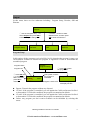
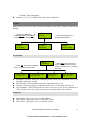
LNB Frequency
5150MHz
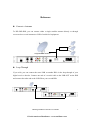
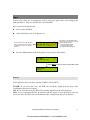
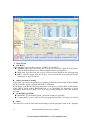
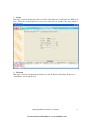
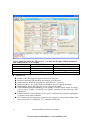
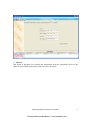
① Press OK button to
enter this submenu
Satellite Frequency
4000MHz
Inputs
Source Params Setup
Symbol Rate
26850KBaud
LNB Voltage
Off
② Use the navigation key↑↓
to select different items.
③ To modify the value,
press OK, a cursor will
appear below the default
value, then you can modify
the first number by press ↑
↓button; press ←→button to
modify other numbers. Press
OK to confirm the value.
LNB 22KHz
Off
z
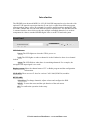
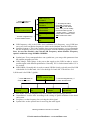
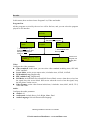
LNB frequency: this is the LNB’s local oscillation (LO) frequency, every LNB have
one or two local oscillation frequencies which can be obtained from the LNB provider.
z Satellite frequency: This is the satellite down-conversion frequency, every transponder
has one frequency, and you can get this parameter from the satellite programs provider.
Note: be sure the absolute value which LNB Frequency minus Satellite Frequency
equals is within the range 950MHz-2150MHz.
z
z
z
Symbol rate: Every transponder have one symbol rate, you can get this parameter from
the satellite programs provider.
LNB Voltage: LNB voltage is the power that supply to the LNB in order to receive
satellite signal with different polarization. Generally 18V is for horizontal while 13V is
for vertical.
LNB 22KHz: Generally this is used to control 22KHz Switch, typically used for LNB
with double L.O in Ku band. ‘On’ is for the high L.O and ‘Off’ is for the low L.O
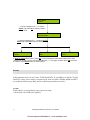
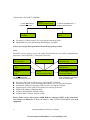
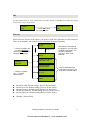
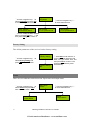
2) If the unit is for DVB-C (QAM):
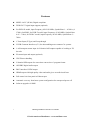
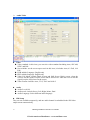
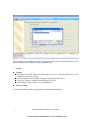
① Press OK button to
enter this submenu
FEC Mode
Annex A
z
z
z
z
Inputs
Source Params Setup
Constellation
64
② Use the navigation key↑↓
to select different items.
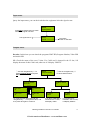
Frequency
247MHz
Symbol Rate
6875KBaud
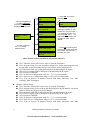
FEC Mode: select the adaptable FEC mode (Annex A/B) according to the fact.
Constellation: set this value according to the setting of QAM modulator in the headend system.
Frequency: set the frequency for receiving the cable signal.
Symbol rate: set the symbol rate for receiving the cable signal.
HD Integrated Receiver Decoder User Manual
¾ 1RUWK$PHULFDQ'LVWULEXWRUZZZVDWHOOLWHDYFRP
14