1
TESTING PROCEDURES
© Panduit Corp. 2013
PN524B
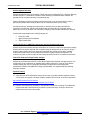
For detailed instructions on Set Reference procedure, refer to Fluke Network’s DTX-1800
Series User Manual page 20, on “Setting the Reference for Twisted Pair Cabling”. The link
for the User’s Manual is:
http://www.flukenetworks.com
Note: Fluke Networks also recommends factory calibration once a year to ensure that the
test tool meets or exceeds the published accuracy specifications.
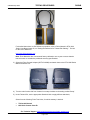
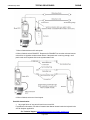
3) Select the Fluke Channel Adapter (# DTX-CHA002) and attach them to the DTX-1800 Series
Main and Remote unit.
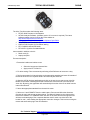
4) Turn the main function dial from ‘Autotest’ one step clockwise to the setting entitled ‘Setup’.
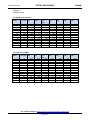
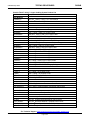
5) Under Twisted Pair, set the appropriate Standard Limit to apply different standards,
Select from the following Fluke Test Limits, for which warranty is desired:
•
•
TIA Cat 6A Channel
ISO11801 Channel Class EA
For Technical Support: www.panduit.com/resources/install_maintain.asp
Page 3 of 9