1
2. Turning On Your Phone and Making a Call
Turning on your phone
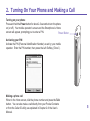
Press and hold the Power button for about 2-3 seconds to turn the phone
on (or off). Your mobile operator's screen and the Smartphone’s Home
screen will appear, prompting you to enter a PIN.
Power Button
Activating your PIN
Activate the PIN (Personal Identification Number) as set by your mobile
operator. Enter the PIN number, then press the Left Softkey (“Done”).
Making a phone call
When in the Home screen, dial the phone number and press the Talk
button. You can also make a call directly from your Pocket Contacts
or from the Caller ID utility, as explained in Chapter 2 of the User’s
Manual.
5