Download user manual
Transcript
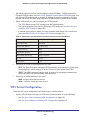
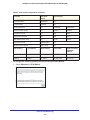
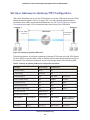
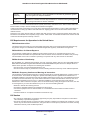
B. VPN Configuration Case study on how to set up a VPN B The DGND3800B can terminate up to five VPNs. This appendix is a case study on how to configure a secure IPSec VPN tunnel from your modem router to a FVL328. This case study follows the VPN Consortium interoperability profile guidelines (found at http://www.vpnc.org/InteropProfiles/Interop-01.html). The following topics are discussed: • Configuration Profile • Modem Router with FQDN to Gateway B • Configuration Summary (Telecommuter Example) • Set Up Client-to-Gateway VPN (Telecommuter Example) • Monitoring the VPN Tunnel (Telecommuter Example) Configuration Profile The configuration in this appendix follows the addressing and configuration mechanics defined by the VPN Consortium. Gather necessary information before you begin configuration. Verify that the firmware is up to date, and that you have all the addresses and parameters to be set on both sides. Check that there are no firewall restrictions. Table 12. Wireless modem router to Gateway B profile summary VPN Consortium Scenario Scenario 1 (Identity Using Preshared Secrets) Type of VPN LAN-to-LAN or gateway-to-gateway (not client-to-gateway) Security scheme: IKE with pre-shared secret/key (not certificate based) IP addressing: Gateway A Static IP address Gateway B Static IP address 150