1
IUCLID 5
Guidance and Support
IUCLID 5
Technical Completeness
Check Plug-in
User Manual
February 2013 v1.6
IUCLID 5: Technical Completeness Check plug-in – User Manual
Table of contents
1
Principle of the Technical Completeness Check (TCC) plug-in ........................................... 3
1.1
Technical Completeness Check ......................................................................................... 3
1.2
Business rules check ........................................................................................................... 3
1.3
Dossier Quality Assistant.................................................................................................... 4
2 Adding the plug-in to your local IUCLID 5 installation ......................................................... 5
2.1
Workstation / stand-alone installation ............................................................................ 5
2.2
Distributed installation ....................................................................................................... 6
3 Launching the TCC plug-in ......................................................................................................... 8
3.1
Checking multiple dossiers / substance datasets ......................................................... 8
3.2
Checking a substance dataset or dossier you are working on ................................... 9
4 Using the TCC plug-in ................................................................................................................ 10
4.1
Checking dossiers (all supported dossier templates) ................................................. 10
4.2
Checking substance datasets (for registration, PPORD, inquiry) ............................ 11
4.2.1 Step 1: select dossier type ................................................................................................. 11
4.2.2 Step 2: select the tonnage bands (only for registration substance datasets) .................... 12
4.3
Interpretation of the TCC plug-in results table ........................................................... 16
4.3.1 BR/TCC tab and Dossier Quality Assistant tab ................................................................. 16
4.3.2 TCC plug-in results toolbar ................................................................................................ 17
4.3.3 Filtering the results table .................................................................................................... 17
4.3.4 TCC plug-in results table ................................................................................................... 19
4.4
Plug-in version information ............................................................................................. 21
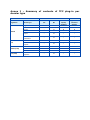
Annex I – Summary of contents of TCC plug-in per dossier type ........................................... 23
Table of figures
Figure 1: Launching the TCC plug-in from the home view of IUCLID ..................................................................... 8
Figure 2: Entry field ‘Select document to check’ ..................................................................................................... 8
Figure 3: Query selection ........................................................................................................................................ 8
Figure 4: ‘Run TCC’ option on a substance dataset ................................................................................................ 9
Figure 5: Radio button for dossier type ................................................................................................................. 11
Figure 6: Selection of phase-in definition, fee waiving and update status ............................................................. 11
Figure 7: Selection of tonnage band for an individual registration ........................................................................ 12
Figure 8: Selection of tonnage band for a joint submission lead registration ........................................................ 13
Figure 9: Selection of tonnage band for a joint submission member registration.................................................. 14
Figure 10: Indication of whether a safety data sheet is needed - joint submission member registration .............. 15
Figure 11: TCC plug-in results display .................................................................................................................. 16
Figure 12: Yellow rows of the TCC plug-in results table ........................................................................................ 19
Figure 13: Grey/white rows of the TCC plug-in results table ................................................................................. 19
Figure 14: Message for failed version check ......................................................................................................... 21
Figure 15: Internet connection configuration ......................................................................................................... 22
Figure 16: Message for plug-in up to date ............................................................................................................. 22
Figure 17: Message when new plug-in is available ............................................................................................... 22
Figure 18: TCC and Business rules version information ....................................................................................... 22
February 2013 v1.6
2/24
IUCLID 5: Technical Completeness Check plug-in – User Manual
1 Principle of the Technical Completeness Check (TCC)
plug-in
The aim of the TCC plug-in is to assist users in the preparation of IUCLID dossiers (e.g.
REACH registration dossiers, PPORD notifications) so that they can be successfully
submitted to and processed by the European Chemicals Agency. The rules included in this
plug-in allow the users to perform the following checks on their dossiers or substance
datasets:
-
The Technical Completeness Check (TCC)
-
The verification of those business rules that do not rely on information from the
ECHA databases (e.g. submission history)
-
A set of consistency checks to improve dossier quality
1.1 Technical Completeness Check
According to the REACH Regulation, registration dossiers and PPORD notifications are
subject to a completeness check (Article 20(2)). This completeness check can be divided
in two parts: the Financial Completeness Check (FCC) and the Technical Completeness
Check (TCC).
The aim of the Technical Completeness Check (TCC) plug-in is to enable registrants and
PPORD notifiers to check within their IUCLID 5 installation (or database) the technical
completeness of their dossiers (or substance datasets) prior a submission to ECHA via
REACH-IT. The plug-in also checks that a dossier (or substance dataset) will be able to
pass some of the business rules.
Note: Although the plug-in simulates the Technical Completeness Check carried out
by ECHA to the largest extent possible, it will not be able to capture exhaustively all
possible scenarios in which a dossier may be found incomplete (e.g. resulting from
different tonnage bands of lead and member dossiers in a joint submission). The
responsibility remains with the company ensure that their submission fulfils all the
relevant legal requirements.
Please refer to Data Submission Manual 5 “How to complete a technical dossier for
registrations and PPORD notifications” for detailed information on how to fill in the
minimum
requirements
in
IUCLID
5.
The
manual
is
available
at
http://echa.europa.eu/web/guest/support/dossier-submission-tools/reach-it/datasubmission-industry-user-manuals.
1.2 Business rules check
The TCC plug-in also incorporates several of the business rules (BR) checked at ECHA.
The following REACH dossier types are supported for business rules check: Registration,
Downstream user report, PPORD-, Substance in article- and Inquiry notification. In
addition, the business rules check is available for the dossier types CLP notification and
CLP alternative name request. From version 5.4.0 onwards, the TCC plug-in also supports
the business rules check for dossiers submitted by Authorities, namely Substance
Evaluation dossiers, REACH Annex XV proposals (restriction and SVHC) and CLP Annex VI
(CLH) proposals.
Note: As some of the business rules depend on information that is stored within the
REACH-IT database, the plug-in cannot simulate all the business rules checked at ECHA.
February 2013 v1.6
3/24
IUCLID 5: Technical Completeness Check plug-in – User Manual
For further information on the business rule check, please refer to Data Submission
Manual 4: “How to Pass Business Rule Verification ("Enforce Rules")”, available at:
http://echa.europa.eu/web/guest/support/dossier-submission-tools/reach-it/datasubmission-industry-user-manuals.
1.3 Dossier Quality Assistant
From version 5.4.3 onwards, the TCC plug-in contains a new feature. This so-called
Dossier Quality Assistant has been designed to assist companies in the preparation of
registration and inquiry dossiers. It contains rules of the type ‘warning’ that highlight
some of the most common inconsistencies found in registration and inquiry dossiers.
While the rule set will be extended in the future, at present the Dossier Quality Assistant
module focuses on the following areas in the IUCLID substance dataset and dossier:
-
Sections 1.1 and 1.2, reported as Substance Identity warnings (registration and
inquiry)
-
Section 3.2, reported as Quality warnings (registration, standard tonnage)
-
Section 3.5, reported as Quality warnings (registration, intermediate)
-
Endpoint study records, Administrative Data, reported as Quality warnings
(registration)
The Dossier Quality Assistant runs automatically when users launch the TCC plug-in
(version 5.4.3 or above) on their substance dataset or dossier. The results are shown in a
separate screen and have no impact on the outcome of the Technical Completeness
Check. However, registrants are encouraged to analyse the results obtained from the
Assistant and revise their dossiers as appropriate.
The warnings given by the Dossier Quality Assistant can refer to that conflicting data
have been provided; that data have been entered in an unexpected manner; or they can
just be reminders highlighting the need for extra caution on a particular topic. Note, that
in certain situations it may be justifiable to ignore the warnings. This should be decided
after consulting the warning message and the relevant guidance documents.
Note: The Dossier Quality Assistant does not affect the outcome of the Technical
Completeness Check performed by ECHA. It is a tool which helps registrants to avoid
common data inconsistency issues and thereby improve the quality of their dossiers.
Note: The use of the Dossier Quality Assistant is without prejudice to the expert
assessment carried out by ECHA to establish the adequacy of the information required
under the REACH Regulation.
For further information on the preparation of inquiry and registration dossiers, please
refer to:
Data submission manuals (2, 4, 5, 18):
http://echa.europa.eu/web/guest/support/dossier-submission-tools/reach-it/datasubmission-industry-user-manuals.
Guidance documents: http://echa.europa.eu/guidance-documents/guidance-onreach.
Practical guides (2–4): http://echa.europa.eu/en/practical-guides
February 2013 v1.6
4/24
IUCLID 5: Technical Completeness Check plug-in – User Manual
2 Adding the plug-in to your local IUCLID 5 installation
The plug-in is based on a server side and a client side ZIP file called:
eu.echa.iuclid.client.plugin.tccvalidate.ui.zip
eu.echa.iuclid.server.plugin.tccvalidate.zip
The installation of the plug-in depends on your IUCLID 5 installation:
workstation / stand-alone version or
distributed version
2.1 Workstation / stand-alone installation
If you have installed the IUCLID 5 stand-alone software in the folder
C:\ IUCLID5
You will find the sub-folders:
C:\IUCLID5\plugins\client
(folder for the client side plug-ins)
C:\IUCLID5\plugins\server
(folder for the server side plug-ins)
To install the plug-in you need to copy the above-mentioned client and server side zipfiles into the appropriate folders (see examples below in the table).
Note: For the plug-in to work properly, both of the zip-files must be copied into their
respective folders – it is not enough to copy only the client side zip-file.
Important:
Do not extract the ZIP files!
Depending on your computer setting the file name may be displayed
without extension (.zip).
Copy
the file
eu.echa.iuclid.client.plugin.tccvalidate.ui.zip
into
the
folder
<IUCLID5-folder>\plugins\client
Sample
C:\IUCLID5\plugins\client\eu.echa.iuclid.client.plugin.tccvalidate.ui.zi
p
Hint
In the folder you will already find files like:
February 2013 v1.6
-
ClientExtensionPointRootPlugin.zip
-
eu.echa.iuclid.plugin.helpsystemEN.zip
-
eu.echa.iuclid.plugin.xform.zip
5/24
IUCLID 5: Technical Completeness Check plug-in – User Manual
Copy
the file
eu.echa.iuclid.server.plugin.tccvalidate.zip
into
the
folder
<IUCLID5-folder>\plugins\server
Sample
C:\IUCLID5\plugins\server\eu.echa.iuclid.server.plugin.tccvalidate.zip
Hint
In the folder you will already find files like:
-
ServerExtensionPointRootPlugin.zip
-
eu.echa.iuclid.plugin.resources.zip
The plug-in will be available after re-starting your IUCLID 5 application.
Tip:
If the plug-in is no longer required, the files can be removed from the
folders. The plug-in will disappear from the IUCLID 5 application.
2.2 Distributed installation
You will find the sub-folders on your IUCLID 5 application server:
...\i5clientPlug-ins\remotePlugins
(folder for the client side plug-ins)
...\WEB-INF\classes\plugins
(folder for the server side plug-ins)
To install the plug-in you need to copy the above-mentioned client and server side zipfiles into the appropriate folders (see examples below in the table).
Important:
Do not extract the ZIP files!
Depending on your computer setting the file name may be displayed
without extension (.zip).
Copy
the file
eu.echa.iuclid.client.plugin.tccvalidate.ui.zip
into
the
folder
<IUCLID5 WebApp-folder>\i5clientPlugins\remotePlugins
Sample
C:\Program Files\apache-tomcat\webapps\i5server\
i5clientPlugins\remotePlugins\eu.echa.iuclid.client.plugin.tccvalidate.ui.zip
Hint
In the folder you will already find files like:
February 2013 v1.6
-
ClientExtensionPointRootPlugin.zip
-
eu.echa.iuclid.plugin.helpsystemEN.zip
-
eu.echa.iuclid.plugin.xform.zip
6/24
IUCLID 5: Technical Completeness Check plug-in – User Manual
Copy
the file
eu.echa.iuclid.server.plugin.tccvalidate.zip
into
the
folder
<IUCLID5 WebApp-folder>\WEB-INF\classes\plugins
Sample
C:\Program Files\apache-tomcat\webapps\i5server\
WEBINF\classes\plugins\eu.echa.iuclid.server.plugin.tccvalidate.zip
Hint
In the folder you will already find files like:
-
ServerExtensionPointRootPlugin.zip
-
eu.echa.iuclid.plugin.resources.zip
The plug-in will be available after re-starting your IUCLID 5 application as well as
your server (e.g. TOMCAT).
Tip:
If the plug-in is no longer required, the files can be removed from the
folders. The plug-in will disappear from the IUCLID 5 application.
February 2013 v1.6
7/24
IUCLID 5: Technical Completeness Check plug-in – User Manual
3 Launching the TCC plug-in
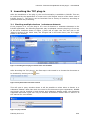
After the installation of the plug-in, the new functionality is available in IUCLID. This can
be confirmed by the appearance of a new icon in the ‘Plugins’ section of the home view of
IUCLID (Figure 1). The plug-in can be launched from a variety of locations, according to
preference and way of working.
3.1 Checking multiple dossiers / substance datasets
If the purpose is to run the plug-in on a set of dossiers or substance datasets in the
IUCLID application, the following approach may be adopted. Launch the plug-in from any
of the three locations shown in Figure 1 (from left to right: the TCC tool icon in the
‘Plugins’ section of the home view; the ‘Plugins’ tab in the main menu; the TCC toggle
button in the toolbar).
Figure 1: Launching the TCC plug-in from the home view of IUCLID
After launching the TCC plug-in, the first step in the wizard is to choose the document to
be checked by clicking on the
icon.
Figure 2: Entry field ‘Select document to check’
This will open a query window where it will be possible to select either a dossier or a
substance dataset. Note that while the rules for the document types registration, PPORD
and inquiry can be checked in both dossier and substance dataset mode, the remaining
supported document types can only be checked as dossiers. Please refer to Annex I of
this manual for more details.
Figure 3: Query selection
February 2013 v1.6
8/24
IUCLID 5: Technical Completeness Check plug-in – User Manual
Note that the TCC toggle button in the toolbar (rightmost option in Figure 1) can be used
at any point to hide or display the TCC plug-in window without losing the its settings or
result.
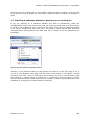
3.2 Checking a substance dataset or dossier you are working on
If you are working on a substance dataset and want to interactively check the
TCC/BR/Quality rules while entering the data, the most convenient way to do this may be
to, while in the ‘Substance’ menu, right-click the name of the relevant substance dataset
in the ‘Query’ window and select ‘Run TCC’. The plug-in window can be kept open and
refreshed while entering/editing the data (see Tip in chapter 4.3.4 for instructions on
refreshing).
Figure 4: ‘Run TCC’ option on a substance dataset
Similarly, if you finished creating a new dossier and want to run the TCC plug-in on it,
you can in the ‘Dossier’ menu right-click the name of the dossier in the ‘Query’ window
and select ‘Run TCC’. This is a convenient way to launch the plug-in on the dossier right
after creating it without having to search for it. Furthermore, since the plug-in can be
launched from the same location where dossier creation or dossier export takes place, the
possibility of checking the incorrect dossier is reduced.
February 2013 v1.6
9/24
IUCLID 5: Technical Completeness Check plug-in – User Manual
4 Using the TCC plug-in
This section explains how to use the TCC plug-in to check a dossier or a substance
dataset. Depending on the dossier type, the dossier content is assessed through Business
Rules checks, Technical Completeness Checks or Substance Identity and Quality checks,
or their combinations. Annex I of this manual summarises which checks are available for
each dossier type. Launch the TCC plug-in as described in Chapter 3.
4.1 Checking dossiers (all supported dossier templates)
When the TCC plug-in is launched on a dossier, it will by default perform the check(s)
corresponding to the dossier template used. These are summarised in the table in Annex
I of this manual.
For dossiers created with any of the REACH Registration templates, the plug-in
performs a Technical Completeness Check according to the tonnage band
information from the dossier template and header. In the same screen, the
outcome of the Business Rules check is automatically reported. In addition, for
these dossier templates the quality check in the Dossier Quality Assistant tab is
launched.
For dossiers created with the template REACH PPORD, the plug-in carries out a
Technical Completeness Check and a Business Rules check.
For dossiers created with the template REACH Inquiry, a Business Rules check is
performed. In addition, the quality check in the Dossier Quality Assistant is
launched.
For the remaining templates supported by the plug-in (see Annex I), only a
Business Rules check is performed.
Important note: For all types of dossiers, it is strongly recommended to run the TCC
plug-in on the final dossier prior to submitting it in REACH-IT.
Note: Please keep in mind that this plug-in has been designed to validate the
technical completeness of REACH registration dossiers and PPORDs. In addition, the
REACH templates for Inquiry, Downstream user report and Notification of substance in
article, and the CLP templates for CLP notification and CLP alternative name request, are
supported for a partial business rules check. The plug-in also supports the business rules
check for the following dossier types submitted by Authorities: Substance Evaluation,
REACH Annex XV - Restriction, REACH Annex XV - SVHC and CLP Regulation - CLH
dossier. If the validation is started on a dossier created with another dossier template
the process aborts with an error similar to the one shown below:
February 2013 v1.6
10/24
IUCLID 5: Technical Completeness Check plug-in – User Manual
4.2 Checking substance datasets (for registration, PPORD, inquiry)
4.2.1
Step 1: select dossier type
Unlike dossiers, substance datasets do not correspond to a specific type of submission
and therefore the user needs to select against which rules the dataset should be checked.
If the substance has to be checked in order to create a PPORD notification dossier,
select the radio button ‘PPORD notification’. When clicking ‘Next’, you will be
directed directly to step 3 where the results of the check are displayed.
If the substance dataset will be used for the preparation of an inquiry dossier,
select the radio button ‘Substance identity check (for inquiry notification)’. When
clicking ‘Next’, you will be directed directly to step 3 where the results of the
check are displayed.
Otherwise, leave the box ‘Registration dossier templates’ selected (selection done
by default). When clicking ‘Next’ you will be directed to a new screen where you
can select the type of registration dossier you would like to perform the Technical
Completeness Check on (see Step 2 in the next chapter).
Figure 5: Radio button for dossier type
The user must also define if the dossier is for a phase-in or for a non phase-in substance.
If the user wants to claim a fee waiver, this must also be indicated in Step 2 of the
wizard; note that a fee waiver can only be claimed in the case stated in REACH Article
74(2). By default, the settings of the plug-in are for a phase-in substance with no fee
waiving claimed. In addition, to check that the relevant ‘Regulatory programme
identifiers’ are entered in IUCLID 5 section 1.3, the user should indicate the update
status of the dossier to be submitted
Figure 6: Selection of phase-in definition, fee waiving and update status
February 2013 v1.6
11/24
IUCLID 5: Technical Completeness Check plug-in – User Manual
Important note: A IUCLID 5 dossier consists of two parts: a substance dataset, and the
so-called dossier header. The dossier header is generated during the dossier creation
process. It contains relevant information about the dossier, such as the tonnage band
covered by the registration. The Technical Completeness Check verifies the presence of
certain information in the dossier header. However, this information can only be checked
for dossiers, since a substance dataset does not contain a dossier header. Therefore,
even if your substance dataset is considered complete by the plug-in, it is very important
that you check also the dossier you have generated from the substance dataset to verify
that the dossier header is also complete.
4.2.2
Step 2: select the tonnage bands (only for registration substance
datasets)
In this step the user has to define which template should be used for the Technical
Completeness Check, i.e. the tonnage band of the registration dossier, if it is part of a
joint submission and if it covers intermediate uses or not. After these parameters are
defined, the ‘Next’ button becomes active.
Individual registration
If you are preparing a dossier that is not part of a joint submission, select the radio
button ‘No’ under the heading ‘Joint submission’ and then use the picklists ‘Registration
dossier’ and ‘Intermediates’ to indicate the relevant tonnage band. In the exceptional
case of preparing a combined dossier, i.e. a registration dossier that covers both the use
of a substance as an intermediate as well as non-intermediate use, select the appropriate
tonnage bands from both picklists.
Figure 7: Selection of tonnage band for an individual registration
February 2013 v1.6
12/24
IUCLID 5: Technical Completeness Check plug-in – User Manual
Lead of a joint submission
If you are preparing the lead dossier for a joint submission, select the radio button ‘Yes’
under the heading ‘Joint submission’. The heading ‘Role in the joint submission’ will
appear. Set the radio button to ‘Lead registrant of a joint submission’ and then select the
tonnage band(s) for your dossier using the picklists ‘Registration dossier’ and
‘Intermediates’.
Figure 8: Selection of tonnage band for a joint submission lead registration
Member of a joint submission
Select the radio button ‘Yes’ under the heading ‘Joint submission’. Set the radio button
for the block ‘Role in the joint submission’ to ‘Member of a joint submission’ and then
select the tonnage band(s) for your dossier using the picklists ‘Registration dossier’ and
‘Intermediates’. For a correct outcome of the TCC tool, you should also indicate if the
‘Chemical Safety Report’ and ‘Guidance on safe use’ are provided by the lead registrant
on your behalf or if they are included in your dossier.
Please note also that you should make a selection in the picklist ‘Tonnage band of the
joint submission’.
Note: For the endpoint sections (section 4 to 8 of IUCLID 5) a dossier for a member of
a joint submission should normally contain only endpoint study records for those
endpoints for which the member opts out from the joint submission. In the same manner,
the member dossier should not contain any Classification and Labelling information
(IUCLID 5 sections 2.1 and 2.2) unless the member indicates that they are opting out for
the C&L.
February 2013 v1.6
13/24
IUCLID 5: Technical Completeness Check plug-in – User Manual
Figure 9: Selection of tonnage band for a joint submission member registration
Note: IUCLID 5.4 offers the possibility to claim confidential the information contained
in the Safety Data Sheet (SDS), such as the registration number, the legal entity, and
the outcome of the PBT assessment. These confidentiality claims will be charged and
invoiced for all substances that require a SDS. As before, a business rule will check that
all chargeable claims are supported by a justification. To determine whether the
substance being registered requires a SDS or not, for joint submission member
registrations that lack information on classification and/or PBT assessment, some input
by the user may be needed. This information is indicated with the radio buttons that
appear under the new heading ‘Is a safety data sheet required for this substance?’ in
Step 2 of the TCC plug-in wizard (Figure 10).
The input is only asked when the substance dataset or dossier contains confidentiality
claims on the safety data sheet information and the member dossier does not contain
enough information to determine whether a SDS is required for the substance to be
registered.
More information on the dissemination and confidentiality claims of SDS information can
be found in the FAQ document “Questions and answers on dissemination and
confidentiality claims of Safety Data Sheet information in IUCLID 5.4” available at:
http://echa.europa.eu/support/faqs
February 2013 v1.6
14/24
IUCLID 5: Technical Completeness Check plug-in – User Manual
Figure 10: Indication of whether a safety data sheet is needed - joint submission member registration
After having completed Step 2 of the TCC plug-in wizard the ‘Next’ button becomes
active. Clicking on the ‘Next’ button will run the TCC rules according to the selected
parameters and display the results in Step 3.
February 2013 v1.6
15/24
IUCLID 5: Technical Completeness Check plug-in – User Manual
4.3 Interpretation of the TCC plug-in results table
In step 3 of the TCC plug-in wizard, the outcome of the performed check(s) is displayed
(Figure 11). The different parts of the results display are further described in the
following subsections. While the screenshots used in this chapter illustrate the case of a
dossier type checked with Technical Completeness Check rules, Business Rules and
Dossier Quality Assistant rules the interpretation of the results as described below is also
valid for dossier types which are only checked by some of the modules.
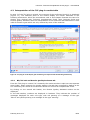
Figure 11: TCC plug-in results display (the numbering corresponds with the following subsections)
4.3.1
BR/TCC tab and Dossier Quality Assistant tab
From the TCC plug-in version 5.4.3 onwards, the results window is split into two separate
parts (tabs). When entering the results window, the tab that is opened by default is the
one containing the results of the Business Rules and Technical Completeness Check.
By clicking on the second tab header, the Dossier Quality Assistant results can be
displayed.
In the tab headers, numbers are displayed in brackets. They indicate the number of
messages displayed for each rule type, with red pointing to a message of the type
‘failure’ and yellow pointing to a message of the type ‘warning’.
February 2013 v1.6
16/24
IUCLID 5: Technical Completeness Check plug-in – User Manual
4.3.2
TCC plug-in results toolbar
Refresh the plug-in result (only for substance datasets)
Export the result list as xml. All the plug-in results are exported in a XML
file.
Print the plug-in result
Copy the plug-in results (can be pasted to Excel, Word…)
Navigate to the document in the dossier (only for dossiers). If you select
any row and press this button, it will open the corresponding section in
the dossier which was checked.
Navigate to the document in the substance dataset. If you select any row
in the results table and press this button, it will open the substance
which was checked (if the results are from a substance dataset) or the
substance dataset that was used to create your dossier (if the results are
from a dossier) at the corresponding section. This option is not available
if you were checking a dossier but the substance dataset that was used
to generate that dossier is not in your IUCLID 5 database.
Tip: A double click on any row of the plug-in results table has the same effect as
clicking on the navigation buttons
and
. As a consequence a double click on
a specific row will directly open the substance/dossier at the corresponding
section.
4.3.3
Filtering the results table
Show all
Business Rules
/ Technical
Completeness
Check tab
Dossier Quality
Assistant tab
All result items are displayed without filtering.
Only TCC rules
Only results with the level ‘TCC failure’ ( )
and ‘TCC warning’ ( ) are displayed in the
results table.
Only Business
rules
Only results with the level ‘BR failure’ ( )
and ‘BR warning’ ( ) are displayed in the
results table.
Only Dossier
Quality rules
Only results with the level ‘Dossier Quality
warning’ ( ) are displayed in the results
table.
Only Substance
Identity rules
Only results with the ‘Substance Identity
warning’ ( ) are displayed in the results
table.
failure, warning
Both failures and warnings are displayed in
the results table.
failure
Only the failures are displayed in the results
table, not the warnings.
February 2013 v1.6
17/24
IUCLID 5: Technical Completeness Check plug-in – User Manual
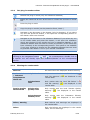
When the TCC plug-in is run on a dossier or substance dataset, there are six types of
messages that can be displayed, depending on the dossier template selected: TCC
warnings and TCC failures; BR warnings and BR failures; Dossier Quality warnings and
Substance Identity warnings. TCC messages appear only for registration and PPORD
dossiers or substance datasets. BR messages appear for all dossier types supported by
the plug-in, as well as for substance datasets of the type registration, PPORD notification
or inquiry. Substance Identity warnings appear for registration and inquiry dossiers and
substance datasets. Dossier Quality warnings appear for registration dossiers and
substance datasets.
TCC failure
TCC failure messages correspond to the Technical Completeness Check carried out at
ECHA. If you submit your dossier without correcting the issues mentioned in the TCC
failure messages, your dossier will fail the TCC in REACH-IT. These messages are flagged
with the
icon.
TCC warning
A TCC warning is not an indication of that your dossier will fail the Technical
Completeness Check, but it suggests that some information that should normally be in
your registration dossier is lacking. Therefore, you are advised to correct the issue that
raised the warning message, since it could have implications for the compliance of your
dossier.
BR failure
A BR failure in the plug-in is associated with a Business Rules step failure at ECHA. If you
submit a dossier without correcting the issue mentioned in the message, your dossier will
fail the business rules check during the submission process.
BR warning
A BR warning does not directly translate into a Business Rules step failure at ECHA, but it
indicates that some information that should normally be in your dossier is missing.
Therefore, you are advised to correct the issue that raised the warning message, since it
could have implications for the compliance of your dossier.
Dossier Quality warnings
Dossier Quality warnings are only displayed for registration dossiers and substance
datasets. A Dossier Quality warning contains important recommendations on how to
improve the consistency of the selected information. The warnings can refer to the fact
that conflicting data have been provided; that data have been entered in an unexpected
manner; or they can simply be reminders highlighting the need for extra caution on
specific topics.
You are recommended to consider all Dossier Quality warnings and address the reported
inconsistencies before submitting your dossier to ECHA. Note that in certain situations it
may be justifiable to ignore the warnings. This should be decided after consulting the
warning message and the relevant guidance documents.
Substance Identity warnings
Substance Identity warnings are only displayed for registration and inquiry dossiers and
substance datasets. A Substance Identity warning contains important recommendations
on how to improve the consistency of the reported substance identity information. The
warnings can refer to the fact that conflicting data have been provided; that data have
been entered in an unexpected manner; or they can simply be reminders highlighting the
need for extra caution on specific topics.
February 2013 v1.6
18/24
IUCLID 5: Technical Completeness Check plug-in – User Manual
You are recommended to consider all Substance Identity warnings and address the
reported inconsistencies before submitting your dossier to ECHA. Note that in certain
situations it may be justifiable to ignore the warnings. This should be decided after
consulting the warning message and the relevant guidance documents.
4.3.4
TCC plug-in results table
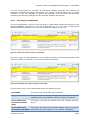
The rows highlighted in yellow in the TCC plug-in results table indicate the sections of the
dossier/substance that gave rise to the failure/warning, or in the case of BR/Dossier
Quality/Substance Identity rules, the section and the number of the rule.
Figure 12: Yellow rows of the TCC plug-in results table
The rows in grey or white describe in more detail the fields of the dossier/substance that
need to be filled, or modified, in to correct the failure/warning.
Figure 13: Grey/white rows of the TCC plug-in results table
A right mouse click on the results table opens the following menu:
Print table
The whole TCC result table will be printed.
Copy table
The whole TCC result table will be copied in the windows
clipboard and can be pasted in Excel or Word, for instance.
Go to referenced
document (dossier
data)
This option will open the dossier that was checked with the
plug-in.
Go to referenced
This option will open the substance dataset that was checked
document (raw data) with the plug-in (if available in your IUCLID 5 database).
February 2013 v1.6
19/24
IUCLID 5: Technical Completeness Check plug-in – User Manual
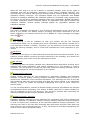
Tip: At step 3 of the TCC plug-in (results table), if you are running the plug-in on
a substance dataset, it is possible to interactively correct/modify the dataset
while keeping the TCC results table open. After obtaining the TCC results table in
step 3:
- Click on the toggle button
to hide the TCC plug-in window, or move the
plug-in window aside by dragging with the mouse
- Correct the indicated failure in the substance dataset
- Click on the save button
in the IUCLID 5 toolbar
- Click on the toggle button to show the TCC plug-in window if you had hidden it
- Click on the refresh button
description is still present.
of the TCC plug-in window to see if the failure
Specific cases where a failure indicated by the TCC plug-in may be disregarded:
There are certain cases where a TCC failure is listed in the TCC result table even if the
dossier may be technically complete. These TCC failures do not mean that the dossier will
necessarily fail the Technical Completeness Check but that a manual intervention will be
needed from ECHA side in order to verify completeness. This is the case, for instance,
with the following TCC failure:
Dossier header: You are a member of a joint submission and your dossier
contains an opt-out. If your tonnage band is higher than the tonnage band of the
joint submission, ECHA will check that your additional information requirements
have been fulfilled. If your tonnage band is not higher than the tonnage band of
the joint submission then this message can be disregarded.
When the plug-in does not detect any failures/warnings for one or several of the modules
in the dossier or the substance dataset, this is reported by the following disclaimer
messages:
TCC (registration, PPORD): Your dossier/substance dataset is considered as
complete for the indicated tonnage band. However, please note that the
completeness check performed by ECHA might include additional checks as for
instance the relationship with other dossiers (e.g. lead versus member). These
additional checks could potentially lead to different conclusions from those
indicated by this tool. The use of the TCC tool is without prejudice to the obligation
to submit a dossier that fulfils all relevant legal requirements.
BR: No BR failures were detected by the plug-in. Please note that some of the
business rules can only be checked at dossier level. Also note that due to technical
reasons, the BR check performed by the plug-in does not cover all business rules
checked at ECHA.
Dossier Quality (registration): No quality concerns were detected by the plugin. Please note that this tool does not carry out a full assessment of the adequacy
of the information provided. The use of this tool is without prejudice to the expert
assessment carried out by ECHA to establish the adequacy of the information
required under article 10, 17 or 18 of the REACH Regulation.
February 2013 v1.6
20/24
IUCLID 5: Technical Completeness Check plug-in – User Manual
Note: When updating a registration that was previously a notification under Directive
67/548/EEC for another reason than a tonnage band update, less information is required
than for a standard dossier. The minimum information to be provided in this case is
described in Annex 4 of Data Submission Manual 5 ‘How to complete a technical dossier
for registrations and PPORD notifications’.
The TCC plug-in does not offer the possibility to verify the completeness of only these
reduced information requirements, but will check the full requirements for the selected
tonnage band. As a consequence, the TCC plug-in can be used to check the completeness
of these dossiers but only the TCC failures/warnings related to the information
requirements indicated in Annex 4 of Data Submission Manual 5 could be a reason for
considering
the
dossier
as
incomplete.
The
manual
is
available
at
http://echa.europa.eu/web/guest/support/dossier-submission-tools/reach-it/datasubmission-industry-user-manuals.
Similarly, for this type of dossier, any warnings issued by the Dossier Quality Assistant
concerning sections outside the information requirements indicated in Annex 4 of Data
Submission Manual 5 may be disregarded.
Note: As stated in section 1, the check performed by the TCC plug-in does not cover
all of the verifications carried out on a dossier submitted to ECHA. It is the responsibility
of the submitter to ensure that the dossier fulfils the appropriate data requirements and
to monitor the outcome of the submission process in REACH-IT.
4.4 Plug-in version information
When launching the TCC plug-in, in step 1 there is a plug-in version checker at the
bottom of the plug-in window. The version checker verifies the version of the currently
installed TCC plug-in and displays a warning message if a newer version is available on
the IUCLID 5 website. To get the version checker working an internet access needs to be
established. In case a proxy server is necessary for the internet access this can be
defined by pressing the plug-in checker button:
Figure 14: Message for failed version check
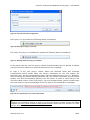
Afterwards, a configuration popup window will appear where you will be able to define, if
necessary, a proxy hostname and a port. The vendor URL is the URL from the IUCLID 5
website which is used for the online check. The definitions are stored for each user on the
server. To reset the default value for the vendor URL just press ‘Reset to default URL’
below the vendor URL input field.
February 2013 v1.6
21/24
IUCLID 5: Technical Completeness Check plug-in – User Manual
Figure 15: Internet connection configuration
If the plug-in is up to date the following status is displayed:
Figure 16: Message for plug-in up to date
If a newer TCC plug-in is available for update the following status is displayed:
Figure 17: Message when new plug-in is available
In this latter case the new TCC plug-in should be downloaded from the IUCLID 5 website
(the previous one needs to be removed and the new one installed).
In step 3 of the TCC plug-in wizard, below the Business Rules and Technical
Completeness Check results table, the version information for the TCC engine, the
Business rules, and the Completeness check rules are displayed (see Figure 18). Similarly,
when accessing the Dossier Quality Assistant tab, the version information for the Dossier
Quality rules and the Substance Identity rules are shown. In order to verify that you are
using the latest version of the TCC plug-in, you may compare these version numbers with
the ones listed on the download page of the TCC plug-in on the IUCLID 5 homepage.
Figure 18: TCC and Business rules version information
Note: If you are uncertain about how to enter the required information in the correct
format in your IUCLID 5 dossier or how to run the TCC plug-in, please contact the ECHA
Helpdesk at http://echa.europa.eu/web/guest/contact. ECHA will then provide you with
specific advice on how to proceed.
February 2013 v1.6
22/24
Annex I – Summary of contents of TCC plug-in per
dossier type
Available modules
Regulation
REACH
CLP
REACH (auth)
CLP (auth)
Dossier type
Registration
PPORD
Inquiry
Downstream user
report
Substance in article
notification
CLP notification
CLP alternative name
request
Substance evaluation
Annex XV – restriction
Annex XV – SVHC
Annex VI – CLH
proposal
X
X
X
Dossier
Quality
Assistant
X
–
X
Applicable to
substance
datasets
X
X
X
–
X
–
–
–
X
–
–
–
X
–
–
–
X
–
–
–
–
–
X
X
X
–
–
–
–
–
–
–
X
–
–
TCC
BR
X
X
–
European Chemicals Agency
IUCLID 5 Support
Technical Completeness Check plug-in Manual
February 2013 v 1.6
http://iuclid.eu