1
IUCLID 5: Technical Completeness Check plug-in – User Manual
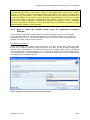
Note: When updating a registration that was previously a notification under Directive
67/548/EEC for another reason than a tonnage band update, less information is required
than for a standard dossier. The minimum information to be provided in this case is
described in Annex 4 of Data Submission Manual 5 ‘How to complete a technical dossier
for registrations and PPORD notifications’.
The TCC plug-in does not offer the possibility to verify the completeness of only these
reduced information requirements, but will check the full requirements for the selected
tonnage band. As a consequence, the TCC plug-in can be used to check the completeness
of these dossiers but only the TCC failures/warnings related to the information
requirements indicated in Annex 4 of Data Submission Manual 5 could be a reason for
considering
the
dossier
as
incomplete.
The
manual
is
available
at
http://echa.europa.eu/web/guest/support/dossier-submission-tools/reach-it/datasubmission-industry-user-manuals.
Similarly, for this type of dossier, any warnings issued by the Dossier Quality Assistant
concerning sections outside the information requirements indicated in Annex 4 of Data
Submission Manual 5 may be disregarded.
Note: As stated in section 1, the check performed by the TCC plug-in does not cover
all of the verifications carried out on a dossier submitted to ECHA. It is the responsibility
of the submitter to ensure that the dossier fulfils the appropriate data requirements and
to monitor the outcome of the submission process in REACH-IT.
4.4 Plug-in version information
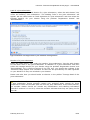
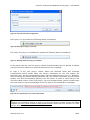
When launching the TCC plug-in, in step 1 there is a plug-in version checker at the
bottom of the plug-in window. The version checker verifies the version of the currently
installed TCC plug-in and displays a warning message if a newer version is available on
the IUCLID 5 website. To get the version checker working an internet access needs to be
established. In case a proxy server is necessary for the internet access this can be
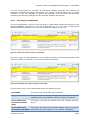
defined by pressing the plug-in checker button:
Figure 14: Message for failed version check
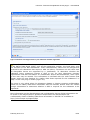
Afterwards, a configuration popup window will appear where you will be able to define, if
necessary, a proxy hostname and a port. The vendor URL is the URL from the IUCLID 5
website which is used for the online check. The definitions are stored for each user on the
server. To reset the default value for the vendor URL just press ‘Reset to default URL’
below the vendor URL input field.
February 2013 v1.6
21/24