1
3 Data Input
3.1 Data Input Screen
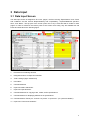
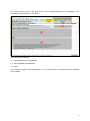
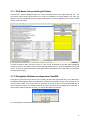
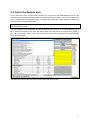
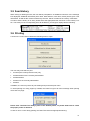
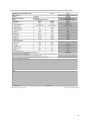
The data input screen is designed to fit on two “pages”, the first covering “Specifications” and “Terms
and conditions” and the second “Representativity and comparability”, “Options/additional specifications”, and “Notes”. The top part of the screen (rows one to six) is fixed and will be visible on both
pages. In order to reference the various parts of the screen more easily, they are labelled with red
boxes and white text in the following figure.
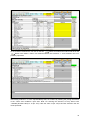
1:
Pull-down list containing all items
2:
Navigation buttons next/previous item/BH
3:
“Filter” settings (eight checkboxes)
4:
Item status
5:
Command buttons
6:
Input area “Make and Model”
7:
Input area “Specifications”
8:
Command buttons for copying make, model, and/or specifications
9:
Command button for displaying differences in specifications
10: Command button “Show pict.” and info “no picture” or “picture av.” (for “picture available”)
11: Input area “Terms and conditions”
4