1
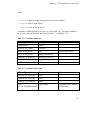
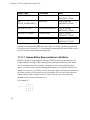
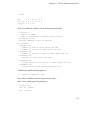
Users’ Guide to NetSolve V1.4
(http://icl.cs.utk.edu/netsolve/)
Dorian Arnold
Sudesh Agrawal
Susan Blackford
Jack Dongarra
Michelle Miller
Sathish Vadhiyar
Innovative Computing Laboratory, Department of Computer
Science, University of Tennessee
Knoxville, TN 37996-3450
Users’ Guide to NetSolve V1.4: (http://icl.cs.utk.edu/netsolve/)
by Dorian Arnold, Sudesh Agrawal, Susan Blackford, Jack Dongarra, Michelle Miller, and
Sathish Vadhiyar
version 1.4 Edition
Copyright © 1995-2001 by The NetSolve Project, University of Tennessee
Legal Restrictions
Allowed Usage:Users may use NetSolve in any capacity they wish. We only ask that proper
credit and citations be used when the NetSolve system is being leveraged in other software
systems.
Redistribution:Users are allowed to freely distribute the NetSolve system in unmodified form.
At no time is a user to accept monetary or other compensation for redistributing parts or all of the
NetSolve system.
Modification of Code:Users are free to make whatever changes they wish to the NetSolve
system to suit their personal needs. We mandate, however, that you clearly highlight which
portions are of the original system and which are a result of the third-party modification.
Warranty Disclaimer:USER ACKNOWLEDGES AND AGREES THAT: (A) NEITHER THE
NetSolve TEAM NOR THE BOARD OF REGENTS OF THE UNIVERSITY OF TENNESSEE
SYSTEM (REGENTS) MAKE ANY REPRESENTATIONS OR WARRANTIES
WHATSOEVER ABOUT THE SUITABILITY OF NetSolve FOR ANY PURPOSE; (B)
NetSolve IS PROVIDED ON AN "AS IS, WITH ALL DEFECTS" BASIS WITHOUT
EXPRESS OR IMPLIED WARRANTIES, INCLUDING WARRANTIES OF
MERCHANTABILITY AND FITNESS FOR A PARTICULAR PURPOSE OR
NONINFRINGEMENT; (C) NEITHER THE NetSolve TEAM NOR THE REGENTS SHALL
BE LIABLE FOR ANY DAMAGE OR LOSS OF ANY KIND ARISING OUT OF OR
RESULTING FROM USER’S POSSESSION OR USE OF NetSolve (INCLUDING DATA
LOSS OR CORRUPTION), REGARDLESS OF WHETHER SUCH LIABILITY IS BASED IN
TORT, CONTRACT, OR OTHERWISE; AND (D) NEITHER THE NetSolve TEAM NOR THE
REGENTS HAVE AN OBLIGATION TO PROVIDE DEBUGGING, MAINTENANCE,
SUPPORT, UPDATES, ENHANCEMENTS, OR MODIFICATIONS EXCEPT WHERE
EXPLICIT WRITTEN ARRANGEMENTS HAVE BEEN PRE-ARRANGED.
Damages Disclaimer:USER ACKNOWLEDGES AND AGREES THAT IN NO EVENT
WILL THE NetSolve TEAM OR THE REGENTS BE LIABLE TO USER FOR ANY
SPECIAL, CONSEQUENTIAL, INDIRECT OR SIMILAR DAMAGES, INCLUDING ANY
LOST PROFITS OR LOST DATA ARISING OUT OF THE USE OR INABILITY TO USE
NetSolve EVEN IF THE NetSolve TEAM OR THE REGENTS HAVE BEEN ADVISED OF
THE POSSIBILITY OF SUCH DAMAGES.
Attribution Requirement:User agrees that any reports, publications, or other disclosure of
results obtained with NetSolve will attribute its use by an appropriate citation. The appropriate
reference for NetSolve is "The NetSolve Software Program (NetSolve) was developed by the
NetSolve Team at the Computer Science Department of the University of Tennessee, Knoxville.
All rights, title, and interest in NetSolve are owned by the NetSolve Team."
Compliance with Applicable Laws:User agrees to abide by copyright law and all other
applicable laws of the United States including, but not limited to, export control laws.
Table of Contents
Preface...........................................................................................................................11
1. Who Should Read This Document ....................................................................11
2. Organization of This Document.........................................................................11
3. Document Conventions......................................................................................12
4. Request for Comments.......................................................................................14
I. Introduction ..............................................................................................................15
1. A NetSolve Overview ........................................................................................16
1.1. An Introduction to Distributed Computing.............................................16
1.2. What is NetSolve?...................................................................................16
1.2.1. Background ..................................................................................16
1.2.2. Overview and Architecture ..........................................................17
1.3. Who is the NetSolve User? .....................................................................19
1.4. The Status of NetSolve ...........................................................................20
2. Related Projects and Systems ............................................................................21
II. The User’s Manual..................................................................................................24
3. Downloading, Installing, and Testing the Client................................................25
3.1. Installation on Unix Systems ..................................................................25
3.2. Testing the Unix installation ...................................................................29
3.3. Installation on Windows systems............................................................30
3.4. Testing the Windows installation ............................................................31
3.4.1. Using NetSolve from Windows Matlab .......................................32
3.4.2. Using the NetSolve Management Tools in Windows ..................33
4. Introduction to the NetSolve Client ...................................................................34
4.1. NetSolve Problem Specification .............................................................34
4.2. Available Client Interfaces......................................................................34
4.3. Problems that can be solved with NetSolve............................................35
4.4. Naming Scheme for a NetSolve problem ...............................................36
5. C and Fortran77 Interfaces.................................................................................37
5.1. Introduction.............................................................................................37
5.2. What is the Calling Sequence? ...............................................................38
5.3. Blocking Call ..........................................................................................41
5
5.4. Nonblocking Call ....................................................................................42
5.5. Catching errors........................................................................................43
5.6. Row- or column-major............................................................................44
5.7. Limitations of the Fortran77 interface ....................................................44
5.8. Built-in examples ....................................................................................45
6. Matlab Interface .................................................................................................46
6.1. Introduction.............................................................................................46
6.2. What to Do First......................................................................................46
6.3. Calling netsolve() to perform computation .......................................49
6.4. Calling netsolve_nb() ........................................................................51
6.5. What Can Go Wrong?.............................................................................54
6.6. Catching NetSolve errors........................................................................55
6.7. Demo.......................................................................................................56
6.8. Optional: Testing the NetSolve BLAS interfaces ...................................56
6.9. Optional: Testing the NetSolve LAPACK interfaces ..............................56
6.10. Optional: Testing the NetSolve ScaLAPACK interfaces ......................57
6.11. Optional: Testing the NetSolve ’sparse_iterative_solve’ interface .......58
6.12. Optional: Testing the NetSolve ’sparse_direct_solve’ interface ...........59
7. Mathematica Interface .......................................................................................62
7.1. Introduction.............................................................................................62
7.2. What to do first........................................................................................62
7.3. Blocking call to NetSolve .......................................................................67
7.4. Nonblocking Call to NetSolve ................................................................69
7.5. Catching Errors .......................................................................................70
7.6. Demo.......................................................................................................70
7.7. Optional: Testing the NetSolve BLAS interfaces ...................................71
7.8. Optional: Testing the NetSolve LAPACK interfaces ..............................71
8. NetSolve Request Farming ................................................................................73
8.1. Calling Farming in C ..............................................................................73
8.2. An example .............................................................................................74
8.3. Catching errors........................................................................................76
8.4. Calling Farming in Matlab......................................................................76
8.5. An example .............................................................................................77
8.6. Current Implementation and Future Improvements................................79
6
9. NetSolve Request Sequencing ...........................................................................80
9.1. Goals and Methodologies .......................................................................80
9.2. The Application Programming Interface ................................................80
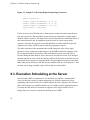
9.3. Execution Scheduling at the Server ........................................................82
10. Security in NetSolve Client .............................................................................84
10.1. Introduction...........................................................................................84
10.2. Compiling a Kerberized Server.............................................................85
10.3. Running a Kerberized NetSolve Client.................................................85
11. The User-Supplied Function Feature ...............................................................87
11.1. Motivation .............................................................................................87
11.2. Solution .................................................................................................87
11.3. For the Client ........................................................................................88
11.3.1. Determining the Format of the Function to Supply ...................88
11.3.2. From Matlab, Mathematica, C and Fortran ...............................88
11.3.3. From the NetSolve Java API......................................................88
11.3.4. From the Java GUI.....................................................................89
11.4. For the Server........................................................................................89
11.5. Conclusion ............................................................................................90
12. Troubleshooting ...............................................................................................91
12.1. Details of the Makefile.NETSOLVE_ARCH.inc File ..........................91
III. The Administrator’s Manual .............................................................................100
13. Downloading, Installing, and Testing the Agent and Server .........................101
13.1. Installation on Unix Systems ..............................................................101
13.2. Testing the Software ...........................................................................105
13.2.1. Agent-Server-Client Test .........................................................105
13.3. Expanding the Server Capabilities......................................................106
13.3.1. Enabling the LAPACK library .................................................107
13.3.2. Enabling the ScaLAPACK library ...........................................108
13.3.3. Enabling Sparse Iterative Solvers (PETSc, Aztec, and ITPACK)
109
13.3.4. Enabling Sparse Direct Solvers (SuperLU and MA28) ...........110
14. Running the NetSolve Agent .........................................................................112
15. Running the NetSolve Server.........................................................................114
7
15.1. Starting a Server..................................................................................114
15.2. The Server Configuration File ............................................................115
16. NetSolve Management Tools for Administrators ..........................................118
16.1. NS_conf ..............................................................................................118
16.2. NS_problems .....................................................................................118
16.3. NS_probdesc......................................................................................119
16.4. NS_killagent ......................................................................................120
16.5. NS_killserver .....................................................................................120
16.6. NS_killall............................................................................................121
17. The Problem Description File........................................................................122
17.1. Contents of a Problem Description File..............................................122
17.1.1. NetSolve Objects .....................................................................122
17.1.1.1. Sparse Matrix Representation in NetSolve ...................124
17.1.2. Mnemonics...............................................................................126
17.1.3. Sections of a Problem Description...........................................127
17.1.3.1. Problem ID and General Information ...........................127
17.1.3.2. Input Specification ........................................................128
17.1.3.3. Output Specification......................................................129
17.1.3.4. Additional Information .................................................129
17.1.4. Calling Sequence .....................................................................130
17.1.4.1. Pseudo-Code .................................................................132
17.1.5. A Simple Example ...................................................................134
17.1.6. PDF Generator .........................................................................136
18. Security in NetSolve ......................................................................................138
18.1. Introduction.........................................................................................138
18.2. Compiling a Kerberized Server...........................................................139
18.3. Installing a Kerberized Server.............................................................139
18.4. Running a Kerberized Server..............................................................141
IV. Miscellaneous Features .......................................................................................143
19. Using the Network Weather Service..............................................................144
19.1. Introduction.........................................................................................144
19.2. To Use NWS: ......................................................................................144
19.3. NWS Components utilized in NetSolve .............................................145
8
19.4. NetSolve agent and the NWS nameserver, memory and forecast ......146
19.5. NetSolve server and the NWS sensor .................................................147
20. Distributed Storage Infrastructure (DSI) in NetSolve....................................148
20.1. Introduction.........................................................................................148
20.2. To Use DSI:.........................................................................................148
20.3. DSI APIs: ............................................................................................148
20.4. Example ..............................................................................................152
V. References ..............................................................................................................156
21. Matlab Reference Manual..............................................................................157
22. C Reference Manual ......................................................................................159
23. Fortran Reference Manual .............................................................................161
24. Error Handling in NetSolve ...........................................................................163
VI. Appendices ...........................................................................................................166
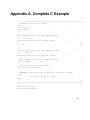
A. Complete C Example ......................................................................................167
B. Complete Fortran77 Example .........................................................................174
Bibliography ...............................................................................................................180
9
List of Tables
17-1. Available data types ............................................................................................123
17-2. Available object types.........................................................................................123
24-1. Error Codes.........................................................................................................163
List of Figures
1-1. The NetSolve System .............................................................................................17
9-1. Sample C Code Using Request Sequencing Constructs.........................................81
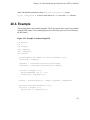
20-1. Example 1 (without using DSI) ..........................................................................153
20-2. Example 2 (using DSI) .......................................................................................154
10
Preface
1. Who Should Read This Document
This Document is intended to provide the reader with a discussion of how to use the
different components of the NetSolve System and to serve as a reference manual for the
commands and functions made available by NetSolve. Although we offer a brief
discussion of the NetSolve System, this document is not necessarily intended to
provide details about the NetSolve components. The reader should refer to the
NetSolve documents in the reference list and refer to the Documentation section of the
NetSolve homepage (http://icl.cs.utk.edu/netsolve/) for more appropriate discussion of
the NetSolve system.
The reader is expected to have some level of familiarity with programming and at least
one programming languages, preferably the C language. Rudimentary knowledge of
the UNIX™ operating system environment and the make utility will prove handy if
installing and configuring NetSolve for the UNIX environment.
2. Organization of This Document
This users’ guide is divided into six parts. These parts are aimed at the needs of
different types of users. Therefore, it is not necessary for a user to read all chapters of
this users’ guide.
Part I: Introduction
This part of the users’ guide provides a general overview of the NetSolve system,
as well as a discussion of related projects.
Part II: The User’s Manual
These chapters are aimed at the average user of NetSolve who is only interested
11
Preface
in utilizing the client interfaces. They provide installation instructions for the
client software, a discussion of the available client interfaces and how to utilize
specific features of the NetSolve system such as request farming, security, and
user-supplied functions, and a troubleshooting section to explain error-handling
within the NetSolve system.
Part III: The Administrator’s Manual
These chapters are aimed at the user who will be installing and customizing a
stand-alone NetSolve system. They give installation instructions for the agent and
server software and the management tools, explanations of how to enable new
software into the NetSolve system, and a thorough explanation of the design of
features in the NetSolve system such as request farming, security, and the
user-supplied function.
Part IV: Miscellaneous Features
These chapters provide detailed information on miscellaneous features of the
NetSolve system such as the Network Weather Service (NWS).
Part V: Reference
These sections provide reference manuals for the client interfaces, as well as a
listing of error-handling messages within the NetSolve system.
Part VI: Appendices
These appendices provides example programs calling the Fortran77 and C
NetSolve interfaces.
3. Document Conventions
Program Output
Text that is output from a program.
12
Preface
UNIX>
The UNIX prompt at which commands can be entered.
User Input
Data to be entered by the user.
Replaceable
Content that may or must be replaced by the user.
Action
A response to a user event.
Constant
A program or system constant.
Function
The name of a function or subroutine.
Parameter
A value or symbolic reference to a value.
Type
The classification of a value.
Variable
The name of a variable.
Application
The name of a software program.
Command
The name of an executable program or other software command.
13
Preface
ENVAR
A software environment variable.
Filename
The name of a file.
4. Request for Comments
Please help us improve future editions of this document by reporting any errors,
inaccuracies, bugs, misleading or confusing statements, and typographical errors that
you find. Email your bug reports and comments to us at [email protected].
(mailto:[email protected]) Your help is greatly appreciated.
14
I. Introduction
Chapter 1. A NetSolve Overview
1.1. An Introduction to Distributed Computing
The efficient solution of large problems is an ongoing thread of research in scientific
computing. An increasingly popular method of solving these types of problems is to
harness disparate computational resources and use their aggregate power as if it were
contained in a single machine. This mode of using computers that may be distributed in
geography, as well as ownership, has been termed Distributed Computing. Some of the
major issues concerned with Distributed Computing are resource discovery, resource
allocation and resource management, fault-tolerance, security and access control,
scalability, flexibility and performance. Various organizations have developed
mechanisms that attempt to address these issues, each with their own perspectives of
how to resolve them.
1.2. What is NetSolve?
NetSolve (http://icl.cs.utk.edu/netsolve/) is an example of a Distributed Computing
system that hopes to present functionalities and features that a wide variety of scientists
will find highly useful and helpful.
1.2.1. Background
Various mechanisms have been developed to perform computations across diverse
platforms. The most common mechanism involves software libraries. Unfortunately,
the use of such libraries presents several difficulties. Some software libraries are highly
optimized for only certain platforms and do not provide a convenient interface to other
computer systems. Other libraries demand considerable programming effort from the
user. While several tools have been developed to alleviate these difficulties, such tools
16
Chapter 1. A NetSolve Overview
themselves are usually available on only a limited number of computer systems and are
rarely freely distributed. Matlab [matlab] and Mathematica [mathematica] are examples
of such tools.
These considerations motivated the establishment of the NetSolve project. NetSolve
(http://icl.cs.utk.edu/netsolve) project. The basic philosophy of NetSolve is to provide a
uniform, portable and efficient way to access computational resources over a network.
1.2.2. Overview and Architecture
The NetSolve project is being developed at the University of Tennessee’s Computer
Science Department. It provides remote access to computational resources, both
hardware and software. Built upon standard Internet protocols, like TCP/IP sockets, it
is available for all popular variants of the UNIX™ operating system, and parts of the
system are available for the Microsoft Windows 95™, Windows 98™, Windows NT™,
and Windows 2000™ platforms. Testing has not yet been conducted on the Windows
ME™ operating system.
The NetSolve system is comprised of a set of loosely connected machines. By loosely
connected, we mean that these machines are on the same local, wide or global area
network, and may be administrated by different institutions and organizations.
Moreover, the NetSolve system is able to support these interactions in a heterogeneous
environment, i.e. machines of different architectures, operating systems and internal
data representations can participate in the system at the same time.
17
Chapter 1. A NetSolve Overview
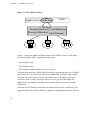
Figure 1-1. The NetSolve System
NS
Applications Client Library
Users
NS Agent
Resource Discovery Load Balancing
Resource Allocation Fault Tolerance
NS
Server
NS
Server
NS
Server
Figure 1-1 shows the global conceptual picture of the NetSolve system. In this figure,
we can see the three major components of the system:
•
The NetSolve client,
•
The NetSolve agent,
•
The NetSolve computational resources (or servers).
The figure also shows the relation NetSolve has to the applications that use it. NetSolve
and systems like it are often referred to as Grid Middleware; this figure helps to make
the reason for this terminology clearer. The shaded parts of the figure represent the
NetSolve system. It can be seen that NetSolve acts as a glue layer that brings the
application or user together with the hardware and/or software it needs to complete
useful tasks.
At the top tier, the NetSolve client library is linked in with the user’s application. The
application then makes calls to NetSolve’s application programming interface (API) for
18
Chapter 1. A NetSolve Overview
specific services. Through the API, NetSolve client-users gain access to aggregate
resources without the users needing to know anything about computer networking or
distributed computing. In fact, the user does not even have to know remote resources
are involved.
The NetSolve agent maintains a database of NetSolve servers along with their
capabilities (hardware performance and allocated software) and dynamic usage
statistics. It uses this information to allocate server resources for client requests. The
agent finds servers that will service requests the quickest, balances the load amongst its
servers and keeps track of failed ones.
The NetSolve server is a daemon process that awaits client requests. The server can run
on single workstations, clusters of workstations, symmetric multi-processors or
machines with massively parallel processors. A key component of the NetSolve server
is a source code generator which parses a NetSolve problem description file (PDF).
This PDF contains information that allows the NetSolve system to create new modules
and incorporate new functionalities. In essence, the PDF defines a wrapper that
NetSolve uses to call functions being incorporated.
The (hidden) semantics of a NetSolve request are:
i. Client contacts the agent for a list of capable servers.
ii. Client contacts server and sends input parameters.
iii. Server runs appropriate service.
iv. Server returns output parameters or error status to client.
No root/superuser privileges are needed to install or use any component of the
NetSolve system.
1.3. Who is the NetSolve User?
There are two types of NetSolve users. The first type of user is one who installs and
accesses only the client interface(s) and utilizes existing pools of resources (agent(s)
19
Chapter 1. A NetSolve Overview
and server(s)). The second type of NetSolve user installs and administrates his own
NetSolve system (client, agent(s), server(s)), and potentially enables his software to be
used by NetSolve. This Users’ Guide addresses the needs of both types of users. If the
user wishes to only install the client interface(s), he should follow instructions in Part
II. The User’s Manual. However, if the users wishes to install client, agent(s), and
server(s), he should follow the instructions in Part III. The Administrator’s Manual.
Note that the term "administrates" or "administrator" here simply refers to the person
setting up and maintaining the NetSolve agent and server components -- NO ROOT
PRIVILEGES ARE NEEDED TO INSTALL OR USE ANY COMPONENT OF THE
NetSolve SYSTEM.
1.4. The Status of NetSolve
The official release of NetSolve-1.4 is July, 2001. Features implemented in this release
include a new Java GUI to aid in the creation of PDFs, IBP-enabled clients and servers,
and more server modules for sparse matrix computations. The Java interface and the
Globus proxy are currently being updated and are not available for this release. A
Microsoft Excel interface is also under development. NetSolve has been recognized as
a significant effort in research and development, and was named in R & D Magazine’s
top 100 list for 1999.
20
Chapter 2. Related Projects and
Systems
There are a variety of related projects.
CONDOR
Condor (http://www.cs.wisc.edu/condor/)is a software system that runs on a
cluster of workstations to harness wasted CPU cycles. A Condor pool consists of
any number of machines, of possibly different architectures and operating systems,
that are connected by a network.
NetSolve currently has the ability to access CONDOR pools as its computational
resource. With little effort, the server can be configured to submit the client’s
request to an existing CONDOR pool, collect the results, and send them to the
client.
Globus
The Globus project (http://www.globus.org/) is developing the fundamental
technology that is needed to build computational grids, execution environments
that enable an application to integrate geographically-distributed instruments,
displays, and computational and information resources. Such computations may
link tens of hundreds of these resources.
In its testing phase is a new NetSolve client which implements a Globus proxy to
allow the client to utilize the Globus grid infrastructure if available. If not, the
client resorts to its present behavior.
IBP (Internet Backplane Protocol)
IBP (http://icl.cs.utk.edu/ibp/) is a storage management system which serves up
writable storage as a wide-area network resource, allows for the remote direction
of storage activities, and decouples the notion of user identification from storage.
21
Chapter 2. Related Projects and Systems
Currently available in NetSolve are IBP-enabled clients and servers that allow
NetSolve to allocate and schedule storage resources as part of its resource
brokering. This leads to much improved performance and fault-tolerance when
resources fail.
Legion
Legion (http://legion.virginia.edu/) has been incorporated in such a way to allow
the client-user to program using the NetSolve interface while leveraging the
Legion meta-computing resources. The NetSolve client side uses Legion data-flow
graphs to keep track of data dependencies. This effort has been extended only to
the FORTRAN interfaces and was done by the Legion group at the University of
Virginia.
metaNEOS
The metaNEOS project (http://www-unix.mcs.anl.gov/metaneos/) integrates
fundamental algorithmic research in optimization with research and infrastructure
tool development in distributed systems management. Algorithms that can exploit
the powerful but heterogeneous, high-latency and possibly failure-prone virtual
hardware platform typical of metacomputing platforms have been developed in
such areas as global optimization, integer linear optimization, integer nonlinear
optimization, combinatorial optimization, and stochastic optimization.
Ninf
Ninf (http://ninf.etl.go.jp) and NetSolve are remote computing systems which are
oriented to provide numerical computations. These two systems are very similar to
each other in their design and motivation. Adapters have been implemented to
enable each system to use numerical routines installed on the other.
NWS (Network Weather Service)
NWS (http://www.nws.npaci.edu/NWS/) is a system that uses sensor processes
on workstations to monitor the cpu and network connection. It constantly collects
statistics on these entities and has the ability to incorporate statistical models to
run on the collected data to generate a forecast of future behavior.
22
Chapter 2. Related Projects and Systems
NetSolve has integrated NWS into its agent to help its efforts of determining
which computational servers would yield results to the client most efficiently.
23
II. The User’s Manual
The user has two choices when installing NetSolve. He can install only the client
software and use existing pools of resources (agent(s) and server(s)), or he can install
his own stand-alone NetSolve system (client, agent(s) and server(s)). If the user wishes
to only install the client interface(s), he should follow instructions in Part II. The User’s
Manual. However, if the users wishes to install client, agent(s), and server(s), he should
follow the instructions in Part III. The Administrator’s Manual.
24
Chapter 3. Downloading, Installing, and
Testing the Client
The NetSolve client software is available for UNIX/UNIX-like operating systems and
Windows environments. All of the client, agent, and server software is bundled into one
tar-gzipped file. There is a separate distribution tar file for Unix and Windows
installations. No root/superuser privileges are needed to install or use any component of
the NetSolve system.
3.1. Installation on Unix Systems
The NetSolve distribution tar file is available from the NetSolve homepage.
(http://icl.cs.utk.edu/netsolve/download/NetSolve-1.4.tgz) Once the file has been
downloaded, the following UNIX commands will create the NetSolve directory:
gunzip -c NetSolve-1.4.tgz | tar xvf From this point forward, we assume that the UNIX SHELL is from the csh family.
The installation of NetSolve is configured for a given architecture using the GNU tool
configure.
UNIX> cd NetSolve
UNIX> ./configure
For a list of all options that can be specified to configure, type
UNIX> ./configure --help
Usage: configure [--with-cc=C_COMPILER] [--withcnooptflags=C_NOOPT_FLAGS]
[--with-coptflags=C_OPT_FLAGS] [--withfc=F77_COMPILER]
25
Chapter 3. Downloading, Installing, and Testing the Client
[--with-fnooptflags=F77_NOOPT_FLAGS]
[--with-foptflags=F77_OPT_FLAGS]
[--with-ldflags=LOADER_FLAGS]
[--with-nws=NWSDIR]
[--with-ibp=IBPDIR]
[--with-kerberos]
[--with-proxy=PROXY_TYPE]
[--with-outputlevel=OUTPUT_LEVEL]
[--enable-infoserver=INFOSERVER]
[--with-mpi=MPI_DIR]
[--with-petsc=PETSCDIR]
[--with-aztec=AZTEC_DIR]
[--with-azteclib=AZTEC_LIB]
[--with-superlu=SUPERLU_DIR]
[--with-superlulib=SUPERLU_LIB]
[--with-scalapacklib=SCALAPACK_LIB]
[--with-blacslib=BLACS_LIB]
[--with-lapacklib=LAPACK_LIB]
[--with-blaslib=BLAS_LIB]
where
C_COMPILER
= default is to use gcc
C_NOOPT_FLAGS
= C compiler flags to be used on files that
must be compiled without optimization
C_OPT_FLAGS
= C compiler optimization flags (e.g., -O)
F77_COMPILER
= default is to use g77
F77_NOOPT_FLAGS
= Fortran77 compiler flags to be used on files that
must be compiled without optimization
F77_OPT_FLAGS
= Fortran77 compiler optimization flags (e.g., -O)
LOADER_FLAGS
= Flags to be passed only to the loader
NWSDIR
= directory where NWS is installed (optional)
IBPDIR
= directory where IBP is installed (optional)
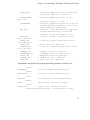
26
Chapter 3. Downloading, Installing, and Testing the Client
PROXY_TYPE
OUTPUT_LEVEL
bug, view,
INFOSERVER
MPI_DIR
PETSCDIR
tory (optional)
AZTEC_DIR
tory (optional)
AZTEC_LIB
SUPERLU_DIR
tory (optional)
SUPERLU_LIB
SCALAPACK_LIB
BLACS_LIB
LAPACK_LIB
BLAS_LIB
= currently supported values are netsolve
and globus (default is netsolve)
= currently supported values are deand none (default is view)
= currently supported values are alone and
nothing specified (default is not alone,
where nothing is specified).
= location of the MPI directory (optional,
assumes MPICH directory structure)
(default is /usr/local/mpich-1.2.1).
= location of PETSc installation direc= location of Aztec installation direc= Aztec link line (optional)
= location of SuperLU installation direc=
=
=
=
=
SuperLU link line (optional)
ScaLAPACK link line (optional)
MPIBLACS link line (optional)
LAPACK link line (optional)
BLAS link line (optional)
All arguments are optional. The options particularly pertinent to NetSolve are:
--withnws=NWSDIR
location of NWS installation dir
--withibp=IBPDIR
location of IBP installation dir
--withkerberos
use Kerberos5 client authentication
--withproxy
which Proxy? (netsolve, globus)
--withoutputlevel
output level (debug,view,none)
--enable-infoserver[=alone] use InfoServer [alone]
27
Chapter 3. Downloading, Installing, and Testing the Client
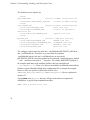
The NetSolve service options are:
--withpetsc=PETSCDIR
location
--with-petsclibdir=PETSC_LIB_DIR
--withaztec=AZTEC_DIR
location
--with-azteclib=AZTEC_LIB
--with-superlu=SUPERLU_DIR
stallation dir
--with-superlulib=SUPERLU_LIB
--withmpi=MPI_DIR
location
--with-lapacklib=LAPACK_LIB
--with-scalapacklib=SCALAPACK_LIB
--with-blacslib=BLACS_LIB
--with-blaslib=BLAS_LIB
of PETSc installation dir
location of PETSc library
of Aztec installation dir
Aztec link line
location of SuperLU inSuperLU link line
of MPI Root Directory
LAPACK link line
ScaLAPACK link line
MPIBLACS link line
BLAS link line
The configure script creates two main files, ./conf/Makefile.$NETSOLVE_ARCH.inc
and ./conf/Makefile.inc. These files are created from the templates
./conf/Makefile.generic-arch and ./conf/Makefile.inc.in respectively.
$NETSOLVE_ARCH is the string printed by the command ./conf/config.guess, with all
’-’ and ’.’ characters converted to ’_’ characters. The variable $NETSOLVE_ROOT is
the complete path name to the installed NetSolve directory and defined in
./conf/Makefile.inc . These *.inc files are included by the Makefiles that build the
NetSolve system. Manually editing these configuration files is strongly discouraged.
However, if the user prefers to edit this file, details of the
$NETSOLVE_ROOT/conf/Makefile.$NETSOLVE_ARCH.inc file are explained in
Section 12.1.
Typing make in the NetSolve directory will give instructions to complete the
compilation. A typical client compilation includes:
UNIX> make C Fortran tools test
28
Chapter 3. Downloading, Installing, and Testing the Client
to build the C and Fortran client interfaces, NetSolve management tools (see Chapter
16), and NetSolve test suite (see Section 13.2). To build the Matlab client interface to
NetSolve, type
UNIX> make matlab
and to build the Mathematica client interface to NetSolve, type
UNIX> make mathematica
As previously stated, the Java client interface is in the process of being updated, and is
not available in release 1.4 of NetSolve. After a successful compilation process, the
appropriate binaries and/or libraries can be found in the
$NETSOLVE_ROOT/bin/$NETSOLVE_ARCH and/or
$NETSOLVE_ROOT/lib/$NETSOLVE_ARCH directories respectively. Thus, to execute a
NetSolve binary, the user must either execute the command from within the
$NETSOLVE_ROOT/bin/$NETSOLVE_ARCH directory, or add this directory name to his
UNIX path variable.
3.2. Testing the Unix installation
Testing solely the client software means that a pre-existing NetSolve system will be
contacted, possibly the default agent and servers running at the University of
Tennessee. That system can be contacted via the host netsolve.cs.utk.edu
which should always be running an agent. The step-by-step procedure to test your
NetSolve client installation is as follows:
1. cd NetSolve
2. make test
3. setenv NETSOLVE_AGENT netsolve.cs.utk.edu
4. Test
29
Chapter 3. Downloading, Installing, and Testing the Client
While the tester is running, it prints messages about its execution. This test tests only
the C and Fortran77 interfaces. Details of this process are explained in the following
chapters. For more information on the C and Fortran77 interfaces, see Chapter 5.
Chapter 6 and Chapter 7 detail how to test the Matlab and Mathematica interfaces,
respectively.
If an error is encountered during testing, refer to the Troubleshooting section of the
Errata file (http://icl.cs.utk.edu/netsolve/errata.html) for NetSolve.
3.3. Installation on Windows systems
This section describes the installation and testing of the Windows version of the
NetSolve client software. At present, the software is distributed in the form of a
self-extracting exe file. An InstallShield setup is being developed to simplify the
installation instructions, and this setup will be available soon.
The contents of the self-extracting exe file are as follows, where NETSOLVE_DIR refers
to the directory where you have unzipped the distribution.
NETSOLVE_DIR\
This directory contains the readme file and an installation script.
NETSOLVE_DIR\lib
This directory contains the NetSolve client library.
NETSOLVE_DIR\matlab
This directory contains the matlab binaries.
NETSOLVE_DIR\tools
This directory contains various tools for managing NetSolve.
30
Chapter 3. Downloading, Installing, and Testing the Client
NETSOLVE_DIR\testing
This directory contains various sample binary test programs that you can run to
verify your installation.
The installation process is quite simple.
a. Run the exe you downloaded from the NetSolve webpage.
To determine the agent host name, the user can issue the following command:
a. cd NETSOLVE_DIR\tools
b. getagent
To set a new agent host name, the user must issue the following command:
a. cd NETSOLVE_DIR\tools
b. setagent [agent host name]
If the agent host name is not specified on the command line, you will be prompted
for a host name. You will have the option of specifying a name or accepting the
current agent name set in the registry.
The de-installation process is quite similar.
a. cd NETSOLVE_DIR
b. netsolve_install -uninstall
The above program removes the keys from the Windows registry.
c. delete NETSOLVE_DIR
31
Chapter 3. Downloading, Installing, and Testing the Client
3.4. Testing the Windows installation
You can use the various programs in the NETSOLVE_DIR\testing directory to test
your NetSolve installation. Remember that a valid NetSolve agent and server should
already be running, and the required problems should be installed on the servers. Here
is a list of test programs and the problems they make use of:
c_test
chartest, doubletest, inttest, stringlisttest, stringtest, totaltest
farming_test
doubletest
sequence_test
mpass, vpass, pass, multipass
For example, to perform a sample run of c_test, the user must do the following:
a. Use setagent to point to the correct agent host
b. Run c_test.exe
3.4.1. Using NetSolve from Windows Matlab
A user new to Netsolve will find the Matlab interface very simple. The matlab interface
is in NETSOLVE_DIR\matlab . To access the interface
a. Start up Matlab
b. Click on File -> Set Path ...
c. Add the NETSOLVE_DIR\matlab directory to the path
32
Chapter 3. Downloading, Installing, and Testing the Client
The interface consists of 4 NetSolve calls
netsolve.dll
netsolve_nb.dll
netsolve_err.dll
netsolve_errmsg.dll
Testing NetSolve within Matlab involves the following steps:
netsolve(’?’)
This command prints the agent and servers currently available.
netsolve
This command prints the list of problems that can be solved.
Help on any call can be obtained by typing just the call on the Matlab prompt.
3.4.2. Using the NetSolve Management Tools in Windows
There are various tools in the NETSOLVE_DIR\tools directory that allow the user to
explore the NetSolve metacomputing system.
netsolveconfig.exe [agent_name]
provides a list of agents and servers as seen by agent_name
netsolveproblems.exe [agent_name]
provides a list of problems that can be solved within the NetSolve framework as
seen by agent_name
33
Chapter 4. Introduction to the NetSolve
Client
4.1. NetSolve Problem Specification
Solving a computational problem with NetSolve is a function evaluation:
<output> = <name>(<input>)
where
• <name>
is a character string containing the name of the problem,
• <input>
is a list of input objects,
• <output>
is a list of output objects.
An object is itself described by an object type and a data type. The types available in
the current version of NetSolve are shown in Table 17-1 and Table 17-2. Rather than
giving examples for each object type, we refer the reader to the programs in:
$NETSOLVE_ROOT/src/Examples and $NETSOLVE_ROOT/src/Testing . The user
can also refer to Section 17.1.2 for a description of the requirements for each NetSolve
object type as it relates to the problem description file.
4.2. Available Client Interfaces
NetSolve provides a variety of client interfaces:
• C, Fortran
interfaces are detailed in Chapter 5.
34
Chapter 4. Introduction to the NetSolve Client
• Matlab
interface is detailed in Chapter 6.
• Mathematica
interface is detailed in Chapter 7.
We are in the process of updating our Java interface, thus this interface is not available
in version 1.4 of NetSolve. We are also developing an Excel interface.
In Section 4.1, we described the input and output arguments of a NetSolve problem as
lists of objects. The Matlab, Mathematica, and Java interfaces to NetSolve can
manipulate objects directly and it is therefore very easy to call NetSolve from their
interfaces once problem descriptions are known. From interfaces that are not
object-oriented (C and Fortran), it is necessary to use a calling sequence that describes
the objects’ features individually. For complete details, the user should refer to Chapter
5 and Section 17.1.1.1.
4.3. Problems that can be solved with NetSolve
In order for a problem to be solved (i.e., a function or library routine to be invoked)
using NetSolve, there must exist a problem description file (PDF) corresponding to the
problem/routine. A variety of PDFs are included with the NetSolve distribution. A user
can also write his own PDF for his function, as described in Chapter 17.
The default NetSolve distribution provides only a limited subset of enabled software to
test the various client interfaces. Interfaces have been written for a variety of software
libraries (refer to $NETSOLVE_ROOT/problems/ ), but as the libraries themselves are
not included in the NetSolve distribution, the library interfaces are not enabled. The
user can, therefore, customize his installation to include these existing interfaces and/or
new interfaces. Refer to Section 13.1 for further details.
It is possible to query a NetSolve agent to obtain a list and descriptions of the problems
that can be solved by its respective servers. There are several ways of sending such
queries.
1. From the NetSolve homepage, it is possible to specify an agent name and run CGI
scripts to obtain detailed information about NetSolve problems, including C and
35
Chapter 4. Introduction to the NetSolve Client
Fortran calling sequence specifications.
2. Problem lists and descriptions are also directly available from the Matlab interface,
the Mathematica interface, and the Java GUI.
3. The NetSolve management tools described in Chapter 16 give access to that
information from the UNIX prompt.
4.4. Naming Scheme for a NetSolve problem
The full name of a NetSolve problem has two parts:
i. the path, and
ii. the nickname.
Let us demonstrate this with an example. The problem nicknamed ddot, which
computes the inner product of two double-precision vectors, has the full name
/BLAS/Level1/ddot . This problem can be found in
$NETSOLVE_ROOT/problems/blas . This full name has two purposes. First, when we
display a list of problems, they are sorted alphabetically by their full name, and the
problems are grouped by "directory". Second, by convention, the first element of the
full name (e.g., BLAS) is the name of the numerical library containing the operation
(problem). This convention has proven to be useful, as seen in Section 5.2.
36
Chapter 5. C and Fortran77 Interfaces
5.1. Introduction
As previously mentioned in Section 3.1, the C/Fortran77 client interfaces for NetSolve
are built by typing
UNIX> make C Fortran
in the directory $NETSOLVE_ROOT. This compilation produces the following two
archive files:
• $NETSOLVE_ROOT/lib/$NETSOLVE_ARCH/libnetsolve.a :
the C library
• $NETSOLVE_ROOT/lib/$NETSOLVE_ARCH/libfnetsolve.a :
the Fortran77
library
where NETSOLVE_ROOT is the full path name to the NetSolve directory and
NETSOLVE_ARCH is the architecture name generated by configure.
Before linking to one of these libraries, the user must include the appropriate header
file in his program:
• $NETSOLVE_ROOT/include/netsolve.h in
C,
• $NETSOLVE_ROOT/include/fnetsolve.h in
Fortran77.
The Fortran77 include file is not mandatory, but increases the source program
readability by allowing calling subroutines to manipulate the NetSolve error codes by
variable name rather than by integer value.
The Fortran77 interface is built on top of the C interface since all of the networking
underneath NetSolve is written in C. However, we chose to write the Fortran77
interface with subroutines instead of functions (for reasons of compiler
37
Chapter 5. C and Fortran77 Interfaces
compatibilities). The C functions all return a NetSolve error code equal to 0 if the call
was successful or to a negative value in case of error. Chapter 24 contains the list of all
possible error codes. The Fortran77 subroutines take an extra output integer argument
(passed by reference) at the end of the calling sequence that contains the error code
after completion of the call. The reference manuals for C and Fortran77 are in Chapter
22 and Chapter 23.
The basic concepts here are the same as the ones we have introduced in Chapter 6 for
the Matlab interface, especially the ability to call NetSolve in a blocking or
nonblocking fashion.
We describe the C and Fortran77 interfaces by the means of an example. In the
following section we start developing the example by demonstrating how a user can
obtain information about the calling sequence to a given problem.
5.2. What is the Calling Sequence?
As described in Section 4.1, the C and Fortran77 interfaces, as they are not
object-capable, need to use specific calling sequences that are more involved than the
ones used from Matlab or Mathematica.
Let us take a very simple example: the user wants to perform a dense linear system
solve. The first thing to know, as stated in earlier chapters, is the name or IP address of
a host running a NetSolve agent. The default NetSolve agent running at the University
of Tennessee is aware of many servers that can perform the computation. In fact, a
dense linear system solve is provided with the NetSolve distribution as default
numerical software for the server. The user has now two possible courses of action to
find out about the problem. Let us assume that the user chooses to use the UNIX
command line management tools (see Chapter 16 for a complete description of these
tools). The alternative would be to use the CGI scripts on the NetSolve homepage.
Section 13.3 shows how the servers specify the calling sequence to a given problem. It
is usual for servers to enforce the same calling sequence as the original numerical
software and to give a problem the name of the original library function. In the
example, dgesv() is the name of an LAPACK subroutine and the user can therefore
38
Chapter 5. C and Fortran77 Interfaces
expect the calling sequence for the problem dgesv to match the one of the subroutine.
One can see in the problem list returned by NS_problems a problem called linsol. In
this example, linsol is a simplified version of dgesv and has a simplified calling
sequence chosen by whomever started the first server that provides access to that
problem. Since linsol is not the name of an LAPACK subroutine, its calling sequence
can be arbitrary.
UNIX> NS_problems netsolve.cs.utk.edu
/ImageProcessing/Filters/blur
/LAPACK/LinearSystems/dgesv
/LAPACK/LinearSystems/linsol
Next, two situations are possible. First, the user already knows the numerical software
(e.g., LAPACK) and may even have code already written in terms of this software. In
this case, the switching to NetSolve is immediate. The second possibility is that the user
does not know the software. If this is the case, he needs to pay close attention to the
output given by NS_probdesc. The output from this command first gives the calling
sequence as it would be invoked from Matlab, and then gives the calling sequence from
C/Fortran.
UNIX> NS_probdesc netsolve.cs.utk.edu dgesv
-- dgesv -- From LAPACK Compute the solution to a real system of linear equations
A * X = b
where A is an N-by-B matrix and X and B are N-by-NRHS matrices.
Matlab Example : [x y z info ] = netsolve(’dgesv’,a,b)
http://www.netlib.org/lapack/index.html
* 2 objects in INPUT
- input 0: Matrix Double Precision Real.
Matrix A
- input 1: Matrix Double Precision Real.
Right hand side
* 4 objects in OUTPUT
- output 0: Matrix Double Precision Real.
LU factors ( A = P*L*U)
- output 1: Vector Integer.
39
Chapter 5. C and Fortran77 Interfaces
Vector of pivots (defines the P matrix)
- output 2: Matrix Double Precision Real.
Solution
- output 3: Scalar Integer.
INFO
0 successful
<0 error on calling ?
>0 QR algorithm failed
* Calling sequence from C or Fortran
8 arguments
- Argument #0:
- number of rows of input object #0 (A)
- number of columns of input object #0 (A)
- number of rows of input object #1 (RHS)
- Argument #1:
- number of columns of input object #1 (RHS)
- Argument #2:
- pointer to input object #0 (A)
- pointer to output object #0 (LU)
- pointer to output object #0 (LU)
- Argument #3:
- leading dimension of input object #0 (A)
- Argument #4:
- pointer to output object #1 (PIVOT)
- Argument #5:
- pointer to input object #1 (RHS)
- pointer to output object #1 (PIVOT)
- pointer to output object #2 (SOLUTION)
- Argument #6:
- leading dimension of input object #1 (RHS)
- Argument #7:
- pointer to output object #3 (INFO)
This output can appear rather cryptic at first. Let us work through it step by step. First,
the number of arguments in the calling sequence is 8. This means that the call from C
will look like:
40
Chapter 5. C and Fortran77 Interfaces
status = netsl(’dgesv()’,X0,X1,X2,X3,X4,X5,X6,X7);
And from Fortran77, the call to NetSolve would be:
CALL FNETSL(’dgesv()’,STATUS,X0,X1,X2,X3,X4,X5,X6,X7)
Now, each argument is described in the information returned by NS_probdesc and this
description can be translated into meaningful variable names in the user source code.
For instance, X2 should be a pointer to the matrix of the linear system, and X3 should
be an integer that is the leading dimension of the matrix. We can now move on to the
descriptions of the different ways of calling NetSolve from C or Fortran77.
5.3. Blocking Call
The blocking call to NetSolve from C or Fortran77 is the easiest to implement.
Specifically, if the main program is in C, one calls the function, netsl(), and if the
main program is in Fortran77, one calls the function, FNETSL(). This C function
returns an error code. It takes as arguments the name of a problem and the list of input
data. These inputs are listed according to the calling sequence discussed in Section 5.2.
The C prototype of the function is
int netsl(char *problem_name, ... < argument list > ...)
and the Fortran77 prototype is
&
SUBROUTINE FNETSL( PROBLEM_NAME, STATUS, ...
< argument list > ...)
where PROBLEM_NAME is a string and STATUS is the integer status code returned by
NetSolve.
Let us resume our example of the call to dgesv. In Fortran77, the direct call to
LAPACK looks like
CALL DGESV( N, 1, A, LDA, IPIV, B, LDB, INFO )
41
Chapter 5. C and Fortran77 Interfaces
The equivalent blocking call to NetSolve is
&
CALL FNETSL(’DGESV()’, STATUS, N, 1, A, LDA, IPIV,
B, LDB, INFO )
The call in C is
status = netsl(’dgesv()’,n,1,a,lda,ipiv,b,ldb,&info);
Notice that the name of the problem is case insensitive and that it is appended by an
opening and a closing parenthesis. The parentheses are used by NetSolve to handle
Fortran/C interoperability on certain platforms. In Fortran77, every identifier represents
a pointer, but in C we actually had the choice to use pointers or not. We chose to use
integer (int) for the sizes of the matrices/vectors, but pointers for everything else.
From the user’s point of view, the call to NetSolve is exactly equivalent to a call to
LAPACK. One detail, however, needs to be mentioned. Most numerical software is
written in Fortran77 and requires users to provide workspace arrays as well as data,
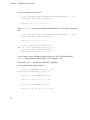
since there is no possibility for dynamic memory allocation. Because we preserved the
exact calling sequence of the numerical software, we require the user to pass those
arrays. But, since the computation is performed remotely, workspace on the client side
is meaningless. It will, in fact, be dynamically created on the server side. Therefore,
when the numerical software would require workspace, the NetSolve user may provide
a one-length array for workspace.
This is signaled in the output of NS_probdesc by an argument description such as:
- Argument #6:
- ignored
5.4. Nonblocking Call
We developed this nonblocking call for the same reason we developed one for Matlab
(see Section 6.4): to allow the user to have some NetSolve-parallelism. The
42
Chapter 5. C and Fortran77 Interfaces
nonblocking version of netsl() is netslnb(). Similarly, the nonblocking version of
FNETSL() is FNETSLNB(). The user calls it exactly as he would call netsl() or
FNETSL(). If the call to netslnb() or FNETSLNB() is successful, it returns a request
handler in the form of a (positive) integer. If it is not successful, it returns an error code.
Continuing with our example:
CALL FNETSLNB( ’DGESV()’, REQUEST, N, 1, A, LDA, IPIV,
&
B, LDB, INFO )
and in C :
request = netslnb(’dgesv()’,n,1,a,max,ipiv,b,max,&info);
In case of an error, the request handler actually contains the (negative) NetSolve error
code.
The next step is to check the status of the request. As in the Matlab interface, the user
can choose to probe or to wait for the request. Probing is done by calling netslpr()
or FNETSLPR() which returns a NetSolve error code:
CALL FNETSLPR( REQUEST, INFO )
and in C :
info = netslpr(request);
Typical error codes returned are NetSolveNotReady and NetSolveOK (see Chapter
24). Waiting is done by using netslwt() or FNETSLWT(). This function blocks until
the computation is complete and the result is available. Here is the Fortran77 call:
CALL FNETSLWT( REQUEST, INFO )
and the C call :
info = netslwt(request);
43
Chapter 5. C and Fortran77 Interfaces
If the call is successful, the function/subroutine returns the error code NetSolveOK and
the result is in the user memory space.
5.5. Catching errors
Given a NetSolve error code, there is a function in the C and Fortran77 interface that
prints explicit error messages to the standard error. The C call is :
netslerr(info);
and in Fortran77
CALL FNETSLERR( INFO )
The user should refer to Chapter 24 for a list of all possible error codes.
5.6. Row- or column-major
To allow the NetSolve user to store her/his matrices either in row-wise or column-wise
fashion, we also provide the function netslmajor() in C and FNETSLMAJOR() in
Fortran77. This function can be called at any time in the user’s program in C:
netslmajor("col");
netslmajor("row");
or in Fortran77:
CALL FNETSLMAJOR(’col’)
CALL FNETSLMAJOR(’row’)
All of the subsequent calls to NetSolve will assume the corresponding major. The
default values are of course row-wise for C and column-wise for Fortran77.
44
Chapter 5. C and Fortran77 Interfaces
5.7. Limitations of the Fortran77 interface
Due to Fortran77’s restrictions for the use of pointer and its inability to dynamically
allocate memory, the Fortran77 interface to NetSolve does not support the
PACKEDFILES and STRINGLIST object type. It also does not support output objects
of type STRING.
5.8. Built-in examples
C and Fortran77 and Java examples are included in the NetSolve distribution in
$NETSOLVE_ROOT/src/Examples . To build them, the user simply types make
examples in the top directory. The examples use different problems that have been
given servers at the University of Tennessee. They should help the user to understand
how the system works. We also have full examples in C and Fortran in Appendix A and
Appendix B.
45
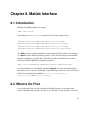
Chapter 6. Matlab Interface
6.1. Introduction
Building the Matlab interface by typing
UNIX> make matlab
in the directory $NETSOLVE_ROOT produces the four following mex-files :
$NETSOLVE_ROOT/bin/$NETSOLVE_ARCH/netsolve.mex###
$NETSOLVE_ROOT/bin/$NETSOLVE_ARCH/netsolve_nb.mex###
$NETSOLVE_ROOT/bin/$NETSOLVE_ARCH/netsolve_err.mex###
$NETSOLVE_ROOT/bin/$NETSOLVE_ARCH/netsolve_errmsg.mex###
The ### part of the extension depends on the architecture (for instance, the extension
is .mexsol for the Solaris Operating System). These four files alone are the Matlab
interface to NetSolve. To make these four files accessible to Matlab, the user must
modify the MATLABPATH environment variable as:
UNIX> setenv MATLABPATH $NETSOLVE_ROOT/bin/$NETSOLVE_ARCH
It is also possible to use the Matlab command addpath. For more information about
mex-files, the user can refer to [matlab]. In the following sections, the user will learn to
call four new functions from Matlab: netsolve(), netsolve_nb(),
netsolve_err() , and netsolve_errmsg() .
6.2. What to Do First
Let us assume that the user has compiled the Matlab interface, set an agent name,
started a Matlab session and is now ready to use NetSolve. In this section we describe
46
Chapter 6. Matlab Interface
those features of the interface that allow the user to obtain information about the
currently available NetSolve system.
As stated briefly in Section 4.3, it is possible to obtain the list of solvable problems
from Matlab, as well as from the homepage CGI scripts or the management tools. In
the case of Matlab, this information is obtained by typing the following command
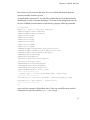
>> netsolve
NetSolve - List of available problems /BLAS-wrappers/Level3/dmatmul
/BLAS-wrappers/Level3/zmatmul
/BLAS/Level1/daxpy
/BLAS/Level1/ddot
/BLAS/Level1/zaxpy
/BLAS/Level2/dgemv
/BLAS/Level3/dgemm
/BLAS/Level3/zgemm
/LAPACK-wrapper/Simple/Eig_and_Singular/eig
/LAPACK-wrapper/Simple/Linear_Equations/linsol
/LAPACK/Simple/Linear_Equations/dgesv
/LAPACK/Auxiliary/dlacpy
/Mandelbrot/mandelbrot
/QuickSort/DoublePrecision/dqsort
/QuickSort/Integer/iqsort
/SCALAPACK/LinearSystem/pdgesv
/SCALAPACK/LinearSystem/pdposv
/SCALAPACK/LinearSystem/plinsol
/SuperLU-MA28/sparse_direct_solve
----------------------[ output args ] = netsolve(problem name, input args)
----------------------Information on a specific problem : netsolve(problem name)
Information on the servers : netsolve(’?’)
---------------------->>
where each line contains a full problem name. If the user would like more detailed
information on a specific problem, e.g., eig, he can type
47
Chapter 6. Matlab Interface
>> netsolve(’eig’)
-- eig -- Wrapper around the LAPACK routine DGEEV -Simplified version of DGEEV.
Computes the eigenvalues of a double precision real
matrix A. Returns two double precision real
vectors containing respectively the real parts and
the imaginary parts of the eigenvalues.
MATLAB Example : [r i ] = netsolve(’eig’,a)
* 1 objects in INPUT
- input 0: Matrix Double Precision Real.
Matrix A
* 2 objects in OUTPUT
- output 0: Vector Double Precision Real.
Real parts of the eigen values
- output 1: Vector Double Precision Real.
Imaginary parts of the eigen values
-------------------------------------Output Objects 0 and 1 can be merged.
>>
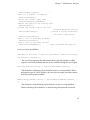
This output gives a short description of the problem, an example in Matlab using
netsolve(), the input objects that must be supplied by the user, and the output that
will be returned to the user. This particular problem requires only one double-precision
matrix on input. Notice that this matrix must be square (as stated in the description of
the problem). If the user tries to call NetSolve for this problem with a rectangular
matrix, he will receive an error message stating that the dimensions of the input are
invalid. On output, the problem eig will return two vectors, the real and imaginary
parts of the eigenvalues of the input matrix, respectively.
Since Matlab provides a mechanism to manipulate complex objects, it is probable that
the user would like to have eig return one single complex vector instead of two
separate real vectors. Thus, in the Matlab interface it is possible to merge these two real
output vectors into one complex vector. This point is further developed in the next
section.
48
Chapter 6. Matlab Interface
The Matlab interface has another feature that is concerned not with the actual problem
solving but with providing information about the NetSolve configuration itself. We
have just seen how to get information about the problems handled by the NetSolve
servers; it is also possible to obtain the physical locations of these servers. Let us
assume that our NETSOLVE_AGENT environment variable is set to
netsolve.cs.utk.edu (see Chapter 14). The command
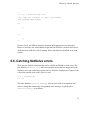
>> netsolve(’?’)
produces the following output:
NetSolve - List of available agents netsolve.cs.utk.edu(128.169.93.161)
NetSolve - List of available servers maruti.cs.berkeley.edu(128.32.36.83)
cupid.cs.utk.edu(128.169.94.221)
torc3.cs.utk.edu(128.169.93.74) (0 failures)
The same information can be obtained from the homepage CGI scripts or the
management tools.
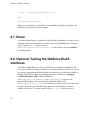
6.3. Calling netsolve() to perform computation
The easiest way to perform a numerical computation in NetSolve is to call the function
netsolve(). With this function, the user sends a blocking request to NetSolve. By
blocking we mean that after typing the command in the Matlab session, the user
resumes control only when the computation has been successfully completed on a
server. The other way to perform computation is to send a nonblocking request as
described in Section 6.4.
Let us continue with the eig example we started to develop in the preceding section.
The user now knows that he has to provide a double-precision square matrix to
NetSolve, and he knows that he is going to get two real vectors back (or one single
complex vector). He first creates a 300 300 matrix, for instance,
49
Chapter 6. Matlab Interface
>> a = rand(300);
The call to NetSolve is now
>> [x y] = netsolve(’eig’,a)
All the calls to netsolve() will look the same. The left-hand side must contain the
output arguments, in the same order as listed in the output description (see Section 6.2).
The first argument to netsolve() is always the name of the problem. After this first
argument the input arguments are listed, in the same order as they are listed in the input
description (see Section 6.2). This function does not have a fixed calling sequence,
since the number of inputs and outputs depends on the problem the user wishes to solve.
Let us see what happens when we type:
>> [x y] = netsolve(’eig’,a)
Sending Input to Server zoot.cs.utk.edu
Downloading Output from Server zoot.cs.utk.edu
x =
y =
10.1204
-0.9801
-0.9801
-1.0195
-0.6416
...
...
0
0.8991
-0.8991
0
0.6511
...
...
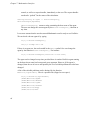
As mentioned earlier, the user can decide to regroup x and y into one single complex
vector. Let us make it clear again that this possibility is a specificity of eig and is not
available in general for all problems. To merge x and y, the user has to type:
>> [x] = netsolve(’eig’,a)
Sending Input to Server zoot.cs.utk.edu
Downloading Output from Server zoot.cs.utk.edu
x =
50
Chapter 6. Matlab Interface
10.1204
-0.9801 + 0.8991i
-0.9801 - 0.8991i
-1.0195
-0.6416 + 0.6511i
.........
.........
6.4. Calling netsolve_nb()
The obvious drawback of the function netsolve() is that while the computation is
being performed remotely, the user must wait to regain control of the prompt. To
address this drawback, we provide a nonblocking function, netsolve_nb(). The user
can then do work in parallel and check for the completion of the request later. He can
even send multiple requests to NetSolve. Thanks to the load-balancing strategy
implemented in the NetSolve agent, all these requests will be solved on different
machines if possible, achieving some NetSolve-parallelism. Let us now describe this
function with the eig example.
As in Section 6.3, the user creates a 300
300 matrix and calls NetSolve:
>> a = rand(300);
>> [r] = netsolve_nb(’send’,’eig’,a)
Obviously, the calling sequence to netsolve_nb() is a little different from the one to
netsolve(). The left-hand side always contains one single argument. Upon
completion of this call, it will contain a NetSolve request handler. The right-hand side
is composed of two parts: the action to perform and the arguments that would be passed
to netsolve(). In this example, the action to perform is ’send’, which means that
we send a request to NetSolve. Throughout this section, we will encounter all of the
possible actions, and they will be summarized in Chapter 21.
Let us resume our example and see what NetSolve answers to the first call to
netsolve_nb():
51
Chapter 6. Matlab Interface
>> [r] = netsolve_nb(’send’,’eig’,a)
Sending Input to Server zoot.cs.utk.edu
rd->request_id = 0
r =
0
>>
netsolve_nb() returns a request handler: 0. This request handler will be used in the
subsequent calls to the function. The request is being processed on cupid, and the
result will eventually return. The user can obtain this result in one of two ways. The
first one is to call netsolve_nb() with the ’probe’ action:
>> [status] = netsolve_nb(’probe’,r)
netsolve_nb() returns the status of a pending request. The right-hand side contains
the action, as is required for netsolve_nb(), and the request handler. This call
returns immediately, and prints a message. Here are the two possible scenarios:
>> [status] = netsolve_nb(’probe’,r)
Not ready yet
status = -1
...
>> [status] = netsolve_nb(’probe’,r)
Result available
status = 1
To obtain the result of the computation one must call netsolve_nb() with the
’wait’ action:
>> [x y] = netsolve_nb(’wait’,r)
Downloading Output from Server zoot.cs.utk.edu
x =
52
y =
Chapter 6. Matlab Interface
10.1204
-0.9801
-0.9801
-1.0195
-0.6416
...
...
0
0.8991
-0.8991
0
0.6511
...
...
As with the netsolve() function, one can merge the real part and the imaginary part
into a single complex vector. The typical scenario is to call netsolve_nb() with the
action ’send’, then make repeated calls with the action ’probe’ until there is
nothing more to do than wait for the result. The user then calls netsolve_nb() with
the action ’wait’. It is of course possible to call netsolve_nb() with the action
’wait’ before making any call with the action ’probe’. One last action can be
passed to netsolve_nb(), as shown here:
>> netsolve_nb(’status’)
This command will return a description of all of the pending requests. Let us see how it
works on this last complete example:
>> a=rand(100); b = rand(150);
>> [r1] = netsolve_nb(’send’,’eig’,a)
Sending Input to Server zoot.cs.utk.edu
rd->request_id = 0
r1 =
0
>> [r2] = netsolve_nb(’send’,’eig’,b)
Sending Input to Server zoot.cs.utk.edu
rd->request_id = 1
r2 =
1
53
Chapter 6. Matlab Interface
Now let us see what ’status’ does:
>> netsolve_nb(’status’)
--- NetSolve: pending requests --Requests #0: ’eig’, submitted to zoot.cs.utk.edu (160.36.58.152)
was started 24 seconds ago.
netsolveProbeRequest returned: 1, ns_errno = 0
Completed
Requests #1: ’eig’, submitted to zoot.cs.utk.edu (160.36.58.152)
was started 7 seconds ago.
netsolveProbeRequest returned: 1, ns_errno = 0
Completed
The user can check what requests he has sent so far and obtain an estimation of the
completion times. By using the ’status’ action, the user can also determine whether
a request is still running or has been completed. By sending multiple non-blocking
requests to NetSolve and relying on the agent for load balancing, the user can achieve
parallelism.
6.5. What Can Go Wrong?
During a computation, two classes of error can occur: NetSolve failures and user
mistakes. Let us demonstrate a few examples:
>> netsolve
NS:netsolveproxybasics.c:225: :
Cannot contact agent
...
>> [x] = netsolve(’foo’,a)
unknown problem
x =
[]
54
connection refused
Chapter 6. Matlab Interface
...
>> [x y] = netsolve(’eig’,a,a)
’eig’ requires 1 objects in input (2 provided)
bad problem input/output
x =
[]
y =
[]
>>
In case of error, the different NetSolve functions print appropriate error messages.
However, when the user writes Matlab scripts that call NetSolve, he/she needs ways to
catch the errors while the script is running. Hence the functions described in the next
section.
6.6. Catching NetSolve errors
There are two NetSolve functions that can be called from Matlab to catch errors. The
first function, netsolve_err() takes no arguments and returns an integer that is the
NetSolve error code returned by the last call to a NetSolve function (see Chapter 24 for
a list of the possible error codes). Here is a call:
>> e = netsolve_err
e = -11
The other function, netsolve_errmsg() takes an error code as an argument and
returns a string that contains the corresponding error message. A typical call to
netsolve_errmsg() is as follows:
55
Chapter 6. Matlab Interface
>> [msg] = netsolve_errmsg(netsolve_err)
msg =
bad problem input/output
With these two functions, it is possible to write Matlab scripts that call NetSolve and
handle all of the NetSolve errors at runtime.
6.7. Demo
A NetSolve-Matlab demo is available with the NetSolve distribution. It consists of a set
of Matlab scripts that call NetSolve to compute parts of the Mandelbrot set. The main
script is called mandel.m and is located in
$NETSOLVE_ROOT/src/Demo/mandelbrot/. To run the demo, just type mandel at
the Matlab prompt.
6.8. Optional: Testing the NetSolve BLAS
interfaces
A NetSolve-Matlab BLAS test suite is available with the NetSolve distribution, and
tests a subset of BLAS routines available in the NetSolve distribution. The user can test
the reference implementation BLAS included in NetSolve or he could have enabled an
optimized BLAS library during the configuration phase of NetSolve (./configure
--with-blaslib=BLAS_LIB) or hand modified the
$NETSOLVE_ROOT/conf/Makefile.$NETSOLVE_ARCH.inc to point to the
optimized BLAS library. The user must then enable the BLAS in the
$NETSOLVE_ROOT/server_config file, and he/she is ready to run this test suite. The
test suite consists of a set of Matlab scripts that test each of the BLAS interfaces
available in NetSolve. The main script is called blas_test.m and is located in
56
Chapter 6. Matlab Interface
$NETSOLVE_ROOT/src/Testing/matlab/ . To run the BLAS test suite, type
blas_test at the Matlab prompt.
6.9. Optional: Testing the NetSolve LAPACK
interfaces
A NetSolve-Matlab LAPACK test suite is available with the NetSolve distribution. If
the user enabled LAPACK during the configuration phase of NetSolve as instructed in
Section 13.3.1 or hand modified the
$NETSOLVE_ROOT/conf/Makefile.$NETSOLVE_ARCH.inc to point to the
LAPACK library and BLAS library, and has enabled LAPACK in the
$NETSOLVE_ROOT/server_config file, he/she may choose to run this test suite.
Note that only a subset of LAPACK is included in the NetSolve distribution. The
complete LAPACK library is not included as default numerical software for the server,
and must be installed separately. The test suite consists of a set of Matlab scripts that
test each of the LAPACK interfaces available in NetSolve. The main script is called
lapack_test.m and is located in $NETSOLVE_ROOT/src/Testing/matlab/. To
run the LAPACK test suite, type lapack_test at the Matlab prompt.
6.10. Optional: Testing the NetSolve
ScaLAPACK interfaces
Likewise, a NetSolve-Matlab ScaLAPACK test suite is available with the NetSolve
distribution. If the user enabled ScaLAPACK during the configuration phase of
NetSolve as instructed in Section 13.3.2 or hand modified the
$NETSOLVE_ROOT/conf/Makefile.$NETSOLVE_ARCH.inc to point to the
ScaLAPACK, MPIBLACS, BLAS, and MPI libraries, and has enabled ScaLAPACK in
the $NETSOLVE_ROOT/server_config file, he/she may choose to run this test suite.
The ScaLAPACK library is not included as default numerical software for the server,
57
Chapter 6. Matlab Interface
and must be installed separately (as well as MPI). The test suite consists of a set of
Matlab scripts that test each of the ScaLAPACK interfaces available in NetSolve. The
main script is called scalapack_test.m and is located in
$NETSOLVE_ROOT/src/Testing/matlab/ . To run the ScaLAPACK test suite, type
scalapack_test at the Matlab prompt.
6.11. Optional: Testing the NetSolve
’sparse_iterative_solve’ interface
The NetSolve ’sparse_iterative_solve’ interface to PETSc, Aztec, and ITPACK can
only be tested if the user has enabled sparse_iterative_solve in the
$NETSOLVE_ROOT/server_config file and has configured NetSolve with the
respective paths to the PETSc library, Aztec library, and MPI library. The PETSc,
Aztec, and ITPACK libraries are not included as default numerical software for the
server, and must be installed separately (as well as MPI). Refer to Section 13.3.3 for
further details.
This interface can be tested most effectively by using sparse matrices generated from
collections such as the Harwell Boeing test collection on the Matrix Market homepage
(http://math.nist.gov/MatrixMarket/). Refer to the section on the webpage entitled
Software, where the test matrices are available in C, Fortran, and Matlab. For ease of
testing, several of the test matrices from this collection are included in the distribution
of NetSolve.
After Matlab has been invoked, the user can then call the test scripts petsc_test.m,
aztec_test.m, and itpack_test.m in the
$NETSOLVE_ROOT/src/Testing/matlab/ directory, by typing
>> petsc_test
and
>> aztec_test
58
Chapter 6. Matlab Interface
and
>> itpack_test
These scripts invoke the PETSc, Aztec, and ITPACK interfaces and check the validity
of the computed solution.
Alternatively, the user can generate a series of Harwell Boeing matrix types (1-5),
using the generate.m script. To see a list of Harwell Boeing matrix types that can be
generated, type
>> generate(0);
And then call the functions petsc.m and/or aztec.m by typing
>> [A,rhs] = generate(1);
>> [x1,its1] = petsc(A,rhs);
>> [x2,its2] = aztec(A,rhs);
Note that the user can query for the list of arguments in the calling sequence to the
routine by using the NetSolve tool routine.
>> netsolve(’sparse_iterative_solve’)
6.12. Optional: Testing the NetSolve
’sparse_direct_solve’ interface
The NetSolve ’sparse_direct_solve’ interface to MA28 and SuperLU can only be tested
if the user has enabled sparse_direct_solve in the $NETSOLVE_ROOT/server_config
file and has configured NetSolve with the respective paths to the SuperLU and MPI
libraries. The MA28 library is distributed with NetSolve in
$NETSOLVE_ROOT/src/SampleNumericalSoftware/MA28/ as a small
modification to the library was necessary to enable its use in NetSolve. The SuperLU
59
Chapter 6. Matlab Interface
library is not included as default numerical software for the server, and must be
installed separately (as well as MPI). Refer to Section 13.3.4 for further details.
This interface can be tested most effectively by using sparse matrices generated from
collections such as the Harwell Boeing test collection on the Matrix Market homepage
(http://math.nist.gov/MatrixMarket/). Refer to the section on the webpage entitled
Software, where the test matrices are available in C, Fortran, and Matlab. For ease of
testing, several of the test matrices from this collection are included in the distribution
of NetSolve.
After Matlab has been invoked, the user can then call the test scripts ma28_test.m and
superlu_test.m in the $NETSOLVE_ROOT/src/Testing/matlab/ directory, by
typing
>> ma28_test
and
>> superlu_test
These scripts invoke the MA28 and SuperLU interfaces and check the validity of the
computed solution.
Alternatively, the user can generate a series of Harwell Boeing matrix types (1-5),
using the generate.m script. To see a list of Harwell Boeing matrix types that can be
generated, type
>> generate(0);
And then call the functions ma28.m and/or superlu.m by typing
>> [A,rhs] = generate(1);
>> [x1] = ma28(A,rhs);
>> [x2] = superlu(A,rhs);
Note that the user can query for the list of arguments in the calling sequence to the
routine by using the NetSolve tool routine.
60
Chapter 6. Matlab Interface
>> netsolve(’direct_solve_serial’)
61
Chapter 7. Mathematica Interface
7.1. Introduction
The Mathematica client interface for NetSolve is built by typing
UNIX> make mathematica
in the directory $NETSOLVE_ROOT.
Details of this interface can be found in [ns:mathematica] and quick
instructions/requirements for building it are in the file:
$NETSOLVE_ROOT/src/Mathematica/INSTALL Full details of the installation
procedure can be found in:
$NETSOLVE_ROOT/src/Mathematica/doc/UsersGuide.tex
7.2. What to do first
Once the interface is successfully installed, the first thing to do is to start a
Mathematica client and type
NetSolve[]
which prints information on how to use the interface:
In[1]:= NetSolve[]
usage:
NetSolve[FuncName[arg1, ...]]
- blocking problem call
NetSolveNB[FuncName[arg1, ...]] - nonblocking problem call
NetSolveProbe[request]
checks if a request has been completed
62
Chapter 7. Mathematica Interface
NetSolveWait[request]
waits for a request to complete
NetSolveGetAgent[]
returns the current agent name
NetSolveSetAgent[AgentName]
changes the agent we are working with
NetSolveError[]
returns the result code of the last
NetSolveErrorMsg[rc]
executed NetSolve function
- returns a string describing
the result code passed
NetSolve["?problems"]
shows a list of available problems
NetSolve["?servers"]
shows a list of available servers
NetSolve["?FuncName[]"]
- shows a problem description
Let us review the possibilities:
Information functions -- NetSolve["?problems"], NetSolve["?servers"]
and NetSolve["?FuncName[]"]
This set of functions provides information about a specific problem’s calling
sequence and which problems and servers are available through the user’s agent.
Blocking problem solving -- NetSolve[ProblemName[arguments, ... ]]
This function is a blocking call to NetSolve to solve a certain problem. When
utilizing this type of call to NetSolve, the user does not regain execution control
until the result becomes available.
Nonblocking problem solving -- NetSolveNB[ProblemName[arguments, ...
]]
This function is a non-blocking call to NetSolve to solve a certain problem.
Unlike a blocking call to NetSolve, a non-blocking call returns the execution
63
Chapter 7. Mathematica Interface
control, as well as a request handler, immediately to the user. The request handler
can then be “probed” for the status of the calculation.
Getting/setting an agent -- NetSolveGetAgent[],
NetSolveSetAgent[AgentName]
NetsolveGetAgent[] returns a string containing the host name of the agent.
The user can change the current agent by the NetSolveSetAgent[] function at
any time.
Let us now assume that the user has started Mathematica and is ready to use NetSolve.
We can check who our agent is by typing
In[1]:= NetSolveGetAgent[]
Out[1]= unidhp.uni-c.dk
If there is no agent set, the result would be the $Null symbol. One can change the
agent by the function NetSolveSetAgent[] . For instance
In[2]:= NetSolveSetAgent["netsolve.cs.utk.edu"]
The agent can be changed at any time provided there is another NetSolve agent running
on the host whose name has been passed as an argument. However, if the agent is
changed, then the set of servers and possibly the set of solvable problems has also been
changed.
A list of the solvable problems can be obtained by the function
NetSolve["?problems"] . Here is a possible list (clipped to save space).
In[3]:= NetSolve["?problems"]
/BLAS/Matrices/dgemm
/BLAS/Matrices/dmatmul
/BLAS/Matrices/zgemm
/BLAS/Matrices/zmatmul
/BLAS/Vectors/daxpy
/BLAS/Vectors/ddot
64
Chapter 7. Mathematica Interface
/BLAS/Vectors/zaxpy
/LAPACK/Matrices/EigenValues/eig
/LAPACK/Matrices/LinearSystem/dgesv
/LAPACK/Matrices/LinearSystem/linsol
/MinPack/hybrd1
/MinPack/lmdif1
/QuickSort/DoublePrecision/dqsort
/QuickSort/Integer/iqsort
. . .
Similarly, a list of the servers can be printed by the function NetSolve["?servers"]
In[4]:= NetSolve["?servers"]
netsolve.cs.utk.edu (128.169.93.161)
NetSolve Agent
Host: Up Server: Running
cetus1a.cs.utk.edu (128.169.94.21)
Handles 24 problems
Host: Up Server: Running
cetus1b.cs.utk.edu (128.169.94.22)
Handles 24 problems
Host: Up Server: Running
cetus1c.cs.utk.edu (128.169.94.23)
Handles 24 problems
Host: Up Server: Running
. . .
For every server associated with a specific agent, the following information is given: its
name, IP address, host and server status, and how many different problems it can solve.
The user can easily determine information about a specific problem, iqsort for
instance, by typing
NetSolve["?iqsort[]"]
The brackets after the problem name are required because every NetSolve problem is
treated as a function defined in Mathematica.
65
Chapter 7. Mathematica Interface
The output of that command is as follows:
In[5]:= NetSolve["?iqsort[]"]
iqsort: Quicksort Sorts a vector of integers
Input:
# 0 : Integer Vector
Vector of integers to Sort
Output:
# 0 : Integer Vector
Sorted Vector
Mathematica example:
rI0 = NetSolve[iqsort[I0]]
examples for types:
Char
Byte/Integer Single/Double Complex
Scalar: "c"
42
66.32
4 - 7 I
Vector: "vector"
{1,2,3}
{3,4.5,7}
{3, -5+3I, 8}
Matrix: {"line 1", {{1,2,3},
{{6.4,2,1},
{{1+2I, 3+4I},
"line 2"} {4,5,6}}
{-7,1.2,4}}
{5-6I, 7}}
The first part of the output is a brief general description of the problem. The second
part describes the input and output objects, their type and description. And lastly, an
example is provided.
If the user does not provide the number, the type, and the sequence of arguments
correctly, an error message message will be printed and the $Null symbol will be
returned.
The arguments shown in the example are variables but the user may also choose to pass
numerical values, symbols with assigned data or function calls.
Here are some rules the user must remember.
66
Chapter 7. Mathematica Interface
1. Characters are passed as strings (only the first character is used).
2. Integers can be passed instead of reals and vice versa (conversion is performed
automatically).
3. Integers and reals can be passed instead of complex numbers.
4. Vectors of characters are passed as strings.
5. Matrices of characters are passed as vectors of strings.
7.3. Blocking call to NetSolve
In the previous section we explained how the user can obtain information about a
problem and its calling sequence. For the call itself, the function NetSolve[] is
invoked with the problem name and its arguments. For example,
In[6]:= NetSolve[iqsort[{7,2,3,5,1}]]
contacting server merlin.comlab ...
Out[6]= {1, 2, 3, 5, 7}
As stated earlier the user can pass not only numerical values, but also symbols that
contain data of proper type or functions that return a result of this type. Indeed,
Mathematica calculates these expressions and passes the arguments by value. For
example
In[7]:= v = -Range[5]
Out[7]= {-1, -2, -3, -4, -5}
In[8]:= NetSolve[iqsort[v]]
contacting server merlin.comlab ...
Out[8]= {-5, -4, -3, -2, -1}
67
Chapter 7. Mathematica Interface
or to sort a random vector of size 7
In[9]:= NetSolve[iqsort[Table[Ceiling[10*Random[]], {7}]]]
contacting server merlin.comlab ...
Out[9]= {1, 2, 2, 2, 4, 6, 7}
Since NetSolve[] is a function defined in Mathematica, it can be used in expressions
like:
In[9]:= NetSolve[iqsort[Table[Ceiling[10*Random[]], {7}]]]
contacting server merlin.comlab ...
Out[9]= {1, 2, 2, 2, 4, 6, 7}
In[10]:= Print["The minimal element of v is ", NetSolve[iqsort[v]][[1]]]
contacting server merlin.comlab ...
The minimal element of v is -5
Let us consider a more complex problem such as the Level 3 BLAS subroutine
dgemm[] which calculates where $op(X) = X$ or $op(X) = X’$.
The routine dgemm[] requires the following 7 arguments.
Let us generate three random matrices.
In[11]:= RandomMatrix[m_,n_] := Table[Ceiling[10*Random[]], {m}, {n}]
In[12]:= a = RandomMatrix[2,3]
Out[12]= {{9, 2, 3}, {6, 3, 9}}
In[13]:= b = RandomMatrix[3,2]
Out[13]= {{6, 4}, {4, 10}, {2, 9}}
68
Chapter 7. Mathematica Interface
In[14]:= c = RandomMatrix[2,2]
Out[14]= {{4, 7}, {4, 8}}
and call dgemm[].
In[15]:= NetSolve[dgemm["N", "N", 2, a, b, 3, c]]
contacting server cetus2a.cs.utk.edu ...
Out[15]= {{148., 187.}, {144., 294.}}
In[16]:= 2 a . b + 3 c
Out[16]= {{148, 187}, {144, 294}}
7.4. Nonblocking Call to NetSolve
As in the Matlab interface (see Chapter 6), the Mathematica interface can be called in
an asynchronous fashion. Nonblocking calls are performed by the function
NetSolveNB[], and its calling sequence is the same as the blocking call NetSolve[].
The difference is in the result returned. NetSolveNB[] always returns a request
handler.
NetSolveProbe[] returns an integer value to indicate if the problem has been
completed. A value of 0 indicates that the result is available and a value of 1 indicates
that the computation is still in progress. Other values are error codes (see Section 7.5).
Let us multiply two complex matrices using NetSolveNB[]. We generate the matrices
ac and bc using already generated matrices a, b and c.
In[17]:= ac = a - 2 a I
Out[17]= {{9 - 18 I, 2 - 4 I, 3 - 6 I}, {6 - 12 I, 3 - 6 I, 9 18 I}}
69
Chapter 7. Mathematica Interface
In[18]:= bc = b - 3 b I
Out[18]= {{6 - 18 I, 4 - 12 I}, {4 - 12 I, 10 - 30 I}, {2 6 I, 9 - 27 I}}
In[19]:= request = NetSolve[zmatmul[ac, bc]]
contacting server cetus2a.cs.utk.edu ...
Out[19]= 0
In[20]:= NetSolveProbe[request]
Out[20]= 0
As the computation is still in progress, the user can choose to perform other work, or
wait for the request to complete:
In[21]:= NetSolveWait[request]
Out[21]= {{-340. - 340. I, -415. - 415. I}, {-330. - 330. I, 675. - 675. I}}
7.5. Catching Errors
As in the Matlab interface, it is possible to detect errors with the functions
NetSolveError[] and NetSolveErrorMsg[] . The first function returns an integer
which is the error code of the last executed NetSolve function. NetSolveErrorMsg[]
takes an error code as an input argument and returns a string describing the error.
With these two functions, it is possible to write Mathematica scripts that call NetSolve
and handle all of the NetSolve errors at runtime.
70
Chapter 7. Mathematica Interface
7.6. Demo
A NetSolve-Mathematica demo is available with the NetSolve distribution. It invokes
and explains the various NetSolve features available within Mathematica. The main
script is called NSdemo.m and is located in
$NETSOLVE_ROOT/src/Testing/mathematica/. To run the demo, just type
<<NSdemo‘ at the Mathematica prompt.
7.7. Optional: Testing the NetSolve BLAS
interfaces
A NetSolve-Mathematica BLAS test suite is available with the NetSolve distribution,
and tests a subset of BLAS routines available in the NetSolve distribution. The user can
test the reference implementation BLAS included in NetSolve, or he can enable an
optimized BLAS library during the configuration phase of NetSolve (./configure
--with-blaslib=BLAS_LIB) or hand modify the
$NETSOLVE_ROOT/conf/Makefile.$NETSOLVE_ARCH.inc to point to the
optimized BLAS library. The user must then enable the BLAS in the
$NETSOLVE_ROOT/server_config file, and he/she is ready to run this test suite. The
test suite consists of a set of Mathematica scripts that test each of the BLAS interfaces
available in NetSolve. The main script is called NSblastest.m and is located in
$NETSOLVE_ROOT/src/Testing/mathematica/. To run the BLAS test suite, type
<<NSblastest‘ at the Mathematica prompt.
7.8. Optional: Testing the NetSolve LAPACK
interfaces
A NetSolve-Mathematica LAPACK test suite is available with the NetSolve
distribution. If the user enabled LAPACK during the configuration phase of NetSolve
71
Chapter 7. Mathematica Interface
as instructed in Section 13.3.1 or hand modified the
$NETSOLVE_ROOT/conf/Makefile.$NETSOLVE_ARCH.inc to point to the
LAPACK library and BLAS library, and has enabled LAPACK in the
$NETSOLVE_ROOT/server_config file, he/she may choose to run this test suite.
Note that only a subset of LAPACK is included in the NetSolve distribution. The
complete LAPACK library is not included as default numerical software for the server,
and must be installed separately. The test suite consists of a set of Mathematica scripts
that test each of the LAPACK interfaces available in NetSolve. The main script is
called NSlapacktest.m and is located in
$NETSOLVE_ROOT/src/Testing/mathematica/. To run the LAPACK test suite,
type <<NSlapacktest‘ at the Mathematica prompt.
72
Chapter 8. NetSolve Request Farming
Farming is a new way of calling NetSolve to manage large numbers of requests for a
single NetSolve problem. Many NetSolve users are confronted by situations when
many somewhat similar computations must be performed in parallel. Previously, the
way to do this in NetSolve was to write non-blocking calls to netslnb() in C for
instance. However, this becomes very cumbersome. Not only because the user must
manage all of the requests himself, but also because the NetSolve system is at a loss
trying to manage such a large number of requests without flooding the servers. This is
the motivation for distributing a new call in NetSolve: netsl_farm(). In the present
distribution, this call is only available from C and Matlab, but will soon be made
available from Matlab, Mathematica, and Java. A Fortran interface will most likely not
be provided because of pointer management.
8.1. Calling Farming in C
Like netsl() and netslnb(), the netsl_farm() function takes a variable number
of arguments. Its first argument is a string that describes the iteration range. This string
is of the form "i=%d,%d" (in C string format symbols). The second argument is a
problem name appended with an opening and a closing parenthesis. The arguments
following are similar in intent to the ones supplied to netsl(), but are iterators as
opposed to integers or pointers. Where the user was passing, say an integer, to
netsl(), he now needs to pass an array of integers and tell netsl_farm() which
element of this array is to be used for which iteration. This information is encapsulated
in an iterator and we provide three functions to generate iterators:
ns_int()
ns_int_array()
ns_ptr_array()
Let us review these functions one by one.
73
Chapter 8. NetSolve Request Farming
ns_int()
This function takes only one argument: a character string that contains an
expression that is evaluated to an integer at each iteration. The format of that string
is based on a Shell syntax. $i represents the current iteration index, and classic
arithmetic operators are allowed. For instance:
ns_int("$i+1")
returns an iterator that generates an integer equal to one plus the current iteration index
at each iteration.
ns_int_array()
This function takes two arguments:
i. a pointer to an integer array (int *);
ii. a character string that contains an expression.
For instance,
ns_int_array(ptr,"$i")
returns an iterator that generates at each iteration an integer equal to the i-th element of
the array ptr where i is the current iteration index.
ns_ptr_array()
This function takes two arguments:
i. a pointer to an array of pointers (void **);
ii. a character string that contains an expression.
For instance,
ns_ptr_array(ptr,"$i")
returns an iterator that generates at each iteration a pointer which is the i-th element of
the array ptr where i is the current iteration index.
74
Chapter 8. NetSolve Request Farming
8.2. An example
Let us assume that the user wants to sort an array of integers with NetSolve using the C
interface. The default NetSolve server comes with a default problem called iqsort
that does a quicksort on an integer vector. The call looks like
status = netsl(’iqsort()’,size,ptr,sorted);
where size is the size of the array to be sorted, ptr is a pointer to the first element of
the array, and sorted is a pointer to the memory space that will hold the sorted array
on return. What if the user wants to sort 200 arrays? One way is to write 200 calls as
the one above. Not only would it be tedious, but also inefficient as the sorts would be
done successively, with no parallelism. In order to obtain some parallelism, one must
call netslnb() and make the corresponding calls to netslpr() and netslwt() as
explained in Chapter 5. Again, this is tedious and as it is a rather common situation we
decided to address it with netsl_farm(). Before calling netsl_farm(), the user
needs to construct arrays of pointers and integers that contain the arguments of each of
the NetSolve calls. This is straightforward: where the user would have called NetSolve
as:
requests1 = netslnb(’iqsort’,size1,ptr1,sorted1);
requests2 = netslnb(’iqsort’,size2,ptr2,sorted2);
...
requests200 = netslnb(’iqsort’,size200,array200,sorted200);
and then to have calls to netslpr() and netslwt() for each request.
With farming, one only needs to construct three arrays as:
int size_array[200];
void *ptr_array[200];
void *sorted_array[200];
size_array[0] = size1;
ptr_array[0] = ptr1;
sorted_array[0] = sorted1;
...
75
Chapter 8. NetSolve Request Farming
Then, netsl_farm() can be called as:
status_array = netsl_farm("i=0,199","iqsort",
ns_int_array(size_array,"$i"),
ns_ptr_array(ptr_array,"$i"),
ns_ptr_array(sorted_array,"$i"));
In short, netsl_farm() is a concise, convenient way of farming out groups of
requests. Of course, it uses netslnb() underneath, thereby ensuring fault-tolerance
and load-balancing.
8.3. Catching errors
netsl_farm() returns an integer array. That array is dynamically allocated and must
be freed by the user after the call. The array is at least of size 1. The first element of the
array is either 0 or -1. If it is 0, then the call was completed successfully and the array is
of size 1. If first element of the array is -1, then at least one of the requests failed. The
array is then of size one plus the number of requests and the (1+i)-th element of the
array is the error code for the i-th request. Here is an example on how to print error
messages:
status = netsl_farm("i=0,200",....);
if (status[0] == 0){
fprintf(stderr,"Success\n");
free(status);
} else {
for (i=1;i<201;i++) {
fprintf(stderr,"Request #%d:",i);
netslerr(status[i]);
}
}
free(status);
76
Chapter 8. NetSolve Request Farming
8.4. Calling Farming in Matlab
NetSolve provides Matlab user with a convenient interface whereby he can make
multiple requests to the same NetSolve program possibly with different arguments.
This facility is useful in task farming problems like Monte Carlo simulation where
multiple simulation runs are executed across different machines and the results from
the simulation runs are combined to form the final output.
The Matlab task farming uses "cell" function calls in Matlab. The NetSolve user needs
to have Matlab version 6.2 and higher to use this functionality.
The user calls the matlab task farm as
netsolve_farm(iterator string, problem name,
argument cell 0, argument cell 1, ...)
The iterator string represents the number of requests to be made to the netsolve
problem whose name is represented by problem name argument. The value of the
iterator string assumes the form "i=0,number of requests -1". The netsolve arguments
needed by the netsolve problem are passed as cells. Each cell is a one-dimensional
array and the size of the cell is equal to the number of requests in the farming. Each
element in the cell corresponds to a single argument need by the NetSolve problem.
The i-th element corresponds to the argument for the i-th request in the farm.
8.5. An example
In this example, the Matlab task farming interface is invoked to make multiple requests
to a NetSolve problem, totalarea. The inputs to the problem are the name of a function
which is a string, the starting point on the x-axis which is an integer and the ending
point on the x-axis which is another integer value. The problem computes the area of
the function under the curve bounded within a region and gives back the total area
under the curve. Thus, using the normal NetSolve call, the user would invoke this
problem as
77
Chapter 8. NetSolve Request Farming
area = netsolve(’totalarea’, xstart, xend);
One way to solve this problem is to divide the function into many sub areas and make
multiple requests to the ’totalarea’ problem passing different start and end points on the
x-axis. The NetSolve program that uses the task farming interface for this method is
given below.
function [total_area] =
totalarea ( func, a, b, num_strips )
strip_length = (b-a)/num_strips
x1 = cell(num_strips, 1);
x2 = cell(num_strips, 1);
x1{1} = a;
for i=1:num_strips
funcs{i} = func;
x2{i} = x1{i}+strip_length;
if i < num_strips
x1{i+1} = x2{i};
end
end
str1 = ’i=0,’;
str2 = int2str(num_strips-1);
str = [str1,str2];
area = netsolve_farm(str, ’area’, funcs, x1, x2);
total_area = 0.0;
for i=1:num_strips
total_area = total_area+area{i};
end
end
78
Chapter 8. NetSolve Request Farming
fprintf(2, ’total_area: %f\n’, total_area);
8.6. Current Implementation and Future
Improvements
One of the advantages of farming is that the user does not have the responsibility of
managing the requests. As it would be unreasonable to send all of the requests if there
are not enough servers to perform the computations, the netsl_farm() farming
algorithm avoids this problem by dynamically tuning the maximum number of pending
requests to reflect changes in the computational server pool (size and load). This is
done by constantly measuring the throughput of the computations.
79
Chapter 9. NetSolve Request
Sequencing
9.1. Goals and Methodologies
Our aim in request sequencing is to decrease network traffic amongst NetSolve client
and server components in order to decrease overall request response time. Our design
ensures that i) no unnecessary data is transmitted and ii) all necessary data is
transferred. As briefly discussed below, we also reduce execution time by executing
computational modules simultaneously when possible. All this is accomplished by
performing a detailed analysis of the input and output parameters of every request in
the sequence to produce a directed acyclic graph (DAG) that represents the tasks and
their execution dependences. This DAG is then sent to a server in the system where it is
scheduled for execution. More details regarding this interface and some results can be
found in [sequencing].
In order to build the DAG or task graph, we need to analyze every input and output in
the sequence of requests. We evaluate two parameters as the same if they share the
same reference. We use the size fields and reference pointer of the input parameters to
calculate when inputs overlap in the memory space. Only matrices and vectors are
checked for recurrences on the premise that these are the only objects that tend to be
large enough for the overhead of the analysis to pay dividends. Through this analysis
we build a DAG in which the nodes represent computational modules or NetSolve
services and the arcs represent data dependencies amongst these modules. The graph is
acyclic because looping control structures are not allowed within the sequence, and
therefore, a node can never be its own descendant.
9.2. The Application Programming Interface
80
Chapter 9. NetSolve Request Sequencing
For request sequencing, we add three functions to the NetSolve client API:
void netsl_sequence_begin();
This function takes no arguments, and returns nothing. It notifies the NetSolve
system to collect information from subsequent calls to netsl() from which to
construct a DAG as explained above. The netsolve services will not be scheduled
for execution until a subsequent call to netsl_sequence_end()
int netsl_sequence_end(void *, ...);
This function takes as arguments an NS_NULL-terminated list of pointers. (For
technical reasons, the user must use the special variable NS_NULL defined in the
netsolve.h header file. These pointers are to be references to objects designated
as output pointers in previous calls made to netsl() after the most recent call to
netsl_sequence_begin() . These pointers designate to the NetSolve system
which output parameters NOT to return to the client program. In other words,
these output parameters serve only as intermediary input to calls within the chain
or sequence. At the point where netsl_sequence_end() is called, the NetSolve
system will transfer the collected sequence (in the form of a DAG) to a
computational server(s) for execution. netsl_sequence_end() returns an error
code that can be used to determine success or failure, and the cause in the case of
the latter.
int netsl_sequence_status();
This function takes no arguments, and returns TRUE (non-zero) if the system is
currently collecting NetSolve requests (i.e. constructing a DAG or is in the middle
of a sequence) and FALSE (zero) otherwise.
Figure 9-1 illustrates what a sequencing call might look like. Two points to note in this
example: i)for all requests, only the last parameter is an output, and ii)the user is
instructing the system not to return the intermediate results of command1 and
command2.
81
Chapter 9. NetSolve Request Sequencing
Figure 9-1. Sample C Code Using Request Sequencing Constructs
...
begin_sequence();
submit_request("command1", A, B, C);
submit_request("command2", A, C, D);
submit_request("command3", D, E, F);
begin_end(C, D, NS_NULL);
...
For the system to be well-behaved, we must impose certain restrictions upon the user.
Our first restriction is that no control structure that may change the execution path is
allowed within a sequence. We impose this restriction because the conditional clause of
this control structure may be dependent upon the result of a prior request in the
sequence, and since the requests are not scheduled for execution until the end of the
sequence, the results will likely not be what the programmer expects.
The other restriction is that statements that would change the value of any input
parameter of any component of the sequence are forbidden within the sequence (with
the exception of calls to the NetSolve API itself that the system can track.) This is
because during the data analysis, only references to the data are stored. So if changed,
the data transferred at the end of the sequence will not be the same as the data that was
present when the request was originally made. We contemplated saving the entire data,
rather than just the references, but this directly conflicts with one of our premises -- that
the data sets are large; multiple copies of these data are not desirable.
9.3. Execution Scheduling at the Server
Once the entire DAG is constructed, it is transferred to a NetSolve computational
server. In this first version of request sequencing, the NetSolve agent uses a large
granularity and decides which server should execute the entire sequence. We execute a
node if all its inputs are available and there are no conflicts with its output parameters.
Currently the only mode of execution we support is on a single NetSolve server -though, that server may be a symmetric multi-processor (SMP).
82
Chapter 9. NetSolve Request Sequencing
For data partitioning, we transfer the union of the input parameter sets to the selected
server host. This makes input for all nodes, except those which are intermediate output
from prior nodes, available for the execution of the sequence. Our scheduling algorithm
can be summarized as follows:
while(problems left to execute)
{
execute all problems with satisfied dependencies;
wait for at least one problem to finish;
update dependencies;
}
83
Chapter 10. Security in NetSolve Client
10.1. Introduction
This is the first version of NetSolve with (rudimentary) Kerberos support. NetSolve
components include clients, agents, and servers. Currently the only requests that
require authentication are requests that the client makes to the server, and of those, only
the “run problem” request. Other requests could be authenticated (an obvious one being
“kill server”), but drastic changes along these lines would probably require drastic
restructuring of NetSolve. For instance, a client can currently inform an agent that a
particular server is down, and the agent will not advertise that server for use in other
problems. It seems of dubious value to require authentication for such requests until
there is a mechanism for specifying the trust relationship between clients and agents.
An attempt has been made to allow Kerberized NetSolve clients to interoperate with
both Kerberized and non-Kerberized NetSolve servers. In either case the client sends a
request to the server. An ordinary server will return a status code indicating that he will
accept the requested operation. By contrast, a Kerberized server will immediately
return an “authentication required” error in response to the request. The client is then
required to send Kerberos credentials to the server before the request will be processed.
This allows the server to require authentication of the client. Currently there is no
mechanism to allow the client to insist on authentication of the server - a Kerberized
client will happily talk with either Kerberized or non-Kerberized servers.
The server implements access control via a simple list of Kerberos principal names.
This list is kept in a text file which is consulted by the server. A request to a NetSolve
server must be made on behalf of one of those principal names. If the principal name
associated with the Kerberos credentials in the request appears in the list, and the
credentials are otherwise valid, the request will be honored. Otherwise, the request will
be denied.
Since the NetSolve server was not designed to run as a set-uid program, it is not
currently feasible to have the NetSolve server run processes using the user-id of the
84
Chapter 10. Security in NetSolve Client
particular UNIX user who submitted the request. NetSolve thus uses its own service
principal name of “netsolve” rather than using the “host” principal. What this means
(among other things) is that you need to generate service principals and keytabs for
each of your NetSolve servers, even if you already have host principals in place.
The NetSolve server, by default, runs in non-Kerberized mode. To start up the server in
Kerberized mode you need to add the -k option to the command-line, and also set
environment variables NETSOLVE_KEYTAB (pointing to the keytab) and
NETSOLVE_USERS pointing to the list of authorized users).
This version of Kerberized NetSolve performs no encryption of the data exchanged
among NetSolve clients, servers, or agents. Nor is there any integrity protection for the
data stream.
10.2. Compiling a Kerberized Server
1. Compile Kerberos. See the Kerberos V5 Installation Guide for instructions for
how to do this.
2. Compile the NetSolve client libraries with Kerberos support. Refer to the
instructions in the Section 13.1 section following the notes that talk about
authentication and authentication libraries. In part, this involves editing the
$NETSOLVE_ROOT/conf/Makefile.NETSOLVE_ARCH.inc and modifying the
KLIBS field to point to the appropriate Kerberos libraries and setting the
AUTHENTICATION field to KERBEROS5.
85
Chapter 10. Security in NetSolve Client
10.3. Running a Kerberized NetSolve Client
1. Set up the necessary environment variables:
UNIX> setenv NETSOLVE_AGENT netsolve.agent.host
2. Run kinit to get a ticket-granting ticket for yourself. You don’t have to do this if
you already have a ticket and it has not expired.
3. Run your NetSolve program. If the server contacted requires authentication, the
NetSolve client automatically contacts the Kerberos Key Distribution Center for a
ticket and sends it to the server. If this client is authorized to utilize the NetSolve
server services will be granted to the client, if not, an
AUTHENTICATION_REJECTED error protocol will be returned to the client.
86
Chapter 11. The User-Supplied
Function Feature
11.1. Motivation
In the preceding sections, we described all the client interfaces to NetSolve. In these
descriptions we assumed that the only input the user had to supply to NetSolve was
numerical data, that is, matrices, vectors, or scalars. This assumption is valid for a lot of
numerical software. However, for some software that we would like to include in
NetSolve via NetSolve servers, we need an additional feature. Indeed, numerous
scientific packages require the user to provide numerical data as well as a function.
Typically, nonlinear software requires the user to pass a pointer to a subroutine that
computes the nonlinear function. This is a problem in NetSolve because the
computation is performed remotely and the user cannot provide NetSolve with a
pointer to one of his linked-in subroutines. The only solution is to send code over the
network to the server. This approach raises a lot of issues, including security.
11.2. Solution
Let us describe here the solution we have adopted. This is really a first attempt, and
there is definitely room for improvement. However, we believe that it provides
reasonable capabilities for now, considering that NetSolve is still at an early stage of
development. As we noted, we need to ship code over to the computational server.
Since NetSolve works in a heterogeneous environment, it is not possible to migrate
compiled code. Thus, we require that the user have his subroutine or function in a
separate file, written either in C or Fortran. We send this file to the computational
server. The server compiles it and is then able to use this user-supplied function.
The security implementation is quite simple. When compiling the user’s function, we
87
Chapter 11. The User-Supplied Function Feature
use the nm UNIX command to disallow any system call. The approach is very
restrictive for the user, but typically the subroutine that has to be passed needs only to
perform computations. If course, there are a lot of hacker ways to go around this
problem, and our system currently does not pretend to be a real security manager. We
are investigating Java to deal with this user-supplied function issue.
11.3. For the Client
11.3.1. Determining the Format of the Function to Supply
We now understand that the user has to write a Fortran subroutine or a C function to
call a problem that requires a user-supplied function. For now, the prototype of this
subroutine/function can be found in the description of the problem, available from
Matlab or the CGI scripts of the NetSolve homepage (see Section 4.3). Following the
usual philosophy of NetSolve, the prototype of the user-supplied function is exactly the
same as if the user were using the numerical software directly. Some softwares require
the user to provide more than one function. When that is the case, the description of the
problem mentions it and gives all the prototypes for all the functions to supply.
11.3.2. From Matlab, Mathematica, C and Fortran
A UPF is passed to NetSolve as a string that contains the path to the file that contains
the source code of the function.
11.3.3. From the NetSolve Java API
Users of the NetSolve API may specify a UPF input item as they would any other input
item, using the pushArg() method. However, an extra argument is required when
88
Chapter 11. The User-Supplied Function Feature
pushing a UPF item: the language that the UPF is written in. For example:
n.pushArg(new String(upf0,0),GlobalDefs.LANG_FORTRAN);
n.pushArg(new String(upf1,0),GlobalDefs.LANG_C);
Currently, the user must pass the UPF as a String. Therefore, if the UPF is stored in a
file, it is up to the user to read the file into a String. Future versions of the API will
allow the user to simply pass the name of the file.
11.3.4. From the Java GUI
Entering a user-supplied function via the Java interface is very much similar to entering
any other kind of data. If the problem requires a user-supplied function, there will be an
entry in the Input List called “User Provided Function” for which data must be
specified, just like any other input object. The user may choose to enter the
user-supplied function manually into the Data Input Box or from a file specified in the
Filename Selection Box. If the user enters the function manually, the language must
also be specified by choosing either C or FORTRAN from an “option menu” that
appears just above the Data Input Box. If the user-supplied function comes from a file,
the file must end with either “.c” or “.f” (with names ending in “.c” interpreted as C
functions and names ending in “.f” interpreted as FORTRAN functions).
11.4. For the Server
The problem description of a problem that requires one or more user-supplied functions
must contain a line:
@OBJECT UPF CHAR
for each function as an input object so that mnemonics can be used in the description of
the calling sequence (after the ’@FORMAT’ clause). In the pseudo-code section, the
functions should be declared as extern like:
89
Chapter 11. The User-Supplied Function Feature
extern int upf0();
extern double upf1();
etc....
for instance. The identifiers upf0, upf1, . . . can be used in the rest of the pseudo code
to designate the user-supplied functions. This is not very natural. It would be better to
be able to use mnemonics as for classic objects, but it makes compilation difficult on
some platforms.
11.5. Conclusion
This new feature of NetSolve is still under investigation. We are aware that security is
an important issue here. For now, NetSolve is still a research project developed to allow
experimentations with this relatively new type of software. In the future, more attention
will be given to the user-supplied mechanism in order to make it as safe as possible. As
mentioned earlier, we may use Java in order to set up a viable security manager. Using
Java currently appears to be the best solution for security, but it has obvious drawbacks.
First, the user would have to write his function in Java: the typical NetSolve user is a
scientist who does not have the time or inclination to learn new languages, especially
object-oriented ones. Second, with the current implementations of Java, efficiency
would also be a problem.
90
Chapter 12. Troubleshooting
If an error occurs during the invocation of NetSolve, a variety of diagnostic runtime
error messages, as well as error codes that can be returned when calling a NetSolve
function from the C or Fortran interfaces, are provided. The error codes and runtime
error messages are listed in Chapter 24 and may have several possible
explanations/causes. If one of these error messages occurs, the user should first check
the agent and server log files, $NETSOLVE_ROOT/nsagent.log or
$NETSOLVE_ROOT/nsserver.log , respectively. These files may contain more
information to clarify the reason for the error message.
For diagnostic help in explaining the reasons for specific NetSolve run-time error
messages, refer to the NetSolve Errata File (http://icl.cs.utk.edu/netsolve/errata.html)
12.1. Details of the
Makefile.NETSOLVE_ARCH.inc File
Although suitable default options are provided for the compilation of the software,
one may look in the NetSolve/conf directory to edit the
Makefile.NETSOLVE_ARCH.inc file. This file contains parameters to customize
the compilation process.
Note:
All of the parameters in this include file can (and should) be modified using
command line arguments to configure.
91
Chapter 12. Troubleshooting
Most of the contents of this file are straightforward, including definitions for compilers,
linkers, etc., and will not be explained here. There are however a few entries that may
need explanation.
NETSOLVE SPECIFIC OPTIONS:
The OUTPUT_LEVEL macro defines the amount of debug output to print during
installation. PROXY specifies which client proxy to use. CPU_STAT defines which
method to use to monitor server processes in terms of workload, etc. and what
method to use to assign tasks to servers. The AUTH_LIBS and AUTHENTICATION
macros define the authentication to use (if any) in the system. Currently, the only
options are KERBEROS5 or NO_AUTH (no authentication) for the
AUTHENTICATION macro. If authentication is set to KERBEROS4, then
AUTH_LIBS must be set to the location of the appropriate libraries needed to use
the kerberos application programming interface.
AUXILIARY PACKAGES:
If NWS is enabled, i.e., CPU_STAT = NWS, the variable NWSDIR provides the path
to the NWS distribution. See Chapter 19) for further details.
In the case of a parallel server, it is necessary to set the MPI_DIR,
MPI_INCLUDE_DIR , and MPI_INCDIR variables to the proper paths.
If IBP is enabled, i.e., IBPDIR provides the path to the IBP distribution. See
Chapter 20 for further details.
Auxiliary Libs:
This section contains variables for setting path names and to optional software
packages such as PETSc, Aztec, ITPACK, SuperLU, LAPACK, ScaLAPACK,
MPIBLACS, and BLAS.
An example Makefile.NETSOLVE_ARCH.inc for IRIX is listed below.
# Generated automatically from Makefile.genericarch.in by configure.
92
Chapter 12. Troubleshooting
# Never include this file directly!
#
Always include ./Makefile.inc and make sure it is appropriately
#
set to include the proper platform specific file.
# CUSTOMIZING CONFIGURATION
#
SHELL = /bin/sh
#############################
#### INSTALL DIRECTORIES ####
#############################
PLATFORM
NETSOLVE_VERSION
EXEC_PREFIX
BINDIR
LIBDIR
OBJDIR
MATLABOBJDIR
PDFGUICLASSDIR
=
=
=
=
=
=
=
=
mips-sgi-irix6.5
1.4
$(NETSOLVE_ROOT)/$(NETSOLVE_ARCH)
$(NETSOLVE_ROOT)/bin/$(NETSOLVE_ARCH)
$(NETSOLVE_ROOT)/lib/$(NETSOLVE_ARCH)
$(NETSOLVE_ROOT)/obj/$(NETSOLVE_ARCH)
$(OBJDIR)/MATLAB
$(BINDIR)/PDFGUICLASSDIR
###############################
#### COMPILERS AND OPTIONS ####
###############################
CC
= /usr/bin/cc
C_OPT_FLAGS
= -O3
C_NOOPT_FLAGS
= -n32 -mips4 -r12000 -common
CFLAGS
= $(C_OPT_FLAGS) $(C_NOOPT_FLAGS)
NS_C_OPT_FLAGS
= $(C_OPT_FLAGS) $(HBMFLAG) $(F2CFLAG) $(OUTPUT_LEVEL) $(ARCHCFLAGS) \
$(INCDIR) $(PROXY) ${CPU_STAT} ${IBPFLAG} \
${AUTHENTICATION} $(DSIFLAGS)
NS_C_NOOPT_FLAGS = $(C_NOOPT_FLAGS) $(HBMFLAG) $(F2CFLAG) $(OUTPUT_LEVEL) $(ARCHCFLAGS) \
$(INCDIR) $(PROXY) ${CPU_STAT} ${IBPFLAG} \
${AUTHENTICATION} $(DSIFLAGS)
93
Chapter 12. Troubleshooting
NS_CFLAGS
= $(CFLAGS) $(HBMFLAG) $(F2CFLAG) $(OUTPUT_LEVEL) $(ARCHCFLAGS) \
$(INCDIR) $(PROXY) ${CPU_STAT} ${IBPFLAG} \
${AUTHENTICATION} $(DSIFLAGS)
FC
F_OPT_FLAGS
F_NOOPT_FLAGS
FFLAGS
NS_FFLAGS
NS_F_OPT_FLAGS
NS_F_NOOPT_FLAGS
LINKER
LDFLAGS
=
=
=
=
=
=
=
/usr/bin/f77
-O3
-n32 -mips4 -r12000
$(F_OPT_FLAGS) $(F_NOOPT_FLAGS)
$(FFLAGS) $(INCDIR) $(ARCHCFLAGS)
$(F_OPT_FLAGS) $(INCDIR) $(ARCHCFLAGS)
$(F_NOOPT_FLAGS) $(INCDIR) $(ARCHCFLAGS)
= $(FC)
= -LD_MSG:OFF=15,84 -n32 -mips4 -r12000
MEX
= /usr/local/matlab/bin/mex
MEXFLAGS
= -O
MEXEXT
= .mexsg
NS_MEXFLAGS = $(MEXFLAGS) $(HBMFLAG) $(F2CFLAG) $(OUTPUT_LEVEL) $(ARCHMFLAGS) \
$(INCDIR) $(PROXY) ${CPU_STAT} ${IBPFLAG} \
${AUTHENTICATION} $(DSIFLAGS) -g -DMATLAB
JAVAC
=
NS_JAVAFLAGS = -classpath $(NETSOLVE_ROOT)/src/PDF_GUI/classes:$(PDFGUICLASSDIR) \
-d $(PDFGUICLASSDIR)
##############################
### LIBS, DIRS AND DEFINES ###
##############################
LIBS
INCDIR
94
= -lm -lc
= -I$(NETSOLVE_ROOT)/include \
$(NWS_INCDIR) \
$(IBP_INCDIR) \
Chapter 12. Troubleshooting
$(MPI_INCDIR)
ARCHCFLAGS
= -D$(NETSOLVE_OS) \
-D$(F2CSTR) -D$(F2CINT) -D$(F2CNAMES) -
D$(RUSAGE) \
-DNETSOLVE_ROOT=\"$(NETSOLVE_ROOT)\" \
-DNETSOLVE_ARCH=\"$(NETSOLVE_ARCH)\" \
-DMPI_DIR=\"$(MPI_DIR)\"
ARCHMFLAGS
= -D$(NETSOLVE_OS) \
-D$(F2CSTR) -D$(F2CINT) -D$(F2CNAMES) -
D$(RUSAGE) \
-D’NETSOLVE_ROOT=\"$(NETSOLVE_ROOT)\"’ \
-D’NETSOLVE_ARCH=\"$(NETSOLVE_ARCH)\"’
#### $F2CINT options
#### FINT2CLONG : F77 INTEGER -> C long
#### FINT2CINT
: F77 INTEGER -> C int
#### FINT2CSHORT : F77 INTEGER -> C short
F2CINT = FINT2CINT
#### $F2CNAMES options
#### F2CADD_
: F77
#### F2CADD__
: F77
#### F2CNOCHANGE : F77
#### F2CUPCASE
: F77
F2CNAMES = F2CADD_
netsl(
netsl(
netsl(
netsl(
#### $F2CSTR options
#### F2CSTRSUNSTYLE
:
#### F2CSTRCRAYSTYLE
:
#### F2CSTRSTRUCTPTR
:
ing strings from f2c
#### F2CSTRSTRUCTVAL
:
ing strings from f2c
F2CSTR = F2CSTRSUNSTYLE
)
)
)
)
->
->
->
->
C
C
C
C
(default)
netsl_( ) (default)
netsl__( )
netsl( )
NETSL( )
Sun style of passing strings from f2c
Cray style of passing strings from f2c
Struct * style of passStruct style of pass-
95
Chapter 12. Troubleshooting
##########################
### AUXILIARY PROGRAMS ###
##########################
FLEX
= /usr/bin/flex
BISON
= /usr/bin/bison
AR
= /usr/bin/ar
ARFLAGS
= cr
RANLIB
= :
RUSAGE
= HAVERUSAGE
###################################
#### NETSOLVE SPECIFIC OPTIONS ####
###################################
#================#
# F2C
#================#
F2CFLAG = -DNOCHANGE
#================#
# Program Output #
#================#
#### DEBUG
: For really verbose debugging information
#### VIEW
: For smooth information during the execution
#### NO_OUTPUT : no output
OUTPUT_LEVEL = -DVIEW
#==============#
# Client Proxy #
#==============#
####
Proxies are currently mutually exclusive
####
GLOBUS_PROXY
: build and enable globus proxy
####
NETSOLVE_PROXY : build and enable netsolve proxy
PROXY = -DNETSOLVE_PROXY
#====================#
96
Chapter 12. Troubleshooting
# Information Server #
#====================#
# options for INFOSERVERFLAGS
# INFOSERVERFLAGS =
(blank means do not use)
# INFOSERVERFLAGS = DINFOSERVER
(use as part of agent)
# INFOSERVERFLAGS = -DINFOSERVER DSTANDALONEISERV (use in standalone mode)
INFOSERVERFLAGS =
INFOSERVER =
#=================#
# Workload Prober #
#=================#
## Which probes? options are NWS, NS_WORKLOAD (NetSolve)
CPU_STAT = -DNS_WORKLOAD
#=====#
# DSI #
#=====#
DSIFLAGS =
########################
## AUXILIARY PACKAGES ##
########################
#================#
# AUTHENTICATION #
#================#
## options are NO_AUTH, KERBEROS5
AUTHENTICATION = -DNO_AUTH
AUTH_LIBS =
#=====#
# NWS #
97
Chapter 12. Troubleshooting
#=====#
NWSDIR =
NWS_INCDIR =
NWSLIBS =
NWSEXECSSTUB =
#=====#
# MPI #
#=====#
MPI_DIR = /usr/local/mpich
MPI_INCLUDE_DIR = $(MPI_DIR)/include
MPI_INCDIR = -I$(MPI_INCLUDE_DIR)
#=====#
# IBP #
#=====#
IBPDIR =
IBPARCH =
IBP_INCDIR =
IBPLIB =
IBPOBJS_STUB =
IBPOBJS =
IBPFLAG =
#========#
# Globus #
#========#
#GLOBUS_DIR =
#include $(GLOBUS_DIR)/etc/makefile_header
#G_LIBS = -L$(GLOBUS_DIR)/lib $(GLOBUS_GRAM_CLIENT_LIBS) $(LIBS)
#G_CFLAGS = $(GLOBUS_GRAM_CLIENT_CFLAGS) -I$(GLOBUS_DIR)/include
#G_LDFLAGS = $(GLOBUS_GRAM_CLIENT_LDFLAGS)
#LDAP_DIR = /usr/local/ldap
#LDAP_LIBS = -L$(LDAP_DIR)/lib
#LDAP_CFLAGS = -I$(LDAP_DIR)/include
#LDAP_LDFLAGS = -lldap -llber
98
Chapter 12. Troubleshooting
#================#
# Auxiliary Libs #
#================#
HAVE_petsc = 0
PETSC_DIR = /src/icl2/petsc/petsc-2.0.29/
PETSC_ARCH = linux
BOPT
= O
PETSC_LIB_DIR = $(PETSC_DIR)/lib/lib$(BOPT)/$(PETSC_ARCH)
HAVE_aztec = 0
AZTEC_DIR
= /src/icl2/Aztec/
AZTEC_LIB_DIR = /src/icl2/Aztec/lib/libg/linux
HAVE_superlu
= 0
SUPERLU_DIR
= /src/icl2/SuperLU/
SUPERLU_LIB_DIR = /src/icl2/SuperLU/lib/sequential/linux
USE_SUPERLU_SERIAL = -DUSE_SERIAL
USE_SUPERLU_DIST =
LAPACK_LIB_LINK = /usr/local/lib/liblapack-n32.a
SCALAPACK_LIB_LINK = /usr/local/lib/libscalapack.a
BLAS_LIB_LINK = /usr/lib32/mips4/libblas.a
BLACS_LIB_LINK = /usr/local/lib/libmpiblacsCinitp4.a /usr/local/lib/libmpiblacsp4.a /usr/local/lib/libmpiblacsCinit-p4.a
99
III. The Administrator’s
Manual
The user has two choices when installing NetSolve. He can install only the client
software and use existing pools of resources (agent(s) and server(s)), or he can install
his own stand-alone NetSolve system (client, agent(s) and server(s)). If the user wishes
to only install the client interface(s), he should follow instructions in Part II. The User’s
Manual. However, if the users wishes to install client, agent(s), and server(s), he should
follow the instructions in Part III. The Administrator’s Manual.
100
Chapter 13. Downloading, Installing,
and Testing the Agent and Server
The NetSolve agent and server software is currently only available for UNIX and
UNIX-like operating systems. All of the client, agent, and server software is bundled
into one tar-gzipped file. There is a separate distribution tar file for Unix and Windows
installations. No root/superuser privileges are needed to install or use any component of
the NetSolve system.
13.1. Installation on Unix Systems
The NetSolve distribution tar file is available from the NetSolve homepage.
(http://icl.cs.utk.edu/netsolve/download/NetSolve-1.4.tgz) Once the file has been
downloaded, the following UNIX commands will create the NetSolve directory:
gunzip -c NetSolve-1.4.tgz | tar xvf From this point forward, we assume that the UNIX SHELL is from the csh family.
The installation of NetSolve is configured for a given architecture using the GNU tool
configure.
UNIX> cd NetSolve
UNIX> ./configure
For a list of all options that can be specified to configure, type
UNIX> ./configure --help
Usage: configure [--with-cc=C_COMPILER] [--withcnooptflags=C_NOOPT_FLAGS]
[--with-coptflags=C_OPT_FLAGS] [--withfc=F77_COMPILER]
101
Chapter 13. Downloading, Installing, and Testing the Agent and Server
[--with-fnooptflags=F77_NOOPT_FLAGS]
[--with-foptflags=F77_OPT_FLAGS]
[--with-ldflags=LOADER_FLAGS]
[--with-nws=NWSDIR]
[--with-ibp=IBPDIR]
[--with-kerberos]
[--with-proxy=PROXY_TYPE]
[--with-outputlevel=OUTPUT_LEVEL]
[--enable-infoserver=INFOSERVER]
[--with-mpi=MPI_DIR]
[--with-petsc=PETSCDIR]
[--with-aztec=AZTEC_DIR]
[--with-azteclib=AZTEC_LIB]
[--with-superlu=SUPERLU_DIR]
[--with-superlulib=SUPERLU_LIB]
[--with-scalapacklib=SCALAPACK_LIB]
[--with-blacslib=BLACS_LIB]
[--with-lapacklib=LAPACK_LIB]
[--with-blaslib=BLAS_LIB]
where
C_COMPILER
= default is to use gcc
C_NOOPT_FLAGS
= C compiler flags to be used on files that
must be compiled without optimization
C_OPT_FLAGS
= C compiler optimization flags (e.g., -O)
F77_COMPILER
= default is to use g77
F77_NOOPT_FLAGS
= Fortran77 compiler flags to be used on files that
must be compiled without optimization
F77_OPT_FLAGS
= Fortran77 compiler optimization flags (e.g., -O)
LOADER_FLAGS
= Flags to be passed only to the loader
NWSDIR
= directory where NWS is installed (optional)
IBPDIR
= directory where IBP is installed (optional)
102
Chapter 13. Downloading, Installing, and Testing the Agent and Server
PROXY_TYPE
OUTPUT_LEVEL
bug, view,
INFOSERVER
MPI_DIR
PETSCDIR
tory (optional)
AZTEC_DIR
tory (optional)
AZTEC_LIB
SUPERLU_DIR
tory (optional)
SUPERLU_LIB
SCALAPACK_LIB
BLACS_LIB
LAPACK_LIB
BLAS_LIB
= currently supported values are netsolve
and globus (default is netsolve)
= currently supported values are deand none (default is view)
= currently supported values are alone and
nothing specified (default is not alone,
where nothing is specified).
= location of the MPI directory (optional,
assumes MPICH directory structure)
(default is /usr/local/mpich-1.2.1).
= location of PETSc installation direc= location of Aztec installation direc= Aztec link line (optional)
= location of SuperLU installation direc=
=
=
=
=
SuperLU link line (optional)
ScaLAPACK link line (optional)
MPIBLACS link line (optional)
LAPACK link line (optional)
BLAS link line (optional)
All arguments are optional. The options particularly pertinent to NetSolve are:
--withnws=NWSDIR
location of NWS installation dir
--withibp=IBPDIR
location of IBP installation dir
--withkerberos
use Kerberos5 client authentication
--withproxy
which Proxy? (netsolve, globus)
--withoutputlevel
output level (debug,view,none)
--enable-infoserver[=alone] use InfoServer [alone]
103
Chapter 13. Downloading, Installing, and Testing the Agent and Server
The NetSolve service options are:
--withpetsc=PETSCDIR
location
--with-petsclibdir=PETSC_LIB_DIR
--withaztec=AZTEC_DIR
location
--with-azteclib=AZTEC_LIB
--with-superlu=SUPERLU_DIR
stallation dir
--with-superlulib=SUPERLU_LIB
--withmpi=MPI_DIR
location
--with-lapacklib=LAPACK_LIB
--with-scalapacklib=SCALAPACK_LIB
--with-blacslib=BLACS_LIB
--with-blaslib=BLAS_LIB
of PETSc installation dir
location of PETSc library
of Aztec installation dir
Aztec link line
location of SuperLU inSuperLU link line
of MPI Root Directory
LAPACK link line
ScaLAPACK link line
MPIBLACS link line
BLAS link line
The configure script creates two main files, ./conf/Makefile.$NETSOLVE_ARCH.inc
and ./conf/Makefile.inc. These files are created from the templates
./conf/Makefile.generic-arch and ./conf/Makefile.inc.in respectively.
$NETSOLVE_ARCH is the string printed by the command ./conf/config.guess, with all
’-’ and ’.’ characters converted to ’_’ characters. The variable $NETSOLVE_ROOT is
the complete path name to the installed NetSolve directory and defined in
./conf/Makefile.inc . These *.inc files are included by the Makefiles that build the
NetSolve system. Manually editing these configuration files is strongly discouraged.
However, details of the $NETSOLVE_ROOT/conf/Makefile.$NETSOLVE_ARCH.inc
file are explained in Section 12.1.
Typing make in the NetSolve directory will give instructions to complete the
compilation. A typical agent and server compilation includes:
UNIX> make standard
to build the agent, server, NetSolve management tools (see Chapter 16), and NetSolve
test suite (see Section 13.2). After a successful compilation process, the appropriate
104
Chapter 13. Downloading, Installing, and Testing the Agent and Server
binaries and/or libraries can be found in the
$NETSOLVE_ROOT/bin/$NETSOLVE_ARCH and/or
$NETSOLVE_ROOT/lib/$NETSOLVE_ARCH directories respectively. Thus, to execute a
NetSolve binary, the user must either execute the command from within the
$NETSOLVE_ROOT/bin/$NETSOLVE_ARCH directory, or add this directory name to his
UNIX path variable.
13.2. Testing the Software
Testing the software consists of starting an agent and a server and running a client test
(Section 13.2.1). Alternatively, the default agent and servers running at the University
of Tennessee can be used to test the client only (see Section 3.2). We describe here the
step-by-step procedure that involves manipulations that will be detailed and explained
in the following chapters.
13.2.1. Agent-Server-Client Test
1. Choose a machine to run the agent, server and client (say
netsolve.world.net),
2. cd NetSolve,
3. edit the file ./server_config to replace netsolve.cs.utk.edu by
netsolve.world.net, and save the file.
4. setenv NETSOLVE_AGENT netsolve.world.net
5. $NETSOLVE_ROOT/bin/$NETSOLVE_ARCH/agent
6. $NETSOLVE_ROOT/bin/$NETSOLVE_ARCH/server
7. cd $NETSOLVE_ROOT/bin/$NETSOLVE_ARCH
8. Test
105
Chapter 13. Downloading, Installing, and Testing the Agent and Server
While the test suite is running, it prints messages about its execution. This test tests
only the C and Fortran interfaces. See Chapter 6 for details on how to test the Matlab
interface. Successful completion of these tests assures you that you have properly
installed the NetSolve agent and server.
If an error is encountered during testing, refer to the Troubleshooting section of the
Errata file (http://icl.cs.utk.edu/netsolve/errata.html) for NetSolve.
13.3. Expanding the Server Capabilities
It is possible to add new functionalities to a NetSolve computational server by
specifying additional problem description files in the server configuration file. In fact, a
number of PDFs have been written for a variety of serial and parallel software
packages: ARPACK, Aztec, BLAS, ITPACK, LAPACK, MA28, PETSc, ScaLAPACK,
and SuperLU. These PDFs are available in the $NETSOLVE_ROOT/problems/
directory. If a user has one of these software libraries compiled on the architecture to
which he is installing NetSolve, he can easily add this functionality to his server in
three steps.
106
•
During the configure phase of NetSolve, specify the configure option(s) for enabling
the respective library. Refer to Section 13.1 for details. This step will automatically
set the needed @LIB line(s) in the respective $NETSOLVE_ROOT/problems/ PDF
file, as well as set the required variables in the
$NETSOLVE_ROOT/conf/Makefile.$NETSOLVE_ARCH.inc file.
•
Uncomment the respective line in the keyword section @PROBLEMS: of the
$NETSOLVE_ROOT/server_config file.
•
Recompile the server by typing make server in the $NETSOLVE_ROOT/ directory.
Chapter 13. Downloading, Installing, and Testing the Agent and Server
Note
If you are enabling sparse_iterative_sovle or sparse_direct_solve, you will need to
type make wrappers followed by make server.
NetSolve’s distributed memory services (e.g., ScaLAPACK, PETSc) are spawned using
MPI (mpirun -machinefile MPImachines ...) and thus require an MPI machine file
describing the parallel machine on which to run. The name of the file containing this
list of homogeneous machines is called $NETSOLVE_ROOT/MPImachines and is
referenced in the file $NETSOLVE_ROOT/server_config for configuring the server.
Therefore, if you are enabling parallel services within a server, the user MUST edit this
$NETSOLVE_ROOT/MPImachines file to list the specific machines to be used. The
current implementation of NetSolve allows only one MPImachines file per server. This
spawning file is tied to the server, and not to a specific service enabled. Thus,
unfortunately, if you wish to enable parallel services on different clusters, then you
must enable the software on different servers -- i.e., maintain a separate NetSolve
source code tree for each server enablement so that each parallel service can have its
own MPImachines file from which to spawn. A future release of NetSolve should
identify a separate MPImachines file with each parallel service that can be enabled.
13.3.1. Enabling the LAPACK library
To enable LAPACK within NetSolve, one must perform the following steps:
•
During the configure phase of the NetSolve installation, type
UNIX> ./configure --with-lapacklib=LAPACK_LIB --withblaslib=BLAS_LIB
where LAPACK_LIB denotes the name of the LAPACK library, and BLAS_LIB denotes
107
Chapter 13. Downloading, Installing, and Testing the Agent and Server
the name(s) of the BLAS library. If these libraries are not already available on the
user’s machine, he can download LAPACK from the LAPACK web page
(http://www.netlib.org/lapack/lapack.tgz). If an optimized BLAS library is not
available on the user’s machine, he can view the BLAS FAQ
(http://www.netlib.org/blas/faq.html#1.6) for details of availability; otherwise, he can
download ATLAS from the ATLAS webpage (http://www.netlib.org/atlas/) and it will
automatically generate an optimized BLAS library for the installation architecture.
•
The user must then uncomment the respective line
#./problems/lapack
in the @PROBLEMS: section of the $NETSOLVE_ROOT/server_config file by
removing the # from the beginning of the line.
•
And lastly, the user must recompile the server by typing make server in the
$NETSOLVE_ROOT/ directory.
13.3.2. Enabling the ScaLAPACK library
To enable ScaLAPACK within NetSolve, one must perform the following steps.
•
During the configure phase of the NetSolve installation, type
UNIX> ./configure --with-scalapacklib=SCALAPACK_LIB \
--with-blacslib=BLACS_LIB --with-blaslib=BLAS_LIB \
--with-mpidir=MPI_DIR
where SCALAPACK_LIB denotes the name of the ScaLAPACK library, BLACS_LIB
denotes the name(s) of the MPIBLACS libraries, and BLAS_LIB denotes the name(s)
of the BLAS library. If these libraries are not already available on the user’s
machine, he can download ScaLAPACK from the ScaLAPACK web page
(http://www.netlib.org/scalapack/scalapack.tgz), and the MPIBLACS from the
BLACS web page (http://www.netlib.org/blacs/mpiblacs.tgz). If an optimized BLAS
library is not available on the user’s machine, he can view the BLAS FAQ
(http://www.netlib.org/blas/faq.html#1.6) for details of availability; otherwise, he can
108
Chapter 13. Downloading, Installing, and Testing the Agent and Server
download ATLAS from the ATLAS webpage (http://www.netlib.org/atlas/) and it will
automatically generate an optimized BLAS library for the installation architecture.
MPI_DIR denotes the location of the MPI library (assumes the standard MPICH
distribution).
•
The user must then uncomment the respective line
#./problems/scalapack
in the @PROBLEMS: section of the $NETSOLVE_ROOT/server_config file by
removing the # from the beginning of the line.
•
And lastly, the user must recompile the server by typing make server in the
$NETSOLVE_ROOT/ directory.
13.3.3. Enabling Sparse Iterative Solvers (PETSc, Aztec,
and ITPACK)
NetSolve offers a ’sparse_iterative_solve’ service as a convenient interface to sparse
iterative methods packages such as PETSc, Aztec, and ITPACK. If the user would like
to enable PETSc, Aztec, or ITPACK within NetSolve, he must perform the following
steps.
•
During the configure phase of the NetSolve installation, type
UNIX> ./configure --with-petsc=PETSC_DIR --withaztec=AZTEC_DIR \
--with-azteclib=AZTEC_LIB --with-lapacklib=LAPACK_LIB \
--with-blaslib=BLAS_LIB --with-mpidir=MPI_DIR
where PETSC_DIR denotes the location of the PETSc directory containing the standard
distribution, AZTEC_DIR denotes the location of the Aztec directory where the
include files can be found, AZTEC_LIB is the link line for the Aztec library,
LAPACK_LIB denotes the name of the LAPACK library, BLAS_LIB denotes the
name(s) of the BLAS library, and MPI_DIR denotes the location of the MPI library
109
Chapter 13. Downloading, Installing, and Testing the Agent and Server
(assumes the standard MPICH distribution). If these libraries are not already
available on the user’s machine, he can download and install the software from the
respective webpages -- (PETSc homepage (http://www-fp.mcs.anl.gov/petsc/), and
Aztec homepage (http://www.cs.sandia.gov/CRF/aztec1.html)). The PETSc interface
is compatible with PETSc, version 2.0.29. LAPACK can be downloaded from the
LAPACK web page (http://www.netlib.org/lapack/lapack.tgz). If an optimized BLAS
library is not available on the user’s machine, he can view the BLAS FAQ
(http://www.netlib.org/blas/faq.html#1.6) for details of availability; otherwise, he can
download ATLAS from the ATLAS webpage (http://www.netlib.org/atlas/) and it will
automatically generate an optimized BLAS library for the installation architecture.
The ITPACK library is distributed with NetSolve in
$NETSOLVE_ROOT/src/SampleNumericalSoftware/ITPACK/ since a small
modification to the library was necessary to enable its use in NetSolve.
•
The user must then uncomment the respective line
#./problems/sparse_iterative_solve
in the @PROBLEMS: section of the $NETSOLVE_ROOT/server_config file by
removing the # from the beginning of the line.
•
And second, the user must compile the server by typing make wrappers and make
server in the $NETSOLVE_ROOT/ directory.
13.3.4. Enabling Sparse Direct Solvers (SuperLU and
MA28)
NetSolve offers a ’sparse_direct_solve’ service as a convenient interface to sparse
direct methods packages such as SuperLU and MA28. If the user would like to enable
SuperLU or MA28 within NetSolve, he must perform the following steps.
•
110
During the configure phase of the NetSolve installation, type (for example, to enable
Chapter 13. Downloading, Installing, and Testing the Agent and Server
SuperLU)
UNIX> ./configure --with-superlu=SUPERLU_DIR --withsuperlulib=SUPERLU_LIB \
--with-lapacklib=LAPACK_LIB --with-blaslib=BLAS_LIB \
--with-mpidir=MPI_DIR
where SUPERLU_DIR denotes the location of the SuperLU directory where the include
files can be found, SUPERLU_LIB is the link line for the SuperLU library,
LAPACK_LIB denotes the name of the LAPACK library, BLAS_LIB denotes the
name(s) of the BLAS library, and MPI_DIR denotes the location of the MPI library
(assumes the standard MPICH distribution). If these libraries are not already
available on the user’s machine, he can download and install the software from the
respective webpage -- SuperLU homepage
(http://www.nersc.gov/~xiaoye/SuperLU/). The MA28 library is distributed with
NetSolve in $NETSOLVE_ROOT/src/SampleNumericalSoftware/MA28/ since a
small modification to the library was necessary to enable its use in NetSolve.
LAPACK can be downloaded from the LAPACK web page
(http://www.netlib.org/lapack/lapack.tgz). If an optimized BLAS library is not
available on the user’s machine, he can view the BLAS FAQ
(http://www.netlib.org/blas/faq.html#1.6) for details of availability; otherwise, he can
download ATLAS from the ATLAS webpage (http://www.netlib.org/atlas/) and it will
automatically generate an optimized BLAS library for the installation architecture.
•
The user must then uncomment the respective line
#./problems/sparse_direct_solve
in the @PROBLEMS: section of the $NETSOLVE_ROOT/server_config file by
removing the # from the beginning of the line.
•
And lastly, the user must compile the server by typing make wrappers and make
server in the $NETSOLVE_ROOT/ directory.
111
Chapter 14. Running the NetSolve
Agent
After compiling the agent as explained in Section 13.1, the executable of the NetSolve
agent is located in:
$NETSOLVE_ROOT/bin/$NETSOLVE_ARCH/agent.
The proper command line for this program is
agent [-a agent_name] [-l logfile]
When invoked with no arguments, a stand-alone agent is started. This agent is now
available for registrations of NetSolve servers wanting to participate in a new NetSolve
system. After servers are registered, client programs can contact this agent and have
requests serviced by one or more of the registered servers.
Note:
Only one NetSolve agent can be running on a given machine at a given time.
When the -a option is used, as in:
UNIX> agent -a netsolve.cs.utk.edu
the new agent will register itself with the agent running on the host specified by the
agent_name argument. If no agent is running on this host, the new agent will exit with
an appropriate error message. However, when it is able to contact that agent, it will
112
Chapter 14. Running the NetSolve Agent
receive from that agent, a list of servers (who have given the previous agent the
permission to broadcast their status, see Chapter 15) and possibly other agents. These
servers then also become available for the servicing of requests sent via the new agent.
The -l option specifies the name of a file to use for logging purposes.
UNIX> agent -l /home/me/agent_logfile
This file is where the agent logs all of its interactions (and possibly errors) since it is a
daemon with no controlling terminal and therefore has no way to do this otherwise.
This log file also produces very useful information about requests, among other things,
that helps administrators know how their NetSolve system is being used. If no -l
option is specified, the default log file is $NETSOLVE_ROOT/nsagent.log . This
means that successive runs of the agent with no specification of a log file will overwrite
the original log file, so if the information is needed, it must be copied to another file.
To terminate an existing agent (or query an existing NetSolve system), the user should
refer to the NetSolve management tools, particularly NS_killagent, as outlined in
Chapter 16.
113
Chapter 15. Running the NetSolve
Server
15.1. Starting a Server
After compiling the server as explained in Section 13.1, the executable of the NetSolve
server is located in:
$NETSOLVE_ROOT/bin/$NETSOLVE_ARCH/server.
The proper command line for this program is
server [-f config_file] [-l logfile] [-k]
This executable uses a configuration file for initializing the NetSolve server. When
invoked with no arguments as:
UNIX> server
the default configuration file located in $NETSOLVE_ROOT/server_config is used.
This is the file that should be used for first experiments and for testing the system.
However, it is possible to customize or expand the functionality of a server (Section
15.2), or to specify another configuration file by calling the executable as in
UNIX> server -f /home/me/my_config
for instance.
The -l option specifies the name of a file to use for logging purposes.
UNIX> server -l /home/me/agent_logfile
114
Chapter 15. Running the NetSolve Server
This file is where the server logs all of its interactions (and possibly errors) since it is a
daemon with no controlling terminal and therefore has no way to do this otherwise. If
the -l option is not specified, the default log file is
$NETSOLVE_ROOT/nsserver.log . Successive runs of the server with no
specification of a log file will overwrite the original log file, so if the information is
needed, it must be copied to another file!
Note:
Multiple NetSolve servers can be running on a given machine if and only if they
have a different NetSolve agent.
When the server has been compiled with the Kerberos libraries, the administrator has
the option of having the server require clients to authenticate before rendering services.
To mandate this authentication, the -k option must be used, otherwise no
authentication will be asked for, and the server will be available to service requests to
ANY client asking for services.
To terminate an existing server (or query an existing NetSolve system), the user should
refer to the NetSolve management tools as outlined in Chapter 16.
15.2. The Server Configuration File
The server configuration file is used to customize the server. The default configuration
file in $NETSOLVE_ROOT/server_config should be used as a template to create new
configuration files. This configuration file is organized as follows. A line can start with
a ’#’ in which case the line is ignored and can be used for comments. A line can also
start with a keyword that is prefixed by a ’@’ typically followed by a single value or
115
Chapter 15. Running the NetSolve Server
parameter. Let us review all of the possible keywords and how they can be used to
precisely define a NetSolve server as it is done in the default configuration file.
specifies the agent that the NetSolve server must
contact to register into a NetSolve system. The agent is identified by the name of the
host on which it is running and there can be only one such line in the configuration
file. If the ’*’ is present, then the server will broadcast its existence to all NetSolve
agents known to the one running on <hostname>. Otherwise, the server will only be
known to the agent on <hostname>.
• ’@AGENT:<hostname>’[*]
specifies the number of processors (=1 for a single processor,
=2 for a dual processor, =4 for a quad processor) that can be used by the server to
perform simultaneous computations on the local hosts. There can only be one such
line in the configuration file.
• ’@PROC:<number>’
specifies the path to the file that contains
the list of machines that can be used by MPI, and the maximum number of
processors that can be spawned by MPI.
• ’@MPIHOSTS <filename> <number>’
specifies the value of the workload beyond which the
server refuses new requests (e.g. ’@WORKLOADMAX:100’ ). A value of -1 means that
the server accepts requests regardless of the workload.
• ’@WORKLOADMAX:<max>’
specifies where the NetSolve server can put temporary
directories and files. The default is /tmp/.
• ’@SCRATCH:<path>’
specifies that the NetSolve server is using a Condor [condor1]
[condor2] pool as a computing resource. The path to the Condor base directory must
be provided. There can be only one such line in the configuration file.
• ’@CONDOR:<path>’
marks the beginning of the list of problem description file (PDF)
names that are enabled in the NetSolve server installation. Each of these problem
description files contains interfaces to a number of problems/subroutines from a
particular software library. If a particular problem description file is enabled in the
server configuration file, then the problems/subroutines contained therein become
available on that server. A number of PDFs have been written for a variety of
• ’@PROBLEMS:’
116
Chapter 15. Running the NetSolve Server
software packages, but the default NetSolve installation only enables a small subset,
as there is only a limited amount of software included with the NetSolve distribution.
Details of description files are given in Section 13.3.
marks the beginning of the list of access restrictions that are
applicable to the NetSolve server. The list consists of lines formatted as:
• ’@RESTRICTIONS:’
<domain name>
<number of pending requests allowed>
The symbol ’*’ is used as a wildcard in the domain name. For instance, the line:
*.edu 10
means that only 10 requests from clients residing on a .edu machine can be serviced
simultaneously. When the server receives a request from some machine, it
determines which line in the list must be used to accept or reject the request by
taking the most refined domain name. For instance, if the list of the restrictions is:
*.edu 5
*.utk.edu 10
then the server accepts at most 5 simultaneous requests coming from .edu machines
that are not in the .utk.edu sub-domain, and at most 10 requests that come from
machines in the .utk.edu sub-domain for a total of 15 possible simultaneous
requests.
117
Chapter 16. NetSolve Management
Tools for Administrators
The NetSolve distribution comes with a set of tools to manage/query a NetSolve
system. After compiling the tools as explained in Section 13.1, the following six
executables are available:
$NETSOLVE_ROOT/bin/$NETSOLVE_ARCH/NS_conf
$NETSOLVE_ROOT/bin/$NETSOLVE_ARCH/NS_problems
$NETSOLVE_ROOT/bin/$NETSOLVE_ARCH/NS_probdesc
$NETSOLVE_ROOT/bin/$NETSOLVE_ARCH/NS_killagent
$NETSOLVE_ROOT/bin/$NETSOLVE_ARCH/NS_killserver
$NETSOLVE_ROOT/bin/$NETSOLVE_ARCH/NS_killall
Let us review these executables one by one.
16.1. NS_conf
This executable takes one argument on the command line, the name of a host running a
NetSolve agent:
UNIX> NS_conf netsolve.cs.utk.edu
It prints the list of hosts participating in the NetSolve system:
AGENT: netsolve.cs.utk.edu (128.169.93.161)
SERVER: maruti.cs.berkeley.edu (128.32.36.83)
SERVER: cupid.cs.utk.edu (128.169.94.221)
118
Chapter 16. NetSolve Management Tools for Administrators
16.2. NS_problems
This executable takes the name of a host running an agent as single argument on its
command line. It prints the list of problems that can be solved by contacting that agent:
UNIX> NS_problems netsolve.cs.utk.edu
/BLAS/Matrices/matmul
/ItPack/jsi
/LAPACK/Matrices/EigenValues/eig
/LAPACK/Matrices/SingularValues/svd
16.3. NS_probdesc
This executable takes two arguments on its command line: the name of a host running a
NetSolve agent and the nickname of a NetSolve problem. It prints the description of the
problem:
UNIX> NS_probdesc netsolve.cs.utk.edu linsol
-- linsol -- From LAPACK Compute the solution to a real system of linear equations
A * X = b
where A is an N-by-B matrix and X and B are N-by-NRHS matrices.
Matlab Example : [x] = netsolve(’dgesv’,a,b)
http://www.netlib.org/lapack/index.html
* 2 objects in INPUT
- input 0: Matrix Double Precision Real.
Matrix A
- input 1: Matrix Double Precision Real.
Right hand side
* 1 objects in OUTPUT
- output 0: Matrix Double Precision Real.
Solution
* Calling sequence from C or Fortran
6 arguments
119
Chapter 16. NetSolve Management Tools for Administrators
- Argument #0:
- number of rows of input object #0 (A)
- number of columns of input object #0 (A)
- number of rows of input object #1 (RHS)
- Argument #1:
- number of columns of input object #1 (RHS)
- Argument #2:
- pointer to input object #0 (A)
- Argument #3:
- leading dimension of input object #0 (A)
- Argument #4:
- pointer to input object #1 (RHS)
- pointer to output object #0 (SOLUTION)
- Argument #5:
- leading dimension of input object #1 (RHS)
16.4. NS_killagent
This executable takes one argument on its command line, the name of a host running a
NetSolve agent. After a (basic) user authentication, the executable kills the agent.
UNIX> NS_killagent netsolve.cs.utk.edu
Agent on netsolve.cs.utk.edu : killed
16.5. NS_killserver
This executable takes two arguments on its command line, the name of a host running a
NetSolve agent and the name of a host running a NetSolve server. After a (basic) user
authentication, the executable kills the server, using the agent as an entry-point into the
system.
120
Chapter 16. NetSolve Management Tools for Administrators
UNIX> NS_killserver netsolve.cs.utk.edu cupid.cs.utk.edu
Server on cupid.cs.utk.edu killed : killed
16.6. NS_killall
This Shell script takes one argument on its command line, the name of a host running a
NetSolve agent. After a (basic) user authentication, the executable kills the agent, along
with all other NetSolve processes (agents and servers) known to that agent:
UNIX> NS_killall netsolve.cs.utk.edu
Server on cupid.cs.utk.edu : killed
Server on maruti.cs.berkeley.edu : killed
Agent on netsolve.cs.utk.edu : killed
121
Chapter 17. The Problem Description
File
The problem description file (PDF) is the mechanism through which NetSolve enables
services for the user. The NetSolve distribution contains the source code for MA28,
ITPACK, qsort, and a subset of BLAS and LAPACK routines. This software is
contained in the $NETSOLVE_ROOT/src/SampleNumericalSoftware/ directory.
Therefore, the default NetSolve enablement (contained in
$NETSOLVE_ROOT/server_config ) only accesses the PDFs related to the included
software packages. The user should refer to Section 13.3 for details on expanding the
capabilities of a server, and refer to Section 17.1 for details on the structure of a
problem description file.
17.1. Contents of a Problem Description File
In what follows we describe the contents of a problem description file (PDF). We offer
all of the details because it may be necessary or desirable to be aware of them, but we
strongly recommend the use of the GUI application described in Section 17.1.6 to
create new PDFs.
The rationale for the syntax of the description files is explained in [ima]. Each
description file is composed of several problem descriptions. Before explaining how to
create a problem description, we reiterate the concept of objects in NetSolve, and then
define the concept of mnemonics.
17.1.1. NetSolve Objects
As detailed in Section 4.1, the syntax of a NetSolve problem specification is a function
evaluation:
<output> = <name>(<input>)
122
Chapter 17. The Problem Description File
where
• <name>
is a character string containing the name of the problem,
• <input>
is a list of input objects,
• <output>
is a list of output objects.
An object is itself described by an object type and a data type. The types available in
the current version of NetSolve are shown in Table 17-1 and Table 17-2.
Table 17-1. Available data types
Data Type
Description
NETSOLVE_I
Integer
NETSOLVE_CHAR
Character
NETSOLVE_BYTE
Byte
NETSOLVE_FLOAT
Single precision real
NETSOLVE_DOUBLE
Double precision real
Note
never XDR encoded
NETSOLVE_SCOMPLEX Single precision complex
NETSOLVE_DCOMPLEX Double precision complex
Table 17-2. Available object types
Object Type
Description
NETSOLVE_SCALAR
scalar
NETSOLVE_VECTOR
vector
NETSOLVE_MATRIX
matrix
NETsparse matrix
SOLVE_SPARSEMATRIX
Note
Compressed Row Storage
(CRS) format
123
Chapter 17. The Problem Description File
Object Type
Description
Note
NETSOLVE_FILE
file
only of data type
NETSOLVE_CHAR
NETSOLVE_PACKEDFILES
packed files
only of data type
NETSOLVE_CHAR
NETSOLVE_UPF
User Provided Function
only of data type
NETSOLVE_CHAR
NETSOLVE_STRING
Character string
only of data type
NETSOLVE_CHAR
NETSOLVE_STRINGLIST Character string list
only of data type
NETSOLVE_CHAR
A problem description file (PDF) uses these objects to define a problem specification
for a given service. Section 17.1.2 describes the requirements for each NetSolve object
type as it relates to the problem description file.
17.1.1.1. Sparse Matrix Representation in NetSolve
NetSolve uses the Compressed Row Storage (CRS) for storing sparse matrices. The
Compressed Row Storage (CRS) format puts the subsequent nonzeros of the matrix
rows in contiguous memory locations. Assuming we have a nonsymmetric sparse
matrix, we create vectors: one for floating-point numbers (val), and the other two for
integers (col_ind, row_ptr). The val vector stores the values of the nonzero elements of
the matrix, as they are traversed in a row-wise fashion. The col_ind vector stores the
column indexes of the elements in the val vector. The row_ptr vector stores the
locations in the val vector that start a row.
For example, if
A =
124
1
0
6
4
0
0
1
0
3
5
0
0
1
2
8
0
Chapter 17. The Problem Description File
then,
val:
1 3 1 5 2 6 1 8 4
col_ind: 0 2 3 2 3 0 1 3 0
row_ptr: 0 3 5 8 9
Thus, if a problem in NetSolve has the following specifications:
-- sm_prob -* 1 object in INPUT
- input 0: Sparse Matrix Double Precision Real.
the sparse matrix
* Calling sequence from C or Fortran
11 arguments
- Argument #0:
- number of rows of input object #0 (sm)
- number of columns of input object #0 (sm)
- Argument #1:
- number of non-zero values of input object #0 (sm)
- Argument #2:
- pointer to input object #0 (sm)
- Argument #3:
- column indices of non-zeros of input object #0 (sm)
- Argument #4:
- row pointers of the sparse matrix #0 (sm)
a Matlab user would call this program as:
>> netsolve(’sm_prob’, SM);
where SM is a Matlab constructed sparse matrix object.
and a C user would invoke this problem as:
double* val;
int* col_index;
int* row_ptr;
125
Chapter 17. The Problem Description File
int rows, num_nzeros;
/* initialize the arrays and variables */
...
...
...
status = netsl("sm_prob()", rows, num_nzeros, val, col_index, row_ptr);
17.1.2. Mnemonics
As described in Section 17.1.1, the NetSolve system defines data structures that we call
NetSolve objects. These are high-level objects that are comprised of integers, and
arrays of characters and floats. To be able to relate high-level and low-level descriptions
of the input and output objects of a given problem, we need to develop some kind of
syntax. We decided to term this syntax mnemonics. A mnemonic is a character string
(typically 2 or 3 characters long) that is used to access low level details of the different
input and output objects. We index the list of objects, starting at 0. Therefore, the first
object in input to a problem is the input object number 0 and the third object in output
to a problem is the output object number 2, for instance. We use an I or an O to specify
whether an object is in input or output. Here are the eight types of mnemonics for an
object indexed x:
126
•
Pointer to the data : [I|O]x,
•
Number of rows : m[I|O]x (only for matrices, vectors, packed files and string lists),
•
Number of columns : n[I|O]x (only for matrices),
•
Leading dimensions : l[I|O]x (only for matrices).
•
Special descriptor : d[I|O]x (only for distributed memory objects).
Chapter 17. The Problem Description File
•
Nonzero values of the sparse matrix: f[I|O]x
•
Row pointers for the sparse matrix: i[I|O]x
•
Column indices for the sparse matrix: p[I|O]x
For example, mI4 designates the number of rows of the input object number 4, whereas
O1 designates the pointer to the data of output object number 1. In the next section, we
describe the different sections that are necessary to build a problem description and will
see how the mnemonics are used.
17.1.3. Sections of a Problem Description
The structure of a problem description file is very similar to that of a server
configuration file. The lines starting with a ’#’ are considered comments. Keywords
are prefixed by a ’@’ and mark the beginning of sub-sections. In what follows, we
describe each section separately as well as each keyword and sub-sections within each
section. Keep in mind to look at one existing problem description file as a template
when reading this section.
17.1.3.1. Problem ID and General Information
The following keywords are required and must occur in the order in which they are
presented.
• ’@PROBLEM <nickname>’
specifies the name of a problem as it will be visible to
the NetSolve users (clients).
specifies a C header file to include (See the example in
Section 17.1.5). There can be several such lines as a problem can call several
functions.
• ’@INCLUDE <name>’
specifies a default directory in which header files are to be
looked for, in a similar way as the -I option of most C compilers. There can be
several such lines as a problem can call several functions.
• ’@DASHI <path>’
127
Chapter 17. The Problem Description File
specifies a library or an object file to link to, or a -L option for the
linker (See the example in Section 17.1.5). If multiple libraries are required, a
separate @LIB line must be specified for each library, and the libraries will be linked
in the order in which they are specified. The @LIB line(s) can contain variable name
substitutions such as $(NETSOLVE_ROOT) .
• ’@LIB <name>’
specifies the name of a function from the underlying
numerical software library that is being called to solve the problem. There can be
several such lines as a problem can call several functions.
• ’@FUNCTION <name>’
specifies whether the underlying numerical library is
written in C or in Fortran. This is used in conjunction with the function names
specified with ’@FUNCTION’ to handle multi-language interoperability.
• ’@LANGUAGE [C|FORTRAN]’
specifies what major should be used to store the input
matrices before calling the underlying numerical software. For instance, if the
numerical library is LAPACK [lapack], the major must be ’COL’.
• ’@MAJOR [COL|ROW]’
specifies a path-like name for the problems. This path is only a
naming convention and is used for presentation purposes.
• ’@PATH <path>’
marks the beginning of the textual description of the problem.
This sub-section is mandatory as it is used by the NetSolve management tools to
provide information to the NetSolve users (clients) about a specific problem.
• ’@DESCRIPTION’
17.1.3.2. Input Specification
specifies the number of objects in input to the problem. This
line is followed by that corresponding <number> of object descriptions (see below).
• ’@INPUT <number>’
specifies an object type,
data type, and name. The name is only used for presentation purposes. This line is
followed by a mandatory textual description of the object. The data types are
abbreviated by replacing NETSOLVE_I by I, NETSOLVE_CHAR by CHAR,
NETSOLVE_BYTE by B, NETSOLVE_FLOAT by S, NETSOLVE_DOUBLE by D,
• ’@OBJECT <object type> <data type> <name>’
128
Chapter 17. The Problem Description File
NETSOLVE_SCOMPLEX by C, and NETSOLVE_DCOMPLEX by Z, (see Table 17-1).
Similarly, the object types are abbreviated by replacing NETSOLVE_SCALAR by
SCALAR, NETSOLVE_VECTOR by VECTOR, NETSOLVE_MATRIX by MATRIX,
NETSOLVE_SPARSEMATRIX by SPARSEMATRIX, NETSOLVE_FILE by FILE,
NETSOLVE_PACKEDFILES by PACKEDFILES, NETSOLVE_UPF by UPF,
NETSOLVE_STRING by STRING, and NETSOLVE_STRINGLIST by STRINGLIST,
(see Table 17-2). The objects of object type FILE, STRING, UPF, and
PACKEDFILES do not have a data type. Here are a few examples:
@OBJECT VECTOR I X
An integer vector named ’X’
@OBJECT MATRIX D A
A double precision real matrix named ’A’
@OBJECT FILE foo
A file named ’foo’
17.1.3.3. Output Specification
specifies the number of objects in output from the problem.
This line is followed by that corresponding <number> of object descriptions (see
below).
• ’@OUTPUT <number>’
specifies an object type, a
data type and a name. This line is followed by a mandatory textual description of the
object. The abbreviations for data types and object types are as defined previously in
Section 17.1.3.2.
• ’@OBJECT <object type> <data type> <name>’
17.1.3.4. Additional Information
129
Chapter 17. The Problem Description File
The following list of tags are optional.
specifies that the output objects
number <number1> and <number2> can be merged as a complex object upon
receipt of the numerical results from the Matlab client interface (see Chapter 6).
• ’@MATLAB_MERGE <number1>,<number2>’
specifies that given the size of the
problem, say n, the asymptotic complexity, say C, of the problem in number of
floating point operations is
• ’@COMPLEXITY <number1>,<number2>’
C = number1 * n^(number2)
is an internal customization used by the code developers.
It means that the NetSolve server code will do something different (or custom)
before invoking a routine. For example, this option is used for the enablement of
ScaLAPACK and the sparse solvers. The functionality of this keyword will be
expanded in the future. Novice users are advised to avoid using this keyword.
• ’@CUSTOMIZED <name>’
specifies that the software enabled in the problem description
file is parallel and uses MPI. Thus, MPI must be installed on the server to which you
are enabling this service.
• ’@PARALLEL MPI’
17.1.4. Calling Sequence
The calling sequence to the problem must be defined so that the NetSolve client using
the C or Fortran interfaces can call the problem. The material described in this section
is ignored by NetSolve when the client is Matlab, Mathematica or Java. To clarify, let
us take an example. Let us say that the problem ’toto’ takes a matrix in input and
returns a matrix in output. The call from the Matlab interface looks like:
>> [b] = netsolve(’toto’,a)
for instance. However, there can be several possible calling sequences from C or
Fortran. Assuming the following declarations in Fortran:
130
Chapter 17. The Problem Description File
DOUBLE PRECISION A(M,N)
DOUBLE PRECISION B(K,L)
the following calling sequences are all possible:
CALL FNETSL(’toto()’,A,B,M,N,K,L)
CALL FNETSL(’toto()’,A,M,N,B,K,L)
CALL FNETSL(’toto()’,M,N,A,K,L,B)
etc.....
The Calling Sequence sub-section in the problem description specifies the order of the
arguments (represented with mnemonics) in the C and Fortran interface calling
sequence. Indeed, still with the same example, the integer N can be represented by the
mnemonic nI0, and the pointer B can be represented by the mnemonic O0.
It is very important to note that the number of rows or columns or the leading
dimension of input and output arguments must be specified in the @CALLINGSEQUENCE
sub-section. If a dimension is not passed as an input argument, or equivalenced with an
existing input argument (via @ARG), it must be set/computed using @COMP.
marks the beginning of a calling sequence description. This
description consists of a list of argument specifications (see below).
• ’@CALLINGSEQUENCE’
• ’@ARG <comma-separated list of mnemonics>’
specifies an argument of
the calling sequence. For instance the line
@ARG I0
specifies that the current argument in the calling sequence is the pointer to the data of
the first object in input. The line
@ARG mI0,lI0
specifies that the current argument in the calling sequence is the number of rows and
the leading dimension of the first object in input (which in this case is a matrix). The
line
@ARG ?
131
Chapter 17. The Problem Description File
specifies that the current argument in the calling sequence should be ignored by
NetSolve (useful in some cases). Note that no argument description contains
mnemonics of the form [m|n]O*.
specifies that the number of rows or columns
or the leading dimension of an input object is constant and can not be found in the
calling sequence. For instance, the line
• ’@CONST <mnemonic>=<number>’
@CONST mI4=12
means that the number of rows of the fifth object in input is always 12 and is not passed
in by the NetSolve user.
specifies that the number of rows or
columns or the leading dimension of an input object has not been supplied as an
argument in the calling sequence, but can be computed using arguments in the
calling sequence.
• ’@COMP <mnemonic>=<expression>’
Here are some examples:
@COMP mI1=mI0
@COMP mI0=op(+,mI3,1)
// performs an addition
@COMP mI3=array(I2,0)
// performs an indirection
@COMP mI1=op(-,array(I0,op(-,mI0,1)),1)
@COMP mI2=op(+,op(+,array(I1,0),1),op(*,array(I0,0),2))
@COMP mI2=if(array(I0,0)=’N’,mI1,if(array(I0,0)=’T’,nI1,op(,0,1)))
// conditionals
where the op notation is used to perform addition and subtraction, and the array
notation is used to access the value of a specific element of an array. For example,
mI3 is equal to the value of the zero-th element of the array I2.
This feature of NetSolve is rarely used, and is only necessary in routines when the
user’s array storage differs from the array storage passed to the computational
routine. A good example of such an occurrence is in the interfaces to the LAPACK
routines for band and tridiagonal matrices.
132
Chapter 17. The Problem Description File
17.1.4.1. Pseudo-Code
• ’@CODE’
marks the beginning of the pseudo-code section.
• ’@END_CODE’
marks the end of the pseudo-code section.
The pseudo-code is C code that uses the mnemonics described in Section 17.1.2. This
code contains call(s) to the numerical library function(s) that the problem is supposed
to use as part of its algorithm. The arguments in the calling sequences of these library
routines will be primarily the different mnemonics. In the pseudo-code, the mnemonics
are pre- and ap-pended by a ’@’ to facilitate the parsing. Let us review again the
meaning of some possible mnemonics in the pseudo-code:
• ’@I0@’: pointer
to the elements of the first object in input.
• ’@mI0@’: pointer
to an integer that is number of rows of the first object in input.
• ’@nO1@’: pointer
to an integer that is number of columns of the second object in
output.
Usually, the pseudo-code is organized in three parts. First, the preparation of the input
(if necessary). Second, the call to the numerical library function(s). Third, the update of
the output (pointer and sizes). At this point, it is best to give an example. Let us assume
that we have access to a hypothetical numerical C library that possesses a function
matvec() that performs a matrix-vector multiply for square matrices. The prototype of
the function is
void matvec(float *a, float *b, int n, int l);
where a is a pointer to the matrix, b is a pointer to the vector, n is the dimension of the
matrix, l is the leading dimension of the matrix and the result is stored in b
(overwriting the input). We may define the problem such that the matrix is the first
object in the input, the vector the second object in the input, and the result the only
object in output. Possible preparations could be for instance the creation of workspace,
test of input values to detect mistakes, test of matching dimensions. In this case, we
133
Chapter 17. The Problem Description File
may want to check that the dimension of vector b agrees with the number of columns
of matrix a. This can be done as follows:
@CODE
if (*@mI1@ != *@nI0@)
return NS_PROT_DIM_MISMATCH;
The macro NS_PROT_DIM_MISMATCH is defined by NetSolve. Other macros available
are NS_PROT_BAD_VALUES (for invalid input parameters),
NS_PROT_INTERNAL_FAILURE (for a malfunction of the numerical software) or
NS_PROT_NO_SOLUTION (sometimes useful if no numerical solution has been found
and the client is interactive). Notice the use of ’*’ for accessing the integers at
addresses @mI1@ and @nI0@.
The second part of the pseudo-code consists of calling the function matvec and is:
matvec(@I0@,@I1@,*@mI0@,*@mI0@);
A few things can be said on this call. First, we use the ’*’ to access integers via the
pointers. Note that if matvec() were a Fortran subroutine, we would pass the
addresses themselves (see Example below). Second, the leading dimension is taken to
be equal to the dimension. This code is executed at the server level where the matrix (or
sub-matrix) has been received from the client over the network. As such, it has been
stored contiguously in memory and has a leading dimension equal to its number of
rows. As a general rule, the mnemonics @l[I|O]*@ never appear in the pseudo-code.
The last thing to do at this point is to update the output:
@O0@ = @I1@;
*@mO0@ = *@mI1@;
@END_CODE
The first line expresses the fact that the input has been overwritten by the output. The
second line sets the number of rows of the output. The following section gives a
complete example, with all of the sections of the problem description.
134
Chapter 17. The Problem Description File
17.1.5. A Simple Example
Let us imagine that we have access to a Fortran numerical library that contains a
function, say LINSOL, to solve a linear system according to the following prototype:
SUBROUTINE LINSOL( A, B, N, NRHS, LDA, LDB )
DOUBLE PRECISION A( LDA, * )
DOUBLE PRECISION B( LDB, * )
INTEGER
INTEGER
INTEGER
INTEGER
N
NRHS
LDA
LDB
// Left-hand side (NxN)
// Right-hand side (NxNRHS),
// overwritten with the solution
// Leading Dimension of A
// Leading Dimension of B
Then, an appropriate description for a problem that solves a linear system using
LINSOL and that expects from the client the same calling sequence as the one for
LINSOL is:
@PROBLEM linsol
@INCLUDE <math.h>
@INCLUDE "/home/me/my_header.h"
@LIB -L/home/lib/
@LIB -lstuff
@LIB /home/me/lib_$(NETSOLVE_ARCH).a
@LIB /home/stuff/add.o
@FUNCTION linsol
@LANGUAGE FORTRAN
@MAJOR COL
@PATH
LinearAlgebra/LinearSystems/
@DESCRIPTION
Solves the square linear system A*X = B. Where:
A is a double-precision matrix of dimension NxN
B is a double-precision matrix of dimension NxNRHS
X is the solution
@INPUT 2
@OBJECT MATRIX D A
135
Chapter 17. The Problem Description File
Matrix A (NxN)
@OBJECT MATRIX D B
Matrix B (NxNRHS)
@OUTPUT 1
@OBJECT MATRIX D X
Solution X (NxNRHS)
@COMPLEXITY 3,3
@CALLINGSEQUENCE
@ARG I0
@ARG I1,O0
@ARG nI0,mI0,mI1
@ARG nI1
@ARG lI0
@ARG lI1,lO0
@CODE
linsol(@I0@,@I1@,@mI0@,@nI1@,@lI0@,@lI1@);
@O0@ =@I1@;
*@mO0@ = *@mI1@;
*@nO0@ = *@nI1@;
/* Pointing to the overwritten input */
/* Setting the number of rows
*/
/* Setting the number of columns
*/
@END_CODE
17.1.6. PDF Generator
The process of creating new problem descriptions can be difficult, especially for a first
time user. It is true that after writing a few files, it becomes rather routine and several
NetSolve users have already generated a good number of working PDFs for a variety of
purposes (including linear algebra, optimization, image processing, etc.). However, we
have designed a graphical Java GUI application that helps users in creating PDFs. To
compile this GUI, type
UNIX> make pdgui
136
Chapter 17. The Problem Description File
from the $NETSOLVE_ROOT directory. This creates a set of Java classfiles needed to run
the GUI application and places them in the
$NETSOLVE_ROOT/bin/$NETSOLVE_ARCH directory. After this compilation, you can
also find a shell script named NS_pdgui that can be used from any directory to
properly run the GUI application which needs to locate the abovementioned classfiles.
Apart from being easy to use, the GUI also has a help menu that offers great help, so
we defer other details about running the GUI to those help files. One note that we must
mention is that currently the GUI does not have the capability of loading PDFs, so
while using it to create PDFs, we recommend keeping the GUI open until you are
assured the PDF is correct. This prevents having to start from scratch once errors are
found to exist in the PDF.
137
Chapter 18. Security in NetSolve
18.1. Introduction
This version of NetSolve has (rudimentary) Kerberos support. NetSolve components
include clients, agents, and servers. Currently the only requests that require
authentication are requests that the client makes to the server, and of those, only the
“run problem” request. Other requests could be authenticated (an obvious one being
“kill server”), but drastic changes along these lines would probably require drastic
restructuring of NetSolve. For instance, a client can currently inform an agent that a
particular server is down, and the agent will not advertise that server for use in other
problems. It seems of dubious value to require authentication for such requests until
there is a mechanism for specifying the trust relationship between clients and agents.
An attempt has been made to allow Kerberized NetSolve clients to interoperate with
both Kerberized and non-Kerberized NetSolve servers. In either case the client sends a
request to the server.An ordinary server will return a status code indicating that he will
accept the requested operation. By contrast, a Kerberized server will immediately
return an “authentication required” error in response to the request. The client is then
required to send Kerberos credentials to the server before the request will be processed.
This allows the server to require authentication of the client. Currently there is no
mechanism to allow the client to insist on authentication of the server - a Kerberized
client will happily talk with either Kerberized or non-Kerberized servers.
The server implements access control via a simple list of Kerberos principal names.
This list is kept in a text file which is consulted by the server. A request to a NetSolve
server must be made on behalf of one of those principal names. If the principal name
associated with the Kerberos credentials in the request appears in the list, and the
credentials are otherwise valid, the request will be honored. Otherwise, the request will
be denied.
Since the NetSolve server was not designed to run as a set-uid program, it is not
currently feasible to have the NetSolve server run processes using the user-id of the
138
Chapter 18. Security in NetSolve
particular UNIX user who submitted the request. NetSolve thus uses its own service
principal name of “netsolve” rather than using the “host” principal. What this means
(among other things) is that you need to generate service principals and keytabs for
each of your NetSolve servers, even if you already have host principals in place.
The NetSolve server, by default, runs in non-Kerberized mode. To start up the server in
Kerberized mode you need to add the -k option to the command-line, and also set
environment variables NETSOLVE_KEYTAB (pointing to the keytab) and
NETSOLVE_USERS pointing to the list of authorized users).
This version of Kerberized NetSolve performs no encryption of the data exchanged
among NetSolve clients, servers, or agents. Nor is there any integrity protection for the
data stream.
18.2. Compiling a Kerberized Server
1. Compile Kerberos. See the Kerberos V5 Installation Guide for instructions for
how to do this.
2. Compile the NetSolve server with Kerberos support (./configure
--with-kerberos).
18.3. Installing a Kerberized Server
1. Install Kerberos on the server machine. See Kerberos V5 Installation Guide for
instructions for how to do this. You do not have to install all of the Kerberos clients
just to run a NetSolve server, but you do need kadmin and components that deal
with Kerberos tickets like kinit and kdestroy.
2. Define a Kerberos service principal for the NetSolve server. To define the
139
Chapter 18. Security in NetSolve
principal for machine foo.bar.com:
a. Get the name and the password of a Kerberos principal that is authorized to
run kadmin and create principals.
b. Log on to the machine where you want to install the Kerberized NetSolve
server. Make sure you have a secure connection to the client machine (perhaps
you’re typing on the machine’s keyboard, or perhaps you’re using ssh to log in
to that machine), so that your password will not be exposed on the net.
c. Do a kinit to acquire a ticket that identifies you as someone who can create
principals.
d. Create a service principal for the NetSolve server on your host. If your host is
named foo.bar.com, the service principal should be named
netsolve/foo.bar.com:
UNIX> kadmin
(if you don’t have a Kerberos ticket yet, kadmin will try to get one for you based
on your UNIX username. If there is a Kerberos principal for that username,
and that principal has the ability to create new principals, just type in your
password when asked to do so. Otherwise run kinit to get a ticket for some
other principal - one that has the ability to create new principals - and then run
kadmin again.)
UNIX> kadmin: addprincipal -randkey netsolve/foo.bar.com
UNIX> kadmin: ktadd k /etc/netsolve.keytab netsolve/foo.bar.com
This will extract the key into the file /etc/netsolve.keytab . You can put this
keytab any place you want it but it must be on a local filesystem. If you put the
file on a NFS-mounted filesystem then (a) you will compromise the security of
your server by exposing the key to eavesdroppers, and (b) there’s a good
chance that NFS file locking bugs will cause your NetSolve server to get
wedged.
140
Chapter 18. Security in NetSolve
e. While you’re at it, you might want to define other service principals for the
same host. For instance, a service principal of the form host/foo.bar.com is
needed if you want to allow Kerberized logins to that host. This is
straightforward:
UNIX> kadmin: addprincipal -randkey host/foo.bar.com
UNIX> kadmin: ktadd host/foo.bar.com
f. Make sure that /etc/netsolve.keytab is readable only by the UNIX
user-id that will run the NetSolve server. (Permissions should be 0600,
-rw-------). The owner should not be root.
18.4. Running a Kerberized Server
1. You must have a NetSolve agent running somewhere first.
2. You must be logged into UNIX as the owner of the /etc/netsolve.keytab
file, since the server needs to be able to read this file.
3. Set up the environment variables:
UNIX> setenv NETSOLVE_AGENT netsolve.agent.host
UNIX> setenv NETSOLVE_KEYTAB /etc/netsolve.keytab
UNIX> setenv NETSOLVE_USERS /etc/netsolve.users
The NETSOLVE_USERS file is a text file that contains a list of Kerberos principal
names, one per line, who are authorized to use the server. It is reopened each time
a user tries to authenticate to the server, so you can add users while the server is
running.
4. Start the server
UNIX> /path/to/netsolve/server -k &
141
Chapter 18. Security in NetSolve
If you do not use the -k flag, the server will not require authentication.
142
IV. Miscellaneous Features
143
Chapter 19. Using the Network Weather
Service
19.1. Introduction
In NetSolve, as in other metacomputing systems, the scheduling of tasks to available
resources is difficult. NetSolve uses a limited load-balancing strategy to improve the
utilization of computational resources. This load-balancing strategy takes into account
the current workload of the computational resources available in the NetSolve system.
In scheduling the client’s requests over a network, the workload estimate should be
“forecast” for when the computation will execute, and not a workload estimate
obtained at a time prior to the request. There are also other characteristics of distributed
metacomputing resources such as the CPU speed of the resource, the amount of
physical memory of the resource, as well as the latency/bandwidth from the client to
the computational resource, that can be effectively utilized in scheduling decisions for
the computational resources.
The Network Weather Service (NWS) is a system which provides a way of forecasting
dynamically changing performance characteristics, such as the workload, from
distributed metacomputing resources. Integrating NWS into NetSolve improves the
load-balancing strategy by taking into account the future load instead of the current
load of the computational resources.
19.2. To Use NWS:
To use NWS within NetSolve, one must enable the NWS feature by typing
UNIX> ./configure --with-nws=NWS_DIR
144
Chapter 19. Using the Network Weather Service
during the configure phase of NetSolve, where NWS_DIR denotes the location of the
NWS directory. NWS is downloadable from the NWS web page (http://nws.cs.utk.edu/)
19.3. NWS Components utilized in NetSolve
Nameserver
This process implements a DNS-like directory capability used to bind process and
data names with low-level contact information. It knows which hosts are running
in the NWS system, and provides a database (name, location, function) for the
NWS processes. To ensure that all hosts are known and well-referenced, there
must be only one nameserver per NWS system. The address of the nameserver
process is the only well-known address used by the system, allowing both data and
service to be distributed. All NWS processes must register their name, their
location and their function with the nameserver as soon as they are started. One
role of the nameserver is to know at any time where is the memory corresponding
to a sensor.
Sensor
The sensor is a monitoring process running on each resource. It periodically
measures the workload of the resource and sends this information to the memory
process described below. Moreover, it empirically measures the network
“weather” between a collection of specified hosts. A sensor executes infinitely to
provide recent measurements at any time. The earlier the process is started, the
more numerous are the measurements and thus the more accurate are the forecasts.
Memory
The memory process stores measurements sent by sensors and retrieves
measurements for the forecaster. As these measurements represent a key in NWS,
they are immediately written to the memory and stored with a time stamp and a
value name corresponding to the host/experiment to which they correspond.
145
Chapter 19. Using the Network Weather Service
Forecaster
The forecaster generates predictions by requesting the relevant measurement
history from the memory process. As the measurements are continually updated
by a sensor, the most recent data will be available to the forecaster when it makes
its request.
A nameserver must be started first in an NWS system, as all other NWS processes
depend upon it. After starting the nameserver, memories can then register themselves,
and sensor or forecaster processes can be initialized on any host.
The default port numbers reserved for the NWS processes (nameserver, memory,
forecaster, and sensor) are specified in the file
$NETSOLVE_ROOT/include/nwsutils.h .
The integration of NWS into NetSolve requires the startup of NWS processes, their
management and the accurate use of the forecaster. The NWS processes (nameserver,
memory, forecaster, and sensor) can be started in various places within NetSolve. We
now present our design for the integration and motivate our choices.
19.4. NetSolve agent and the NWS nameserver,
memory and forecast
As previously stated, only one NWS nameserver can exist in an NWS system, and this
process must be placed in NetSolve where it will have full knowledge of the
computational resources and be visible to all components of the NetSolve system. The
Netsolve agent is the “brain” of the NetSolve system, knowing how many resources
exist and where they are located, and making all decisions on the execution of requests
in the system. Moreover, the NetSolve agent is known by all components of the
NetSolve system. Thus, the logical choice for the placement of the NWS nameserver is
on the NetSolve agent.
The first started agent in NetSolve is called the master. During its initialization, a
nameserver and a memory are started. In fact the memory is started for the sake of
146
Chapter 19. Using the Network Weather Service
simplicity. Indeed, the master agent is known by the whole system. It enables each
sensor to register and easily store its measurements. Furthermore this scheme avoids
unnecessary communication costs. A forecaster process is then started by each agent. It
generates information as soon as needed by the agent. Thus, each agent possesses its
own forecaster and can deal with client requests. We shall now examine what happens
on computational resources.
19.5. NetSolve server and the NWS sensor
As soon as a NetSolve server (computational resource) is added to the NetSolve
system, it is necessary to start an NWS sensor. This sensor is started on the server after
its registration with the agent to avoid any incoherency with the NetSolve system. The
NWS sensor is totally independent from the NetSolve processes running on the server.
At present, the NWS sensor is only detecting the CPU speed of the computational
resource. Future implementations will expand this functionality to include monitoring
for the amount of physical memory available per computational resource, as well as the
latency/bandwidth of the communication between each server and the client. These
improvements will require an additional sensor to be started on the client.
147
Chapter 20. Distributed Storage
Infrastructure (DSI) in NetSolve
20.1. Introduction
The Distributed Storage Infrastructure (DSI) in NetSolve1.4 is a new feature added to
NetSolve. It is a first attempt towards achieving coscheduling of the computation and
data movement over the NetSolve Grid. The DSI APIs help the user in controlling the
placement of data that will be accessed by a NetSolve service. This is useful in
situations where a given service accesses a single block of data a number of times.
Instead of multiple transmissions of the same data from the client to the server, the DSI
feature helps to transfer the data from the client to a storage server just once, and
relatively cheap multiple transmissions from the storage server to the computational
server. Thus the present DSI feature helps NetSolve to operate in a cache-like setting.
Presently, only Internet Backplane Protocol (IBP) is used for providing the storage
service. In the future, we hope to integrate other commonly available storage service
systems.
20.2. To Use DSI:
To use DSI, one should enable the DSI feature both at the NetSolve client and the
server. Type
UNIX> ./configure --with-ibp=IBP_DIR
during the initial configure of NetSolve. Here IBP_DIR denotes the location of the IBP
directory. This is specifically the directory of the IBP full distribution downloadable
from the IBP web site (http://icl.cs.utk.edu/ibp/)
148
Chapter 20. Distributed Storage Infrastructure (DSI) in NetSolve
20.3. DSI APIs:
The DSI APIs are modeled after the UNIX file manipulation commands (open, close
etc.) with a few extra parameters that are specific to the concepts of DSI. This section
provides the syntax and semantics of the different DSI APIs available to the NetSolve
user.
DSI_FILE* ns_dsi_open(char* host_name, int flag, int
permissions, int size, dsi_type storage_system);
host_name
Name of the host where the IBP server resides.
flag
This flag has the same meaning as the flag in open() calls in C. Specifically
O_CREAT is used for creating a dsi file and so on.
permissions
While creating the file with O_CREAT flag, the user can specify the permissions
for himself and others. The permissions are similar to the ones used in UNIX.
Hence if the user wants to set read, write, execute permissions for himself and
read and write permissions for others, he would call ns_dsi_open with 74 as the
value for the permissions.
size
Represents the maximum length of the DSI file. Write or read operations over this
size limit will return an error.
storage_system
At present, IBP.
149
Chapter 20. Distributed Storage Infrastructure (DSI) in NetSolve
ns_dsi_open() is used for allocating a chunk of storage in the IBP storage. On
success, ns_dsi_open returns a pinter to the DSI file. On failure, returns NULL.
Following are the various error values set in case of failure.
NetSolveUnknownDsiFile
If the file does not exist and if the file is opened without O_CREAT.
NetSolveIBPAllocateError
Error while allocating IBP storage.
NetSolveDsiDisabled
If DSI is not enabled in the NetSolve configuration.
int ns_dsi_close(DSI_FILE* dsi_file);
dsi_file
Pointer to the DSI file.
ns_dsi_close() is used for closing a DSI file.
On success returns 1. On failure, returns -1. Following are the various error values set
in case of failure.
NetSolveIBPManageError
Error in IBP internals while closing.
NetSolveDsiDisabled
If DSI is not enabled in the NetSolve configuration.
DSI_OBJECT* ns_dsi_write_vector(DSI_FILE* dsi_file, void* data,
int count, int data_type);
150
Chapter 20. Distributed Storage Infrastructure (DSI) in NetSolve
dsi_file
The name of the DSI file where the vector will be written.
data
Vector to write to the DSI storage.
count
Number of elements in the vector.
data_type
One of netsolve data types.
ns_dsi_write_vector() is used for writing a vector of a particular datatype to a
DSI file.
On success, ns_dsi_write_vector() returns a pointer to the DSI object created for
the vector. On failure, returns NULL. Following are the various error values set in case
of failure.
NetSolveIBPStoreError
Error while storing the vector in IBP.
NetSolveDsiEACCESS
Not enough permissions for writing to the DSI file.
NetSolveDsiDisabled
If DSI is not enabled in the NetSolve configuration.
DSI_OBJECT* ns_dsi_write_matrix(DSI_FILE* dsi_file, void* data,
int rows, int cols, int data_type);
Same functionality and return values as ns_dsi_write_vector() except
ns_dsi_write_matrix() is used to write matrix of rows rows and cols columns.
151
Chapter 20. Distributed Storage Infrastructure (DSI) in NetSolve
int ns_dsi_read_vector(DSI_OBJECT* dsi_obj, void* data, int
count, int data_type);
dsi_obj
Pointer to the DSI object that contains the data to read.
data
Actual vector to read.
count
Number of elements of the vector to read.
data_type
One of NetSolve data types.
On success, returns the number of elements read. On failure, returns -1. Following are
the various error values set in case of failure.
NetSolveIBPLoadError
Error while loading the vector from IBP.
NetSolveDsiEACCESS
Not enough permissions for reading from the DSI file.
NetSolveDsiDisabled
If DSI is not enabled in the NetSolve configuration.
int ns_dsi_read_matrix(DSI_OBJECT* dsi_obj, void* data, int
rows, int cols, int data_type);
152
Chapter 20. Distributed Storage Infrastructure (DSI) in NetSolve
Same functionality and return values as ns_dsi_read_vector() except
ns_dsi_read_matrix() is used to read matrix of rows rows and cols columns.
20.4. Example
This section shows two example programs. The first program solves quick sort without
using the DSI feature. The second program solves the same quick sort, but with using
the dsi feature.
Figure 20-1. Example 1 (without using DSI)
int main(){
int i;
int length;
int* inputVec;
int* outputVec;
int status;
printf("Enter the number of vector elements: \n");
scanf("%d", &length);
inputVec = (int*)malloc(sizeof(int)*length);
outputVec = (int*)malloc(sizeof(int)*length);
for(i=0; i<length; i++){
printf("Element %d: ", i+1);
scanf("%d", &inputVec[i]);
}
status = netsl("iqsort()", length, inputVec, outputVec);
printf("\n\nSorted Elements: \n");
for(i=0; i<length; i++)
printf("%d ", outputVec[i]);
153
Chapter 20. Distributed Storage Infrastructure (DSI) in NetSolve
printf("\n");
return 0;
}
Figure 20-2. Example 2 (using DSI)
int main(){
int i;
int length;
int* inputVec;
int* outputVec;
int status;
DSI_FILE* dsi_file;
DSI_OBJECT* dvec;
printf("Enter the number of vector elements: \n");
scanf("%d", &length);
inputVec = (int*)malloc(sizeof(int)*length);
outputVec = (int*)malloc(sizeof(int)*length);
for(i=0; i<length; i++){
printf("Element %d: ", i+1);
scanf("%d", &inputVec[i]);
}
dsi_file = ns_dsi_open("torc1.cs.utk.edu", O_CREAT|O_RDWR , 744 , 3000, IBP
if(dsi_file == NULL){
printf("error in open\n");
}
dvec = ns_dsi_write_vector(dsi_file, inputVec, 10, NETSOLVE_D);
if(dvec == NULL){
154
Chapter 20. Distributed Storage Infrastructure (DSI) in NetSolve
printf("error in write\n");
}
status = netsl("iqsort()", length, dvec, outputVec);
printf("\n\nSorted Elements: \n");
for(i=0; i<length; i++)
printf("%d ", outputVec[i]);
printf("\n");
ns_dsi_close(dsi_file);
return 0;
}
155
V. References
156
Chapter 21. Matlab Reference Manual
In this appendix, we describe all of the NetSolve calls that can be invoked from within
Matlab. In the case of an error, all of these calls will print very simple and explicit error
messages. The user should refer to Chapter 24 for a list of all possible NetSolve error
messages.
>> netsolve
Prints to the screen the list of all problems that are available in the NetSolve
system.
>> netsolve(’<problem name>’)
Prints all information available from Matlab about a specific problem.
>> netsolve(’?’)
Prints the list of all the agents and servers in the NetSolve system, that is, the
NetSolve system containing the host whose name is in the environment variable
NETSOLVE_AGENT.
>> [ ... ] = netsolve(’<problem name>’, ...)
Sends a blocking request to NetSolve. The left-hand side contains the output
arguments. The right-hand side contains the problem name and the input
arguments. The arguments are listed according to the problem description. Upon
completion of this call, the output arguments contain the result of the computation.
>> [r] = netsolve_nb(’send’,’<problem name>’, ...)
Sends a non-blocking request to NetSolve. The right-hand side contains the
keyword send, the problem name, and the list of input arguments. These
arguments are listed according to the problem description. The left-hand side will
contain a request handler upon completion of the call.
157
Chapter 21. Matlab Reference Manual
>> [ ... ] = netsolve_nb(’wait’,r)
Waits for a request’s completion. The right-hand side contains the keyword wait
and the request handler. The left-hand side contains the output arguments. These
arguments are listed according to the problem description. Upon completion of
this call, the output arguments contain the result of the computation.
>> [ status ] = netsolve_nb(’probe’,r)
Probes for a request completion. The right-hand side contains the keyword
probe and the request handler. The left-hand side contains the output arguments.
These arguments are listed according to the problem description. The right-hand
side contains the keyword probe and the request handler. Upon completion of
this call, the output arguments contain the result of the computation.
>> netsolve_nb(’status’)
Prints out the list of all the pending requests. This list contains estimated time of
completion, the computational servers handling the requests and the current status.
The status can be COMPLETED or RUNNING.
>> netsolve_err
Returns the error code of the most recently called NetSolve function.
>> netsolve_errmsg(e)
Returns a string containing the error message that corresponds to the error code
passed as the argument.
158
Chapter 22. C Reference Manual
We describe here all of the possible calls to NetSolve from C. All of these calls return a
NetSolve code status. The list of the possible code status is given in Chapter 24.
status = netsl("<problem name()>()", ...)
Sends a blocking request to NetSolve. netsl() takes as argument the name of
the problem and the list of arguments in the calling sequence. See Section 5.2 for a
discussion about this calling sequence. It returns the NetSolve status code (integer
status). If the call is successful, the result of the computation is stored in the
output arguments. The output arguments are specified in the calling sequence.
status = netslnb("<problem name()>()", ...)
Sends a nonblocking request to NetSolve. netslnb() takes as argument the
name of the problem, and the list of arguments in the calling sequence. See Section
5.2 for a discussion about this calling sequence. It returns the NetSolve status code
(integer status). If the call is successful, status contains the request handler.
status = netslwt(<request handler>)
Waits for a request completion. netslwt() takes as argument a request handler
(an integer). If the call is successful, the result of the computation is stored in the
output arguments. The output arguments are specified in the calling sequence
during the call to netslnb().
status = netslpr(<request handler>)
Probes for a request completion. netslpr() takes as argument a request
handler (an integer). If the call is successful, the result of the computation is stored
in the output arguments. The output arguments are specified in the calling
sequence during the call to netslnb().
159
Chapter 22. C Reference Manual
netslerr(<error code>)
Displays an explicit error message given a NetSolve error code.
netslmajor("<major>")
Sets the way the user has stored her matrices (row- or column-wise). The
argument can be "col" or "row". It is case-insensitive and in fact only the first
character is used by NetSolve.
160
Chapter 23. Fortran Reference Manual
We describe here all the possible calls to NetSolve from Fortran. All these calls return a
NetSolve code status. The list of the possible code status is given in Chapter 24.
CALL FNETSL(’<problem name()>}()’,INFO, ...)
Sends a blocking request to NetSolve. FNETSL() takes as argument the name of
the problem, an integer, and the list of arguments in the calling sequence. See
Section 5.2 for a discussion about this calling sequence. When the call returns, the
integer INFO contains the NetSolve status code. If the call is successful, the result
of the computation is stored in the output arguments. The output arguments are
specified in the calling sequence.
CALL FNETSLNB(’<problem name()>}()’,INFO, ...)
Sends a nonblocking request to NetSolve. FNETSLNB() takes as argument the
name of the problem, an integer, and the list of arguments in the calling sequence.
See Section 5.2 for a discussion about this calling sequence. It returns the
NetSolve status code (integer status). If the call is successful, status
contains the request handler.
CALL FNETSLWT(<request handler>,INFO)
Waits for a request completion. FNETSLWT() takes as argument a request
handler and an integer. When the call returns, INFO contains the NetSolve status
code. If the call is successful, the result of the computation is stored in the output
arguments. The output arguments are specified in the calling sequence during the
call to FNETSLNB().
CALL FNETSLPR(<request handler>,INFO)
Probes for a request completion. FNETSLPR() takes as argument a request
handler and an integer. When the call returns, INFO contains the NetSolve status
code. If the call is successful, the result of the computation is stored in the output
161
Chapter 23. Fortran Reference Manual
arguments. The output arguments are specified in the calling sequence during the
call to FNETSLNB().
CALL FNETSLERR(<error code>)
Displays an explicit error message given a NetSolve error code.
CALL FNETSLMAJOR(’<major>’)
Sets the way the user has stored her matrices (row- or column-wise). The
argument can be ’col’ or ’row’. It is case-insensitive and in fact only the first
character is used by NetSolve.
162
Chapter 24. Error Handling in NetSolve
If an error occurs during the invocation of NetSolve, a variety of diagnostic runtime
error messages, as well as error codes that can be returned when calling a NetSolve
function from the C or Fortran interfaces, are provided. Table 24-1 lists all of the
possible error codes that can be returned when invoking a NetSolve function from the C
or Fortran interfaces. These error codes are listed in the
$NETSOLVE_ROOT/include/netsolveerror.h include file. Each of these return
codes has an equivalent runtime error message, also listed in Table 24-1. These runtime
error messages are defined in
$NETSOLVE_ROOT/src/CoreFunctions/netsolveerror.c. If one of these error
messages occurs, the user should first check the agent and server log files,
$NETSOLVE_ROOT/nsagent.log or $NETSOLVE_ROOT/nsserver.log ,
respectively. These files may contain more information to clarify the reason for the
error message. Otherwise, the user can refer to Chapter 12 for an explanation of
possible causes for specific error messages.
Table 24-1. Error Codes
ERROR CODE
NetSolveOK
RUNTIME ERROR MESSAGE
VALUE
0 NS: no error
NetSolveNotReady
-1 NS: not ready
NetSolveSetNetSolveAgent
-2 NS: NETSOLVE_AGENT not set
NetSolveSetNetSolveRoot
-3 NS: NETSOLVE_ROOT not set
NetSolveSetNetSolveArch
-4 NS: NETSOLVE_ARCH not set
NetSolveInternalError
-5 NS: internal error
NetSolveUnknownHost
-6 NS: Unknown host
NetSolveNetworkError
-7 NS: network error
NetSolveUnknownProblem
-8 NS: unknown problem
163
Chapter 24. Error Handling in NetSolve
ERROR CODE
NetSolveProtocolError
-9 NS: protocol error
NetSolveNoServer
-10 NS: no available server
NetSolveBadProblemSpecification
-11 NS: bad problem input/output
NetSolveNotAllowed
-12 NS: not allowed
NetSolveBadValues
-13 NS: bad input values
NetSolveDimensionMismatch
-14 NS: dimension mismatch
NetSolveNoSolution
-15 NS: no solution
NetSolveUnknownError
-16 NS: unknown error
NetSolveInvalidRequestID
-17 NS: invalid request ID
NetSolveBadProblemName
-18 NS: invalid problem name
NetSolveInvalidMajor
164
RUNTIME ERROR MESSAGE
VALUE
19 NS: invalid major specification
NetSolveTooManyPendingRequests
-20 NS: too many pending requests
NetSolveFileError
-21 NS: file I/O error
NetSolveUnknownDataFormat
-22 NS: unknown machine type
NetSolveInvalidUPFFilename
-23 NS: invalid upf filename
NetSolveMismatch
-24 NS: inconsistent object transfers
NetSolveSystemError
-25 NS: system error
NetSolveConnectionRefused
-26 NS: connection refused
NetSolveCannotBind
-27 NS: impossible to bind to port
NetSolveUPFError
-28 NS: impossible to compile UPF
NetSolveUPFUnsafe
-29 NS: UPF security violation
NetSolveServerError
-30 NS: server error
NetSolveBadIterationRange
-31 NS: invalid interation range
NetSolveFarmingError
-32 NS: One or more request failed
NetSolveCannotStartProxy
-33 NS: Cannot start proxy
Chapter 24. Error Handling in NetSolve
ERROR CODE
RUNTIME ERROR MESSAGE
VALUE
NetSolveUnknownServer
-34 NS: Unknown server
NetSolveProxyError
-35 NS: Error while talking to proxy
NetSolveCondorError
-36 NS: Condor error
NetSolveCannotContactAgent
-37 NS: Cannot contact agent
NetSolveTimedOut
-38 NS: operation timed out
NetSolveAuthenticationError
-39 NS: Authentication to server failed
NetSolveUnknownHandle
-40
NetSolveUnknownDsiFile
-41 NS: DSI file not found
NetSolveIBPAllocateError
-42 NS: error in IBP_Allocate
NetSolveIBPManageError
-43 NS: error in IBP_Manage
NetSolveIBPLoadError
-44 NS: error in IBP_Load
NetSolveIBPStoreError
-45 NS: error in IBP_Store
NetSolveDsiEACCESS
-46 NS: permission denied to DSI file
NetSolveDsiDisabled
-47 NS: NetSolve not configured with DSI
165
VI. Appendices
166
Appendix A. Complete C Example
/*******************************************************************/
/* Example of the C call to NetSolve
*/
/* This program sends :
*/
/*
*/
/*
One blocking request for the problem ’dgesv’
*/
/*
- One nonblocking request for the problem ’dgesv’
*/
/*
*/
/* and
*/
/*
*/
/*
One blocking request for the problem ’linsol’
*/
/*
- One nonblocking request for the problem ’linsol’
*/
/*
*/
/* The problem ’linsol’ is a simplified version of ’dgesv’
*/
/*
*/
/* The matrices are stored columnwise in a Fortran fashion
*/
/*
*/
/* WARNING : The matrix may be singular, in which case NetSolve
*/
/*
will print out an error message.
*/
/*
*/
/*******************************************************************/
#include <stdio.h>
#include "netsolve.h"
167
Appendix A. Complete C Example
#include
#include
#include
#include
#include
<stdio.h>
<stdlib.h>
<string.h>
<time.h>
<unistd.h>
main(int argc,char **argv)
{
int m;
/* Size of the matrix and righthand side
*/
double *a1,*b1;
/* Matrix and righthand side for the 1st call */
double *a2,*b2;
/* Matrix and righthand side for the 2nd call */
double *a3,*b3;
/* Matrix and righthand side for the 3rd call */
double *a4,*b4;
/* Matrix and righthand side for the 4th call */
int *pivot;
/* Vector of pivots returned by ’dgesv’
*/
int ierr;
/* ’dgesv’ error code
*/
int i;
dex
int init=1325;
tor
*/
int info;
ror code
int request;
dler
/* Loop in*/
/* Seed of the random number genera/* NetSolve er*/
/* NetSolve request han*/
if (argc != 2)
{
fprintf(stderr,"Usage : %s <size>\n",argv[0]);
exit(0);
}
168
Appendix A. Complete C Example
if ((m = atoi(argv[1])) <= 0)
{
fprintf(stderr,"’%s’ : Should be a positive integer\n",argv[1]);
exit(0);
}
/*
* Generating the random mxm matrices, as well as the
* random right hand sides.
*/
fprintf(stderr,"Generating the problem ...\n");
a1 = (double *)malloc(m*m*sizeof(double));
a2 = (double *)malloc(m*m*sizeof(double));
a3 = (double *)malloc(m*m*sizeof(double));
a4 = (double *)malloc(m*m*sizeof(double));
for (i=0;i<m*m;i++) {
init = 2315*init % 65536;
a1[i] = (double)((double)init - 32768.0) / 16384.0;
a2[i] = a1[i]; /*
a3[i] = a1[i]; /* In this example, we solve 4 times the same problem */
a4[i] = a1[i]; /*
}
*/
*/
b1 = (double *)malloc(m*sizeof(double));
b2 = (double *)malloc(m*sizeof(double));
b3 = (double *)malloc(m*sizeof(double));
b4 = (double *)malloc(m*sizeof(double));
for (i=0;i<m;i++) {
init = 2315*init % 65536;
b1[i] = (double)((double)init - 32768.0) / 16384.0;
b2[i] = b1[i];
b3[i] = b1[i];
b4[i] = b1[i];
169
Appendix A. Complete C Example
}
pivot = (int *)malloc(m*sizeof(double));
/* Calling Netsolve for ’dgesv’ in a blocking fashion */
/* For ’dgesv’, the right-hand side is overwritten
*/
/* with the solution
*/
netslmajor("Col");
fprintf(stderr,"Calling NetSolve for ’dgesv’, blocking :\n");
info = netsl("dgesv()",m,1,a1,m,pivot,b1,m,&ierr);
if (info <0)
{
netslerr(info);
exit(0);
}
if (ierr != 0)
fprintf(stderr,"Cannot solve for this Matrix and righthand side\n");
else
{
fprintf(stderr,"Solution :\n");
for (i=0;i<m;i++)
fprintf(stderr,"--> %f\n",b1[i]);
}
/* Calling Netsolve for ’dgesv’ in a non-blocking fashion */
/* For ’dgesv’, the right-hand side is overwritten
*/
/* with the solution
*/
fprintf(stderr,"Calling NetSolve for ’dgesv’, nonblocking :\n");
request = netslnb("dgesv()",m,1,a2,m,pivot,b2,m,&ierr);
if (request <0)
{
netslerr(request);
exit(0);
170
Appendix A. Complete C Example
}
fprintf(stderr,"Request #%d being processed\n",request);
fprintf(stderr,"Probing......\n");
info = netslpr(request);
while(info == NetSolveNotReady)
{
sleep(4);
fprintf(stderr,".");
fflush(stderr);
info = netslpr(request);
}
fprintf(stderr,"\n");
if (info == NetSolveOK)
{
info = netslwt(request);
}
if (info < 0)
netslerr(info);
else
{
if (ierr != 0)
fprintf(stderr,"Cannot solve for this Matrix and righthand side\n");
else
{
fprintf(stderr,"Solution :\n");
for (i=0;i<m;i++)
fprintf(stderr,"\t--> %f\n",b2[i]);
}
}
/* Calling Netsolve for ’linsol’ in a blocking fashion */
/* For ’linsol’, the right-hand side is overwritten
*/
/* with the solution
*/
fprintf(stderr,"Calling NetSolve for ’linsol’, blocking :\n");
info = netsl("linsol()",m,1,a3,m,b3,m);
171
Appendix A. Complete C Example
if (info <0)
{
netslerr(info);
}
else
{
fprintf(stderr,"*************\n");
fprintf(stderr,"** Success **\n");
fprintf(stderr,"*************\n");
fprintf(stderr,"Solution :\n");
for (i=0;i<m;i++)
fprintf(stderr,"\t --> %f\n",b3[i]);
}
/* Calling Netsolve for ’linsol’ in a non-blocking fashion */
/* For ’linsol’, the right-hand side is overwritten
*/
/* with the solution
*/
fprintf(stderr,"Calling NetSolve for ’linsol’, nonblocking :\n");
request = netslnb("linsol()",m,1,a4,m,b4,m);
if (info <0)
{
netslerr(info);
exit(0);
}
fprintf(stderr,"Request #%d being processed\n",request);
fprintf(stderr,"Probing......\n");
info = netslpr(request);
while(info == NetSolveNotReady)
{
sleep(4);
fprintf(stderr,".");
fflush(stderr);
info = netslpr(request);
}
fprintf(stderr,"\n");
172
Appendix A. Complete C Example
if (info == NetSolveOK)
{
info = netslwt(request);
}
if (info < 0)
netslerr(info);
else
{
fprintf(stderr,"*************\n");
fprintf(stderr,"** Success **\n");
fprintf(stderr,"*************\n");
fprintf(stderr,"Solution :\n");
for (i=0;i<m;i++)
fprintf(stderr,"\t--> %f\n",b4[i]);
}
return 1;
}
173
Appendix B. Complete Fortran77
Example
C
C
C
C
C
C
C
C
C
C
C
C
C
C
C
C
Example of the FORTRAN call to NetSolve
This program sends :
- One blocking request for the problem ’dgesv’
- One non-blocking request for the problem ’dgesv’
and
- One blocking request for the problem ’linsol’
- One non-blocking request for the problem ’linsol’
The problem ’linsol’ is a simplified version of ’dgesv’
WARNING : The matrix may be singular, in which case NetSolve
will print an error message.
PROGRAM EXAMPLE
INCLUDE ’../../include/fnetsolve.h’
INTEGER MAX
PARAMETER (MAX =
INTEGER M
DOUBLE PRECISION
DOUBLE PRECISION
DOUBLE PRECISION
DOUBLE PRECISION
DOUBLE PRECISION
DOUBLE PRECISION
DOUBLE PRECISION
500)
A1(MAX,MAX)
A2(MAX,MAX)
A3(MAX,MAX)
A4(MAX,MAX)
B1(MAX)
B2(MAX)
B3(MAX)
174
Appendix B. Complete Fortran77 Example
DOUBLE PRECISION B4(MAX)
INTEGER PIVOT(MAX)
INTEGER IERR
INTEGER I,J, II, III
INTEGER INIT
INTEGER INFO,REQUEST
EXTERNAL FNETSL, FNETSLNB, FNETSLPB, FNETSLWT
INTRINSIC DBLE, MOD
WRITE(*,*) ’Enter the size of your matrix
READ(*,*) M
M =’
IF(M.GT.MAX) THEN
WRITE(*,*) ’Too big !!’
STOP
ENDIF
C
C
C
11
10
Generating the matrices
WRITE(*,*) ’Generating the problem ...’
INIT = 1325
DO 10 I = 1,M
DO 11 J = 1,M
INIT = MOD(2315*INIT,65536)
A1(J,I) = (DBLE(INIT) - 32768.D0)/16384.D0
A2(J,I) = A1(J,I)
A3(J,I) = A1(J,I)
A4(J,I) = A1(J,I)
CONTINUE
CONTINUE
175
Appendix B. Complete Fortran77 Example
C
C
C
12
C
C
C
Generating the right-hand sides
DO 12 I = 1,M
INIT = MOD(2315*INIT,65536)
B1(I) = (DBLE(INIT) - 32768.D0)/16384.D0
B2(I) = B1(I)
B3(I) = B1(I)
B4(I) = B1(I)
CONTINUE
Calling Netsolve for ’dgesv’ in a blocking fashion
For ’dgesv’, the right-hand side is overwritten
with the solution
WRITE(*,*) ’Calling NetSolve for "dgesv", blocking :’
CALL FNETSL( ’dgesv()’,INFO,M,1,A1,MAX,PIVOT,B1,MAX,IERR )
IF( INFO.LT.0 ) THEN
CALL FNETSLERR( INFO )
STOP
END IF
IF( IERR.NE.0 ) THEN
WRITE(*,*) ’Cannot solve for this Matrix and righthand side’
ELSE
WRITE(*,*) ’*************’
WRITE(*,*) ’** Success **’
WRITE(*,*) ’*************’
WRITE(*,*) ’
Result :’
DO 13 I = 1,M
WRITE(*,*) ’
--> ’,B1(I)
13
CONTINUE
END IF
C
C
C
176
Calling Netsolve for ’dgesv’ in a non-blocking fashion
For ’dgesv’, the right-hand side is overwritten
with the solution
Appendix B. Complete Fortran77 Example
WRITE(*,*) ’Calling NetSolve for "dgesv", non-blocking :’
CALL FNETSLNB( ’dgesv()’,REQUEST,M,1,A2,MAX,PIVOT,B2,MAX,IERR )
IF( REQUEST.LT.0 ) THEN
CALL FNETSLERR( REQUEST )
STOP
END IF
WRITE(*,*) ’Request #’,INFO,’ being processed’
WRITE(*,*) ’Probing......’
14
CONTINUE
CALL FNETSLPR( REQUEST, INFO )
IF( INFO.EQ.NetSolveNotReady ) THEN
DO 21 II=1,50
III = II + 3*II
21
CONTINUE
GO TO 14
END IF
IF( INFO.EQ.NetSolveOK )
$
CALL FNETSLWT( REQUEST, INFO )
IF( IERR.NE.0 ) THEN
WRITE(*,*) ’Cannot solve for this Matrix and righthand side’
ELSE
WRITE(*,*) ’*************’
WRITE(*,*) ’** Success **’
WRITE(*,*) ’*************’
WRITE(*,*) ’
Result :’
DO 16 I = 1,M
WRITE(*,*) ’
--> ’,B2(I)
16
CONTINUE
END IF
C
C
C
Calling Netsolve for ’linsol’ in a blocking fashion
For ’linsol’, the right-hand side is overwritten
with the solution
177
Appendix B. Complete Fortran77 Example
17
C
C
C
18
22
178
WRITE(*,*) ’Calling NetSolve for "linsol", blocking :’
CALL FNETSL( ’linsol()’,INFO,M,1,A3,MAX,B3,MAX )
IF( INFO.LT.0 ) THEN
CALL FNETSLERR( INFO )
ELSE
WRITE(*,*) ’*************’
WRITE(*,*) ’** Success **’
WRITE(*,*) ’*************’
WRITE(*,*) ’
Result :’
DO 17 I= 1,M
WRITE(*,*) ’
-->’,B3(I)
CONTINUE
END IF
Calling Netsolve for ’linsol’ in a non-blocking fashion
For ’linsol’, the right-hand side is overwritten
with the solution
WRITE(*,*) ’Calling NetSolve for "linsol", non-blocking :’
CALL FNETSLNB( ’linsol()’,REQUEST,M,1,A4,MAX,B4,MAX )
IF( REQUEST.LT.0 ) THEN
CALL FNETSLERR( INFO )
STOP
END IF
WRITE(*,*) ’Request #’,REQUEST,’ being processed’
WRITE(*,*) ’Probing......’
CONTINUE
CALL FNETSLPR(REQUEST,INFO)
IF (INFO.EQ.NetSolveNotReady) THEN
DO 22 II=1,50
III = II + 3*II
CONTINUE
GO TO 18
END IF
IF( INFO.EQ.NetSolveOK )
$
CALL FNETSLWT( REQUEST, INFO )
Appendix B. Complete Fortran77 Example
20
IF( INFO.LT.0 ) THEN
CALL FNETSLERR( INFO )
ELSE
WRITE(*,*) ’*************’
WRITE(*,*) ’** Success **’
WRITE(*,*) ’*************’
WRITE(*,*) ’
Result :’
DO 20 I= 1,M
WRITE(*,*) ’
-->’,B4(I)
CONTINUE
END IF
STOP
END
179
Bibliography
[matlab] 1992, The MathWorks, Inc., MATLAB Reference Guide.
[mathematica] 1996, Wolfram Median, Inc. and Cambridge University Press, The
Mathematica Book, Third Edition.
[netsolve] 1997, The International Journal of Supercomputer Applications and
Performance Computing, NetSolve: A Network Server for Solving Computational
Science Problems.
[ieee-cse] 1997, 1998, IEEE, IEEE Computational Science & Engineering, NetSolve’s
Network Enabled Server: Examples and Applications, 57-67, 5(3), Henri
Casanova and Jack Dongarra.
[sequencing] 2000, Euro-Par 2000: Parallel Processing, Request Sequencing:
Optimizing Communication for the Grid, 3-540-67956-1, D. Arnold, D.
Bachmann, and J. Dongarra.
[ns-impl] 1998, UT Department of Computer Science Technical Report, NetSolve
version 1.2: Design and Implementation, Henri Casanova and Jack Dongarra.
[ns:mathematica] 1998, UNI • C Technical Report UNIC-98-05, Mathematica Interface
to NetSolve, Henri Casanova, Jack Dongarra, A. Karaivanov, and Jerzy
Wasniewski.
[condor1] 1988, Proceedings of the 8th International Conference of Distributed
Computing Systems, Condor - A Hunter of Idle Workstations, 104-111, M.
Litzkow, M. Livny, and M. W. Mutka.
[condor2] 1990, IEEE, Proceedings of the IEEE Workshop on Experimental
Distributed Systems, Experience with the Condor Distributed Batch System, M.
Litzkow and M. Livny.
180
Bibliography
[ima] 1998, Springer-Verlag, IMA Volumes in Mathematics and its Applications,
Algorithms for Parallel Processing, Providing Uniform Dynamic Access to
Numerical Software, 345-355, 105, Henri Casanova and Jack Dongarra.
[lapack] 1999, SIAM, LAPACK Users’ Guide, Third Edition, 0-89871-447-8, E.
Anderson, Z. Bai, C. Bischof, S. Blackford, J. Demmel, J. Dongarra, J. Du Croz,
A. Greenbaum, S. Hammarling, A. McKenney, and D. Sorensen.
181