1
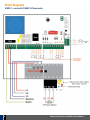
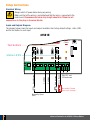
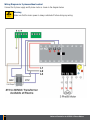
240VAC Supply
Supply connection to power the 415S1E controls
Auxiliary Output
Used to connect a lock or courtesy light. Relay Contacts, Common and Normally Open
Limit Switch
If limit switches are used connect them to this terminal.
Factory Default is Normally Closed
Push Button
Used to connect an external push button to operate the gate or door. Normally open input.
Common
Common terminal for all inputs
Pedestrian Access
Used to connect an external push button to open gate or door partially for pedestrian access.
Normally Open input.
Photo Electric Beam
Used to connect a photo electric beam. Default Normally Closed input. User can change to
Normally Open.
DC Output
24VDC / 150mA. Use to supply accessories.
(Use Elsema Reg12 to convert this output to 12VDC)
ABB Contactor
ABB industrial grade contactor with mechanical and electrical interlock.
Thermal Overload
Thermal overload with adjustable overload setting range of 2.4-4Amps
Motor U
Used to connect U of a 415VAC motor
Motor V
Used to connect V of a 415VAC motor
Motor W
Used to connect W of a 415VAC motor
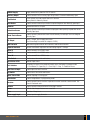
Slide Switch
Used to access the control card features.
Input Status LEDs
Indicates inputs status.
Tact Switches
Test button for inputs in Run mode and used to access the features in program mode.
A = Push Button, B = Open Only, C = Close Only, D = Stop, E = Pedestrian Access
Auto Close trimpot
Used to adjust the Auto Close time.
Dip Switch
Used to access the control card features.
Open, Close LEDs
Indicates Opening or Closing cycle.
Enter button
Used to change features in programming mode.
Receiver
Used to connect Elsema’s receivers to operate the control card with a remote control. Use
Elsema’s Pentacode series.
Antenna
Used to connect an external antenna for the plug in receiver.
Buzzer
Indicates that change of features was successful.
Fuse
Slow blow 2 Amps fuse.
Motor supply input
3-phase input to supply the motor.
www.elsema.com
5